【存储测试】07-WPF 通过 WMI + NVMe SMART 实现 SSD 规格自动验证
系列:《WPF 产线功能测试实战》第七篇
关键词 :WPFC#WMINVMeSMARTP/InvokeSSD检测产线测试.NET FrameworkCrystalDiskMark
一、前言与应用场景
在笔记本电脑的产线测试中,SSD 的规格验证是一个比内存更复杂的环节。内存规格可以直接从 SMBIOS 读取,SSD 的情况则更多样:需要验证容量是否符合订单、固件版本是否为指定版本(固件版本决定了盘的稳定性和兼容性)、SMART 健康数据是否正常(排查翻新盘/超时使用的设备)。
本文介绍如何通过 WMI Win32_DiskDrive 读取磁盘基本信息,通过 NVMe SMART 接口读取通电时长和通电次数,实现三项覆盖不同失效场景的存储规格自动验证。Demo 用本地 JSON 文件替代生产线 MES,开箱即用。
二、基础概念科普
WMI 是什么?
WMI(Windows Management Instrumentation)是 Windows 内置的系统管理接口,可以理解成操作系统提供的"硬件信息查询服务"。C# 通过 System.Management 命名空间(或封装好的查询类)即可调用,不需要额外的驱动或 DLL,适合获取磁盘型号、序列号、固件版本、容量等基础信息。
SSD 容量为什么要留 5% 容差?
磁盘厂商用十进制 标注容量:1GB = 1,000,000,000 字节;而 Windows 用二进制 (GiB)报告:1GiB = 1,073,741,824 字节。WMI 返回的 Size 字段单位是字节,换算成 GiB 后,一块标称"512GB"的硬盘实际显示约 476 GiB。
如果不留容差直接比对,几乎所有机器都会失败。5% 的容差(约 25GB)覆盖了这种单位换算偏差,同时也能容忍不同批次盘的微小出厂差异。
固件版本(Firmware Revision)是什么?
固件是 SSD 控制器内置的"操作系统",决定了盘的读写调度策略、错误修复算法、与主机兼容性等。产线测试指定固件版本,是为了确保出厂设备的固件统一,避免老固件存在的已知 Bug 流入市场。
NVMe SMART 是什么?
SMART(Self-Monitoring, Analysis and Reporting Technology)是硬盘自我健康监测机制。NVMe SSD 的 SMART 数据通过 NVMe 协议的 Get Log Page 命令获取,其中最关键的两个字段是:
| 字段 | 含义 | 产测用途 |
|---|---|---|
PowerOnHours |
累计通电时长(小时) | 排查翻新盘 / 库存积压设备 |
PowerCycle |
累计通电次数 | 排查异常开关机次数过多的设备 |
Windows 没有原生 .NET API 直接读取 NVMe SMART,需要通过自定义 DLL 封装 DeviceIoControl 的 NVMe passthrough 命令来实现。
三、方案设计与架构
测试流程
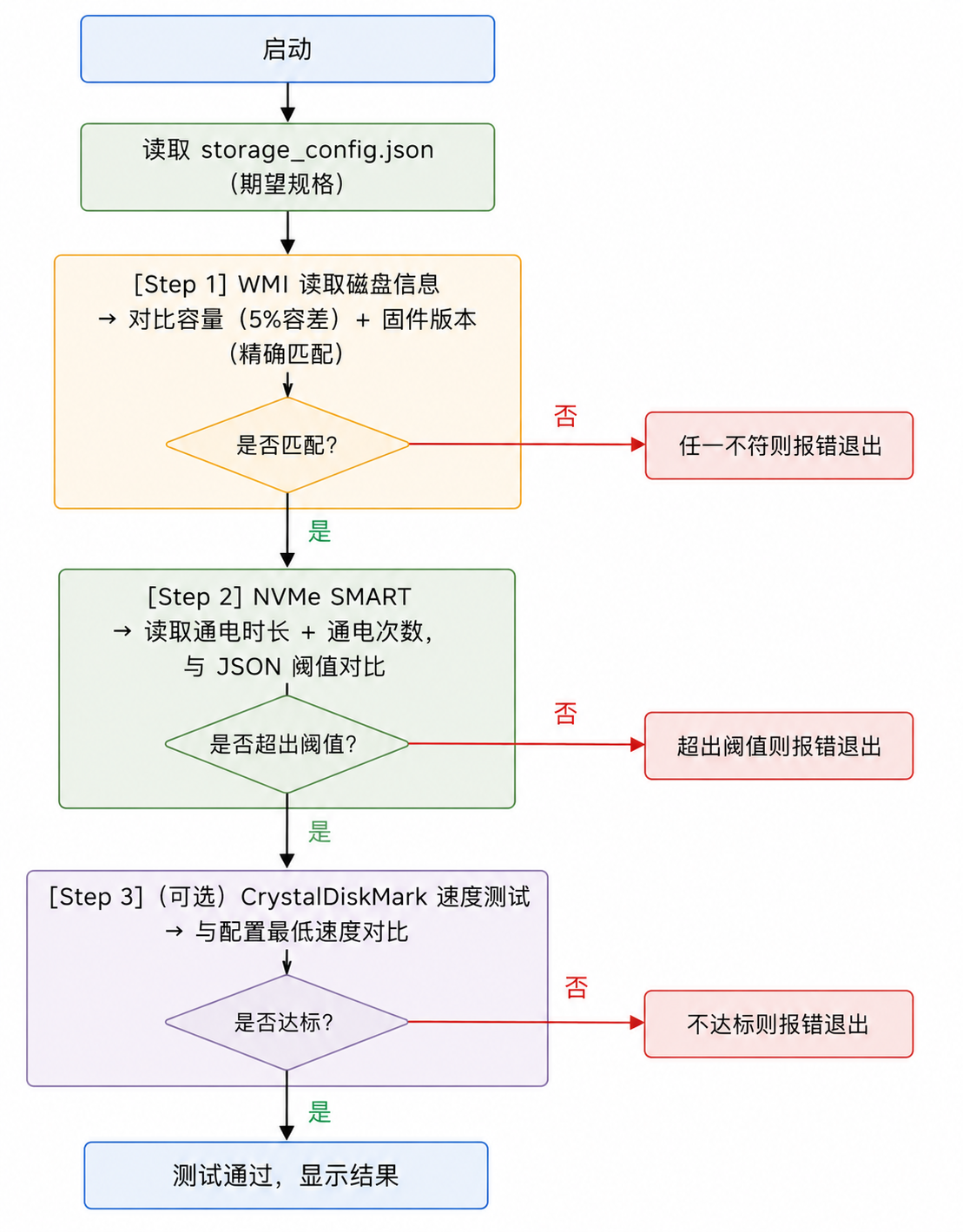
Step 3 速度测试在生产环境中已注释掉------速度测试耗时较长(约 2-3 分钟),根据实际需要决定是否启用。
MVVM 职责分层
| 层 | 文件 | 职责 |
|---|---|---|
| View | MainWindow.xaml |
显示测试状态和日志 |
| ViewModel | MainVM.cs |
编排三步测试,更新 UI |
| 工具类 | DiskInfoReader.cs |
WMI 磁盘查询封装 |
| 工具类 | NvmeSmartReader.cs |
NVMe SMART 读取(P/Invoke DLL) |
| 配置 | StorageConfig.cs |
读写本地 JSON 配置文件 |
核心依赖
System.Management(.NET Framework 内置,需在项目中添加程序集引用)Newtonsoft.Json(NuGet:Install-Package Newtonsoft.Json)NVMeSMARTInformation.dll(自定义封装 NVMe 命令的原生 DLL,Demo 中提供优雅降级)
四、核心代码详解
4.1 WMI 读取磁盘基本信息
csharp
using System.Management;

public class DiskInfoReader
{
    public class DiskInfo
    {
        public string Model { get; set; }
        public string SerialNumber { get; set; }
        public string FirmwareRevision { get; set; }
        public double SizeGB { get; set; }  // 单位:GiB(Windows 二进制换算后)
    }

    public List<DiskInfo> GetAllDisks()
    {
        var result = new List<DiskInfo>();

        // WMI 查询 Win32_DiskDrive,返回所有物理磁盘
        using var searcher = new ManagementObjectSearcher("SELECT * FROM Win32_DiskDrive");
        foreach (ManagementObject obj in searcher.Get())
        {
            var info = new DiskInfo
            {
                Model = obj["Model"]?.ToString() ?? string.Empty,
                SerialNumber = obj["SerialNumber"]?.ToString()?.Trim() ?? string.Empty,
                FirmwareRevision = obj["FirmwareRevision"]?.ToString()?.Trim() ?? string.Empty,
                // Size 字段单位为字节,/1024^3 换算成 GiB,保留2位小数
                SizeGB = obj["Size"] != null
                    ? Math.Round(Convert.ToUInt64(obj["Size"]) / 1024.0 / 1024 / 1024, 2)
                    : 0
            };
            result.Add(info);
        }
        return result;
    }
}
Win32_DiskDrive 的 FirmwareRevision 字段对应设备管理器里显示的固件版本号。注意 Trim() 是必要的------WMI 返回的字符串可能带有尾部空格,直接比较会导致匹配失败。
4.2 容量对比:5% 容差处理
csharp
public bool CheckSize(double actualGiB, double expectedGiB)
{
    if (expectedGiB <= 0) return false;
    double tolerance = expectedGiB * 0.05;  // 5% 容差
    return Math.Abs(actualGiB - expectedGiB) <= tolerance;
}
为什么是 5%? 以 512GB 为例:标称 512GB(厂商十进制)→ WMI 报告约 476 GiB(Windows 二进制)。如果 JSON 配置填 476,则容差覆盖 ±23.8 GiB,足够应对批次差异。实际上 MES 通常存储的也是 GiB 值(与 Windows 显示一致),两者相差不超过几 GiB,5% 绰绰有余。
4.3 固件版本对比:不区分大小写
csharp
public bool CheckFirmware(string actualFW, string expectedFW)
{
    if (string.IsNullOrEmpty(expectedFW)) return false;
    // 忽略大小写,避免因厂商固件号大小写不一致导致误判
    return string.Equals(actualFW, expectedFW, StringComparison.OrdinalIgnoreCase);
}
固件版本号如 KPCS2135 和 kpcs2135 本质上是同一版本,不区分大小写可以防止因此产生的误报。
4.4 读取 NVMe SMART 数据(通电时长 + 次数)
NVMe SMART 的完整数据结构(NVME_HEALTH_INFO_LOG)由 NVMe 规范定义,通过 P/Invoke 调用自定义封装 DLL:
csharp
[StructLayout(LayoutKind.Sequential)]
public struct NVME_HEALTH_INFO_LOG
{
    public byte CriticalWarning;

    [MarshalAs(UnmanagedType.ByValArray, SizeConst = 2)]
    public byte[] Temperature;

    public byte AvailableSpare;
    public byte AvailableSpareThreshold;
    public byte PercentageUsed;

    [MarshalAs(UnmanagedType.ByValArray, SizeConst = 26)]
    public byte[] Reserved0;

    [MarshalAs(UnmanagedType.ByValArray, SizeConst = 16)]
    public byte[] DataUnitRead;

    [MarshalAs(UnmanagedType.ByValArray, SizeConst = 16)]
    public byte[] DataUnitWritten;

    [MarshalAs(UnmanagedType.ByValArray, SizeConst = 16)]
    public byte[] HostReadCommands;

    [MarshalAs(UnmanagedType.ByValArray, SizeConst = 16)]
    public byte[] HostWrittenCommands;

    [MarshalAs(UnmanagedType.ByValArray, SizeConst = 16)]
    public byte[] ControllerBusyTime;

    [MarshalAs(UnmanagedType.ByValArray, SizeConst = 16)]
    public byte[] PowerCycle;      // 通电次数(128位小端整数,取低32位即可)

    [MarshalAs(UnmanagedType.ByValArray, SizeConst = 16)]
    public byte[] PowerOnHours;    // 通电时长(128位小端整数,取低32位即可)

    // ... 其余字段省略
}

// P/Invoke 声明:调用 NVMeSMARTInformation.dll
[DllImport("NVMeSMARTInformation.dll", CallingConvention = CallingConvention.Cdecl)]
public static extern bool GetNVMeSMARTInfo(int diskIndex, ref NVME_HEALTH_INFO_LOG outInfo);
解析通电数据:
csharp
public (int powerOnHours, int powerCycle) ReadSmartData(int diskIndex = 0)
{
    var smartInfo = new NVME_HEALTH_INFO_LOG();
    bool ok = GetNVMeSMARTInfo(diskIndex, ref smartInfo);
    if (!ok) return (-1, -1);

    // NVMe 规范中 PowerOnHours 和 PowerCycle 是 128 位小端整数
    // 实际小时数不会超过 int 范围,取低 32 位(前4字节)即可
    int hours = smartInfo.PowerOnHours?.Length >= 4
        ? BitConverter.ToInt32(smartInfo.PowerOnHours, 0) : 0;
    int cycles = smartInfo.PowerCycle?.Length >= 4
        ? BitConverter.ToInt32(smartInfo.PowerCycle, 0) : 0;

    return (hours, cycles);
}
为什么用 128 位整数? NVMe 1.2 规范将这些计数器定义为 128 位,是为了支持极长寿命的企业级 SSD(理论上可记录到几十亿小时)。消费级 SSD 的实际值远不会超过 int 范围,直接取低 32 位就够用。
五、完整可运行 Demo
Demo 项目结构
StorageTestDemo/
├── App.xaml
├── MainWindow.xaml          ← 测试结果 UI
├── MainWindow.xaml.cs
├── MainVM.cs                ← 编排三步测试
├── DiskInfoReader.cs        ← WMI 磁盘信息封装
├── StorageConfig.cs         ← JSON 配置读写
└── storage_config.json      ← 用户可编辑(自动生成)
NVMe SMART 部分:若运行目录下不存在
NVMeSMARTInformation.dll,程序会自动跳过 SMART 检测并在日志中注明,不会崩溃。
NuGet 依赖 :Newtonsoft.Json(Install-Package Newtonsoft.Json)
程序集引用 :System.Management(项目右键 → 添加引用 → 程序集 → System.Management)
storage_config.json(首次运行自动生成)
json
{
  "ExpectedSizeGiB": 476.0,
  "SizeTolerance": 0.05,
  "ExpectedFirmwareVersion": "KPCS2135",
  "MaxPowerOnHours": 200,
  "MaxPowerCycleCount": 2000
}| 字段 | 说明 |
|---|---|
ExpectedSizeGiB |
期望容量(GiB,与 Windows 显示一致)。512GB SSD 填 476,1TB SSD 填 931 |
SizeTolerance |
容差比例,默认 0.05(即 5%) |
ExpectedFirmwareVersion |
固件版本号,填 "" 可跳过固件检测 |
MaxPowerOnHours |
通电时长上限(小时),超出则失败 |
MaxPowerCycleCount |
通电次数上限,超出则失败 |
StorageConfig.cs
csharp
using System;
using System.IO;
using System.Text;
using Newtonsoft.Json;

namespace StorageTestDemo
{
    public class StorageConfig
    {
        public double ExpectedSizeGiB { get; set; } = 476.0;
        public double SizeTolerance { get; set; } = 0.05;
        public string ExpectedFirmwareVersion { get; set; } = "KPCS2135";
        public int MaxPowerOnHours { get; set; } = 250;
        public int MaxPowerCycleCount { get; set; } = 2500;

        private static readonly string ConfigPath =
            Path.Combine(AppDomain.CurrentDomain.BaseDirectory, "storage_config.json");

        public static StorageConfig Load()
        {
            if (!File.Exists(ConfigPath))
            {
                var def = new StorageConfig();
                def.Save();
                return def;
            }
            string json = File.ReadAllText(ConfigPath, Encoding.UTF8);
            return JsonConvert.DeserializeObject<StorageConfig>(json) ?? new StorageConfig();
        }

        public void Save()
        {
            File.WriteAllText(ConfigPath,
                JsonConvert.SerializeObject(this, Formatting.Indented), Encoding.UTF8);
        }
    }
}
DiskInfoReader.cs
csharp
using System;
using System.Collections.Generic;
using System.Management;

namespace StorageTestDemo
{
    public class DiskInfoReader
    {
        public class DiskInfo
        {
            public string Model { get; set; }
            public string FirmwareRevision { get; set; }
            public double SizeGiB { get; set; }
        }

        public List<DiskInfo> GetAllDisks()
        {
            var result = new List<DiskInfo>();
            try
            {
                using var searcher = new ManagementObjectSearcher(
                    "SELECT Model, FirmwareRevision, Size FROM Win32_DiskDrive");
                foreach (ManagementObject obj in searcher.Get())
                {
                    result.Add(new DiskInfo
                    {
                        Model = obj["Model"]?.ToString() ?? string.Empty,
                        FirmwareRevision = obj["FirmwareRevision"]?.ToString()?.Trim() ?? string.Empty,
                        SizeGiB = obj["Size"] != null
                            ? Math.Round(Convert.ToUInt64(obj["Size"]) / 1024.0 / 1024 / 1024, 2)
                            : 0
                    });
                }
            }
            catch { /* WMI 查询失败则返回空列表 */ }
            return result;
        }

        public double GetTotalSizeGiB(List<DiskInfo> disks)
        {
            double total = 0;
            foreach (var d in disks) total += d.SizeGiB;
            return Math.Round(total, 2);
        }
    }
}
MainVM.cs
csharp
using System;
using System.Collections.Generic;
using System.ComponentModel;
using System.Linq;
using System.Runtime.CompilerServices;
using System.Runtime.InteropServices;
using System.Text;
using System.Threading.Tasks;
using System.Windows.Media;

namespace StorageTestDemo
{
    public class MainVM : INotifyPropertyChanged
    {
        private string _statusText = "点击"开始测试"";
        private Brush _statusColor = Brushes.Gray;
        private string _logText = string.Empty;

        public string StatusText { get => _statusText; set { _statusText = value; OnChanged(); } }
        public Brush StatusColor { get => _statusColor; set { _statusColor = value; OnChanged(); } }
        public string LogText { get => _logText; set { _logText = value; OnChanged(); } }

        private readonly DiskInfoReader _diskReader = new DiskInfoReader();
        private readonly StringBuilder _log = new StringBuilder();

        // NVMe SMART P/Invoke(若 DLL 不存在则 DllNotFoundException,跳过)
        [StructLayout(LayoutKind.Sequential)]
        struct NVME_HEALTH_INFO_LOG
        {
            public byte CriticalWarning;
            [MarshalAs(UnmanagedType.ByValArray, SizeConst = 57)] public byte[] Padding;
            [MarshalAs(UnmanagedType.ByValArray, SizeConst = 16)] public byte[] PowerCycle;
            [MarshalAs(UnmanagedType.ByValArray, SizeConst = 16)] public byte[] PowerOnHours;
            [MarshalAs(UnmanagedType.ByValArray, SizeConst = 382)] public byte[] Rest;
        }

        [DllImport("NVMeSMARTInformation.dll", CallingConvention = CallingConvention.Cdecl)]
        static extern bool GetNVMeSMARTInfo(int index, ref NVME_HEALTH_INFO_LOG outInfo);

        public async Task StartTestAsync()
        {
            _log.Clear();
            LogText = string.Empty;

            StorageConfig config = StorageConfig.Load();
            Log($"期望容量:{config.ExpectedSizeGiB} GiB(容差 {config.SizeTolerance * 100:F0}%)");
            Log($"期望固件:{(string.IsNullOrEmpty(config.ExpectedFirmwareVersion) ? "(跳过)" : config.ExpectedFirmwareVersion)}");
            Log($"SMART 阈值:通电 < {config.MaxPowerOnHours}h,开关次数 < {config.MaxPowerCycleCount} 次");
            Log("---");

            // Step 1:磁盘信息检测
            SetStatus("正在读取磁盘信息...", Brushes.Yellow);
            var disks = _diskReader.GetAllDisks();
            if (disks.Count == 0) { SetStatus("未检测到任何磁盘设备", Brushes.Red); return; }

            foreach (var d in disks)
                Log($"发现磁盘:{d.Model} | 固件:{d.FirmwareRevision} | 容量:{d.SizeGiB} GiB");

            double totalSize = _diskReader.GetTotalSizeGiB(disks);
            Log($"合计容量:{totalSize} GiB");

            // 容量对比
            double tolerance = config.ExpectedSizeGiB * config.SizeTolerance;
            if (Math.Abs(totalSize - config.ExpectedSizeGiB) > tolerance)
            {
                SetStatus($"容量不符!期望 {config.ExpectedSizeGiB} GiB,实际 {totalSize} GiB", Brushes.Red);
                return;
            }
            Log("✔ 容量检测通过");

            // 固件版本对比(配置为空则跳过)
            if (!string.IsNullOrEmpty(config.ExpectedFirmwareVersion))
            {
                bool fwMatch = disks.Any(d =>
                    string.Equals(d.FirmwareRevision, config.ExpectedFirmwareVersion,
                        StringComparison.OrdinalIgnoreCase));
                if (!fwMatch)
                {
                    SetStatus($"固件版本不符!期望 {config.ExpectedFirmwareVersion}", Brushes.Red);
                    return;
                }
                Log($"✔ 固件版本检测通过({config.ExpectedFirmwareVersion})");
            }

            // Step 2:NVMe SMART 检测
            SetStatus("正在读取 NVMe SMART 数据...", Brushes.Yellow);
            try
            {
                var smartInfo = new NVME_HEALTH_INFO_LOG();
                bool ok = GetNVMeSMARTInfo(0, ref smartInfo);
                if (!ok)
                {
                    Log("⚠ SMART 读取返回失败,跳过此项");
                }
                else
                {
                    int hours = smartInfo.PowerOnHours?.Length >= 4
                        ? BitConverter.ToInt32(smartInfo.PowerOnHours, 0) : 0;
                    int cycles = smartInfo.PowerCycle?.Length >= 4
                        ? BitConverter.ToInt32(smartInfo.PowerCycle, 0) : 0;

                    Log($"通电时长:{hours} 小时(上限 {config.MaxPowerOnHours})");
                    Log($"通电次数:{cycles} 次(上限 {config.MaxPowerCycleCount})");

                    if (hours >= config.MaxPowerOnHours)
                    {
                        SetStatus($"SMART 失败:通电时长 {hours}h 超出阈值 {config.MaxPowerOnHours}h", Brushes.Red);
                        return;
                    }
                    if (cycles >= config.MaxPowerCycleCount)
                    {
                        SetStatus($"SMART 失败:通电次数 {cycles} 超出阈值 {config.MaxPowerCycleCount}", Brushes.Red);
                        return;
                    }
                    Log("✔ SMART 检测通过");
                }
            }
            catch (DllNotFoundException)
            {
                // 没有 NVMeSMARTInformation.dll 时优雅跳过,不影响其他测试项
                Log("⚠ 未找到 NVMeSMARTInformation.dll,SMART 检测已跳过");
            }

            SetStatus($"全部通过!磁盘 {totalSize} GiB", Brushes.YellowGreen);
        }

        private void SetStatus(string text, Brush color)
        {
            StatusText = text;
            StatusColor = color;
            Log(text);
        }

        private void Log(string msg)
        {
            _log.AppendLine(msg);
            LogText = _log.ToString();
        }

        public event PropertyChangedEventHandler PropertyChanged;
        private void OnChanged([CallerMemberName] string name = "") =>
            PropertyChanged?.Invoke(this, new PropertyChangedEventArgs(name));
    }
}
MainWindow.xaml
xml
<Window x:Class="StorageTestDemo.MainWindow"
        xmlns="http://schemas.microsoft.com/winfx/2006/xaml/presentation"
        xmlns:x="http://schemas.microsoft.com/winfx/2006/xaml"
        Title="存储规格检测 Demo" Height="440" Width="560"
        Background="#1E1E2E">
    <Grid Margin="20">
        <Grid.RowDefinitions>
            <RowDefinition Height="Auto"/>
            <RowDefinition Height="Auto"/>
            <RowDefinition Height="*"/>
            <RowDefinition Height="Auto"/>
        </Grid.RowDefinitions>

        <TextBlock Grid.Row="0" Text="{Binding StatusText}"
                   Foreground="{Binding StatusColor}"
                   FontSize="18" FontWeight="Bold"
                   TextWrapping="Wrap" Margin="0,0,0,10"/>

        <TextBlock Grid.Row="1"
                   Text="📄 规格配置:storage_config.json(与 exe 同目录,可手动编辑)"
                   Foreground="#888" FontSize="11" Margin="0,0,0,8"/>

        <ScrollViewer Grid.Row="2" VerticalScrollBarVisibility="Auto">
            <TextBox Text="{Binding LogText, Mode=OneWay}"
                     Background="#12121C" Foreground="#CDD6F4"
                     FontFamily="Consolas" FontSize="12"
                     IsReadOnly="True" TextWrapping="Wrap"
                     BorderThickness="0"/>
        </ScrollViewer>

        <Button Grid.Row="3" Content="开始测试" Margin="0,12,0,0"
                Height="36" FontSize="14"
                Background="#89B4FA" Foreground="#1E1E2E"
                BorderThickness="0"
                Click="StartButton_Click"/>
    </Grid>
</Window>
MainWindow.xaml.cs
csharp
using System.Windows;

namespace StorageTestDemo
{
    public partial class MainWindow : Window
    {
        private readonly MainVM _vm = new MainVM();

        public MainWindow()
        {
            InitializeComponent();
            DataContext = _vm;
        }

        private async void StartButton_Click(object sender, RoutedEventArgs e)
        {
            await _vm.StartTestAsync();
        }
    }
}
典型输出(通过)
期望容量:476 GiB(容差 5%)
期望固件:KPCS2135
SMART 阈值:通电 < 200h,开关次数 < 2000 次
---
发现磁盘:KIOXIA-EXCERIA G2 | 固件:KPCS2135 | 容量:476.93 GiB
合计容量:476.93 GiB
✔ 容量检测通过
✔ 固件版本检测通过(KPCS2135)
通电时长:3 小时(上限 200)
通电次数:12 次(上限 2000)
✔ SMART 检测通过
全部通过!磁盘 476.93 GiB
六、总结与扩展
本文核心要点
- WMI
Win32_DiskDrive是读取磁盘基础信息的最简途径,无需额外依赖,FirmwareRevision对应固件版本,Size单位为字节需手动换算 GiB - 5% 容差是解决厂商 GB(十进制)与 Windows GiB(二进制)单位差异的工程实践,而非随意设定
- NVMe SMART 的
PowerOnHours和PowerCycle字段是产线排查翻新盘的重要手段,字段为 128 位整数,取低 32 位即可满足实际需求 - DLL 降级 :将
DllNotFoundException单独 catch,让没有特定 DLL 的环境也能跑通其他测试项,是产测工具健壮性的常见设计
可以扩展的方向
- 速度测试集成:通过 Win32 消息自动控制 CrystalDiskMark 完成基准测试并抓取结果,适合对出厂读写性能有硬性要求的产品
- SATA SSD 支持 :SATA 硬盘的 SMART 数据通过
DeviceIoControl+IOCTL_ATA_PASS_THROUGH获取,结构与 NVMe 不同
如有问题欢迎评论区交流。觉得有用的话点个赞和关注下,系列会持续更新 😃