一、前言
在日常工作中,我们经常需要从图片中提取文字信息。虽然市面上有不少 OCR 服务,但它们往往需要联网、存在隐私风险,或者需要付费。2026 年百度发布了开源文档解析模型 PaddleOCR-VL-1.5,该模型不仅支持常规文字识别,还支持表格、公式、图表、印章等任务。更重要的是,它提供了 GGUF 格式版本,可以直接在本地使用 llama.cpp 进行推理。
本文将详细介绍如何使用 C# WinForm 结合 llama.cpp ,打造一个完整的桌面端 OCR 客户端,实现本地离线、安全高效的多功能 OCR 识别。
二、架构总览
整个方案的架构非常简单清晰,由三部分组成:
scss
┌─────────────────┐       HTTP (OpenAI API)        ┌─────────────────┐
│   C# WinForm    │  ──────────────────────────>    │  llama-server   │
│   (RestSharp)   │  <──────────────────────────    │  (llama.cpp)    │
└─────────────────┘       JSON Response             └─────────────────┘
                                                            │
                                                            ▼
                                                   ┌─────────────────┐
                                                   │  PaddleOCR-VL   │
                                                   │  1.5 GGUF 模型   │
                                                   └─────────────────┘
llama-server:由 llama.cpp 提供的轻量级 HTTP 服务器,与 OpenAI API 完全兼容,负责加载 GGUF 模型并提供推理 API。
PaddleOCR-VL-1.5 GGUF 模型:包含模型权重和视觉投影仪两个文件。
C# WinForm 客户端:使用 RestSharp 通过 HTTP 调用本地服务,实现图片选择、发送、结果显示的全流程。
这种架构的好处非常明显:服务端与客户端完全解耦,你可以随时升级服务端版本或更换模型,而无需修改任何客户端代码。
三、环境准备
scss
组件 版本/说明
llama.cpp b9101 (预编译 CUDA 12.4 版本)
模型文件 PaddleOCR-VL-1.5-GGUF.gguf + PaddleOCR-VL-1.5-GGUF-mmproj.gguf
.NET .NET Framework 4.8
C# 语言版本 7.3+
RestSharp 114.x (v107+ 新 API)
Newtonsoft.Json 13.0.3
四、服务端启动
启动 llama-server 先进入 llama.cpp 的可执行文件目录,打开终端执行:
css
llama-server.exe -m ../PaddleOCR-VL-1.5-GGUF/PaddleOCR-VL-1.5.gguf --mmproj ../PaddleOCR-VL-1.5-GGUF/PaddleOCR-VL-1.5-mmproj.gguf --port 8080 --host 0.0.0.0 --temp 0关键参数解读:
-m 指定 GGUF 模型文件路径
--mmproj 指定多模态投影仪文件(VLM 必需)
--port 8080 服务监听端口
--host 0.0.0.0 允许局域网其他设备访问
--temp 0 温度设为 0,使输出结果确定、稳定
效果
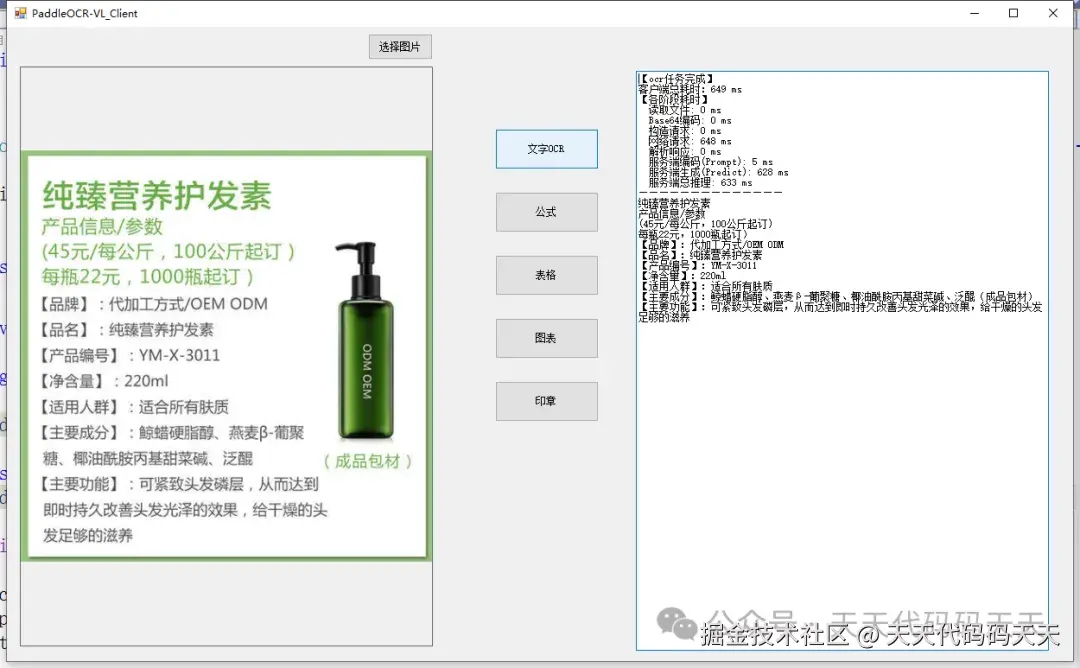
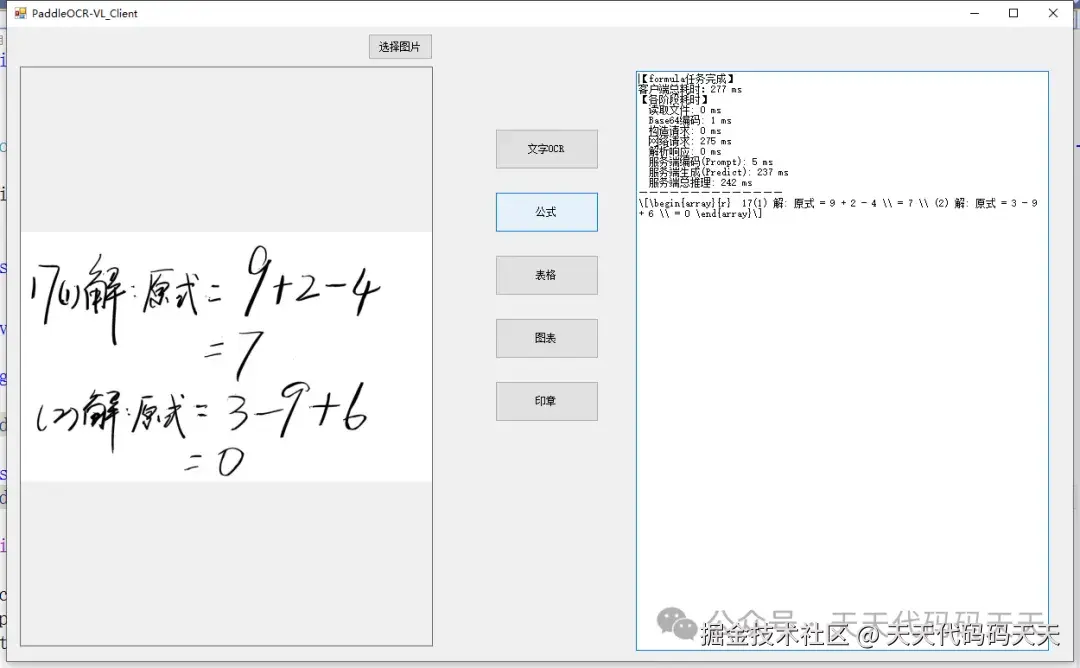
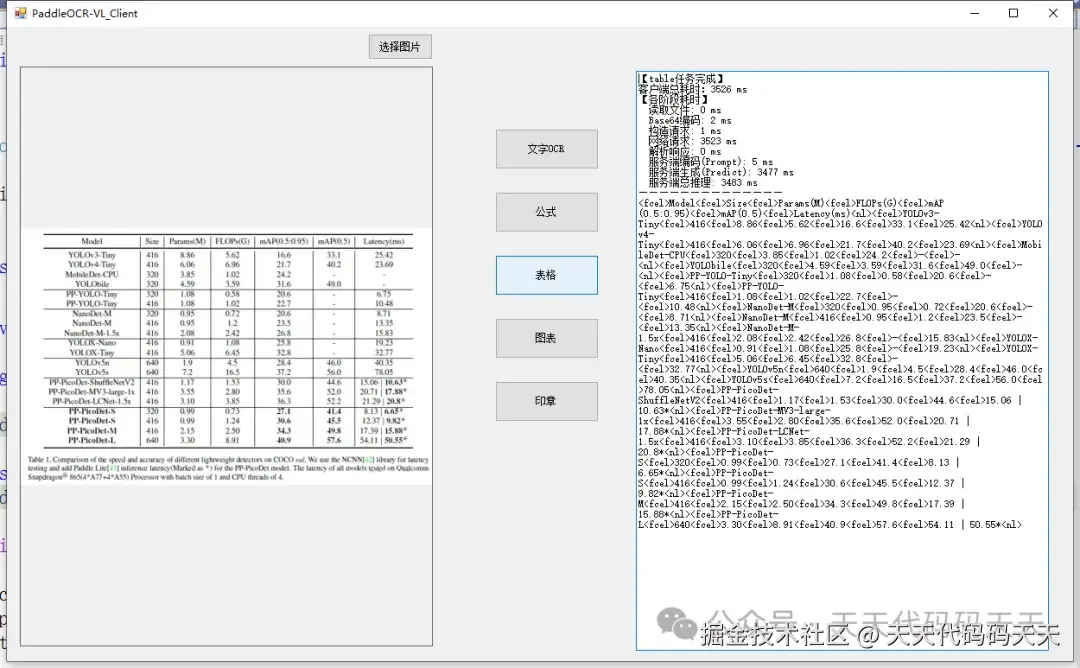
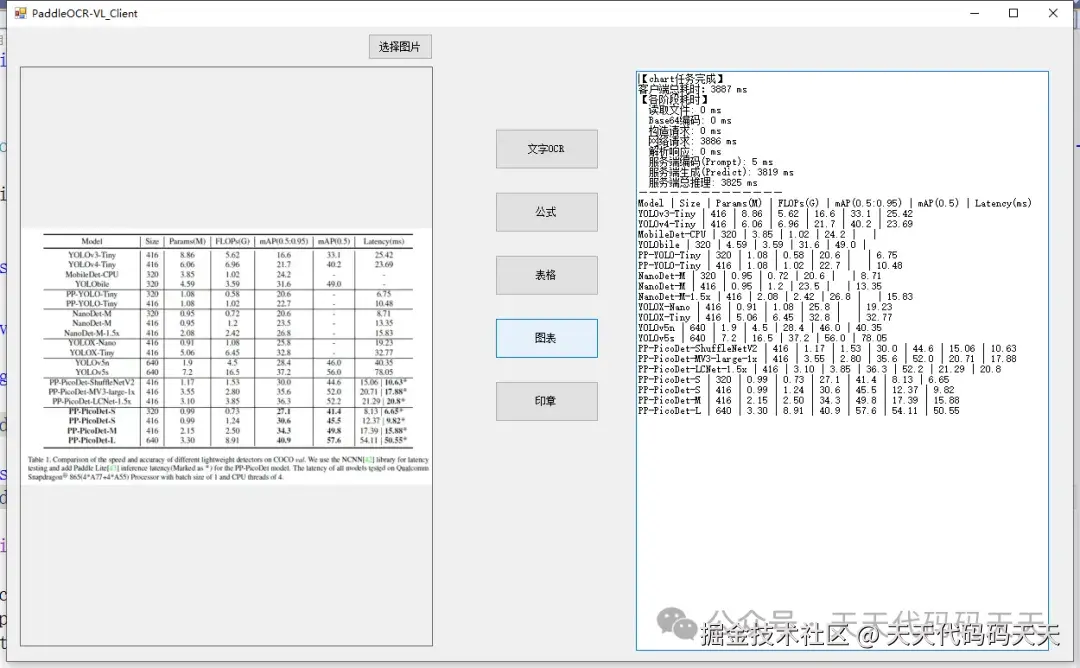
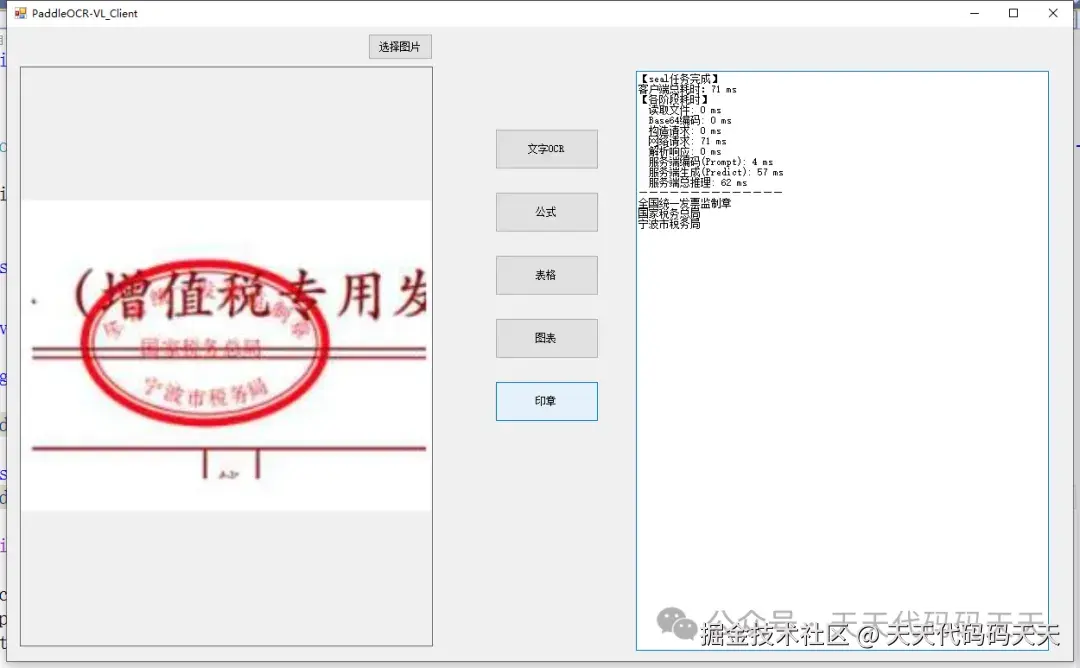
客户端C#代码
csharp
using Newtonsoft.Json;
using Newtonsoft.Json.Linq;
using RestSharp;
using System;
using System.Collections.Generic;
using System.Diagnostics;
using System.Drawing;
using System.IO;
using System.Security.Cryptography;
using System.Threading.Tasks;
using System.Windows.Forms;

namespace PaddleOCR_Client
{
    public partial class Form1 : Form
    {
        // 定义 PaddleOCR-VL 支持的核心任务类型
        public enum OcrTaskType
        {
            ocr,        // 文字识别
            formula,    // 公式识别
            table,      // 表格识别
            chart,      // 图表识别
            seal       // 印章识别
        }

        // 内部结果类,包含识别文本及分阶段耗时
        private class OcrResult
        {
            public string Text { get; set; }
            public Dictionary<string, long> Timings { get; set; } = new Dictionary<string, long>();
        }

        public Form1()
        {
            InitializeComponent();
        }

        private string currentImagePath;

        private void btnSelectImage_Click(object sender, EventArgs e)
        {
            using (var dlg = new OpenFileDialog())
            {
                dlg.Filter = "图片文件|*.jpg;*.jpeg;*.png;*.bmp";

                string defaultDir = System.IO.Path.Combine(System.Windows.Forms.Application.StartupPath, "test_img");
                dlg.InitialDirectory = defaultDir;

                if (dlg.ShowDialog() != DialogResult.OK) return;

                currentImagePath = dlg.FileName;
                pictureBox1.Image = new Bitmap(currentImagePath);
                txtResult.Text = string.Empty;
            }
        }

        // 核心任务调度器(已包含服务端推理时间展示)
        private async Task ExecuteOcrTask(OcrTaskType taskType)
        {
            if (string.IsNullOrEmpty(currentImagePath))
            {
                MessageBox.Show("请先选择一张图片", "提示", MessageBoxButtons.OK, MessageBoxIcon.Warning);
                return;
            }

            SetButtonsEnabled(false);
            txtResult.Text = $"正在进行{taskType}任务,请稍候...";

            var swTotal = Stopwatch.StartNew();
            try
            {
                OcrResult result = await OcrImageGeneralAsync(currentImagePath, taskType);
                swTotal.Stop();

                // 构建耗时分项信息
                string timingDetails = "【各阶段耗时】\r\n";
                foreach (var kvp in result.Timings)
                {
                    timingDetails += $"  {kvp.Key}: {kvp.Value} ms\r\n";
                }

                // 换行显示问题
                string displayText = result.Text.Replace("\n", Environment.NewLine);

                txtResult.Text = $"【{taskType}任务完成】\r\n" +
                                 $"客户端总耗时:{swTotal.ElapsedMilliseconds} ms\r\n" +
                                 timingDetails +
                                 $"------------------------------------------\r\n" +
                                 displayText;
            }
            catch (Exception ex)
            {
                swTotal.Stop();
                txtResult.Text = $"【{taskType}任务失败】\r\n" +
                                 $"客户端总耗时:{swTotal.ElapsedMilliseconds} ms\r\n" +
                                 $"错误信息:{ex.Message}";
            }
            finally
            {
                SetButtonsEnabled(true);
            }
        }

        private void Form1_Load(object sender, EventArgs e) { }

        /// <summary>
        /// 通用的OCR/VL任务调用方法,返回识别结果及分步耗时(含服务端推理耗时)
        /// </summary>
        private async Task<OcrResult> OcrImageGeneralAsync(string imagePath, OcrTaskType taskType)
        {
            var result = new OcrResult();
            var sw = Stopwatch.StartNew();

            // 步骤1:读取文件
            byte[] imgBytes = File.ReadAllBytes(imagePath);
            result.Timings["读取文件"] = sw.ElapsedMilliseconds;
            sw.Restart();

            // 步骤2:Base64编码
            string mime = GetMimeType(Path.GetExtension(imagePath));
            string base64Image = $"data:{mime};base64,{Convert.ToBase64String(imgBytes)}";
            result.Timings["Base64编码"] = sw.ElapsedMilliseconds;
            sw.Restart();

            // 步骤3:构造请求(Payload序列化)
            string taskPrompt = BuildPromptForTask(taskType);
            var payload = new
            {
                messages = new[]
                {
                    new
                    {
                        role = "user",
                        content = new object[]
                        {
                            new { type = "image_url", image_url = new { url = base64Image } },
                            new { type = "text", text = taskPrompt }
                        }
                    }
                }
            };
            string jsonBody = JsonConvert.SerializeObject(payload);
            result.Timings["构造请求"] = sw.ElapsedMilliseconds;
            sw.Restart();

            // 步骤4:发送HTTP请求并等待响应
            var options = new RestClientOptions("http://localhost:8080"); // 你的启动端口
            using (var client = new RestClient(options))
            {
                var request = new RestRequest("/v1/chat/completions", Method.Post);
                request.AddHeader("Content-Type", "application/json");
                request.AddParameter("application/json", jsonBody, ParameterType.RequestBody);

                RestResponse response = await client.ExecuteAsync(request);
                result.Timings["网络请求"] = sw.ElapsedMilliseconds;
                sw.Restart();

                if (!response.IsSuccessful)
                {
                    string errorDetail = string.IsNullOrEmpty(response.Content) ? response.StatusDescription : response.Content;
                    throw new Exception($"服务器错误 ({response.StatusCode}): {errorDetail}");
                }

                // 步骤5:解析响应JSON
                JObject jResult = JObject.Parse(response.Content);
                string content = jResult["choices"]?[0]?["message"]?["content"]?.ToString();
                result.Timings["解析响应"] = sw.ElapsedMilliseconds;

                // 提取服务端推理耗时 (prompt_ms + predicted_ms)
                JToken timingsToken = jResult["timings"];
                if (timingsToken != null)
                {
                    double promptMs = timingsToken.Value<double>("prompt_ms");
                    double predictedMs = timingsToken.Value<double>("predicted_ms");
                    result.Timings["服务端编码(Prompt)"] = (long)promptMs;
                    result.Timings["服务端生成(Predict)"] = (long)predictedMs;
                    result.Timings["服务端总推理"] = (long)(promptMs + predictedMs);
                }

                sw.Stop();

                string finalText = content ?? "未能提取到识别文本";

                result.Text = finalText;
                return result;
            }
        }


        /// <summary>
        /// 为不同任务构建提示词
        /// </summary>
        private string BuildPromptForTask(OcrTaskType taskType)
        {
            switch (taskType)
            {
                case OcrTaskType.ocr:
                    return"<__media__>OCR:";

                case OcrTaskType.formula:
                    return"<__media__>Formula:";

                case OcrTaskType.table:
                    return"<__media__>Table:";

                case OcrTaskType.chart:
                    return"<__media__>Chart:";

                case OcrTaskType.seal:
                    return"<__media__>Seal:";

                default:
                    return"<__media__>OCR:";
            }
        }

        /// <summary>
        /// 根据扩展名获取MIME类型
        /// </summary>
        private string GetMimeType(string ext)
        {
            switch (ext.ToLower())
            {
                case".jpg":
                case".jpeg":
                    return"image/jpeg";
                case".png":
                    return"image/png";
                case".bmp":
                    return"image/bmp";
                default:
                    return"image/jpeg";
            }
        }

        /// <summary>
        /// 统一设置所有功能按钮的启用/禁用状态
        /// </summary>
        private void SetButtonsEnabled(bool enabled)
        {
            btnOCR.Enabled = enabled;
            btnFormula.Enabled = enabled;
            btnTable.Enabled = enabled;
            btnChart.Enabled = enabled;
            btnSeal.Enabled = enabled;
        }

        // 各任务按钮事件处理
        async private void btnOCR_Click(object sender, EventArgs e)
        {
            await ExecuteOcrTask(OcrTaskType.ocr);
        }

        async private void btnFormula_Click(object sender, EventArgs e)
        {
            await ExecuteOcrTask(OcrTaskType.formula);
        }

        async private void btnTable_Click(object sender, EventArgs e)
        {
            await ExecuteOcrTask(OcrTaskType.table);
        }

        async private void btnChart_Click(object sender, EventArgs e)
        {
            await ExecuteOcrTask(OcrTaskType.chart);
        }

        async private void btnSeal_Click(object sender, EventArgs e)
        {
            await ExecuteOcrTask(OcrTaskType.seal);
        }

    }
}