本篇文章来分享一个在 Vue3 + OpenLayers 中实现地图加载动画的小案例。
这种效果常用于:
- GIS 点位高亮
- 预警点
- 实时监测
- 设备在线状态
- 雷达扫描效果
- 热点位置提示
一、效果图
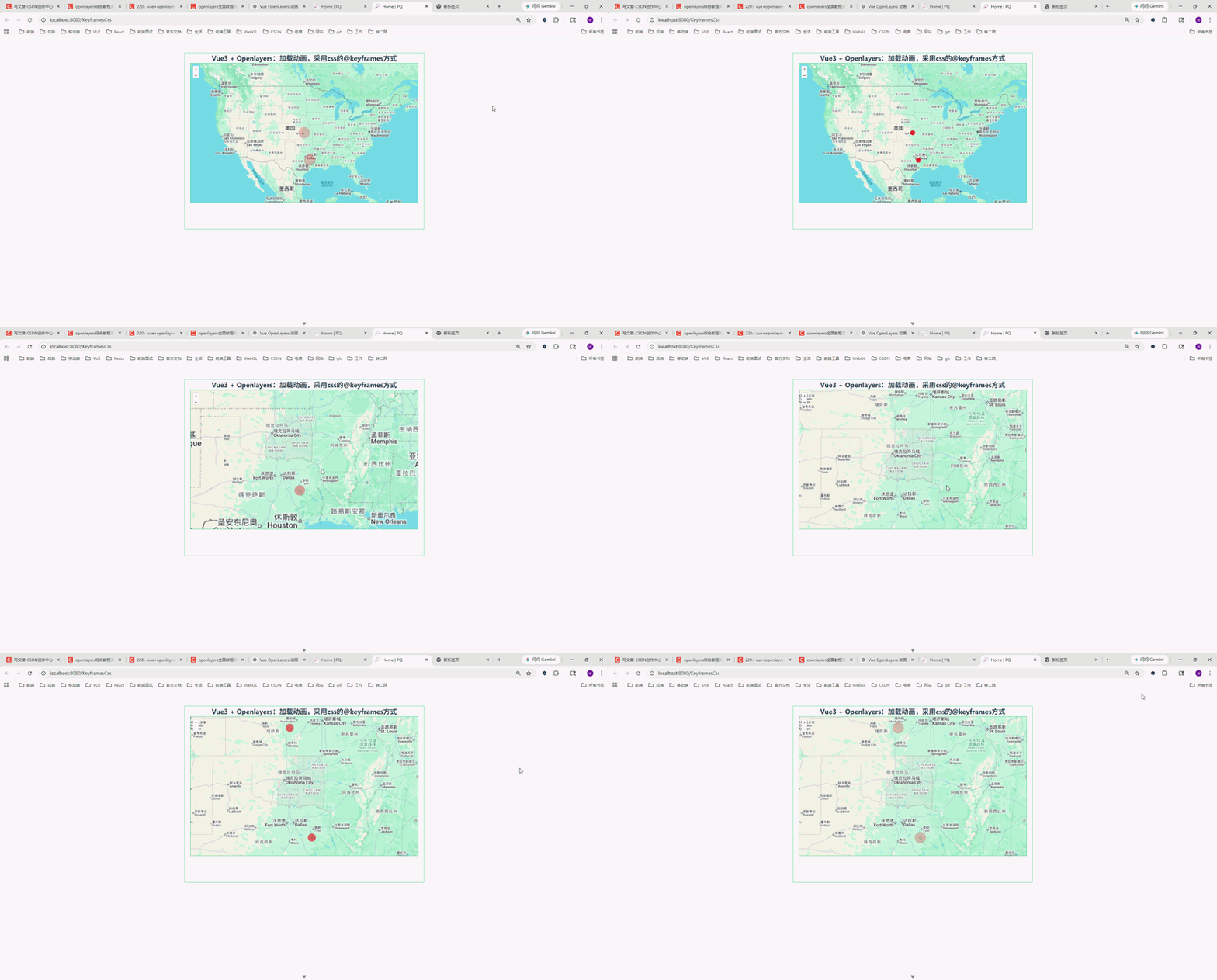
最终效果类似于:
- 地图上出现一个红色圆点
- 圆点不断扩散
- 类似雷达波纹动画
整体效果比较轻量,而且性能也不错。
二、核心思路
实现原理其实并不复杂。
主要分为三步:
1、创建 Overlay
OpenLayers 的 Overlay 可以向地图中添加 HTML 元素。
例如:
const overlay = new Overlay({
  position: coordinate,
  element: pointDiv,
  positioning: 'center-center',
})
2、动态创建 DOM
这里我们采用:
document.createElement('div')动态生成动画节点。
3、使用 CSS 动画
核心动画:
@keyframes myfirst {
  to {
    transform: scale(2);

    background: rgba(255, 0, 0, 0.2);

    box-shadow: inset 0 0 50px rgba(255, 0, 0, 0);
  }
}
通过:
- scale
- rgba
- box-shadow
实现波纹扩散效果。
三、完整代码
javascript
<!--
 * @Author: 彭麒
 * @Date: 2026/5/11
 * @Email: 1062470959@qq.com
 * @Description: 此源码版权归吉檀迦俐所有,可供学习和借鉴或商用。
 -->
<template>
    <div class="container">
      <div class="w-full flex justify-center flex-wrap">
      <div class="font-bold text-[24px]">
        Vue3 + Openlayers:加载动画,采用css的@keyframes方式
      </div>
    </div>
      <div id="vue-openlayers"></div>
    </div>
  </template>

  <script setup>
  import { onMounted, ref } from 'vue'

  import 'ol/ol.css'
  import Map from 'ol/Map'
  import View from 'ol/View'
  import Overlay from 'ol/Overlay'

  import TileLayer from 'ol/layer/Tile'
  import XYZ from 'ol/source/XYZ'

  import { fromLonLat, useGeographic } from 'ol/proj'

  // map 实例
  const map = ref(null)

  // geojson 数据
  const geojsonData = {
    type: 'FeatureCollection',
    features: [
      {
        type: 'Feature',
        properties: {
          title: 'point1',
        },
        geometry: {
          type: 'Point',
          coordinates: [-95.4, 31.8],
        },
      },
      {
        type: 'Feature',
        properties: {
          title: 'point2',
        },
        geometry: {
          type: 'Point',
          coordinates: [-97.1, 38.7],
        },
      },
    ],
  }

  // 获取坐标
  const getCoordinatesByGeojson = (geojsonData) => {
    return geojsonData.features.map(
      (feature) => feature.geometry.coordinates
    )
  }

  // 显示动画
  const showAnimation = () => {
    const coordinates = getCoordinatesByGeojson(geojsonData)

    coordinates.forEach((coordinate, index) => {
      // 创建 dom
      const pointDiv = document.createElement('div')

      pointDiv.className = 'cssAnimation'
      pointDiv.id = `coordinate_${index}`

      // 注意:
      // overlay 的 element 不需要 append 到 document
      // OpenLayers 会自动处理
      const overlay = new Overlay({
        position: coordinate,
        element: pointDiv,
        positioning: 'center-center',
      })

      map.value.addOverlay(overlay)
    })
  }

  // 初始化地图
  const initMap = () => {
    const googleLayer = new TileLayer({
      source: new XYZ({
        url: 'https://www.google.com/maps/vt?lyrs=m&gl=en&x={x}&y={y}&z={z}',
        crossOrigin: 'anonymous',
      }),
    })

    map.value = new Map({
      target: 'vue-openlayers',
      layers: [googleLayer],
      view: new View({
        projection: 'EPSG:3857',
        center: fromLonLat([-97.1, 38.7]),
        zoom: 4,
      }),
    })
  }

  onMounted(() => {
    initMap()

    // 核心,必须要有
    useGeographic()

    showAnimation()
  })
  </script>

  <style scoped>
  .container {
    width: 840px;
    height: 620px;
    margin: 50px auto;
    border: 1px solid #42b983;
  }

  #vue-openlayers {
    width: 800px;
    height: 490px;
    margin: 0 auto;
    border: 1px solid #42b983;
    position: relative;
  }

  /* 动态创建的 overlay 节点无 data-v-*,scoped 下需用 :deep 才能命中 */
  :deep(.cssAnimation) {
    width: 20px;
    height: 20px;

    border-radius: 50%;

    background: rgba(255, 0, 0, 0.9);

    box-shadow: inset 0 0 8px red;

    transform: scale(0);

    animation: myfirst 3s infinite;
  }

  @keyframes myfirst {
    to {
      transform: scale(2);

      background: rgba(255, 0, 0, 0.2);

      box-shadow: inset 0 0 50px rgba(255, 0, 0, 0);
    }
  }
  </style>
四、为什么 scoped 下必须使用 :deep?
这里其实是很多人容易踩坑的地方。
我们动态创建的节点:
document.createElement('div')并不是 Vue 模板生成的。
所以:
<style scoped>生成的:
[data-v-xxxx]并不会作用到动态创建的 DOM。
因此:
.cssAnimation会失效。
正确写法
必须使用:
:deep(.cssAnimation)这样才能穿透 scoped。
这是本案例中的关键点。
五、为什么 Overlay 不需要 appendChild?
很多人会这样写:
document.body.appendChild(pointDiv)其实没必要。
因为:
new Overlay({
  element: pointDiv
})
OpenLayers 内部会自动挂载。
如果手动 append:
- 会导致 DOM 重复
- 有概率产生定位问题
- 甚至导致动画异常
因此:
直接传给 Overlay 即可。
六、为什么 useGeographic() 必须放这里?
这一句非常关键:
useGeographic()因为:
GeoJSON 中的坐标:
[-95.4, 31.8]属于:
EPSG:4326也就是:
经纬度坐标而 OpenLayers 默认:
EPSG:3857如果不使用:
useGeographic()则 Overlay 位置可能会出现偏移。
七、动画还能怎么优化?
目前只是最基础版本。
实际上还能继续增强:
1、多层波纹
例如:
- 一个大圈
- 一个中圈
- 一个小圈
形成雷达效果。
2、不同颜色
例如:
- 红色:危险
- 绿色:在线
- 黄色:预警
3、添加中心点
可以在波纹中心增加:
width: 6px;
height: 6px;
形成更明显的定位效果。
4、动态数据
目前数据是写死的:
geojsonData实际项目中:
- websocket
- 接口返回
- 实时定位
都可以动态更新。
八、适用场景
这个方案在 GIS 项目里非常常见。
例如:
| 场景 | 用途 |
|---|---|
| 无人机巡检 | 实时设备点 |
| 物联网 | 在线设备状态 |
| 车辆监控 | 车辆当前位置 |
| 风险预警 | 告警点 |
| 应急系统 | 事故位置 |
| 气象系统 | 台风/暴雨点 |
九、总结
本篇文章主要介绍了:
- Vue3 + OpenLayers
- Overlay 的使用
- CSS 动画实现
- @keyframes 波纹效果
- scoped 与 :deep
- useGeographic 的作用
整体方案:
- 轻量
- 易扩展
- 性能不错
- 不依赖第三方动画库
非常适合 GIS 项目中的动态点位效果。
十、结尾
如果你也在做:
- OpenLayers
- GIS
- Vue3
- 智慧城市
- 数字孪生
- 地图可视化
这个动画方案还是非常实用的。
感兴趣可以关注一下。