mainwindow.cpp
#include "mainwindow.h"
#include "ui_mainwindow.h"
#include "QTimer"


MainWindow::MainWindow(QWidget *parent) :
    QMainWindow(parent),
    ui(new Ui::MainWindow)
{
    ui->setupUi(this);

    m_server = new QWebSocketServer("Camera Server", QWebSocketServer::NonSecureMode, this);

   connect(m_server, &QWebSocketServer::newConnection,
               this, &MainWindow::onNewConnection);

   connect(this, &MainWindow::showCameraSignal,
           this, &MainWindow::onShowCamera,
           Qt::QueuedConnection); // ✅ 安全,不会死锁

    startServer(8080);
}


// 启动服务器
bool MainWindow::startServer(quint16 port)
{
    // 监听所有网卡
        if (m_server->listen(QHostAddress::Any, port)) {
            qDebug() << "========================================";
            qDebug() << "WebSocket 服务端启动成功!端口:" << port;
            qDebug() << "监听地址:" << m_server->serverAddress().toString();
            qDebug() << "服务端地址 (客户端连接用):";

            // 打印本机所有可用IP(最实用!)
            QList<QHostAddress> addrs = QNetworkInterface::allAddresses();
            for (const QHostAddress& addr : addrs) {
                // 只打印IPv4,过滤掉本地回环和无效IP
                if (addr.protocol() == QAbstractSocket::IPv4Protocol
                    && addr != QHostAddress::LocalHost
                    && addr != QHostAddress::Any) {
                    qDebug() << "    ws://" + addr.toString() + ":" + QString::number(port);
                }
            }
            qDebug() << "========================================";
            return true;
        } else {
            qDebug() << "启动失败:" << m_server->errorString();
            return false;
        }
}

// 新客户端连接
void MainWindow::onNewConnection()
{
    QWebSocket *socket = m_server->nextPendingConnection();

    connect(socket, &QWebSocket::disconnected,
            this, &MainWindow::onClientDisconnected);

    connect(socket, &QWebSocket::binaryMessageReceived,
            this, &MainWindow::onBinaryMessageReceived);


    m_clients << socket;
    qDebug() << "新客户端接入,当前在线:" << m_clients.size();
}

// 客户端断开
void MainWindow::onClientDisconnected()
{
    QWebSocket *s = qobject_cast<QWebSocket*>(sender());
    if (s) {
        m_clients.removeAll(s);
        s->deleteLater();
        qDebug() << "客户端断开,在线:" << m_clients.size();
    }
}


// NV12 转 RGB 函数
QImage nv12ToRGB(const uchar* nv12Data, int width, int height) {
    QImage rgbImage(width, height, QImage::Format_RGB888);

    const uchar* yData = nv12Data;

    int uIndex = width * height;
    int vIndex = uIndex + ((width * height) >> 2);

    for (int y  = 0; y  < height; y ++) {
        for (int x = 0; x < width; x++) {

            // Y分量
            double Y = (double)yData[y * width + x];
            // U分量
            double U = (double)yData[uIndex + (y / 2) * (width / 2) + (x / 2)] - 128;
            // V分量
            double V = (double)yData[vIndex + (y / 2) * (width / 2) + (x / 2)] - 128;

            // 转换公式
            int R = (int)(Y + 1.13983 * V);
            int G = (int)(Y - 0.39466 * U - 0.58060 * V);
            int B = (int)(Y + 2.03211 * U);

            R = qBound(0, R, 255);
            G = qBound(0, G, 255);
            B = qBound(0, B, 255);

            rgbImage.setPixel(x, y, qRgb(R, G, B));
        }
    }
    return rgbImage;
}


// 收到二进制消息
void MainWindow::onBinaryMessageReceived(const QByteArray &message)
{
    if (message.isEmpty()) return;

    // 1. 把新收到的数据追加到缓冲区(拼包)
    m_recvBuffer.append(message);

    const int len = 2764800;    // 单路相机数据长度
    const int frameLen = 1 + len + len; // 一整帧总长度:标识 + cam1 + cam2

    // 2. 循环处理缓冲区里的完整帧(可能一次收到多帧)
    while (m_recvBuffer.size() >= frameLen) {
        // 检查帧头是不是 0x01
        if ((uchar)m_recvBuffer[0] == 0x01) {
            // 取出一整帧
            QByteArray frame = m_recvBuffer.left(frameLen);

            // 拆两路相机
            //下标1开始取len字节数据
            QByteArray cam1 = frame.mid(1, len);
            //下标1+len开始取len字节数据
            QByteArray cam2 = frame.mid(1 + len, len);

            qDebug() << "✅ 成功解析一帧:cam1=" << cam1.size() << "cam2=" << cam2.size();

            // 发信号给UI显示(你原来的逻辑不变)
            emit showCameraSignal(cam1, cam2);

            // 从缓冲区移除已经处理完的这一帧
            m_recvBuffer.remove(0, frameLen);
        }
        else {
            // 无效数据,丢掉第一个字节,重新同步
            m_recvBuffer.remove(0, 1);
        }
    }
}


void MainWindow::onShowCamera(QByteArray cam1, QByteArray cam2)
{
    // 这里 100% 是主线程!放心操作 UI!
    qDebug() << "主线程实时显示画面";

    QImage img1((const uchar*)cam1.data(), 1280, 720, QImage::Format_RGB888);
    img1.bits(); // 强制深拷贝,解决浅拷贝花屏/崩溃
    // 等比例显示
    ui->label->setPixmap(QPixmap::fromImage(img1).scaled(ui->label->size(), Qt::KeepAspectRatio, Qt::FastTransformation));

    QImage img2((const uchar*)cam2.data(), 1280, 720, QImage::Format_RGB888);
    img2.bits(); // 强制深拷贝,解决浅拷贝花屏/崩溃
    // 等比例显示
    ui->label_2->setPixmap(QPixmap::fromImage(img2).scaled(ui->label_2->size(), Qt::KeepAspectRatio, Qt::FastTransformation));

}


// 给所有客户端发送二进制数据
void MainWindow::sendBinaryData(const QByteArray &data)
{
    for (QWebSocket *s : qAsConst(m_clients)) {
        s->sendBinaryMessage(data);
    }
}


MainWindow::~MainWindow()
{
    delete ui;
    m_server->close();
    qDeleteAll(m_clients);
    m_clients.clear();
}
mainwindow.h
#ifndef MAINWINDOW_H
#define MAINWINDOW_H

#include <QMainWindow>

#include <QObject>
#include <QWebSocketServer>
#include <QWebSocket>
#include <QList>
#include <QNetworkInterface>
#include "QLabel"

namespace Ui {
class MainWindow;
}

class MainWindow : public QMainWindow
{
    Q_OBJECT

public:
    explicit MainWindow(QWidget *parent = nullptr);
    ~MainWindow();
    // 启动服务端 port: 端口 例如 8080
    bool startServer(quint16 port);
    //给客户端发送消息
    void sendBinaryData(const QByteArray &data);
    //显示画面
    void showCameraFrame(QLabel *label, const QByteArray &data);


private slots:
    void onNewConnection();
    void onClientDisconnected();
    void onBinaryMessageReceived(const QByteArray &message);
    void onShowCamera(QByteArray cam1, QByteArray cam2);

signals:
    void showCameraSignal(QByteArray cam1, QByteArray cam2); // 加这行

private:
    Ui::MainWindow *ui;
    QWebSocketServer *m_server;
    QList<QWebSocket*> m_clients;
    QByteArray m_recvBuffer; // 接收缓冲区 ← 加上这个
};


#endif // MAINWINDOW_H
mainwindow.ui
<?xml version="1.0" encoding="UTF-8"?>
<ui version="4.0">
 <class>MainWindow</class>
 <widget class="QMainWindow" name="MainWindow">
  <property name="geometry">
   <rect>
    <x>0</x>
    <y>0</y>
    <width>1280</width>
    <height>720</height>
   </rect>
  </property>
  <property name="windowTitle">
   <string>MainWindow</string>
  </property>
  <widget class="QWidget" name="centralWidget">
   <widget class="QLabel" name="label">
    <property name="geometry">
     <rect>
      <x>0</x>
      <y>0</y>
      <width>1280</width>
      <height>720</height>
     </rect>
    </property>
    <property name="text">
     <string/>
    </property>
   </widget>
   <widget class="QLabel" name="label_2">
    <property name="geometry">
     <rect>
      <x>0</x>
      <y>360</y>
      <width>640</width>
      <height>360</height>
     </rect>
    </property>
    <property name="text">
     <string/>
    </property>
   </widget>
  </widget>
  <widget class="QMenuBar" name="menuBar">
   <property name="geometry">
    <rect>
     <x>0</x>
     <y>0</y>
     <width>1280</width>
     <height>21</height>
    </rect>
   </property>
  </widget>
  <widget class="QToolBar" name="mainToolBar">
   <attribute name="toolBarArea">
    <enum>TopToolBarArea</enum>
   </attribute>
   <attribute name="toolBarBreak">
    <bool>false</bool>
   </attribute>
  </widget>
  <widget class="QStatusBar" name="statusBar"/>
 </widget>
 <layoutdefault spacing="6" margin="11"/>
 <resources/>
 <connections/>
</ui>#-------------------------------------------------
#
# Project created by QtCreator 2026-04-24T15:28:31
#
#-------------------------------------------------
QT += core gui websockets network
greaterThan(QT_MAJOR_VERSION, 4): QT += widgets
TARGET = webSocketTest
TEMPLATE = app
# The following define makes your compiler emit warnings if you use
# any feature of Qt which has been marked as deprecated (the exact warnings
# depend on your compiler). Please consult the documentation of the
# deprecated API in order to know how to port your code away from it.
DEFINES += QT_DEPRECATED_WARNINGS
# You can also make your code fail to compile if you use deprecated APIs.
# In order to do so, uncomment the following line.
# You can also select to disable deprecated APIs only up to a certain version of Qt.
#DEFINES += QT_DISABLE_DEPRECATED_BEFORE=0x060000 # disables all the APIs deprecated before Qt 6.0.0
CONFIG += c++11
SOURCES += \
main.cpp \
mainwindow.cpp
HEADERS += \
mainwindow.h
FORMS += \
mainwindow.ui
# Default rules for deployment.
qnx: target.path = /tmp/$${TARGET}/bin
else: unix:!android: target.path = /opt/$${TARGET}/bin
!isEmpty(target.path): INSTALLS += target效果图:
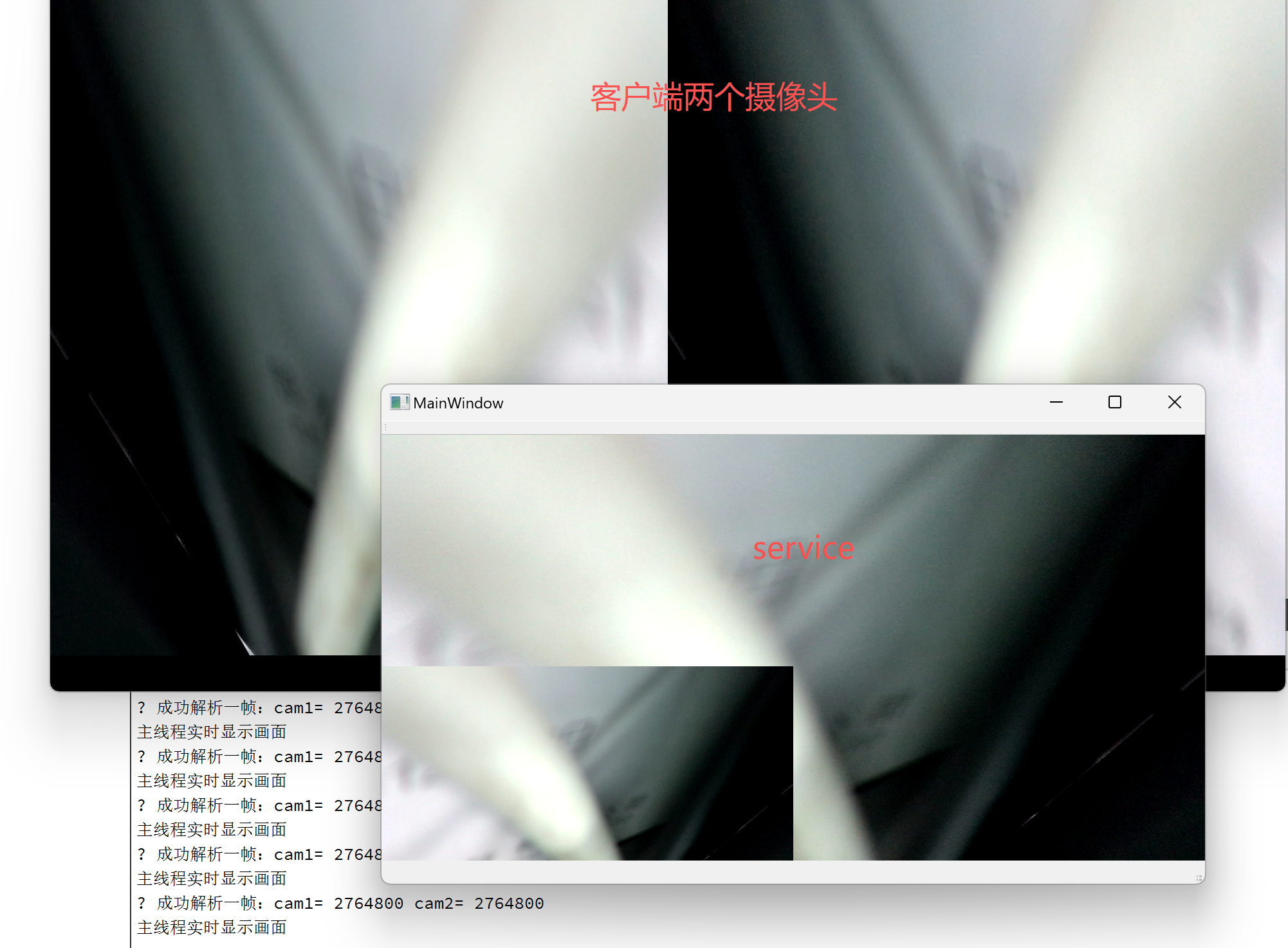
我这里接收的写法是我在客户端自定义的
// 同时发送 两路相机数据
// camera1: 相机1数据   len1: 长度
// camera2: 相机2数据   len2: 长度
int  sunchip_sendDualCameraData(const char* camera1, int len1, const char* camera2, int len2) {
	 // ===================== 最关键:先判断是否连接 =====================
    if (g_sock < 0) {
        return -404; // 已断开!直接返回错误
    }

    if (!camera1 || !camera2 || len1 <= 0 || len2 <= 0) {
        return -404;
    }

    // ===================== WebSocket 帧头 =====================
    char head[10];
    int totalLen = 1 + len1 + len2;
    int headLen = 0;

    head[0] = 0x82;

    if (totalLen <= 125) {
        head[1] = totalLen;
        headLen = 2;
    } else if (totalLen <= 0xFFFF) {
        head[1] = 126;
        head[2] = (totalLen >> 8) & 0xFF;
        head[3] = totalLen & 0xFF;
        headLen = 4;
    } else {
        head[1] = 127;
        memset(head + 2, 0, 4);
        head[6] = (totalLen >> 24) & 0xFF;
        head[7] = (totalLen >> 16) & 0xFF;
        head[8] = (totalLen >> 8) & 0xFF;
        head[9] = totalLen & 0xFF;
        headLen = 10;
    }

    // ===================== 发送,并判断是否发送失败 =====================
    ssize_t ret;

    ret = send(g_sock, head, headLen, MSG_NOSIGNAL);
    if (ret <= 0) {
        close(g_sock);
        g_sock = -1;
        return -404;
    }

    char flag = 0x01;
    ret = send(g_sock, &flag, 1, MSG_NOSIGNAL);
    if (ret <= 0) {
        close(g_sock);
        g_sock = -1;
        return -404;
    }

    ret = send(g_sock, camera1, len1, MSG_NOSIGNAL);
    if (ret <= 0) {
        close(g_sock);
        g_sock = -1;
        return -404;
    }

    ret = send(g_sock, camera2, len2, MSG_NOSIGNAL);
    if (ret <= 0) {
        close(g_sock);
        g_sock = -1;
        return -404;
    }
    return 0;
}