1. Skill 是什么?
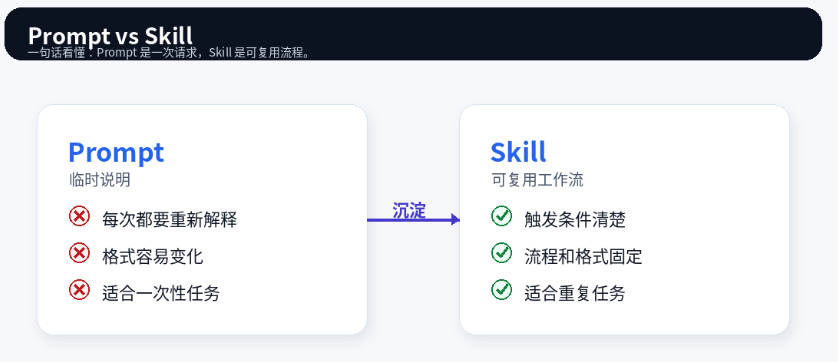
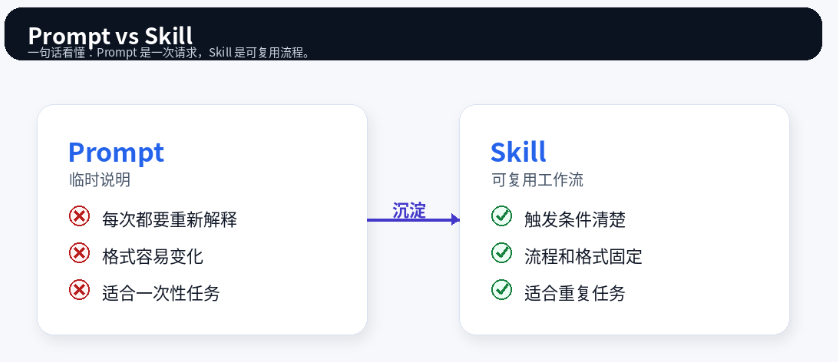
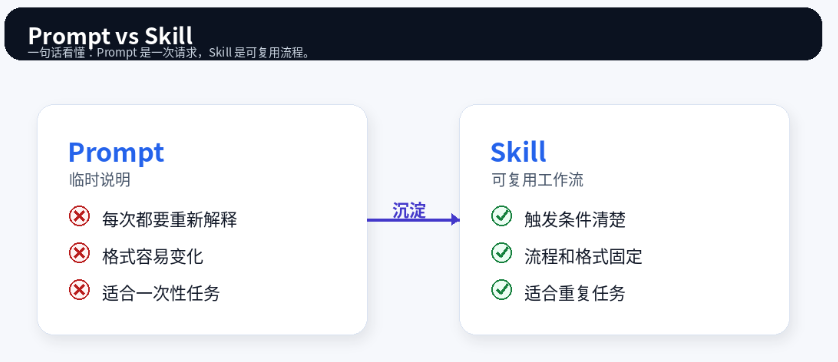
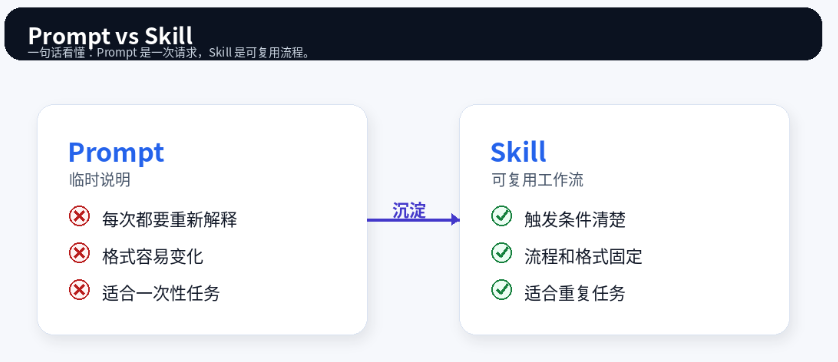
Skill 不是更长的 Prompt,而是一份给 AI agent 使用的工作手册。
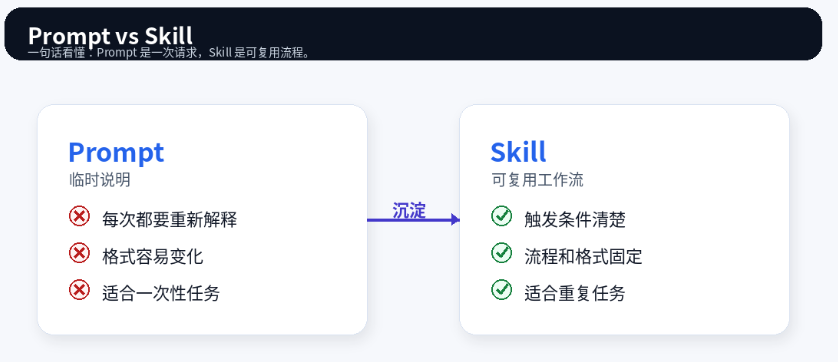
Prompt 通常解决一次问题;Skill 则把一套重复流程沉淀下来,让 AI 以后遇到类似任务时按同一套标准执行。
OpenAI 帮助中心把 ChatGPT Skills 描述为可复用、可共享的工作流,可以包含指令、示例和代码。Agent Skills 规范也说明,一个 Skill 至少包含 SKILL.md,还可以附带脚本、参考资料和模板。
一句话:
Prompt 解决一次问题,Skill 沉淀一套方法。
2. 一个 Skill 长什么样?
最小结构:
text
my-skill/
└── SKILL.md
完整一点的结构:
text
my-skill/
├── SKILL.md
├── references/
├── scripts/
└── assets/
各部分的作用:
| 部分 | 作用 |
|---|---|
SKILL.md |
必须有,写触发条件、核心流程、输出格式 |
references/ |
放规则、模板、schema、示例 |
scripts/ |
放稳定、重复、容易出错的机械处理 |
assets/ |
放文档、PPT、图片、Excel 等可复用素材 |
核心原则:
SKILL.md放主流程;长资料放references/;机械步骤放scripts/。
3. 具体案例:客户反馈洞察 Skill
假设你经常让 AI 分析客户反馈:
text
请分析这些客户访谈,提炼痛点、需求、功能建议和下一步行动。这个任务很适合写成 Skill,因为它重复发生,而且需要固定格式和判断标准。
这个 Skill 的目标是:
text
把访谈、客服工单、问卷评论整理成产品洞察报告。推荐目录:
text
customer-feedback-insight/
├── SKILL.md
├── references/
│   ├── output-template.md
│   └── severity-rubric.md
└── scripts/
    └── normalize_feedback_csv.py
为什么这样设计?
| 文件 | 作用 |
|---|---|
SKILL.md |
说明何时使用、如何分析、如何输出 |
output-template.md |
固定报告格式 |
severity-rubric.md |
统一严重程度判断 |
normalize_feedback_csv.py |
清洗 CSV 输入 |
4. SKILL.md 怎么写?
下面是一版简洁可用的 SKILL.md:
markdown
---
name: customer-feedback-insight
description: analyze customer feedback, interview notes, support tickets, survey responses, or sales call notes into structured product insights. use when the user asks to identify pain points, user needs, feature requests, evidence, severity, priority, or recommended next steps.
---

# Customer Feedback Insight

## Goal

Turn raw customer feedback into structured, evidence-based product insights.

## Workflow

1. Read all provided feedback.
2. Extract pain points, user needs, objections, and feature requests.
3. Separate direct evidence from interpretation.
4. Use customer quotes as evidence when available.
5. Do not invent missing facts, numbers, dates, or business impact.
6. Use `references/output-template.md` for the final format.
7. Use `references/severity-rubric.md` when assigning severity.
8. If the input is a CSV file, run `scripts/normalize_feedback_csv.py` first.

## Output Rules

- Keep the summary short.
- Every major insight must include evidence.
- Mark weak evidence clearly.
- Do not treat one customer comment as a broad trend.
- Include recommended next steps.
重点是 description。它不只是简介,而是触发条件。要写清楚:
text
这个 Skill 做什么?
什么时候该用?
输入通常是什么?
输出通常是什么?
5. 好 Skill 的标准
好 Skill 通常有 6 个特点:
| 标准 | 说明 |
|---|---|
| 触发清楚 | description 写清什么时候用 |
| 输入明确 | 支持哪些文本、文件或数据 |
| 流程稳定 | 步骤可重复执行 |
| 输出固定 | 格式和字段明确 |
| 边界清楚 | 不能猜、不能编、不能夸大 |
| 资源合理 | 复杂资料拆出去,机械任务脚本化 |
坏 Skill 通常是这样:
markdown
---
name: feedback-helper
description: helps analyze feedback.
---

Analyze feedback and provide useful insights.
问题是太泛,不知道什么时候触发,也不知道怎么输出。
6. 什么时候用 references、scripts、assets?
简单判断:
| 场景 | 放哪里 |
|---|---|
| 核心流程和规则 | SKILL.md |
| 输出模板、评分标准、schema | references/ |
| CSV 清洗、PDF 处理、JSON 校验 | scripts/ |
| PPT、Word、Excel、图片模板 | assets/ |
不要为了显得专业而塞很多文件。
能简单就简单,只有真正复用的内容才放进 Skill。
7. skills 和 skills.sh 是什么?
这里要区分两个概念。
ChatGPT Skills :
ChatGPT 中可安装、创建、共享的可复用工作流。OpenAI 帮助中心说明,用户可以在 Skills 页面管理 Skills,也可以直接在对话里让 ChatGPT 创建 Skill。
skills.sh / skills CLI :
面向 agent skills 的生态入口和命令行工具。skills.sh 文档说明,skills CLI 可以用来发现、安装和管理 agent skills,例如:
bash
npx skills add owner/repo安装外部 Skill 前,建议检查:
text
1. 读 SKILL.md
2. 看 scripts/ 有没有危险命令
3. 看是否需要网络、文件系统或密钥
4. 不要只因为热门就安装
8. 写 Skill 的最短流程
按这个顺序写就够了:
text
1. 找一个重复任务
2. 写 3 个真实使用例子
3. 明确输入和输出
4. 写 description 触发条件
5. 写 SKILL.md 主流程
6. 必要时添加 references / scripts / assets
7. 用真实案例测试
8. 根据失败点修改
如果一个 Skill 写完后不能回答这三个问题,它大概率还不够好:
text
什么时候用?
怎么做?
输出什么?
9. 最终模板
markdown
---
name: your-skill-name
description: describe what this skill does and when to use it. include likely inputs, user intents, and expected outputs.
---

# Skill Title

## Goal

State the outcome this skill should produce.

## Workflow

1. Understand the user's input.
2. Follow the required steps.
3. Read reference files if needed.
4. Run scripts if deterministic processing is needed.
5. Produce the final output in the required format.
6. Mark uncertainty instead of guessing.

## Output Format

Return:

1. Summary
2. Evidence
3. Analysis
4. Recommendations

## Quality Rules

- Do not invent missing facts.
- Preserve user-provided numbers and names.
- Separate evidence from interpretation.
- Keep the output concise.
10. 结语
写 Skill 的关键不是写得复杂,而是写得稳定。
好的 Skill 能回答三个问题:
text
什么时候用?
按什么步骤做?
输出成什么样?
最后一句话总结:
Prompt 是临时请求,Skill 是可复用方法。
参考资料
- OpenAI Help Center, "Skills in ChatGPT", https://help.openai.com/en/articles/20001066
- OpenAI Academy, "Skills", https://academy.openai.com/public/resources/skills
- Agent Skills Specification, https://agentskills.io/specification
- skills.sh Documentation, https://skills.sh/docs
- skills.sh CLI Reference, https://skills.sh/docs/cli