Tool calling
AI大模型借助工具来完成自己本身不能完成的一些事情。
AI 工具调用
1、web搜索,天气API
2、数据库数据获取
3、PDF生成、文件生成
4、API访问
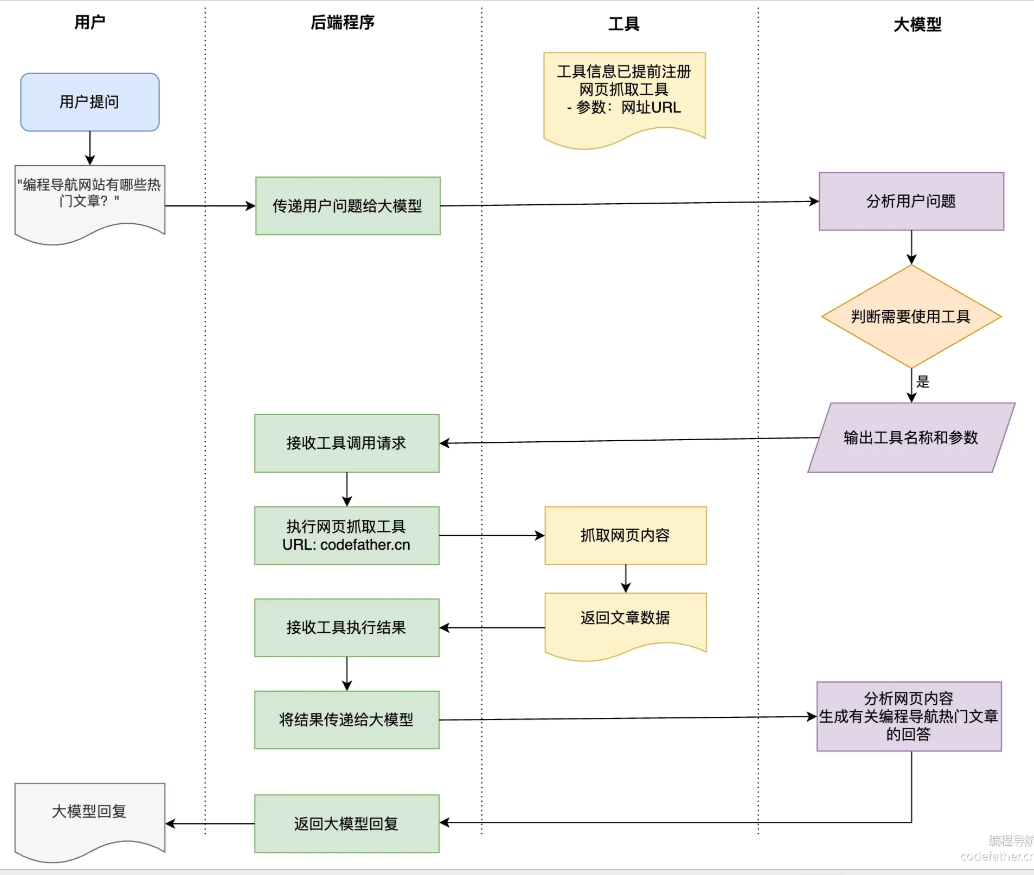
大模型工具调用流程图:
注意:工具的调用一定是程序中自己去调用的,而非直接给大模型去调用,LLM本身具备不稳定性,在这种意料之外的情况发生时,可能造成你的数据被异常删改等情况。
这里很关键的一点是安全性,AI模型永远无法直接接触你的API或者系统资源,所有操作都必须通过你的程序来执行,这样你可以完全控制AI能做什么,不能做什么。
举例,你有一个爆破工具,用户给AI提需求拆房子,AI表示我要用爆破工具,但是需要经过你的同意才能执行爆破。
建议使用已有的成熟框架来进行工具的开发调用,因为LLM调用的成功率会高,效果会好一些。
工具调用成功率:本应去调用工具的一个问题,一些LLM判断问题不需要工具,则其回答很可能是有偏差或错误的。
推荐使用SpringAI langChain等框架,经过专业测试的,成功率会高,效果会好。
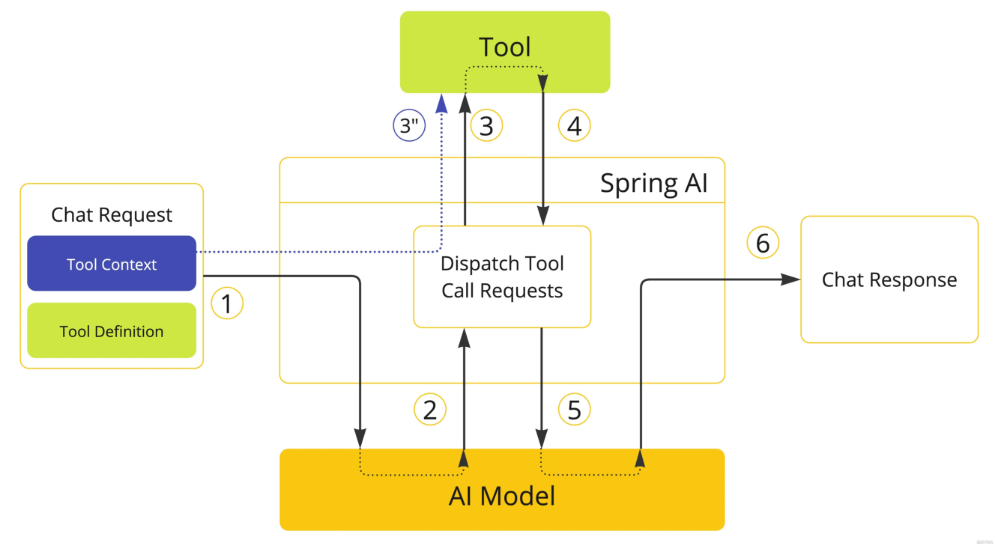
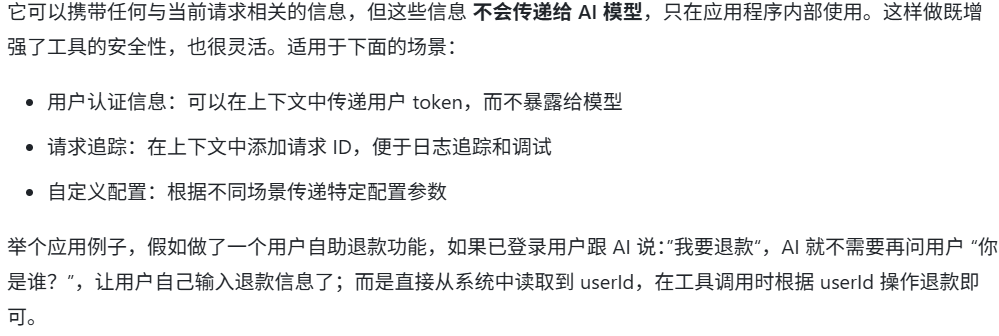
工具上下文:
作用:
1、安全性,一些用户登录信息保存在系统的上下文中,而不传给AI。
2、避免给AI传递一些多余的信息。
SpringAI提供了两种控制工具调用的方式:
- SpringAI框架来调用
- 自己手动来调用
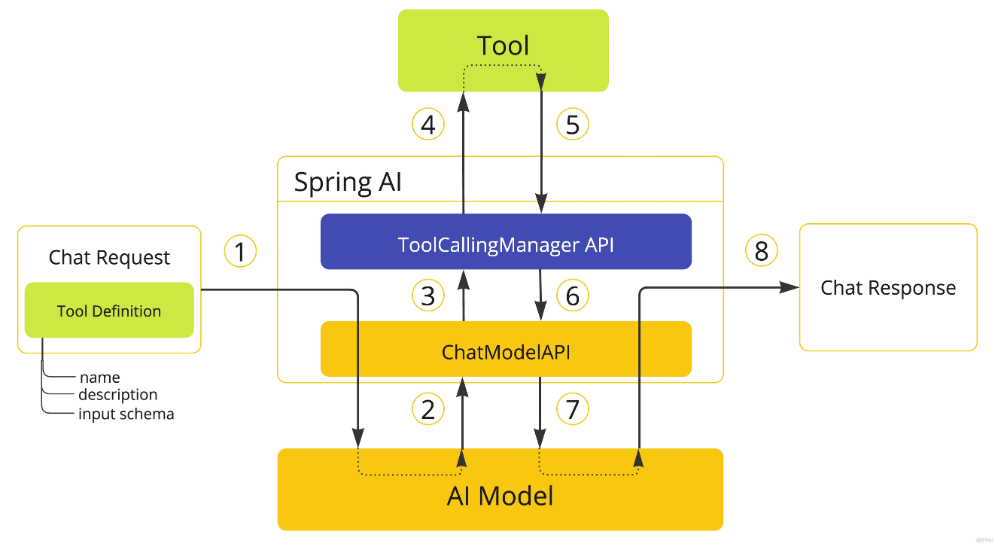
ToolCoolingManager: 管理工具调用的整个生命周期。
和LLM沟通对话,并且将对话内容保存, 以此来提供给大模型和SpringAI框架交互的上下文信息。以便LLM语义理解,给出一个恰当合适的答案。
java
public ToolExecutionResult executeToolCalls(Prompt prompt, ChatResponse chatResponse) {
        Assert.notNull(prompt, "prompt cannot be null");
        Assert.notNull(chatResponse, "chatResponse cannot be null");
        Optional<Generation> toolCallGeneration = chatResponse.getResults().stream().filter((g) -> !CollectionUtils.isEmpty(g.getOutput().getToolCalls())).findFirst();
        if (toolCallGeneration.isEmpty()) {
            throw new IllegalStateException("No tool call requested by the chat model");
        } else {
            AssistantMessage assistantMessage = ((Generation)toolCallGeneration.get()).getOutput();
            ToolContext toolContext = buildToolContext(prompt, assistantMessage);
            InternalToolExecutionResult internalToolExecutionResult = this.executeToolCall(prompt, assistantMessage, toolContext);
            List<Message> conversationHistory = this.buildConversationHistoryAfterToolExecution(prompt.getInstructions(), assistantMessage, internalToolExecutionResult.toolResponseMessage());
            return ToolExecutionResult.builder().conversationHistory(conversationHistory).returnDirect(internalToolExecutionResult.returnDirect()).build();
        }
    }
Spring AI和LLM的交互:
根据LLM的响应结果,来判断是否需要工具调用。需要调用时则LLM以固定格式来返回工具名,参数,SpringAI拿到工具名和参数之后去执行工具调用。工具执行结果再添加到对话上下文中,再继续请求AI,结合工具执行结果来回到用户问题。或者直接返回工具执行结果returnDirectly。
鱼皮提供的用户自定义的手动工具执行的示例:
java
// 配置不自动执行工具
ChatOptions chatOptions = ToolCallingChatOptions.builder()
    .toolCallbacks(ToolCallbacks.from(new WeatherTools()))
    .internalToolExecutionEnabled(false)  // 禁用内部工具执行
    .build();

// 创建工具调用管理器
ToolCallingManager toolCallingManager = DefaultToolCallingManager.builder().build();

// 创建初始提示
Prompt prompt = new Prompt("获取编程导航的热门项目教程", chatOptions);
// 发送请求给模型
ChatResponse chatResponse = chatModel.call(prompt);
// 手动处理工具调用循环
while (chatResponse.hasToolCalls()) {
    // 执行工具调用
    ToolExecutionResult toolExecutionResult = toolCallingManager.executeToolCalls(prompt, chatResponse);
    // 创建包含工具结果的新提示
    prompt = new Prompt(toolExecutionResult.conversationHistory(), chatOptions);
    // 再次发送请求给模型
    chatResponse = chatModel.call(prompt);
}

// 获取最终回答
System.out.println(chatResponse.getResult().getOutput().getText());
异常处理
当工具调用出现异常,这是很常见的情况,例如,AI识别参数有误,构造的参数格式不正确,选择错了工具等等。在工具执行过程中都会出现异常。当工具调用时异常,默认是不中断不抛出,打日志,让LLM继续执行。也可以手动将alwaysThrow改为true,则出现异常时直接中断。
实现工具执行异常处理器的接口,直接返回默认异常处理器,设置alwaysThrow为true,则每次都抛出异常。
java
@Bean
ToolExecutionExceptionProcessor toolExecutionExceptionProcessor() {
    // true 表示总是抛出异常,false 表示返回错误消息给模型
    return new DefaultToolExecutionExceptionProcessor(true);
}
自定义异常的处理
java
@Bean
ToolExecutionExceptionProcessor customExceptionProcessor() {
    return exception -> {
        if (exception.getCause() instanceof IOException) {
            // 网络错误返回友好消息给模型
            return "Unable to access external resource. Please try a different approach.";
        } else if (exception.getCause() instanceof SecurityException) {
            // 安全异常直接抛出
            throw exception;
        }
        // 其他异常返回详细信息
        return "Error executing tool: " + exception.getMessage();
    };
}