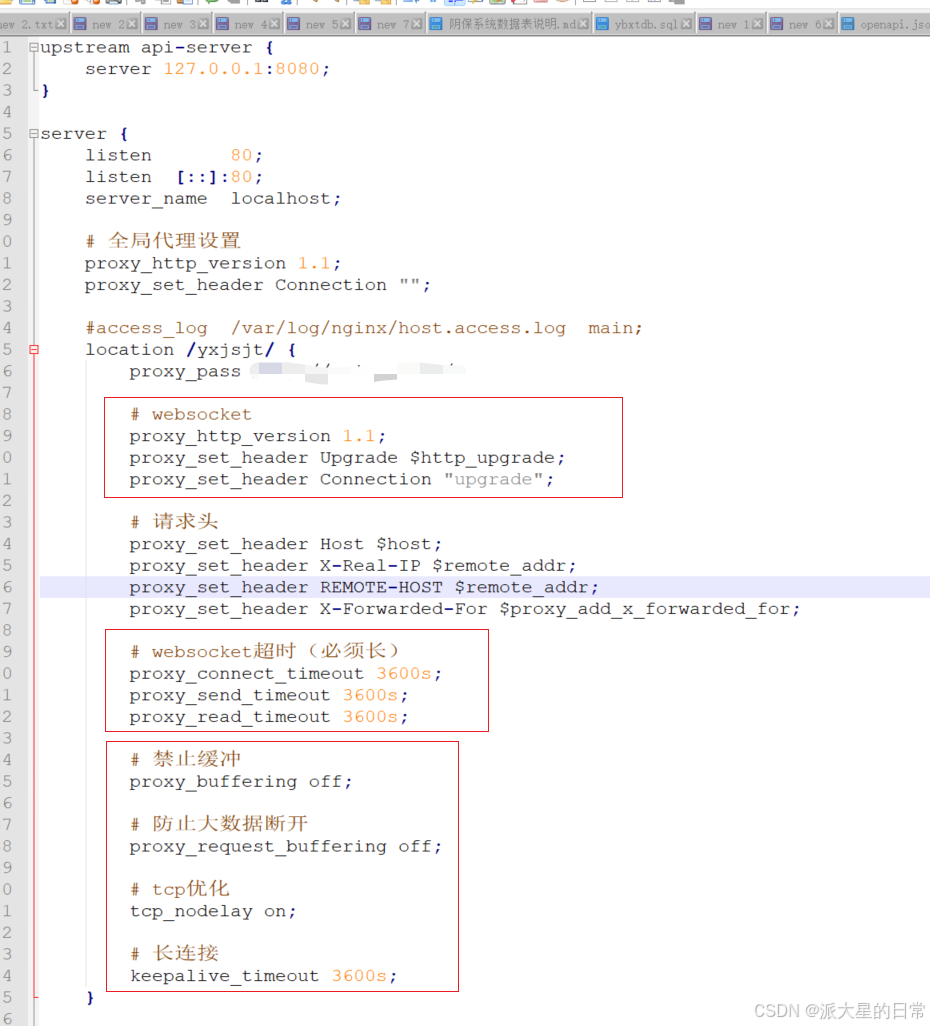
1. nginx设置超时时间配置
websocket
proxy_http_version 1.1;
proxy_set_header Upgrade $http_upgrade;
proxy_set_header Connection "upgrade";
websocket超时(必须长)
proxy_connect_timeout 3600s;
proxy_send_timeout 3600s;
proxy_read_timeout 3600s;
禁止缓冲
proxy_buffering off;
防止大数据断开
proxy_request_buffering off;
tcp优化
tcp_nodelay on;
长连接
keepalive_timeout 3600s;
2. 引入WebSocket配置
java
/**
 * 开启WebSocket支持
 * @author Zgz
 */
@Configuration
public class WebSocketConfig {

    @Bean
    public ServerEndpointExporter serverEndpointExporter() {
        return new ServerEndpointExporter();
    }

}
3.开启异步支持
java
@Configuration
@EnableAsync // 确保开启异步支持
public class AsyncTaskConfig {

    @Bean("taskExecutor") // 定义Bean名称为taskExecutor,@Async默认会使用它
    public Executor taskExecutor() {
        ThreadPoolTaskExecutor executor = new ThreadPoolTaskExecutor();
        // 设置核心线程数,可根据您的任务数量和服务器CPU核心数调整
        executor.setCorePoolSize(10);
        // 设置最大线程数
        executor.setMaxPoolSize(30);
        // 设置队列容量
        executor.setQueueCapacity(100);
        // 设置线程空闲时间(秒)
        executor.setKeepAliveSeconds(60);
        // 设置线程名称前缀,便于日志追踪
        executor.setThreadNamePrefix("DiagnosisAsync-");
        // 设置拒绝策略:当线程池和队列都满时,由调用者线程(通常是定时任务线程)自己执行
        // 这是一种保证任务不会被丢弃的策略,适合您的业务场景 [1,6](@ref)
        executor.setRejectedExecutionHandler(new ThreadPoolExecutor.CallerRunsPolicy());
        // 初始化线程池
        executor.initialize();
        return executor;
    }
}
4.启动类添加异步识别注解 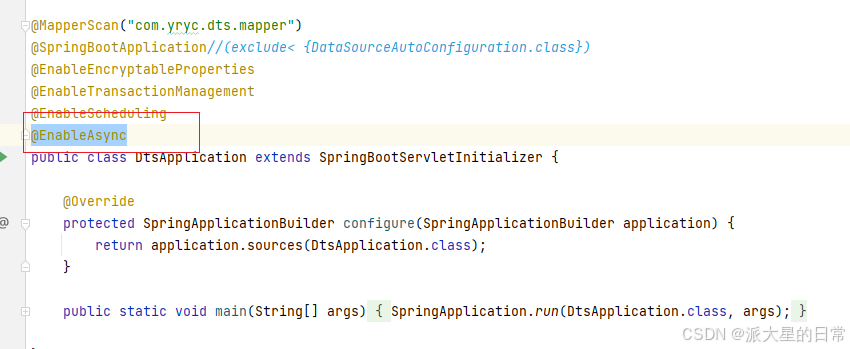
5.定义webSocket接口前端访问地址
java
/**
 * @author Lxz
 * 状态监测WebSocket - 已增加心跳保活(ping/pong)
 */
@ServerEndpoint("/conditionMonitoring/{userId}")
@Component
public class ConditionMonitoringSocket {

    static Log log = LogFactory.get(ConditionMonitoringSocket.class);
    /**静态变量,用来记录当前在线连接数。应该把它设计成线程安全的。*/
    private static int onlineCount = 0;
    /**concurrent包的线程安全Set,用来存放每个客户端对应的MyWebSocket对象。*/
    private static ConcurrentHashMap<String, ConditionMonitoringSocket> webSocketMap = new ConcurrentHashMap<>();
    /**与某个客户端的连接会话,需要通过它来给客户端发送数据*/
    private Session session;
    /**接收userId*/
    private String userId = "";

    /**
     * 连接建立成功调用的方法
     */
    @OnOpen
    public void onOpen(Session session, @PathParam("userId") String userId) {
        this.session = session;
        this.userId = userId;
        if (webSocketMap.containsKey(userId)) {
            webSocketMap.remove(userId);
            webSocketMap.put(userId, this);
        } else {
            webSocketMap.put(userId, this);
            addOnlineCount();
        }

        log.info("用户连接:" + userId + ",当前在线人数为:" + getOnlineCount());

        try {
            sendMessage("连接成功");
        } catch (IOException e) {
            log.error("用户:" + userId + ",网络异常!!!!!!");
        }
    }

    /**
     * 连接关闭调用的方法
     */
    @OnClose
    public void onClose() {
        if (webSocketMap.containsKey(userId)) {
            webSocketMap.remove(userId);
            subOnlineCount();
        }
        log.info("用户退出:" + userId + ",当前在线人数为:" + getOnlineCount());
    }

    /**
     * 收到客户端消息后调用的方法
     *
     * @param message 客户端发送过来的消息
     */
    @OnMessage
    public void onMessage(String message, Session session) {
        log.info("用户消息:" + userId + ",报文:" + message);

        // ===================== 【新增:心跳包自动响应】 =====================
        if ("ping".equalsIgnoreCase(message)) {
            try {
                sendMessage("pong");
                log.info("用户[{}] 心跳响应 pong", userId);
            } catch (IOException e) {
                log.error("用户[{}] 心跳回复失败", userId, e);
            }
            return; // 心跳包不进入业务逻辑
        }
        // ==================================================================

        if (StrUtil.isNotEmpty(message)) {
            try {
                String toUserId = this.userId;
                if (StrUtil.isNotEmpty(toUserId) && webSocketMap.containsKey(toUserId)) {
                    webSocketMap.get(toUserId).sendMessage(message);
                } else {
                    log.error("请求的userId:" + toUserId + "不在该服务器上");
                }
            } catch (Exception e) {
                e.printStackTrace();
            }
        }
    }

    /**
     * @param session
     * @param error
     */
    @OnError
    public void onError(Session session, Throwable error) {
        log.error("用户错误:" + this.userId + ",原因:" + error.getMessage());
        error.printStackTrace();
    }

    /**
     * 实现服务器主动推送(----异步推送----)
     */
    public void sendMessage(String message) throws IOException {
        this.session.getAsyncRemote().sendText(message);
    }

    /**
     * 发送自定义消息
     */
    public static void sendInfo(String message, @PathParam("userId") String userId) throws IOException {
        log.info("发送消息到:" + userId + ",报文:" + message);
        if (StrUtil.isNotEmpty(userId) && webSocketMap.containsKey(userId)) {
            webSocketMap.get(userId).sendMessage(message);
        } else {
            log.error("用户" + userId + ",不在线!");
        }
    }

    public static synchronized int getOnlineCount() {
        return onlineCount;
    }

    public static synchronized void addOnlineCount() {
        ConditionMonitoringSocket.onlineCount++;
    }

    public static synchronized void subOnlineCount() {
        ConditionMonitoringSocket.onlineCount--;
    }

    public static ConcurrentHashMap<String, ConditionMonitoringSocket> getWebSocketSet() {
        return webSocketMap;
    }

}
6.开启定时推送数据
java
@Component
public class ConditionMonitoringTask {


    @Resource
    private SzlsProcessPointService szlsProcessPointService;

    @Scheduled(cron = "*/15 * * * * *")
    public void run() throws Exception {
        try {
            ConcurrentHashMap<String, ConditionMonitoringSocket> webSocketMap = ConditionMonitoringSocket.getWebSocketSet();
            Set<String> collect = ConditionMonitoringSocket.getWebSocketSet().keySet().stream().collect(Collectors.toSet());
            // 查询当前设备运行状态
            if(collect.size()>0){
                Object monitoring = szlsProcessPointService.conditionMonitoringInternal(null);
                for (String s : collect) {
                    Map<String,Object> returnMap = new HashMap<>();
                    returnMap.put("code",200);
                    returnMap.put("msg","成功");
                    returnMap.put("data",monitoring);
                    webSocketMap.get(s).sendMessage(JSONObject.toJSONString(returnMap));
                }
            }
        } catch (IOException e) {
            e.printStackTrace();
        }
    }
}
后端测试地址为:ws://IP:端口号/realTimeData/userId
注:这个userId无论是前端还是后端都要传成随机数,不能重复。