1.mysql的备份与恢复
数据备份的重要性
-
在生产环境中,数据的安全性至关重要
-
任何数据的丢失都可能产生严重的后果
-
造成数据丢失的原因
-
程序错误
-
人为操作错误
-
运算错误
-
磁盘故障
-
灾难(如火灾、地震)和盗窃
-
数据库备份的分类
从物理与逻辑的角度,备份可分为
-
物理备份:对数据库操作系统的物理文件(如数据文件、日志文件等)的备份
-
物理备份方法
-
冷备份(脱机备份):是在关闭数据库的时候进行的
-
热备份(联机备份):数据库处于运行状态,依赖于数据库的日志文件
-
温备份:数据库锁定表格(不可写入但可读)的状态下进行备份操作
-
-
-
逻辑备份:对数据库逻辑组件(如:表等数据库对象)的备份
常见的备份方法
-
物理冷备
-
备份时数据库处于关闭状态,直接打包数据库文件
-
备份速度快,恢复时也是最简单的
-
-
专用备份工具mydump或mysqlhotcopy
-
mysqldump常用的逻辑备份工具
-
mysqlhotcopy仅拥有备份MylSAM和ARCHIVE表
-
-
启用二进制日志进行增量备份
- 进行增量备份,需要刷新二进制日志
-
第三方工具备份
- 免费的MvSQL热备份软件PerconaXtraBackup
冷备份
备份(推荐写法)
root@mysql01 \~# systemctl stop mysqld # 先停止服务
root@mysql01 \~# cd /usr/local/mysql/data
root@mysql01 data# mkdir /mysql_bak
root@mysql01 data# tar czf /mysql_bak/mysql-backup-$(date +%F).tar.gz *
root@mysql01 data# systemctl start mysqld # 备份完成后启动服务
#测试服务正常
删除数据
root@mysql01 \~# systemctl stop mysqld # 先停止服务
root@mysql01 \~# rm -rf /usr/local/mysql/data/* # 清空数据目录(谨慎操作!)
#再次开启测试,发现数据库坏了
root@mysql01 \~# systemctl start mysqld
#停止数据库,恢复数据库
root@mysql01 \~# systemctl stop mysqld
root@mysql01 \~# tar xzf /mysql_bak/mysql-backup-2025-10-15.tar.gz -C /usr/local/mysql/data/
root@mysql01 \~# chown -R mysql:mysql /usr/local/mysql/data # 恢复权限
root@mysql01 \~# systemctl start mysqld # 启动服务
#再次测试,发现数据库恢复了
逻辑备份
#备份数据库
root@mysql01 \~# systemctl start mysqld
root@mysql01 \~# mysqldump -u root -pschool > /mysql_bak/school.sql
Enter password:
root@mysql01 \~# ls /mysql_bak/school.sql
mysql_bak/school.sql
root@mysql01 \~# cat /mysql_bak/school.sql
#备份多个数据库
root@mysql01 \~# mysqldump -u root -p --databases school mysql > /mysql_bak/school-mysql.sql
Enter password:
root@mysql01 \~# cat /mysql_bak/school-mysql.sql
#备份所有数据库
root@mysql01 \~# mysqldump -u root -p --opt --all-databases > /mysql_bak/all.sql
Enter password:
root@mysql01 \~# cat /mysql_bak/all.sql
#备份整个表
root@mysql01 \~# mysqldump -u root -p school info > /mysql_bak/info.sql
Enter password:
root@mysql01 \~# cat /mysql_bak/info.sql
恢复数据
root@mysql01 \~# mysql -u root -p
Enter password:
mysql> use school
mysql> show tables;
+------------------+
| Tables_in_school |
+------------------+
| info |
+------------------+
1 row in set (0.00 sec)
#永久删除info表
mysql> drop table info;
Query OK, 0 rows affected (0.01 sec)
#从备份文件恢复表(核心操作)
mysql> source /mysql_bak/info.sql
mysql> show tables;
+------------------+
| Tables_in_school |
+------------------+
| info |
+------------------+
1 row in set (0.00 sec)
增量备份
root@mysql01 \~# vim /etc/my.cnf
mysqld
log-bin=mysql-bin #这段下面最后加一行
root@web-server \~# systemctl restart mysqld.service
root@mysql01 \~# ls /usr/local/mysql/data/
auto.cnf client-cert.pem ibdata1 ibtmp1 mysql-bin.index public_key.pem server-key.pem
ca-key.pem client-key.pem ib_logfile0 mysql performance_schema school sys
ca.pem ib_buffer_pool ib_logfile1 mysql-bin.000001 private_key.pem server-cert.pem
#先进行完整性备份
root@mysql01 \~# mysqldump -uroot -p school > /opt/school.sql
Enter password:
#日志刷新生效
root@mysql01 \~# mysqladmin -uroot -p flush-logs
Enter password:
#新产生的mysql-bin.000002只记录上次刷新后的操作
root@mysql01 \~# ls /usr/local/mysql/data/
auto.cnf client-cert.pem ibdata1 ibtmp1 mysql-bin.000002 private_key.pem server-cert.pem
ca-key.pem client-key.pem ib_logfile0 mysql mysql-bin.index public_key.pem server-key.pem
ca.pem ib_buffer_pool ib_logfile1 mysql-bin.000001 performance_schema school sys
root@mysql01 \~# mysql -uroot -p
Enter password:
mysql> use school;
mysql> select * from info;
+----+--------+-------+---------+-------+
| id | name | score | address | hobby |
+----+--------+-------+---------+-------+
| 1 | 张三 | 90.00 | 广州 | 1 |
| 2 | 叶凡 | 91.00 | 伦敦 | 2 |
| 4 | 曹操 | 66.50 | 合肥 | 4 |
+----+--------+-------+---------+-------+
3 rows in set (0.00 sec)
#再次插入数据生产增量备份
mysql> insert into info (name,score,address,hobby) values ('美猴王',75,'武汉',1);
Query OK, 1 row affected (0.00 sec)
mysql> exit
Bye
root@mysql01 \~# mysqladmin -uroot -p flush-log
Enter password:
#新产生mysql-bin.000003日志记录insert操作
root@mysql01 \~# ls /usr/local/mysql/data/
auto.cnf client-cert.pem ibdata1 ibtmp1 mysql-bin.000002 performance_schema school sys
ca-key.pem client-key.pem ib_logfile0 mysql mysql-bin.000003 private_key.pem server-cert.pem
ca.pem ib_buffer_pool ib_logfile1 mysql-bin.000001 mysql-bin.index public_key.pem server-key.pem
root@mysql01 \~# mysql -uroot -p
Enter password:
mysql> use school;
Reading table information for completion of table and column names
You can turn off this feature to get a quicker startup with -A
Database changed
mysql> insert into info (name,score,address,hobby) values ('超人',83,'上海',2);
Query OK, 1 row affected (0.00 sec)
mysql> select * from info;
+----+-----------+-------+---------+-------+
| id | name | score | address | hobby |
+----+-----------+-------+---------+-------+
| 1 | 张三 | 90.00 | 广州 | 1 |
| 2 | 叶凡 | 91.00 | 伦敦 | 2 |
| 4 | 曹操 | 66.50 | 合肥 | 4 |
| 5 | 美猴王 | 75.00 | 武汉 | 1 |
| 6 | 超人强 | 83.00 | 上海 | 2 |
+----+-----------+-------+---------+-------+
5 rows in set (0.00 sec)
mysql> exit
Bye
#刷新日志生效
root@mysql01 \~# mysqladmin -uroot -p flush-log
Enter password:
#环境准备
root@mysql01 \~# mysql -uroot -p
Enter password:
mysql> use school;
Reading table information for completion of table and column names
You can turn off this feature to get a quicker startup with -A
Database changed
#删除内容
mysql> delete from info where id=6;
Query OK, 1 row affected (0.00 sec)
mysql> delete from info where id=5;
Query OK, 1 row affected (0.01 sec)
mysql> select * from info;
+----+--------+-------+---------+-------+
| id | name | score | address | hobby |
+----+--------+-------+---------+-------+
| 1 | 张三 | 90.00 | 广州 | 1 |
| 2 | 叶凡 | 91.00 | 伦敦 | 2 |
| 4 | 曹操 | 66.50 | 合肥 | 4 |
+----+--------+-------+---------+-------+
3 rows in set (0.00 sec)
mysql> exit
Bye
root@mysql01 \~# ls /usr/local/mysql/data/
auto.cnf client-cert.pem ibdata1 ibtmp1 mysql-bin.000002 mysql-bin.index public_key.pem server-key.pem
ca-key.pem client-key.pem ib_logfile0 mysql mysql-bin.000003 performance_schema school sys
ca.pem ib_buffer_pool ib_logfile1 mysql-bin.000001 mysql-bin.000004 private_key.pem server-cert.pem
#查看日志文件,vim看日志是乱码
root@mysql01 \~# mysqlbinlog --no-defaults --base64-output=decode-rows -v /usr/local/mysql/data/mysql-bin.000003
root@mysql01 \~# mysqlbinlog --no-defaults --base64-output=decode-rows -v /usr/local/mysql/data/mysql-bin.000004
#恢复操作,恢复时如果被拒绝,是有其他mysql进程占用了
root@mysql01 \~# mysqlbinlog --no-defaults /usr/local/mysql/data/mysql-bin.000003 | mysql -uroot -p
Enter password:
#验证
root@web-server \~# mysql -uroot -p
Enter password:
mysql> select * from info;
+----+--------+-------+---------+-------+
| id | name | score | address | hobby |
+----+--------+-------+---------+-------+
| 1 | 张三 | 90.00 | 广州 | 1 |
| 2 | 叶凡 | 91.00 | 伦敦 | 2 |
| 4 | 曹操 | 66.50 | 合肥 | 4 |
| 6 | 超人强 | 83.00 | 上海 | 2 |
+----+--------+-------+---------+-------+
4 rows in set (0.00 sec)
2.主从复制和读写分离
使用目标:数据冗余和灾难恢复;提升并发能力、避免锁冲突。
MySQL读写分离原理
-
只在主服务器上写,只在从服务器上读
-
主数据库处理事务性查询,从数据库处理SELECT查询
-
数据库复制用于将事务性查询的变更同步到集群中的从数据库
-
读写分离方案
-
基于程序代码内部实现
-
基于中间代理层实现
-
MySQL-Proxy
-
Amoeba
-
-
-
在每个事务更新数据完成之前,Master将这些改变记录进二进制日志。写入二进制日志完成后,Master通知存储引擎提交事务。
-
Slave将Master 的 Binary log复制到其中继日志(Relay log)。首先,Slave开始一个工作线程-I/0线程,I/0线程在Master上打开一个普通的连接,然后开始Binlog dump process。Binlog dump process从Master 的二进制日志中读取事件,如果已经跟上Master,它会睡眠并等待Master产生新的事件。I/0线程将这些事件写入中继日志。
-
SQLslavethread(SQL从线程)处理该过程的最后一步。SQL线程从中继日志读取事件,并重放其中的事件而更新Slave数据,使其与Master中的数据保持一致。只要该线程与I/0线程保持一致,中继日志通常会位于0S的缓存中,所以中继日志的开销很小。复制过程有一个很重要的限制,即复制在Slave上是串行化的,也就是说Master上的并行更新操作不能在Slave上并行操作。
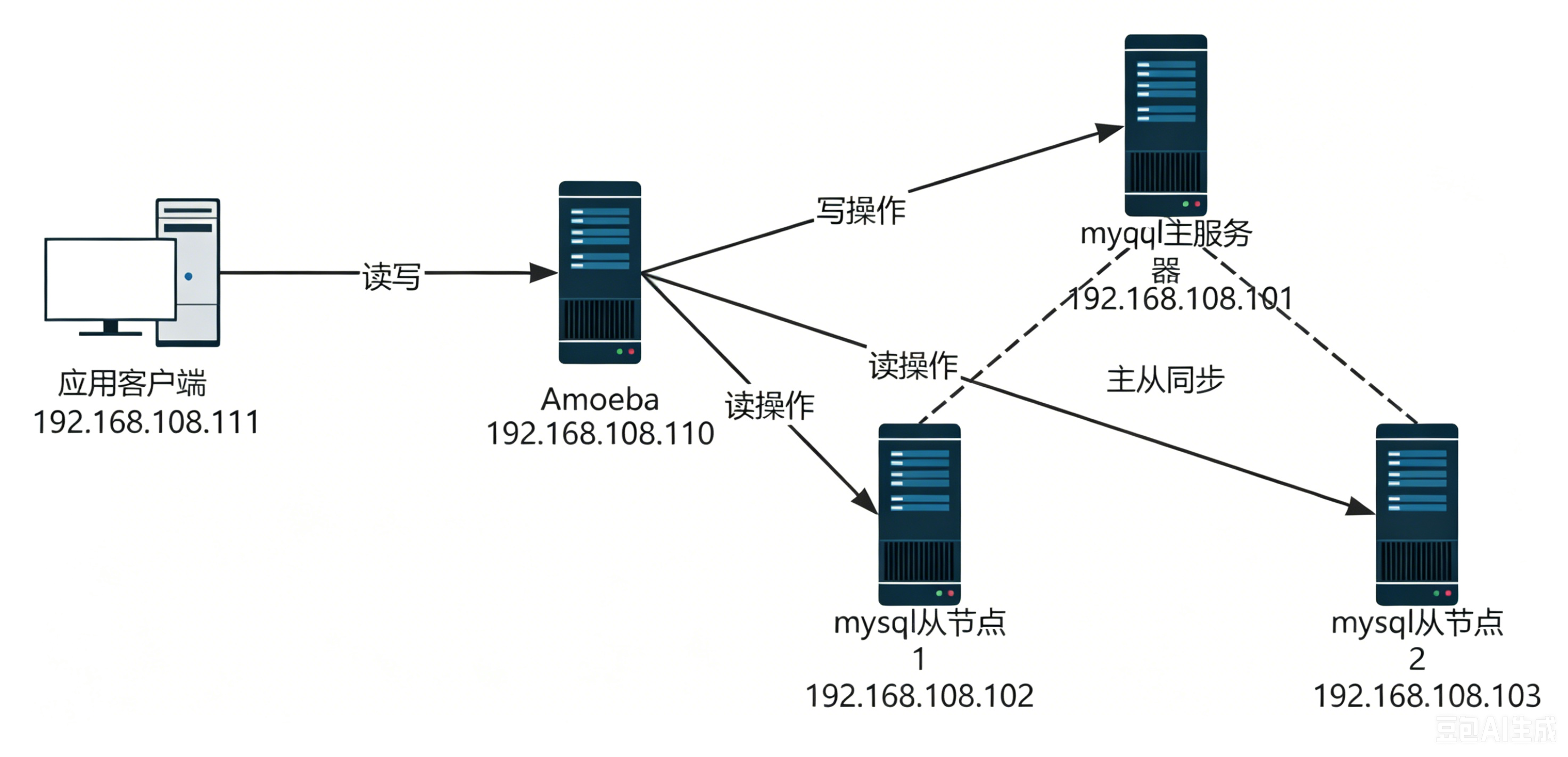
实验拓扑图
使用Centos-7-template模板克隆产生应用客户端和amoeba
使用mysql模板克隆产生mysql主服务器,mysql从节点1,mysql从节点2
根据下表,将IP地址,主机名更改好
| 主机名 | IP地址 | 作用 |
|---|---|---|
| mysql-master | 192.168.108.101 | mysql主服务器 |
| mysql-slave01 | 192.168.108.102 | mysql从节点1 |
| mysql-slave02 | 192.168.108.103 | mysql从节点2 |
| amoeba | 192.168.108.110 | amoeba |
| mysql-client | 192.168.108.111 | 应用客户端 |
时间同步
所有节点
root@mysql-all \~# ntpdate ntp.aliyun.com
root@mysql-all \~# date -R
root@mysql-all \~# setenforce 0
mysql主从服务器配置
mysql主服务器配置
root@mysql-master \~# vim /etc/my.cnf
server-id = 11
log-bin = master-bin #主服务器日志文件
log-slave-updates = true #从服务器更新二进制日志
root@mysql-master \~# systemctl restart mysqld
root@mysql-master \~# mysql -u root -p
Enter password:
mysql> GRANT REPLICATION SLAVE ON *.* TO 'myslave'@'192.168.108.%' IDENTIFIED BY '123456';
Query OK, 0 rows affected, 1 warning (0.01 sec)
mysql> FLUSH PRIVILEGES;
Query OK, 0 rows affected (0.00 sec)
mysql> show master status;
+-------------------+----------+--------------+------------------+-------------------+
| File | Position | Binlog_Do_DB | Binlog_Ignore_DB | Executed_Gtid_Set |
+-------------------+----------+--------------+------------------+-------------------+
| master-bin.000001 | 604 | | | |
+-------------------+----------+--------------+------------------+-------------------+
1 row in set (0.00 sec)
#记录一下 master-bin.000001 | 604
#检查有没有master-bin.000001
root@mysql-master \~# ls /usr/local/mysql/data
auto.cnf ibdata1 ib_logfile1 master-bin.000001 mysql sys
ib_buffer_pool ib_logfile0 ibtmp1 master-bin.index performance_schema
mysql从服务器配置
mysql-slave01,mysql-slave02都要做如下操作
#主从是克隆的要做这个操作,否则UUID一致
root@mysql-slave01 \~# systemctl stop mysqld
root@mysql-slave01 \~# rm -f /usr/local/mysql/data/auto.cnf
root@mysql-slave01 \~# systemctl start mysqld
root@mysql-slave01 \~# vim /etc/my.cnf
server-id = 22 #另外一台为23
relay-log = relay-log-bin #从主服务器上同步日志文件记录到本地
relay-log-index = slave-relay-bin.index #定义relay-log的位置和名称
root@mysql-slave01 \~# systemctl restart mysqld
root@mysql-slave01 \~# mysql -u root -p
Enter password:
mysql> change master to master_host='192.168.108.101',master_user='myslave',master_password='123456',master_log_file='master-bin.000001',master_log_pos=604; #master_log_file,master_log_pos与前面查询的相同
Query OK, 0 rows affected, 2 warnings (0.03 sec)
mysql> start slave;
Query OK, 0 rows affected (0.02 sec)
mysql> show slave status\G;
*************************** 1. row ***************************
Slave_IO_State: Waiting for master to send event
Master_Host: 192.168.108.101
Master_User: myslave
Master_Port: 3306
Connect_Retry: 60
Master_Log_File: master-bin.000001
Read_Master_Log_Pos: 604
Relay_Log_File: relay-log-bin.000002
Relay_Log_Pos: 321
Relay_Master_Log_File: master-bin.000001
Slave_IO_Running: Yes #Yes
Slave_SQL_Running: Yes #Yes
Replicate_Do_DB:
Replicate_Ignore_DB:
Replicate_Do_Table:
Replicate_Ignore_Table:
Replicate_Wild_Do_Table:
Replicate_Wild_Ignore_Table:
Last_Errno: 0
Last_Error:
Skip_Counter: 0
Exec_Master_Log_Pos: 604
Relay_Log_Space: 526
Until_Condition: None
Until_Log_File:
Until_Log_Pos: 0
Master_SSL_Allowed: No
Master_SSL_CA_File:
Master_SSL_CA_Path:
Master_SSL_Cert:
Master_SSL_Cipher:
Master_SSL_Key:
Seconds_Behind_Master: 0
Master_SSL_Verify_Server_Cert: No
Last_IO_Errno: 0
Last_IO_Error:
Last_SQL_Errno: 0
Last_SQL_Error:
Replicate_Ignore_Server_Ids:
Master_Server_Id: 11
Master_UUID: 5d895caf-a1e0-11f0-b3ec-000c29866c0f
Master_Info_File: /usr/local/mysql/data/master.info
SQL_Delay: 0
SQL_Remaining_Delay: NULL
Slave_SQL_Running_State: Slave has read all relay log; waiting for more updates
Master_Retry_Count: 86400
Master_Bind:
Last_IO_Error_Timestamp:
Last_SQL_Error_Timestamp:
Master_SSL_Crl:
Master_SSL_Crlpath:
Retrieved_Gtid_Set:
Executed_Gtid_Set:
Auto_Position: 0
Replicate_Rewrite_DB:
Channel_Name:
Master_TLS_Version:
1 row in set (0.00 sec)
ERROR:
No query specified
#mysql-slave02
root@mysql-slave02 \~# systemctl stop mysqld
root@mysql-slave02 \~# rm -f /usr/local/mysql/data/auto.cnf
root@mysql-slave02 \~# systemctl start mysqld
root@mysql-slave02 \~# vim /etc/my.cnf
server-id = 23
relay-log = relay-log-bin
relay-log-index = slave-relay-bin.index
root@mysql-slave02 \~# systemctl restart mysqld
root@mysql-slave02 \~# mysql -u root -p
Enter password:
mysql> change master to master_host='192.168.108.101',master_user='myslave',master_password='123456',master_log_file='master-bin.000001',master_log_pos=604;
Query OK, 0 rows affected, 2 warnings (0.04 sec)
mysql> start slave;
Query OK, 0 rows affected (0.01 sec)
mysql> show slave status\G;
*************************** 1. row ***************************
Slave_IO_State: Waiting for master to send event
Master_Host: 192.168.108.101
Master_User: myslave
Master_Port: 3306
Connect_Retry: 60
Master_Log_File: master-bin.000001
Read_Master_Log_Pos: 604
Relay_Log_File: relay-log-bin.000002
Relay_Log_Pos: 321
Relay_Master_Log_File: master-bin.000001
Slave_IO_Running: Yes
Slave_SQL_Running: Yes
Replicate_Do_DB:
Replicate_Ignore_DB:
Replicate_Do_Table:
Replicate_Ignore_Table:
Replicate_Wild_Do_Table:
Replicate_Wild_Ignore_Table:
Last_Errno: 0
Last_Error:
Skip_Counter: 0
Exec_Master_Log_Pos: 604
Relay_Log_Space: 526
Until_Condition: None
Until_Log_File:
Until_Log_Pos: 0
Master_SSL_Allowed: No
Master_SSL_CA_File:
Master_SSL_CA_Path:
Master_SSL_Cert:
Master_SSL_Cipher:
Master_SSL_Key:
Seconds_Behind_Master: 0
Master_SSL_Verify_Server_Cert: No
Last_IO_Errno: 0
Last_IO_Error:
Last_SQL_Errno: 0
Last_SQL_Error:
Replicate_Ignore_Server_Ids:
Master_Server_Id: 11
Master_UUID: 5d895caf-a1e0-11f0-b3ec-000c29866c0f
Master_Info_File: /usr/local/mysql/data/master.info
SQL_Delay: 0
SQL_Remaining_Delay: NULL
Slave_SQL_Running_State: Slave has read all relay log; waiting for more updates
Master_Retry_Count: 86400
Master_Bind:
Last_IO_Error_Timestamp:
Last_SQL_Error_Timestamp:
Master_SSL_Crl:
Master_SSL_Crlpath:
Retrieved_Gtid_Set:
Executed_Gtid_Set:
Auto_Position: 0
Replicate_Rewrite_DB:
Channel_Name:
Master_TLS_Version:
1 row in set (0.00 sec)
ERROR:
No query specified
验证主从同步
主服务器上:
root@mysql-master \~# mysql -uroot -phuawei
mysql> create database school;
Query OK, 1 row affected (0.01 sec)
mysql> use school;
CREATE TABLE student (
id int UNSIGNED AUTO_INCREMENT PRIMARY KEY,
name VARCHAR(20) NOT NULL,
age tinyint UNSIGNED,
#height DECIMAL(5,2),
gender ENUM('M','F') default 'M'
)ENGINE=InnoDB AUTO_INCREMENT=10 DEFAULT CHARSET=utf8mb4;
mysql> insert student (name,age)values('路飞',20);
去从服务器上 show databases;
root@mysql-slave01 \~# mysql -uroot -phuawei
mysql> select * from school.student;
+----+--------+------+--------+
| id | name | age | gender |
+----+--------+------+--------+
| 10 | 路飞 | 20 | M |
+----+--------+------+--------+
1 row in set (0.00 sec)
amoeba服务器
#普通linux克隆
root@amoeba \~# hostnamectl set-hostname amoeba
root@amoeba \~# systemctl stop firewalld.service
root@amoeba \~# setenforce 0
root@amoeba \~# chmod +x jdk-6u14-linux-x64.bin
root@amoeba \~# ./jdk-6u14-linux-x64.bin
到yes的时候,输入yes按enter
root@amoeba \~# mv jdk1.6.0_14/ /usr/local/jdk1.6
root@amoeba \~# vim /etc/profile
最下面加
export JAVA_HOME=/usr/local/jdk1.6 #java家目录
export CLASSPATH=CLASSPATH:JAVA_HOME/lib:$JAVA_HOME/jre/lib #类环境和jre
export PATH=JAVA_HOME/lib:JAVA_HOME/jre/bin/:PATH:HOME/bin
export AMOEBA_HOME=/usr/local/amoeba #指定amoeba路径
export PATH=PATH:AMOEBA_HOME/bin
root@amoeba \~# source /etc/profile
root@amoeba \~# mkdir /usr/local/amoeba
root@amoeba \~# tar zxvf amoeba-mysql-binary-2.2.0.tar.gz -C /usr/local/amoeba/
root@amoeba \~# chmod -R 755 /usr/local/amoeba/
#执行结果显示amoeba start|stop说明安装成功
root@amoeba \~# /usr/local/amoeba/bin/amoeba
amoeba start|stop
在三台mysql上添加权限开放给amoeba访问
#amooba访问数据库的账号
#mysql-master
mysql> grant all on *.* to test@'192.168.108.%' identified by '123.com';
#mysql-slave01
mysql> grant all on *.* to test@'192.168.108.%' identified by '123.com';
#mysql-slave02
mysql> grant all on *.* to test@'192.168.108.%' identified by '123.com';
回到amoeba服务器
root@amoeba \~# cd /usr/local/amoeba/
root@amoeba amoeba# vim conf/amoeba.xml
---30行--
<property name="user">amoeba</property #客户端访问amoeba账号
----32行---------
<property name="password">123456</property> #客户端访问ameoba密码
---117和120-去掉注释-
115行 <property name="defaultPool">master</property>
116
117
118行<property name="writePool">master</property>
119行<property name="readPool">slaves</property>
120
root@amoeba amoeba# vim conf/dbServers.xml #数据库配置
---23--注意!!!(mysql5.7,默认没有test数据库所以需要修改为mysql数据库)-(mysql5.5直接忽略)--
<!-- mysql schema -->
<property name="schema">mysql</property>
--25行到30行,第30行-->移动到28行后面
25 <!-- mysql user -->
26 <property name="user">test</property>
27
28 <!-- mysql password -->
29 <property name="password">123.com</property>
30
-----45到50行主服务器地址---
45行<dbServer name="master" parent="abstractServer">
48行<property name="ipAddress">192.168.108.101</property>
--52到57行从服务器主机名-
52行<dbServer name="slave1" parent="abstractServer">
--55-从服务器地址-
55 <property name="ipAddress">192.168.108.102</property>
---52到57行复制一份在58行后面
原52行<dbServer name="slave2" parent="abstractServer">
--55-从服务器地址-
原55 <property name="ipAddress">192.168.108.103</property>
---仅跟在上面的配置后面,multiPool行(本来就有,修改)
<dbServer name="slaves" virtual="true">
<poolConfig class="com.meidusa.amoeba.server.MultipleServerPool #不改
<property name="poolNames">slave1,slave2</property>
</poolConfig> #不改
root@amoeba \~# /usr/local/amoeba/bin/amoeba start&
1 33499
root@amoeba \~# netstat -anpt | grep java
tcp6 0 0 :::8066 :::* LISTEN 33499/java
tcp6 0 0 127.0.0.1:21128 :::* LISTEN 33499/java
tcp6 0 0 192.168.108.110:41754 192.168.108.101:3306 ESTABLISHED 33499/java
tcp6 0 0 192.168.108.110:41722 192.168.108.102:3306 ESTABLISHED 33499/java
tcp6 0 0 192.168.108.110:36956 192.168.108.103:3306 ESTABLISHED 33499/java
测试客户端
root@mysql-client \~# yum install -y mysql
root@mysql-client \~# mysql -u amoeba -p123456 -h 192.168.108.110 -P8066 #连接amoeba服务器,8086端口在amoeba上执行netstat -anpt|grep java看
MySQL (none)>show databases;
MySQL (none)>use school;
MySQL (school)>show tables;
MySQL (school)>select * from student;
在MASTER上
root@mysql-master \~# mysql -u root -p
Enter password:
mysql> use school;
Reading table information for completion of table and column names
You can turn off this feature to get a quicker startup with -A
Database changed
mysql> insert student (name,age)values('鸣人',20);
Query OK, 1 row affected (0.00 sec)
#此时会同步
#mysql-slave01
mysql> select * from student;
+----+--------+------+--------+
| id | name | age | gender |
+----+--------+------+--------+
| 10 | 路飞 | 20 | M |
| 11 | 鸣人 | 20 | M |
+----+--------+------+--------+
2 rows in set (0.00 sec)
#mysql-slave02
mysql> select * from student;
+----+--------+------+--------+
| id | name | age | gender |
+----+--------+------+--------+
| 10 | 路飞 | 20 | M |
| 11 | 鸣人 | 20 | M |
+----+--------+------+--------+
2 rows in set (0.00 sec)
在两台从节点上
mysql-slave01
mysql> stop slave;
mysql-slave02
mysql> stop slave;
在客户端上插入数据,内容不会同步
#mysql-client上添加,由于不会同步,只有mysql-master192.168.108.101节点有该记录
mysql-client
MySQL school> insert student (name,age)values('卡卡西',30);
在mysql-slave01上
#mysql-slave01
mysql> use school;
mysql> insert student (name,age)values('卡卡西',31);
mysql-slave02上
mysql-slave02
mysql> use school;
mysql> insert student (name,age)values('卡卡西',32);
验证主从复制
在mysql-slave01和mysql-slave02上查看
mysql-slave01
mysql> select * from student;
+----+-----------+------+--------+
| id | name | age | gender |
+----+-----------+------+--------+
| 10 | 路飞 | 20 | M |
| 11 | 鸣人 | 20 | M |
| 12 | 卡卡西 | 31 | M |
+----+-----------+------+--------+
3 rows in set (0.00 sec)
#mysql-slave02
mysql> select * from student;
+----+-----------+------+--------+
| id | name | age | gender |
+----+-----------+------+--------+
| 10 | 路飞 | 20 | M |
| 11 | 鸣人 | 20 | M |
| 12 | 卡卡西 | 32| M |
+----+-----------+------+--------+
3 rows in set (0.00 sec)
并没有将客户端写入的insert student (name,age)values('卡卡西',30);同步
在mysq-master上查看内容发现写入成功:
mysql-master
mysql> select * from student;
+----+-----------+------+--------+
| id | name | age | gender |
+----+-----------+------+--------+
| 10 | 路飞 | 20 | M |
| 11 | 鸣人 | 20 | M |
| 12 | 卡卡西 | 30 | M |
+----+-----------+------+--------+
3 rows in set (0.00 sec)
验证读写分离
在客户端上测试,第一次会向从服务器1读数,据-第二次会向从2读取
#mysql-client
MySQL (none)> select * from school.student;
+----+-----------+------+--------+
| id | name | age | gender |
+----+-----------+------+--------+
| 10 | 路飞 | 20 | M |
| 11 | 鸣人 | 20 | M |
| 12 | 卡卡西 | 31 | M |
+----+-----------+------+--------+
3 rows in set (0.02 sec)
MySQL (none)> select * from school.student;
+----+-----------+------+--------+
| id | name | age | gender |
+----+-----------+------+--------+
| 10 | 路飞 | 20 | M |
| 11 | 鸣人 | 20 | M |
| 12 | 卡卡西 | 32 | M |
+----+-----------+------+--------+
3 rows in set (0.00 sec)
#都是从从节点读取的,读写分离,由实验结果可知:客户端的读取内容会从mysql-slave01和mysql-slave02上轮询得到。