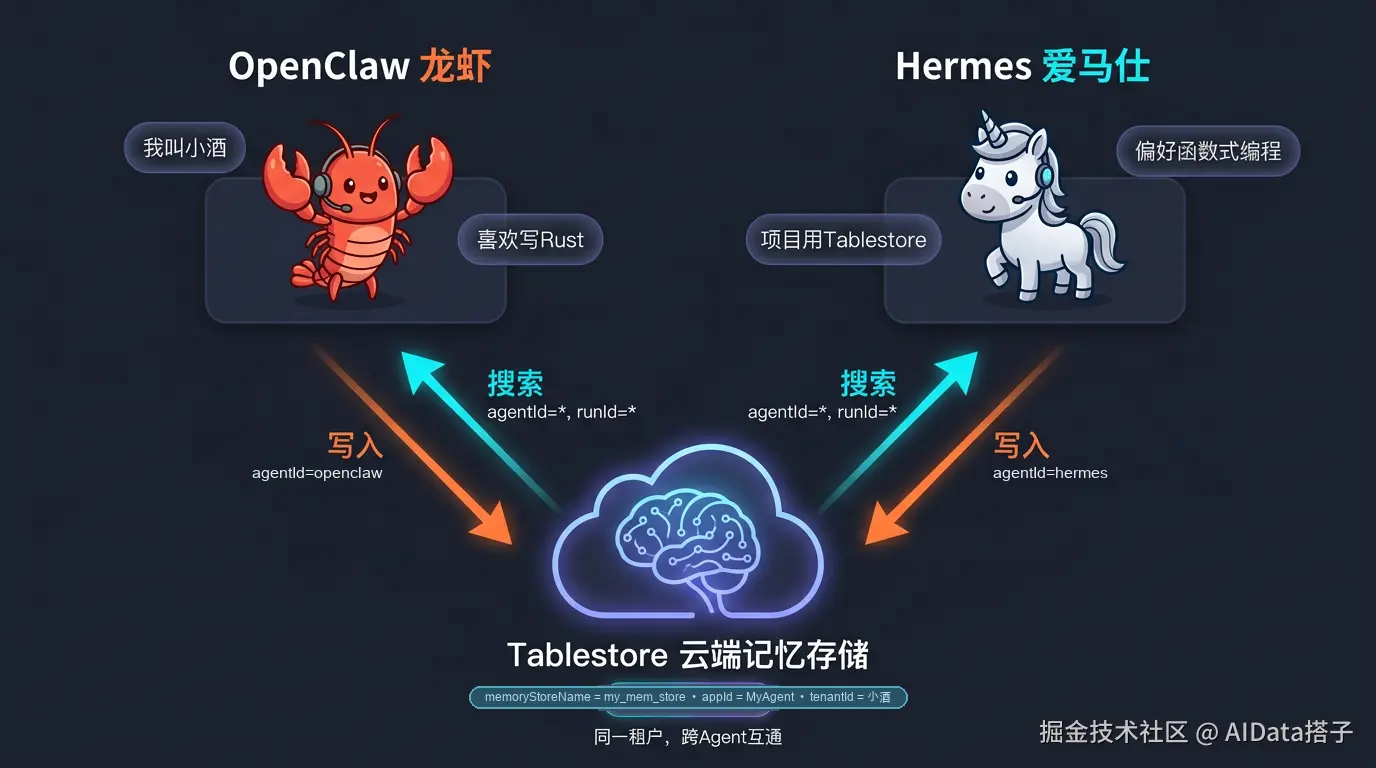
两个插件只要连接同一个 Tablestore 实例、使用相同的应用 ID 和租户 ID,它们的记忆就能自动互通。写入时各自标记来源,读取时自动共享所有数据,无需额外配置。
实战开始:三步让龙虾和马共享记忆
前置准备
在开始之前,请确保你已经:
-
拥有一个阿里云账号,并已开通 Tablestore 服务
-
创建好一个北京地域的 Tablestore 实例,获取 Endpoint、实例名称、AccessKey
-
已安装 OpenClaw 和 Hermes Agent
Step 1|从龙虾迁移到马
如果你已经有 OpenClaw 的配置和记忆,先用 Hermes 内置命令一键迁移:
bash
hermes claw migrate这条命令会自动完成:
-
迁移 OpenClaw 的配置文件
-
迁移 MEMORY.md 等记忆文件
-
迁移 API Key 配置
-
迁移已有的技能和消息平台设置
迁移完成后,你的 Hermes 已经"继承"了龙虾的全部记忆和个性。后续安装 Tablestore 插件后,这些本地记忆文件还会自动镜像到云端,实现双重保障(详见 Step 2.2)。
Step 2|两边安装 Tablestore 记忆插件
2.1 OpenClaw 侧安装
bash
# 安装插件
openclaw plugins install @tablestore/openclaw-tablestore-memory
编辑 ~/.openclaw/openclaw.json,添加配置:
json
{
  "plugins": {
    "slots": {
      "memory": "tablestore-mem"
    },
    "entries": {
      "tablestore-mem": {
        "enabled": true,
        "config": {
          "endpoint": "https://你的实例.cn-beijing.ots.aliyuncs.com",
          "otsInstanceName": "你的实例名",
          "accessKeyId": "<your-ak>",
          "accessKeySecret": "<your-sk>",
          "appId": "MyAgent",
          "tenantId": "小酒",
          "autoCreateMemoryStore": true,
          "memoryStoreName": "my_mem_store"
        },
        "hooks": {
          "allowConversationAccess": true
        }
      }
    }
  }
}
重启生效:
bash
openclaw gateway restart验证:
bash
openclaw tablestore-mem doctor
# 能正常返回即安装成功
{
  "ok": true,
  "connection": {
    "endpoint": "https://xxx.cn-beijing.ots.aliyuncs.com",
    "otsInstanceName": "xxx",
    "memoryStoreName": "my_mem_store"
  },
  "scope": {
    "appId": "openclaw",
    "tenantId": "__default__",
    "agentId": "*",
    "runId": "*"
  },
  "checks": [
    "ensureMemoryStore",
    "getMemoryStore",
    "listMemories"
  ],
  "memoryStore": {
    "ok": true,
    "memoryStoreName": "my_mem_store",
    "otsInstance": "q02790o2dy0c",
    "description": "OpenClaw long-term memory"
  },
  "listMemories": {
    "ok": true,
    "count": 4,
    "limit": 5,
    "nextToken": "....",
    "sample": [
      {
        "id": "cfe6369cdae5619a118be15fb38ded01",
        "text": "'token-1777535109' is the cryptographic or session token associated with the verification search request 'verify-search-015'",
        "scope": {
          "appId": "openclaw",
          "tenantId": "__default__",
          "agentId": "openclaw",
          "runId": "agent:openclaw:openai-user:__default__"
        }
      }
    ]
  },
  "errors": []
}
2.2 Hermes 侧安装
bash
# 安装插件
hermes plugins install https://github.com/aliyun/hermes-tablestore-memory

# 交互式激活(推荐)
hermes memory setup
# 选择 tablestore-mem
密钥配置写入 ~/.hermes/.env:
plaintext
TABLESTORE_MEMORY_AK=<your-ak>(与 OpenClaw 侧相同)
TABLESTORE_MEMORY_SK=<your-sk>(与 OpenClaw 侧相同)
非密钥配置写入 $HERMES_HOME/tablestore_memory.json:
json
{
  "endpoint": "https://你的实例.cn-beijing.ots.aliyuncs.com",
  "instance_name": "你的实例名",
  "memory_store_name": "my_mem_store",
  "app_id": "MyAgent",
  "tenant_id": "小酒",
  "enable_rerank": true,
  "auto_create_store": true,
  "timeout": 30.0
}
验证:
bash
hermes tablestore-mem doctor
# 输出:
{
  "ok": true,
  "provider": "tablestore-mem",
  "instance_name": "xxx",
  "endpoint": "https://xxx.cn-beijing.ots.aliyuncs.com",
  "memory_store_name": "my_mem_store",
  "scope": {
    "appId": "hermes",
    "tenantId": "__default__",
    "agentId": "*",
    "runId": "*"
  },
  "checks": {
    "initialize": {
      "ok": true
    },
    "describe_memory_store": {
      "ok": true,
      "memory_store_name": "my_mem_store"
    },
    "list_memories": {
      "ok": true,
      "memory_count": 0,
      "has_next_token": false
    }
  }
}
内置记忆镜像:安装完成后,Hermes 插件会自动将内置的 MEMORY.md 和 USER.md 同步写入 Tablestore。这意味着:
-
Step 1 中从 OpenClaw 迁移过来的记忆文件,会自动备份到云端
-
即使本地文件丢失或设备更换,你的记忆依然安全------Tablestore 里有完整镜像
2.3 共享关键:确保配置一致
两边能共享记忆的核心条件:
| 配置项 | OpenClaw 侧 | Hermes 侧 | 要求 |
|---|---|---|---|
| Tablestore 实例 | endpoint + otsInstanceName | endpoint + instance_name | 必须相同 |
| AccessKey | accessKeyId / accessKeySecret | TABLESTORE_MEMORY_AK / SK | 必须相同 |
| 记忆库名称 | 默认 openclaw_mem | 默认 hermes_mem | 必须相同(这是共享的关键) |
| appId | 默认 MyAgent | 默认 MyAgent | 必须相同(这是共享的关键) |
| 租户标识 | tenantId | tenant_id | 必须相同(这是共享的关键) |
| AgentId | 默认 openclaw | 默认 hermes | 可以不同,用于区分记忆来源 |
重点 :
tenantId/tenant_id是记忆共享的唯一钥匙。两边设置成同一个值(比如你的用户名"小酒"),搜索时插件会自动用agentId=*通配,检索该租户下所有 Agent 的记忆。
Step 3|开始玩耍:跨 Agent 记忆实测
实验一:龙虾写入,马来回忆
在 OpenClaw 中,新开一个 session,输入:
我叫小酒,你叫虾头。我喜欢喝冰美式,不加糖。周末喜欢写 Rust。
等待几秒,让插件自动回写完成。也可以手动确认:
bash
openclaw tablestore-mem search "小酒"你应该能看到刚刚存入的记忆。
切换到 Hermes,新开一个全新 session,输入:
你好呀,你知道我是谁吗?
Hermes 的 queue_prefetch() 会自动从 Tablestore 检索相关记忆。它应该回答出:
你是小酒,你喜欢喝冰美式(不加糖),周末喜欢写 Rust。
龙虾记住的,马也知道了。
实验二:马写入,龙虾来回忆
在 Hermes 中输入:
记住:我们的项目叫 Cortex,用的是 MySQL + Tablestore 架构,部署在阿里云北京地域。
Hermes 的 sync_turn() 会自动同步到 Tablestore。也可以用工具显式确认:
调用 tablestore_search 搜索 "Cortex 项目"
切换回 OpenClaw,新开 session,输入:
帮我写一个 Cortex 项目的数据库健康检查脚本
OpenClaw 的 before_prompt_build 钩子会自动检索到 Hermes 写入的记忆,直接知道要针对 MySQL + Tablestore 生成检查逻辑。
马记住的,龙虾也知道了。
实验三:CLI 交叉验证
两边的 CLI 命令也可以交叉查看记忆:
bash
# 在 OpenClaw 侧搜索所有记忆(包括 Hermes 写入的)
openclaw tablestore-mem search "项目架构"

# 在 Hermes 侧搜索所有记忆(包括 OpenClaw 写入的)
hermes tablestore-mem search "小酒的偏好"
进阶玩法
用 CLI 手动管理共享记忆
bash
# OpenClaw 侧:手动添加一条记忆
openclaw tablestore-mem add "团队规范:所有 API 必须写单元测试"

# Hermes 侧:手动添加一条记忆
hermes tablestore-mem add "代码审查偏好:关注性能和安全" --metadata source=manual

# 任意一侧搜索,两边的记忆都能被检索到
hermes tablestore-mem search "团队规范" --top-k 10
在 Hermes 对话中显式操作记忆
Hermes 插件提供四个 Agent 工具,可以在对话中直接调用:
| 工具 | 用途 | 示例 |
|---|---|---|
tablestore_profile |
查看记忆快照 | "列出我所有的记忆" |
tablestore_search |
语义搜索 | "搜索关于部署方案的记忆" |
tablestore_remember |
主动存储 | "记住:生产环境禁止使用 root 账号" |
tablestore_forget |
删除记忆 | "删除关于旧项目的记忆" |
在 OpenClaw 对话中使用斜杠命令
你可以在 OpenClaw 对话中通过斜杠命令快速搜索和添加共享记忆,无需打开终端
plaintext
/tablestore-mem-search 部署方案
/tablestore-mem-add 新规范:所有接口必须做限流
工作原理:为什么能互通?
两个插件能无缝共享记忆,核心在于 Scope 机制的设计:
plaintext
写入时(精确归属):
  OpenClaw → {memoryStoreName:"my_mem_store", appId: "MyAgent", tenantId: "小酒", agentId: "openclaw", runId: "session-123"}
  Hermes   → {memoryStoreName:"my_mem_store", appId: "MyAgent", tenantId: "小酒", agentId: "hermes", runId: "session-456"}

搜索时(通配检索):
两边都用 → {appId: MyAgent, tenantId: "小酒", agentId: *, runId: *}-
写入:每条记忆都精确标记了来自哪个 Agent、哪个会话,数据归属清晰
-
搜索 :自动展开为通配符,在同一
tenantId下检索所有 Agent、所有会话的记忆 -
效果:龙虾写的、马写的、不同会话写的,全部可被任意一方检索到
常见问题
Q:两边的 memoryStoreName 不一样(openclaw_mem vs hermes_mem),记忆还能互通吗?
A:不可以。Tablestore 的记忆检索基于 Scope(memoryStoreName + tenantId + appId + runId)进行匹配。需要几大配置一致,才能跨 Agent 检索。
Q:迁移后 OpenClaw 还能继续用吗?
A:完全可以。hermes claw migrate 是复制而非剪切,原有的 OpenClaw 配置和数据不受影响。你可以两边同时使用,各取所长。
Q:记忆会不会冲突?比如龙虾说我喜欢 Python,马说我喜欢 Rust?
A:不会冲突。每条记忆独立存储,搜索时按语义相关性排序返回。两条记忆会同时被召回,Agent 会根据上下文判断哪条更相关。你也可以用 tablestore_forget 手动清理过时的记忆。
Q:如果我只想用 Hermes,不再用 OpenClaw,需要做什么?
A:直接使用 Hermes 即可。OpenClaw 侧写入的记忆已经在 Tablestore 中,Hermes 可以直接检索到。不需要做额外的数据迁移。
最后
龙虾🦞和马🐴,不是二选一的关系。
-
OpenClaw 在 IDE 中编码依然犀利
-
Hermes 在跨平台调度和自进化上更胜一筹
-
Tablestore 让它们共享同一个"大脑",各司其职但记忆互通
装上 Tablestore 记忆插件,你的龙虾不再只是龙虾,你的马也不再只是马------它们是同一个"你"的两只手。