大语言模型(LLMs)是无状态的,即它们不会自动保留先前对话信息。这在需要跨多次交互保持上下文或状态时,是一个显著限制。Spring AI 引入 Chat Memory 功能,允许你在多轮对话中存储并检索信息,以解决这一问题。
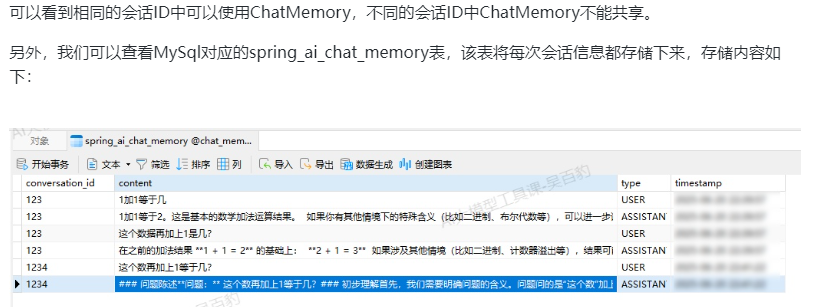
Spring AI中的Chat Memory可以将最近N次对话上下文信息保存在内存或者外部数据库(例如PostgreSQL、MySQL、SQL Server、HSQLDB、Cassandra、Neo4j)中,以便LLM在同一会话的多轮互动中保持语义连贯,默认N为20(包括USER、ASSISTANT消息),也可以用户来指定,超出后按时间顺序清理(system 消息一直存在,不计入20条内)。
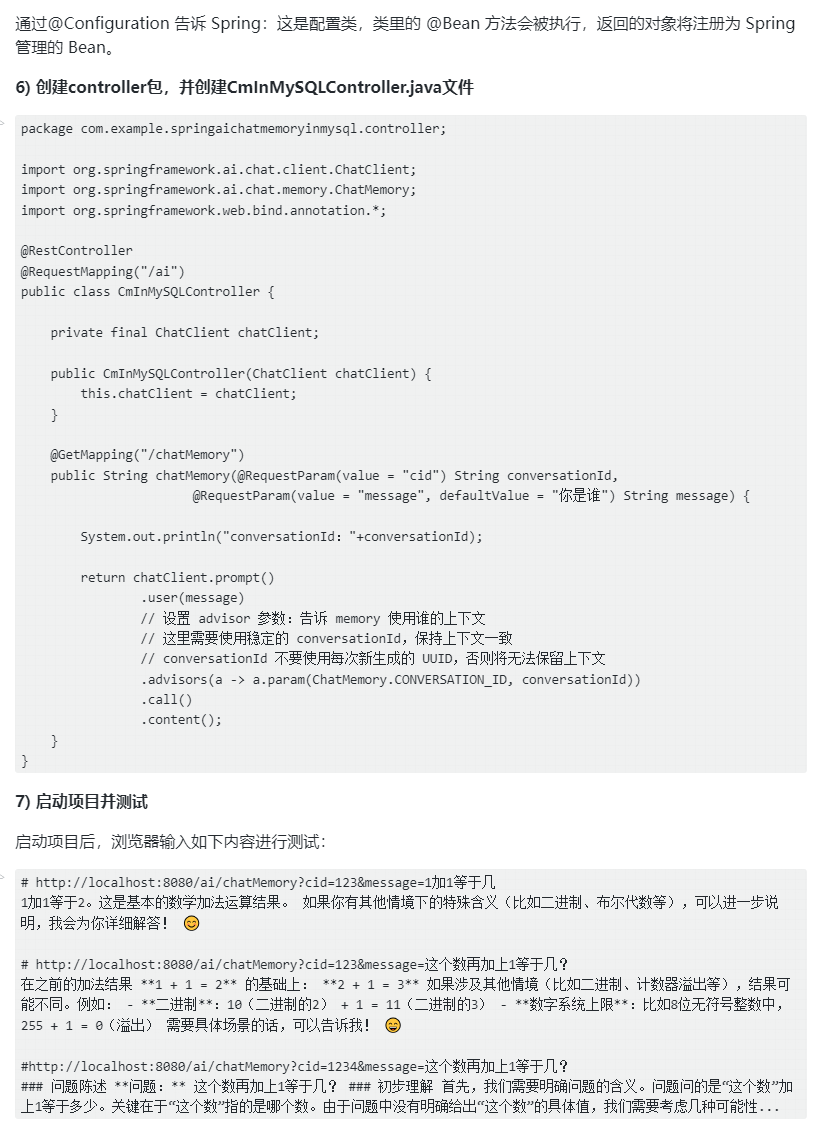
ChatMemory抽象与使用方式
ChatMemory使用中涉及如下两个接口:
Ø ChatMemory接口:提供在指定对话中添加消息、检索记忆内容、以及清理旧消息的能力。
Ø ChatMemoryRepository接口:负责消息的底层储存与提取。
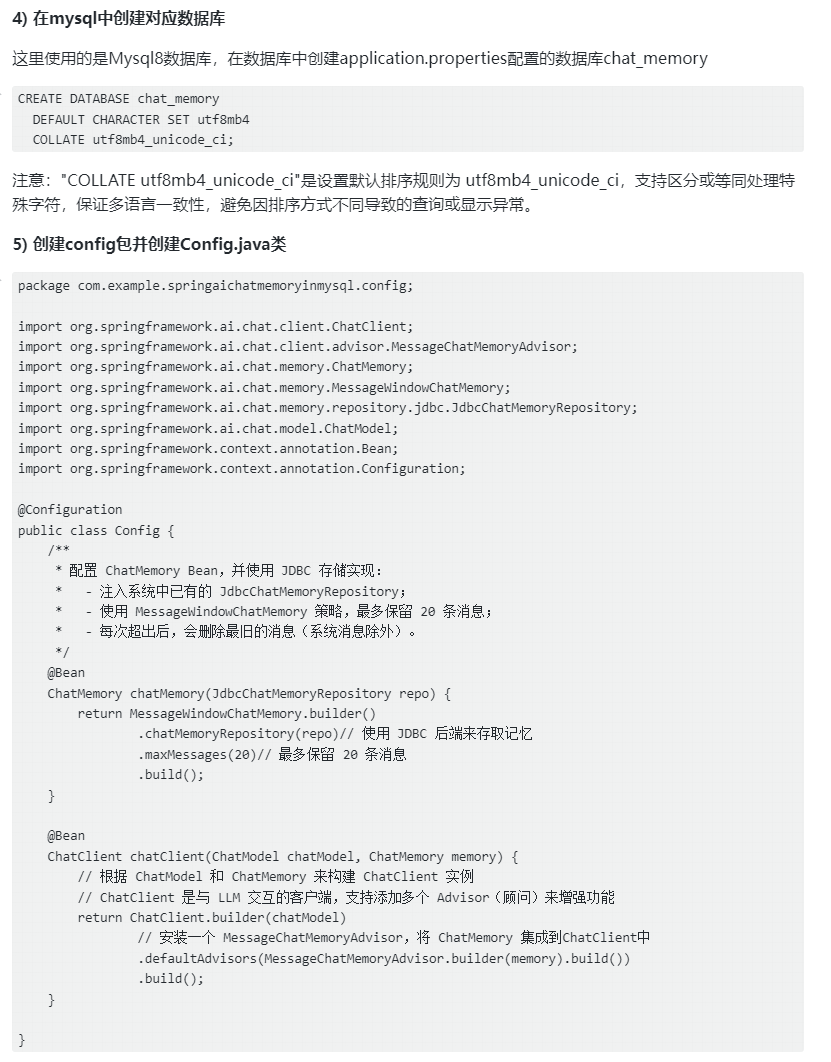
ChatMemory默认实现为MessageWindowChatMemory类,如下方式创建ChatMemory:
MessageWindowChatMemory memory = MessageWindowChatMemory.builder()
.maxMessages(20)
.build();
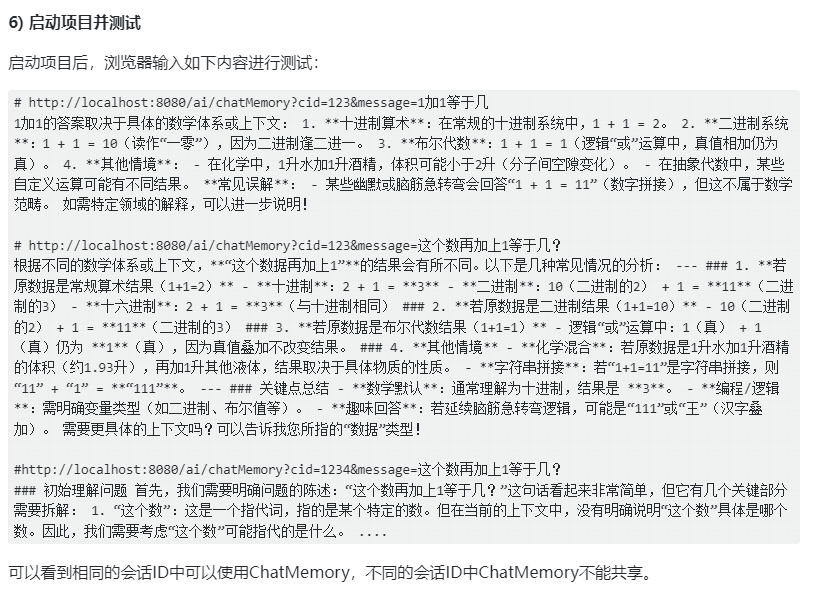
以上这种方式创建ChatMemory对象默认将保存最近N条对话信息(默认20条),超出后按时间顺序清理(系统消息不会被清除)。最近N条对话消息存储到哪里由ChatMemoryRepository的实现决定(存储后端),ChatMemoryRepository有如下四种实现:
InMemoryChatMemoryRepository:使用 ConcurrentHashMap 存储消息,这种也是默认方式。
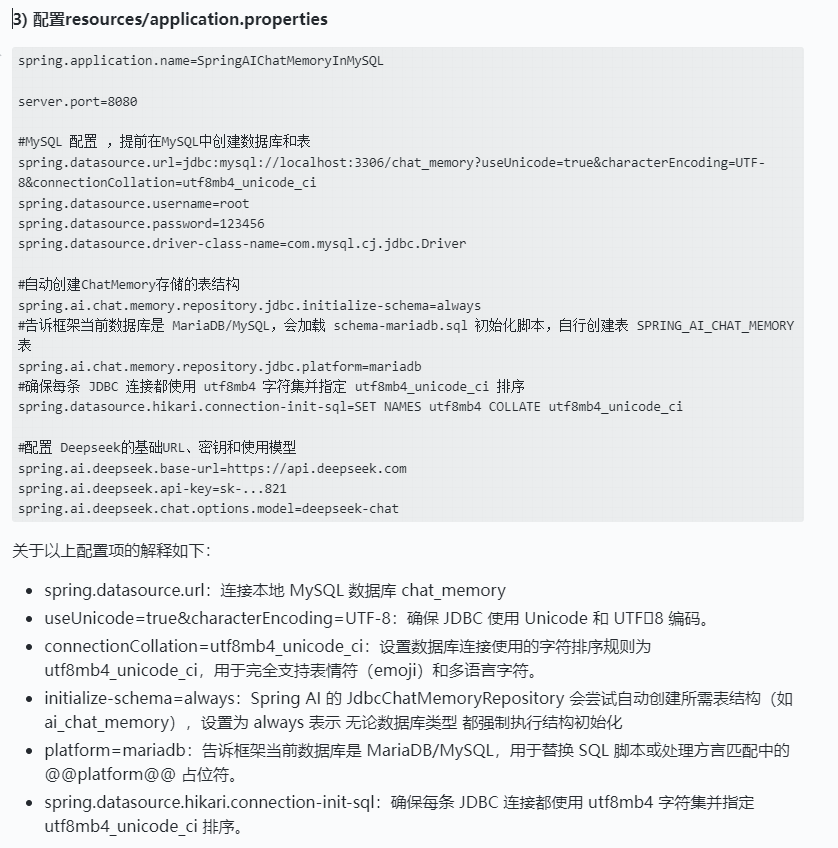
JdbcChatMemoryRepository:基于 JDBC 的关系型数据库(PostgreSQL、MySQL、SQL Server、HSQLDB)存储数据,支持通过 Spring 属性配置 schema 初始化时机与脚本位置。
CassandraChatMemoryRepository:使用 Cassandra,可配置 TTL(例如 3 年)实现自动过期。
Neo4jChatMemoryRepository:基于图数据库 Neo4j存储消息。
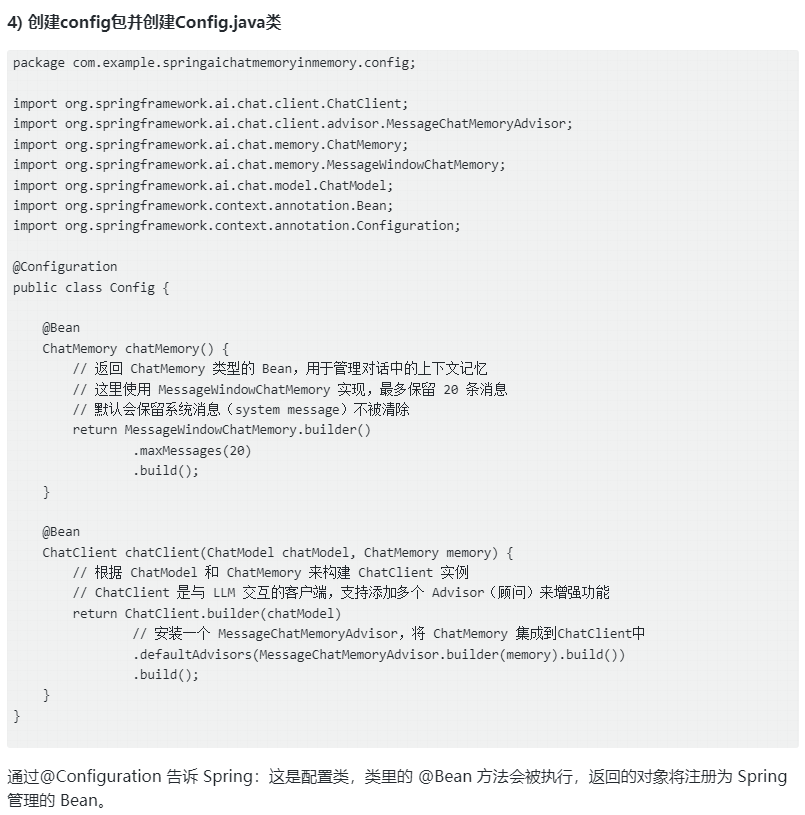
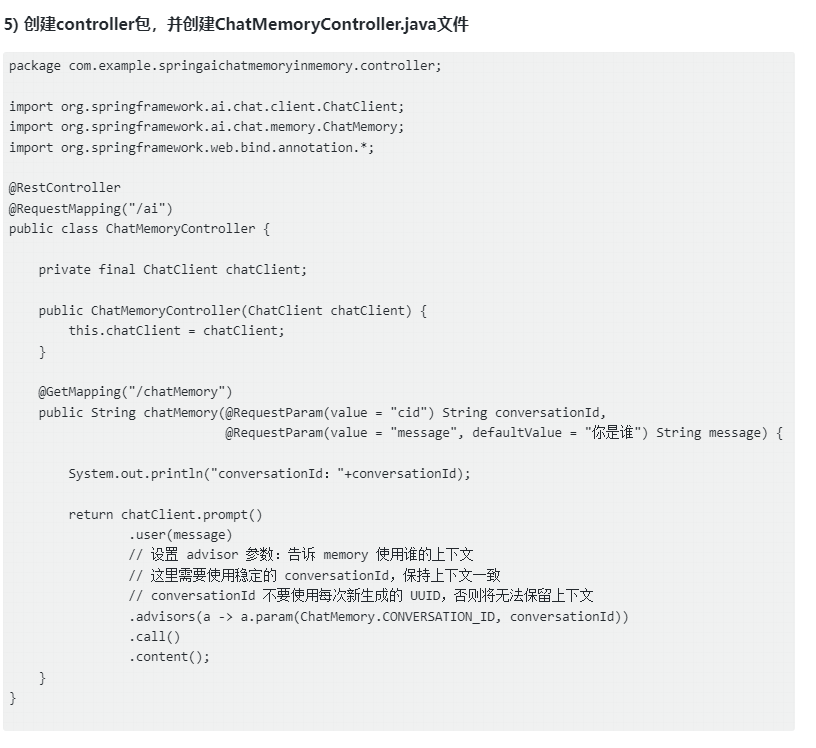
在SpringBoot项目中,使用ChatMemory的步骤如下:
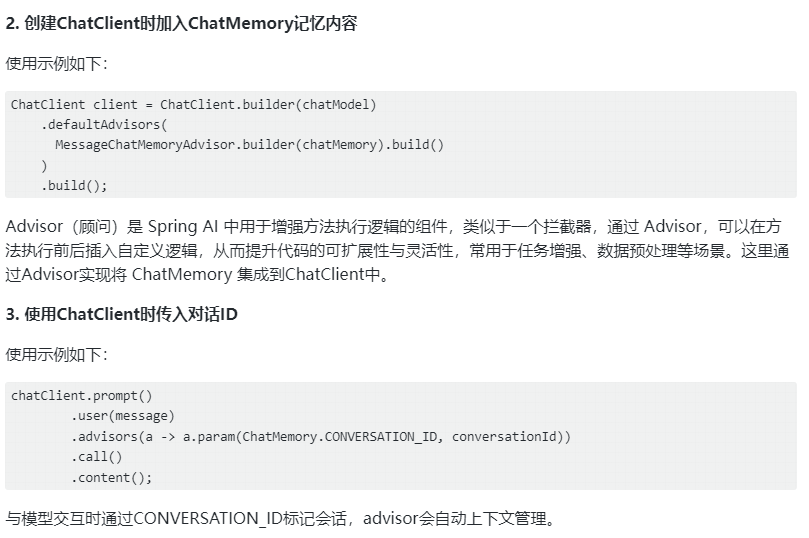
- 在项目中配置ChatMemory Bean
使用示例如下:
java
#使用默认内存方式
@Bean
ChatMemory chatMemory() {
    // 保留 20条最近消息
    return MessageWindowChatMemory.builder()
            .maxMessages(20)
            .build();
}

#使用JDBC方式
@Bean
ChatMemory chatMemory(JdbcChatMemoryRepository repo) {
    return MessageWindowChatMemory.builder()
            .chatMemoryRepository(repo)
            .maxMessages(20)
            .build();
}
ChatMemory存储在内存案例
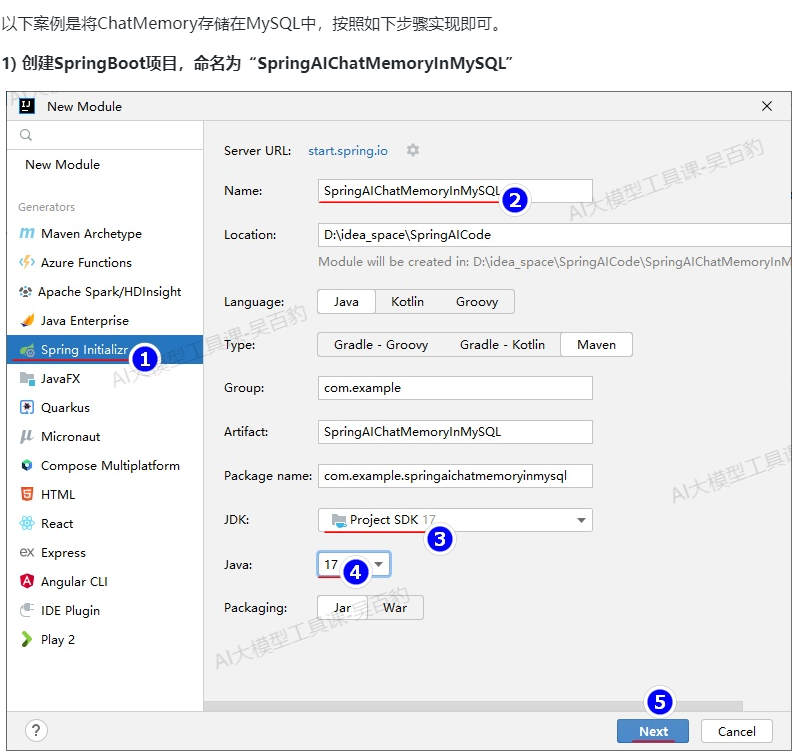
以下案例是将ChatMemory存储在内存中,按照如下步骤实现即可。
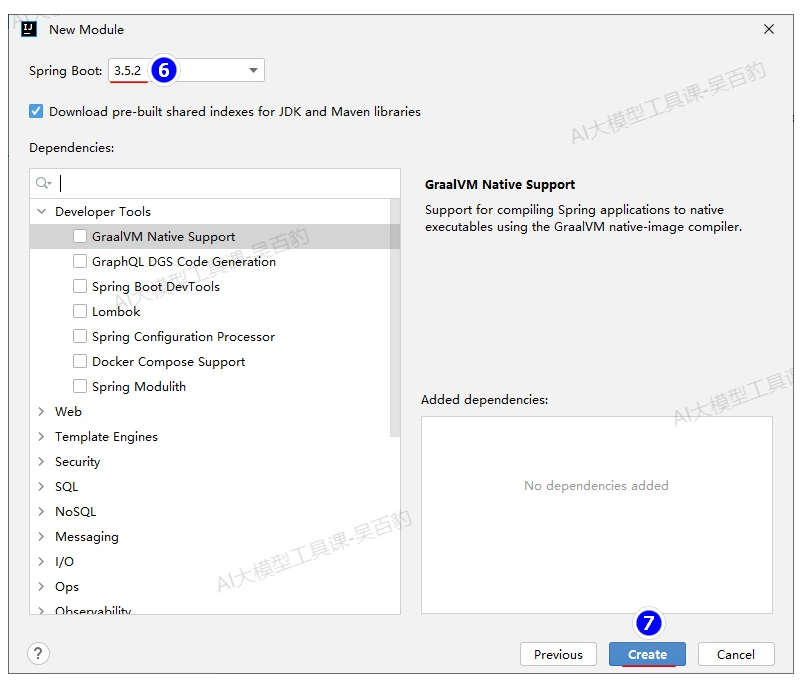
- 创建SpringBoot项目,命名为"SpringAIChatMemoryInMemory"
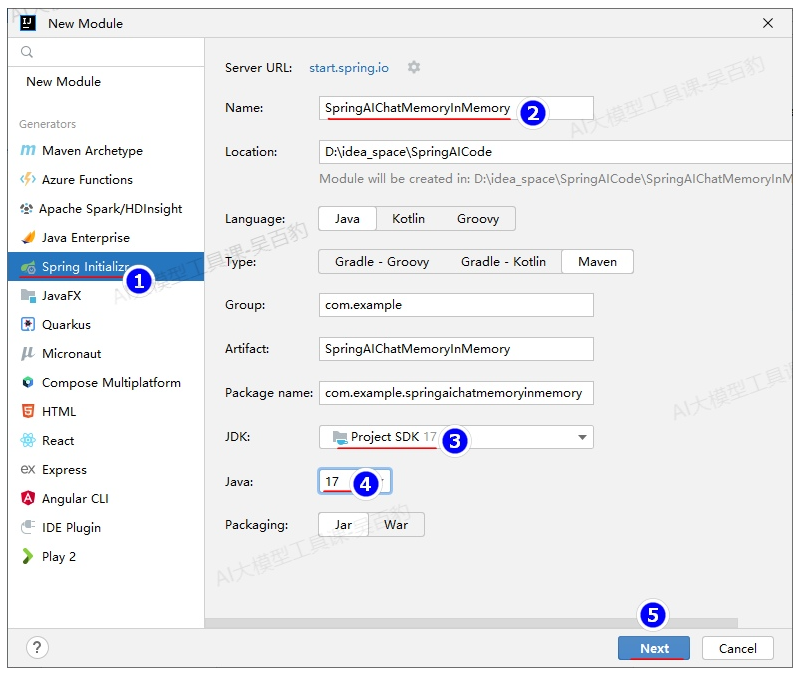
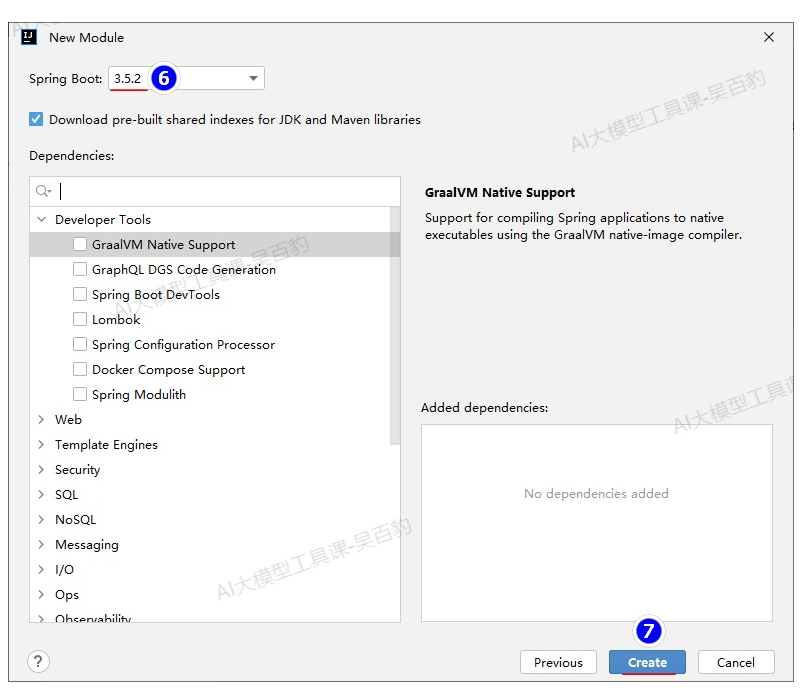
- 配置项目pom.xml
java
<?xml version="1.0" encoding="UTF-8"?>
<project xmlns="http://maven.apache.org/POM/4.0.0" xmlns:xsi="http://www.w3.org/2001/XMLSchema-instance"
         xsi:schemaLocation="http://maven.apache.org/POM/4.0.0 https://maven.apache.org/xsd/maven-4.0.0.xsd">
    <modelVersion>4.0.0</modelVersion>
    <parent>
        <groupId>org.springframework.boot</groupId>
        <artifactId>spring-boot-starter-parent</artifactId>
        <version>3.5.2</version>
        <relativePath/> <!-- lookup parent from repository -->
    </parent>
    <groupId>com.example</groupId>
    <artifactId>SpringAIChatMemoryInMemory</artifactId>
    <version>0.0.1-SNAPSHOT</version>
    <name>SpringAIChatMemoryInMemory</name>
    <description>SpringAIChatMemoryInMemory</description>


    <properties>
        <java.version>17</java.version>
    </properties>

    <!-- 导入 Spring AI BOM,用于统一管理 Spring AI 依赖的版本,
    引用每个 Spring AI 模块时不用再写 <version>,只要依赖什么模块 Mavens 自动使用 BOM 推荐的版本 -->
    <dependencyManagement>
        <dependencies>
            <dependency>
                <groupId>org.springframework.ai</groupId>
                <artifactId>spring-ai-bom</artifactId>
                <version>1.0.0-SNAPSHOT</version>
                <type>pom</type>
                <scope>import</scope>
            </dependency>
        </dependencies>
    </dependencyManagement>

    <dependencies>
        <dependency>
            <groupId>org.springframework.boot</groupId>
            <artifactId>spring-boot-starter-web</artifactId>
        </dependency>
        <dependency>
            <groupId>org.springframework.ai</groupId>
            <artifactId>spring-ai-starter-model-deepseek</artifactId>
        </dependency>
    </dependencies>


    <!-- 声明仓库, 用于获取 Spring AI 以及相关预发布版本-->
    <repositories>
        <repository>
            <id>spring-snapshots</id>
            <name>Spring Snapshots</name>
            <url>https://repo.spring.io/snapshot</url>
            <releases>
                <enabled>false</enabled>
            </releases>
        </repository>
        <repository>
            <name>Central Portal Snapshots</name>
            <id>central-portal-snapshots</id>
            <url>https://central.sonatype.com/repository/maven-snapshots/</url>
            <releases>
                <enabled>false</enabled>
            </releases>
            <snapshots>
                <enabled>true</enabled>
            </snapshots>
        </repository>
    </repositories>

</project>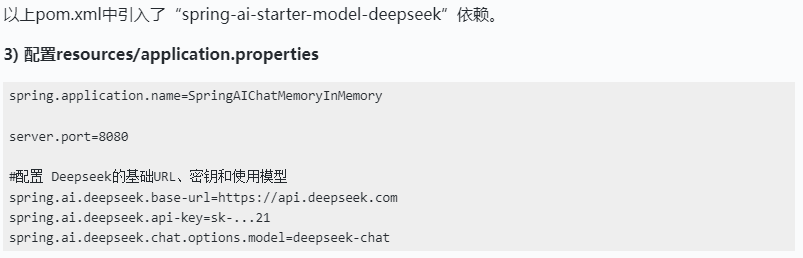
ChatMemory存储在MySQL案例
- 配置项目pom.xml
html
<?xml version="1.0" encoding="UTF-8"?>
<project xmlns="http://maven.apache.org/POM/4.0.0" xmlns:xsi="http://www.w3.org/2001/XMLSchema-instance"
         xsi:schemaLocation="http://maven.apache.org/POM/4.0.0 https://maven.apache.org/xsd/maven-4.0.0.xsd">
    <modelVersion>4.0.0</modelVersion>
    <parent>
        <groupId>org.springframework.boot</groupId>
        <artifactId>spring-boot-starter-parent</artifactId>
        <version>3.5.3</version>
        <relativePath/> <!-- lookup parent from repository -->
    </parent>
    <groupId>com.example</groupId>
    <artifactId>SpringAIChatMemoryInMySQL</artifactId>
    <version>0.0.1-SNAPSHOT</version>
    <name>SpringAIChatMemoryInMySQL</name>
    <description>SpringAIChatMemoryInMySQL</description>

    <properties>
        <java.version>17</java.version>
    </properties>

    <!-- 导入 Spring AI BOM,用于统一管理 Spring AI 依赖的版本,
    引用每个 Spring AI 模块时不用再写 <version>,只要依赖什么模块 Mavens 自动使用 BOM 推荐的版本 -->
    <dependencyManagement>
        <dependencies>
            <dependency>
                <groupId>org.springframework.ai</groupId>
                <artifactId>spring-ai-bom</artifactId>
                <version>1.0.0-SNAPSHOT</version>
                <type>pom</type>
                <scope>import</scope>
            </dependency>
        </dependencies>
    </dependencyManagement>

    <dependencies>
        <dependency>
            <groupId>org.springframework.boot</groupId>
            <artifactId>spring-boot-starter-web</artifactId>
        </dependency>

        <dependency>
            <groupId>org.springframework.ai</groupId>
            <artifactId>spring-ai-starter-model-deepseek</artifactId>
        </dependency>

        <!--将 ChatMemory 存储到关系数据库 依赖包-->
        <dependency>
            <groupId>org.springframework.ai</groupId>
            <artifactId>spring-ai-starter-model-chat-memory-repository-jdbc</artifactId>
        </dependency>

        <!-- 引入 MySQL 驱动包-->
        <dependency>
            <groupId>com.mysql</groupId>
            <artifactId>mysql-connector-j</artifactId>
            <version>8.0.33</version>
        </dependency>

    </dependencies>


    <!-- 声明仓库, 用于获取 Spring AI 以及相关预发布版本-->
    <repositories>
        <repository>
            <id>spring-snapshots</id>
            <name>Spring Snapshots</name>
            <url>https://repo.spring.io/snapshot</url>
            <releases>
                <enabled>false</enabled>
            </releases>
        </repository>
        <repository>
            <name>Central Portal Snapshots</name>
            <id>central-portal-snapshots</id>
            <url>https://central.sonatype.com/repository/maven-snapshots/</url>
            <releases>
                <enabled>false</enabled>
            </releases>
            <snapshots>
                <enabled>true</enabled>
            </snapshots>
        </repository>
    </repositories>

</project>