timescaledb下载地址: https://github.com/timescale/timescaledb
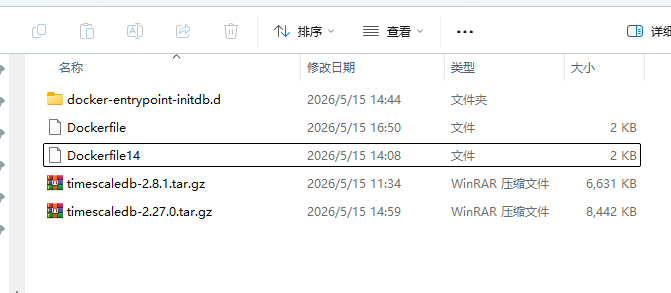
构建镜像(pg14+2.8.1)
Dockerfile
FROM postgres:14-alpine

ARG TS_VERSION=2.8.1

# 拷贝本地源码包
COPY timescaledb-${TS_VERSION}.tar.gz /tmp/

RUN set -ex \
    && apk add --no-cache --virtual .build-deps \
        gcc \
        make \
        cmake \
        util-linux-dev \
        openssl-dev \
        krb5-dev \
        libc-dev \
        coreutils \
        dpkg-dev \
        dpkg \
    && apk add --no-cache libstdc++ \
    \
    # 解压源码
    && mkdir -p /build \
    && tar -xzf /tmp/timescaledb-${TS_VERSION}.tar.gz -C /build \
    && cd /build/timescaledb-${TS_VERSION} \
    \
    # 编译
    && ./bootstrap -DCMAKE_BUILD_TYPE=RelWithDebInfo \
    && cd build \
    && make install \
    \
    # 清理
    && apk del .build-deps \
    && rm -rf /build /tmp/timescaledb-${TS_VERSION}.tar.gz \
    \
    # 配置 preload
    && sed -ri "s/#?(shared_preload_libraries)\s*=\s*'(.*)'/\1 = 'timescaledb,\2'/; s/,'/'/" \
        /usr/local/share/postgresql/postgresql.conf.sample

# 拷贝两个脚本(关键!)
COPY docker-entrypoint-initdb.d/ /docker-entrypoint-initdb.d/

ENTRYPOINT ["docker-entrypoint.sh"]
CMD ["postgres"]
构建镜像(pg18+2.27.0)
Dockerfile
FROM postgres:18-alpine

ARG TS_VERSION=2.27.0

# 拷贝本地源码包
COPY timescaledb-${TS_VERSION}.tar.gz /tmp/

RUN set -ex \
    && apk add --no-cache --virtual .build-deps \
        gcc \
        make \
        cmake \
        util-linux-dev \
        openssl-dev \
        krb5-dev \
        libc-dev \
        coreutils \
        dpkg-dev \
        dpkg \
        icu-dev \
    && apk add --no-cache libstdc++ \
        icu-libs \
    \
    # 解压源码
    && mkdir -p /build \
    && tar -xzf /tmp/timescaledb-${TS_VERSION}.tar.gz -C /build \
    && cd /build/timescaledb-${TS_VERSION} \
    \
    # 编译
    && ./bootstrap -DCMAKE_BUILD_TYPE=RelWithDebInfo \
    && cd build \
    && make install \
    \
    # 清理
    && apk del .build-deps \
    && rm -rf /build /tmp/timescaledb-${TS_VERSION}.tar.gz \
    \
    # 配置 preload
    && sed -ri "s/#?(shared_preload_libraries)\s*=\s*'(.*)'/\1 = 'timescaledb,\2'/; s/,'/'/" \
        /usr/local/share/postgresql/postgresql.conf.sample

# 拷贝两个脚本(关键!)
COPY docker-entrypoint-initdb.d/ /docker-entrypoint-initdb.d/

ENTRYPOINT ["docker-entrypoint.sh"]
CMD ["postgres"]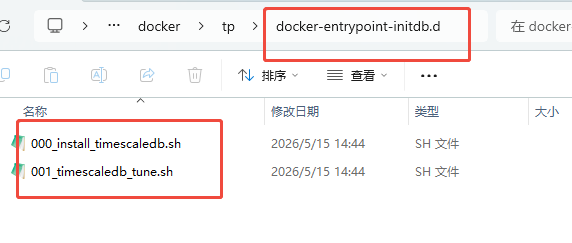
000_install_timescaledb.sh
#!/bin/bash

create_sql=`mktemp`

# Checks to support bitnami image with same scripts so they stay in sync
if [ ! -z "${BITNAMI_APP_NAME:-}" ]; then
	if [ -z "${POSTGRES_USER:-}" ]; then
		POSTGRES_USER=${POSTGRESQL_USERNAME}
	fi

	if [ -z "${POSTGRES_DB:-}" ]; then
		POSTGRES_DB=${POSTGRESQL_DATABASE}
	fi

	if [ -z "${PGDATA:-}" ]; then
		PGDATA=${POSTGRESQL_DATA_DIR}
	fi
fi

if [ -z "${POSTGRESQL_CONF_DIR:-}" ]; then
	POSTGRESQL_CONF_DIR=${PGDATA}
fi

cat <<EOF >${create_sql}
CREATE EXTENSION IF NOT EXISTS timescaledb CASCADE;
EOF

TS_TELEMETRY='basic'
if [ "${TIMESCALEDB_TELEMETRY:-}" == "off" ]; then
	TS_TELEMETRY='off'

	# We delete the job as well to ensure that we do not spam the
	# log with other messages related to the Telemetry job.
	cat <<EOF >>${create_sql}
SELECT alter_job(1,scheduled:=false);
EOF
fi

echo "timescaledb.telemetry_level=${TS_TELEMETRY}" >> ${POSTGRESQL_CONF_DIR}/postgresql.conf


# create extension timescaledb in initial databases
psql -U "${POSTGRES_USER}" postgres -f ${create_sql}
psql -U "${POSTGRES_USER}" template1 -f ${create_sql}

if [ "${POSTGRES_DB:-postgres}" != 'postgres' ]; then
    psql -U "${POSTGRES_USER}" "${POSTGRES_DB}" -f ${create_sql}
fi
001_timescaledb_tune.sh
#!/bin/bash

NO_TS_TUNE=${NO_TS_TUNE:-""}
TS_TUNE_MEMORY=${TS_TUNE_MEMORY:-""}
TS_TUNE_NUM_CPUS=${TS_TUNE_NUM_CPUS:-""}
TS_TUNE_MAX_CONNS=${TS_TUNE_MAX_CONNS:-""}
TS_TUNE_MAX_BG_WORKERS=${TS_TUNE_MAX_BG_WORKERS:-""}

if [ ! -z "${NO_TS_TUNE:-}" ]; then
    # The user has explicitly requested not to run timescaledb-tune; exit this script
    exit 0
fi


if [ -z "${POSTGRESQL_CONF_DIR:-}" ]; then
        POSTGRESQL_CONF_DIR=${PGDATA}
fi

if [ -z "${TS_TUNE_MEMORY:-}" ]; then
    # See if we can get the container's total allocated memory from the cgroups metadata
    if [ -f /sys/fs/cgroup/memory/memory.limit_in_bytes ]; then
        TS_TUNE_MEMORY=$(cat /sys/fs/cgroup/memory/memory.limit_in_bytes)

        if [ "${TS_TUNE_MEMORY}" = "18446744073709551615" ]; then
            # Bash seems to error out for numbers greater than signed 64-bit,
            # so if the value of limit_in_bytes is the 64-bit UNSIGNED max value
            # we should just bail out and hope timescaledb-tune can figure this
            # out. If we don't, the next comparison is likely going to fail
            # or it might store a negative value which will crash later.
            TS_TUNE_MEMORY=""
        fi

        FREE_KB=$(grep MemTotal: /proc/meminfo | awk '{print $2}')
        FREE_BYTES=$(( ${FREE_KB} * 1024 ))
        if [ ${TS_TUNE_MEMORY} -gt ${FREE_BYTES} ]; then
            # Something weird is going on if the cgroups memory limit exceeds the total available
            # amount of system memory reported by "free", which is the total amount of memory available on the host.
            # Most likely, it is this issue: https://github.com/moby/moby/issues/18087 (if no limit is
            # set, the max limit is set to the max 64 bit integer). In this case, we just leave
            # TS_TUNE_MEMORY blank and let timescaledb-tune derive the memory itself using syscalls.
            TS_TUNE_MEMORY=""
        else
            # Convert the bytes to MB so it plays nicely with timescaledb-tune
            TS_TUNE_MEMORY="$(echo ${TS_TUNE_MEMORY} | awk '{print int($1 / 1024 / 1024)}')MB"
        fi
    fi
fi

if [ -z "${TS_TUNE_NUM_CPUS:-}" ]; then
    # See if we can get the container's available CPUs from the cgroups metadata
    if [ -f /sys/fs/cgroup/cpuset/cpuset.cpus ]; then
        TS_TUNE_NUM_CPUS=$(cat /sys/fs/cgroup/cpuset/cpuset.cpus)
        if [[ ${TS_TUNE_NUM_CPUS} == *-* ]]; then
            # The CPU limits have been defined as a range (e.g., 0-3 for 4 CPUs). Subtract them and add 1
            # to convert the range to the number of CPUs.
            TS_TUNE_NUM_CPUS=$(echo ${TS_TUNE_NUM_CPUS} | tr "-" " " | awk '{print ($2 - $1) + 1}')
        elif [[ ${TS_TUNE_NUM_CPUS} == *,* ]]; then
            # The CPU limits have been defined as a comma separated list (e.g., 0,1,2,3 for 4 CPUs). Count each CPU
            TS_TUNE_NUM_CPUS=$(echo ${TS_TUNE_NUM_CPUS} | tr "," "\n" | wc -l)
        elif [ $(echo -n ${TS_TUNE_NUM_CPUS} | wc -c) -eq 1 ]; then
            # The CPU limit has been defined as a single numbered CPU. In this case the CPU limit is 1
            # regardless of what that number is
            TS_TUNE_NUM_CPUS=1
        fi
    fi
fi

if [ ! -z "${TS_TUNE_MEMORY:-}" ]; then
    TS_TUNE_MEMORY_FLAGS=--memory="${TS_TUNE_MEMORY}"
fi

if [ ! -z "${TS_TUNE_NUM_CPUS:-}" ]; then
    TS_TUNE_NUM_CPUS_FLAGS=--cpus=${TS_TUNE_NUM_CPUS}
fi

if [ ! -z "${TS_TUNE_MAX_CONNS:-}" ]; then
    TS_TUNE_MAX_CONNS_FLAGS=--max-conns=${TS_TUNE_MAX_CONNS}
fi

if [ ! -z "${TS_TUNE_MAX_BG_WORKERS:-}" ]; then
    TS_TUNE_MAX_BG_WORKERS_FLAGS=--max-bg-workers=${TS_TUNE_MAX_BG_WORKERS}
fi

if [ ! -z "${PG_MAJOR}" ]; then
    TS_TUNE_PG_VERSION=--pg-version=${PG_MAJOR}
fi

/usr/local/bin/timescaledb-tune --quiet --yes --conf-path="${POSTGRESQL_CONF_DIR}/postgresql.conf" ${TS_TUNE_MEMORY_FLAGS} ${TS_TUNE_NUM_CPUS_FLAGS} ${TS_TUNE_MAX_CONNS_FLAGS} ${TS_TUNE_MAX_BG_WORKERS_FLAGS} ${TS_TUNE_PG_VERSION}
执行构建镜像命令:
docker build -t my-timescaledb:14 .docker-compose.yml
version: '3.8'

networks:
  test-net:
    driver: bridge

volumes:
  timescale-data:
    driver: local
    driver_opts:
      type: none
      o: bind
      device: ${PWD}/data/timescale

services:
  # TimescaleDB 时序数据库
  timescaledb:
    image: my-timescaledb:14
    container_name: tp-timescaledb
    restart: unless-stopped
    environment:
      - TZ=${TZ}
      - POSTGRES_DB=test
      - POSTGRES_USER=postgres
      - POSTGRES_PASSWORD=${POSTGRES_PASSWORD}
    volumes:
      # pg14使用的版本
      #- timescale-data:/var/lib/postgresql/data
      # pg18使用的版本
      - timescale-data:/var/lib/postgresql
    networks:
      - thingspanel-net
    healthcheck:
      test: ["CMD-SHELL", "pg_isready -U postgres -d ThingsPanel"]
      interval: 10s
      timeout: 5s
      retries: 5
      start_period: 30s
和docker-compose.yml同目录下的.env
# 数据库密码配置
POSTGRES_PASSWORD=postgres123


# 时区配置
TZ=Asia/Shanghai