Oxfmt
Oxfmt 是 Oxc 项目推出的新一代代码格式化工具,基于 Rust 编写,专为 JavaScript / TypeScript 生态打造。它被设计为 Prettier 的直接替代品------零配置、高度兼容、极速运行 。在 100% 兼容 Prettier 格式的同时,运行速度比 Prettier 快 30 倍以上 ,比同为 Rust 工具链的 Biome 也快约 3 倍。
在项目中使用
bash
npm add -D oxfmtOxfmt 的配置文件
oxfmt 会读取项目中的 .editorconfig 文件,并自动将其中的 indent_style、indent_size 等基础规则映射到 useTabs、tabWidth 等配置。
Oxfmt 支持多种配置文件格式(按优先级从高到低):
.oxfmtrc.jsonc/.oxfmtrc.json.oxfmtrc.js/.oxfmtrc.mjs/.oxfmtrc.cjs(导出配置对象)oxfmt.config.js/oxfmt.config.mjs/oxfmt.config.cjspackage.json中的"oxfmt"字段
vue3-vite-cube/.oxfmtrc.json
json
{
  "$schema": "./node_modules/oxfmt/configuration_schema.json",
  "semi": false, // 不使用分号
  "singleQuote": true, // 使用单引号
  "printWidth": 120, // 宽度
  "tabWidth": 2, // 缩进宽度
  "trailingComma": "none", // 不使用尾随逗号
  "bracketSpacing": true, // 括号内添加空格
  "arrowParens": "avoid", // 避免箭头函数参数添加括号
  "endOfLine": "lf", // 换行符
  "ignorePatterns": ["dist/", "dist-cube/", "node_modules/"], // 忽略的文件模式
  "insertFinalNewline": true, // 在文件末尾添加换行符
  "sortImports": {
    "newlinesBetween": true, // 保持导入之间的换行符
    "ignoreCase": true, // 忽略大小写
    "internalPattern": ["^@/"], // 内部导入模式
    "order": "asc", // 排序顺序
    "sortSideEffects": false // 排序副作用导入
  }
}
"$schema" 字段的作用是为编辑器提供 JSON Schema 的引用路径,从而实现配置文件的智能提示、自动补全和实时校验。
执行命令
oxfmt, 所有文件格式化并修复oxfmt src/,src目录下文件格式化并修复oxfmt --check, 只检查不修复oxfmt --list-different,会列出需要格式化的文件,但不修改它们--migrate prettier, 读取并转换项目已有的 prettier 配置文件,以生成 oxfmt 配置
"format": "oxfmt src/ --check"

Oxlint
Oxlint 是 Oxc 项目推出的 Rust 驱动的 JavaScript / TypeScript Linter,旨在替代 ESLint 并提供极快的检查速度。它的设计理念包括:
- 零配置启动:默认规则集适用于大多数项目。
- 高性能:基于 Rust,比 ESLint 快 50-100 倍。
- 可扩展性:支持插件系统,兼容 ESLint 规则。
安装
bash
pnpm add -D oxlint

# 初始化
oxfmt --init
Oxlint 的配置文件
vue3-vite-cube/.oxlintrc.json
json
{
  "$schema": "./node_modules/oxlint/configuration_schema.json",
  // 启用的插件列表
  "plugins": ["eslint", "typescript", "unicorn", "oxc", "vue", "vitest"],
  // 定义代码的运行环境,影响全局变量的可用性
  "env": {
    "browser": true
  },
 //  按类别设置规则的严重级别
  "categories": {
    "correctness": "error"
  },
  "rules": {
    "unicorn/quote-style": "off",
    "quotes": ["error", "single"]
  }
}
执行命令
bash
# 执行检查并且修复
oxlint . --fix
与 ESLint 共存
由于 ESLint 有丰富的插件生态(如 eslint-plugin-react、eslint-plugin-vue),oxlint 尚无法完全替代。推荐的策略是:
- 使用 oxlint 做快速的基础规则检查(在 pre-commit、CI 中);
- 保留 ESLint 用于复杂场景(如框架特有规则、自定义规则)。
官方也在开发插件系统,未来将支持加载 ESLint 插件。
vue3-vite-cube/eslint.config.ts
js
import { globalIgnores } from 'eslint/config'
import { defineConfigWithVueTs, vueTsConfigs } from '@vue/eslint-config-typescript'
import pluginVue from 'eslint-plugin-vue'
import pluginVitest from '@vitest/eslint-plugin'
import pluginOxlint from 'eslint-plugin-oxlint'
import skipFormatting from 'eslint-config-prettier/flat'

// To allow more languages other than `ts` in `.vue` files, uncomment the following lines:
// import { configureVueProject } from '@vue/eslint-config-typescript'
// configureVueProject({ scriptLangs: ['ts', 'tsx'] })
// More info at https://github.com/vuejs/eslint-config-typescript/#advanced-setup

export default defineConfigWithVueTs(
  {
    name: 'app/files-to-lint',
    files: ['**/*.{vue,ts,mts,tsx}'],
  },
  globalIgnores(['**/dist/**', '**/dist-ssr/**', '**/coverage/**']),
  ...pluginVue.configs['flat/essential'],
  vueTsConfigs.recommended,
  {
    ...pluginVitest.configs.recommended,
    files: ['src/**/__tests__/*'],
  },
  ...pluginOxlint.buildFromOxlintConfigFile('.oxlintrc.json'),

  skipFormatting,
)
oxc-parser
负责将源代码解析为 AST。
parseSync / parseAsync
js
const { parseSync } = require('oxc-parser')

const code = `
let a = 1; const arr = [1,2,3 ]
`
const result = parseSync('./parser/example.js', code)

console.log(JSON.stringify(result))
结果
json
{
    "program": {
        "type": "Program",
        "start": 0,
        "end": 33,
        "body": [
            {
                "type": "VariableDeclaration",
                "start": 1,
                "end": 11,
                "kind": "let",
                "declarations": [
                    {
                        "type": "VariableDeclarator",
                        "start": 5,
                        "end": 10,
                        "id": {
                            "type": "Identifier",
                            "start": 5,
                            "end": 6,
                            "name": "a"
                        },
                        "init": {
                            "type": "Literal",
                            "start": 9,
                            "end": 10,
                            "value": 1,
                            "raw": "1"
                        }
                    }
                ]
            },
            {
                "type": "VariableDeclaration",
                "start": 12,
                "end": 32,
                "kind": "const",
                "declarations": [
                    {
                        "type": "VariableDeclarator",
                        "start": 18,
                        "end": 32,
                        "id": {
                            "type": "Identifier",
                            "start": 18,
                            "end": 21,
                            "name": "arr"
                        },
                        "init": {
                            "type": "ArrayExpression",
                            "start": 24,
                            "end": 32,
                            "elements": [
                                {
                                    "type": "Literal",
                                    "start": 25,
                                    "end": 26,
                                    "value": 1,
                                    "raw": "1"
                                },
                                {
                                    "type": "Literal",
                                    "start": 27,
                                    "end": 28,
                                    "value": 2,
                                    "raw": "2"
                                },
                                {
                                    "type": "Literal",
                                    "start": 29,
                                    "end": 30,
                                    "value": 3,
                                    "raw": "3"
                                }
                            ]
                        }
                    }
                ]
            }
        ],
        "sourceType": "module",
        "hashbang": null
    },
    "module": {
        "hasModuleSyntax": false,
        "staticImports": [],
        "staticExports": [],
        "dynamicImports": [],
        "importMetas": []
    },
    "comments": [],
    "errors": []
}
oxc-transform
oxc-transform 的职责是 完成一次完整的转译闭环,内部自然包含了三个步骤:
- 解析(Parse):调用
oxc-parser将源代码转换为 AST。 - 转换(Transform):修改 AST(降级语法、替换节点等)。
- 代码生成(Codegen):将修改后的 AST 重新生成为代码字符串,并生成 Source Map。
js
import { transform } from 'oxc-transform'

const code = `
let a = 1; const arr = [1,2,3 ]
`
const transformedResult = transform('./parser/example.js', code)
console.log(transformedResult)
结果
js
{
  code: 'let a = 1;\nconst arr = [\n\t1,\n\t2,\n\t3\n];\n',
  helpersUsed: {},
  errors: []
}
oxc-resolver
oxc-resolver 是一个用 Rust 编写的、高性能的 Node.js 模块解析库。它的核心任务是模块路径解析,即根据 import 或 require 语句中的标识符(specifier)找到其在文件系统中的真实路径。
js
// 不支持在 ESM 模块中使用
const { ResolverFactory } = require("oxc-resolver");

async function main() {
  const resolver = new ResolverFactory();
  const result = resolver.sync(__dirname, "./parser/example.js");
  console.log(result);
}
main();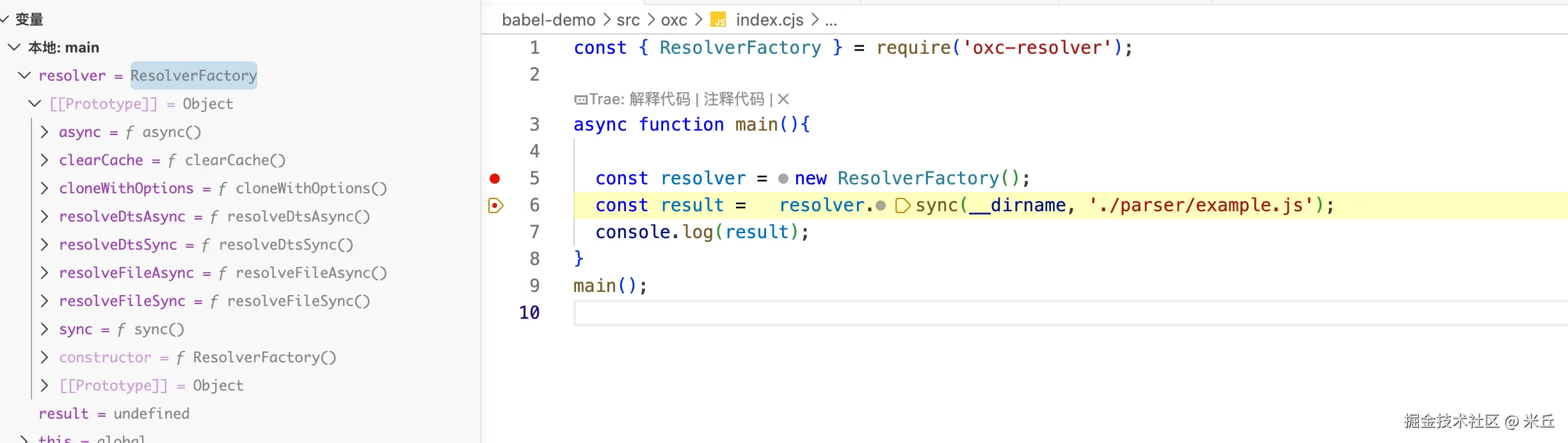
结果
js
{
  path: '/Users/xxx/Documents/code/cloudcode/blog/babel-demo/src/oxc/parser/example.js',
  packageJsonPath: '/Users/xxx/Documents/code/cloudcode/blog/babel-demo/package.json'
}
oxc-minify
oxc-minify 是一个用 Rust 编写的新一代 JavaScript/TypeScript 代码压缩工具。
js
import { minify } from 'oxc-minify'

const code = `
const roles = [1,2,3 ]
const users = [4,5,6 ]
console.log(roles)
`

const minifiedCode = minify('./parser/base.js',code ,{
})
console.log(minifiedCode)
结果
js
{
  code: 'const roles=[1,2,3],users=[4,5,6];console.log(roles);',
  errors: []
}
示例
js
import { parseSync } from "oxc-parser";
import { transform } from "oxc-transform";
import { minify } from "oxc-minify";

const code = `
const roles = [1,2,3 ]
const users = [4,5,6 ]
console.log(roles)
`;

const options = {
  compress: true,
  mangle: {
    toplevel: true, // 混淆顶层变量名
  },
  codegen: {
    removeWhitespace: true, // 移除空白
  },
  sourcemap: true,
};

const minifiedCode = minify("./parser/base.js", code, options);
console.log(minifiedCode);
结果
json
{
  code: 'const e=[1,2,3],t=[4,5,6];console.log(e);',
  map: {
    mappings: 'AACA,MAAMA,EAAQ,CAAC,EAAE,EAAE,EAAG,CAChBC,EAAQ,CAAC,EAAE,EAAE,EAAG,CACtB,QAAQ,IAAID,EAAM',
    names: [ 'roles', 'users' ],
    sources: [ './parser/base.js' ],
    sourcesContent: [
      '\nconst roles = [1,2,3 ]\nconst users = [4,5,6 ]\nconsole.log(roles)\n'
    ],
    version: 3
  },
  errors: []
}