在 C++11 及更高版本中,lambda 表达式(通常简称为 lambda)是一种便捷的方式,可以在调用或作为参数传递给函数的位置直接定义一个匿名函数对象(代码块)。lambda 通常用于封装传递给算法或异步函数的几行代码。本文将定义 lambda 的概念,并将其与其他编程技术进行比较。文章还将介绍 lambda 的优势,并提供一些基本示例。
1. lambda表达式的格式
以下是一个简单的 lambda 表达式,它作为第三个参数传递给 std::sort() 函数:
cpp
#include <algorithm>
#include <cmath>

void abssort(float* x, unsigned n) {
    std::sort(x, x + n,
        // Lambda expression begins
        [](float a, float b) {
            return (std::abs(a) < std::abs(b));
        } // end of lambda expression
    );
}
下图表明了 lambda 表达式的成分:
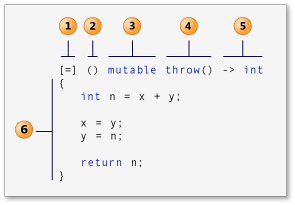
1------捕获子句(在 C++ 规范中也称为 lambda 引入符。)
2------参数列表(可选)。(也称为 lambda 声明符)
3------可变规范(可选)。
4------异常规范(可选)。
5------返回类型(可选)。
6------ lambda 代码体。
1.1 lambda 引入符
在 C++14 中,lambda 表达式可以在其表达式体中引入新的变量,也可以访问或捕获外部作用域中的变量。lambda 表达式以捕获子句开头。捕获子句指定要捕获哪些变量,以及捕获方式是按值捕获还是按引用捕获。带有 & 符号前缀的变量按引用访问,而没有 & 符号前缀的变量按值访问。
空的捕获子句 表示 lambda 表达式的表达式体不访问外部作用域中的任何变量。
你可以使用默认捕获模式来指示如何捕获 lambda 表达式体中引用的任何外部变量:\& 表示所有引用的变量都按引用捕获,而 = 表示按值捕获 。你可以使用默认捕获模式,然后为特定变量显式指定相反的模式。例如,如果 lambda 表达式的表达式体按引用访问外部变量 total,按值访问外部变量 factor,则以下捕获子句是等效的:
cpp
[&total, factor]
[factor, &total]
[&, factor]
[=, &total]
当使用 capture-default 时,只有在 lambda 表达式主体中提到的变量才会被捕获。
如果捕获子句包含默认捕获&时,则该捕获子句中任何捕获的标识符都不能采用 &identifier 的形式。同样,如果捕获子句包含捕获=睦,则该捕获子句中任何捕获的标识符都不能采用 =identifier 的形式 。标识符或 this 在捕获子句中只能出现一次。以下代码片段展示了一些示例:
cpp
struct S { void f(int i); };

void S::f(int i) {
    [&, i]{};      // 可行
    [&, &i]{};     // 错误: 当 & 为默认时,i之前出现了&
    [=, this]{};   // 错误: 当 = 为默认时出现了this
    [=, *this]{ }; // 可行: 用值捕获 this. 见下面。
    [i, i]{};      // 错误: i 重复出现
}捕获后接省略号表示扩展,如下面的可变参数模板示例所示:
cpp
template<class... Args>
void f(Args... args) {
    auto x = [args...] { return g(args...); };
    x();
}
要在类成员函数体中使用 lambda 表达式,请将 this 指针传递给捕获子句,以便访问封装类的成员函数和数据成员。
可以通过在捕获子句中指定***this** 来按值捕获 this指针。按值捕获会将整个匿名函数复制到 lambda 表达式被调用的每一个调用点。(封装 lambda 表达式的匿名函数对象。)当 lambda 表达式以并行或异步操作执行时,按值捕获非常有用。它在某些硬件架构(例如 NUMA)上尤其有用。
**在 C++14 中,你可以在捕获子句中引入并初始化新变量,而无需这些变量存在于 lambda 函数的外层作用域中。初始化表达式可以是任意形式;新变量的类型由表达式生成的类型推导而来。**此功能允许你从外层作用域捕获仅可移动变量(例如 std::unique_ptr),并在 lambda 函数中使用它们。
cpp
pNums = make_unique<vector<int>>(nums);
//...
      auto a = [ptr = move(pNums)]()
        {
           // use ptr
        };
1.2 参数列表
**Lambda 表达式既可以捕获外部变量,也可以接受输入参数。**参数列表(在标准语法中称为 lambda 声明符)是可选的,并且在大多数方面与函数的参数列表类似。
cpp
auto y = [] (int first, int second)
{
    return first + second;
};
在 C++14 中,如果参数类型是泛型的,可以使用 auto 关键字作为类型说明符。该关键字指示编译器将函数调用运算符创建为模板。参数列表中每个 auto实例都等价于一个不同的类型参数。
cpp
auto y = [] (auto first, auto second)
{
    return first + second;
};
lambda 表达式可以接受另一个 lambda 表达式作为参数。由于参数列表是可选的,因此如果你不向 lambda 表达式传递参数,并且其 lambda 声明符不包含异常说明、尾随返回类型或 mutable 属性,则可以省略空括号。
1.3 可变之规范
通常,lambda 函数的调用运算符是按值传递的,但使用 mutable 关键字会改变这一点。它不会生成可变数据成员。mutable 规范允许 lambda 表达式的主体修改按值传递的变量 。本文后面的一些示例将展示如何使用 mutable。
1.4 异常之规范
你可以使用 noexcept异常规范来指示 lambda 表达式不会抛出任何异常。与普通函数一样,如果 lambda 表达式声明了 noexcept异常规范,但 lambda 表达式主体抛出了异常,Microsoft C++ 编译器会生成警告 C4297,如下所示:
cpp
// compile with: /W4 /EHsc
int main() // C4297 expected
{
   []() noexcept { throw 5; }();
}
1.5 返回类型
lambda 表达式的返回类型会自动推断。除非你指定了返回类型,否则无需使用 auto关键字。尾随返回类型类似于普通函数或成员函数的返回类型部分。但是,返回类型必须位于参数列表之后,并且必须在返回类型之前包含尾回类型关键字 ->。
如果 lambda 表达式的主体仅包含一个 return 语句,或者表达式不返回值,则可以省略 lambda 表达式的返回类型部分。 如果 lambda 表达式的主体包含一个 return 语句,编译器会根据返回表达式的类型推断返回类型。否则,编译器会将返回类型推断为 void。以下示例代码片段说明了此原理:
cpp
auto x1 = [](int i){ return i; }; // 可行: 返回类型是 int
auto x2 = []{ return{ 1, 2 }; };  // 错误: 返回类型是 void, 从带括号的初始化列表中推断返回类型无效
lambda 表达式可以返回另一个 lambda 表达式。
1.6 lambda 代码体
lambda表达式的函数体是一个复合语句。它可以包含普通函数或成员函数体中允许的任何内容。普通函数和 lambda 表达式的函数体都可以访问以下类型的变量:
如前所述,从封装作用域捕获的变量。
参数。
局部声明的变量。
类数据成员(当在类内部声明并被捕获时)。
任何具有静态存储期的变量------例如,全局变量。
以下示例包含一个 lambda 表达式,该表达式显式地按值捕获变量 n,并隐式地按引用捕获变量 m:
cpp
// compile with: /W4 /EHsc
#include <iostream>
using namespace std;

int main()
{
   int m = 0;
   int n = 0;
   [&, n] (int a) mutable { m = ++n + a; }(4);
   cout << m << endl << n << endl;
}
输出:
cpp
5
0
由于变量 n 是按值捕获的,因此在调用 lambda 表达式后,其值仍然为 0。可变性规范允许在 lambda 表达式内部修改 n。
lambda 表达式只能捕获具有自动存储期的变量。但是,你可以在 lambda 表达式的主体中使用具有静态存储期的变量。以下示例使用 generate 函数和 lambda 表达式为 vector对象中的每个元素赋值。lambda 表达式修改静态变量以生成下一个元素的值。
cpp
void fillVector(vector<int>& v)
{
    // A local static variable.
    static int nextValue = 1;

    //在对 generate 函数的以下调用中出现的 lambda 表达式修改并使用局部静态变量 nextValue。
    generate(v.begin(), v.end(), [] { return nextValue++; });
    //WARNING: this isn't thread-safe and is shown for illustration only
}
cpp
// compile with: /W4 /EHsc
#include <algorithm>
#include <iostream>
#include <vector>
#include <string>

using namespace std;

template <typename C> void print(const string& s, const C& c) {
    cout << s;

    for (const auto& e : c) {
        cout << e << " ";
    }

    cout << endl;
}

void fillVector(vector<int>& v)
{
    // A local static variable.
    static int nextValue = 1;

    // The lambda expression that appears in the following call to
    // the generate function modifies and uses the local static
    // variable nextValue.
    generate(v.begin(), v.end(), [] { return nextValue++; });
    //WARNING: this isn't thread-safe and is shown for illustration only
}

int main()
{
    // The number of elements in the vector.
    const int elementCount = 9;

    // Create a vector object with each element set to 1.
    vector<int> v(elementCount, 1);

    // These variables hold the previous two elements of the vector.
    int x = 1;
    int y = 1;

    // Sets each element in the vector to the sum of the
    // previous two elements.
    generate_n(v.begin() + 2,
        elementCount - 2,
        [=]() mutable throw() -> int { // lambda is the 3rd parameter
        // Generate current value.
        int n = x + y;
        // Update previous two values.
        x = y;
        y = n;
        return n;
    });
    print("vector v after call to generate_n() with lambda: ", v);

    // Print the local variables x and y.
    // The values of x and y hold their initial values because
    // they are captured by value.
    cout << "x: " << x << " y: " << y << endl;

    // Fill the vector with a sequence of numbers
    fillVector(v);
    print("vector v after 1st call to fillVector(): ", v);
    // Fill the vector with the next sequence of numbers
    fillVector(v);
    print("vector v after 2nd call to fillVector(): ", v);
}
输出:
cpp
vector v after call to generate_n() with lambda: 1 1 2 3 5 8 13 21 34
x: 1 y: 1
vector v after 1st call to fillVector(): 1 2 3 4 5 6 7 8 9
vector v after 2nd call to fillVector(): 10 11 12 13 14 15 16 17 18