1.事件被组件对象处理后可能传递到其父组件对象上
2.QEvent中的关键成员函数
- void ignore():接收者忽略当前事件,事件可能传递给父组件
- void accept():接收者期望处理当前事件
- bool isAccepted():判断当前事件是否被处理
Widget.h
#ifndef WIDGET_H
#define WIDGET_H

#include <QWidget>
#include "MyLineEdit.h"

class Widget : public QWidget
{
    Q_OBJECT
    MyLineEdit myLineEdit;

public:
    explicit Widget(QWidget *parent = nullptr);
    ~Widget() override;
    bool event(QEvent *);
    void keyPressEvent(QKeyEvent* e);

};
#endif // WIDGET_H
Widget.cpp
#include "Widget.h"
#include <QDebug>
#include <QEvent>


Widget::Widget(QWidget *parent)
    : QWidget(parent), myLineEdit(this)
{

}

bool Widget::event(QEvent *e)
{
    if( e->type() == QEvent::KeyPress )
    {
        qDebug() << "Widget::event";
    }
    return QWidget::event(e);
}

void Widget::keyPressEvent(QKeyEvent* e)
{
    qDebug() << "Widget::keyPressEvent";
    QWidget::keyPressEvent(e);
}
Widget::~Widget()
{

}
MyLineEdit.h
#ifndef MYLINEEDIT_H
#define MYLINEEDIT_H

#include <QLineEdit>
#include <QWidget>

class MyLineEdit : public QLineEdit
{
public:
    MyLineEdit(QWidget* parent = 0);
    bool event(QEvent *);
    void keyPressEvent(QKeyEvent* e);


};

#endif // MYLINEEDIT_H
MyLineEdit.cpp
#include "MyLineEdit.h"
#include <QDebug>
#include <QEvent>
#include <QKeyEvent>

MyLineEdit::MyLineEdit(QWidget* parent) : QLineEdit(parent)
{

}

bool MyLineEdit::event(QEvent* e)
{
    if( e->type() == QEvent::KeyPress )
    {
        qDebug() << "MyLineEdit::event";
    }
    return QLineEdit::event(e);
}
void MyLineEdit::keyPressEvent(QKeyEvent* e)
{
    qDebug() << "MyLineEdit::keyPressEvent";
    QLineEdit::keyPressEvent(e);
    e->ignore();
}
main.cpp
#include "Widget.h"

#include <QApplication>

int main(int argc, char *argv[])
{
    QApplication a(argc, argv);
    Widget w;
    w.show();
    return QCoreApplication::exec();
}
运行结果:键盘按下后
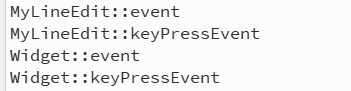
3.Qt中的事件过滤器
- 事件过滤器可以对其他组件接收到的事件进行监控
- 任意的QObject对象都可以作为事件过滤器使用
- 事件过滤器对象需要重写eventFilter()函数
组件通过installEventFilter()函数安装事件过滤器
- 事件过滤器在组件之前接收到事件
- 事件过滤器能够决定是否将事件转发到组件对象
在Widget.h中添加成员函数
bool eventFilter(QObject* obj, QEvent* e); //第一个参数表示被监控的对象,第二个参数表示需要过滤的事件Widget.cpp
Widget::Widget(QWidget *parent)
    : QWidget(parent), myLineEdit(this)
{
    myLineEdit.installEventFilter(this);
}

bool Widget::eventFilter(QObject* obj, QEvent* e)
{
    bool ret = true;
    if( (obj == &myLineEdit) && (e->type() == QEvent::KeyPress) )
    {
        qDebug() << "Widget::eventFilter";
        QKeyEvent* evt = dynamic_cast<QKeyEvent*>(e);
        switch (evt->key()) {
        case Qt::Key_0:
        case Qt::Key_1:
        case Qt::Key_2:
        case Qt::Key_3:
        case Qt::Key_4:
        case Qt::Key_5:
        case Qt::Key_6:
        case Qt::Key_7:
        case Qt::Key_8:
        case Qt::Key_9:
            ret = false;
            break;
        default:
            break;
        }
    }
    else
    {
        ret = QWidget::eventFilter(obj, e);
    }
    return ret;
}
运行结果:
当键盘按下数字时:
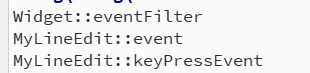
按下其他按钮时
