从吴恩达到 Vibe Coding:小白用一句 Prompt 十分钟搓出完整应用
不写一行代码,我做出了人生第一个"趣味生日贺卡"Web应用。
零基础学前端和AI,很多人问我路线是什么。我的答案很直接:先看吴恩达,然后立刻开始 Vibe Coding。
deeplearning.ai,AI 学习的第一站
如果你想系统入门 AI,我只有一个建议------去 deeplearning.ai 看吴恩达的课。他是斯坦福教授、Google Brain 创始人,也是全球 AI 教育的布道者。课程对零基础极度友好,不堆公式,从直觉出发让你理解机器学习、深度学习到底在干什么。
B站就有大量资源,我最近在追他的 《面向开发者的 LLM 入门课程》 ,短小精悍,看完就能用。
但光看课不够,真正让我上瘾的,是 Vibe Coding。
什么是 Vibe Coding?
古法编程:语法 + 算法 + 数据结构,一行一行手敲,debug 半天。
Vibe Coding:用 自然语言 Prompt 告诉 AI 你要什么,代码完全由 LLM 生成。你只需要描述需求,调整指令,然后------边喝酒边听音乐,享受 AI 编程带来的快乐。
90% 甚至 100% 不写代码,把体力和精力从细节中释放出来,转而去思考产品本身。这就是 AI Engineering 的雏形:你不是在写代码,你是在调度 AI。
实战:一个生日贺卡应用,Vibe 出来
让我们真正玩一下。
需求很朴素:我想做一个 Web 版生日贺卡生成器。用户输入名字、年龄、爱好,点击按钮就生成一段有趣的祝福语,并且能复制。界面要有节日感,像真正的贺卡。
我的做法不是新建一个 HTML 文件开始敲,而是打开 ChatGPT/Claude,输入这样一段 Prompt:
创建一个网页来帮我写生日贺卡。当我输入一个人的姓名、年龄和爱好后,它应该给我返回一条有趣的消息。使用喜庆的标题和颜色。把贺卡显示在右侧,并且让它看起来像生日贺卡的内容。在页面顶部添加一个有趣的标题。另外,不要替换旧的贺卡,而是保留它们的显示状态,把它们堆叠在新贺卡的下方。
几分钟,AI 直接生成了一个完整的 HTML+CSS+JS 文件。效果惊艳:左侧表单、右侧立体贺卡堆叠效果,配色暖洋洋的,还有飘浮动画。我把代码复制出来保存成 .html,浏览器打开,立马能用。
这就是 Vibe Coding:一句 Prompt,项目落地。
如何写 Prompt?别急着下指令,先思考
很多人拿到 AI 就开始瞎指挥:"给我写个贺卡",结果产出一坨不可用的代码。为什么?因为 思考的质量决定 Prompt 的质量,Prompt 的质量决定 LLM 产出的质量。
我总结了一个 Prompt 基本框架,适用于任何项目:
Goal(目标清晰) + Input(输入) + Output(输出) + Layout(布局) + Features(特色)
用生日贺卡举例:
- Goal:创建一个帮我写生日贺卡的网页
- Input:姓名、年龄、爱好
- Output:有趣的消息
- Layout:表单左侧,贺卡右侧,堆叠显示,顶部大标题
- Features:喜庆配色,卡片风格,保留旧卡片
把这些要素喂给 AI,它立刻知道你想要什么。你就像一个架构师,定义好产品轮廓,剩下的交给 LLM 施工。
Vibe 的进阶:反复对话,像 PM 一样推进产品
第一版生成的贺卡可能有点单调------祝福语随机性不够?配色不够活泼?移动端显示奇怪?没关系,继续 Vibe。
我接着发指令:
- "把贺卡背景加上淡淡的纹理,让纸质感更强"
- "祝福语需要更多变化,请再给我 10 组不同风格的模板"
- "适配手机屏幕,布局在 768px 以下改为上下排列"
每次只提一个明确的改进点,AI 改一次,我看一次,就像产品经理在验收。不需要懂底层实现,只要会描述"哪里不对,想变成什么样"。
这种 "给出基本指令 → 看结果 → 继续提要求" 的循环,就是 Vibe Coding 的日常。定位上,你已经是 PM + Owner,AI 是你的开发团队。
从生日贺卡到任何项目
这个套路可以迁移到任何小工具:待办清单、倒计时页面、个人简介站、数据看板......你只需要把 Goal/Input/Output/Layout/Features 套进去,就能让 AI 快速产出原型。
更重要的是,你在不断练习中会内化一种"产品思维":用户会怎么用?界面如何更直观?交互怎样更顺畅?这些才是未来 AI 无法替代的能力。
大二的我,接下来的学习路径
- 继续刷吴恩达的课,建立 AI 底层认知。
- 每天抽半小时做 Vibe Coding,用 AI 生成 1 个小项目,训练 Prompt 精准度。
- 整理自己的 Prompt 模板库,把好的指令模式沉淀下来。
- 尝试与 Agent 结合,用 Coze 或 LangChain 把多个 AI 工具串成自动化链路。
用吴恩达的话说:"AI 是新的电力。" 而我们这一代开发者,生逢其时,不必在底层重复造轮子,而是站在巨人的肩膀上,用 Prompt 召唤能量。
一行代码没写,我做出了第一个产品。你也试试。
贺卡页面以及AI所生成代码:
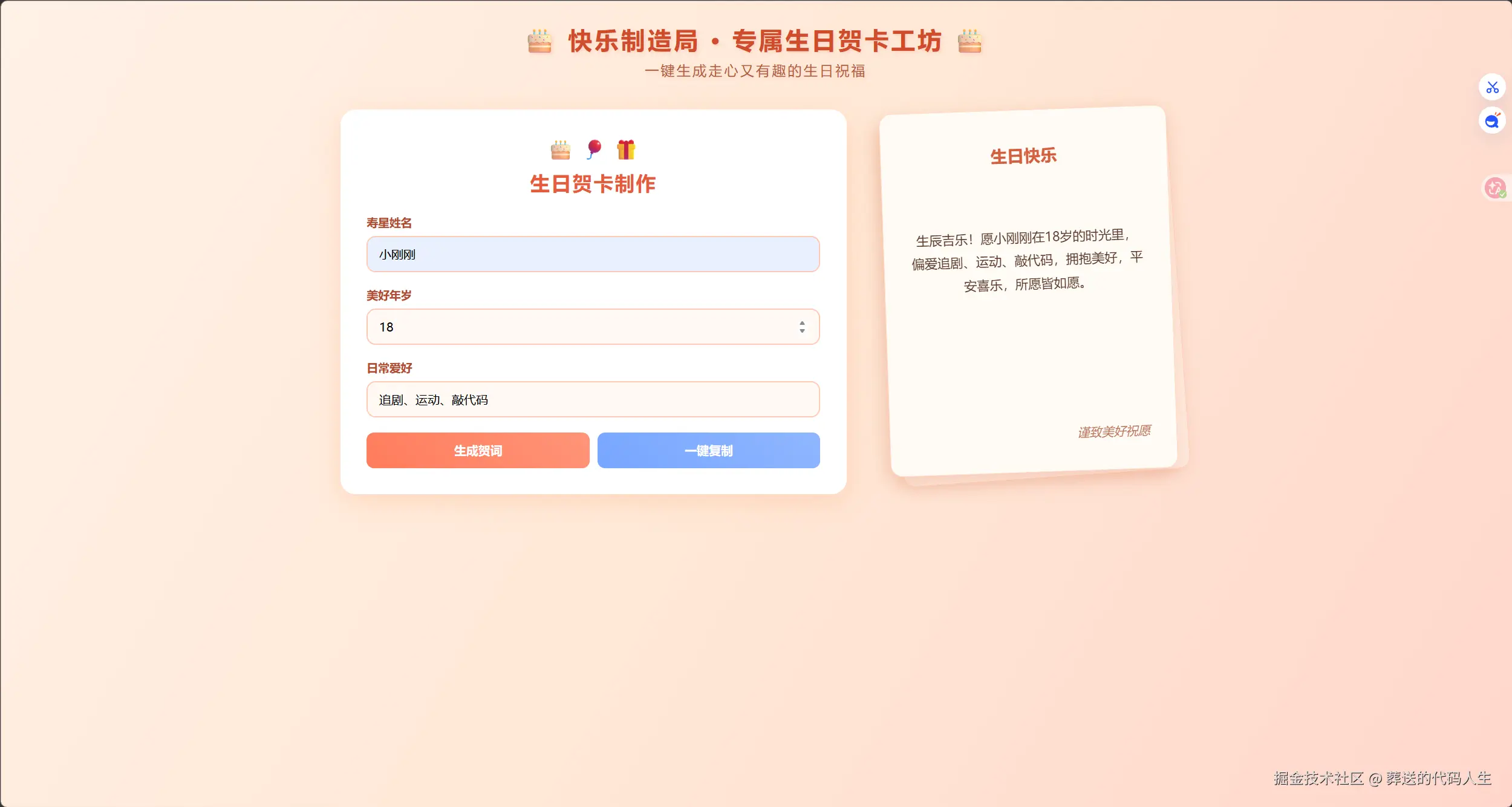
xml
<!DOCTYPE html>
<html lang="zh-CN">
<head>
    <meta charset="UTF-8">
    <meta name="viewport" content="width=device-width, initial-scale=1.0">
    <title>趣味生日贺卡生成器</title>
    <style>
        * {
            margin: 0;
            padding: 0;
            box-sizing: border-box;
            font-family: "微软雅黑", sans-serif;
        }

        body {
            background: linear-gradient(120deg, #fff1e6, #ffe8d6, #ffd6cc);
            min-height: 100vh;
            padding: 30px 20px;
        }

        /* 顶部趣味大标题 */
        .page-title {
            text-align: center;
            font-size: 32px;
            color: #d14b2a;
            font-weight: bold;
            margin-bottom: 40px;
            text-shadow: 2px 2px 4px #ffd3c0;
            letter-spacing: 3px;
        }

        .page-title span {
            font-size: 18px;
            display: block;
            margin-top: 8px;
            color: #b35c40;
            font-weight: normal;
        }

        .main-container {
            display: flex;
            gap: 50px;
            align-items: flex-start;
            max-width: 1100px;
            margin: 0 auto;
        }

        /* 左侧输入面板 */
        .input-panel {
            flex: 1;
            background: #ffffff;
            padding: 35px;
            border-radius: 20px;
            box-shadow: 0 8px 35px rgba(255, 150, 100, 0.25);
        }

        .top-decor {
            text-align: center;
            font-size: 26px;
            margin-bottom: 10px;
            color: #ff7c5c;
        }

        h1 {
            text-align: center;
            color: #e65c3c;
            font-size: 26px;
            margin-bottom: 25px;
            letter-spacing: 2px;
        }

        .input-item {
            margin-bottom: 20px;
        }

        label {
            display: block;
            margin-bottom: 8px;
            color: #b34a2f;
            font-weight: 600;
            font-size: 15px;
        }

        input {
            width: 100%;
            padding: 12px 15px;
            border: 2px solid #ffc9b5;
            border-radius: 12px;
            font-size: 16px;
            background: #fff9f5;
            outline: none;
            transition: all 0.3s ease;
        }

        input:focus {
            border-color: #ff7c5c;
            background: #fff3ee;
        }

        .btn-box {
            display: flex;
            gap: 10px;
            margin-top: 10px;
        }

        .btn {
            flex: 1;
            padding: 13px;
            border: none;
            border-radius: 10px;
            font-size: 16px;
            font-weight: bold;
            cursor: pointer;
            transition: 0.3s;
        }

        .make-btn {
            background: linear-gradient(45deg, #ff7c5c, #ff9478);
            color: #fff;
        }

        .make-btn:hover {
            background: linear-gradient(45deg, #e65c3c, #ff7c5c);
        }

        .copy-btn {
            background: linear-gradient(45deg, #78a6ff, #8fb6ff);
            color: #fff;
        }

        .copy-btn:hover {
            background: linear-gradient(45deg, #598de8, #78a6ff);
        }

        /* 右侧贺卡堆叠容器 */
        .card-stack-wrap {
            position: relative;
            width: 380px;
            height: 480px;
        }

        /* 底层旧卡片 */
        .old-card {
            position: absolute;
            width: 380px;
            height: 480px;
            background: #ffe8dc;
            border-radius: 16px;
            border: 1px solid #ffd2bc;
            box-shadow: -4px 6px 20px rgba(210,120,80,0.2);
            transform: rotate(-4deg) translateX(8px) translateY(8px);
            z-index: 1;
        }

        /* 上层新主贺卡 */
        .birthday-card {
            position: absolute;
            width: 380px;
            height: 480px;
            background: #fffbf5;
            border-radius: 16px;
            box-shadow: -6px 8px 25px rgba(220, 130, 90, 0.3);
            padding: 45px 35px;
            border: 1px solid #ffdfcc;
            transform: rotate(-2deg);
            z-index: 2;
        }

        .card-title {
            text-align: center;
            font-size: 22px;
            color: #d46040;
            margin-bottom: 35px;
            font-weight: bold;
        }

        .card-content {
            font-size: 17px;
            line-height: 1.8;
            color: #5c3c2e;
            text-align: center;
            min-height: 180px;
            display: flex;
            align-items: center;
            justify-content: center;
        }

        .card-footer {
            position: absolute;
            bottom: 40px;
            right: 35px;
            color: #b8755c;
            font-style: italic;
        }

        @keyframes float {
            0%,100%{transform: translateY(0);}
            50%{transform: translateY(-6px);}
        }
        .float-icon{
            animation: float 2.5s ease-in-out infinite;
        }

        /* 手机适配 */
        @media (max-width: 768px) {
            .main-container {
                flex-direction: column;
                align-items: center;
            }
            .card-stack-wrap{
                margin-top: 40px;
            }
        }
    </style>
</head>
<body>

    <!-- 顶部趣味大标题 -->
    <div class="page-title">
        🎂 快乐制造局 · 专属生日贺卡工坊 🎂
        <span>一键生成走心又有趣的生日祝福</span>
    </div>

    <div class="main-container">
        <!-- 左侧输入区域 -->
        <div class="input-panel">
            <div class="top-decor float-icon">🎂 🎈 🎁</div>
            <h1>生日贺卡制作</h1>

            <div class="input-item">
                <label>寿星姓名</label>
                <input type="text" id="name" placeholder="请输入对方名字">
            </div>

            <div class="input-item">
                <label>美好年岁</label>
                <input type="number" id="age" placeholder="输入年龄">
            </div>

            <div class="input-item">
                <label>日常爱好</label>
                <input type="text" id="hobby" placeholder="追剧、运动、美食、旅行">
            </div>

            <div class="btn-box">
                <button class="btn make-btn" onclick="getBirthdayText()">生成贺词</button>
                <button class="btn copy-btn" onclick="copyWords()">一键复制</button>
            </div>
        </div>

        <!-- 右侧堆叠贺卡:下层旧卡片 + 上层新卡片 -->
        <div class="card-stack-wrap">
            <div class="old-card"></div>
            <div class="birthday-card">
                <div class="card-title">生日快乐</div>
                <div class="card-content" id="showText">
                    填写信息,即刻生成专属生日寄语
                </div>
                <div class="card-footer">谨致美好祝愿</div>
            </div>
        </div>
    </div>

    <script>
        function getBirthdayText(){
            let name = document.getElementById('name').value.trim()
            let age = document.getElementById('age').value.trim()
            let hobby = document.getElementById('hobby').value.trim()
            if(!name || !age || !hobby){
                document.getElementById('showText').innerText = '请填写完整姓名、年龄与爱好~'
                return
            }
            let wordList = [
                `祝${name}${age}岁生日快乐!岁岁无忧,万事顺心,闲暇尽情享受${hobby},日子温柔又闪光。`,
                `生辰吉乐!愿${name}在${age}岁的时光里,偏爱${hobby},拥抱美好,平安喜乐,所愿皆如愿。`,
                `恭祝${name}生日快乐!${age}岁风华正好,一边热爱生活,一边沉醉${hobby},年年岁岁皆欢喜。`,
                `亲爱的${name},${age}岁生日快乐!愿美好常伴,${hobby}填满日常,自在舒心,无忧无虑。`,
                `岁岁年年,欢喜常在!祝${name}${age}岁生辰愉快,随心而行,钟情${hobby},永远向阳温暖。`
            ]
            let randomNum = Math.floor(Math.random()*wordList.length)
            document.getElementById('showText').innerText = wordList[randomNum]
        }

        function copyWords(){
            let content = document.getElementById('showText').innerText
            if(content === '填写信息,即刻生成专属生日寄语' || content === '请填写完整姓名、年龄与爱好~'){
                alert('请先生成祝福语再复制!')
                return
            }
            navigator.clipboard.writeText(content).then(()=>{
                alert('✅ 贺卡文案复制成功!')
            })
        }
    </script>
</body>
</html>
这篇文章同样诞生于我与 AI 的 Vibe Coding 合作,希望能给从零开始的你一点启发。