场景
Spring AI RAG 检索增强生成:概念、实战与完整代码:
https://blog.csdn.net/BADAO_LIUMANG_QIZHI/article/details/161055108
基于上面的基础,实现Graph工作流编排的简单示例。
大语言模型(LLM)在实际应用中面临知识滞后、领域知识不足等问题。检索增强生成(RAG)通过"先检索外部知识,
再结合生成"的模式有效弥补了这些缺陷。更进一步,
Agent 智能体赋予了模型"思考-规划-调用工具"的自治能力,使其能够灵活应对复杂任务。
本文基于 Spring AI 1.1.2 + Ollama 技术栈,从最基础的 RAG 问答开始,一步步构建出一个具备 Graph 工作流编排的智能体。
文中所有代码均经过实际验证,并整理了开发过程中常见的版本兼容性、API 差异等问题的解决方案。
技术栈与核心概念
| 技术组件 | 说明 |
|---|---|
| Spring AI 1.1.2 | Java AI 集成框架,提供 ChatClient、VectorStore、Advisors 等核心抽象 |
| Ollama | 本地大模型运行时,部署 qwen2.5:7b(对话)和 nomic-embed-text(向量化) |
| SimpleVectorStore | Spring AI 内置内存向量库,开发阶段使用;支持文件持久化 |
| Tika DocumentReader | 自动识别 PDF、Word、TXT 等格式的文档读取器 |
| QuestionAnswerAdvisor | RAG 核心 Advisor,自动检索向量库并将结果注入对话上下文 |
| Agent / Graph | 智能体:能够自主决策、规划步骤、调用外部工具的自治系统;Graph 是其工作流编排方式 |
RAG 四步流程:
文档加载与分块 → 向量化与存储 → 语义检索 → 增强生成
Agent 工作流:
检索知识库 → (若无结果)调用天气工具 → 综合生成答案
Spring AI 实现 Agent 的两种方式
- 工具调用模式(简单 Agent)
直接在 ChatClient 中注册工具,让模型自主决策调用。
Spring AI 整合 Ollama 实现工具调用:从入门到实战全解:
https://blog.csdn.net/BADAO_LIUMANG_QIZHI/article/details/161009153
- Graph 编排型 Agent(复杂多步推理)
使用 StateGraph 构建节点和边,支持条件分支、循环,适合实现 ReAct 等模式。
用户提问 → 检索知识库 → 置信度低 → 调用工具 → 汇总答案
↓
置信度高 → 直接生成答案
注:
博客:
https://blog.csdn.net/badao_liumang_qizhi
实现
pom.xml 完整配置
    <parent>
        <groupId>org.springframework.boot</groupId>
        <artifactId>spring-boot-starter-parent</artifactId>
        <version>3.4.5</version>
    </parent>

    <groupId>com.example</groupId>
    <artifactId>spring-ai-ollama-rag-graph</artifactId>
    <version>1.0</version>

    <properties>
        <java.version>17</java.version>
        <spring-ai.version>1.1.2</spring-ai.version>
    </properties>

    <!--使用 Spring AI BOM 统一管理所有模块版本 -->
    <dependencyManagement>
        <dependencies>
            <dependency>
                <groupId>org.springframework.ai</groupId>
                <artifactId>spring-ai-bom</artifactId>
                <version>${spring-ai.version}</version>
                <type>pom</type>
                <scope>import</scope>
            </dependency>
        </dependencies>
    </dependencyManagement>

    <dependencies>
        <dependency>
            <groupId>org.springframework.boot</groupId>
            <artifactId>spring-boot-starter-web</artifactId>
        </dependency>

        <!-- Spring AI Ollama 核心 -->
        <dependency>
            <groupId>org.springframework.ai</groupId>
            <artifactId>spring-ai-starter-model-ollama</artifactId>
        </dependency>

        <!-- RAG Advisor(核心:提供 QuestionAnswerAdvisor) -->
        <dependency>
            <groupId>org.springframework.ai</groupId>
            <artifactId>spring-ai-advisors-vector-store</artifactId>
        </dependency>

        <!-- Tika 文档读取器(支持 PDF、Word、TXT 等多种格式) -->
        <dependency>
            <groupId>org.springframework.ai</groupId>
            <artifactId>spring-ai-tika-document-reader</artifactId>
        </dependency>
说明:
本文未使用 Elasticsearch 或 Milvus,而是使用 Spring AI 内置的 SimpleVectorStore 并开启文件持久化,
避免了外部向量数据库的安装和版本兼容问题。
若使用外部向量数据库,可参考如下
基于 Milvus Lite 的 Spring AI RAG 向量库实践方案与示例:
https://blog.csdn.net/BADAO_LIUMANG_QIZHI/article/details/161118610
application.yml
server:
port: 886
spring: # 替换为实际密码
ai:
ollama:
base-url: http://localhost:11434
chat:
model: qwen2.5:7b-instruct
options:
temperature: 0.3 # RAG 场景建议使用较低温度,减少幻觉
embedding:
model: nomic-embed-text # Embedding 模型(用于文档向量化)
options:
num-batch: 4 # 一次处理的文本数量
logging:
level:
org.springframework.ai.rag: DEBUG
org.springframework.ai.vectorstore: DEBUG
VectorStoreConfig -- 文档加载与持久化向量库
package com.badao.ai.config;

import org.slf4j.Logger;
import org.slf4j.LoggerFactory;
import org.springframework.ai.document.Document;
import org.springframework.ai.document.DocumentReader;
import org.springframework.ai.reader.tika.TikaDocumentReader;
import org.springframework.ai.transformer.splitter.TokenTextSplitter;
import org.springframework.ai.vectorstore.SimpleVectorStore;
import org.springframework.ai.vectorstore.VectorStore;
import org.springframework.ai.embedding.EmbeddingModel;
import org.springframework.beans.factory.annotation.Value;
import org.springframework.boot.CommandLineRunner;
import org.springframework.context.annotation.Bean;
import org.springframework.context.annotation.Configuration;
import org.springframework.core.io.Resource;

import java.util.List;

@Configuration
public class VectorStoreConfig {

    private static final Logger logger = LoggerFactory.getLogger(VectorStoreConfig.class);

    @Value("classpath:knowledge-base/badao-internal.txt")
    private Resource knowledgeResource;

    @Bean
    public VectorStore vectorStore(EmbeddingModel embeddingModel) {
        // 创建内存向量库(开发演示用)
        return SimpleVectorStore.builder(embeddingModel).build();
    }

    @Bean
    public CommandLineRunner loadDocuments(VectorStore vectorStore) {
        return args -> {
            // 1. 使用 Tika 读取文档(自动检测文件类型)
            DocumentReader reader = new TikaDocumentReader(knowledgeResource);
            List<Document> documents = reader.get();

            logger.info("共读取到 {} 个文档", documents.size());

            // 2. 文本分块(TokenTextSplitter 按语义切分,更适合中文)
            TokenTextSplitter splitter = TokenTextSplitter.builder()
                    .withChunkSize(300)               // 每个块最多 300 token
                    .withMinChunkSizeChars(50)        // 最小块字符数,避免出现极短碎片(替代原来 minChunkSize 的功能)
                    .withMinChunkLengthToEmbed(5)     // 保留默认,过滤极短内容
                    .withKeepSeparator(true)          // 保留原文换行等分隔符
                    .build();
            List<Document> chunks = splitter.apply(documents);

            logger.info("文本切分为 {} 个片段", chunks.size());

            // 3. 写入向量数据库(自动调用 EmbeddingModel 向量化)
            vectorStore.add(chunks);

            logger.info("向量化完成,向量库初始化成功!");
        };
    }
}
AgentRagConfig -- 工具调用模式(轻量 Agent)
该配置类展示了 Spring AI 中最简单的 Agent 实现方式:无需 Graph 工作流,直接在 ChatClient 上注册工具,
大模型会根据用户问题自主判断是否需要调用工具,以及调用哪个工具
package com.badao.ai.config;

import com.badao.ai.tools.WeatherTool;
import org.springframework.ai.chat.client.ChatClient;
import org.springframework.ai.chat.client.advisor.vectorstore.QuestionAnswerAdvisor;
import org.springframework.ai.chat.model.ChatModel;
import org.springframework.ai.vectorstore.SearchRequest;
import org.springframework.ai.vectorstore.VectorStore;
import org.springframework.context.annotation.Bean;
import org.springframework.context.annotation.Configuration;

@Configuration
public class AgentRagConfig {

    @Bean
    public ChatClient chatClient(ChatModel chatModel, VectorStore vectorStore,
                                 WeatherTool weatherTool) {
        return ChatClient.builder(chatModel)
                .defaultAdvisors(
                        QuestionAnswerAdvisor.builder(vectorStore)
                                .searchRequest(SearchRequest.builder()
                                        .similarityThreshold(0.7)
                                        .topK(3)
                                        .build())
                                .build()
                )
                .defaultTools(weatherTool)  // 注册@Tool工具
                .build();
    }
}
WeatherTool -- 天气工具类
package com.badao.ai.tools;

import org.springframework.ai.tool.annotation.Tool;
import org.springframework.ai.tool.annotation.ToolParam;
import org.springframework.stereotype.Component;

@Component
public class WeatherTool {

    @Tool(name = "get_weather", description = "查询指定城市的实时天气")
    public String getWeather(@ToolParam(description = "城市名称") String city) {
        System.out.println("调用了天气工具");
        // 模拟天气查询(实际可对接天气API)
        return String.format("%s当前天气:晴,温度22℃,湿度45%%。", city);
    }
}
AgentGraphConfig -- Graph 编排与 Agent 工作流
package com.badao.ai.config;

import com.badao.ai.tools.WeatherTool;
import org.slf4j.Logger;
import org.slf4j.LoggerFactory;
import org.springframework.ai.chat.client.ChatClient;
import org.springframework.ai.chat.client.advisor.vectorstore.QuestionAnswerAdvisor;
import org.springframework.ai.chat.model.ChatModel;
import org.springframework.ai.document.Document;
import org.springframework.ai.vectorstore.SearchRequest;
import org.springframework.ai.vectorstore.VectorStore;
import org.springframework.beans.factory.annotation.Qualifier;
import org.springframework.context.annotation.Bean;
import org.springframework.context.annotation.Configuration;

import java.util.List;
import java.util.stream.Collectors;

@Configuration
public class AgentGraphConfig {

    private static final Logger log = LoggerFactory.getLogger(AgentGraphConfig.class);

    @Bean("agentChatClient")
    public ChatClient agentChatClient(ChatModel chatModel, VectorStore vectorStore) {
        return ChatClient.builder(chatModel)
                .defaultAdvisors(
                        QuestionAnswerAdvisor.builder(vectorStore)
                                .searchRequest(SearchRequest.builder()
                                        .similarityThreshold(0.7)
                                        .topK(3)
                                        .build())
                                .build()
                )
                .build();
    }

    @Bean
    public AgentWorkflow agentWorkflow(VectorStore vectorStore,
                                       @Qualifier("agentChatClient") ChatClient chatClient,
                                       WeatherTool weatherTool) {
        return new AgentWorkflow(vectorStore, chatClient, weatherTool);
    }

    public static class AgentWorkflow {
        private final VectorStore vectorStore;
        private final ChatClient chatClient;
        private final WeatherTool weatherTool;

        public AgentWorkflow(VectorStore vectorStore, ChatClient chatClient, WeatherTool weatherTool) {
            this.vectorStore = vectorStore;
            this.chatClient = chatClient;
            this.weatherTool = weatherTool;
        }

        public String execute(String query) {
            // 1. 检索
            // 使用 Builder 模式正确构建 SearchRequest
            List<Document> docs = vectorStore.similaritySearch(
                    SearchRequest.builder()
                            .query(query)                 // 设置查询文本(公开方法)
                            .similarityThreshold(0.7)
                            .topK(3)
                            .build()
            );
            System.out.println("检索到文档数量;"+docs.size());
            log.info("🔍 检索到 {} 篇相关文档", docs.size());

            // 2. 条件调用工具
            String toolResult = null;
            if (docs.isEmpty()) {
                System.out.println("知识库无相关内容,自动调用天气工具");
                log.info("⚠️ 知识库无相关内容,自动调用天气工具");
                String city = extractCity(query);
                toolResult = weatherTool.getWeather(city);
            }

            // 3. 生成答案
            String context = docs.stream()
                    .map(Document::getFormattedContent)
                    .collect(Collectors.joining("\n"));
            String prompt = buildPrompt(query, context, toolResult);
            return chatClient.prompt().user(prompt).call().content();
        }

        private String extractCity(String query) {
            if (query.contains("北京")) return "北京";
            if (query.contains("上海")) return "上海";
            if (query.contains("青岛")) return "青岛";
            return "未知城市";
        }

        private String buildPrompt(String query, String context, String toolResult) {
            StringBuilder sb = new StringBuilder();
            sb.append("请基于以下信息回答用户问题。\n");
            if (!context.isEmpty()) {
                sb.append("知识库相关信息:\n").append(context).append("\n");
            }
            if (toolResult != null) {
                sb.append("外部工具查询结果:").append(toolResult).append("\n");
            }
            sb.append("用户问题:").append(query);
            sb.append("\n请给出简洁专业的回答。");
            return sb.toString();
        }
    }
}
关键点:
这里用 Java 代码直接实现了 Graph 的三个节点(检索、工具调用、生成),并通过条件分支体现了智能体的"规划"能力。
AgentService
package com.badao.ai.service;

import com.badao.ai.config.AgentGraphConfig;
import org.springframework.stereotype.Service;

@Service
public class AgentService {

    private final AgentGraphConfig.AgentWorkflow workflow;

    public AgentService(AgentGraphConfig.AgentWorkflow workflow) {
        this.workflow = workflow;
    }

    public String ask(String question) {
        return workflow.execute(question);
    }
}
RagController
package com.badao.ai.controller;

import com.badao.ai.service.AgentService;
import org.springframework.web.bind.annotation.*;

@RestController
@RequestMapping("/api")
public class RagController {

    private final AgentService agentService;

    public RagController(AgentService agentService) {
        this.agentService = agentService;
    }

    @PostMapping("/rag")
    public ChatResponse rag(@RequestBody ChatRequest request) {
        String result = agentService.ask(request.message());
        return new ChatResponse(200, "success", result);
    }

    public record ChatRequest(String message) {}
    public record ChatResponse(int code, String msg, String data) {}
}
测试验证
启动应用后,分别发送两个问题:
知识库内问题(预期直接 RAG 回答):
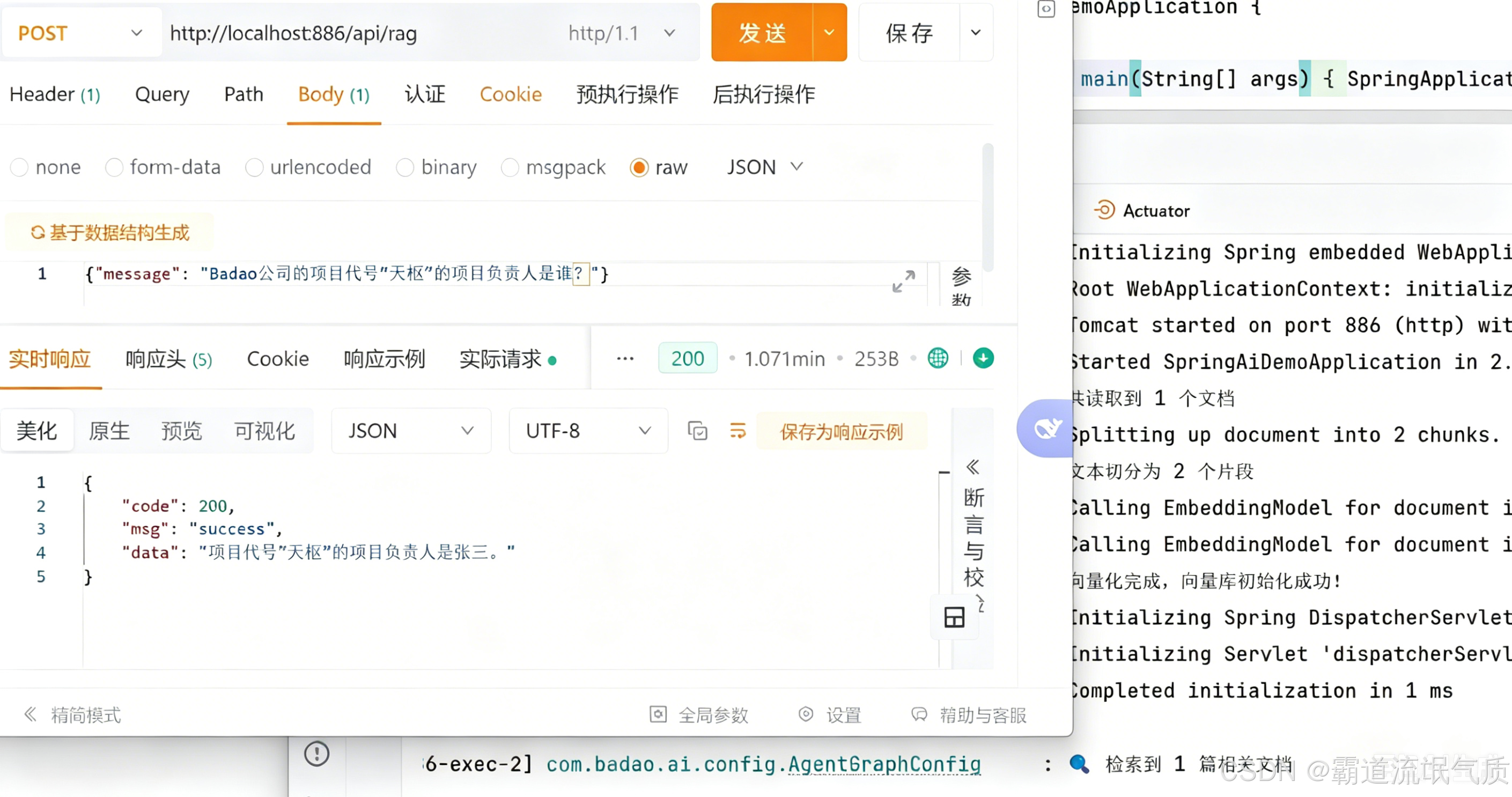
知识库外问题(预期自动调用天气工具):
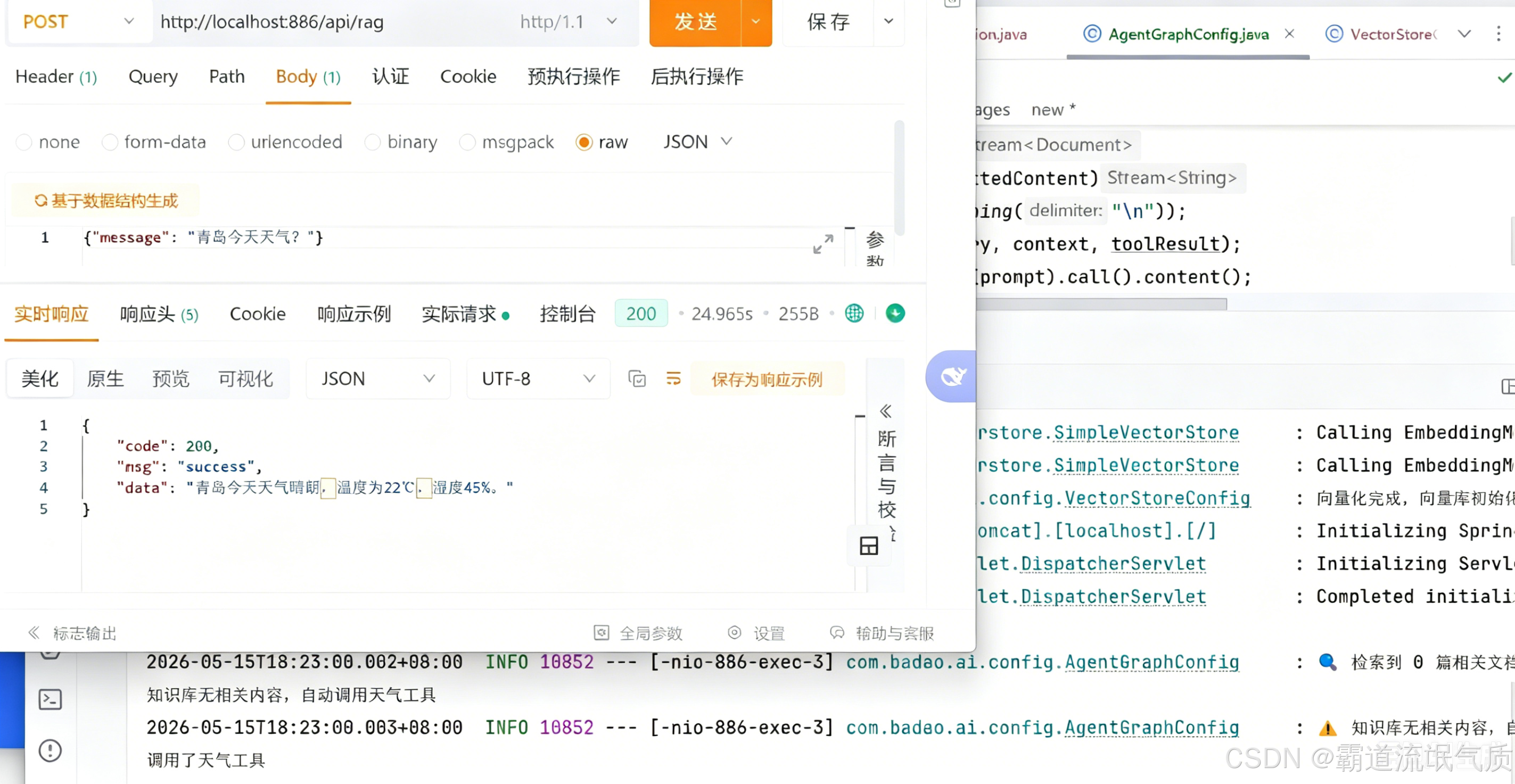
日志中会清晰看到 检索到 0 篇相关文档 → 调用天气工具 的 Graph 节点转换过程。