反射只要明白
创建对象
获取类成员
加载程序集
读写属性值
构造函数很少使用
Activator正是反射三大经典操作中提到的"创建对象" 的绝对主力。
  public class UserInfo
  {
      public UserInfo()
      {
          MessageBox.Show("UserInfo的构造函数");
      }

      public int UserId { get; set; }
      public string UserName { get; set; }
      public int UserAge { get; set; }
  }

UserInfo User1=new UserInfo();  创建实例

//假设不直接创建
Type type=typeof(UserInfo); //获取类型的Type对象
UserInfo user2=Activator.CreateInstance<UserInfo>(); //创建一个UserInfo实例;
UserInfo user3=(UserInfo)Activator.CreateInstance(type);   //使用默认构造函数创建实例;


//带参数的构造函数
Type type=typeof(studentInfo);
object obj=Activator.CreateInstance(typeof(studentInfo),23);
studentInfo student2=(studentInfo)obj;
txtBox.Text += "studentInfo的Id为" + student2.Id;

//获取类成员


//读写属性值

//  Assembly ass = Assembly.LoadFile(@"D:\vs\c++\futoubang\QTVSTOOL\test_反射\test_反射\bin\Debug\Models3.dll");
  Assembly ass = Assembly.LoadFrom("Models3.dll");

  Type MenuInfoType=ass.GetType("Models3.MenuInfo");

   object menuInfo=  Activator.CreateInstance(MenuInfoType);  //创建实例

  MenuInfoType.GetProperty("MenuName").SetValue(menuInfo, "小凡");
  MenuInfoType.GetProperty("FrmName").SetValue(menuInfo, "页面名称");
  MenuInfoType.GetProperty("Remark").SetValue(menuInfo, "标记");

  var method = MenuInfoType.GetProperty("MenuName");
  var method2 = MenuInfoType.GetProperty("MenuName").GetValue(menuInfo);
  Console.WriteLine(method.Name);
  Console.WriteLine(method2.ToString());


  var IdProperty = MenuInfoType.GetProperty("MenuId");
  var IdProperty2 = MenuInfoType.GetProperty("MenuId").GetValue(menuInfo);

//加载程序集
Type 类是房子的"全套设计图纸" ,那么 System.Activator 就是拿着这张图纸帮你盖房子的"万能施工队"。
在平常写代码时,我们创建对象都是直接使用 new 关键字(比如 Student s = new Student();)。
但用 new 有一个硬性前提:你在敲代码(编译)的那一刻,必须确切地知道你要创建的类叫什么名字。
而 Activator 的强大之处在于:哪怕你在写代码时根本不知道具体的类名是什么(比如类名是以字符串的形式从配置文件里读取的),只要在程序运行的时候给它一张 Type 图纸,它就能当场给你 new 出一个真实的实例对象来。
问题:
而 Activator 的强大之处在于:哪怕你在写代码时根本不知道具体的类名是什么(比如类名是以字符串的形式从配置文件里读取的),只要在程序运行的时候给它一张 Type 图纸,它就能当场给你 new 出一个真实的实例对象来。 我不明白,你看利用Student s=new Student() 的时候,我们必须要用到Student这个类,而你说的Activator不知道具体的类名是什么就可以,但是我们在调用的时候使用的Activator.CreeateInstace(typeof(Student));这里面的参数,我们也必须使用到Student这个类啊,怎么能说不需要知道具体的类型是什么就可以呢?
Activator 真正的杀手锏,是配合 Type.GetType("类名的字符串") 来使用的。
想象这样一个真实场景:你正在开发一个游戏,玩家可以选择不同的武器(剑、弓)。你希望程序非常灵活,武器种类全写在外部的一个 config.txt 文本文件里。
让我们看看在这个场景下,Activator 是如何做到"代码里根本不写类名,也能造出对象"的:
using System;

// 假设这些是你或者你的同事写的具体业务类
public class Sword
{
    public Sword() { Console.WriteLine("🗡️ 生成了一把剑!"); }
}

public class Bow
{
    public Bow() { Console.WriteLine("🏹 生成了一把弓!"); }
}


public class Program
{
    public static void Main()
    {
        // 1. 模拟从外部(比如文本文件、数据库或网络)读取到的类名文本
        // 注意:在这个 Main 函数的代码逻辑里,我们根本不知道将来读到的会是什么
        string classNameFromConfig = "Sword";

        // 2. 极致动态:通过纯字符串名称,去程序集里"搜"这张图纸!
        // 这里完全没有用到 typeof(),也没有直接引用具体的类
        Type t = Type.GetType(classNameFromConfig);

        if (t != null)
        {
            // 3. 万能施工队干活:根据找出来的图纸,直接在内存里生成对象
            object myWeapon = Activator.CreateInstance(t);
        }
        else
        {
            Console.WriteLine("没找到这个类的图纸!");
        }
    }
}
为什么这样设计极其强大?
仔细看上面的 Main 函数代码,里面从头到尾都没有出现过 new Sword() 或者 typeof(Sword) 这几个字。
这意味着什么? 如果明天游戏更新了,你新增了一个 MagicWand(魔法杖)类。你完全不需要修改和重新编译 上面 Main 函数里的这段核心加载逻辑!你只需要把外部配置文件里的字符串改成 "MagicWand",运行时 Type.GetType 就会自动找到新图纸,Activator 就会自动造出新武器。
这就是我们在架构设计中常说的"解耦"。
总结一下:
-
用
typeof(X)+Activator:属于"半动态",你得先认识这个类。通常用于泛型或者比较基础的反射场景。 -
用
Type.GetType("字符串")+Activator:属于"完全动态",代码里不需要出现任何具体的类名。只要能搞到类名的名字(字符串),就能把对象造出来。这也是大部分现代 C# 框架(比如 ASP.NET Core 的依赖注入、各种插件系统)底层的核心基石。
梳理:
**📦 [Type 对象] (当前代表 Student 类)
 │
 ├── 属性: Name      -> "Student"         (总图纸叫什么名字)
 ├── 属性: FullName  -> "System.Student"  (总图纸的全称) [cite: 6]
 ├── 属性: IsClass   -> true              (这是不是个房子?) [cite: 6]
 │
 └── 方法: GetProperties() ─────┐ (打开图纸,查看所有的门窗)
                                │
                                ▼
              🚪 [PropertyInfo 数组] (包含 2 个 PropertyInfo 对象)
               │
               ├─▶ [PropertyInfo 对象 1] (代表 Student.Name 属性)
               │    ├── 属性: Name         -> "Name"  (这扇门叫什么名字) [cite: 14]
               │    ├── 属性: CanRead      -> true    (这扇门能打开吗?get;) [cite: 15, 16]
               │    ├── 属性: CanWrite     -> true    (这扇门能锁上吗?set;) [cite: 16]
               │    │
               │    └── 属性: PropertyType -> 📦 [Type 对象] (代表 String 类!)
               │                                👆 注意这里:无限套娃开始!
               │                                   PropertyInfo 会告诉你这个属性的数据类型,
               │                                   而数据类型本身又是一个 Type 对象!
               │
               └─▶ [PropertyInfo 对象 2] (代表 Student.Age 属性)
                    ├── 属性: Name         -> "Age"
                    ├── 属性: CanRead      -> true [cite: 15, 16]
                    ├── 属性: CanWrite     -> true [cite: 16]
                    └── 属性: PropertyType -> 📦 [Type 对象] (代表 Int32 类)**
一、核心概念图
 程序集 (Assembly)
   └── 模块 (Module)
         └── 类型 (Type)  ← 一切的起点
               ├── 字段     (FieldInfo)
               ├── 属性     (PropertyInfo)  ← 你说的 Properties
               ├── 方法     (MethodInfo)
               ├── 构造函数 (ConstructorInfo)
               └── 事件     (EventInfo)
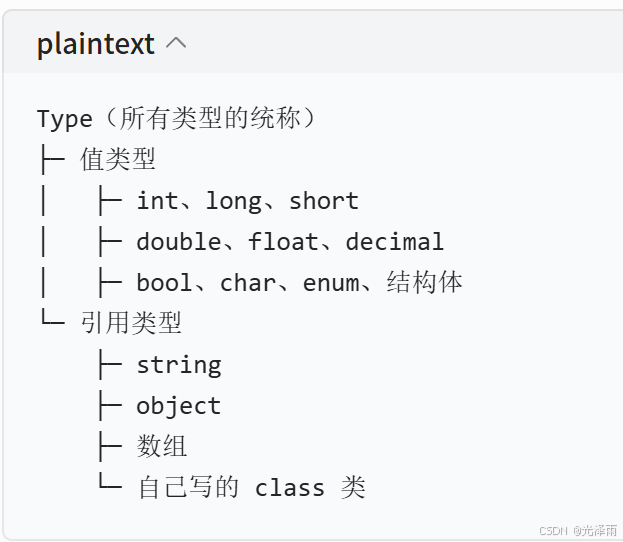
二、获取 Type ------ 万事开头
所有的c#数据类型,本质全都是Type对象
int double string bool 、自定义类全都属于Type
层级关系:
2. 通俗比喻
- Type = 物种分类表
int= 整数这个物种string= 字符串这个物种double= 小数这个物种
typeof(xxx) 就是查到这个物种的档案 ,档案统一都是 Type 格式。
3. 代码直观证明
csharp
运行
// 全部返回 Type 对象
Type t1 = typeof(int);
Type t2 = typeof(double);
Type t3 = typeof(string);
Type t4 = typeof(bool);
Type t5 = typeof(object);
4. 两大核心大类区分
1)值类型(栈内存存放)
int、double、float、bool、char、struct特点:存真实数据,复制互不影响
2)引用类型(堆内存存放)
string、object、class、数组特点:存地址,多个变量可能指向同一份数据
5. 最简单记忆口诀
- 只要是能定义变量的东西,都是 Type
typeof(类型名)统一返回Type- int/double 是值类型 Type,string/class 是引用类型 Type
6. 小判断练习
typeof(int)→ Type ✅typeof(string)→ Type ✅typeof(double)→ Type ✅typeof(自己写的Person类)→ Type ✅
csharp
// 方式1:已知类型名(编译期已知)
Type t1 = typeof(Person);
// 方式2:从对象实例获取
Person p = new Person();
Type t2 = p.GetType();
// 方式3:从字符串获取(运行时才知道类型名,跨程序集常用)
Type t3 = Type.GetType("MyApp.Models.Person");
// 三种方式拿到的是同一个 Type 对象
Console.WriteLine(t1 == t2); // trueType 对象本身有很多有用的属性:
csharp
 Type t = typeof(Person);
 Console.WriteLine(t.Name);          // "Person"
 Console.WriteLine(t.FullName);      // "MyApp.Models.Person"
 Console.WriteLine(t.Namespace);     // "MyApp.Models"
 Console.WriteLine(t.IsClass);       // true
 Console.WriteLine(t.IsAbstract);    // false
 Console.WriteLine(t.BaseType);      // System.Object
三、Activator ------ 动态创建对象
Activator 是用来不用 new 关键字,在运行时创建对象的工具类。
public class Person
{
public string Name { get; set; }
public int Age { get; set; }
public Person() { } // 无参构造
public Person(string name, int age) // 有参构造
{
Name = name;
Age = age;
}
}
// ✅ 无参构造 - 最简单
Person p1 = (Person)Activator.CreateInstance(typeof(Person));
// ✅ 有参构造 - 传参数
Person p2 = (Person)Activator.CreateInstance(typeof(Person), "张三", 25);
// ✅ 泛型版本(更安全,不需要强转)
Person p3 = Activator.CreateInstance<Person>();
// ✅ 只有类型名字符串时(插件系统常用)
Type t = Type.GetType("MyApp.Models.Person");
object p4 = Activator.CreateInstance(t);什么时候用 Activator? 当你在编译期不知道要创建什么类型时,比如:插件加载、依赖注入容器、ORM框架、工厂模式。
四、Properties / PropertyInfo ------ 操作属性
这是你最迷糊的部分,我详细讲。
4.1 获取属性列表
csharp
Type t = typeof(Person);
// 获取所有 public 属性(最常用)
PropertyInfo[] props = t.GetProperties();
// 获取单个属性(按名字)
PropertyInfo nameProp = t.GetProperty("Name");
// 获取非public属性需要指定 BindingFlags
PropertyInfo[] allProps = t.GetProperties(
BindingFlags.Public | BindingFlags.NonPublic | BindingFlags.Instance
);4.2 PropertyInfo 的核心成员
csharp
PropertyInfo prop = typeof(Person).GetProperty("Name");
prop.Name // "Name" 属性名
prop.PropertyType // typeof(string) 属性的类型 ← 这是你说的 PropertyType
prop.CanRead // true 是否有 get
prop.CanWrite // true 是否有 set
prop.DeclaringType // typeof(Person) 声明这个属性的类4.3 PropertyType 是什么?
PropertyType 就是这个属性值的类型 ,它本身也是一个 Type 对象:
csharp
public class Person
{
public string Name { get; set; } // PropertyType = typeof(string)
public int Age { get; set; } // PropertyType = typeof(int)
public Address Home { get; set; } // PropertyType = typeof(Address)
public List<string> Tags { get; set; } // PropertyType = typeof(List<string>)
}
foreach (var prop in typeof(Person).GetProperties())
{
Console.WriteLine($"{prop.Name} 的类型是: {prop.PropertyType.Name}");
}
// 输出:
// Name 的类型是: String
// Age 的类型是: Int32
// Home 的类型是: Address
// Tags 的类型是: List`14.4 读写属性值(GetValue / SetValue)
csharp
Person person = new Person { Name = "张三", Age = 25 };
PropertyInfo nameProp = typeof(Person).GetProperty("Name");
// 读取值
object value = nameProp.GetValue(person);
Console.WriteLine(value); // "张三"
// 写入值
nameProp.SetValue(person, "李四");
//person是实例化对象
Console.WriteLine(person.Name); // "李四"4.5 实战:通用"对象转字典"
csharp
// 这种代码在框架里极其常见!
public static Dictionary<string, object> ToDictionary(object obj)
{
var dict = new Dictionary<string, object>();
foreach (var prop in obj.GetType().GetProperties())
{
dict[prop.Name] = prop.GetValue(obj);
}
return dict;
}
var person = new Person { Name = "张三", Age = 25 };
var dict = ToDictionary(person);
// { "Name": "张三", "Age": 25 }五、MethodInfo ------ 动态调用方法
csharp
public class Calculator
{
public int Add(int a, int b) => a + b;
private int Secret() => 42;
}
Type t = typeof(Calculator);
object calc = Activator.CreateInstance(t);
// 获取并调用 public 方法
MethodInfo addMethod = t.GetMethod("Add");
object result = addMethod.Invoke(calc, new object[] { 3, 5 });
Console.WriteLine(result); // 8
// 获取并调用 private 方法(需要 BindingFlags)
MethodInfo secretMethod = t.GetMethod("Secret",
BindingFlags.NonPublic | BindingFlags.Instance);
object secret = secretMethod.Invoke(calc, null);
Console.WriteLine(secret); // 42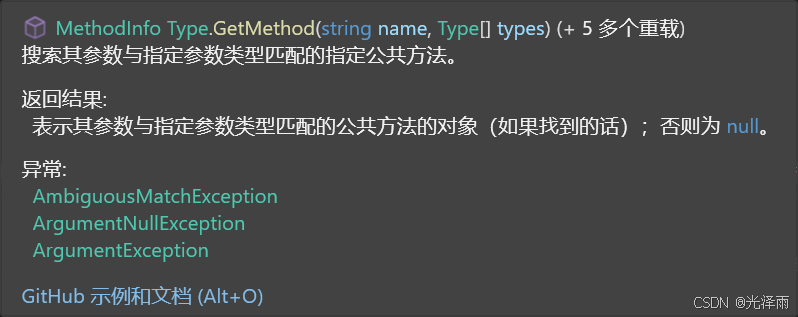
new Type\[\] {} 写入参数就为 new type\[\]{ "XXX","XXX" };
1. 语法拆解:它到底是个啥?
-
Type[]:代表这是一个专门用来存放Type对象(图纸)的数组。 -
new ... { }:这是 C# 里创建并初始化数组的语法。 -
{ }里面是空的:这意味着你创建了一个长度为 0 的空数组,里面什么元素都没有。
所以,new Type[] { } 的字面意思就是:"给我一个空的类型数组"。
2. 核心原理:为什么 GetMethod 非要你传一个空数组?
这里涉及到一个 C# 中非常重要的面向对象概念:方法重载(Overload)。
在一个类里面,是可以允许存在多个同名 的方法的,只要它们的参数不同就行。比如,你的 Student 类里可能同时存在三个叫 Show 的方法:
-
public void Show()(什么参数都不带) -
public void Show(int age)(带一个整数参数) -
public void Show(string name, int age)(带一个字符串和一个整数参数)
现在,你对反射机制说:"去给我把 Show 方法的说明书拿过来!" 程序就会很懵:"大哥,这里有三个 Show,你要我拿哪一个?"
为了防止程序找错,GetMethod 的第二个参数就是让你明确指定该方法的参数列表类型。
配合上面提到的三个 Show 方法,我们来看看如何精准获取它们:
情况 A:获取无参的 Show() 这就是你截图里的情况。你传一个空数组 ,等于是告诉程序:"给我找那个不需要任何参数 的 Show 方法。"
// 找 public void Show() MethodInfo m1 = type.GetMethod("Show", new Type\[\] { });
情况 B:获取带一个参数的 Show(int age) 你需要传一个只包含 int 图纸的数组。
// 找 public void Show(int age)
MethodInfo m2 = type.GetMethod("Show", new Type\[\] { typeof(int) });
情况 C:获取带两个参数的 Show(string name, int age) 你需要按顺序传入参数的图纸。
// 找 public void Show(string name, int age)
MethodInfo m3 = type.GetMethod("Show", new Type\[\] { typeof(string), typeof(int) });
进阶小贴士(C# 老鸟写法)
在实际开发中,每次要找无参方法时都写 new Type[] { } 显得有点啰嗦,而且每次都会在内存里产生一个新的空数组对象。
微软为了方便大家,提供了一个专门的简写属性:Type.EmptyTypes 。它等价于 new Type[] { }。
所以,你截图里的代码在现代 C# 中,通常会写成这样,更加优雅和专业:
MethodInfo mshow = type.GetMethod("Show", Type.EmptyTypes);
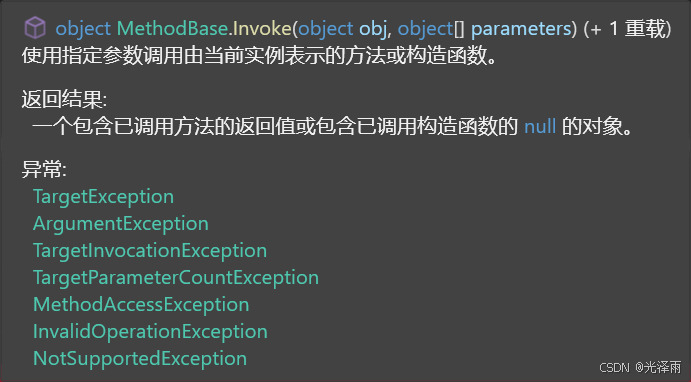
为什么偏偏是 object[](对象数组)?
在平常写代码时,如果你调用 Show(int age),你直接传一个数字 18 进去就行了。那为什么在反射(Invoke)里,非得把参数塞进一个麻烦的 object[] 数组里呢?
答案在于反射的"万能性"。 当微软底层的程序员在编写 Invoke 这个方法时,他们根本不知道你未来会用它去调用什么方法:
-
也许你的方法需要传入一个
(int)。 -
也许你的方法需要传入一个
(string, bool)。 -
也许你的方法需要传入你自己写的
(Student, Teacher)。
因为 C# 中所有的类型(无论是数字、字符串还是你自定义的类)最终都继承自最基础的基类------System.Object 。所以,设计一个 object[](对象数组)就相当于准备了一个"万能快递箱"。不管你要传什么类型的参数,统统可以打包进这个箱子里,然后统一交给 Invoke 运送过去。
组装"万能快递箱"的三条铁律
要想成功通过 parameters 传递参数而不报错(不抛出截图里的那些 Exception),你在组装这个 object[] 数组时必须严格遵守三条规矩:
铁律 1:数量必须绝对对齐
方法要求几个参数,你的数组里就必须装几个元素。
无参数方法: 如果方法是 Show(),不需要任何材料,你可以直接传 null ,或者传一个空数组 new object[0]。
- 多参数方法: 哪怕参数再多,也要全部放进同一个数组里。
铁律 2:顺序必须绝对一致
数组中元素的排列顺序,必须与原方法定义的参数顺序一模一样。
-
如果原方法是:
public void Show(string name, int age) -
你的数组必须是:
new object[] { "张三", 20 }(先放字符串,再放整数)。 -
如果你写成
new object[] { 20, "张三" },程序在运行时就会崩溃报错。
铁律 3:类型必须兼容(底层装箱)
虽然你建的是一个 object[],但你往里面塞的具体东西,必须是方法能接受的类型。
- 当你写
new object[] { 18 }时,C# 底层其实做了一个动作叫做"装箱(Boxing)",也就是把整数18悄悄包装成了一个object对象塞进数组里。当Invoke执行时,它又会把这个包装拆开,拿出18喂给你的目标方法。
💻 直观对比总结
// 场景 1:目标方法不需要参数 -> public void SayHello()
MethodInfo m1 = type.GetMethod("SayHello", Type.EmptyTypes);
// 直接传 null 作为 parameters
m1.Invoke(myStudent, null);


// 场景 2:目标方法需要 1 个参数 -> public void SetAge(int age)
MethodInfo m2 = type.GetMethod("SetAge", new Type[] { typeof(int) });
// 建一个长度为 1 的 object 数组
m2.Invoke(myStudent, new object[] { 25 });


// 场景 3:目标方法需要 3 个不同类型的参数 -> public void UpdateInfo(string name, int age, bool isMale)
MethodInfo m3 = type.GetMethod("UpdateInfo", new Type[] { typeof(string), typeof(int), typeof(bool) });
// 建一个长度为 3 的 object 数组,严格按照 (string, int, bool) 的顺序塞入数据
m3.Invoke(myStudent, new object[] { "李四", 22, true });
静态成员方法调用
MethodInfo staticShow=type.GetMethod("ShowInfo",new Type\[\]{});
staticShow.Invoke(null,null)
静态方法没有实例,第一个参数传递null即可。//静态方法调用,第一个参数null;
六、FieldInfo ------ 操作字段
csharp
public class Config
{
private string _connectionString = "默认值";
}
Type t = typeof(Config);
object config = Activator.CreateInstance(t);
FieldInfo field = t.GetField("_connectionString",
BindingFlags.NonPublic | BindingFlags.Instance);
// 读取私有字段
Console.WriteLine(field.GetValue(config)); // "默认值"
// 修改私有字段(反射可以突破访问限制!)
field.SetValue(config, "新的连接字符串");七、ConstructorInfo ------ 精确控制构造函数
csharp
Type t = typeof(Person);
// 获取有参构造 (string, int)
ConstructorInfo ctor = t.GetConstructor(new Type[] { typeof(string), typeof(int) });
// 调用构造函数
Person p = (Person)ctor.Invoke(new object[] { "张三", 25 });八、Attribute(特性)的反射读取
这是反射最常见的实际用途之一:
csharp
// 自定义特性
[AttributeUsage(AttributeTargets.Property)]
public class DisplayNameAttribute : Attribute
{
public string Name { get; }
public DisplayNameAttribute(string name) => Name = name;
}
public class Person
{
[DisplayName("姓名")]
public string Name { get; set; }
[DisplayName("年龄")]
public int Age { get; set; }
}
// 运行时读取特性
foreach (var prop in typeof(Person).GetProperties())
{
var attr = prop.GetCustomAttribute<DisplayNameAttribute>();
if (attr != null)
{
Console.WriteLine($"属性 {prop.Name} 的显示名是: {attr.Name}");
}
}
// 属性 Name 的显示名是: 姓名
// 属性 Age 的显示名是: 年龄九、BindingFlags 速查
很多 Get* 方法都需要 BindingFlags 来控制搜索范围:
| Flag | 含义 |
|---|---|
Public |
公开成员 |
NonPublic |
私有/保护成员 |
Instance |
实例成员 |
Static |
静态成员 |
DeclaredOnly |
只查本类,不查父类 |
csharp
 // 获取所有实例成员(包括私有)
 BindingFlags flags = BindingFlags.Public | BindingFlags.NonPublic | BindingFlags.Instanc
十、完整综合示例
csharp
using System;
using System.Reflection;
public class Person
{
public string Name { get; set; }
public int Age { get; set; }
private string _secret = "私密信息";
public Person() { }
public Person(string name, int age) { Name = name; Age = age; }
public string Greet() => $"你好,我是{Name}";
}
class Program
{
static void Main()
{
// 1. 获取 Type
Type type = typeof(Person);
// 2. 动态创建对象
Person p = (Person)Activator.CreateInstance(type, "张三", 30);
// 3. 遍历属性
foreach (PropertyInfo prop in type.GetProperties())
{
Console.WriteLine($"[属性] {prop.Name} " +
$"类型:{prop.PropertyType.Name} " +
$"值:{prop.GetValue(p)}");
}
// 4. 动态调用方法
MethodInfo greet = type.GetMethod("Greet");
Console.WriteLine(greet.Invoke(p, null));
// 5. 读取私有字段
FieldInfo secret = type.GetField("_secret",
BindingFlags.NonPublic | BindingFlags.Instance);
Console.WriteLine(secret.GetValue(p));
}
}
// 输出:
// [属性] Name 类型:String 值:张三
// [属性] Age 类型:Int32 值:30
// 你好,我是张三
// 私密信息总结:关系梳理
typeof(X) 或 obj.GetType()
↓
Type ──────────────────────────── 反射入口
├── GetProperties() → PropertyInfo[]
│ ├── .Name 属性名
│ ├── .PropertyType 值的类型(也是Type)
│ ├── .GetValue(obj) 读值
│ └── .SetValue(obj) 写值
├── GetMethods() → MethodInfo[]
│ └── .Invoke(obj, args[])
├── GetFields() → FieldInfo[]
└── GetConstructors() → ConstructorInfo[]
Activator.CreateInstance(type)
↑
动态 new 对象,不需要在编译期知道类型你迷糊的核心点:
-
Type = 类型的"身份证",描述这个类长什么样
-
PropertyInfo = 某一个属性的"描述卡"
-
PropertyType = 这个属性存的值是什么类型(是
Type对象) -
Activator = 动态
new对象的工具