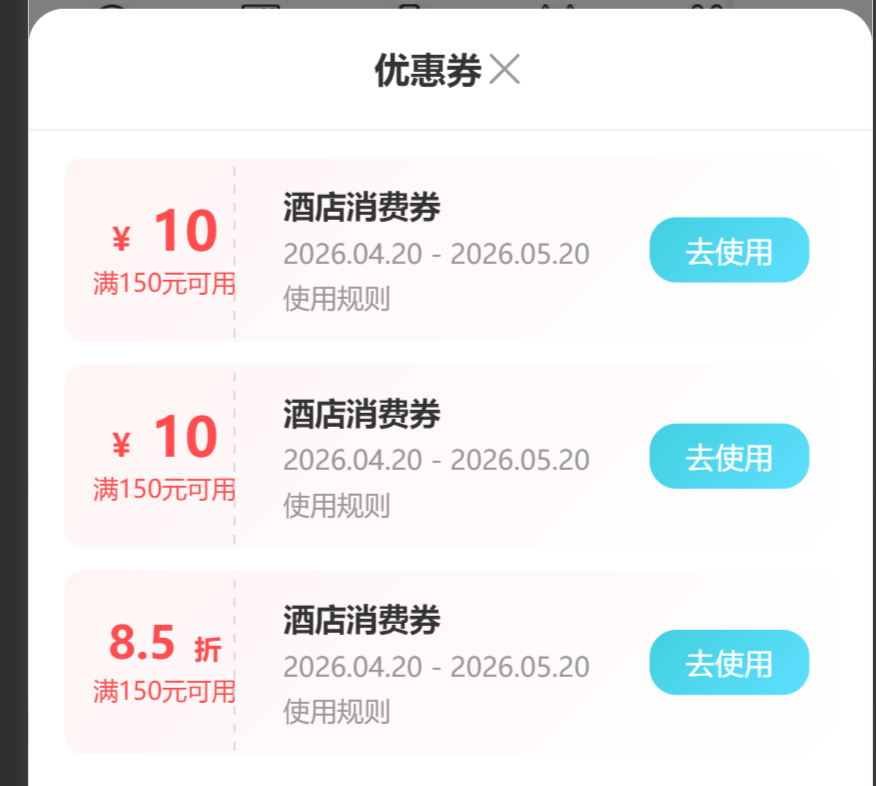
使用
    <!-- 优惠券弹窗 -->
    <CouponPopup
      :show="couponPopupShow"
      :couponList="couponList"
      @update:show="couponPopupShow = $event"
      @use="handleUseCoupon"
    />
  </view>
</template>

<script setup>

import CouponPopup from '@/pagesSubpg/hotel/components/CouponPopup/index.vue'
// 优惠券弹窗显示状态
const couponPopupShow = ref(false)

// 优惠券列表数据
const couponList = ref([
  {
    type: 'money',
    value: '10',
    condition: '150',
    name: '酒店消费券',
    startTime: '2026.04.20',
    endTime: '2026.05.20'
  },
  {
    type: 'money',
    value: '10',
    condition: '150',
    name: '酒店消费券',
    startTime: '2026.04.20',
    endTime: '2026.05.20'
  },
  {
    type: 'discount',
    value: '8.5',
    condition: '150',
    name: '酒店消费券',
    startTime: '2026.04.20',
    endTime: '2026.05.20'
  }
])

// 显示优惠券弹窗
const showCouponPopup = () => {
  couponPopupShow.value = true
}

// 使用优惠券
const handleUseCoupon = (coupon) => {
  console.log('使用优惠券:', coupon)
  uni.showToast({
    title: '已选择优惠券',
    icon: 'success'
  })
}
组件代码
<template>
  <u-popup :show="show" mode="bottom" round="16" @close="handleClose">
    <view class="coupon-popup">
      <!-- 弹窗标题 -->
      <view class="popup-header">
        <text class="popup-title">优惠券</text>
        <view class="uicon">
          <u-icon  name="close" size="20" color="#999" @click="handleClose"></u-icon>
        </view>
      </view>

      <!-- 优惠券列表 -->
      <scroll-view scroll-y class="coupon-list">
        <view class="coupon-item" v-for="(coupon, index) in couponList" :key="index">
          <!-- 左侧金额/折扣区域 -->
          <view class="coupon-left">
            <text class="coupon-value" :class="{ 'is-discount': coupon.type === 'discount' }">
              <text class="symbol" v-if="coupon.type === 'money'">¥</text>
              {{ coupon.value }}
              <text class="unit" v-if="coupon.type === 'discount'">折</text>
            </text>
            <text class="coupon-condition">满{{ coupon.condition }}元可用</text>
          </view>

          <!-- 中间信息区域 -->
          <view class="coupon-center">
            <text class="coupon-name">{{ coupon.name }}</text>
            <text class="coupon-time">{{ coupon.startTime }} - {{ coupon.endTime }}</text>
            <text class="coupon-rule" @click="showRule(coupon)">使用规则</text>
          </view>

          <!-- 右侧操作按钮 -->
          <view class="coupon-right">
            <view class="use-btn" @click="handleUse(coupon)">去使用</view>
          </view>
        </view>
      </scroll-view>
    </view>
  </u-popup>
</template>

<script setup>
import { defineProps, defineEmits } from 'vue'

const props = defineProps({
  show: {
    type: Boolean,
    default: false
  },
  couponList: {
    type: Array,
    default: () => []
  }
})

const emit = defineEmits(['update:show', 'use'])

// 关闭弹窗
const handleClose = () => {
  emit('update:show', false)
}

// 使用优惠券
const handleUse = (coupon) => {
  emit('use', coupon)
  handleClose()
}

// 查看规则
const showRule = (coupon) => {
  uni.showToast({
    title: '查看使用规则',
    icon: 'none'
  })
}
</script>

<style lang="scss" scoped>
.coupon-popup {
  background-color: #fff;
  border-radius: 32rpx 32rpx 0 0;
  max-height: 70vh;
  display: flex;
  flex-direction: column;

  .popup-header {
    display: flex;
    align-items: center;
    justify-content:center;
    padding: 32rpx;
    position: relative;
    border-bottom: 1rpx solid #f0f0f0;

    .popup-title {
      font-size: 32rpx;
      font-weight: bold;
      color: #333;
    }

    .uicon {
      position: absolute;
      right: 30rpx;
      top: 32rpx;
    }
  }

  .coupon-list {
    flex: 1;
    padding: 24rpx 32rpx;
  }

  .coupon-item {
    display: flex;
    background: linear-gradient(135deg, #FFF5F5 0%, #FFFFFF 100%);
    border-radius: 16rpx;
    padding: 24rpx;
    margin-bottom: 20rpx;
    position: relative;
    overflow: hidden;

    // 虚线分隔效果
    &::before {
      content: '';
      position: absolute;
      left: 170rpx;
      top: 0;
      bottom: 0;
      width: 2rpx;
      background: repeating-linear-gradient(
        to bottom,
        transparent 0,
        transparent 8rpx,
        #ddd 8rpx,
        #ddd 16rpx
      );
    }

    .coupon-left {
      width: 150rpx;
      display: flex;
      flex-direction: column;
      align-items: center;
      justify-content: center;
      padding-right: 20rpx;

      .coupon-value {
        font-size: 48rpx;
        font-weight: bold;
        color: #FF4D4F;
        line-height: 1;

        &.is-discount {
          font-size: 40rpx;
        }

        .symbol {
          font-size: 28rpx;
          margin-right: 4rpx;
        }

        .unit {
          font-size: 24rpx;
          margin-left: 4rpx;
        }
      }

      .coupon-condition {
        font-size: 22rpx;
        color: #FF4D4F;
        margin-top: 8rpx;
      }
    }

    .coupon-center {
      flex: 1;
      display: flex;
      flex-direction: column;
      justify-content: space-between;
      padding: 0 20rpx;

      .coupon-name {
        font-size: 28rpx;
        font-weight: bold;
        color: #333;
        margin-bottom: 8rpx;
      }

      .coupon-time {
        font-size: 24rpx;
        color: #999;
        margin-bottom: 8rpx;
      }

      .coupon-rule {
        font-size: 24rpx;
        color: #999;
        // color: #42D0E0;
      }
    }

    .coupon-right {
      display: flex;
      align-items: center;

      .use-btn {
        background: linear-gradient(135deg, #42D0E0 0%, #5EDFFF 100%);
        color: #fff;
        font-size: 26rpx;
        padding: 12rpx 32rpx;
        border-radius: 24rpx;
        text-align: center;
      }
    }
  }
}
</style>