1.Qt可以自定义新的事件类
- 自定义的事件类必须继承自QEvent
- 自定义的事件类必须拥有全局唯一的Type值
- 程序中必须提供处理自定义事件对象的方法
2.Qt中事件的Type值
- 每个事件类都拥有全局唯一的Type值
- 自定义事件类的Type值也需要自定义
- 自定义事件类使用QEvent::User之后的值作为Type值
- 程序中保证QEvent::User+VALUE全局唯一即可
3.处理自定义事件对象的方法
- 将事件过滤器安装到目标对象:在eventFilter()函数中编写自定义事件的处理逻辑
- 在目标对象的类中重写事件处理函数:在event()函数中编写自定义事件的处理逻辑
StringEvent.h
#ifndef STRINGEVENT_H
#define STRINGEVENT_H

#include <QEvent>
#include <QObject>
#include <QString>

class StringEvent : public QEvent
{
    QString m_data;

public:
    const static Type TYPE = static_cast<Type>(QEvent::User + 0xFF);

    explicit StringEvent(QString data);
    QString data();
};

#endif // STRINGEVENT_H
StringEvent.cpp
#include "StringEvent.h"
StringEvent::StringEvent(QString data) : QEvent(TYPE)
{
    m_data = data;
}
QString StringEvent::data()
{
    return m_data;
}
Widget.h
#ifndef WIDGET_H
#define WIDGET_H

#include <QWidget>
#include <QLineEdit>

class Widget : public QWidget
{
    Q_OBJECT
    QLineEdit m_edit;

public:
    explicit Widget(QWidget *parent = nullptr);
    bool event(QEvent* evt);
    bool eventFilter(QObject* obj, QEvent* evt);
    ~Widget() override;
};
#endif // WIDGET_H
Widget.cpp
#include "Widget.h"
#include "StringEvent.h"
#include <QDebug>
#include <QApplication>

Widget::Widget(QWidget *parent) : QWidget(parent), m_edit(this)
{
    m_edit.installEventFilter(this);
}
bool Widget::event(QEvent* evt)
{
    if( evt->type() == QEvent::MouseButtonDblClick )
    {
        qDebug() << "event: Before sendEvent";

        StringEvent e("Hello World");
        QApplication::sendEvent(&m_edit, &e);
        qDebug() << "event: After sendEvent";
    }
    return QWidget::event(evt);
}
bool Widget::eventFilter(QObject* obj, QEvent* evt)
{
    if( (obj == &m_edit) && (evt->type() == StringEvent::TYPE) )
    {
        StringEvent* se = dynamic_cast<StringEvent*>(evt);
        qDebug() << "Receive: " << se->data();
        m_edit.insert(se->data());
        return true;
    }
    return QWidget::eventFilter(obj, evt);
}
Widget::~Widget() = default;
当双击widget时,运行结果:
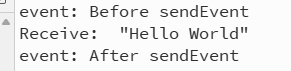
并且可以将Hello World填充到lineEdit中