文章目录
- 背景
- 解决思路
- 现象
- [基于 AI 搜索解决方法](#基于 AI 搜索解决方法)
-
- [借助 Dependencies 工具可以快速查看的缺少的依赖库](#借助 Dependencies 工具可以快速查看的缺少的依赖库)
- 解决方法
背景
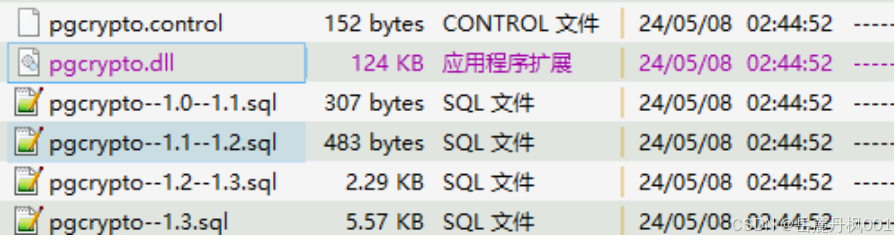
UG 产品中的 PostgreSQL 15.6 没有 pgcrypto 扩展相关的文件 (dll, contorl 以及 SQL 文件)
解决思路
我找到了一个绿色版本的 PGSQL 15.7, 发现里面包含 pgcrypto 扩展相关的文件
然后放到我们 UG 产品的 PostgreSQL 15.6 中
现象
创建扩展 pgcrypto 的时候报错
create extension pgcrypto;
C:\UNVGuard\opt\common-database0\bin\pgsql\bin>dir C:\UNVGuard\opt\common-database0\bin\pgsql\lib\pgcrypto.dll
 驱动器 C 中的卷没有标签。
 卷的序列号是 6AB8-9E0D

 C:\UNVGuard\opt\common-database0\bin\pgsql\lib 的目录

2026/05/14  09:28           126,464 pgcrypto.dll
               1 个文件        126,464 字节
               0 个目录 35,759,714,304 可用字节


postgres=# create extension pgcrypto;
ERROR:  could not load library "C:/UNVGuard/opt/common-database0/bin/pgsql/lib/pgcrypto.dll": The specified module could not be found.
两个环境, 一个是 win10 一个是 win11, 报错相同.
基于 Linux 的经验, 怀疑是缺少依赖的库文件.
基于 AI 搜索解决方法
借助 Dependencies 工具可以快速查看的缺少的依赖库
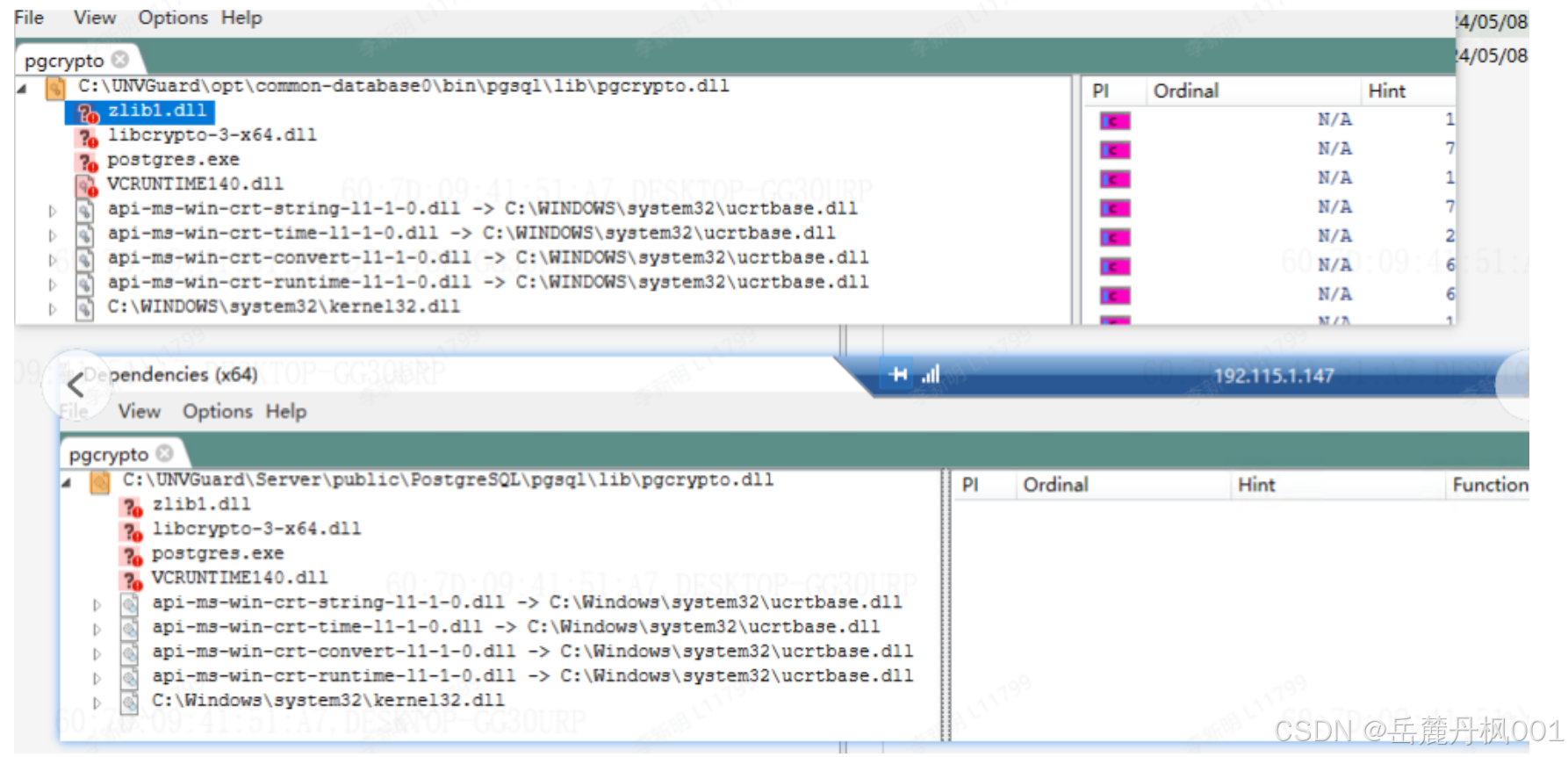
可以看到两个环境中都是缺少几个依赖库:
zlib1.dll, libcrypto-3-x64.dll, postgres.exe, VCRUNTIME140.dll
解决方法
zlib1.dll, libcrypto-3-x64.dll, VCRUNTIME140.dll 复制到 PGHOME/lib 目录下 与 PGHOME/bin 目录下
(如果已经存在, 则不复制进去)
F5 刷新, 再次检查依赖, 会发现依赖正常(无红色的了).
验证扩展是否可以正常创建了.
psql
postgres=# \dx
                 List of installed extensions
  Name   | Version |   Schema   |         Description
---------+---------+------------+------------------------------
 plpgsql | 1.0     | pg_catalog | PL/pgSQL procedural language
(1 row)

postgres=# begin;
BEGIN
postgres=*# create extension pgcrypto;
CREATE EXTENSION
postgres=*# \dx
                  List of installed extensions
   Name   | Version |   Schema   |         Description
----------+---------+------------+------------------------------
 pgcrypto | 1.3     | public     | cryptographic functions
 plpgsql  | 1.0     | pg_catalog | PL/pgSQL procedural language
(2 rows)

postgres=*# rollback;
ROLLBACK