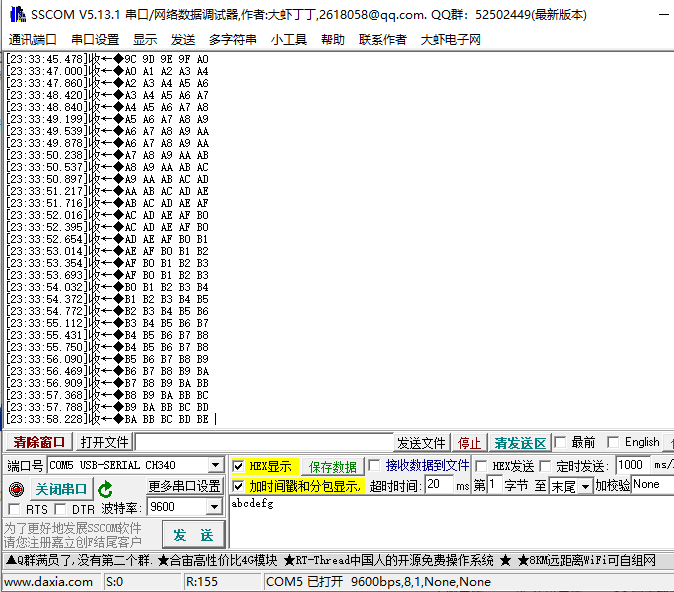
单片机:STM32F407
开发板:DMF407电机开发板
平台:keil V5.31
HSE 为8MHZ
HSI为16MHZ
原理图:
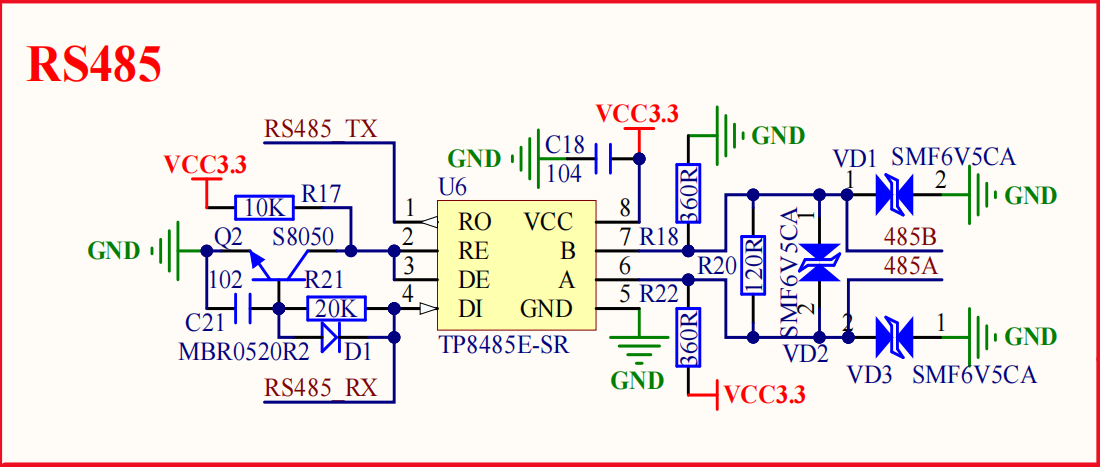
配置:
#define RS485_TX_GPIO_PORT                  GPIOB
#define RS485_TX_GPIO_PIN                   GPIO_PIN_10
#define RS485_TX_GPIO_CLK_ENABLE()          do{ __HAL_RCC_GPIOB_CLK_ENABLE(); }while(0)   /* PB口时钟使能 */

#define RS485_RX_GPIO_PORT                  GPIOB
#define RS485_RX_GPIO_PIN                   GPIO_PIN_11
#define RS485_RX_GPIO_CLK_ENABLE()          do{ __HAL_RCC_GPIOB_CLK_ENABLE(); }while(0)   /* PA口时钟使能 */

#define RS485_UX                            USART3
#define RS485_UX_IRQn                       USART3_IRQn
#define RS485_UX_IRQHandler                 USART3_IRQHandler
#define RS485_UX_CLK_ENABLE()               do{ __HAL_RCC_USART3_CLK_ENABLE(); }while(0)  /* USART3 时钟使能 */

uint8_t g_RS485_rx_buf[RS485_REC_LEN]; /* 接收缓冲, 最大 RS485_REC_LEN 个字节. */
uint8_t g_RS485_rx_cnt = 0;            /* 接收到的数据长度 */

void RS485_UX_IRQHandler(void)
{
    uint8_t res;

    if ((__HAL_UART_GET_FLAG(&g_rs458_handler, UART_FLAG_RXNE) != RESET)) /* 接收到数据 */
    {
        HAL_UART_Receive(&g_rs458_handler, &res, 1, 1000);

        if (g_RS485_rx_cnt < RS485_REC_LEN)         /* 缓冲区未满 */
        {
            g_RS485_rx_buf[g_RS485_rx_cnt] = res;   /* 记录接收到的值 */
            g_RS485_rx_cnt++;                       /* 接收数据增加1 */
        }
    }
}

void rs485_init(uint32_t baudrate)
{

    /* IO 及 时钟配置 */
    RS485_TX_GPIO_CLK_ENABLE(); /* 使能 串口TX脚 时钟 */
    RS485_RX_GPIO_CLK_ENABLE(); /* 使能 串口RX脚 时钟 */
    RS485_UX_CLK_ENABLE();      /* 使能 串口 时钟 */

    GPIO_InitTypeDef gpio_initure;
    gpio_initure.Pin = RS485_TX_GPIO_PIN;
    gpio_initure.Mode = GPIO_MODE_AF_PP;
    gpio_initure.Pull = GPIO_PULLUP;
    gpio_initure.Speed = GPIO_SPEED_FREQ_HIGH;
    gpio_initure.Alternate = GPIO_AF7_USART3;               /* 复用为串口3 */
    HAL_GPIO_Init(RS485_TX_GPIO_PORT, &gpio_initure);       /* 串口TX 脚 模式设置 */

    gpio_initure.Pin = RS485_RX_GPIO_PIN;
    HAL_GPIO_Init(RS485_RX_GPIO_PORT, &gpio_initure);       /* 串口RX 脚 必须设置成输入模式 */

    /* USART 初始化设置 */
    g_rs458_handler.Instance = RS485_UX;                    /* 选择485对应的串口 */
    g_rs458_handler.Init.BaudRate = baudrate;               /* 波特率 */
    g_rs458_handler.Init.WordLength = UART_WORDLENGTH_8B;   /* 字长为8位数据格式 */
    g_rs458_handler.Init.StopBits = UART_STOPBITS_1;        /* 一个停止位 */
    g_rs458_handler.Init.Parity = UART_PARITY_NONE;         /* 无奇偶校验位 */
    g_rs458_handler.Init.HwFlowCtl = UART_HWCONTROL_NONE;   /* 无硬件流控 */
    g_rs458_handler.Init.Mode = UART_MODE_TX_RX;            /* 收发模式 */
    HAL_UART_Init(&g_rs458_handler);                        /* 使能对应的串口, 调用Msp */
    __HAL_UART_DISABLE_IT(&g_rs458_handler, UART_IT_TC);

#if RS485_EN_RX /* 如果使能了接收 */
                /* 使能接收中断 */
    __HAL_UART_ENABLE_IT(&g_rs458_handler, UART_IT_RXNE);   /* 开启接收中断 */
    HAL_NVIC_EnableIRQ(RS485_UX_IRQn);                      /* 使能USART1中断 */
    HAL_NVIC_SetPriority(RS485_UX_IRQn, 3, 3);              /* 抢占优先级3,子优先级3 */
#endif

}

void rs485_send_data(uint8_t *buf, uint8_t len)
{
    HAL_UART_Transmit(&g_rs458_handler, buf, len, 1000); /* 串口2发送数据 */
    g_RS485_rx_cnt = 0;
}

void rs485_receive_data(uint8_t *buf, uint8_t *len)
{
    uint8_t rxlen = g_RS485_rx_cnt;
    uint8_t i = 0;
    *len = 0;     /* 默认为0 */
    delay_ms(10); /* 等待10ms,连续超过10ms没有接收到一个数据,则认为接收结束 */

    if (rxlen == g_RS485_rx_cnt && rxlen) /* 接收到了数据,且接收完成了 */
    {
        for (i = 0; i < rxlen; i++)
        {
            buf[i] = g_RS485_rx_buf[i];
        }

        *len = g_RS485_rx_cnt; /* 记录本次数据长度 */
        g_RS485_rx_cnt = 0;    /* 清零 */
    }
}
主函数:
int main(void)
{
    uint8_t key;
    uint8_t i = 0, t = 0;
    uint8_t cnt = 0;
    uint8_t rs485buf[5];

    HAL_Init();                             /* 初始化HAL库 */
    sys_stm32_clock_init(336, 8, 2, 7);     /* 设置时钟,168Mhz */
    delay_init(168);                        /* 延时初始化 */
    usart_init(115200);                     /* 串口初始化为115200 */
    usmart_dev.init(84);                    /* 初始化USMART */
    led_init();                             /* 初始化LED */
    lcd_init();                             /* 初始化LCD */
    key_init();                             /* 初始化按键 */
    rs485_init(9600);                       /* 初始化RS485 */

    lcd_show_string(30,  50, 200, 16, 16, "STM32", RED);
    lcd_show_string(30,  70, 200, 16, 16, "RS485 TEST", RED);
    lcd_show_string(30,  90, 200, 16, 16, "ATOM@ALIENTEK", RED);
    lcd_show_string(30, 110, 200, 16, 16, "KEY0:Send", RED);    /* 显示提示信息 */

    lcd_show_string(30, 130, 200, 16, 16, "Count:", RED);       /* 显示当前计数值 */
    lcd_show_string(30, 150, 200, 16, 16, "Send Data:", RED);   /* 提示发送的数据 */
    lcd_show_string(30, 190, 200, 16, 16, "Receive Data:", RED);/* 提示接收到的数据 */

    while (1)
    {
        key = key_scan(0);

        if (key == KEY0_PRES)               /* KEY0按下,发送一次数据 */
        {
            for (i = 0; i < 5; i++)
            {
                rs485buf[i] = cnt + i;      /* 填充发送缓冲区 */
                lcd_show_xnum(30 + i * 32, 170, rs485buf[i], 3, 16, 0x80, BLUE);    /* 显示数据 */
            }

            rs485_send_data(rs485buf, 5);   /* 发送5个字节 */
        }

        rs485_receive_data(rs485buf, &key);

        if (key)    /* 接收到有数据 */
        {
            if (key > 5)
            {
                key = 5;                    /* 最大是5个数据. */
            }

            for (i = 0; i < key; i++)
            {
                lcd_show_xnum(30 + i * 32, 210, rs485buf[i], 3, 16, 0x80, BLUE);    /* 显示数据 */
            }
        }

        t++;
        delay_ms(10);

        if (t == 20)
        {
            LED0_TOGGLE();  /* LED0闪烁, 提示系统正在运行 */
            t = 0;

            cnt++;
            lcd_show_xnum(30 + 48, 130, cnt, 3, 16, 0x80, BLUE);    /* 显示数据 */
        }
    }
}
工具:
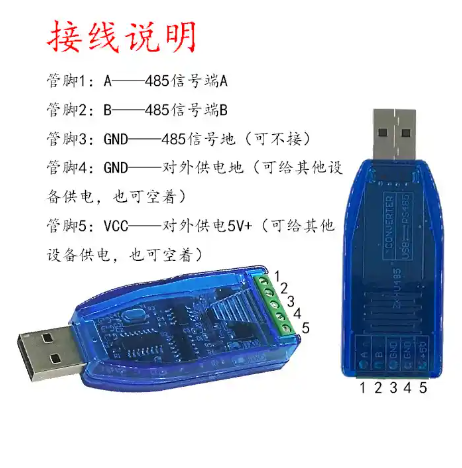
如果有485工具,接好线之后可以直接用SSCOM读写数据。
没有485工具,只能用普通串口工具接TP8485E的输入脚,测试数据