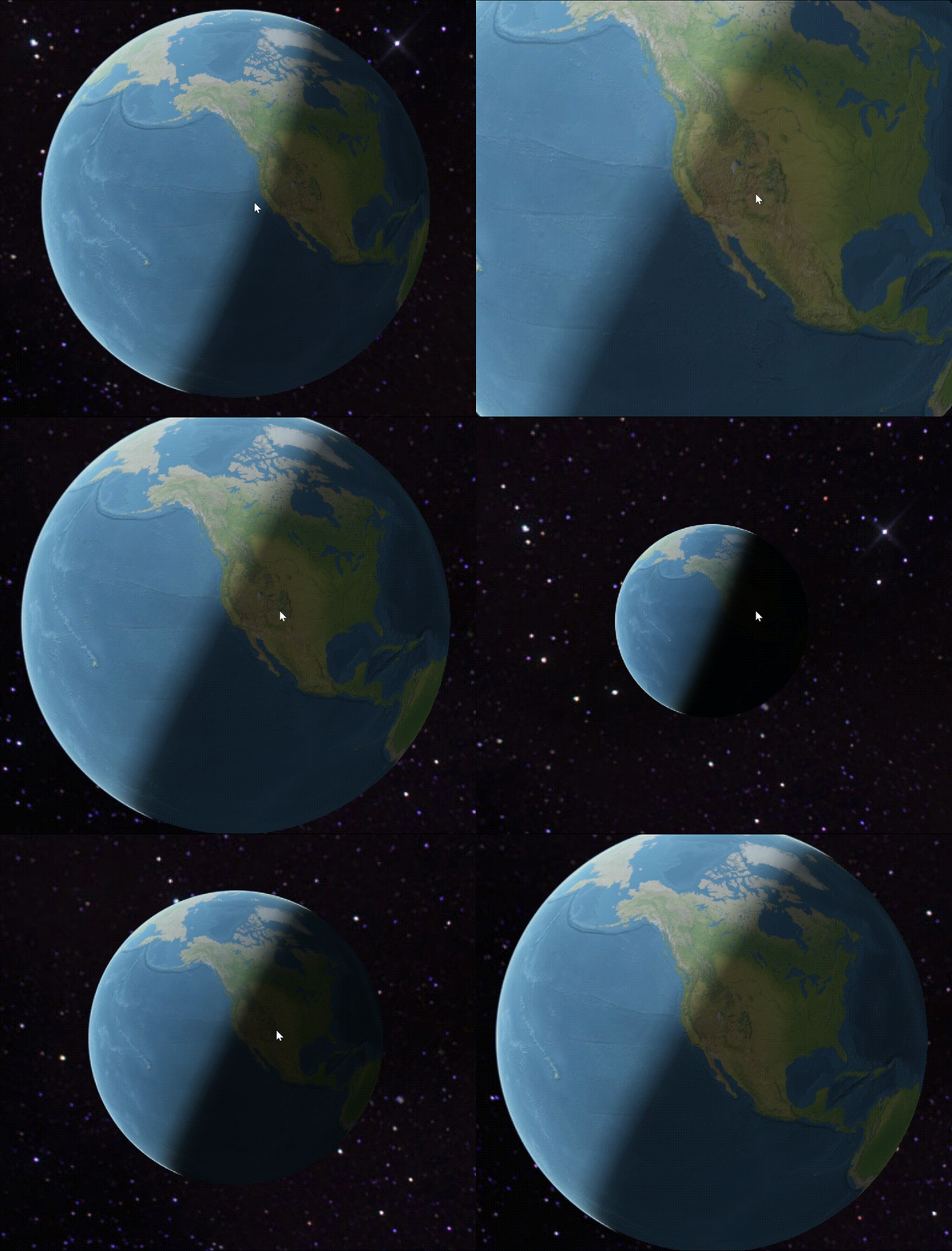
昼夜交替:
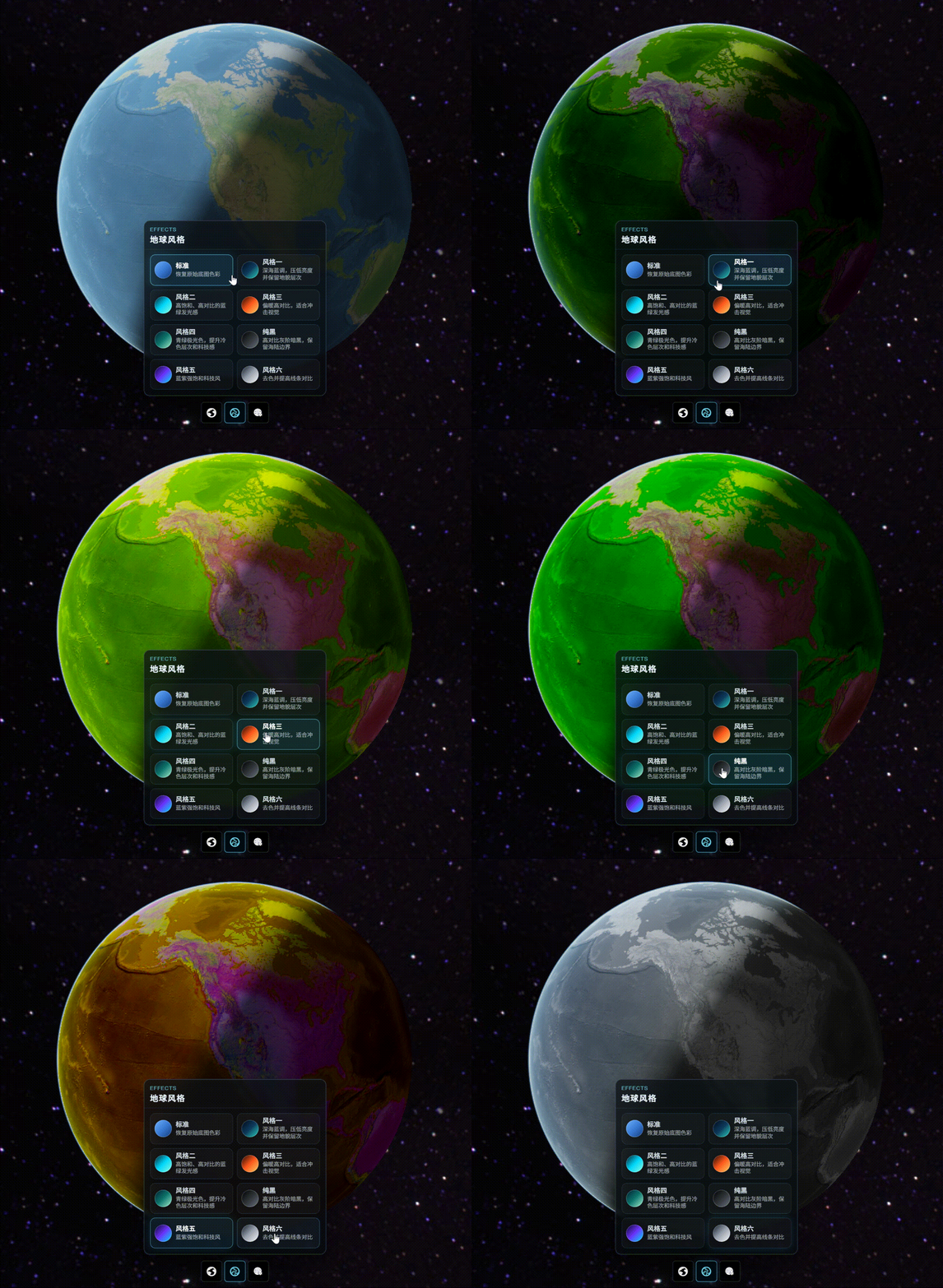
风格切换:
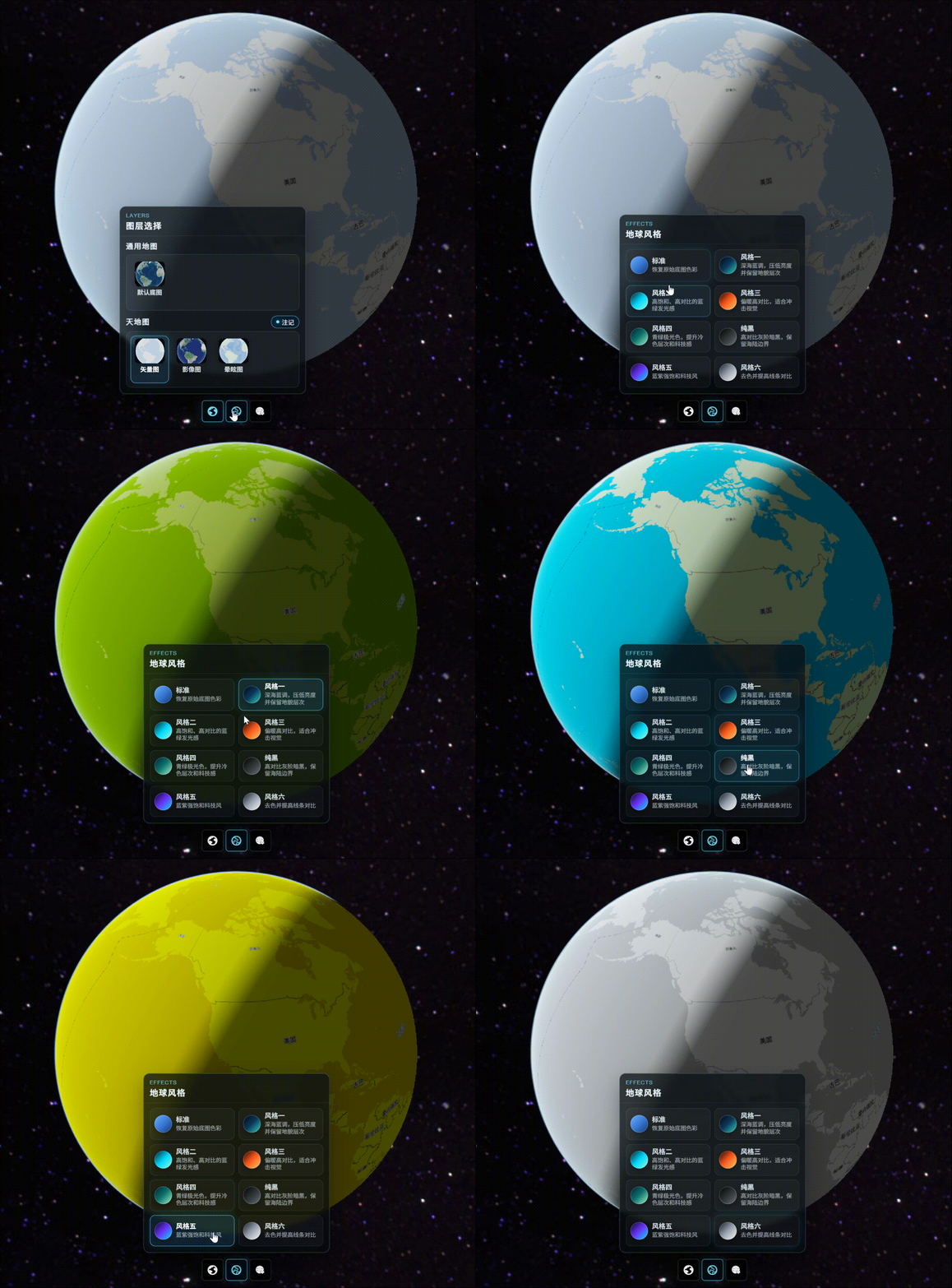
矢量图层的风格切换:
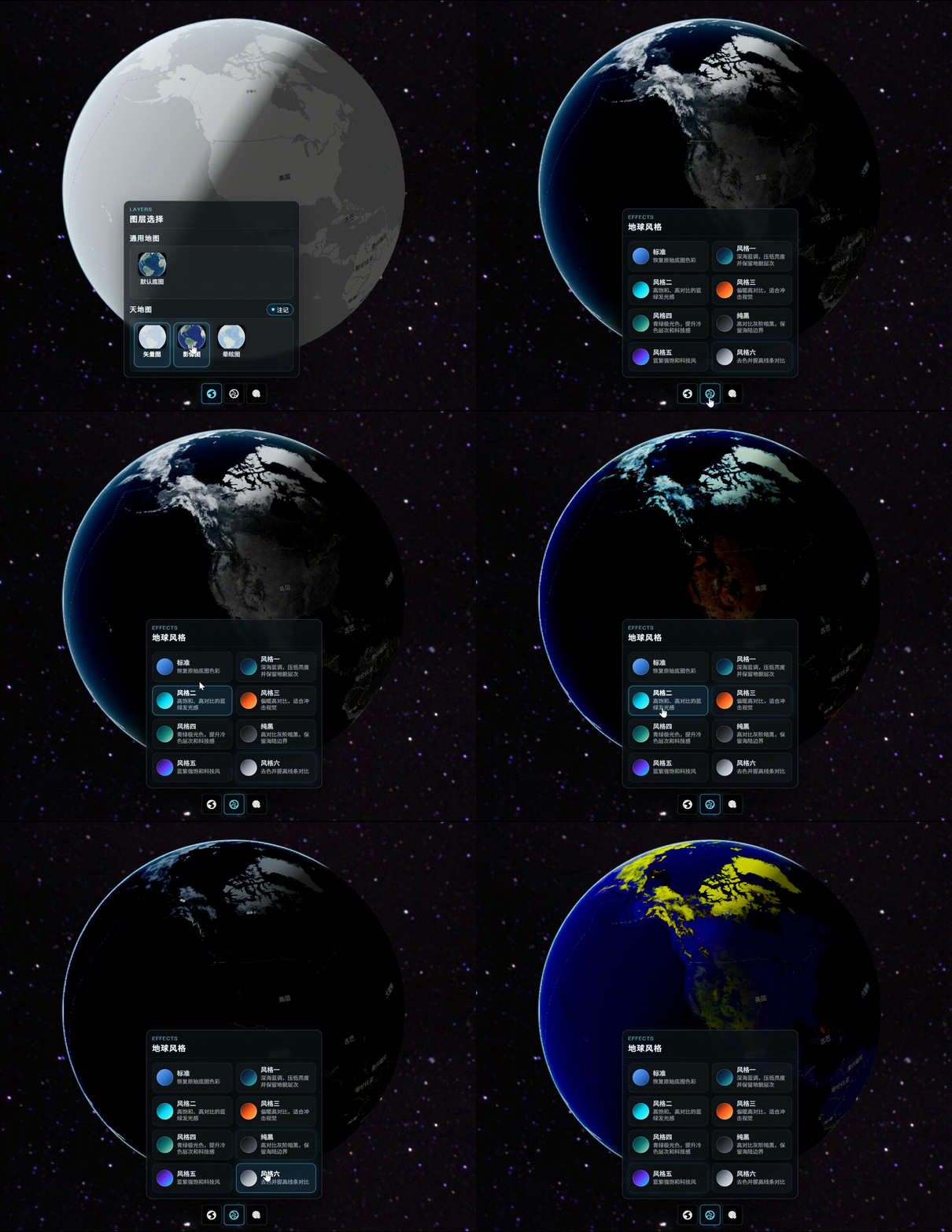
影像图层风格切换:
动态开关昼夜效果:
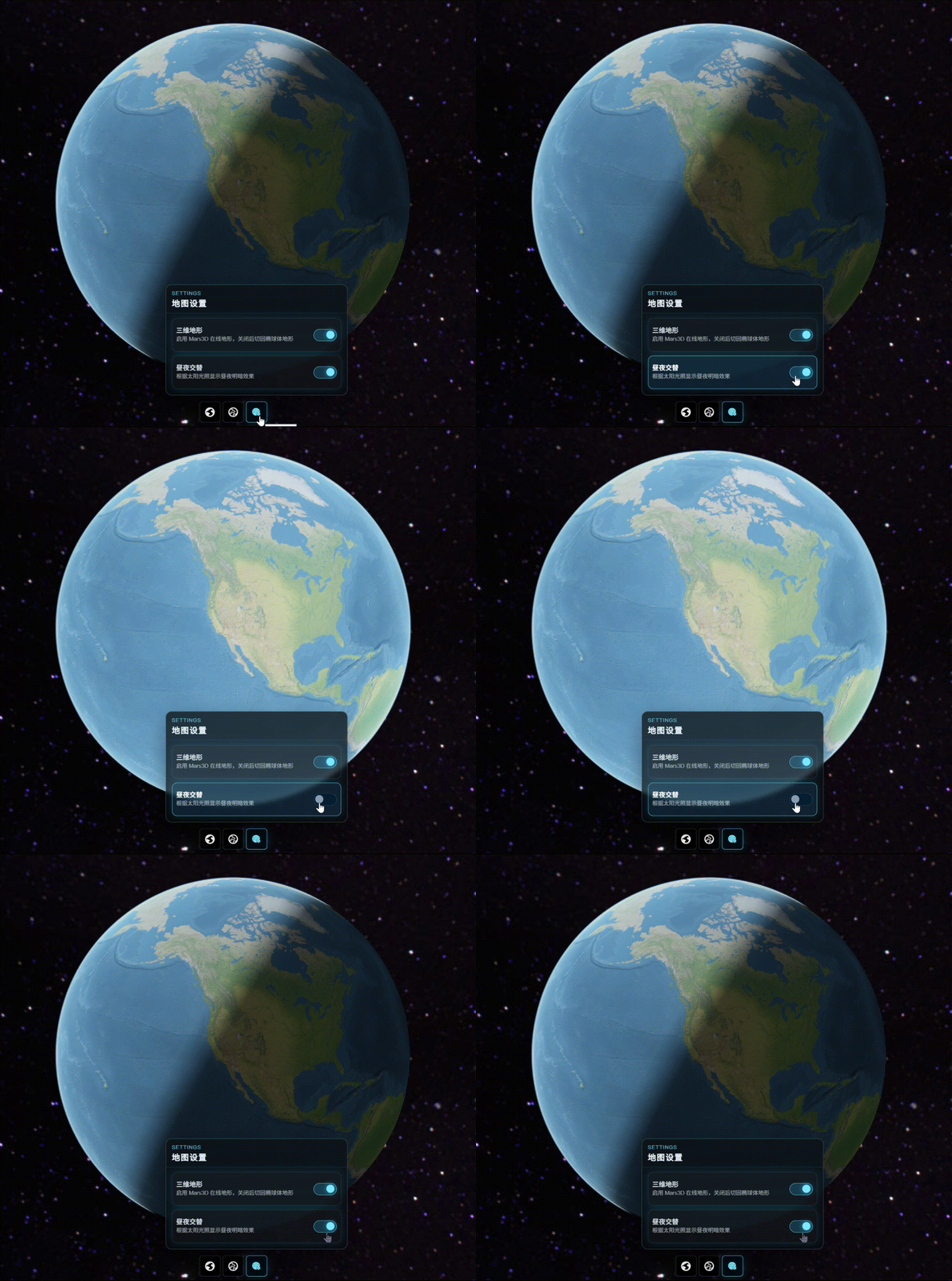
封装源码:
switchLayers.js
javascript
export const DEFAULT_TERRAIN_URL = 'http://data.mars3d.cn/terrain';

export const INITIAL_MAP_OPTIONS = {
    terrain: {
        url: DEFAULT_TERRAIN_URL
    },
    dayNightEffect: true,
    tianditu: false
};

export const TIANDITU_LAYER_ID_BY_TYPE = {
    1: 'tdt-vector',
    2: 'tdt-image',
    3: 'tdt-dizzy'
};

export const TIANDITU_TYPE_BY_LAYER_ID = {
    'tdt-vector': 1,
    'tdt-image': 2,
    'tdt-dizzy': 3
};

export const LAYER_GROUPS = [
    {
        id: 'general',
        title: '通用地图',
        options: [
            {
                id: 'default-layer',
                label: '默认底图',
                image: require('@/assets/layer/defaultLayer.png')
            }
        ]
    },
    {
        id: 'tianditu',
        title: '天地图',
        options: [
            {
                id: 'tdt-vector',
                label: '矢量图',
                image: require('@/assets/layer/vectorLayer.png')
            },
            {
                id: 'tdt-image',
                label: '影像图',
                image: require('@/assets/layer/imageLayer.png')
            },
            {
                id: 'tdt-dizzy',
                label: '晕眩图',
                image: require('@/assets/layer/dizzyLayer.png')
            }
        ]
    }
];

export const STYLE_OPTIONS = [
    {
        id: 'standard',
        label: '标准',
        desc: '恢复原始底图色彩',
        colors: ['#6fb2ff', '#3b7bd6', '#123a78']
    },
    {
        id: 'dark',
        label: '风格一',
        desc: '深海蓝调,压低亮度并保留地貌层次',
        colors: ['#020617', '#0f3a5c', '#2dd4bf']
    },
    {
        id: 'glow',
        label: '风格二',
        desc: '高饱和、高对比的蓝绿发光感',
        colors: ['#05161d', '#00d8ff', '#92ffdf']
    },
    {
        id: 'lava',
        label: '风格三',
        desc: '偏暖高对比,适合冲击视觉',
        colors: ['#1b0500', '#ff5a1f', '#ffd166']
    },
    {
        id: 'ice',
        label: '风格四',
        desc: '青绿极光色,提升冷色层次和科技感',
        colors: ['#021b2d', '#0f766e', '#a7f3d0']
    },
    {
        id: 'black',
        label: '纯黑',
        desc: '高对比灰阶暗黑,保留海陆边界',
        colors: ['#000000', '#2f3437', '#6b7280']
    },
    {
        id: 'cyber',
        label: '风格五',
        desc: '蓝紫强饱和科技风',
        colors: ['#08031c', '#6d35ff', '#00e5ff']
    },
    {
        id: 'grayscale',
        label: '风格六',
        desc: '去色并提高线条对比',
        colors: ['#111827', '#9ca3af', '#f8fafc']
    }
];

const STORAGE_KEY = 'web-drone-platform:test-switch-layers-settings';

export function getInitialMapState() {
    const defaultState = {
        activeLayerId: INITIAL_MAP_OPTIONS.tianditu
            ? TIANDITU_LAYER_ID_BY_TYPE[INITIAL_MAP_OPTIONS.tianditu.type]
            : 'default-layer',
        activeStyleId: 'standard',
        tiandituShowLabel: INITIAL_MAP_OPTIONS.tianditu
            ? INITIAL_MAP_OPTIONS.tianditu.showLabel
            : true,
        terrainEnabled: Boolean(INITIAL_MAP_OPTIONS.terrain),
        terrainUrl: INITIAL_MAP_OPTIONS.terrain ? INITIAL_MAP_OPTIONS.terrain.url : DEFAULT_TERRAIN_URL,
        dayNightEnabled: INITIAL_MAP_OPTIONS.dayNightEffect
    };

    try {
        const raw = window.sessionStorage.getItem(STORAGE_KEY);
        return raw ? { ...defaultState, ...JSON.parse(raw) } : defaultState;
    } catch (error) {
        return defaultState;
    }
}

export function saveMapState(state) {
    try {
        window.sessionStorage.setItem(STORAGE_KEY, JSON.stringify(state));
    } catch (error) {
        // 测试页无需强依赖会话缓存。
    }
}
switchLayersScene.js
javascript
import cesiumUtils from '@/utils/cesium/cesiumUtils.js';
import { DEFAULT_TERRAIN_URL, TIANDITU_TYPE_BY_LAYER_ID } from './switchLayers.js';

function buildTerrainOption(enabled, terrainUrl) {
    return enabled ? { url: terrainUrl || DEFAULT_TERRAIN_URL } : false;
}

export function initSwitchLayersScene(containerId, state) {
    const activeTiandituType = TIANDITU_TYPE_BY_LAYER_ID[state.activeLayerId];
    cesiumUtils.initViewer(containerId, {
        terrain: buildTerrainOption(state.terrainEnabled, state.terrainUrl),
        dayNightEffect: state.dayNightEnabled,
        ...(activeTiandituType
            ? {
                tianditu: {
                    type: activeTiandituType,
                    showLabel: state.tiandituShowLabel
                }
            }
            : {})
    });
    const layerState = cesiumUtils.setImageryLayerStyle(state.activeStyleId);
    const mapSettingsState = getSwitchLayersMapSettingsState(state.terrainUrl);
    return { layerState, mapSettingsState };
}

export function getSwitchLayersMapSettingsState(fallbackTerrainUrl) {
    const state = cesiumUtils.getMapSettingsState();
    return {
        terrainEnabled: state.terrainEnabled,
        terrainUrl: state.terrain && state.terrain.url
            ? state.terrain.url
            : fallbackTerrainUrl || DEFAULT_TERRAIN_URL,
        dayNightEnabled: state.dayNightEnabled
    };
}

export function setSwitchLayer(layerId, showLabel) {
    return cesiumUtils.setMapLayer(layerId, { showLabel });
}

export function setSwitchTiandituLabel(activeLayerId, showLabel) {
    if (activeLayerId.indexOf('tdt-') !== 0) return null;
    return cesiumUtils.setTiandituLayer(4, { showLabel });
}

export function setSwitchStyle(styleId) {
    return cesiumUtils.setImageryLayerStyle(styleId);
}

export function setSwitchTerrain(enabled, terrainUrl) {
    cesiumUtils.setTerrain(buildTerrainOption(enabled, terrainUrl));
}

export function setSwitchDayNight(enabled) {
    cesiumUtils.setGlobeDayNightEffect(enabled ? {} : false);
}
switchLayers.vue
javascript
<template>
<div class="switch-layers-page">
<div id="init-viewer-wrapper"></div>
<div ref="mapTools" class="map-tools">
<button
ref="layerButton"
type="button"
class="tool-btn"
:class="{ 'tool-btn--active': activeToolPanel === 'layer' }"
title="切换图层"
@click.stop="toggleToolPanel('layer')"
>
<i class="iconfont icon-diqiu2 tool-btn__icon"></i>
</button>
<button
ref="styleButton"
type="button"
class="tool-btn"
:class="{ 'tool-btn--active': activeToolPanel === 'style' }"
title="地球风格"
@click.stop="toggleToolPanel('style')"
>
<i class="iconfont icon-diqiu1 tool-btn__icon"></i>
</button>
<button
ref="settingsButton"
type="button"
class="tool-btn"
:class="{ 'tool-btn--active': activeToolPanel === 'settings' }"
title="地图设置"
@click.stop="toggleToolPanel('settings')"
>
<i class="iconfont icon-xian1 tool-btn__icon"></i>
</button>
</div>
<transition name="tool-popup-fade">
<div
v-if="activeToolPanel"
ref="toolPopup"
class="tool-popup"
:style="toolPopupStyle"
@click.stop
>
<section v-if="activeToolPanel === 'layer'" class="control-panel layer-control">
<div class="control-panel__topbar">
<div class="control-panel__eyebrow">Layers</div>
<div class="control-panel__title">图层选择</div>
</div>
<div class="layer-control__body">
<section
v-for="group in layerGroups"
:key="group.id"
class="layer-control__group"
>
<div class="layer-control__group-header">
<h3 class="layer-control__group-title">{{ group.title }}</h3>
<button
v-if="group.id === 'tianditu'"
type="button"
class="layer-control__label-switch"
:class="{ 'layer-control__label-switch--active': tiandituShowLabel }"
@click="handleTiandituLabelChange(!tiandituShowLabel)"
>
<span class="layer-control__switch-dot"></span>
<span>注记</span>
</button>
</div>
<div class="layer-control__grid">
<button
v-for="option in group.options"
:key="option.id"
type="button"
class="layer-control__card"
:class="{ 'layer-control__card--active': activeLayerId === option.id }"
@click="handleLayerSelect(option.id)"
>
<img class="layer-control__thumb" :src="option.image" :alt="option.label">
<span class="layer-control__name">{{ option.label }}</span>
</button>
</div>
</section>
</div>
</section>
<section v-else-if="activeToolPanel === 'style'" class="control-panel style-control">
<div class="control-panel__topbar">
<div class="control-panel__eyebrow">Effects</div>
<div class="control-panel__title">地球风格</div>
</div>
<div class="style-control__grid">
<button
v-for="option in styleOptions"
:key="option.id"
type="button"
class="style-control__card"
:class="{ 'style-control__card--active': activeStyleId === option.id }"
@click="handleStyleSelect(option.id)"
>
<span
class="style-control__swatch"
:style="{ background: 'linear-gradient(135deg, ' + option.colors.join(', ') + ')' }"
></span>
<span class="style-control__content">
<span class="style-control__name">{{ option.label }}</span>
<span class="style-control__desc">{{ option.desc }}</span>
</span>
</button>
</div>
</section>
<section v-else class="control-panel settings-control">
<div class="control-panel__topbar">
<div class="control-panel__eyebrow">Settings</div>
<div class="control-panel__title">地图设置</div>
</div>
<div class="settings-control__body">
<button
type="button"
class="settings-control__item"
:class="{ 'settings-control__item--active': terrainEnabled }"
@click="handleTerrainChange(!terrainEnabled)"
>
<span class="settings-control__content">
<span class="settings-control__name">三维地形</span>
<span class="settings-control__desc">启用 Mars3D 在线地形,关闭后切回椭球体地形</span>
</span>
<span class="settings-control__switch">
<span class="settings-control__switch-thumb"></span>
</span>
</button>
<button
type="button"
class="settings-control__item"
:class="{ 'settings-control__item--active': dayNightEnabled }"
@click="handleDayNightChange(!dayNightEnabled)"
>
<span class="settings-control__content">
<span class="settings-control__name">昼夜交替</span>
<span class="settings-control__desc">根据太阳光照显示昼夜明暗效果</span>
</span>
<span class="settings-control__switch">
<span class="settings-control__switch-thumb"></span>
</span>
</button>
</div>
</section>
</div>
</transition>
</div>
</template>
<script>
import cesiumUtils from '@/utils/cesium/cesiumUtils.js'
import {
DEFAULT_TERRAIN_URL,
LAYER_GROUPS,
STYLE_OPTIONS,
getInitialMapState,
saveMapState
} from './switchLayers.js'
import {
getSwitchLayersMapSettingsState,
initSwitchLayersScene,
setSwitchDayNight,
setSwitchLayer,
setSwitchStyle,
setSwitchTerrain,
setSwitchTiandituLabel
} from './switchLayersScene.js'
export default {
name: 'depthDetection',
components: {},
data() {
const mapState = getInitialMapState();
return {
layerGroups: LAYER_GROUPS,
styleOptions: STYLE_OPTIONS,
activeLayerId: mapState.activeLayerId,
activeStyleId: mapState.activeStyleId,
tiandituShowLabel: mapState.tiandituShowLabel,
terrainEnabled: mapState.terrainEnabled,
terrainUrl: mapState.terrainUrl,
dayNightEnabled: mapState.dayNightEnabled,
activeToolPanel: '',
toolPopupPosition: {
left: 0,
top: 0
}
}
},
computed: {
toolPopupStyle() {
return {
left: this.toolPopupPosition.left + 'px',
top: this.toolPopupPosition.top + 'px'
}
}
},
mounted() {
this.initViewer();
window.addEventListener('resize', this.updateToolPopupPosition);
document.addEventListener('pointerdown', this.handleOutsideToolPanelClick);
},
beforeDestroy() {
window.removeEventListener('resize', this.updateToolPopupPosition);
document.removeEventListener('pointerdown', this.handleOutsideToolPanelClick);
cesiumUtils.destroy();
},
methods: {
async initViewer() {
const { layerState, mapSettingsState } = initSwitchLayersScene('init-viewer-wrapper', {
activeLayerId: this.activeLayerId,
activeStyleId: this.activeStyleId,
tiandituShowLabel: this.tiandituShowLabel,
terrainEnabled: this.terrainEnabled,
terrainUrl: this.terrainUrl,
dayNightEnabled: this.dayNightEnabled
});
this.syncLayerState(layerState);
this.syncMapSettingsState(mapSettingsState);
},
syncLayerState(state) {
this.activeLayerId = state.activeLayerId;
this.activeStyleId = state.activeStyleId;
this.tiandituShowLabel = state.showLabel;
this.persistMapState();
},
syncMapSettingsState(nextState = null) {
const state = nextState || getSwitchLayersMapSettingsState(this.terrainUrl);
this.terrainEnabled = state.terrainEnabled;
this.terrainUrl = state.terrainUrl;
this.dayNightEnabled = state.dayNightEnabled;
this.persistMapState();
},
persistMapState() {
saveMapState({
activeLayerId: this.activeLayerId,
activeStyleId: this.activeStyleId,
tiandituShowLabel: this.tiandituShowLabel,
terrainEnabled: this.terrainEnabled,
terrainUrl: this.terrainUrl || DEFAULT_TERRAIN_URL,
dayNightEnabled: this.dayNightEnabled
});
},
handleLayerSelect(layerId) {
if (layerId === this.activeLayerId) return;
this.syncLayerState(setSwitchLayer(layerId, this.tiandituShowLabel));
},
handleTiandituLabelChange(showLabel) {
this.tiandituShowLabel = showLabel;
const layerState = setSwitchTiandituLabel(this.activeLayerId, showLabel);
if (layerState) {
this.syncLayerState(layerState);
return;
}
this.persistMapState();
},
handleStyleSelect(styleId) {
if (styleId === this.activeStyleId) return;
this.syncLayerState(setSwitchStyle(styleId));
},
handleTerrainChange(enabled) {
this.terrainEnabled = enabled;
setSwitchTerrain(enabled, this.terrainUrl);
this.persistMapState();
},
handleDayNightChange(enabled) {
this.dayNightEnabled = enabled;
setSwitchDayNight(enabled);
this.persistMapState();
},
getToolButton(panel) {
if (panel === 'layer') return this.$refs.layerButton;
if (panel === 'style') return this.$refs.styleButton;
return this.$refs.settingsButton;
},
toggleToolPanel(panel) {
this.activeToolPanel = this.activeToolPanel === panel ? '' : panel;
this.$nextTick(this.updateToolPopupPosition);
},
updateToolPopupPosition() {
if (!this.activeToolPanel) return;
const button = this.getToolButton(this.activeToolPanel);
const popup = this.$refs.toolPopup;
if (!button || !popup) return;
const gap = 12;
const padding = 12;
const buttonRect = button.getBoundingClientRect();
const popupRect = popup.getBoundingClientRect();
const viewportWidth = window.innerWidth;
const viewportHeight = window.innerHeight;
const topSpace = buttonRect.top;
const bottomSpace = viewportHeight - buttonRect.bottom;
const preferredTop = topSpace >= bottomSpace
? buttonRect.top - popupRect.height - gap
: buttonRect.bottom + gap;
const preferredLeft = buttonRect.left + (buttonRect.width - popupRect.width) / 2;
this.toolPopupPosition = {
left: Math.min(Math.max(preferredLeft, padding), viewportWidth - popupRect.width - padding),
top: Math.min(Math.max(preferredTop, padding), viewportHeight - popupRect.height - padding)
};
},
handleOutsideToolPanelClick(event) {
if (!this.activeToolPanel) return;
const target = event.target;
if (!target) return;
if (
(this.$refs.toolPopup && this.$refs.toolPopup.contains(target)) ||
(this.$refs.mapTools && this.$refs.mapTools.contains(target))
) {
return;
}
this.activeToolPanel = '';
}
}
}
</script>
<style scoped>
.switch-layers-page {
position: relative;
width: 100%;
height: 100%;
overflow: hidden;
background: #020814;
}
#init-viewer-wrapper {
position: absolute;
inset: 0;
width: 100%;
height: 100%;
}
.map-tools {
position: absolute;
left: 50%;
bottom: 28px;
z-index: 4;
display: flex;
align-items: center;
justify-content: center;
transform: translateX(-50%);
}
.tool-btn {
display: flex;
align-items: center;
justify-content: center;
width: 42px;
height: 42px;
margin: 0 2px;
border: 1px solid rgba(255, 255, 255, 0.18);
border-radius: 6px;
background: rgba(0, 0, 0, 0.88);
color: #ffffff;
cursor: pointer;
font-size: 14px;
font-weight: 700;
box-shadow: 0 0 0 1px rgba(126, 233, 255, 0.08) inset, 0 10px 24px rgba(0, 0, 0, 0.28);
transition: border-color 0.18s ease, background 0.18s ease, color 0.18s ease, box-shadow 0.18s ease;
}
.tool-btn__icon {
font-size: 18px;
line-height: 1;
}
.tool-btn:hover,
.tool-btn--active {
border-color: rgba(126, 233, 255, 0.78);
background: rgba(0, 12, 20, 0.94);
color: #7ee9ff;
box-shadow: 0 0 0 1px rgba(126, 233, 255, 0.22) inset, 0 0 16px rgba(44, 197, 255, 0.18);
}
.tool-popup {
position: fixed;
z-index: 5;
}
.tool-popup-fade-enter-active,
.tool-popup-fade-leave-active {
transition: opacity 0.22s ease, transform 0.22s ease;
}
.tool-popup-fade-enter,
.tool-popup-fade-leave-to {
opacity: 0;
transform: translateY(6px);
}
.control-panel {
width: min(360px, calc(100vw - 24px));
overflow: hidden;
border: 1px solid rgba(164, 226, 255, 0.28);
border-radius: 12px;
background: linear-gradient(180deg, rgba(16, 22, 28, 0.62), rgba(10, 16, 22, 0.48)), rgba(0, 0, 0, 0.38);
color: #eef8ff;
box-shadow: 0 0 0 1px rgba(255, 255, 255, 0.04) inset, 0 16px 40px rgba(0, 0, 0, 0.32);
backdrop-filter: blur(4px);
}
.control-panel__topbar {
padding: 10px 12px 8px;
border-bottom: 1px solid rgba(164, 226, 255, 0.12);
}
.control-panel__eyebrow {
color: rgba(126, 233, 255, 0.72);
font-size: 10px;
letter-spacing: 0.12em;
text-transform: uppercase;
}
.control-panel__title {
margin-top: 2px;
font-size: 16px;
font-weight: 700;
}
.layer-control__body {
max-height: 390px;
overflow-y: auto;
padding: 10px 12px 12px;
}
.layer-control__group + .layer-control__group {
margin-top: 10px;
}
.layer-control__group-header {
display: flex;
align-items: center;
justify-content: space-between;
gap: 10px;
margin-bottom: 6px;
}
.layer-control__group-title {
margin: 0;
color: rgba(238, 248, 255, 0.94);
font-size: 14px;
font-weight: 700;
}
.layer-control__grid {
display: grid;
grid-template-columns: repeat(4, minmax(0, 1fr));
gap: 7px;
padding: 8px;
border: 1px solid rgba(164, 226, 255, 0.18);
border-radius: 10px;
background: rgba(255, 255, 255, 0.03);
}
.layer-control__card {
display: flex;
flex-direction: column;
align-items: center;
gap: 5px;
min-height: 82px;
padding: 5px 4px 6px;
border: 1px solid transparent;
border-radius: 10px;
background: transparent;
color: rgba(238, 248, 255, 0.86);
cursor: pointer;
transition: border-color 0.18s ease, background 0.18s ease, color 0.18s ease, box-shadow 0.18s ease;
}
.layer-control__card:hover,
.layer-control__card--active,
.style-control__card:hover,
.style-control__card--active,
.settings-control__item:hover,
.settings-control__item--active {
border-color: rgba(126, 233, 255, 0.82);
background: rgba(56, 151, 205, 0.18);
color: #ffffff;
box-shadow: 0 0 16px rgba(44, 197, 255, 0.18);
}
.layer-control__thumb {
width: 58px;
height: 48px;
border-radius: 8px;
object-fit: cover;
box-shadow: 0 4px 14px rgba(0, 0, 0, 0.22);
}
.layer-control__name {
width: 100%;
min-height: 26px;
font-size: 12px;
font-weight: 700;
line-height: 1.2;
text-align: center;
}
.layer-control__label-switch {
display: flex;
align-items: center;
justify-content: center;
gap: 5px;
height: 24px;
padding: 0 9px;
border: 1px solid rgba(125, 232, 255, 0.26);
border-radius: 999px;
background: rgba(3, 29, 50, 0.72);
color: rgba(230, 248, 255, 0.82);
font-size: 12px;
cursor: pointer;
}
.layer-control__switch-dot {
width: 6px;
height: 6px;
border-radius: 50%;
background: rgba(148, 163, 184, 0.86);
}
.layer-control__label-switch--active {
border-color: rgba(126, 233, 255, 0.78);
color: #ffffff;
}
.layer-control__label-switch--active .layer-control__switch-dot {
background: #7ee9ff;
box-shadow: 0 0 10px rgba(44, 197, 255, 0.8);
}
.style-control__grid {
display: grid;
grid-template-columns: repeat(2, minmax(0, 1fr));
gap: 8px;
padding: 10px 12px 12px;
}
.style-control__card,
.settings-control__item {
display: flex;
align-items: center;
gap: 8px;
min-height: 60px;
padding: 8px;
border: 1px solid rgba(164, 226, 255, 0.14);
border-radius: 10px;
background: rgba(255, 255, 255, 0.03);
color: rgba(238, 248, 255, 0.86);
cursor: pointer;
text-align: left;
transition: border-color 0.18s ease, background 0.18s ease, color 0.18s ease, box-shadow 0.18s ease;
}
.style-control__swatch {
flex: 0 0 34px;
width: 34px;
height: 34px;
border-radius: 50%;
box-shadow: 0 0 0 1px rgba(255, 255, 255, 0.22) inset, 0 4px 12px rgba(0, 0, 0, 0.28);
}
.style-control__content,
.settings-control__content {
display: flex;
min-width: 0;
flex-direction: column;
gap: 3px;
}
.style-control__name,
.settings-control__name {
font-size: 13px;
font-weight: 700;
line-height: 1;
}
.style-control__desc,
.settings-control__desc {
color: rgba(238, 248, 255, 0.62);
font-size: 11px;
line-height: 1.25;
}
.settings-control__body {
display: grid;
gap: 8px;
padding: 10px 12px 12px;
}
.settings-control__item {
justify-content: space-between;
min-height: 66px;
}
.settings-control__switch {
position: relative;
flex: 0 0 46px;
width: 46px;
height: 24px;
border: 1px solid rgba(125, 232, 255, 0.24);
border-radius: 999px;
background: rgba(3, 29, 50, 0.8);
}
.settings-control__switch-thumb {
position: absolute;
top: 3px;
left: 3px;
width: 16px;
height: 16px;
border-radius: 50%;
background: rgba(148, 163, 184, 0.95);
transition: background 0.18s ease, box-shadow 0.18s ease, transform 0.18s ease;
}
.settings-control__item--active .settings-control__switch {
border-color: rgba(126, 233, 255, 0.78);
background: rgba(44, 197, 255, 0.2);
}
.settings-control__item--active .settings-control__switch-thumb {
background: #7ee9ff;
box-shadow: 0 0 10px rgba(44, 197, 255, 0.8);
transform: translateX(22px);
}
</style>