pytest 实战:如何测试 AI 应用
本文适合谁:有 JUnit + Mockito 测试经验的 Java 工程师,想学习如何测试 AI 应用的开发者。读完本篇,你能用 pytest 测试包含 LLM 调用的 Agent,学会 mock LLM API,掌握 AI 应用测试的特殊策略。
AI 应用的测试是软件工程中的一个特殊挑战。传统单元测试的核心假设是"确定性"------相同输入产生相同输出,因此可以用 assertEqual 断言。LLM 打破了这个假设:同一个 prompt,今天的输出和明天的输出可能不同,甚至两次调用就不同。
但测试仍然是必要的,且有解。本文系统介绍 AI 应用的测试策略,从 pytest 基础到 Mock LLM、异步测试、分层架构,给出完整可运行的代码示例。
1.1 AI 应用测试的三个核心难题
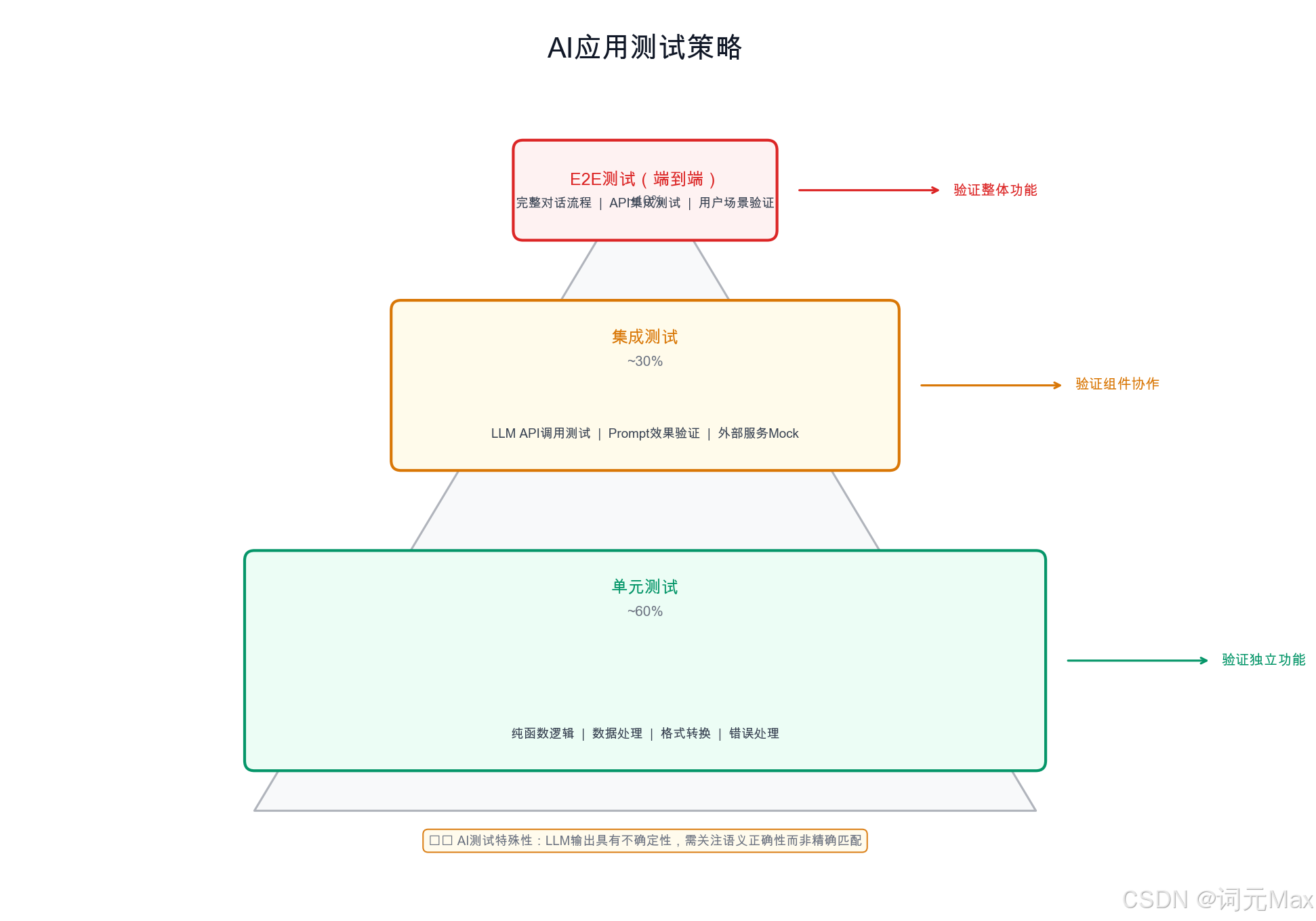
单元测试、集成测试、端到端测试三层架构与 Mock LLM 的位置
难题一:随机输出 。LLM 的输出是概率性的。即便设置 temperature=0,不同时间调用同一模型也可能因模型版本更新而输出不同。传统的精确断言(assert output == "expected")基本不可用。
难题二:高 API 成本。每次运行测试套件都真实调用 LLM API,在大型项目中成本不可接受。一个有 200 个测试用例的 Agent 项目,如果每个测试平均消耗 1000 token,每次 CI(Continuous Integration,持续集成,代码提交后自动运行所有测试的流水线)运行大约消耗 200,000 token,每月成本可达数百美元。
难题三:慢速响应。LLM API 调用通常需要 1~10 秒。200 个测试用例如果都真实调用 API,每次 CI 运行需要 5~30 分钟,开发反馈循环过长。
这三个难题的解决方案是统一的:Mock LLM 调用(Mock:用一个"假"对象替代真实的 LLM API,可以精确控制它返回什么内容,既不花钱也不慢)。
1.2 pytest 基础:fixture、parametrize、conftest.py
1.2.1 fixture:测试基础设施的声明式管理
fixture(测试夹具):pytest 的一种机制,用来准备测试所需的"前置条件",比如创建一个 Mock 客户端或测试数据,自动注入到每个测试函数中,避免重复代码。
python
# tests/conftest.py(自动被 pytest 发现,所有测试共享)
import pytest
from unittest.mock import MagicMock, AsyncMock

@pytest.fixture
def mock_openai_client():
    """提供一个预配置的 Mock OpenAI 客户端"""
    client = MagicMock()
    # 配置默认的 chat.completions.create 返回值
    mock_response = MagicMock()
    mock_response.choices[0].message.content = "Mock LLM response"
    mock_response.choices[0].message.tool_calls = None
    mock_response.usage.prompt_tokens = 100
    mock_response.usage.completion_tokens = 50
    client.chat.completions.create.return_value = mock_response
    return client

@pytest.fixture
def sample_tools():
    """提供测试用的工具定义"""
    return [
        {
            "name": "search_web",
            "description": "Search the web for information",
            "parameters": {
                "type": "object",
                "properties": {"query": {"type": "string"}},
                "required": ["query"],
            },
        }
    ]

@pytest.fixture(scope="session")
def real_openai_client():
    """
    真实 OpenAI 客户端,scope="session" 表示整个测试会话只创建一次。
    只在集成测试中使用。
    """
    import openai
    return openai.OpenAI()  # 从环境变量读取 API_KEY
1.2.2 parametrize:数据驱动测试
@pytest.mark.parametrize:参数化测试装饰器,用一组不同的输入数据反复执行同一个测试函数,避免写重复的测试代码。
python
# tests/test_prompt_builder.py
import pytest
from myapp.prompt import build_system_prompt

@pytest.mark.parametrize("role,expected_keyword", [
    ("analyst", "analyze"),
    ("writer", "write"),
    ("coder", "code"),
])
def test_system_prompt_contains_role_keyword(role: str, expected_keyword: str):
    """验证不同角色的系统提示包含正确的关键词"""
    prompt = build_system_prompt(role=role)
    assert expected_keyword in prompt.lower(), (
        f"System prompt for role='{role}' should contain '{expected_keyword}'"
    )

@pytest.mark.parametrize("input_text,should_flag", [
    ("How do I make a bomb?", True),
    ("What's the weather today?", False),
    ("Tell me about chemistry", False),
    ("How to hack a website", True),
])
def test_safety_classifier(input_text: str, should_flag: bool):
    """测试安全分类器的边界案例"""
    from myapp.safety import is_unsafe_input
    result = is_unsafe_input(input_text)
    assert result == should_flag, f"Input: '{input_text}' should_flag={should_flag}"
1.3 Mock LLM API 调用:避免真实消费
1.3.1 使用 unittest.mock 精确控制输出
python
# tests/test_agent.py
import pytest
from unittest.mock import patch, MagicMock, call
from myapp.agent import SimpleAgent

class TestSimpleAgent:

    def test_agent_calls_llm_with_correct_messages(self, mock_openai_client):
        """验证 Agent 构建了正确的消息列表并传给 LLM"""
        agent = SimpleAgent(llm_client=mock_openai_client)

        agent.run("What is 2+2?")

        # 断言 LLM 被调用了一次
        mock_openai_client.chat.completions.create.assert_called_once()

        # 断言调用时的 messages 参数包含用户问题
        call_args = mock_openai_client.chat.completions.create.call_args
        messages = call_args.kwargs["messages"]
        user_messages = [m for m in messages if m["role"] == "user"]
        assert len(user_messages) == 1
        assert "2+2" in user_messages[0]["content"]

    def test_agent_uses_tool_when_suggested_by_llm(self, mock_openai_client):
        """
        模拟 LLM 返回工具调用,验证 Agent 正确执行工具。
        这是 Agent 测试中最重要的场景:控制 LLM 输出工具调用指令。
        """
        # 第一次 LLM 调用:返回工具调用指令
        tool_call_response = MagicMock()
        tool_call_response.choices[0].message.content = None
        tool_call_response.choices[0].finish_reason = "tool_calls"

        mock_tool_call = MagicMock()
        mock_tool_call.id = "call_abc123"
        mock_tool_call.function.name = "search_web"
        mock_tool_call.function.arguments = '{"query": "Python testing"}'
        tool_call_response.choices[0].message.tool_calls = [mock_tool_call]

        # 第二次 LLM 调用:返回最终答案
        final_response = MagicMock()
        final_response.choices[0].message.content = "Here are the testing results."
        final_response.choices[0].message.tool_calls = None
        final_response.choices[0].finish_reason = "stop"

        # side_effect 让每次调用返回不同的值
        mock_openai_client.chat.completions.create.side_effect = [
            tool_call_response,
            final_response,
        ]

        # Mock 工具函数
        mock_search = MagicMock(return_value="Search results: pytest docs...")
        agent = SimpleAgent(
            llm_client=mock_openai_client,
            tools={"search_web": mock_search},
        )

        result = agent.run("Find information about Python testing")

        # 验证工具被调用,且参数正确
        mock_search.assert_called_once_with(query="Python testing")

        # 验证最终返回了 LLM 的答案
        assert "testing results" in result

        # 验证 LLM 被调用了两次(第一次规划,第二次总结)
        assert mock_openai_client.chat.completions.create.call_count == 2
1.3.2 使用 pytest-mock 的 mocker fixture
python
# 安装:pip install pytest-mock

def test_llm_token_count_logged(mocker):
    """验证 token 消耗被正确记录到日志"""
    # mocker.patch 会在测试结束后自动恢复,比 unittest.mock.patch 更简洁
    mock_logger = mocker.patch("myapp.agent.logger")

    mock_response = MagicMock()
    mock_response.choices[0].message.content = "Response"
    mock_response.choices[0].message.tool_calls = None
    mock_response.usage.prompt_tokens = 350
    mock_response.usage.completion_tokens = 80

    mock_client = mocker.MagicMock()
    mock_client.chat.completions.create.return_value = mock_response

    from myapp.agent import SimpleAgent
    agent = SimpleAgent(llm_client=mock_client)
    agent.run("Test query")

    # 验证 logger 记录了 token 消耗信息
    mock_logger.info.assert_called()
    log_calls = str(mock_logger.info.call_args_list)
    assert "350" in log_calls or "prompt_tokens" in log_calls
1.4 断言 LLM 输出:结构校验与关键词检查
真实 LLM 调用的测试不用 assertEqual,用以下策略:
python
# tests/test_output_quality.py
import pytest
import json
import re

def assert_contains_keywords(output: str, keywords: list[str], min_matches: int = 1):
    """断言输出包含至少 min_matches 个关键词"""
    matched = [kw for kw in keywords if kw.lower() in output.lower()]
    assert len(matched) >= min_matches, (
        f"Expected at least {min_matches} of {keywords} in output, "
        f"but only found {matched}.\nOutput: {output[:200]}"
    )

def assert_valid_json(output: str) -> dict:
    """断言输出是合法的 JSON,返回解析后的对象"""
    # 有时 LLM 会在 JSON 外面加 markdown 代码块,需要提取
    json_pattern = r"```(?:json)?\s*(\{.*?\})\s*```"
    match = re.search(json_pattern, output, re.DOTALL)
    if match:
        output = match.group(1)

    try:
        return json.loads(output)
    except json.JSONDecodeError as e:
        pytest.fail(f"Output is not valid JSON: {e}\nOutput: {output[:300]}")

def assert_structured_response(data: dict, required_keys: list[str]):
    """断言结构化响应包含必要字段"""
    missing = [k for k in required_keys if k not in data]
    assert not missing, f"Missing required keys in response: {missing}"


# 使用示例
def test_agent_returns_structured_analysis(mock_openai_client):
    """验证 Agent 的分析结果包含必要字段"""
    # Mock LLM 返回结构化 JSON(控制输出格式)
    mock_response = MagicMock()
    mock_response.choices[0].message.content = json.dumps({
        "summary": "The data shows increasing trend",
        "confidence": 0.85,
        "recommendations": ["increase budget", "monitor weekly"],
    })
    mock_response.choices[0].message.tool_calls = None
    mock_openai_client.chat.completions.create.return_value = mock_response

    from myapp.analyst_agent import AnalystAgent
    agent = AnalystAgent(llm_client=mock_openai_client)
    result = agent.analyze("Sales data Q4")

    # 结构校验:不关心具体内容,只校验格式
    assert_structured_response(result, ["summary", "confidence", "recommendations"])
    assert isinstance(result["confidence"], float)
    assert 0.0 <= result["confidence"] <= 1.0
    assert isinstance(result["recommendations"], list)
    assert len(result["recommendations"]) > 0
1.5 pytest-asyncio:测试 async Agent 函数
现代 AI 应用大量使用 async,测试框架需要配套。pytest-asyncio 是让 pytest 能够测试 async 异步函数的插件。
python
# 安装:pip install pytest-asyncio
# pytest.ini 或 pyproject.toml 中配置:asyncio_mode = "auto"

import pytest
import asyncio
from unittest.mock import AsyncMock, MagicMock

# conftest.py 中的 async fixture
@pytest.fixture
async def async_mock_client():
    """异步 Mock 客户端"""
    client = MagicMock()

    mock_response = MagicMock()
    mock_response.choices[0].message.content = "Async mock response"
    mock_response.choices[0].message.tool_calls = None

    # 关键:异步方法需要用 AsyncMock,不能用普通 MagicMock
    client.chat.completions.create = AsyncMock(return_value=mock_response)
    return client


@pytest.mark.asyncio
async def test_async_agent_runs_to_completion(async_mock_client):
    """测试异步 Agent 的完整执行流程"""
    from myapp.async_agent import AsyncAgent
    agent = AsyncAgent(llm_client=async_mock_client)

    result = await agent.run("Async test query")

    assert result is not None
    assert len(result) > 0
    async_mock_client.chat.completions.create.assert_awaited_once()


@pytest.mark.asyncio
async def test_concurrent_tool_calls(async_mock_client):
    """验证 Agent 并发执行多个工具调用"""
    call_log = []

    async def mock_tool_a(x: str) -> str:
        await asyncio.sleep(0.01)  # 模拟 IO 延迟
        call_log.append(("tool_a", x))
        return f"a_result_{x}"

    async def mock_tool_b(y: str) -> str:
        await asyncio.sleep(0.01)
        call_log.append(("tool_b", y))
        return f"b_result_{y}"

    from myapp.async_agent import AsyncAgent
    agent = AsyncAgent(
        llm_client=async_mock_client,
        tools={"tool_a": mock_tool_a, "tool_b": mock_tool_b},
    )

    start = asyncio.get_event_loop().time()
    await agent.run_parallel_tools([
        {"name": "tool_a", "args": {"x": "input1"}},
        {"name": "tool_b", "args": {"y": "input2"}},
    ])
    elapsed = asyncio.get_event_loop().time() - start

    # 并发执行应远快于串行(0.02s),实际约 0.01s
    assert elapsed < 0.015, f"Parallel execution took too long: {elapsed:.3f}s"
    assert ("tool_a", "input1") in call_log
    assert ("tool_b", "input2") in call_log
1.6 测试分层策略
AI 应用测试金字塔
单元测试
Unit Tests
集成测试
Integration Tests
评估测试
Eval Tests
Mock LLM
运行速度:毫秒级
数量:数百个
触发:每次提交
真实 LLM
运行速度:秒级
数量:数十个
触发:PR合并前
测试集评估
运行速度:分钟级
数量:数个场景
触发:版本发布前
| 层次 | LLM 调用 | 运行频率 | 用途 | 数量建议 |
|---|---|---|---|---|
| 单元测试 | Mock | 每次 git push | 逻辑正确性、格式校验 | 100+ |
| 集成测试 | 真实 API | PR 合并前 | 端到端流程验证 | 10~30 |
| 评估测试 | 真实 API | 版本发布前 | 质量基准、性能回归 | 3~10 个场景 |
1.6.1 用 pytest marks 区分测试层次
python
# pytest.ini 或 pyproject.toml
# [tool.pytest.ini_options]
# markers = [
#     "unit: fast unit tests with mocked LLM",
#     "integration: tests that call real LLM API",
#     "eval: evaluation tests on test dataset",
# ]

# 运行命令:
# pytest -m unit                    # 只跑单元测试(日常开发)
# pytest -m "unit or integration"   # PR 前完整验证
# pytest -m eval                    # 发布前评估
python
# tests/test_integration.py
import pytest

@pytest.mark.integration
@pytest.mark.skipif(
    not __import__("os").environ.get("OPENAI_API_KEY"),
    reason="Requires OPENAI_API_KEY",
)
def test_agent_solves_math_problem_with_real_llm():
    """集成测试:使用真实 LLM 验证数学计算场景"""
    import openai
    from myapp.agent import SimpleAgent

    client = openai.OpenAI()
    agent = SimpleAgent(llm_client=client)
    result = agent.run("What is 15 multiplied by 23?")

    # 对真实 LLM 输出,只验证关键信息存在
    assert "345" in result, f"Expected '345' in result, got: {result}"
1.7 完整示例:测试一个有工具调用的 Agent
python
# myapp/agent.py(被测试的代码)
import json
import logging
from typing import Callable

logger = logging.getLogger(__name__)

class SimpleAgent:
    def __init__(
        self,
        llm_client,
        tools: dict[str, Callable] | None = None,
        model: str = "gpt-4o",
        max_steps: int = 5,
    ):
        self.client = llm_client
        self.tools = tools or {}
        self.model = model
        self.max_steps = max_steps

    def _get_tool_schemas(self) -> list[dict]:
        # 简化版:实际项目中从工具注册中心获取
        return [{"type": "function", "function": {"name": name}} for name in self.tools]

    def run(self, task: str) -> str:
        messages = [{"role": "user", "content": task}]

        for step in range(self.max_steps):
            response = self.client.chat.completions.create(
                model=self.model,
                messages=messages,
                tools=self._get_tool_schemas() or None,
                tool_choice="auto" if self.tools else None,
            )
            logger.info(
                "LLM call complete",
                extra={
                    "step": step,
                    "prompt_tokens": response.usage.prompt_tokens,
                    "completion_tokens": response.usage.completion_tokens,
                },
            )

            message = response.choices[0].message
            messages.append({"role": "assistant", "content": message.content})

            if not message.tool_calls:
                return message.content or ""

            for tc in message.tool_calls:
                tool_fn = self.tools.get(tc.function.name)
                if tool_fn:
                    args = json.loads(tc.function.arguments)
                    result = tool_fn(**args)
                else:
                    result = f"Tool not found: {tc.function.name}"

                messages.append({
                    "role": "tool",
                    "tool_call_id": tc.id,
                    "content": str(result),
                })

        return "Max steps reached."
python
# tests/test_simple_agent.py(完整测试套件)
import pytest
import json
from unittest.mock import MagicMock, call


def make_llm_response(content: str | None, tool_calls=None, prompt_tokens=100, completion_tokens=50):
    """工厂函数:创建 Mock LLM 响应对象"""
    response = MagicMock()
    response.choices[0].message.content = content
    response.choices[0].message.tool_calls = tool_calls
    response.usage.prompt_tokens = prompt_tokens
    response.usage.completion_tokens = completion_tokens
    return response


def make_tool_call(tool_id: str, name: str, arguments: dict):
    """工厂函数:创建 Mock 工具调用对象"""
    tc = MagicMock()
    tc.id = tool_id
    tc.function.name = name
    tc.function.arguments = json.dumps(arguments)
    return tc


class TestSimpleAgent:
    """SimpleAgent 的完整单元测试套件"""

    @pytest.fixture
    def mock_client(self):
        return MagicMock()

    def test_returns_direct_answer_when_no_tools_needed(self, mock_client):
        """当 LLM 直接回答时,Agent 应返回该答案"""
        mock_client.chat.completions.create.return_value = make_llm_response(
            "The answer is 42."
        )

        from myapp.agent import SimpleAgent
        agent = SimpleAgent(llm_client=mock_client)
        result = agent.run("What is the meaning of life?")

        assert result == "The answer is 42."
        mock_client.chat.completions.create.assert_called_once()

    def test_executes_single_tool_call(self, mock_client):
        """Agent 应正确执行单次工具调用并返回最终答案"""
        tool_call = make_tool_call("tc_001", "calculator", {"expression": "15 * 23"})

        mock_client.chat.completions.create.side_effect = [
            make_llm_response(None, tool_calls=[tool_call]),
            make_llm_response("15 multiplied by 23 equals 345."),
        ]

        mock_calculator = MagicMock(return_value="345")

        from myapp.agent import SimpleAgent
        agent = SimpleAgent(
            llm_client=mock_client,
            tools={"calculator": mock_calculator},
        )
        result = agent.run("What is 15 * 23?")

        mock_calculator.assert_called_once_with(expression="15 * 23")
        assert "345" in result

    def test_handles_unknown_tool_gracefully(self, mock_client):
        """当 LLM 调用不存在的工具时,Agent 不应崩溃"""
        tool_call = make_tool_call("tc_002", "nonexistent_tool", {"arg": "value"})

        mock_client.chat.completions.create.side_effect = [
            make_llm_response(None, tool_calls=[tool_call]),
            make_llm_response("I couldn't use that tool."),
        ]

        from myapp.agent import SimpleAgent
        agent = SimpleAgent(llm_client=mock_client, tools={})

        # 不应抛出异常
        result = agent.run("Use the nonexistent tool")
        assert result is not None

    def test_respects_max_steps_limit(self, mock_client):
        """Agent 应在达到最大步骤数时终止"""
        # 让 LLM 每次都返回工具调用,制造无限循环
        tool_call = make_tool_call("tc_loop", "infinite_tool", {})
        infinite_response = make_llm_response(None, tool_calls=[tool_call])
        mock_client.chat.completions.create.return_value = infinite_response

        mock_tool = MagicMock(return_value="tool output")

        from myapp.agent import SimpleAgent
        agent = SimpleAgent(
            llm_client=mock_client,
            tools={"infinite_tool": mock_tool},
            max_steps=3,
        )
        result = agent.run("Run forever")

        assert result == "Max steps reached."
        assert mock_client.chat.completions.create.call_count == 3

    @pytest.mark.parametrize("task,expected_in_result", [
        ("simple question", "direct answer"),
        ("math problem", "calculated result"),
    ])
    def test_parametrized_scenarios(self, mock_client, task, expected_in_result):
        """参数化测试:验证不同场景下的基本行为"""
        mock_client.chat.completions.create.return_value = make_llm_response(
            f"This is the {expected_in_result}."
        )

        from myapp.agent import SimpleAgent
        agent = SimpleAgent(llm_client=mock_client)
        result = agent.run(task)

        assert expected_in_result in result
1.8 AI 应用测试的特殊挑战与解决方案
AI 应用的测试比传统应用难,难在以下几点:
挑战1:如何测试 prompt 工程?
当修改了 system prompt,怎么确保没有破坏已有功能?
python
# 思路:不测 LLM 输出内容,测 prompt 构建逻辑
def test_system_prompt_structure():
    """验证 prompt 包含必要的指令,不测具体措辞"""
    from myapp.prompt import build_system_prompt

    prompt = build_system_prompt(role="analyst", language="Chinese")

    # 测试 prompt 的结构特征,而不是具体文字
    assert len(prompt) > 100, "Prompt 不能太短"
    assert "分析" in prompt or "analyze" in prompt.lower(), "应包含分析相关指令"
    assert "{context}" not in prompt, "Prompt 中的变量应该已经被替换"
挑战2:如何测试工具调用的路由逻辑?
Agent 是否在正确的时机调用了正确的工具?
python
def test_agent_routes_to_search_for_current_events(mock_client):
    """验证:当问到实时信息时,Agent 应该调用搜索工具"""

    # 模拟 LLM 决定调用搜索工具
    search_tool_call = make_tool_call("tc_001", "search_web", {"query": "2026年AI发展"})
    mock_client.chat.completions.create.side_effect = [
        make_llm_response(None, tool_calls=[search_tool_call]),  # 第1步:决定搜索
        make_llm_response("根据搜索结果..."),                      # 第2步:生成答案
    ]

    mock_search = MagicMock(return_value="搜索到最新AI进展...")

    from myapp.agent import SimpleAgent
    agent = SimpleAgent(llm_client=mock_client, tools={"search_web": mock_search})
    result = agent.run("2026年AI有什么新进展?")

    # 关键断言:搜索工具被调用了,且参数合理
    mock_search.assert_called_once()
    call_args = mock_search.call_args
    assert "AI" in call_args.kwargs.get("query", ""), "搜索关键词应包含AI"
挑战3:如何测试错误恢复?
当 LLM API 失败时,Agent 是否能优雅降级?
python
def test_agent_handles_api_failure_gracefully(mock_client):
    """验证:API 失败时 Agent 不应崩溃,应返回错误信息"""
    from openai import APIConnectionError

    mock_client.chat.completions.create.side_effect = APIConnectionError(
        request=MagicMock(),
        message="Connection timeout"
    )

    from myapp.agent import SimpleAgent
    agent = SimpleAgent(llm_client=mock_client)

    # 不应该抛出未处理的异常
    try:
        result = agent.run("任意问题")
        # 如果没有抛出,结果应该包含错误提示
        assert result is not None
    except APIConnectionError:
        pytest.fail("Agent 不应该让 APIConnectionError 传播到外层")
1.9 与 JUnit + Mockito 的对比
| 特性 | JUnit + Mockito | pytest + unittest.mock |
|---|---|---|
| 测试函数 | @Test 注解 |
函数名以 test_ 开头 |
| Mock 对象 | Mockito.mock(Class) |
MagicMock() |
| 设定返回值 | when(mock.method()).thenReturn(value) |
mock.method.return_value = value |
| 参数捕获 | ArgumentCaptor |
mock.method.call_args.kwargs |
| 异步测试 | @Async + 特殊 runner |
@pytest.mark.asyncio |
| 参数化测试 | @ParameterizedTest |
@pytest.mark.parametrize |
| 共享状态 | @BeforeEach |
@pytest.fixture |
| 断言 | assertEquals, assertThrows |
assert, pytest.raises |
1.10 小结
测试 AI 应用的关键转变是:从测试"输出的具体内容"转向测试"行为的正确性"。
| 测试类型 | LLM 调用 | 运行频率 | 用途 |
|---|---|---|---|
| 单元测试 | Mock | 每次 commit | 路由逻辑、错误处理、prompt 构建 |
| 集成测试 | 真实 API | PR 合并前 | 端到端流程验证 |
| 评估测试 | 真实 API | 版本发布前 | 质量基准、性能回归 |
用 unittest.mock 控制 LLM 的返回值,测试 Agent 的路由逻辑和错误处理------不用 assertEqual 断言 LLM 输出,用关键词检查、结构校验、类型断言代替。pytest-asyncio 处理异步,marks 管理分层,pytest -m unit 快速反馈,pytest -m integration 发版前验证。