[root@iZ5waahoxw3q2bZ ~]# ls /var/lib/mysql -l
total 254044
-rw-r----- 1 mysql mysql        56 May 19 20:40 auto.cnf
drwxr-x--- 2 mysql mysql      4096 May 26 22:05 bit_index
-rw------- 1 mysql mysql      1676 May 19 20:40 ca-key.pem
-rw-r--r-- 1 mysql mysql      1112 May 19 20:40 ca.pem
-rw-r--r-- 1 mysql mysql      1112 May 19 20:40 client-cert.pem
-rw------- 1 mysql mysql      1680 May 19 20:40 client-key.pem
drwxr-x--- 2 mysql mysql      4096 May 21 17:53 d1
drwxr-x--- 2 mysql mysql      4096 May 21 15:10 helloworld
-rw-r----- 1 mysql mysql       284 May 19 21:40 ib_buffer_pool
-rw-r----- 1 mysql mysql 146800640 May 26 22:07 ibdata1
-rw-r----- 1 mysql mysql  50331648 May 26 22:07 ib_logfile0
-rw-r----- 1 mysql mysql  50331648 May 26 22:07 ib_logfile1
-rw-r----- 1 mysql mysql  12582912 May 26 15:20 ibtmp1
drwxr-x--- 2 mysql mysql      4096 May 19 20:40 mysql
srwxrwxrwx 1 mysql mysql         0 May 19 21:41 mysql.sock
-rw------- 1 mysql mysql         4 May 19 21:41 mysql.sock.lock
drwxr-x--- 2 mysql mysql      4096 May 19 20:40 performance_schema
-rw------- 1 mysql mysql      1680 May 19 20:40 private_key.pem
-rw-r--r-- 1 mysql mysql       452 May 19 20:40 public_key.pem
drwxr-x--- 2 mysql mysql      4096 May 26 18:38 scott
-rw-r--r-- 1 mysql mysql      1112 May 19 20:40 server-cert.pem
-rw------- 1 mysql mysql      1676 May 19 20:40 server-key.pem
drwxr-x--- 2 mysql mysql     12288 May 19 20:40 sys
drwxr-x--- 2 mysql mysql      4096 May 26 14:05 test
drwxr-x--- 2 mysql mysql      4096 May 24 14:23 test_db
drwxr-x--- 2 mysql mysql      4096 May 22 17:11 user_db
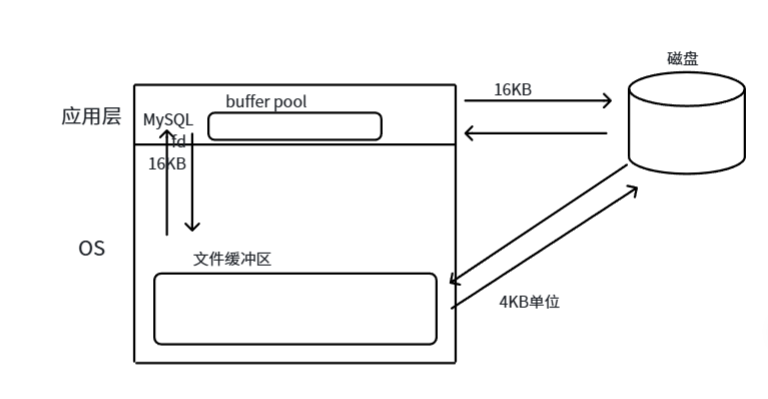
MySQL 作为一款应用软件,可以想象成一种特殊的文件系统。它有着更高的IO场景,所以,为了提高基本的IO效率, MySQL 进行IO的基本单位是 16KB (后面统一使用 InnoDB 存储引擎讲解)
复制代码
mysql> show global status like 'innodb_page_size';
+------------------+-------+
| Variable_name    | Value |
+------------------+-------+
| Innodb_page_size | 16384 |    -- 16*1024=16384
+------------------+-------+
1 row in set (0.00 sec)
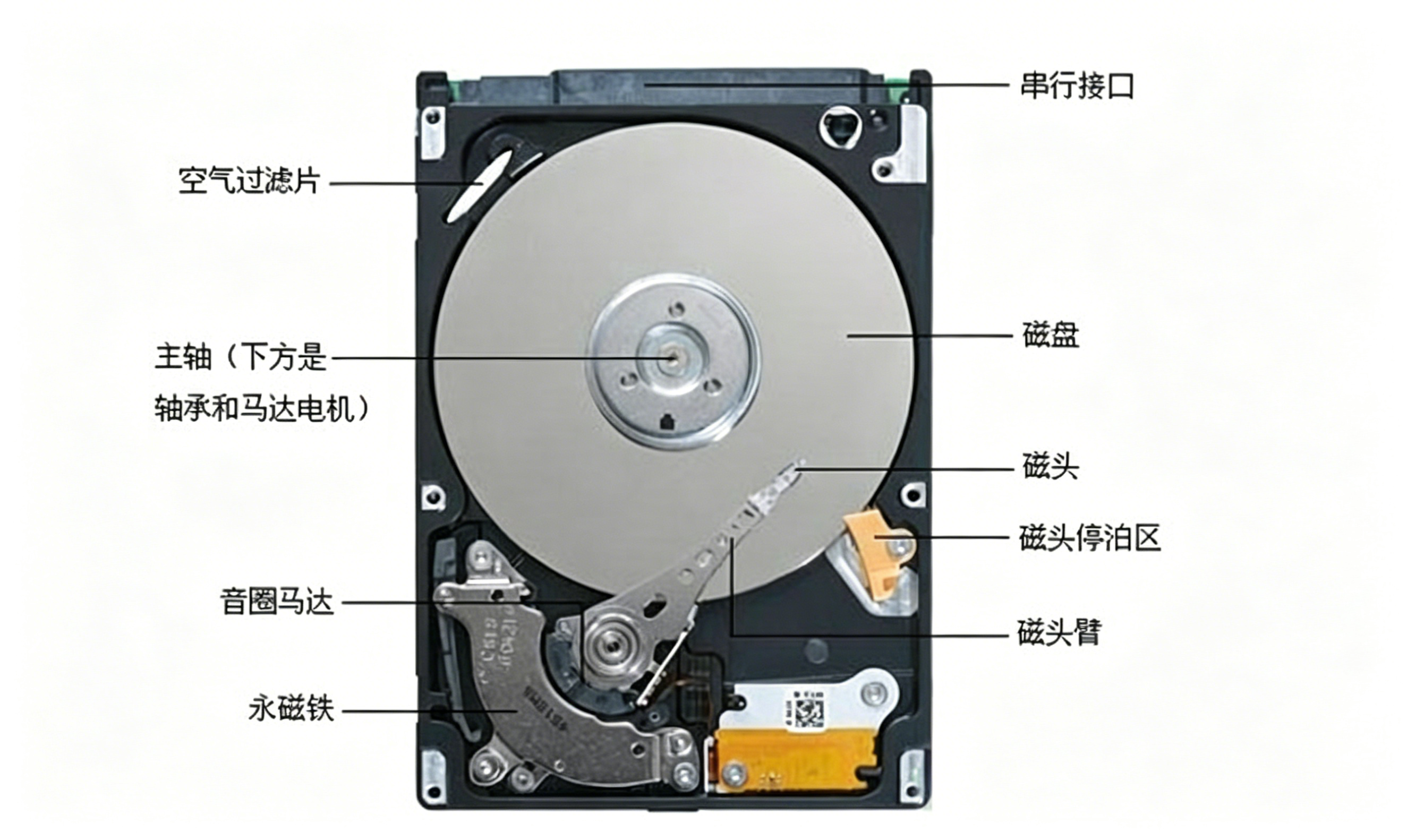
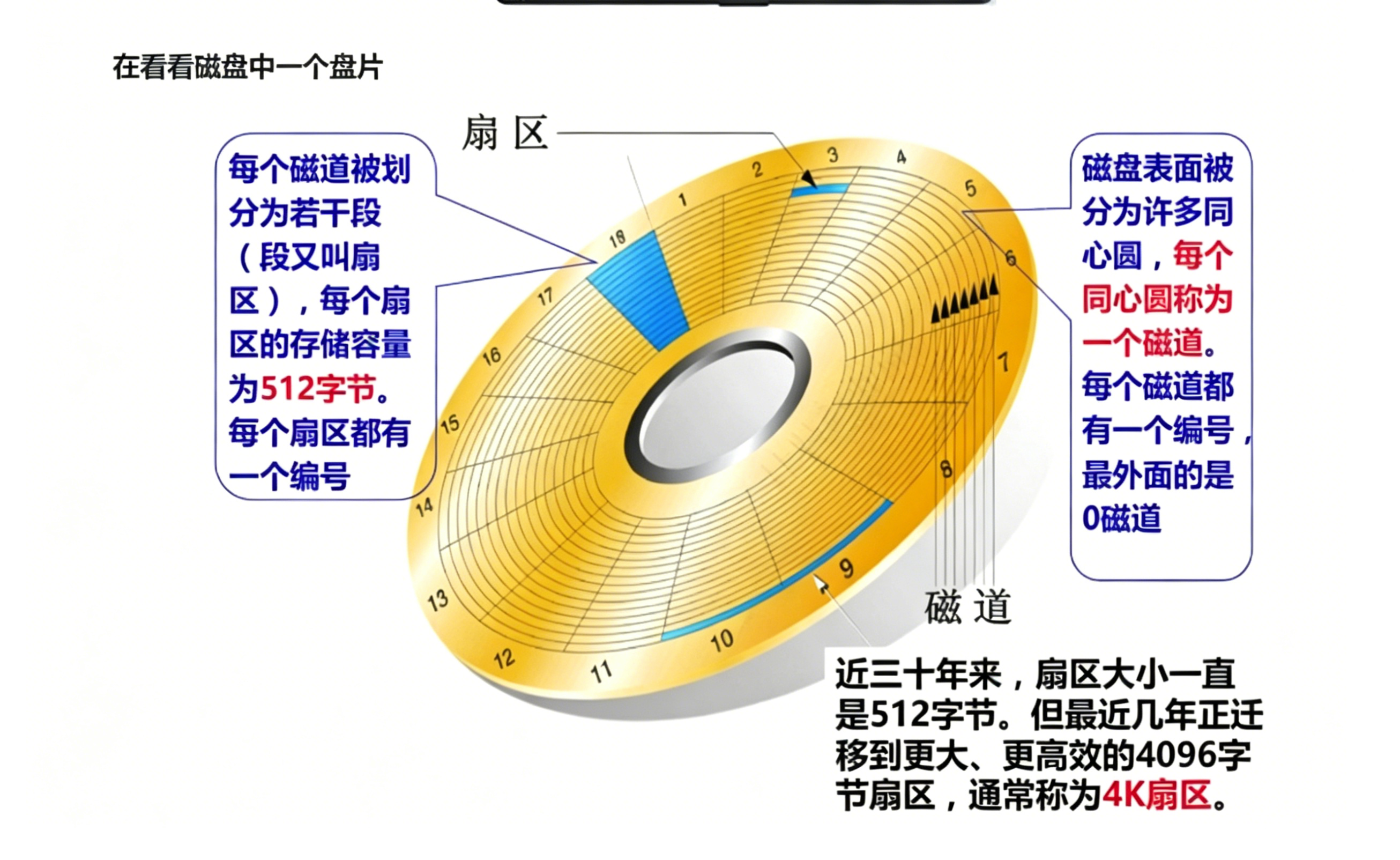
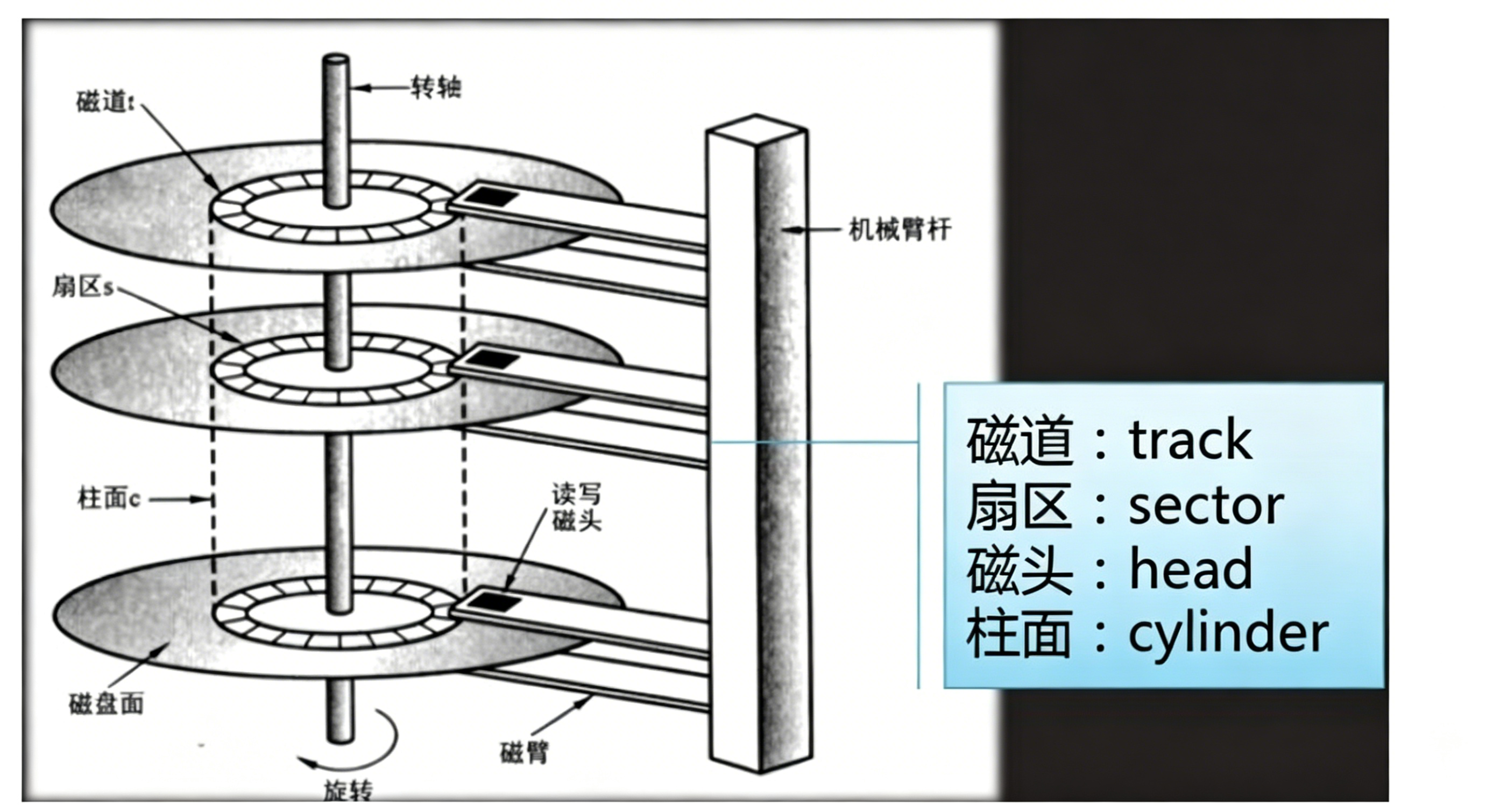
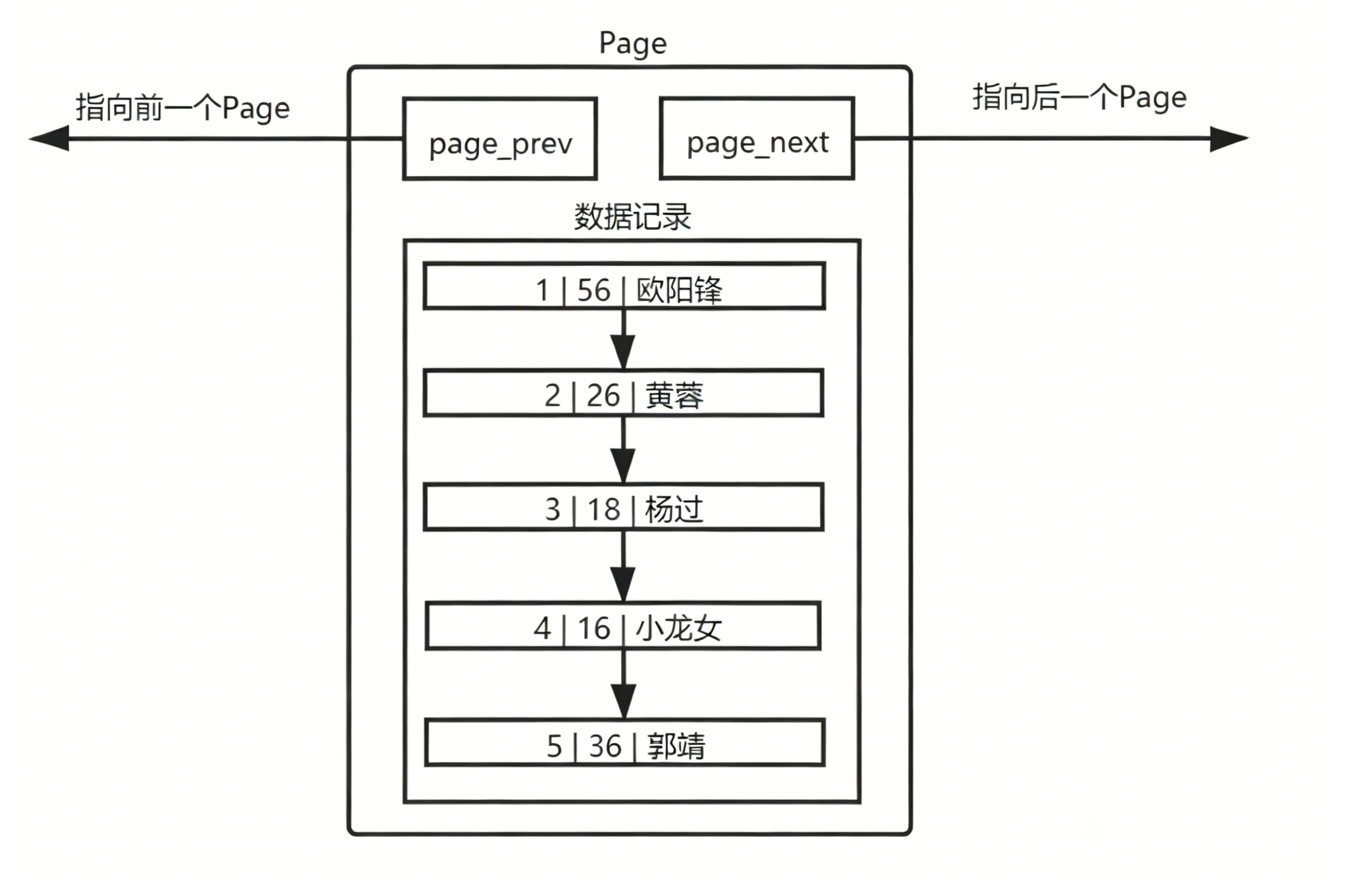
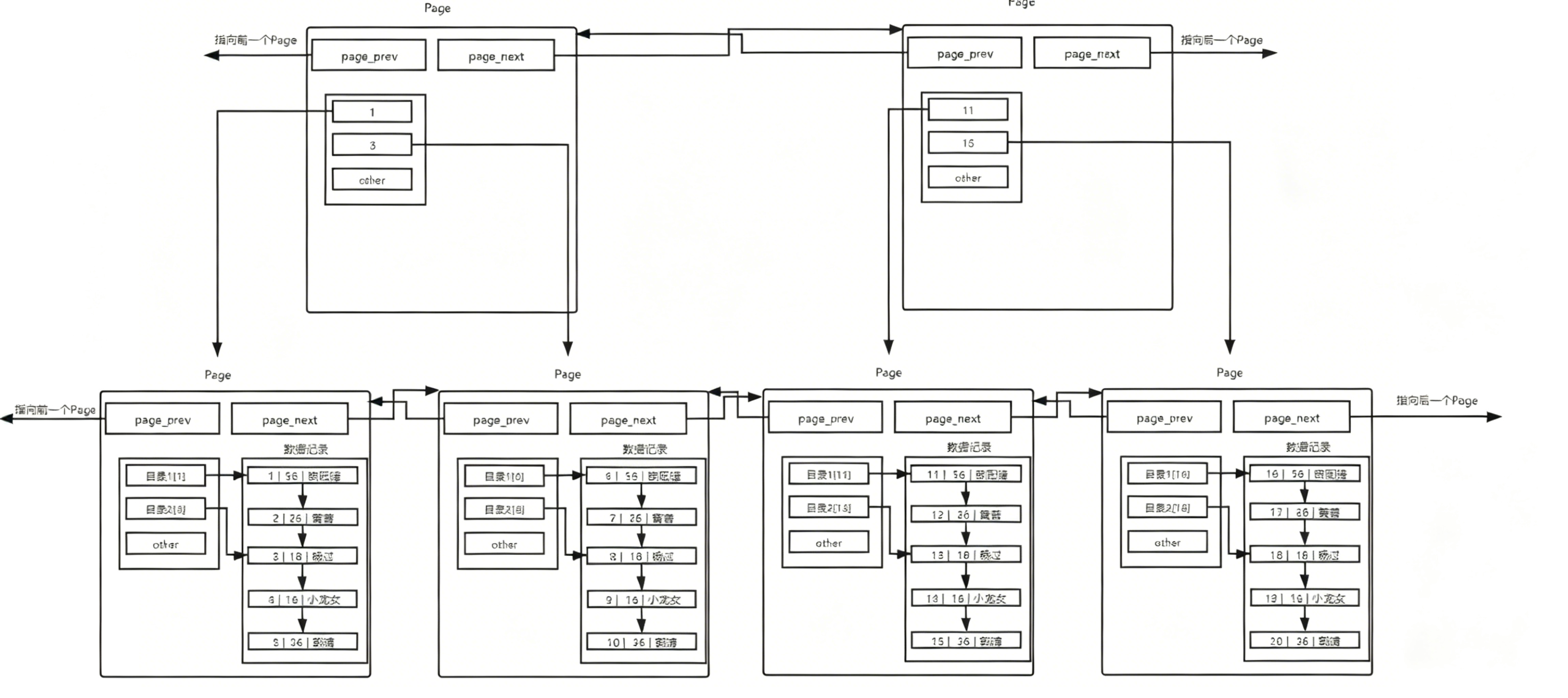
也就是说,磁盘这个硬件设备的基本单位是 512 字节,而 MySQL InnoDB引擎 使用 16KB 进行IO交互。 即, MySQL和磁盘进行数据交互的基本单位是 16KB 。这个基本数据单元,在 MySQL 这里叫做page(注意和系统的page区分)
4.建立共识
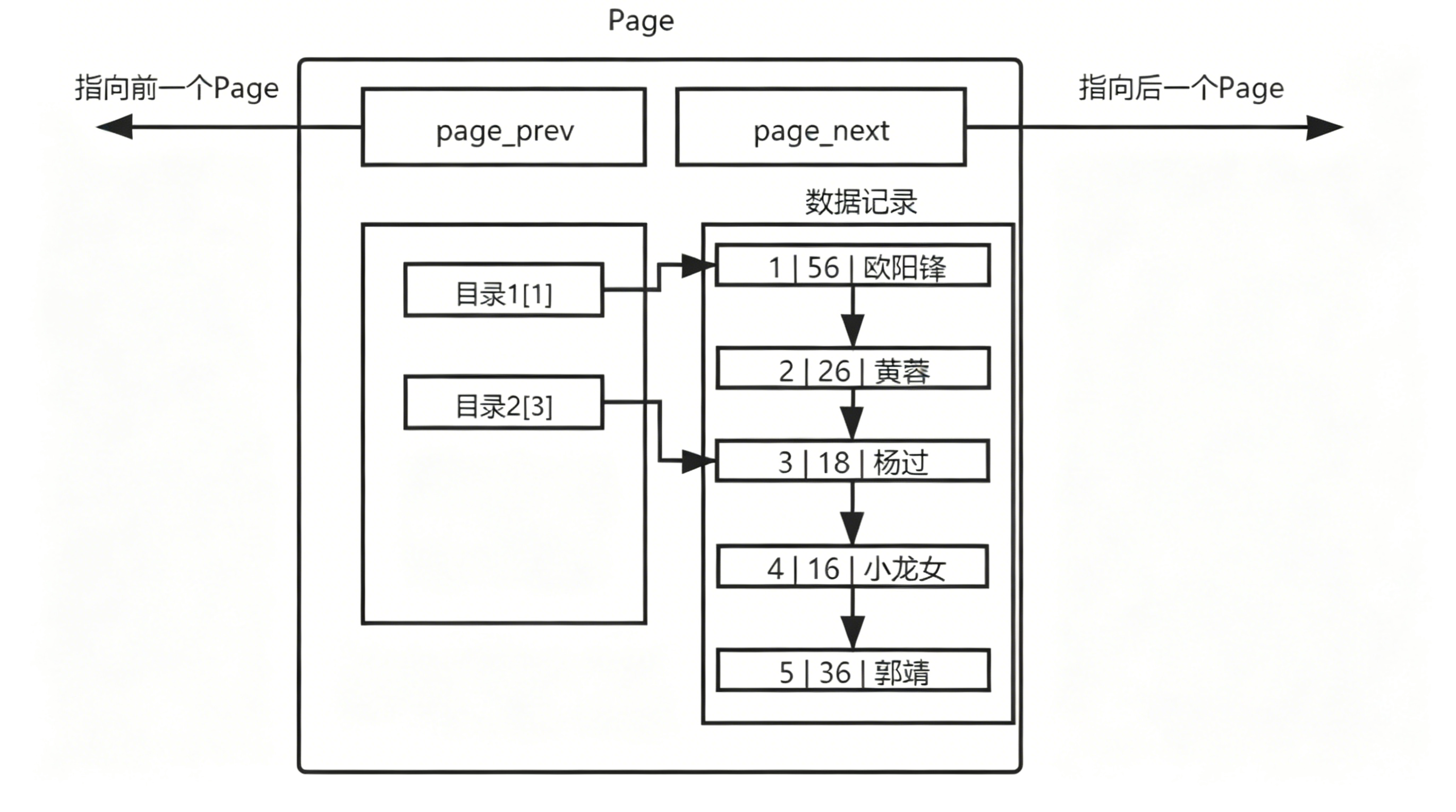
MySQL 中的数据文件,是以page为单位保存在磁盘当中的。
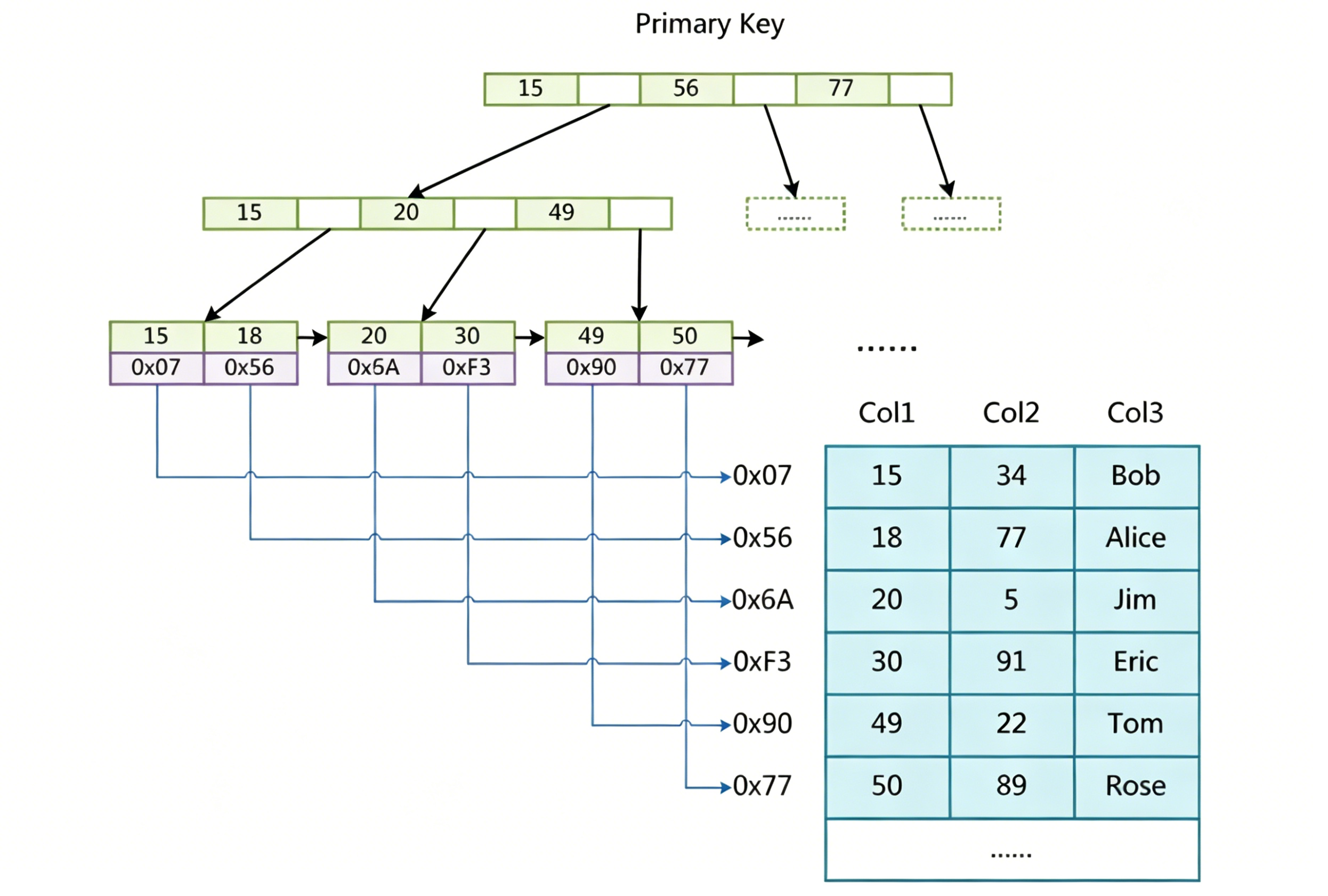
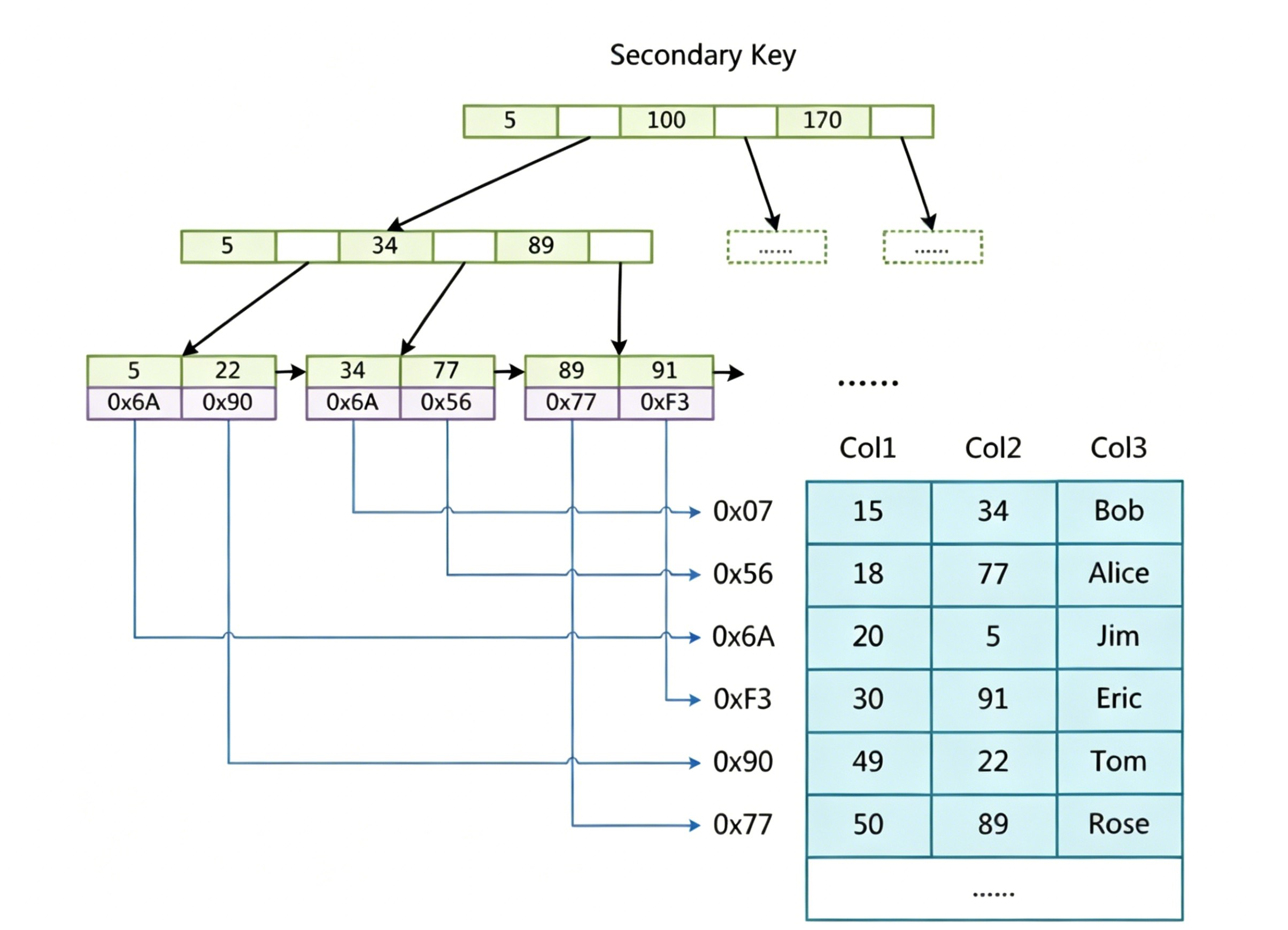
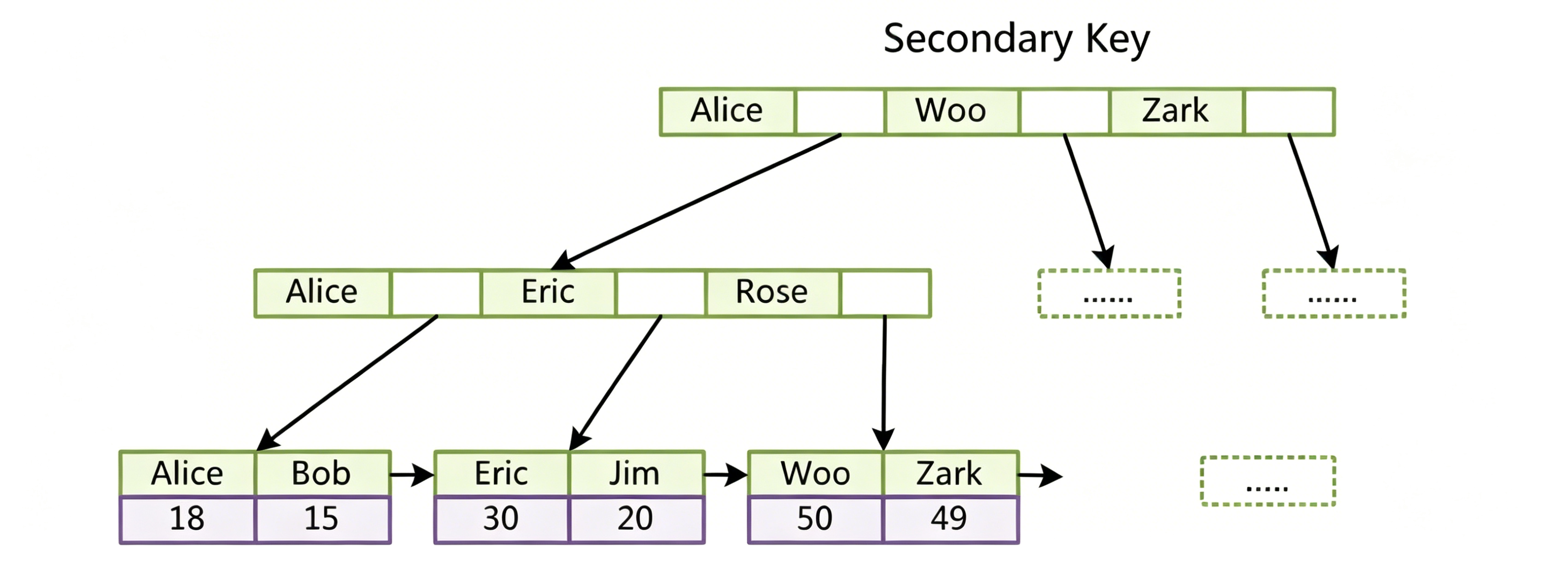
MySQL 的 CURD 操作,都需要通过计算,找到对应的插入位置,或者找到对应要修改或者查询的数据。
为了更好的进行上面的操作, MySQL 服务器在内存中运行的时候,在服务器内部,就申请了被称 为 Buffer Pool 的的大内存空间,来进行各种缓存。其实就是很大的内存空间,来和磁盘数据进行IO交互。
为何更高的效率,一定要尽可能的减少系统和磁盘IO的次数
5.现象和结论
复制代码
mysql> use test_db;
Database changed
创建
复制代码
mysql> create table if not exists user (
    -> id int primary key,    --一定要添加主键哦,只有这样才会默认生成主键索引
    -> age int not null,
    -> name varchar(16) not null
    -> );
Query OK, 0 rows affected (0.01 sec)
[root@iZ5waahoxw3q2bZ ~]# mysql -uroot -p

mysql> create database index_db;
Query OK, 1 row affected (0.01 sec)

mysql> use index_db
Database changed
mysql> create table test1(
    -> id int primary key,
    -> name varchar(20) not null
    -> )engine=innodb;
Query OK, 0 rows affected (0.01 sec)

mysql> show create table test1 \G
*************************** 1. row ***************************
       Table: test1
Create Table: CREATE TABLE `test1` (
  `id` int(11) NOT NULL,
  `name` varchar(20) NOT NULL,
  PRIMARY KEY (`id`)
) ENGINE=InnoDB DEFAULT CHARSET=utf8
1 row in set (0.00 sec)

打开另外一个终端
[root@iZ5waahoxw3q2bZ ~]# cd /var/lib/mysql/index_db
[root@iZ5waahoxw3q2bZ index_db]# ll
total 112
-rw-r----- 1 mysql mysql    61 May 27 08:06 db.opt
-rw-r----- 1 mysql mysql  8586 May 27 08:08 test1.frm
-rw-r----- 1 mysql mysql 98304 May 27 08:08 test1.ibd

mysql> create table test2(
    -> id int primary key,
    -> name varchar(20) not null
    -> )engine=myisam;
Query OK, 0 rows affected (0.00 sec)

mysql> show create table test2 \G
*************************** 1. row ***************************
       Table: test2
Create Table: CREATE TABLE `test2` (
  `id` int(11) NOT NULL,
  `name` varchar(20) NOT NULL,
  PRIMARY KEY (`id`)
) ENGINE=MyISAM DEFAULT CHARSET=utf8
1 row in set (0.00 sec)

另外一个终端
[root@iZ5waahoxw3q2bZ index_db]# ll
total 128
-rw-r----- 1 mysql mysql    61 May 27 08:06 db.opt
-rw-r----- 1 mysql mysql  8586 May 27 08:08 test1.frm
-rw-r----- 1 mysql mysql 98304 May 27 08:08 test1.ibd
-rw-r----- 1 mysql mysql  8586 May 27 08:13 test2.frm
-rw-r----- 1 mysql mysql     0 May 27 08:13 test2.MYD
-rw-r----- 1 mysql mysql  1024 May 27 08:13 test2.MYI
CREATE TABLE articles (
    id INT UNSIGNED AUTO_INCREMENT NOT NULL PRIMARY KEY,
    title VARCHAR(200),
    body TEXT,
    FULLTEXT (title,body)
)engine=MyISAM;

INSERT INTO articles (title,body) VALUES
    ('MySQL Tutorial','DBMS stands for DataBase ...'),
    ('How To Use MySQL Well','After you went through a ...'),
    ('Optimizing MySQL','In this tutorial we will show ...'),
    ('1001 MySQL Tricks','1. Never run mysqld as root. 2. ...'),
    ('MySQL vs. YourSQL','In the following database comparison ...'),
    ('MySQL Security','When configured properly, MySQL ...');
查询有没有database数据
如果使用如下查询方式,虽然查询出数据,但是没有使用到全文索引
复制代码
mysql> select * from articles where body like '%database%';
+----+-------------------+------------------------------------------+
| id | title             | body                                     |
+----+-------------------+------------------------------------------+
|  1 | MySQL Tutorial    | DBMS stands for DataBase ...             |
|  5 | MySQL vs. YourSQL | In the following database comparison ... |
+----+-------------------+------------------------------------------+
2 rows in set (0.01 sec)
可以用explain工具看一下,是否使用到索引
复制代码
mysql> explain select * from articles where body like '%database%'\G
*************************** 1. row ***************************
           id: 1
  select_type: SIMPLE
        table: articles
   partitions: NULL
         type: ALL
possible_keys: NULL
          key: NULL
      key_len: NULL
          ref: NULL
         rows: 6
     filtered: 16.67
        Extra: Using where
1 row in set, 1 warning (0.00 sec)
如何使用全文索引呢?
复制代码
mysql> SELECT * FROM articles
    -> WHERE MATCH (title,body) AGAINST ('database');
+----+-------------------+------------------------------------------+
| id | title             | body                                     |
+----+-------------------+------------------------------------------+
|  5 | MySQL vs. YourSQL | In the following database comparison ... |
|  1 | MySQL Tutorial    | DBMS stands for DataBase ...             |
+----+-------------------+------------------------------------------+
2 rows in set (0.00 sec)
通过explain来分析这个sql语句
复制代码
mysql> explain SELECT * FROM articles WHERE MATCH (title,body) AGAINST ('database')\G
*************************** 1. row ***************************
           id: 1
  select_type: SIMPLE
        table: articles
   partitions: NULL
         type: fulltext
possible_keys: title
          key: title
      key_len: 0
          ref: const
         rows: 1
     filtered: 100.00
        Extra: Using where
1 row in set, 1 warning (0.00 sec)
查询索引
第一种方法:
show keys from 表名
复制代码
mysql> show keys from test1 \G
*************************** 1. row ***************************
        Table: test1
   Non_unique: 0
     Key_name: PRIMARY
 Seq_in_index: 1
  Column_name: id
    Collation: A
  Cardinality: 0
     Sub_part: NULL
       Packed: NULL
         Null:
   Index_type: BTREE
      Comment:
Index_comment:
1 row in set (0.00 sec)
第二种方法:
show index from 表名;
复制代码
mysql> show index from test1 \G
*************************** 1. row ***************************
        Table: test1
   Non_unique: 0
     Key_name: PRIMARY
 Seq_in_index: 1
  Column_name: id
    Collation: A
  Cardinality: 0
     Sub_part: NULL
       Packed: NULL
         Null:
   Index_type: BTREE
      Comment:
Index_comment:
1 row in set (0.00 sec)
第三种方法(信息比较简略):
desc 表名;
复制代码
mysql> desc test1;
+-------+-------------+------+-----+---------+-------+
| Field | Type        | Null | Key | Default | Extra |
+-------+-------------+------+-----+---------+-------+
| id    | int(11)     | NO   | PRI | NULL    |       |
| name  | varchar(20) | NO   |     | NULL    |       |
+-------+-------------+------+-----+---------+-------+
2 rows in set (0.00 sec)
删除索引
第一种方法-删除主键索引:
alter table 表名 drop primary key;
复制代码
mysql> alter table test1 drop primary key;
Query OK, 0 rows affected (0.01 sec)
Records: 0  Duplicates: 0  Warnings: 0

mysql> show index from test1 \G
Empty set (0.00 sec)