一、问题表现

SmartRefreshLayout 开启 mEnableAutoLoadMore(自动加载更多)后,用户向下拉出 Header 一点点松手回弹 (或惯性滑动触顶越界)时,会异常触发 onLoadMore (上拉加载更多) 。
二、 根源剖析:时钟域错位与时序异常
该 Bug 的根本原因是 Android 系统的 Vsync 帧时钟(帧锁死期) 与 主线程 Handler 的实时物理时钟(非锁死期) 在同一主线程的消息队列调度过程中发生了 跨时钟域的时序错位。
2.1 AOSP 时钟哲学与 lockAnimationClock 锁死机制
Android 系统的 AnimationUtils 维护了一个静态的线程局部变量(ThreadLocal)来管理动画时钟,其官方真实源码如下:
java
private static class AnimationState {
    boolean animationClockLocked;
    long currentVsyncTimeMillis;
    long lastReportedTimeMillis;
};

private static ThreadLocal<AnimationState> sAnimationState
= new ThreadLocal<AnimationState>() {
    @Override
    protected AnimationState initialValue() {
        return new AnimationState();
    }
};

/**
* Returns the current animation time in milliseconds. This time should be used when invoking
* {  @link  Animation#setStartTime(long)}. Refer to {  @link  android.os.SystemClock} for more
* information about the different available clocks. The clock used by this method is
* <em>not</em> the "wall" clock (it is not {  @link  System#currentTimeMillis}).
*
*  @return  the current animation time in milliseconds
*
*  @see  android.os.SystemClock
*/
public static long currentAnimationTimeMillis() {
    AnimationState state = sAnimationState.get();
    if (state.animationClockLocked) {
        // It's important that time never rewinds
        return Math.max(state.currentVsyncTimeMillis,
                state.lastReportedTimeMillis);
    }
    state.lastReportedTimeMillis = SystemClock.uptimeMillis();
    return state.lastReportedTimeMillis;
}
2.1.1 lockAnimationClock 的设计约束
根据 Android AOSP 官方源码对于 lockAnimationClock(long vsyncMillis) 方法的详细英文注释,我们可以直窥其底层时钟机制的设计哲学:
java
/**
 * Locks AnimationUtils{  @link  #currentAnimationTimeMillis()} to a fixed value for the current
 * thread. This is used by {  @link  android.view.Choreographer} to ensure that all accesses
 * during a vsync update are synchronized to the timestamp of the vsync.
 *
 * It is also exposed to tests to allow for rapid, flake-free headless testing.
 *
 * Must be followed by a call to {  @link  #unlockAnimationClock()} to allow time to
 * progress. Failing to do this will result in stuck animations, scrolls, and flings.
 *
 * Note that time is not allowed to "rewind" and must perpetually flow forward. So the
 * lock may fail if the time is in the past from a previously returned value, however
 * time will be frozen for the duration of the lock. The clock is a thread-local, so
 * ensure that {  @link  #lockAnimationClock(long)}, {  @link  #unlockAnimationClock()}, and
 * {  @link  #currentAnimationTimeMillis()} are all called on the same thread.
 *
 * This is also not reference counted in any way. Any call to {  @link  #unlockAnimationClock()}
 * will unlock the clock for everyone on the same thread. It is therefore recommended
 * for tests to use their own thread to ensure that there is no collision with any existing
 * {  @link  android.view.Choreographer} instance.
 *
 *  @hide
 * */
@TestApi
public static void lockAnimationClock(long vsyncMillis) {
    AnimationState state = sAnimationState.get();
    state.animationClockLocked = true;
    state.currentVsyncTimeMillis = vsyncMillis;
}
"Note that time is not allowed to 'rewind' and must perpetually flow forward. So the lock may fail if the time is in the past from a previously returned value, however time will be frozen for the duration of the lock."
(译:注意,时间是不允许"倒回/回退"的,它必须永远向前流动。因此,如果锁定的时间在之前已返回时间的"过去",锁可能会失效,但在锁定期间时间会被冻结。)
为了保证这一"时间单调递增"的约束,Android 在 currentAnimationTimeMillis() 内部以 Math.max(currentVsyncTimeMillis, lastReportedTimeMillis) 实现了时间戳的单调递增保障。
2.1.2 锁死期"只读不写"的 API 使用边界约定
这套防倒流防线在锁死期内存在一个经过刻意设计 的 "只读不写" 约束(这是 Google 工程师有意为之的设计规范,不是漏洞):
- 在
state.animationClockLocked == true的锁死期内,调用时钟虽然会进行Math.max比对并返回较大值,但这是一个纯只读操作,源码不会将计算出来的较大时间戳写回state.lastReportedTimeMillis字段。 - 这个设计的初衷是:同帧内所有动画时钟读取都应在同一个锁死期上下文内进行 (AOSP 注释明确要求
lockAnimationClock、unlockAnimationClock、currentAnimationTimeMillis必须在同一线程的同一帧周期内成对调用)。lastReported只在锁完全释放后的常规非锁死期才会被推进,确保帧内时钟完全幂等、稳定一致------这正是 Vsync 帧对齐机制的精髓所在。 - SmartRefreshLayout 的根本问题在于 :
BounceRunnable在帧锁死期(T0)读取了 Vsync 帧时钟值作为mLastTime,却在下一个 Looper 消息的非锁死期(T1)才读取实时物理时钟作为now------两次读取分属不同时钟域,差值语义不一致,从而导致时间步长为负。
2.2 帧时钟域与实时物理时钟域的差异
在多高刷与多缓冲渲染管线中,Choreographer 在触发 doFrame 帧渲染时传入的并非当前实时时间,而是预测该帧被投递到屏幕时的期望显示时间(Expected Presentation Time) 。
这使得同一主线程在运行时存在两种不同的时钟语义:
- Vsync 帧时钟(帧锁死期,
locked: true) :时钟锁定为 Choreographer 预期的未来显示时间,通常比当前物理时间提前 20ms ~ 30ms,用于保障同帧内所有动画时间戳的一致性。 - 实时物理时钟(非锁死期,
locked: false) :时钟直接返回SystemClock.uptimeMillis()的当前物理时间。
2.2.1 实测日志数据与时序分析
为在真机上复现并验证时钟域错位问题,通过以下方式对 BounceRunnable 进行插桩:在构造方法(T0)和第一帧 run()(T1)分别读取 SystemClock.uptimeMillis() 与 AnimationUtils.currentAnimationTimeMillis(),并通过反射获取主线程当前的 AnimationState 对象字段快照。
① 引入依赖( build.gradle )
arduino
dependencies {
    implementation 'org.lsposed.hiddenapibypass:hiddenapibypass:4.3'
}
② AnimationState 反射工具类( TestUtil.java )
由于 AnimationUtils.sAnimationState 是非公开 API,Android 9+ 默认禁止反射访问。TestUtil 通过 HiddenApiBypass 解除限制后,使用标准 Java 反射读取 AnimationState 的三个关键字段:
ini
public class TestUtil {

    private static final String TAG = "SRL_DEBUG";
    private static boolean sBypassed = false;

    /**
     * 通过反射获取 AnimationUtils 的 ThreadLocal sAnimationState 局部变量的所有字段值并高 亮打印
     * 使用 HiddenApiBypass 绕过 Android 9+ 对非 SDK 隐藏接口的反射限制
     *
     *  @param  tag 日志的前缀标签
    */
    public static void printAnimationState(String tag) {
        try {
            // 1. 首次调用时,通过 HiddenApiBypass 豁免所有隐藏 API 限制
            if (!sBypassed) {
                try {
                    if (Build.VERSION.SDK_INT >= Build.VERSION_CODES.P) {
                        org.lsposed.hiddenapibypass.HiddenApiBypass.addHiddenApiExemptions("L");
                        Log.e(TAG, "Successfully added HiddenApi exemptions via HiddenApiBypass!");
                    }
                    sBypassed = true;
                } catch (Throwable t) {
                    Log.e(TAG, "Failed to initialize HiddenApiBypass: " + t.getMessage(), t);
                }
            }

            // 2. 豁免之后,直接使用最标准的 Java 反射获取 sAnimationState
            Field sAnimationStateField = AnimationUtils.class.getDeclaredField("sAnimationState");
            sAnimationStateField.setAccessible(true);
            ThreadLocal<?> sAnimationState = (ThreadLocal<?>) sAnimationStateField.get(null);

            if (sAnimationState == null) {
                Log.e(TAG, tag + " -> sAnimationState is null!");
                return;
            }

            // 3. 从 ThreadLocal 中拿到当前线程的 AnimationState 对象
            Object animationStateObj = sAnimationState.get();
            if (animationStateObj == null) {
                Log.e(TAG, tag + " -> animationStateObj is null!");
                return;
            }

            Class<?> animationStateClass = animationStateObj.getClass();

            // 4. 直接使用最标准的 Java 反射获取私有内部类的各个字段
            Field lockedField = animationStateClass.getDeclaredField("animationClockLocked");
            lockedField.setAccessible(true);
            boolean animationClockLocked = (boolean) lockedField.get(animationStateObj);

            Field vsyncField = animationStateClass.getDeclaredField("currentVsyncTimeMillis");
            vsyncField.setAccessible(true);
            long currentVsyncTimeMillis = (long) vsyncField.get(animationStateObj);

            Field lastReportedField = animationStateClass.getDeclaredField("lastReportedTimeMillis");
            lastReportedField.setAccessible(true);
            long lastReportedTimeMillis = (long) lastReportedField.get(animationStateObj);

            // 4. 获取对象的唯一 Identity HashCode,用以验证是否为同一个 Java 堆对象
            int objHashCode = System.identityHashCode(animationStateObj);

            // 5. 打印输出
            Log.e(TAG, String.format("[%s] ThreadLocal AnimationState (Obj: @%x) -> " +
                    "locked: %b, " +
                    "currentVsync: %d, " +
                    "lastReported: %d",
                    tag, objHashCode, animationClockLocked, currentVsyncTimeMillis, lastReportedTimeMillis));

        } catch (Throwable e) {
            Log.e(TAG, tag + " -> Failed to reflect AnimationState: " + e.getMessage(), e);
        }
    }
}
③ BounceRunnable 插桩点
java
protected class BounceRunnable implements Runnable {

    BounceRunnable(float velocity, int smoothDistance) {
        // ...
        // T0:记录当前物理时间与帧时钟快照(构造时处于帧锁死期内)
        Log.d("SRL_DEBUG", "[BounceRunnable Constructor] SystemClock.uptimeMillis() = " + SystemClock.uptimeMillis());
        mLastTime = AnimationUtils.currentAnimationTimeMillis();
        TestUtil.printAnimationState("BounceRunnable Constructor");
        mHandler.postDelayed(this, mFrameDelay);
    }

    @Override
    public void run() {
        if (animationRunnable == this && !mState.isFinishing) {
            // T1:记录 run() 执行时的物理时间与帧时钟快照(此时已在非锁死期)
            Log.d("SRL_DEBUG", "[BounceRunnable run]" + " SystemClock.uptimeMillis() = " + SystemClock.uptimeMillis());
            long now = AnimationUtils.currentAnimationTimeMillis();
            com.scwang.smart.refresh.layout.util.TestUtil.printAnimationState("BounceRunnable Run");
            float t = 1f * (now - mLastTime) / 1000;
            float velocity = mVelocity * t;
            if (now < mLastTime) {
                android.util.Log.e("SRL_DEBUG", "Detected Time Rewinds in BounceRunnable! now(" + now + ") < mLastTime(" + mLastTime + "), time step t = " + t + ", velocity = " + velocity);
            }
            // ...
        }
    }
}
④ 捕获的实测日志

less
// T0 时刻:20:20:36.188,Traversal 重绘期间(帧锁死期,locked: true)
D/SRL_DEBUG: [BounceRunnable Constructor] SystemClock.uptimeMillis() = 49392919
E/SRL_DEBUG: [BounceRunnable Constructor] AnimationState (Obj: @87d2f05) -> locked: true, currentVsync: 49392943, lastReported: 49392895

// T1 时刻:20:20:36.200,第 1 帧 run()(帧已结束,locked: false)------ 时钟逆序
D/SRL_DEBUG: [BounceRunnable run] SystemClock.uptimeMillis() = 49392930
E/SRL_DEBUG: [BounceRunnable Run] AnimationState (Obj: @87d2f05) -> locked: false, currentVsync: 49392943, lastReported: 49392931
E/SRL_DEBUG: Detected Time Rewinds in BounceRunnable! now(49392931) < mLastTime(49392943), time step t = -0.012, velocity = -165.51784

// T2 时刻:20:20:36.230,第 2 帧 run()(步长恢复正常)
D/SRL_DEBUG: [BounceRunnable run] SystemClock.uptimeMillis() = 49392961
E/SRL_DEBUG: [BounceRunnable Run] AnimationState (Obj: @87d2f05) -> locked: false, currentVsync: 49392954, lastReported: 49392961

// T3 时刻:20:20:36.240,第 3 帧 run()
D/SRL_DEBUG: [BounceRunnable run] SystemClock.uptimeMillis() = 49392971
E/SRL_DEBUG: [BounceRunnable Run] AnimationState (Obj: @87d2f05) -> locked: false, currentVsync: 49392965, lastReported: 49392971

// T4 时刻:20:20:36.251,第 4 帧 run()
D/SRL_DEBUG: [BounceRunnable run] SystemClock.uptimeMillis() = 49392982
E/SRL_DEBUG: [BounceRunnable Run] AnimationState (Obj: @87d2f05) -> locked: false, currentVsync: 49392976, lastReported: 49392982

// T5 时刻:20:20:36.261,第 5 帧 run()
D/SRL_DEBUG: [BounceRunnable run] SystemClock.uptimeMillis() = 49392992
E/SRL_DEBUG: [BounceRunnable Run] AnimationState (Obj: @87d2f05) -> locked: false, currentVsync: 49392987, lastReported: 49392992

// T6 时刻:20:20:36.271,第 6 帧 run()
D/SRL_DEBUG: [BounceRunnable run] SystemClock.uptimeMillis() = 49393002
E/SRL_DEBUG: [BounceRunnable Run] AnimationState (Obj: @87d2f05) -> locked: false, currentVsync: 49392998, lastReported: 49393002

// 20:20:36.504,onLoadMore 被触发(构造后约 316ms,即 mReboundDuration 延迟后回调)
D/SRL_DEBUG: onLoadMore
同一
AnimationState实例的确认 所有帧日志中Obj: @87d2f05对象哈希完全一致,确认 T0~T6 全程操作的是同一主线程的同一AnimationState实例,排除了 ThreadLocal 跨线程隔离或对象重新创建的可能。
数据解读:
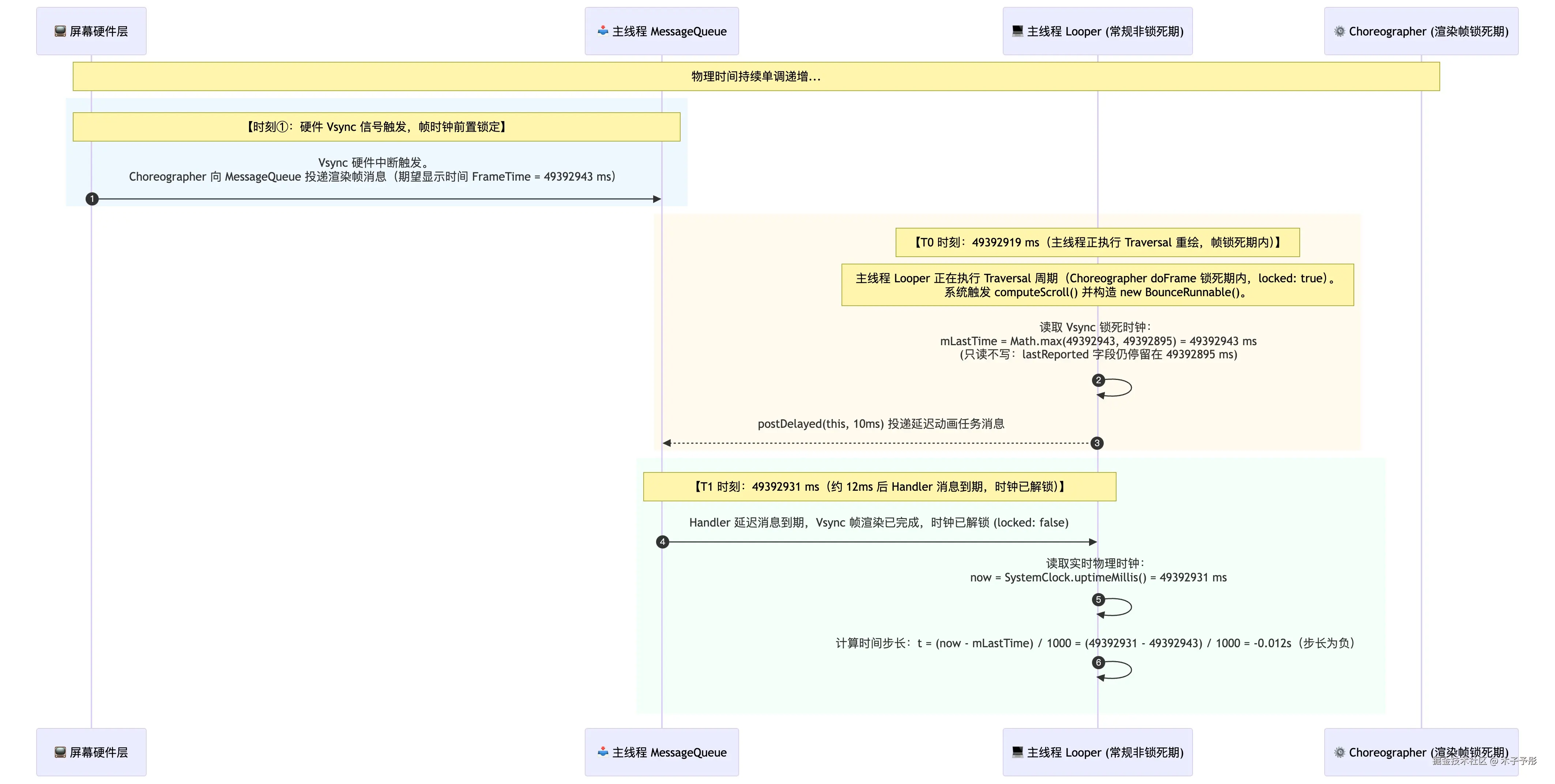
mLastTime = 49392943 ms(Vsync 帧时钟域,T0 时刻) : T0 时刻,主线程处于 Vsync 渲染锁死期(locked: true)。当前物理时间为49392919 ms,帧时钟被 Choreographer 前置锁定为期望显示时间49392943 ms(提前约 24ms)。currentAnimationTimeMillis()返回Math.max(49392943, 49392895) = 49392943,mLastTime锚定此值。由于锁死期内只读不写,state.lastReported仍停留在49392895,帧时钟值未被写回 ThreadLocal。now = 49392931 ms(实时物理时钟域,T1 时刻) : T1 时刻(约 12ms 后),Handler 延迟消息到期,第 1 帧run()被调度。时钟已解锁(locked: false),currentAnimationTimeMillis()直接返回SystemClock.uptimeMillis() = 49392931 ms。- 第 1 帧:跨时钟域差值导致时间步长为负 :
mLastTime来自帧时钟域(T0),now来自实时物理时钟域(T1),尽管物理时间向前流逝了约 12ms,帧时钟的 24ms 提前量仍使差值为负: now (49392931)<mLastTime (49392943) t=100049392931−49392943=−0.012 秒 负步长使速度反转,velocity = mVelocity * t = -165.5,moveSpinnerInfinitely接收到负偏移,触发自动加载误判。 - 第 2~6 帧:步长恢复正常,但误判已产生 : T2 起时钟完全处于非锁死期,
now持续单调增长,不再出现now < mLastTime。但第 1 帧的负位移已写入mOffset并触发状态机,后续正常帧无法撤销这一误判。
关键结论:帧时钟提前量仅需超过 Handler 调度延迟即可触发该缺陷。本次实测帧时钟提前 24ms,物理延迟约 12ms,
t = -0.012s,产生velocity = -165.5(远超|velocity| ≥ 1的阈值),最终在约 316ms 后触发onLoadMore。该缺陷在任何存在帧调度抖动的设备上均可复现。
2.2.2 Vsync 调度与 Handler 消息的时序交错示意图
以下时序图还原了硬件 Vsync 调度与 Handler 延迟消息在主线程中的调度交错过程,精确到毫秒级:
三、 缺陷流转与全链路剖析
整个 Bug 的流转逻辑横跨 Nested Scrolling 手势判定、Scroller 越界检测、Runnable 动画计算、及自动加载状态机判定。
3.1 链路一:惯性越界捕捉
当惯性滑动(Fling)或手势向下拉导致列表触顶/触底时,系统回调 computeScroll 方法检测越界:
scss
@Override
public void computeScroll() {
    int lastCurY = mScroller.getCurrY();
    if (mScroller.computeScrollOffset()) {
        int finalY = mScroller.getFinalY();
        // finalY < 0:向下拉越界(触顶);finalY > 0:向上拉越界(触底)
        if ((finalY < 0 && (mEnableRefresh || mEnableOverScrollDrag) && mRefreshContent.canRefresh())
                || (finalY > 0 && (mEnableLoadMore || mEnableOverScrollDrag) && mRefreshContent.canLoadMore())) {
            if (mVerticalPermit) {
                float velocity;
                // 根据越界方向取正/负速度:触底时取反,触顶时保持正值
                velocity = finalY > 0 ? -mScroller.getCurrVelocity() : mScroller.getCurrVelocity();
                animSpinnerBounce(velocity); // 派发越界回弹
            }
            mScroller.forceFinished(true); // 强行中止 Scroller 惯性
        } else {
            mVerticalPermit = true; // 打开竖直通行证
            final View thisView = this;
            thisView.invalidate();
        }
    }
}
3.2 链路二:动画创建与时钟锚定
animSpinnerBounce 根据速度方向和当前状态创建对应的回弹任务:
ini
protected void animSpinnerBounce(final float velocity) {
    if (reboundAnimator == null) {
        if (velocity > 0 && (mState == RefreshState.Refreshing || mState == RefreshState.TwoLevel)) {
            // 正在刷新时触顶越界:回弹到 HeaderHeight
            animationRunnable = new BounceRunnable(velocity, mHeaderHeight);
        } else if (velocity < 0 && (mState == RefreshState.Loading
                || (mEnableFooterFollowWhenNoMoreData && mFooterNoMoreData && mFooterNoMoreDataEffective && isEnableRefreshOrLoadMore(mEnableLoadMore))
                || (mEnableAutoLoadMore && !mFooterNoMoreData && isEnableRefreshOrLoadMore(mEnableLoadMore) && mState != RefreshState.Refreshing))) {
            // 正在加载 / 自动加载模式触底越界:回弹到 -FooterHeight
            animationRunnable = new BounceRunnable(velocity, -mFooterHeight);
        } else if (mSpinner == 0 && mEnableOverScrollBounce) {
            // 普通越界回弹(非刷新/加载状态):smoothDistance = 0,往外拉再滑回原点
            animationRunnable = new BounceRunnable(velocity, 0);
        }
    }
}
进入 BounceRunnable 的构造方法进行时钟锚定:
ini
BounceRunnable(float velocity, int smoothDistance) {
    mVelocity = velocity;
    mSmoothDistance = smoothDistance;
    mLastTime = AnimationUtils.currentAnimationTimeMillis(); // T0 时刻:处于帧锁死期内,读取到 Vsync 帧时钟值 (49392943ms)
    mHandler.postDelayed(this, mFrameDelay); // 10ms 后开始第一帧 run() 调度
    if (velocity > 0) {
        mKernel.setState(RefreshState.PullDownToRefresh);
    } else {
        mKernel.setState(RefreshState.PullUpToLoad);
    }
}
3.3 链路三:帧计算与速度逆转
10ms 后,Handler 延迟消息到期,主线程 Looper 调度执行 BounceRunnable.run() 的第一帧(此时帧渲染已结束,时钟处于非锁死期):
scss
// SmartRefreshLayout.java:1564
@Override
public void run() {
    if (animationRunnable == this && !mState.isFinishing) {
        // 1. 根据当前位移与目标距离,选择不同的阻尼衰减系数
        if (Math.abs(mSpinner) >= Math.abs(mSmoothDistance)) {
            if (mSmoothDistance != 0) {
                mVelocity *= Math.pow(0.45f, ++mFrame * 2); // 刷新/加载时回弹:强衰减
            } else {
                mVelocity *= Math.pow(0.85f, ++mFrame * 2); // 普通越界回弹:中等衰减
            }
        } else {
            mVelocity *= Math.pow(0.95f, ++mFrame * 2);     // 平滑滚动阶段:弱衰减
        }

        // 2. 读取实时物理时钟。T1 时刻:now (49392931ms) < mLastTime (49392943ms),步长为负
        long now = AnimationUtils.currentAnimationTimeMillis();
        float t = 1f * (now - mLastTime) / 1000; // 核心隐患:计算出 t = -0.012f

        // 3. 计算本帧位移步长,负步长导致速度方向反转
        float velocity = mVelocity * t;

        if (Math.abs(velocity) >= 1) {
            mLastTime = now;
            mOffset += velocity;                  // 位移累加,此处 mOffset 变为负值
            moveSpinnerInfinitely(mOffset);       // 传入负数偏移
            mHandler.postDelayed(this, mFrameDelay);
        } else {
            // 速度衰减至不足 1 时,停止动画并进行状态清理
            if (mViceState.isDragging && mViceState.isHeader) {
                mKernel.setState(RefreshState.PullDownCanceled);
            } else if (mViceState.isDragging && mViceState.isFooter) {
                mKernel.setState(RefreshState.PullUpCanceled);
            }
            animationRunnable = null;
            if (Math.abs(mSpinner) >= Math.abs(mSmoothDistance)) {
                int duration = 10 * Math.min(Math.max((int) SmartUtil.px2dp(Math.abs(mSpinner - mSmoothDistance)), 30), 100);
                animSpinner(mSmoothDistance, 0, mReboundInterpolator, duration);
            }
        }
    }
}
3.4 链路四:异常边界与加载误触
moveSpinnerInfinitely 负责根据偏移量执行阻尼位移,并在末尾判断自动加载条件。以下展示与本缺陷直接相关的两个关键部分(省略了 TwoLevel、Refreshing 等无关分支的阻尼计算):
java
protected void moveSpinnerInfinitely(float spinner) {
    final View thisView = this;
    // ... 省略嵌套滚动边界判定和阻尼位移计算(5 个分支:TwoLevel/Refreshing/Loading/正向/负向)
    // 核心逻辑:根据 spinner 的正/负及当前状态,经阻尼公式 y = M(1-100^(-x/H)) 计算实际位移
    // 最终调用 mKernel.moveSpinner((int) y, true) 执行 UI 位移

    // ↓↓↓ 自动加载判定(与本缺陷直接相关)↓↓↓
    if (mEnableAutoLoadMore && !mFooterNoMoreData && isEnableRefreshOrLoadMore(mEnableLoadMore) && spinner < 0
            && mState != RefreshState.Refreshing
            && mState != RefreshState.Loading
            && mState != RefreshState.LoadFinish) {
        // 缺陷点:仅凭 spinner < 0 即判定为上拉露出 Footer,未校验位移来源
        if (mDisableContentWhenLoading) {
            animationRunnable = null;
            mKernel.animSpinner(-mFooterHeight);
        }
        setStateDirectLoading(false); // 直接进入 Loading 状态
        // 延迟 mReboundDuration 后触发 onLoadMore 回调
        mHandler.postDelayed(() -> {
            if (mLoadMoreListener != null) {
                mLoadMoreListener.onLoadMore(SmartRefreshLayout.this); // 误触发!
            } else if (mOnMultiListener == null) {
                finishLoadMore(2000);
            }
            final OnLoadMoreListener listener = mOnMultiListener;
            if (listener != null) {
                listener.onLoadMore(SmartRefreshLayout.this);
            }
        }, mReboundDuration);
    }
}
四、 防御性修复方案
在物理公式层面切断负步长引起的速度方向逆转,可从源头杜绝该缺陷在卡顿掉帧场景下的发生。
4.1 修复 BounceRunnable
防线在 BounceRunnable.run() 方法内,对计算得到的时间增量进行 Math.max(0, ...) 防御性截断,确保步长时间自变量绝对不为负:
ini
-long now = AnimationUtils.currentAnimationTimeMillis();
-float t = 1f * (now - mLastTime) / 1000;
+long now = AnimationUtils.currentAnimationTimeMillis();
+float t = Math.max(0, 1f * (now - mLastTime) / 1000); // 强限制时间差不能小于 0
 float velocity = mVelocity * t;
4.2 修复 FlingRunnable
同样在惯性滑动任务 FlingRunnable.run() 中进行时间跨度截断拦截:
ini
-long now = AnimationUtils.currentAnimationTimeMillis();
-long span = now - mLastTime;
+long now = AnimationUtils.currentAnimationTimeMillis();
+long span = Math.max(0, now - mLastTime); // 强限制时间跨度不能小于 0
通过此修复,当系统卡顿导致 now < mLastTime(时钟逆序)时,时间步长被截断为 0,位移 mOffset 保持不变,从根本上阻止了负值位移的产生,从而消除该缺陷在帧时序异常场景下的复现。