引言
之前在SpringCloud微服务与大模型之间有一个隔阂,而Spring AI AIibaba的出现就是为了把这两个贯通起来。废话不多说,直接快速入门。
开发手册:SpringAI AIibaba
1. 环境与工具准备
在开始编码之前,请确保你的开发环境已满足以下要求:
- Java: JDK 17 或更高版本。
- 构建工具: Maven 3.6+ 或 Gradle 7.x+。本文将以 Maven 为例。
- IDE: 推荐使用 IntelliJ IDEA、VS Code 或 Eclipse。
- 阿里云账号: 你需要一个阿里云账号,并开通 DashScope(灵积)模型服务平台,以获取 API Key。
3. 配置阿里云 AI 连接
Spring AI 通过 application.properties 或 application.yml 文件来配置与 AI 服务的连接。我们需要添加阿里云 DashScope 的配置。
-
获取阿里云 API Key:
- 登录 阿里云控制台。
- 进入 DashScope(灵积) 控制台。
- 在 API-KEY 管理 页面,创建一个新的 API Key 并妥善保存。
-
配置项目 :
打开
src/main/resources/application.properties文件,添加以下配置:
properties
#springailibaba
spring.ai.dashscope.api-key=${qianwen}
spring.ai.dashscope.chat.options.model=qwen-plus配置说明:
spring.ai.alibaba.dashscope.api-key: 填入你从阿里云获取的 API Key。这个建议直接配置在环境变量中可以避免泄露spring.ai.alibaba.dashscope.chat.options.model: 指定默认使用的模型。qwen-plus- 之前可能还有个baseURL,但是目前看开发手册中好像不需要再写了。
4. Maven依赖
4.1父代Maven
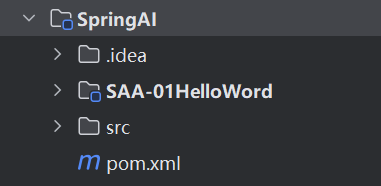
1.我们需要创建一个父子模块来进行后续的学习,结构如下:
2.接下来我们在父模块中导入依赖进行版本控制
java
<?xml version="1.0" encoding="UTF-8"?>
<project xmlns="http://maven.apache.org/POM/4.0.0"
         xmlns:xsi="http://www.w3.org/2001/XMLSchema-instance"
         xsi:schemaLocation="http://maven.apache.org/POM/4.0.0 http://maven.apache.org/xsd/maven-4.0.0.xsd">
    <modelVersion>4.0.0</modelVersion>

    <groupId>com.ai</groupId>
    <artifactId>SpringAI</artifactId>
    <version>1.0-SNAPSHOT</version>
    <packaging>pom</packaging>
    <modules>
        <module>SAA-01HelloWord</module>
    </modules>
    <properties>
        <maven.compiler.source>17</maven.compiler.source>
        <maven.compiler.target>17</maven.compiler.target>
        <project.build.sourceEncoding>UTF-8</project.build.sourceEncoding>
        <spring-boot.version>3.5.13</spring-boot.version>
        <spring-ai.version>1.1.2</spring-ai.version>
        <spring-ai-alibaba.version>1.1.2.1</spring-ai-alibaba.version>
    </properties>
    <dependencyManagement>
        <dependencies>
        <dependency>
            <groupId>com.alibaba.cloud.ai</groupId>
            <artifactId>spring-ai-alibaba-bom</artifactId>
            <version>${spring-ai-alibaba.version}</version>
            <type>pom</type>
            <scope>import</scope>
        </dependency>
        <dependency>
            <groupId>org.springframework.ai</groupId>
            <artifactId>spring-ai-bom</artifactId>
            <version>${spring-ai.version}</version>
            <type>pom</type>
            <scope>import</scope>
        </dependency>
            <!-- Source: https://mvnrepository.com/artifact/org.springframework.boot/spring-boot-dependencies -->
            <dependency>
                <groupId>org.springframework.boot</groupId>
                <artifactId>spring-boot-dependencies</artifactId>
                <version>${spring-boot.version}</version>
                <type>pom</type>
                <scope>import</scope>
            </dependency>
        </dependencies>
    </dependencyManagement>


</project>
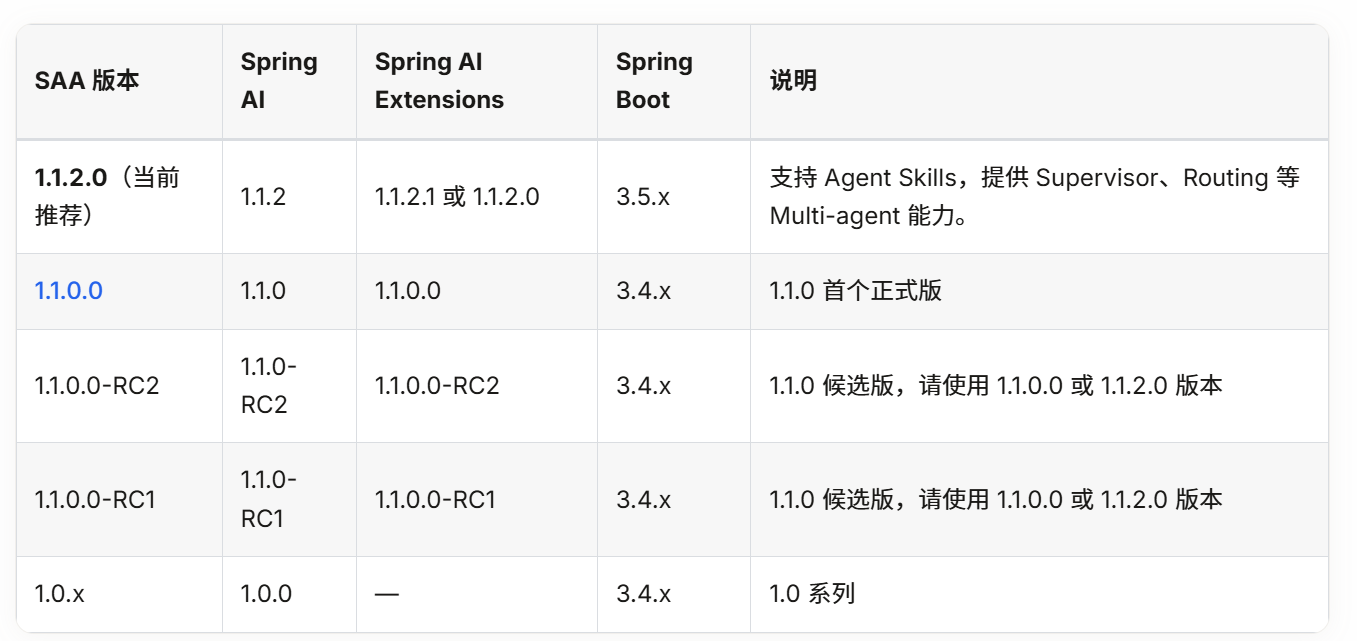
注意三者的版本兼容如下:
spring-ai-alibaba-bom
java
<dependency>
                <groupId>com.alibaba.cloud.ai</groupId>
                <artifactId>spring-ai-alibaba-bom</artifactId>
                <version>${spring-ai-alibaba.version}</version>
                <type>pom</type>
                <scope>import</scope>
</dependency>- spring-ai-alibaba-bom:阿里对 Spring AI 的扩展实现,兼容并依赖 Spring AI,专门对接阿里大模型(通义千问、通义万相等)。
spring-ai-bom
java
dependency>
                <groupId>org.springframework.ai</groupId>
                <artifactId>spring-ai-bom</artifactId>
                <version>${spring-ai.version}</version>
                <type>pom</type>
                <scope>import</scope>
</dependency>- spring-ai-bom:Spring 官方 AI 框架,基于 Spring Boot 构建,统一管理 Spring AI 核心组件
spring-boot-dependencies
java
<dependency>
                <groupId>org.springframework.boot</groupId>
                <artifactId>spring-boot-dependencies</artifactId>
                <version>${spring-boot.version}</version>
                <type>pom</type>
                <scope>import</scope>
</dependency>- Spring-boot-dependencies:最底层基石,管理所有 Spring Boot 官方组件的版本。
4.2子代Maven
java
<?xml version="1.0" encoding="UTF-8"?>
<project xmlns="http://maven.apache.org/POM/4.0.0"
         xmlns:xsi="http://www.w3.org/2001/XMLSchema-instance"
         xsi:schemaLocation="http://maven.apache.org/POM/4.0.0 http://maven.apache.org/xsd/maven-4.0.0.xsd">
    <modelVersion>4.0.0</modelVersion>
    <parent>
        <groupId>com.ai</groupId>
        <artifactId>SpringAI</artifactId>
        <version>1.0-SNAPSHOT</version>
    </parent>

    <artifactId>SAA-01HelloWord</artifactId>
    <dependencies>
        <dependency>
            <groupId>org.springframework.boot</groupId>
            <artifactId>spring-boot-starter-web</artifactId>
        </dependency>
<!--        阿里巴巴调用其内部生态的通用协议-->
        <dependency>
            <groupId>com.alibaba.cloud.ai</groupId>
            <artifactId>spring-ai-alibaba-starter-dashscope</artifactId>
        </dependency>
        <dependency>
            <groupId>org.projectlombok</groupId>
            <artifactId>lombok</artifactId>
        </dependency>
    </dependencies>

    <properties>
        <maven.compiler.source>17</maven.compiler.source>
        <maven.compiler.target>17</maven.compiler.target>
        <project.build.sourceEncoding>UTF-8</project.build.sourceEncoding>
    </properties>

</project>
5.Controller
java
package com.ai.controller;

import jakarta.annotation.Resource;
import org.springframework.ai.chat.model.ChatModel;
import org.springframework.web.bind.annotation.RequestMapping;
import org.springframework.web.bind.annotation.RequestParam;
import org.springframework.web.bind.annotation.RestController;
import reactor.core.publisher.Flux;

@RestController
public class ChatHelloController {
    @Resource
    ChatModel dashScopeChatModel;

    /**
     * 普通调用
     * **/
    @RequestMapping("/chat/call")
    public String chatHello(@RequestParam(value = "msg",defaultValue = "你是谁") String msg){
        return dashScopeChatModel.call(msg);


    }
    /**
     * 流式调用
     * **/
    @RequestMapping("/chat/stream")
    public Flux<String> chatHelloFlux(@RequestParam(value = "msg",defaultValue = "你是谁") String msg){
      return  dashScopeChatModel.stream(msg);


    }
}- call()是普通调用等 AI 把所有内容全部想完,一次性给你返回一整段文字。
- stream()是流式调用:像 ChatGPT 那样一个字一个字往外蹦,边思考边输出。
6.测试
