<!DOCTYPE html>
<html lang="zh-CN">
<head>
    <meta charset="UTF-8">
    <meta name="viewport" content="width=device-width, initial-scale=1.0">
    <title>侧边按钮 - 首字居中</title>
    <script src="https://unpkg.com/vue@3/dist/vue.global.prod.js"></script>
    <style>
        * {
            margin: 0;
            padding: 0;
            box-sizing: border-box;
        }
        body {
            background: #f6f7f9;
            height: 200vh;
            padding: 50px;
            font-family: "Microsoft Yahei", sans-serif;
        }
        .demo-text {
            max-width: 800px;
            line-height: 2;
            color: #333;
            font-size: 16px;
        }
    </style>
</head>
<body>
<div id="app">
    <div class="demo-text">
        <h2>侧边按钮演示</h2>
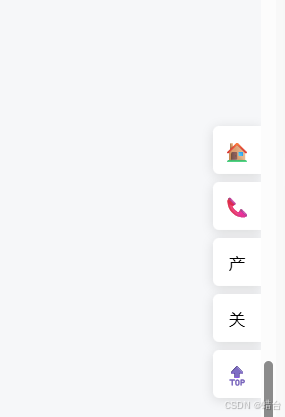
        <p>✅ 无图标收缩:首字【居中显示】</p>
        <p>✅ 有图标收缩:只显示图标</p>
        <p>✅ 鼠标展开:显示完整文字</p>
    </div>

    <side-buttons
            position="right"
            :top="220"
            :offset="0"
            :trigger-width="30"
            :buttons="btnList"
    ></side-buttons>
</div>

<script>
    const { createApp, ref, computed } = Vue

    const SideButtons = {
        props: {
            position: {
                type: String,
                default: 'right',
                validator: val => ['left', 'right'].includes(val)
            },
            top: { type: Number, default: 200 },
            offset: { type: Number, default: 0 },
            triggerWidth: { type: Number, default: 30 },
            buttons: { type: Array, default: () => [] }
        },
        setup(props) {
            const isExpand = ref(false)

            const triggerStyle = computed(() => {
                return {
                    position: 'fixed',
                    top: props.top + 'px',
                    zIndex: 999,
                    [props.position]: '0',
                    width: props.triggerWidth + 'px',
                    height: '360px'
                }
            })

            const wrapperStyle = computed(() => {
                return {
                    position: 'fixed',
                    top: props.top + 'px',
                    [props.position]: props.offset + 'px',
                    zIndex: 999
                }
            })

            const getFirstChar = (str) => str ? str.charAt(0) : ''

            return { isExpand, triggerStyle, wrapperStyle, getFirstChar }
        },
        template: `
          <div
              class="side-trigger"
              :style="triggerStyle"
              @mouseenter="isExpand = true"
              @mouseleave="isExpand = false"
          >
            <div class="side-buttons" :style="wrapperStyle">
              <div
                  class="side-btn"
                  :class="{ expand: isExpand }"
                  v-for="(item, idx) in buttons"
                  :key="idx"
                  @click="item.onClick && item.onClick()"
              >
                <!-- 图标 -->
                <span class="btn-icon" v-if="item.icon">{{ item.icon }}</span>

                <!-- 无图标 + 收起时:首字居中 -->
                <span class="btn-short-text" v-if="!item.icon && !isExpand">
            {{ getFirstChar(item.text) }}
          </span>

                <!-- 展开时:完整文字 -->
                <span class="btn-full-text" v-if="isExpand">{{ item.text }}</span>
              </div>
            </div>
          </div>
        `
    }

    createApp({
        components: { SideButtons },
        setup() {
            const btnList = ref([
                { icon: '🏠', text: '首页', onClick: () => alert('首页') },
                { icon: '📞', text: '在线客服', onClick: () => alert('客服') },
                { icon: '', text: '产品中心', onClick: () => alert('产品中心') },
                { icon: '', text: '关于我们', onClick: () => alert('关于我们') },
                { icon: '🔝', text: '回到顶部', onClick: () => window.scrollTo({ top: 0, behavior: 'smooth' }) }
            ])
            return { btnList }
        }
    }).mount('#app')
</script>

<style>
    .side-buttons {
        display: flex;
        flex-direction: column;
        gap: 8px;
    }
    .side-btn {
        width: 48px;
        height: 48px;
        background: #fff;
        border-radius: 6px 0 0 6px;
        box-shadow: 0 2px 12px rgba(0, 0, 0, 0.12);
        display: flex;
        align-items: center;
        justify-content: center; /* 关键:居中 */
        padding: 0;
        cursor: pointer;
        transition: all 0.3s ease;
        overflow: hidden;
        white-space: nowrap;
    }
    .side-btn.expand {
        width: 130px;
        justify-content: flex-start; /* 展开后左对齐 */
        padding: 0 12px;
    }
    .side-btn:hover {
        background: #409eff;
        color: #fff;
    }

    /* 图标 */
    .btn-icon {
        font-size: 20px;
        flex-shrink: 0;
    }

    /* 首字:居中 */
    .btn-short-text {
        font-size: 16px;
        display: flex;
        align-items: center;
        justify-content: center;
        width: 100%;
        height: 100%;
    }

    /* 展开文字 */
    .btn-full-text {
        font-size: 14px;
        margin-left: 0;
    }

    /* 左侧适配 */
    [position="left"] .side-btn {
        border-radius: 0 6px 6px 0;
    }
</style>
</body>
</html>