canvas 分层渲染
分层渲染适用的场景
-
大量静态背景 + 少量动态元素**
比如地图、数据可视化大屏、战棋游戏地图。静态地形、网格、标注画在底层,只需画一次;人物、光标、高亮效果在顶层单独刷新。这样可以大幅提升性能,尤其是静态层很复杂时。
-
频繁全屏动画,但角色/物体可复用**
典型如弹幕游戏(雷电)、粒子特效。弹幕、粒子每帧更新位置并重绘,但玩家飞船、敌方机体在层中只需重新擦除旧区域或整体替换。利用分层避免每帧重绘所有静态元素。
-
绘图类应用(画板、白板)**
用户已绘制的笔迹作为静态层,当前正在画的临时笔迹作为临时层。橡皮擦预览、辅助线、选区框也适合放在独立层。这样撤销/重做只需替换静态层某一块,无需全部重绘。
-
需要局部高频刷新,其他地方基本不变**
比如实时监控波形图、股票分时图,波形区域独立一个层,重绘该层即可,坐标轴、图例保持不动。同样适用于游戏内的动态血条、倒计时数字。
-
复杂交互中的多种编辑模式**
例如图片标注工具:原图层不动,标注层可独立擦除、修改透明度、移动位置;切换到滤镜预览时,可临时放置效果层对比查看。
总结: 当页面上存在渲染频率有明显差异的功能或者场景, 都可以靠谱分层渲染, 但是分层渲染本身也会带来额外的维护成本, 例如 分层 带来的额外开销.
具体示例
以 杀戮尖塔2 的截图为例
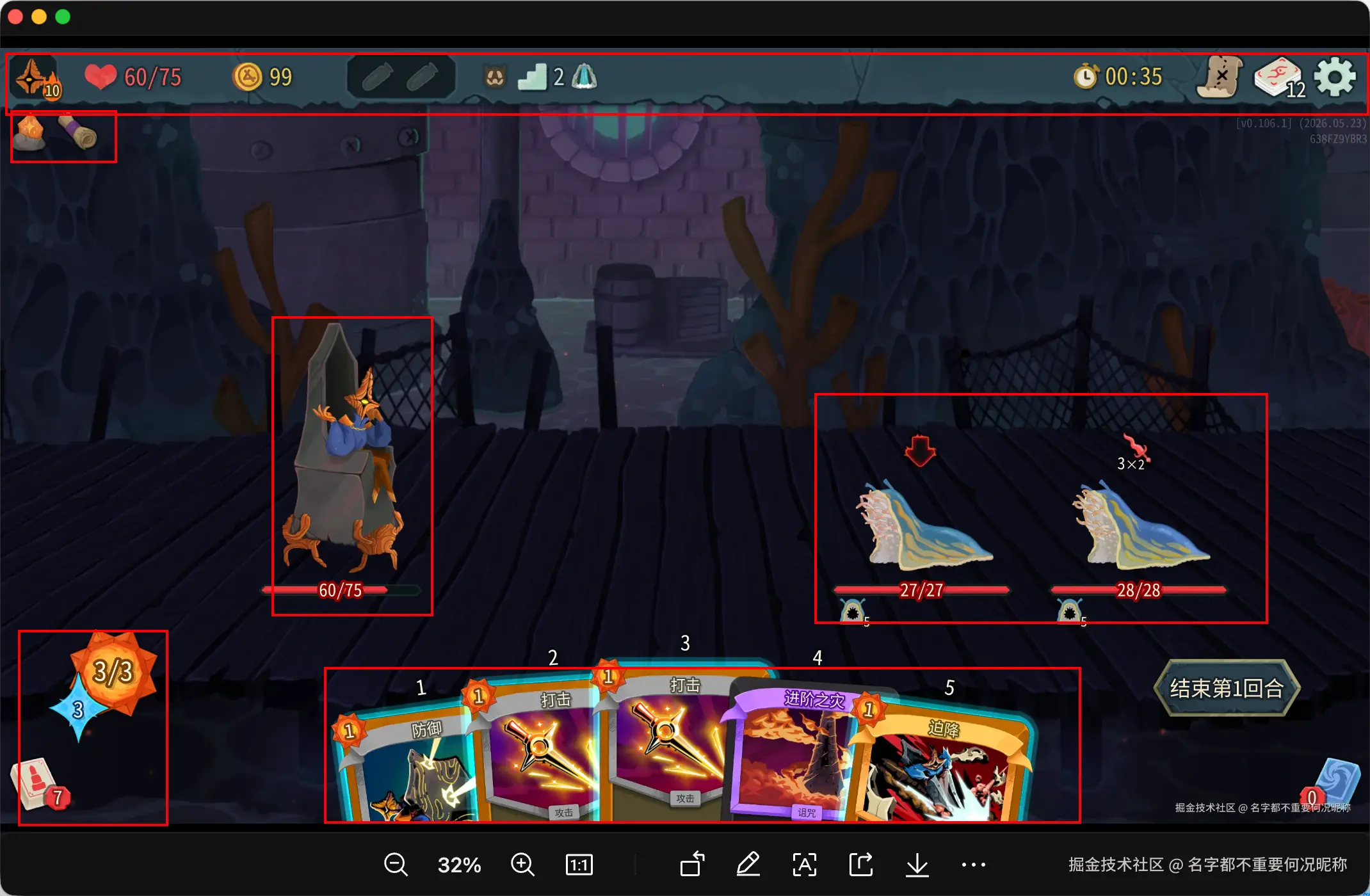
在图片中, 背景很明显和标注出来的高亮图层有着显著的差异, 在这种情况下就可以考虑分层处理 将背景分为一层, 游戏操作界面分为一层.
canvas 脏矩形优化
脏矩形优化讲解
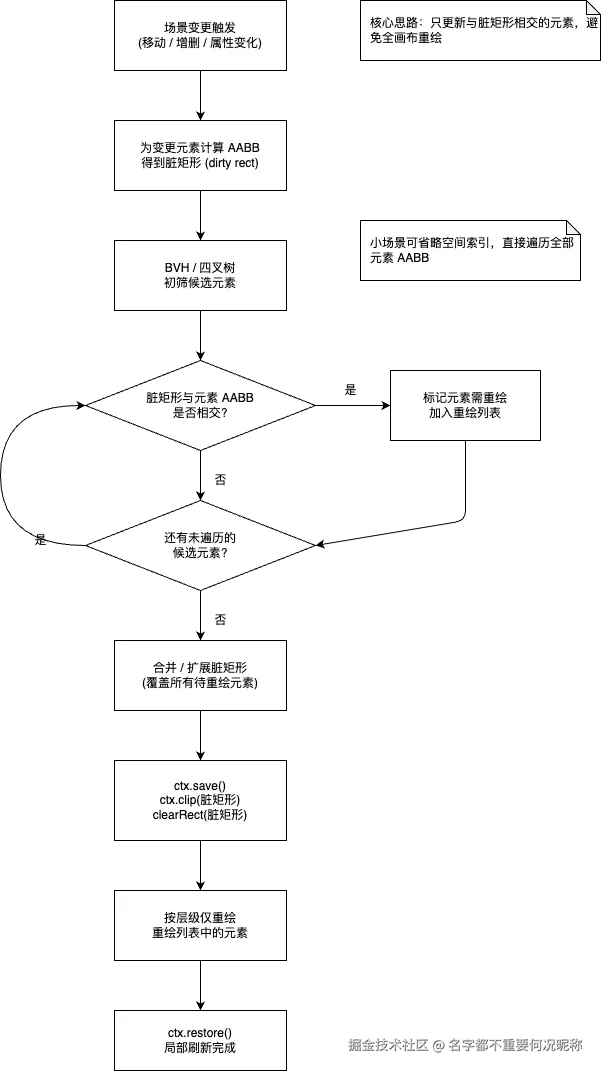
脏矩形是一种优化 Canvas 渲染的技术:每次只重绘画布上发生变化的那一小块区域,而不是清空整个画布。它的前提是需要精确知道哪些区域"脏"了,以及在这些区域内有哪些元素需要重绘。
由于需要精准的确定重绘的区域和重绘的元素, 所以需要配合 BVH, qtree 这些方案实现.
使用场景
高精度更新局部组件 • 少量动态物体在静态背景上移动(如拖动滑块、地图上一个单位)
• 局部高频刷新(波形图、进度条、倒计时)
• 绘图/擦除工具(画板、刮刮乐)
• 实时交互且每次变化区域很小
当更新的区域变大, 脏矩形检测需要更新的元素过多, 那么此时, 脏矩形优化反而会成为负向优化,检测到大多数元素都需要更新的情况下, 那么实际上脏矩形检测本身就会作为冗余的操作, 所以在产品设计层面就需要考虑是否适合脏矩形方案
大致的流程如下
示例代码
html
<!DOCTYPE html>
<html lang="zh-CN">
<head>
  <meta charset="UTF-8">
  <meta name="viewport" content="width=device-width, initial-scale=1.0">
  <title>Canvas 脏矩形更新 Demo</title>
  <style>
    * { box-sizing: border-box; }
    body {
      margin: 0;
      min-height: 100vh;
      display: flex;
      flex-direction: column;
      align-items: center;
      justify-content: center;
      gap: 12px;
      background: #f0f2f5;
      font-family: -apple-system, BlinkMacSystemFont, "Segoe UI", sans-serif;
      color: #1a1a1a;
    }
    h1 {
      margin: 0;
      font-size: 18px;
      font-weight: 600;
    }
    p.hint {
      margin: 0;
      font-size: 13px;
      color: #555;
      max-width: 520px;
      text-align: center;
      line-height: 1.5;
    }
    .panel {
      display: flex;
      flex-wrap: wrap;
      gap: 16px;
      align-items: center;
      justify-content: center;
      font-size: 13px;
    }
    label {
      display: inline-flex;
      align-items: center;
      gap: 6px;
      cursor: pointer;
    }
    canvas {
      display: block;
      background: #fff;
      border: 1px solid #ccc;
      cursor: grab;
      touch-action: none;
    }
    canvas:active { cursor: grabbing; }
    .stats {
      font-family: ui-monospace, monospace;
      font-size: 12px;
      color: #333;
      line-height: 1.6;
    }
  </style>
</head>
<body>
  <h1>Canvas 脏矩形局部刷新(300 小球拖拽)</h1>
  <p class="hint">
    拖拽小球时仅重绘「旧位置 + 新位置」合并后的脏矩形区域,并只绘制与该区域 AABB 相交的小球。
  </p>
  <div class="panel">
    <label><input type="checkbox" id="fullRedraw"> 对比:拖拽时全画布重绘</label>
  </div>
  <canvas id="c" width="400" height="400"></canvas>
  <div class="stats" id="stats"></div>

  <script>
    const W = 400;
    const H = 400;
    const COUNT = 300;
    const BG = "#ffffff";

    const canvas = document.getElementById("c");
    const ctx = canvas.getContext("2d");
    const fullRedrawEl = document.getElementById("fullRedraw");
    const statsEl = document.getElementById("stats");

    const balls = [];

    let dragging = null;
    let dragOffsetX = 0;
    let dragOffsetY = 0;
    let lastDirty = null;
    let dirtyRepaintCount = 0;
    let fullRepaintCount = 0;

    function rand(min, max) {
      return min + Math.random() * (max - min);
    }

    function ballAabb(ball) {
      return {
        x: ball.x - ball.r,
        y: ball.y - ball.r,
        w: ball.r * 2,
        h: ball.r * 2,
      };
    }

    function rectsIntersect(a, b) {
      return (
        a.x < b.x + b.w &&
        a.x + a.w > b.x &&
        a.y < b.y + b.h &&
        a.y + a.h > b.y
      );
    }

    function unionRect(a, b) {
      const x = Math.min(a.x, b.x);
      const y = Math.min(a.y, b.y);
      const right = Math.max(a.x + a.w, b.x + b.w);
      const bottom = Math.max(a.y + a.h, b.y + b.h);
      return { x, y, w: right - x, h: bottom - y };
    }

    /** 裁剪到画布范围内,并留 1px 抗锯齿边距 */
    function clampRect(r, pad = 1) {
      const x = Math.max(0, Math.floor(r.x - pad));
      const y = Math.max(0, Math.floor(r.y - pad));
      const x2 = Math.min(W, Math.ceil(r.x + r.w + pad));
      const y2 = Math.min(H, Math.ceil(r.y + r.h + pad));
      return { x, y, w: x2 - x, h: y2 - y };
    }

    function createBalls() {
      balls.length = 0;
      for (let i = 0; i < COUNT; i++) {
        const r = rand(6, 10);
        balls.push({
          x: rand(r, W - r),
          y: rand(r, H - r),
          r,
          color: `hsl(${Math.floor(rand(0, 360))} 70% 50%)`,
        });
      }
    }

    function drawBall(ball) {
      ctx.beginPath();
      ctx.arc(ball.x, ball.y, ball.r, 0, Math.PI * 2);
      ctx.fillStyle = ball.color;
      ctx.fill();
      ctx.strokeStyle = "rgba(0,0,0,0.15)";
      ctx.lineWidth = 1;
      ctx.stroke();
    }

    function ballsInRect(rect) {
      const list = [];
      for (let i = 0; i < balls.length; i++) {
        if (rectsIntersect(ballAabb(balls[i]), rect)) {
          list.push(balls[i]);
        }
      }
      return list;
    }

    function repaintDirty(dirty) {
      const rect = clampRect(dirty);
      if (rect.w <= 0 || rect.h <= 0) return;

      ctx.save();
      ctx.beginPath();
      ctx.rect(rect.x, rect.y, rect.w, rect.h);
      ctx.clip();

      ctx.fillStyle = BG;
      ctx.fillRect(rect.x, rect.y, rect.w, rect.h);

      const affected = ballsInRect(rect);
      for (let i = 0; i < affected.length; i++) {
        drawBall(affected[i]);
      }
      ctx.restore();

      lastDirty = rect;
      dirtyRepaintCount++;
    }

    function repaintFull() {
      ctx.fillStyle = BG;
      ctx.fillRect(0, 0, W, H);
      for (let i = 0; i < balls.length; i++) {
        drawBall(balls[i]);
      }
      lastDirty = { x: 0, y: 0, w: W, h: H };
      fullRepaintCount++;
    }

    function pickBall(px, py) {
      for (let i = balls.length - 1; i >= 0; i--) {
        const b = balls[i];
        const dx = px - b.x;
        const dy = py - b.y;
        if (dx * dx + dy * dy <= b.r * b.r) {
          return b;
        }
      }
      return null;
    }

    function onDragMove(x, y) {
      if (!dragging) return;

      const ball = dragging;
      const oldAabb = ballAabb(ball);

      ball.x = x - dragOffsetX;
      ball.y = y - dragOffsetY;

      ball.x = Math.max(ball.r, Math.min(W - ball.r, ball.x));
      ball.y = Math.max(ball.r, Math.min(H - ball.r, ball.y));

      const newAabb = ballAabb(ball);
      const dirty = unionRect(oldAabb, newAabb);

      if (fullRedrawEl.checked) {
        repaintFull();
      } else {
        repaintDirty(dirty);
      }
    }

    function pointerPos(e) {
      const rect = canvas.getBoundingClientRect();
      const scaleX = W / rect.width;
      const scaleY = H / rect.height;
      return {
        x: (e.clientX - rect.left) * scaleX,
        y: (e.clientY - rect.top) * scaleY,
      };
    }

    canvas.addEventListener("pointerdown", (e) => {
      canvas.setPointerCapture(e.pointerId);
      const { x, y } = pointerPos(e);
      const ball = pickBall(x, y);
      if (!ball) return;

      dragging = ball;
      dragOffsetX = x - ball.x;
      dragOffsetY = y - ball.y;

      const idx = balls.indexOf(ball);
      if (idx >= 0) {
        balls.splice(idx, 1);
        balls.push(ball);
      }
    });

    canvas.addEventListener("pointermove", (e) => {
      if (!dragging) return;
      const { x, y } = pointerPos(e);
      onDragMove(x, y);
    });

    function endDrag() {
      dragging = null;
    }

    canvas.addEventListener("pointerup", endDrag);
    canvas.addEventListener("pointercancel", endDrag);

    fullRedrawEl.addEventListener("change", () => {
      repaintFull();
    });

    createBalls();
    repaintFull();
    dirtyRepaintCount = 0;
    fullRepaintCount = 0;
  </script>
</body>
</html>
总结
| 方案 | 适用场景 | 优势 | 劣势 |
|---|---|---|---|
| 脏矩形 | 局部小范围变化(拖动、绘图、波形图) | 绘制面积最小,内存低 | 实现复杂,需空间索引与背景缓存 |
| Canvas 分层 | 静态背景+少量动态,需独立操控不同元素 | 简单直观,逻辑分离,静态层只画一次 | 内存高,全动场景无优势,背景更新麻烦 |
求个点赞三连呀