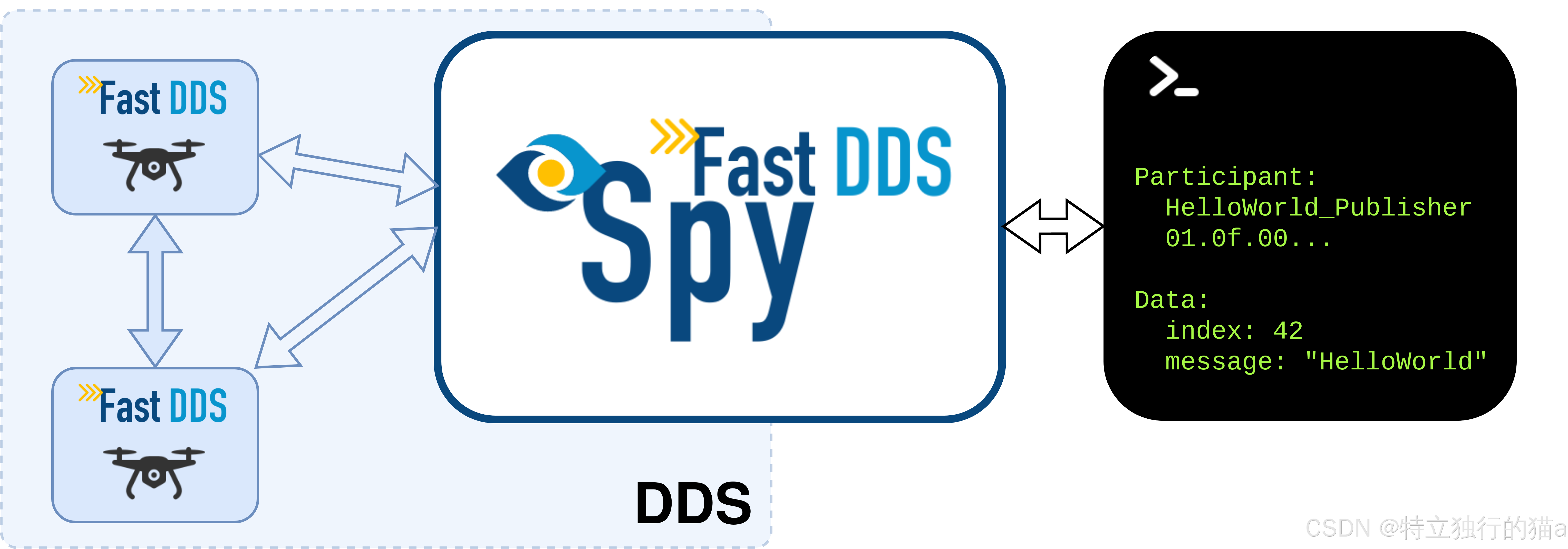
Fast DDS(原名 Fast RTPS)是 eProsima 公司开发的一款高性能 DDS(Data Distribution Service,数据分发服务)的 C++ 实现。Fast DDS Spy是一个命令行交互式工具,用于监控和探查运行中的 DDS 网络。它可以实时发现网络中的 DomainParticipant、DataWriter、DataReader、Topic 等信息,并实时显示用户数据内容。
官网没有提供 Linux Windows 可直接使用的安装包,只有docker镜像,需要基于特定环境从源码层面进行编译安装。本文详细介绍下 Fast DDS Spy Windows x64 编译安装完全过程。
官网地址: https://fast-dds-spy.readthedocs.io/en/latest/rst/formalia/titlepage.html
版本 : Fast DDS 3.6.1 / Fast DDS Spy 1.5.1
编译环境 : Windows 10/11 x64, Visual Studio 2022 Professional
作者 : yangyongzhen (534117529@qq.com)
猫哥的博客 blog.csdn.net/qq8864
文章目录
-
- [1. 什么是 Fast DDS?](#1. 什么是 Fast DDS?)
- [2. 什么是 Fast DDS Spy?](#2. 什么是 Fast DDS Spy?)
- [3. 官网与仓库地址](#3. 官网与仓库地址)
- [4. 依赖关系全景图](#4. 依赖关系全景图)
- [5. 环境准备](#5. 环境准备)
-
- [5.1 硬件要求](#5.1 硬件要求)
- [5.2 软件要求](#5.2 软件要求)
- [5.3 VS2022 环境检查](#5.3 VS2022 环境检查)
- [6. vcpkg 安装与依赖下载](#6. vcpkg 安装与依赖下载)
-
- [6.1 克隆 vcpkg](#6.1 克隆 vcpkg)
- [6.2 引导 vcpkg](#6.2 引导 vcpkg)
- [6.3 安装 Fast DDS 及其所有依赖](#6.3 安装 Fast DDS 及其所有依赖)
- [6.4 安装 yaml-cpp](#6.4 安装 yaml-cpp)
- [6.5 验证 vcpkg 安装](#6.5 验证 vcpkg 安装)
- [7. 编译 dev-utils(cmake_utils + cpp_utils)](#7. 编译 dev-utils(cmake_utils + cpp_utils))
-
- [7.1 克隆 dev-utils](#7.1 克隆 dev-utils)
- [7.2 编译 cmake_utils](#7.2 编译 cmake_utils)
- [7.3 编译 cpp_utils](#7.3 编译 cpp_utils)
- [8. 编译 DDS-Pipe](#8. 编译 DDS-Pipe)
-
- [8.1 克隆 DDS-Pipe](#8.1 克隆 DDS-Pipe)
- [8.2 编译 ddspipe_core](#8.2 编译 ddspipe_core)
- [8.3 编译 ddspipe_participants](#8.3 编译 ddspipe_participants)
- [8.4 编译 ddspipe_yaml](#8.4 编译 ddspipe_yaml)
- [9. 编译 Fast DDS Spy](#9. 编译 Fast DDS Spy)
-
- [9.1 克隆 Fast-DDS-Spy](#9.1 克隆 Fast-DDS-Spy)
- [9.2 编译 fastddsspy_participants](#9.2 编译 fastddsspy_participants)
- [9.3 编译 fastddsspy_yaml](#9.3 编译 fastddsspy_yaml)
- [9.4 编译 fastddsspy_tool(生成最终可执行文件)](#9.4 编译 fastddsspy_tool(生成最终可执行文件))
- [10. 打包独立运行目录](#10. 打包独立运行目录)
- [11. 使用指南](#11. 使用指南)
-
- [11.1 基本用法](#11.1 基本用法)
- [11.2 命令行选项详解](#11.2 命令行选项详解)
- [11.3 交互式 CLI 命令](#11.3 交互式 CLI 命令)
- [11.4 配置文件示例](#11.4 配置文件示例)
- [12. 常见问题](#12. 常见问题)
-
- [Q1: CMake 检测到 VS 2015 而不是 VS 2022](#Q1: CMake 检测到 VS 2015 而不是 VS 2022)
- [Q2: fastdds-config.cmake 找不到 nlohmann_json 目标](#Q2: fastdds-config.cmake 找不到 nlohmann_json 目标)
- [Q3: VS2022 vcvarsall.bat 加载后 cmake 仍然找不到编译器](#Q3: VS2022 vcvarsall.bat 加载后 cmake 仍然找不到编译器)
- [Q4: 运行 fastddsspy.exe 提示找不到 DLL](#Q4: 运行 fastddsspy.exe 提示找不到 DLL)
- [Q5: GitHub 克隆速度慢或连接失败](#Q5: GitHub 克隆速度慢或连接失败)
- [13. 参考文档](#13. 参考文档)
1. 什么是 Fast DDS?
Fast DDS (原名 Fast RTPS)是 eProsima 公司开发的一款高性能 DDS(Data Distribution Service,数据分发服务)的 C++ 实现。DDS 是 OMG(Object Management Group)制定的实时数据分发标准,广泛用于机器人、自动驾驶、工业物联网、航空航天等领域。
核心特性
| 特性 | 说明 |
|---|---|
| 协议 | 完整实现 DDS 1.4 和 RTPS 2.5 标准 |
| 架构 | 去中心化,无单点故障,支持点对点通信 |
| QoS | 丰富的服务质量策略(可靠性、持久性、延迟预算等) |
| 性能 | 毫秒级延迟,支持大规模分布式系统 |
| 发现机制 | 支持静态发现和动态发现(SPDP/SEDP) |
| 安全性 | 支持 DDS Security (OpenSSL 加密认证) |
| 跨平台 | Windows、Linux、macOS、QNX、VxWorks、RTEMS 等 |
| ROS 2 | ROS 2 的默认中间件(自 ROS 2 Foxy 起) |
应用场景
- ROS 2 机器人系统:数据分发和节点通信
- 自动驾驶:传感器数据、控制指令的实时分发
- 工业物联网:设备间的实时数据交换
- 仿真系统:分布式仿真数据同步
2. 什么是 Fast DDS Spy?
Fast DDS Spy 是一个命令行交互式工具,用于监控和探查运行中的 DDS 网络。它可以实时发现网络中的 DomainParticipant、DataWriter、DataReader、Topic 等信息,并实时显示用户数据内容。
核心功能
- 网络发现: 实时列出所有参与的 DDS 节点、发布者、订阅者、主题
- 数据监听: 实时订阅并显示指定主题的数据内容
- 交互式 CLI: 提供交互式命令行界面,可以动态查询和操作
- One-shot 模式: 支持一次性查询网络状态
- YAML 配置: 支持通过 YAML 文件设置参数
运行效果
Usage: Fast DDS Spy
Start an interactive CLI to introspect a DDS network.
General options:
  -h --help           Print this help message.
  -v --version        Print version, branch and commit hash.
  -c --config-path    Path to the Configuration File (yaml format)
  -r --reload-time    Time period in seconds to reload config
     --domain         Set the domain (0-232) to spy on. [Default = 0]
  -d --debug          Set log verbosity to Info
     --log-filter     Set a Regex Filter for log entries
     --log-verbosity  Set Log Verbosity Level
3. 官网与仓库地址
官方网站
| 项目 | 官网 |
|---|---|
| eProsima 主页 | https://eprosima.com |
| Fast DDS 文档 | https://fast-dds.docs.eprosima.com |
| Fast DDS Spy 文档 | https://fast-dds-spy.readthedocs.io |
源代码仓库
| 仓库 | GitHub 地址 | 用途 |
|---|---|---|
| Fast-DDS | https://github.com/eProsima/Fast-DDS | DDS 核心库 |
| Fast-DDS-Spy | https://github.com/eProsima/Fast-DDS-Spy | Spy 探查工具 |
| DDS-Pipe | https://github.com/eProsima/DDS-Pipe | DDS 管道传输库(Spy 的依赖) |
| dev-utils | https://github.com/eProsima/dev-utils | eProsima 通用工具库 |
| Fast-CDR | https://github.com/eProsima/Fast-CDR | CDR 序列化库 |
| vcpkg | https://github.com/microsoft/vcpkg | C++ 包管理器 |
4. 依赖关系全景图
Fast DDS Spy 组件依赖树
fastddsspy_tool  (最终可执行文件)
├── fastddsspy_yaml
│   ├── yaml-cpp (vcpkg)
│   └── fastddsspy_participants
│       ├── ddspipe_participants
│       │   └── ddspipe_core
│       │       ├── fastdds (vcpkg)
│       │       │   ├── fastcdr (vcpkg)
│       │       │   ├── foonathan_memory (vcpkg)
│       │       │   ├── tinyxml2 (vcpkg)
│       │       │   └── OpenSSL (vcpkg)
│       │       └── cpp_utils (dev-utils)
│       │           └── cmake_utils (dev-utils, CMake 工具集)
│       └── cpp_utils
├── ddspipe_yaml
│   ├── yaml-cpp
│   ├── ddspipe_participants
│   └── ddspipe_core
├── fastddsspy_participants
├── ddspipe_yaml
└── optionparser (thirdparty/header-only)
依赖来源分布
| 来源 | 包含的库 |
|---|---|
| vcpkg 安装 | fastdds, fastcdr, foonathan_memory, tinyxml2, yaml-cpp, nlohmann-json, asio, openssl |
| dev-utils 编译 | cmake_utils (CMake 宏), cpp_utils (C++ 工具库) |
| DDS-Pipe 编译 | ddspipe_core, ddspipe_participants, ddspipe_yaml |
| Fast-DDS-Spy 编译 | fastddsspy_participants, fastddsspy_yaml, fastddsspy_tool |
| thirdparty 头文件 | optionparser, nlohmann-json |
编译产物
| 编译产物 | 类型 | 路径 |
|---|---|---|
| cmake_utils | CMake 脚本 | install/share/cmake_utils/ |
| cpp_utils-1.5.dll | 动态库 | install/bin/ |
| ddspipe_core-1.5.dll | 动态库 | install/bin/ |
| ddspipe_participants-1.5.dll | 动态库 | install/bin/ |
| ddspipe_yaml-1.5.dll | 动态库 | install/bin/ |
| fastddsspy_participants-1.5.dll | 动态库 | install/bin/ |
| fastddsspy_yaml-1.5.dll | 动态库 | install/bin/ |
| fastddsspy.exe | 可执行文件 | install/bin/ 或 fastddsspy_dist/ |
5. 环境准备
5.1 硬件要求
- CPU: x64 架构
- 内存: 至少 8GB(编译过程中需要较多内存)
- 磁盘: 至少 10GB 空闲空间
- 网络: 需要能访问 GitHub(中国大陆用户可能需要配置代理)
5.2 软件要求
| 软件 | 要求版本 | 说明 |
|---|---|---|
| Windows | 10/11 x64 | 操作系统 |
| Visual Studio 2022 | Professional 或 Community | 需要安装 "使用 C++ 的桌面开发" 工作负载 |
| CMake | ≥ 3.20 | 构建工具(vcpkg 自带) |
| Git | ≥ 2.30 | 源码管理 |
| vcpkg | 最新 | C++ 包管理器 |
5.3 VS2022 环境检查
确保 VS2022 已正确安装,并且 vcvarsall.bat 可用:
"C:\\Program Files\\Microsoft Visual Studio\\2022\\Professional\\VC\\Auxiliary\\Build\\vcvarsall.bat" x64注意: 本教程使用的 VS2022 Professional。如果您的 VS 安装在非默认路径,请相应调整路径。
6. vcpkg 安装与依赖下载
6.1 克隆 vcpkg
# 在工作目录下克隆 vcpkg
cd C:\\Users\\dicing\\Desktop\\test\\fastdds
git clone https://github.com/microsoft/vcpkg.git
6.2 引导 vcpkg
cd vcpkg
.\\bootstrap-vcpkg.bat
6.3 安装 Fast DDS 及其所有依赖
关键: 必须使用 VS2022 的开发环境来运行 vcpkg,否则会错误地检测到 VS2015 导致编译失败。
创建一个辅助批处理脚本 s2022_env.bat,用于始终在 VS2022 环境下运行命令:
@echo off
call "C:\\Program Files\\Microsoft Visual Studio\\2022\\Professional\\VC\\Auxiliary\\Build\\vcvarsall.bat" x64
set PATH=C:\\Users\\dicing\\Desktop\\test\\fastdds\\vcpkg\\downloads\\tools\\cmake-4.3.2-windows\\cmake-4.3.2-windows-x86_64\\bin;%PATH%
cd /d C:\\Users\\dicing\\Desktop\\test\\fastdds
%*
然后安装 fastdds(会自动拉取所有依赖):
cmd.exe /c "vs2022_env.bat vcpkg install fastdds:x64-windows"⏱️ 这步会从源码编译 fastdds 及其所有依赖,耗时约 15-20 分钟。
6.4 安装 yaml-cpp
cmd.exe /c "vs2022_env.bat vcpkg install yaml-cpp:x64-windows"6.5 验证 vcpkg 安装
检查已安装的包:
.\\vcpkg\\vcpkg list成功安装后应包含:
| 包名 | 版本 | 用途 |
|---|---|---|
| fastdds | 3.6.1 | DDS 核心库 |
| fastcdr | 2.3.5 | CDR 序列化 |
| foonathan_memory | 0.7.4 | 内存管理 |
| asio | 1.32.0 | 异步 I/O |
| tinyxml2 | 11.0.0 | XML 解析 |
| openssl | 3.6.2 | 加密(TLS/SSL) |
| yaml-cpp | 0.9.0 | YAML 解析 |
| nlohmann-json | 3.12.0 | JSON 解析 |
7. 编译 dev-utils(cmake_utils + cpp_utils)
7.1 克隆 dev-utils
git clone https://github.com/eProsima/dev-utils.git -b 1.x7.2 编译 cmake_utils
cmake_utils 是 eProsima 的 CMake 宏集合,所有 eProsima 项目的编译都依赖它。
cmd.exe /c "vs2022_env.bat cmake -G Ninja -S dev-utils/cmake_utils -B build/cmake_utils -DCMAKE_INSTALL_PREFIX=C:\\Users\\dicing\\Desktop\\test\\fastdds\\install -DCMAKE_BUILD_TYPE=Release"
cmd.exe /c "vs2022_env.bat cmake --install build/cmake_utils --config Release"
7.3 编译 cpp_utils
cpp_utils 是 eProsima 的 C++ 通用工具库,依赖于 fastdds。
cmd.exe /c "vs2022_env.bat cmake -G Ninja -S dev-utils/cpp_utils -B build/cpp_utils -DCMAKE_INSTALL_PREFIX=C:\\Users\\dicing\\Desktop\\test\\fastdds\\install -DCMAKE_PREFIX_PATH=C:\\Users\\dicing\\Desktop\\test\\fastdds\\install;C:\\Users\\dicing\\Desktop\\test\\fastdds\\vcpkg\\installed\\x64-windows -DCMAKE_BUILD_TYPE=Release -DBUILD_TESTS=OFF"
cmd.exe /c "vs2022_env.bat cmake --build build/cpp_utils --config Release"
cmd.exe /c "vs2022_env.bat cmake --install build/cpp_utils --config Release"
⚠️ 坑点 : vcpkg 安装的 fastdds-config.cmake 缺少 ind_dependency(nlohmann_json),导致链接时找不到
lohmann_json::nlohmann_json 目标。需要在 fastdds-config.cmake 中手动添加该依赖。详见常见问题章节。
8. 编译 DDS-Pipe
8.1 克隆 DDS-Pipe
git clone https://github.com/eProsima/DDS-Pipe.git -b 1.x8.2 编译 ddspipe_core
cmd.exe /c "vs2022_env.bat cmake -G Ninja -S DDS-Pipe/ddspipe_core -B build/ddspipe_core -DCMAKE_INSTALL_PREFIX=C:\\Users\\dicing\\Desktop\\test\\fastdds\\install -DCMAKE_PREFIX_PATH=C:\\Users\\dicing\\Desktop\\test\\fastdds\\install;C:\\Users\\dicing\\Desktop\\test\\fastdds\\vcpkg\\installed\\x64-windows -DCMAKE_BUILD_TYPE=Release -DBUILD_TESTS=OFF"
cmd.exe /c "vs2022_env.bat cmake --build build/ddspipe_core --config Release"
cmd.exe /c "vs2022_env.bat cmake --install build/ddspipe_core --config Release"
8.3 编译 ddspipe_participants
cmd.exe /c "vs2022_env.bat cmake -G Ninja -S DDS-Pipe/ddspipe_participants -B build/ddspipe_participants -DCMAKE_INSTALL_PREFIX=C:\\Users\\dicing\\Desktop\\test\\fastdds\\install -DCMAKE_PREFIX_PATH=C:\\Users\\dicing\\Desktop\\test\\fastdds\\install;C:\\Users\\dicing\\Desktop\\test\\fastdds\\vcpkg\\installed\\x64-windows -DCMAKE_BUILD_TYPE=Release -DBUILD_TESTS=OFF"
cmd.exe /c "vs2022_env.bat cmake --build build/ddspipe_participants --config Release"
cmd.exe /c "vs2022_env.bat cmake --install build/ddspipe_participants --config Release"
8.4 编译 ddspipe_yaml
cmd.exe /c "vs2022_env.bat cmake -G Ninja -S DDS-Pipe/ddspipe_yaml -B build/ddspipe_yaml -DCMAKE_INSTALL_PREFIX=C:\\Users\\dicing\\Desktop\\test\\fastdds\\install -DCMAKE_PREFIX_PATH=C:\\Users\\dicing\\Desktop\\test\\fastdds\\install;C:\\Users\\dicing\\Desktop\\test\\fastdds\\vcpkg\\installed\\x64-windows -DCMAKE_BUILD_TYPE=Release -DBUILD_TESTS=OFF"
cmd.exe /c "vs2022_env.bat cmake --build build/ddspipe_yaml --config Release"
cmd.exe /c "vs2022_env.bat cmake --install build/ddspipe_yaml --config Release"
9. 编译 Fast DDS Spy
9.1 克隆 Fast-DDS-Spy
git clone https://github.com/eProsima/Fast-DDS-Spy.git9.2 编译 fastddsspy_participants
cmd.exe /c "vs2022_env.bat cmake -G Ninja -S Fast-DDS-Spy/fastddsspy_participants -B build/fastddsspy_participants -DCMAKE_INSTALL_PREFIX=C:\\Users\\dicing\\Desktop\\test\\fastdds\\install -DCMAKE_PREFIX_PATH=C:\\Users\\dicing\\Desktop\\test\\fastdds\\install;C:\\Users\\dicing\\Desktop\\test\\fastdds\\vcpkg\\installed\\x64-windows -DCMAKE_BUILD_TYPE=Release -DBUILD_TESTS=OFF"
cmd.exe /c "vs2022_env.bat cmake --build build/fastddsspy_participants --config Release"
cmd.exe /c "vs2022_env.bat cmake --install build/fastddsspy_participants --config Release"
9.3 编译 fastddsspy_yaml
cmd.exe /c "vs2022_env.bat cmake -G Ninja -S Fast-DDS-Spy/fastddsspy_yaml -B build/fastddsspy_yaml -DCMAKE_INSTALL_PREFIX=C:\\Users\\dicing\\Desktop\\test\\fastdds\\install -DCMAKE_PREFIX_PATH=C:\\Users\\dicing\\Desktop\\test\\fastdds\\install;C:\\Users\\dicing\\Desktop\\test\\fastdds\\vcpkg\\installed\\x64-windows -DCMAKE_BUILD_TYPE=Release -DBUILD_TESTS=OFF"
cmd.exe /c "vs2022_env.bat cmake --build build/fastddsspy_yaml --config Release"
cmd.exe /c "vs2022_env.bat cmake --install build/fastddsspy_yaml --config Release"
9.4 编译 fastddsspy_tool(生成最终可执行文件)
cmd.exe /c "vs2022_env.bat cmake -G Ninja -S Fast-DDS-Spy/fastddsspy_tool -B build/fastddsspy_tool -DCMAKE_INSTALL_PREFIX=C:\\Users\\dicing\\Desktop\\test\\fastdds\\install -DCMAKE_PREFIX_PATH=C:\\Users\\dicing\\Desktop\\test\\fastdds\\install;C:\\Users\\dicing\\Desktop\\test\\fastdds\\vcpkg\\installed\\x64-windows -DCMAKE_BUILD_TYPE=Release -DBUILD_TESTS=OFF"
cmd.exe /c "vs2022_env.bat cmake --build build/fastddsspy_tool --config Release"
cmd.exe /c "vs2022_env.bat cmake --install build/fastddsspy_tool --config Release"
10. 打包独立运行目录
编译完成后,所有产物在 install/bin/ 下,但运行时还需要 vcpkg 安装的 DLL。为了方便分发和使用,可以打包到一个独立目录:
\ = "C:\\path\\to\\fastddsspy_dist"
\ = "C:\\path\\to\\install\\bin"
\ = "C:\\path\\to\\vcpkg\\installed\\x64-windows\\bin"

New-Item -ItemType Directory -Force -Path \ | Out-Null

# 拷贝 exe
Copy-Item "\\\fastddsspy.exe" \

# 拷贝自己编译的 DLL
Get-ChildItem \ -Filter "*.dll" | ForEach-Object {
    Copy-Item \.FullName \
}

# 拷贝 vcpkg 安装的 DLL
\ = @(
    "fastdds-3.6.dll",
    "fastcdr-2.3.dll",
    "foonathan_memory-0.7.4.dll",
    "tinyxml2.dll",
    "yaml-cpp.dll",
    "libssl-3-x64.dll",
    "libcrypto-3-x64.dll"
)
foreach (\ in \) {
    Copy-Item "\\\\" \
}
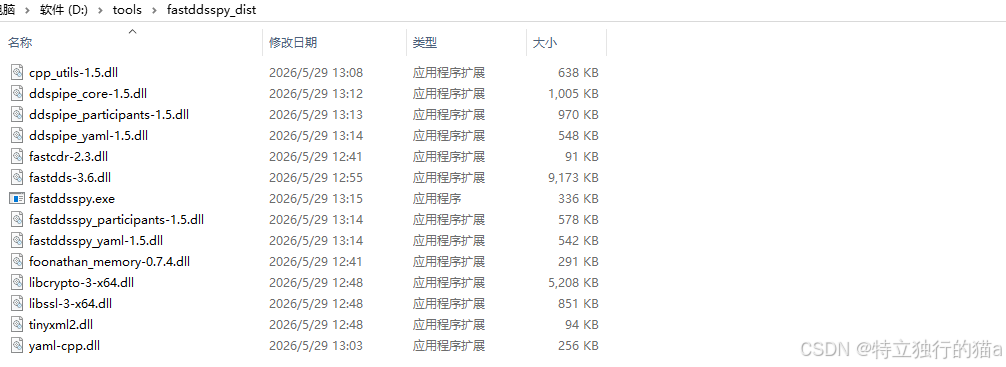
打包后目录结构:
fastddsspy_dist/
├── fastddsspy.exe               # 主程序 (344 KB)
├── cpp_utils-1.5.dll            # 工具库
├── ddspipe_core-1.5.dll         # DDS-Pipe 核心
├── ddspipe_participants-1.5.dll # DDS-Pipe 参与者
├── ddspipe_yaml-1.5.dll         # DDS-Pipe YAML
├── fastddsspy_participants-1.5.dll
├── fastddsspy_yaml-1.5.dll
├── fastdds-3.6.dll              # Fast DDS 核心 (9 MB)
├── fastcdr-2.3.dll              # CDR 序列化
├── foonathan_memory-0.7.4.dll   # 内存管理
├── tinyxml2.dll                 # XML 解析
├── yaml-cpp.dll                 # YAML 解析
├── libssl-3-x64.dll             # OpenSSL (851 KB)
└── libcrypto-3-x64.dll          # OpenSSL (5.2 MB)
\# 总计: 约 20 MB,14 个文件
✅ 所有依赖都在同一目录下,Windows 会自动找到同目录的 DLL,无需设置任何环境变量。
11. 使用指南
11.1 基本用法
# 查看帮助
fastddsspy.exe --help

# 查看版本
fastddsspy.exe --version

# 启动交互模式(探查 domain 0)
fastddsspy.exe

# 探查指定 domain
fastddsspy.exe --domain 1

# 使用配置文件启动
fastddsspy.exe -c my_config.yaml

# 开启调试日志
fastddsspy.exe -d
11.2 命令行选项详解
| 参数 | 简写 | 默认值 | 说明 |
|---|---|---|---|
| --help | -h | - | 打印帮助信息 |
| --version | -v | - | 打印版本号、分支和提交哈希 |
| --config-path | -c | ./FASTDDSSPY_CONFIGURATION.yaml | 配置文件路径(YAML 格式) |
| --reload-time | -r | 配置文件重载间隔(秒),0 表示不重载 | |
| --domain | - | 要探查的 Domain ID (0-232) | |
| --debug | -d | - | 设置日志级别为 Info |
| --log-filter | - | "FASTDDSSPY" | 日志过滤器(正则表达式) |
| --log-verbosity | - | "warning" | 日志级别(info/warning/error) |
11.3 交互式 CLI 命令
启动后进入交互模式,支持以下命令(部分命令,详细可参考官方文档):
| 命令 | 说明 |
|---|---|
| help | 显示帮助信息 |
| quit / exit | 退出程序 |
| participants | 列出所有发现的 DomainParticipant |
| opics | 列出所有主题 |
| endpoints | 列出所有 DataWriter/DataReader |
| echo | 订阅并回显指定主题的数据 |
11.4 配置文件示例
yaml
# FASTDDSSPY_CONFIGURATION.yaml
domain: 0
participants:
  - name: SpyParticipant
    kind: simple
    domain: 0
12. 常见问题
Q1: CMake 检测到 VS 2015 而不是 VS 2022
问题: 运行 cmake 时显示 Building for: Visual Studio 14 2015
原因: 系统上安装了 VS 2015,cmake 默认选择了旧版本。
解决方法:
- 使用 Ninja generator 避免 VS 自动检测
- 在 vcvarsall.bat 环境下运行,通过环境变量传递编译器路径
Q2: fastdds-config.cmake 找不到 nlohmann_json 目标
问题: 编译时报错 The link interface of target "fastdds" contains: nlohmann_json::nlohmann_json but the target was not found.
原因: vcpkg 安装的 fastdds-config.cmake 中缺少 ind_dependency(nlohmann_json)。
解决方法: 在 cpkg\installed\x64-windows\share\fastdds\fastdds-config.cmake 中,在 ind_dependency(foonathan_memory REQUIRED) 后面加上:
find_dependency(nlohmann_json REQUIRED)Q3: VS2022 vcvarsall.bat 加载后 cmake 仍然找不到编译器
问题: 使用 cmd.exe /c "vcvarsall.bat x64 && cmake ..." 时,编译器路径无效。
解决方法: 使用批处理脚本文件(.bat)代替单行命令,确保环境变量正确继承。
Q4: 运行 fastddsspy.exe 提示找不到 DLL
问题: 双击运行或直接执行时报错 无法找到 xxx.dll。
解决方法: 将所有依赖 DLL 拷贝到 exe 同目录下(参见第 10 节打包独立运行目录),或者将 vcpkg 的 bin 目录加入 PATH。
Q5: GitHub 克隆速度慢或连接失败
问题: git clone 超时或连接重置。
解决方法:
- 配置 git 代理
- 使用 --depth 1 参数进行浅克隆
- 使用国内镜像(如 gitee 等)
- 多次重试
13. 参考文档
- Fast DDS 官方文档
- Fast DDS Spy 官方文档
- Fast DDS Spy Windows CMake 安装指南
- Fast DDS Spy Windows 安装指南
- vcpkg 官方文档
- eProsima GitHub 组织
本教程完
如有问题或建议,请联系 534117529@qq.com,或者在猫哥的博客blog.csdn.net/qq8864 留言。