目录
3.证明commit了,客户端崩溃,MySQL数据不会在受影响,已经持久化
2.主要把事务统一commit,这个数据就被直接插入到数据库了。
3.对比试验。证明begin操作会自动更改提交方式,不会受MySQL是否自动提交影响
[4.证明单条 SQL 与事务的关系](#4.证明单条 SQL 与事务的关系)
1.什么是事务
MySQL注定会被很多用户多个客户端同时访问的,被很多线程获取
一个时刻可能同时有多个CURD操作
MySQL本身内部采用多线程的方式来实现数据的存储,注定有并发访问的场景,所以为了更好地解决这个问题,所以我们这个关系数据库给我们提供了事务的概念。
当客户端A检查还有一张票时,将票卖掉,还没有执行更新数据库时,客户端B检查了票数,发现大于0,于是又卖了一次票。然后A将票数更新数据库。这是就出现了同一张票被卖了两次的情况。
CURD满足什么属性,能解决上述问题?
- 买票的过程得是原子的吧(要么我不抢要么抢不到)
- 买票互相应该不能影响吧
- 买完票应该要永久有效吧
- 买前,和买后都要是确定的状态吧
什么是事务?
事务的本质是要站在MySQL上层去看待这个SQL语句,站在MySQL使用者角度要完成具体应用层的功能,这个功能要由多条SQL构成,我们把这个多条SQL叫做事务。
事务就是一组DML语句组成,这些语句在逻辑上存在相关性,这一组DML语句要么全部成功,要么全部 失败,是一个整体。MySQL提供一种机制,保证我们达到这样的效果。事务还规定不同的客户端看到的 数据是不相同的。
事务就是要做的或所做的事情,主要用于处理操作量大,复杂度高的数据。假设一种场景:你毕业了, 学校的教务系统后台 MySQL 中,不在需要你的数据,要删除你的所有信息(一般不会:) ), 那么要删除你的 基本信息(姓名,电话,籍贯等)的同时,也删除和你有关的其他信息,比如:你的各科成绩,你在校表现,甚至你在论坛发过的文章等。这样,就需要多条 MySQL 语句构成,那么所有这些操作合起来,就构成了一个事务。
正如我们上面所说,一个 MySQL 数据库,可不止你一个事务在运行,同一时刻,甚至有大量的请求被包装成事务,在向 MySQL 服务器发起事务处理请求。而每条事务至少一条 SQL ,最多很多 SQL ,这样如果大 家都访问同样的表数据,在不加保护的情况,就绝对会出现问题。甚至,因为事务由多条 SQL 构成,那 么,也会存在执行到一半出错或者不想再执行的情况,那么已经执行的怎么办呢?
所有,一个完整的事务,绝对不是简单的 sql 集合,还需要满足如下四个属性:
- 原子性:一个事务(transaction)中的所有操作,要么全部完成,要么全部不完成,不会结束在中间某个环节。事务在执行过程中发生错误,会被回滚(Rollback)到事务开始前的状态,就像这个事务从来没有执行过一样。
- 一致性:在事务开始之前和事务结束以后,数据库的完整性没有被破坏。这表示写入的资料必须完全符合所有的预设规则,这包含资料的精确度、串联性以及后续数据库可以自发性地完成预定的工作。
- 隔离性:数据库允许多个并发事务同时对其数据进行读写和修改的能力,隔离性可以防止多个事务并发执行时由于交叉执行而导致数据的不一致。事务隔离分为不同级别,包括读未提交( Read uncommitted )、读提交( read committed )、可重复读( repeatable read )和串行化(Serializable )
- 持久性:事务处理结束后,对数据的修改就是永久的,即便系统故障也不会丢失。
在我们MySQL中并没有就一致性做单独操作,通过原子性、隔离性、持久性这三大属性在技术上来保证数据库的一致性。
上面四个属性,可以简称为 ACID 。 原子性(Atomicity,或称不可分割性) 一致性(Consistency) 隔离性(Isolation,又称独立性) 持久性(Durability)。
MySQL通过先描述再组织对事务。来了一批对应的SQL,把这些打包成对应的事务对象,将这些事务对象放入到事务执行列表里,然后让MySQL去执行。
事务本质也是MySQL内部的一个对象。
2.为什么要存在事务
事务被 MySQL 编写者设计出来,本质是为了当应用程序访问数据库的时候,事务能够简化我们的编程模型 , 不需要我们去考虑各种各样的潜在错误和并发问题 .可以想一下当我们使用事务时,要么提交,要么回滚,我们不会去考虑网络异常了,服务器宕机了,同时更改一个数据怎么办对吧?**因此事务本质上是为了应用层服务的.**而不是伴随着数据库系统天生就有的.
备注:我们后面把 MySQL 中的一行信息,称为一行记录。
3.了解事务的提交方式
mysql> show engines \G
*************************** 1. row ***************************
      Engine: InnoDB
     Support: DEFAULT
     Comment: Supports transactions, row-level locking, and foreign keys
Transactions: YES
          XA: YES
  Savepoints: YES
*************************** 2. row ***************************
      Engine: MRG_MYISAM
     Support: YES
     Comment: Collection of identical MyISAM tables
Transactions: NO
          XA: NO
  Savepoints: NO
*************************** 3. row ***************************
      Engine: MEMORY
     Support: YES
     Comment: Hash based, stored in memory, useful for temporary tables
Transactions: NO
          XA: NO
  Savepoints: NO
*************************** 4. row ***************************
      Engine: BLACKHOLE
     Support: YES
     Comment: /dev/null storage engine (anything you write to it disappears)
Transactions: NO
          XA: NO
  Savepoints: NO
*************************** 5. row ***************************
      Engine: MyISAM
     Support: YES
     Comment: MyISAM storage engine
Transactions: NO
          XA: NO
  Savepoints: NO
*************************** 6. row ***************************
      Engine: CSV
     Support: YES
     Comment: CSV storage engine
Transactions: NO
          XA: NO
  Savepoints: NO
*************************** 7. row ***************************
      Engine: ARCHIVE
     Support: YES
     Comment: Archive storage engine
Transactions: NO
          XA: NO
  Savepoints: NO
*************************** 8. row ***************************
      Engine: PERFORMANCE_SCHEMA
     Support: YES
     Comment: Performance Schema
Transactions: NO
          XA: NO
  Savepoints: NO
*************************** 9. row ***************************
      Engine: FEDERATED
     Support: NO
     Comment: Federated MySQL storage engine
Transactions: NULL
          XA: NULL
  Savepoints: NULL
9 rows in set (0.00 sec)
Transactions 事务
可以看到并不是每一种搜索引擎没有,比如是InnoDB可以,而MRG_MYISAM不可以
事务提交方式
事务的提交方式常见的有两种:
- 自动提交
- 手动提交
查看事务提交方式
mysql> show variables like 'autocommit';
+---------------+-------+
| Variable_name | Value |
+---------------+-------+
| autocommit    | ON    |
+---------------+-------+
1 row in set (0.00 sec)
ON表示自动提交
用 SET 来改变 MySQL 的自动提交模式:
#SET AUTOCOMMIT=0 禁止自动提交
#SET AUTOCOMMIT=1 开启自动提交
mysql> set autocommit=0;
Query OK, 0 rows affected (0.00 sec)

mysql> show variables like 'autocommit';
+---------------+-------+
| Variable_name | Value |
+---------------+-------+
| autocommit    | OFF   |
+---------------+-------+
1 row in set (0.00 sec)

mysql> set autocommit=1;
Query OK, 0 rows affected (0.00 sec)

mysql> show variables like 'autocommit';
+---------------+-------+
| Variable_name | Value |
+---------------+-------+
| autocommit    | ON    |
+---------------+-------+
1 row in set (0.00 sec)
4.准备工作
[root@iZ5waahoxw3q2bZ ~]# netstat -nltp
Active Internet connections (only servers)
Proto Recv-Q Send-Q Local Address           Foreign Address         State       PID/Program name
tcp        0      0 0.0.0.0:22              0.0.0.0:*               LISTEN      1149/sshd
tcp6       0      0 :::3306                 :::*                    LISTEN      704/mysqld
不仅本地命令行可以使用,远端的也可以。
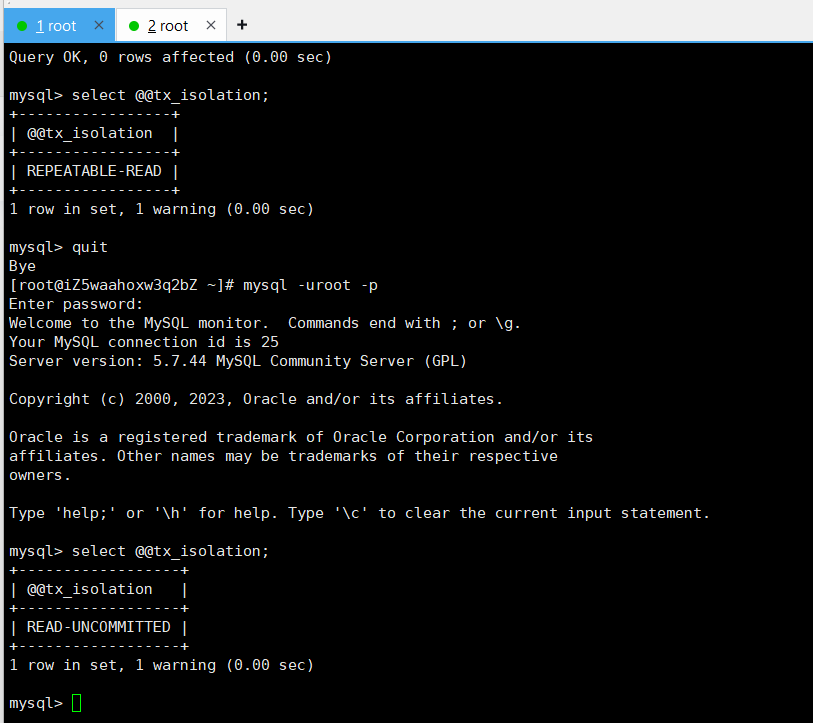
**## 为了便于演示,我们将mysql的默认隔离级别设置成读未提交。
具体操作我们后面专门会讲,现在以使用为主。**
mysql> set global transaction isolation level read uncommitted;
Query OK, 0 rows affected (0.00 sec)

mysql> select @@tx_isolation;
+-----------------+
| @@tx_isolation  |
+-----------------+
| REPEATABLE-READ |
+-----------------+
1 row in set, 1 warning (0.00 sec)
需要重启终端,进行查看
mysql> quit
Bye
[root@iZ5waahoxw3q2bZ ~]# mysql -uroot -p

mysql> select @@tx_isolation;
+------------------+
| @@tx_isolation   |
+------------------+
| READ-UNCOMMITTED |
+------------------+
1 row in set, 1 warning (0.00 sec)
开启两个终端
创建测试表
create table if not exists account(
    id int primary key,
    name varchar(50) not null default '',
    blance decimal(10,2) not null default 0.0
)ENGINE=InnoDB DEFAULT CHARSET=UTF8;

mysql> use test_db;
Reading table information for completion of table and column names
You can turn off this feature to get a quicker startup with -A

Database changed
mysql> create table if not exists account(
    -> id int primary key,
    -> name varchar(50) not null default '',
    -> blance decimal(10,2) not null default 0.0
    -> )ENGINE=InnoDB DEFAULT CHARSET=UTF8;
Query OK, 0 rows affected (0.01 sec)
打开第三个终端,发现有多少'人'在连接
mysql> show processlist;
+----+------+-----------+---------+---------+------+----------+------------------+
| Id | User | Host      | db      | Command | Time | State    | Info             |
+----+------+-----------+---------+---------+------+----------+------------------+
| 25 | root | localhost | test_db | Sleep   |   66 |          | NULL             |
| 26 | root | localhost | test_db | Sleep   |   37 |          | NULL             |
| 27 | root | localhost | NULL    | Query   |    0 | starting | show processlist |
+----+------+-----------+---------+---------+------+----------+------------------+
3 rows in set (0.00 sec)
5.事务正常操作
确认当前事务的提交方式
mysql> show variables like 'autocommit';
+---------------+-------+
| Variable_name | Value |
+---------------+-------+
| autocommit    | ON    |
+---------------+-------+
1 row in set (0.00 sec)
1.设置了事务的保存点
启动事务的方式
两种启动方式
mysql> start transaction;
Query OK, 0 rows affected (0.00 sec)

mysql> begin;
Query OK, 0 rows affected (0.00 sec)
两个事务并发开始跑了,从这之后对应的都属于自己的事务
创建一个保存点s1
终端1
mysql> savepoint s1;
Query OK, 0 rows affected (0.00 sec)
插入一条记录
终端1
mysql> insert into account values (1,'张三',1234.5);
Query OK, 1 row affected (0.00 sec)

终端2

插入前
mysql> select * from account;
Empty set (0.00 sec)

插入后
mysql> select * from account;
+----+--------+---------+
| id | name   | blance  |
+----+--------+---------+
|  1 | 张三   | 1234.50 |
+----+--------+---------+
1 row in set (0.00 sec)
创建保存点s2、s3,插入两个记录
终端1
mysql> savepoint s2;
Query OK, 0 rows affected (0.00 sec)

mysql> insert into account values (2,'李四',4321.6);
Query OK, 1 row affected (0.00 sec)

mysql> savepoint s3;
Query OK, 0 rows affected (0.00 sec)

mysql> insert into account values (3,'王五',3321.6);
Query OK, 1 row affected (0.00 sec)


终端2
mysql> select * from account;
+----+--------+---------+
| id | name   | blance  |
+----+--------+---------+
|  1 | 张三   | 1234.50 |
|  2 | 李四   | 4321.60 |
+----+--------+---------+
2 rows in set (0.00 sec)

mysql> select * from account;
+----+--------+---------+
| id | name   | blance  |
+----+--------+---------+
|  1 | 张三   | 1234.50 |
|  2 | 李四   | 4321.60 |
|  3 | 王五   | 3321.60 |
+----+--------+---------+
3 rows in set (0.00 sec)
我们现在进行回滚操作,直接rollback to s3,回滚到3前
rollback to s1,回滚到1前
终端1
mysql> rollback to s3;
Query OK, 0 rows affected (0.01 sec)

终端2
mysql> select * from account;
+----+--------+---------+
| id | name   | blance  |
+----+--------+---------+
|  1 | 张三   | 1234.50 |
|  2 | 李四   | 4321.60 |
+----+--------+---------+
2 rows in set (0.00 sec)

终端1
mysql> rollback to s1;
Query OK, 0 rows affected (0.01 sec)

终端2
mysql> select * from account;
Empty set (0.00 sec)
提交当前事务
mysql> commit;
Query OK, 0 rows affected (0.00 sec)
2.没有设置对应保存点
终端1
mysql> start transaction;
Query OK, 0 rows affected (0.00 sec)

mysql> insert into account values (1,'张三',1234.5);
Query OK, 1 row affected (0.00 sec)

mysql> insert into account values (2,'李四',4321.6);
Query OK, 1 row affected (0.00 sec)

mysql> insert into account values (3,'王五',3321.6);
Query OK, 1 row affected (0.00 sec)

终端2
mysql> select * from account;
+----+--------+---------+
| id | name   | blance  |
+----+--------+---------+
|  1 | 张三   | 1234.50 |
|  2 | 李四   | 4321.60 |
|  3 | 王五   | 3321.60 |
+----+--------+---------+
3 rows in set (0.00 sec)

终端1
mysql> rollback;
Query OK, 0 rows affected (0.00 sec)

终端2
mysql> select * from account;
Empty set (0.00 sec)

终端1、2
mysql> commit;
Query OK, 0 rows affected (0.00 sec)
3.证明commit了,客户端崩溃,MySQL数据不会在受影响,已经持久化
终端1
mysql> begin;
Query OK, 0 rows affected (0.00 sec)

mysql> insert into account values (1,'张三',1234.5);
Query OK, 1 row affected (0.00 sec)

mysql> insert into account values (2,'李四',4321.6);
Query OK, 1 row affected (0.00 sec)

mysql> insert into account values (3,'王五',3321.6);
Query OK, 1 row affected (0.00 sec)

mysql> commit;
Query OK, 0 rows affected (0.00 sec)

终端2

mysql> begin;
Query OK, 0 rows affected (0.00 sec)

mysql> select * from account;
+----+--------+---------+
| id | name   | blance  |
+----+--------+---------+
|  1 | 张三   | 1234.50 |
|  2 | 李四   | 4321.60 |
|  3 | 王五   | 3321.60 |
+----+--------+---------+
3 rows in set (0.00 sec)

mysql> select * from account;
+----+--------+---------+
| id | name   | blance  |
+----+--------+---------+
|  1 | 张三   | 1234.50 |
|  2 | 李四   | 4321.60 |
|  3 | 王五   | 3321.60 |
+----+--------+---------+
3 rows in set (0.00 sec)

mysql> commit;
Query OK, 0 rows affected (0.00 sec)

mysql> select * from account;
+----+--------+---------+
| id | name   | blance  |
+----+--------+---------+
|  1 | 张三   | 1234.50 |
|  2 | 李四   | 4321.60 |
|  3 | 王五   | 3321.60 |
+----+--------+---------+
3 rows in set (0.00 sec)
之前说的回滚操作是在事务运行期间可以执行回滚操作。在事务提交后,无法回滚。
6.事务异常验证与产出结论
1.MySQL碰到异常情况,会自动进行回滚
终端2
mysql> show variables like 'autocommit';
+---------------+-------+
| Variable_name | Value |
+---------------+-------+
| autocommit    | ON    |
+---------------+-------+
1 row in set (0.00 sec)
终端1插入赵六后不提交,Ctrl+\后客户端直接崩溃了。
终端1
mysql> begin;
Query OK, 0 rows affected (0.00 sec)

mysql> select * from account;
+----+--------+---------+
| id | name   | blance  |
+----+--------+---------+
|  1 | 张三   | 1234.50 |
|  2 | 李四   | 4321.60 |
|  3 | 王五   | 3321.60 |
+----+--------+---------+
3 rows in set (0.00 sec)

mysql> insert into account values (4,'赵六',4325.1);
Query OK, 1 row affected (0.00 sec)

mysql> Aborted    #按Ctrl+\
[root@iZ5waahoxw3q2bZ ~]#

终端2
崩溃前
mysql> select * from account;
+----+--------+---------+
| id | name   | blance  |
+----+--------+---------+
|  1 | 张三   | 1234.50 |
|  2 | 李四   | 4321.60 |
|  3 | 王五   | 3321.60 |
|  4 | 赵六   | 4325.10 |
+----+--------+---------+
4 rows in set (0.00 sec)

崩溃后
mysql> select * from account;
+----+--------+---------+
| id | name   | blance  |
+----+--------+---------+
|  1 | 张三   | 1234.50 |
|  2 | 李四   | 4321.60 |
|  3 | 王五   | 3321.60 |
+----+--------+---------+
3 rows in set (0.00 sec)
2.主要把事务统一commit,这个数据就被直接插入到数据库了。
commit之前可以随时回滚,commit之后不可以回滚。完成持久化
mysql -uroot -p
use test_db;

终端1
mysql> begin;
Query OK, 0 rows affected (0.00 sec)

mysql> insert into account values (4,'赵六',4325.1);
Query OK, 1 row affected (0.00 sec)

mysql> commit;
Query OK, 0 rows affected (0.00 sec)

mysql> Aborted

终端2
mysql> select * from account;
+----+--------+---------+
| id | name   | blance  |
+----+--------+---------+
|  1 | 张三   | 1234.50 |
|  2 | 李四   | 4321.60 |
|  3 | 王五   | 3321.60 |
|  4 | 赵六   | 4325.10 |
+----+--------+---------+
4 rows in set (0.00 sec)
3.对比试验。证明begin操作会自动更改提交方式,不会受MySQL是否自动提交影响
终端1
mysql> set autocommit=0;
Query OK, 0 rows affected (0.00 sec)

mysql> show variables like 'autocommit';
+---------------+-------+
| Variable_name | Value |
+---------------+-------+
| autocommit    | OFF   |
+---------------+-------+
1 row in set (0.00 sec)

终端2
mysql> set autocommit=0;
Query OK, 0 rows affected (0.00 sec)

mysql> show variables like 'autocommit';
+---------------+-------+
| Variable_name | Value |
+---------------+-------+
| autocommit    | OFF   |
+---------------+-------+
1 row in set (0.00 sec)

终端1
mysql> use test_db
Reading table information for completion of table and column names
You can turn off this feature to get a quicker startup with -A

Database changed
mysql> insert into account values (5,'田七',12345.6);
Query OK, 1 row affected (0.00 sec)

mysql> Aborted

终端2
Ctrl+\ 前
mysql> select * from account;
+----+--------+----------+
| id | name   | blance   |
+----+--------+----------+
|  1 | 张三   |  1234.50 |
|  2 | 李四   |  4321.60 |
|  3 | 王五   |  3321.60 |
|  4 | 赵六   |  4325.10 |
|  5 | 田七   | 12345.60 |
+----+--------+----------+
5 rows in set (0.00 sec)

Ctrl+\ 后
mysql> select * from account;
+----+--------+---------+
| id | name   | blance  |
+----+--------+---------+
|  1 | 张三   | 1234.50 |
|  2 | 李四   | 4321.60 |
|  3 | 王五   | 3321.60 |
|  4 | 赵六   | 4325.10 |
+----+--------+---------+
4 rows in set (0.00 sec)
如果是在Ctrl+\ 前commit,那么就已经提交了
mysql> select * from account;
+----+--------+----------+
| id | name   | blance   |
+----+--------+----------+
|  1 | 张三   |  1234.50 |
|  2 | 李四   |  4321.60 |
|  3 | 王五   |  3321.60 |
|  4 | 赵六   |  4325.10 |
|  5 | 田七   | 12345.60 |
+----+--------+----------+
5 rows in set (0.00 sec)
4.证明单条 SQL 与事务的关系
autocommit会影响以前写的单SQL,单SQL每一个SQL就相当于一条事务,每一个SQL执行时都会对MySQL打包成事务,虽然没有写begin、commit
autocommit关闭
终端1
mysql -uroot -p

mysql> show variables like 'autocommit';
+---------------+-------+
| Variable_name | Value |
+---------------+-------+
| autocommit    | ON    |
+---------------+-------+
1 row in set (0.00 sec)

mysql> set autocommit=0;
Query OK, 0 rows affected (0.00 sec)

mysql> show variables like 'autocommit';
+---------------+-------+
| Variable_name | Value |
+---------------+-------+
| autocommit    | OFF   |
+---------------+-------+
1 row in set (0.00 sec)

终端2
mysql> begin;
Query OK, 0 rows affected (0.00 sec)

mysql> use test_db;
Database changed

mysql> select * from account;
+----+--------+----------+
| id | name   | blance   |
+----+--------+----------+
|  1 | 张三   |  1234.50 |
|  2 | 李四   |  4321.60 |
|  3 | 王五   |  3321.60 |
|  4 | 赵六   |  4325.10 |
|  5 | 田七   | 12345.60 |
+----+--------+----------+
5 rows in set (0.00 sec)

终端1
mysql> begin;
Query OK, 0 rows affected (0.00 sec)

mysql> use test_db;
Reading table information for completion of table and column names
You can turn off this feature to get a quicker startup with -A

Database changed
mysql> delete from account where id=5;
Query OK, 1 row affected (0.01 sec)

mysql> commit;
Query OK, 0 rows affected (0.00 sec)

终端2
mysql> select * from account;
+----+--------+---------+
| id | name   | blance  |
+----+--------+---------+
|  1 | 张三   | 1234.50 |
|  2 | 李四   | 4321.60 |
|  3 | 王五   | 3321.60 |
|  4 | 赵六   | 4325.10 |
+----+--------+---------+
4 rows in set (0.00 sec)

终端1
mysql> delete from account where id=2;
Query OK, 1 row affected (0.01 sec)

终端2
mysql> select * from account;
+----+--------+---------+
| id | name   | blance  |
+----+--------+---------+
|  1 | 张三   | 1234.50 |
|  3 | 王五   | 3321.60 |
|  4 | 赵六   | 4325.10 |
+----+--------+---------+
3 rows in set (0.00 sec)

终端1
mysql> Aborted

终端2
mysql> select * from account;
+----+--------+---------+
| id | name   | blance  |
+----+--------+---------+
|  1 | 张三   | 1234.50 |
|  2 | 李四   | 4321.60 |
|  3 | 王五   | 3321.60 |
|  4 | 赵六   | 4325.10 |
+----+--------+---------+
4 rows in set (0.00 sec)
发现李四回来了
autocommit打开
默认打开
mysql> show variables like 'autocommit';
+---------------+-------+
| Variable_name | Value |
+---------------+-------+
| autocommit    | ON    |
+---------------+-------+
1 row in set (0.00 sec)

mysql> use test_db;
Reading table information for completion of table and column names
You can turn off this feature to get a quicker startup with -A

Database changed
mysql> delete from account where id=1;
Query OK, 1 row affected (0.00 sec)

终端2
mysql> select * from account;
+----+--------+---------+
| id | name   | blance  |
+----+--------+---------+
|  2 | 李四   | 4321.60 |
|  3 | 王五   | 3321.60 |
|  4 | 赵六   | 4325.10 |
+----+--------+---------+
3 rows in set (0.00 sec)

终端1
mysql> Aborted

终端2
mysql> select * from account;
+----+--------+---------+
| id | name   | blance  |
+----+--------+---------+
|  2 | 李四   | 4321.60 |
|  3 | 王五   | 3321.60 |
|  4 | 赵六   | 4325.10 |
+----+--------+---------+
3 rows in set (0.00 sec)

mysql> commit;
Query OK, 0 rows affected (0.00 sec)

mysql> select * from account;
+----+--------+---------+
| id | name   | blance  |
+----+--------+---------+
|  2 | 李四   | 4321.60 |
|  3 | 王五   | 3321.60 |
|  4 | 赵六   | 4325.10 |
+----+--------+---------+
3 rows in set (0.00 sec)
当一个单SQL在执行时,如果是OFF的,执行事务时起来了但是由于没有commit只是事务执行中。当一旦客户端崩掉了,会导致数据直接回滚。
但如果时ON的,自动提交的,SQL执行完数据直接被提交到数据库,进行持久化。
结论:
- 只要输入begin或者start transaction,事务便必须要通过commit提交,才会持久化,与是否设置set autocommit无关。
- 事务可以手动回滚,同时,当操作异常,MySQL会自动回滚
- 对于 InnoDB 每一条 SQL 语言都默认封装成事务,自动提交。(select有特殊情况,因为 MySQL 有 MVCC )
- 从上面的例子,我们能看到事务本身的原子性(回滚),持久性(commit)
- 那么隔离性?一致性?
事务操作注意事项
- 如果没有设置保存点,也可以回滚,只能回滚到事务的开始。直接使用 rollback(前提是事务 还没有提交)
- 如果一个事务被提交了(commit),则不可以回退(rollback)
- 可以选择回退到哪个保存点
- InnoDB 支持事务, MyISAM 不支持事务
- 开始事务可以使 start transaction 或者 begin
感谢你的观看,期待我们下次再见!