前言
前面介绍了rust-lldb
随便玩玩lldb (二)-CSDN博客 https://blog.csdn.net/qq_63401240/article/details/155323743?spm=1011.2415.3001.5331说白了,就是使用python脚本来展示rust数据及类型。
那么笔者就自定义脚本来玩玩。
额,展示什么数据,看吧。
正文
笔者新建一个crate------play-lldb。还是一段简单的代码,不必多说,使用RustRover里面的lldb
rust
fn main() {
    let name=String::from("hello lldb");
    println!("name: {}",name);
}
结果如下
rust
(lldb) p name
(alloc::string::String) "hello lldb" {
  vec = size=10 {
    [0] = 104
    [1] = 101
    [2] = 108
    [3] = 108
    [4] = 111
    [5] = 32
    [6] = 108
    [7] = 108
    [8] = 100
    [9] = 98
  }
}
可以发现展示是这样,这其实就已经包含了Python的脚本,可以看看Category
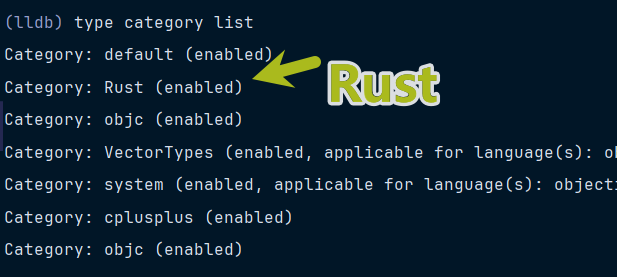
发现Rust是enabled,那么可以先关闭,然后再看看
rust
type category  disable Rust
(lldb) p name
(alloc::string::String) {
  vec = {
    buf = {
      inner = {
        ptr = {
          pointer = {
            pointer = 0x000002478c793df0
          }
          _marker = {}
        }
        cap = (__0 = 10)
        alloc = {}
      }
      _marker = {}
    }
    len = 10
  }
}
展示了pointer才是默认见到的String。
那么要自定义脚本,这里面就有许多细节需要考虑了,笔者慢慢细说。
首先,笔者在当前crate中
- 根目录下新建一个lldb目录。
- 根目录下新建一个.lldbinit文件
其中.lldbinit文件在lldb初始化时加载,其中的内容如下
platform settings -w F:\code\Python\play-lldb
这个命令的意思是设置
platform settings:这是 LLDB 中用于配置当前选定平台参数的命令。platform 命令组主要用于管理和创建调试平台(如 remote-android、ios-simulator 等)
-w :这个参数代表 working directory(工作目录),用于指定程序运行时的默认目录路径。
总之,设置程序运行时的默认路径。
但是,启动lldb。使用命令platform status
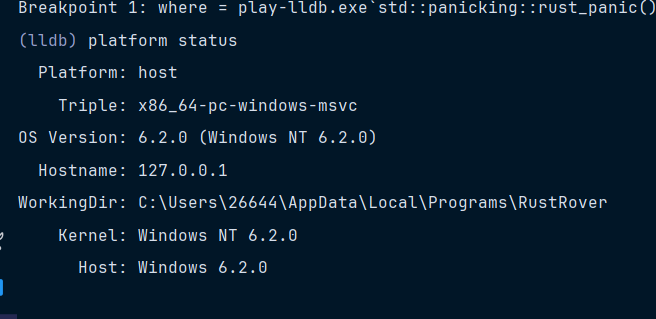
发现WorkingDir没有生效,笔者没想到这个该怎么搞,
笔者系统启动lldb就加载当前的目录,可以在用户目录下写死,但感觉不好
只能使用导入了
(lldb) command source F:\code\Python\play-lldb\.lldbinit
导入后,结果如下
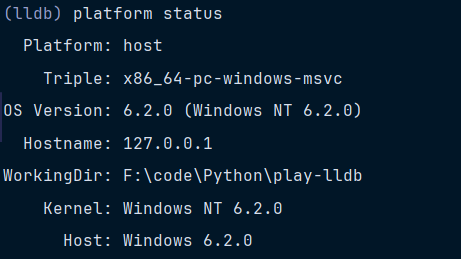
建立SyntheticProvider
在lldb目录下,新建一个string.py文件,其中内容如下,当然,名字任取。
在这个string.py文件中,写一个类------StringSyntheticProvider,其中内容如下
python
from lldb import SBValue
from lldb import formatters


class StringSyntheticProvider:
    def __init__(self, objvalue: SBValue, internal_dict):
        self.logger = formatters.Logger.Logger()
        self.objvalue = objvalue

    def update(self):
        pass

    def num_children(self):
        return 1

    def get_child_index(self, name) -> int:
        return 1

    def get_child_at_index(self, index) -> SBValue:
        pass
这几个函数都是非常关键的方法
update方法,初始化的时候会调用这个方法,非常关键。
get_child_index方法,笔者理解为根据名字设置child的索引
get_child_at_index方法,根据索引获取child,返回的类型是SBValue,这是lldb中的一个类型。
会使用的。
SBValue - 🐛 LLDBhttps://lldb.llvm.org/python_api/lldb.SBValue.html#sbvalue先不慌。
在lldb目录新建一个__init__.py文件,其中内容如下
python
from .string import StringSyntheticProvider额,笔者直接给出文件结构,仅供参考
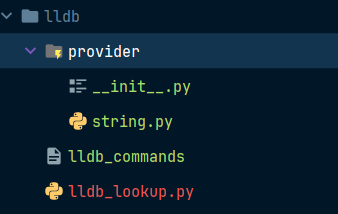
其中lldb_lookup.py的内容如下
python
from lldb import SBValue
from lldb import formatters
class  LLDBOpaque:
    pass

def synthetic_lookup(valobj: SBValue, _dict: LLDBOpaque) -> object:
    type_name = valobj.GetType().GetName()
    formatters.Logger._lldb_formatters_debug_level = 2
    if "String" in type_name:
        from provider import StringSyntheticProvider
        return StringSyntheticProvider(valobj, _dict)
    return None
其中lldb_commands的内容如下
python
command script import F:\code\Python\play-lldb\lldb\lldb_lookup.py
type synthetic add -l lldb_lookup.synthetic_lookup -x "^alloc::string::String$" --category Rust
type category enable Rust
首先导入的是lldb_lookup文件,然后正则匹配String,使用对应的Provider。
再次启动和导入,结果如下
python
(lldb) p name
(alloc::string::String) "" {}
可以发现什么都没有,就说明脚本生效了,没问题。
获取String大小
慢慢来,可以先获取String的大小。
String本质上就是一个Vec。那么长度显然从vec里面获取,如下
python
(lldb) p name.vec.len
(u64) 10那么要使用这个值,需要先取值,需要使用一个方法------GetChildMemberWithName
在Provider类中,修改的代码如下
python
    def update(self):
        self.size=(
            self.objvalue
         .GetChildMemberWithName('vec')
         .GetChildMemberWithName('len')
         )

    def get_child_index(self, name) -> int:
        match name:
            case 'size':
                return 0
        return -1

    def get_child_at_index(self, index) -> SBValue:
        match index:
            case 0:
                return self.size
        return None
再次启动lldb并导入,结果如下
python
(lldb) p name
(alloc::string::String) "" {
  len = 10
}
可以发现,发生了变化,出现了len=10,但是这个是虚拟节点,无法使用.len访问,即
python
(lldb) p name.len
error: no field named len
会报错。但是可以使用0,即
python
(lldb) p name[0]
(u64) 10
类似于数组访问第一个元素。
获取String的内容
要想获取内容,显然需要获取指针,即
python
(lldb) p name.vec.buf.inner.ptr.pointer.pointer
(*mut u8) 0x000001fb8568f270
考虑读取指针的内容,因为前面知道,大小是10,因此读取10个字节,即
python
(lldb) memory read -c10 0x000001fb8568f270
0x1fb8568f270: 68 65 6c 6c 6f 20 6c 6c 64 62                    hello lldb
然后就看到其中的内容,使用python脚本完成这个过程就可以了
笔者在这里犯了许多错误,中间过程不必细说
这里需要另一个方法------CreateValueFromAddress
python
    def CreateValueFromAddress(self, name, address, type):
        r"""CreateValueFromAddress(SBValue self, char const * name, lldb::addr_t address, SBType type) -> SBValue"""
        return _lldb.SBValue_CreateValueFromAddress(self, name, address, type)
需要传入三个参数,name是字符串,address是地址,type是SBType。
这里这个类型是选择字符数组。因此,全部代码如下
python
from lldb import SBValue, eBasicTypeChar
from lldb import formatters
from lldb import SBError

class StringSyntheticProvider:
    def __init__(self, objvalue: SBValue, internal_dict):
        self.logger = formatters.Logger.Logger()
        self.objvalue = objvalue
        self.size=None
        self.content=None
        self.pointer=None

    def update(self):
        self.size=(
            self.objvalue
         .GetChildMemberWithName('vec')
         .GetChildMemberWithName('len')
         )
        self.pointer=(
            self.objvalue
            .GetChildMemberWithName('vec')
            .GetChildMemberWithName('buf')
            .GetChildMemberWithName('inner')
            .GetChildMemberWithName('ptr')
            .GetChildMemberWithName('pointer')
            .GetChildMemberWithName('pointer')
        )


    def num_children(self):
        return 2

    def get_child_index(self, name) -> int:
        match name:
            case 'size':
                return 0
            case 'content':
                return 1
        return -1

    def get_child_at_index(self, index) -> SBValue:
        match index:
            case 0:
                return self.size
            case 1:
                return self.get_content()

        return None
    def get_content(self):
        target = self.objvalue.GetTarget()
        char_type = target.GetBasicType(eBasicTypeChar)
        array_type = char_type.GetArrayType(self.size.GetValueAsUnsigned())
        return self.objvalue.CreateValueFromAddress("content", self.pointer.GetValueAsUnsigned(), array_type)
self.update在初始化的时候会自动调用。
至于为什么写get_content的方法,也是一个值得考虑的问题。
总之,运行后,结果如下
python
(lldb) p name
(alloc::string::String) "" {
  len = 10
  content = "hello lldb"
}
出现了len和content,这两个是不能访问的,但是可以索引访问,如下
python
(lldb) p name[0]
(u64) 10
(lldb) p name[1]
(char[10]) "hello lldb"
没问题。笔者在多次尝试中解决了。读者可以尝试自定义这个字符串的provider。
===========就这样,明天写summary=========
看看HashSet
笔者本来想写summary脚本,但先不慌,再看一个类型HashSet,以前还没有发现。
简单的代码如下
rust
use std::collections::HashSet;

fn main() {
    let mut a=HashSet::new();
    a.insert(9641);
    a.insert(732);
    println!("debugger");
}
打个断点,看看,如下
rust
(lldb) p a
(std::collections::hash::set::HashSet<i32,std::hash::random::RandomState>) size=2 {
  [0] = 9641
  [1] = 732
}
这个显然RustRover使用了python脚本,不然显示不可能是这样。
读取0和1
rust
(lldb) p a[0]
(i32) 9641
(lldb) p a[1]
(i32) 732
发现是可以读取的。读取2的时候,笔者发现了一些东西
rust
(lldb) p a[2]
Traceback (most recent call last):
  File "C:\Users/26644/AppData/Local/Programs/RustRover/plugins/intellij-rust/prettyPrinters\lldb_formatters\lldb_providers.py", line 469, in get_child_at_index
    idx = self.valid_indices[index]
IndexError: list index out of range
error: array index out of bounds
数组越界,但是暴露了python脚本所在的位置
RustRover/plugins/intellij-rust/prettyPrinters\lldb_formatters\lldb_providers.py
RustRover写在这里的。笔者发现可以使用a.base。即
rust
(lldb) p a.base
(hashbrown::set::HashSet<i32,std::hash::random::RandomState,alloc::alloc::Global>) {
  map = {
    hash_builder = (k0 = 2635483306153560131, k1 = 9046456048240208174)
    table = {
      table = {
        bucket_mask = 3
        ctrl = {
          pointer = 0x000001d89570d330
        }
        growth_left = 1
        items = 2
      }
      alloc = {}
      marker = {}
    }
  }
}
看来这才是内部的结构,笔者看到bucket,突然就想到hashmap,以前笔者专门看过。
rust
(lldb) memory read -c4 0x000001d89570d330
0x1d89570d330: 59 ff 4a ff Y.J.显然,索引是1和3
考虑桶的类型是i32,那么桶的大小是4。
因此,第一个地址就是
rust
0x000001d89570d330-4=0x000001d89570d32C读取地址,四个字节
rust
(lldb) memory read -c4 0x000001d89570d32C
0x1d89570d32c: a9 25 00 00
结果是0x000025a9,变成十进制恰好等于9641,看来没问题
那么,第二个地址
rust
0x000001d89570d330-12=0x000001d89570d32C读取地址
rust
(lldb) memory read -c4 0x000001d89570d324
0x1d89570d324: dc 02 00 00                                      ....
结果是0x000002dc,变成十进制恰好等于732。没问题
额,看来这个HashSet和HashMap类似,考虑桶的大小和索引就可以了。
换成字符串
rust
use std::collections::HashSet;

fn main() {
    let mut a=HashSet::new();
    a.insert("tyu");
    a.insert("psfs");
    println!("debugger");
}
桶的大小是16,那么很显然了。直接给出计算过程。
rust
(lldb) p a
(std::collections::hash::set::HashSet<ref$<str$>,std::hash::random::RandomState>) size=2 {
  [0] = "psfs" {
    data_ptr = 0x00007ff65b83f983
    length = 4
  }
  [1] = "tyu" {
    data_ptr = 0x00007ff65b83f980
    length = 3
  }
}
(lldb) p a.base
(hashbrown::set::HashSet<ref$<str$>,std::hash::random::RandomState,alloc::alloc::Global>) {
  map = {
    hash_builder = (k0 = 12219142460503446763, k1 = 2574768623296924692)
    table = {
      table = {
        bucket_mask = 3
        ctrl = {
          pointer = 0x000001a908f54790
        }
        growth_left = 1
        items = 2
      }
      alloc = {}
      marker = {}
    }
  }
}
(lldb) memory read -c4 0x000001a908f54790
0x1a908f54790: 49 ff 26 ff                                      I.&.
(lldb) memory read -c16 0x000001a908f54780
0x1a908f54780: 83 f9 83 5b f6 7f 00 00 04 00 00 00 00 00 00 00  ...[............
(lldb) memory read -c16 0x000001a908f54760
0x1a908f54760: 80 f9 83 5b f6 7f 00 00 03 00 00 00 00 00 00 00  ...[............
(lldb) memory read -c4 0x00007ff65b83f983
0x7ff65b83f983: 70 73 66 73                                      psfs
(lldb) memory read -c3  0x00007ff65b83f980
0x7ff65b83f980: 74 79 75                                         tyu
过程不必细说。
获取HashSet的内容
为什么不获取大小?额,实际上,大小就是items,想获取就获取,简单。
根据前面的过程,要获取实际的内容,需要考虑桶的大小,而且还要判断桶是否占用?
有点意思。
- 桶的大小可以根据类型判断,使用笨方法,可以写一个字典,键作为类型,大小作为值
- 占用可以判断不等于80和ff。
嗯,感觉没什么问题,来试试吧!
在provider目录下啊初始化一个python文件
python
from lldb import SBValue
from lldb import formatters


class HashSetSyntheticProvider:
    def __init__(self, objvalue: SBValue, internal_dict):
        self.logger = formatters.Logger.Logger()
        self.objvalue = objvalue

    def update(self):
        pass

    def num_children(self):
        return 1

    def get_child_index(self, name) -> int:
        return 1

    def get_child_at_index(self, index) -> SBValue:
        pass
需要在__init__.py导入这个类。
牵一发而动全身,修改一下其他地方。
在lldb_commands文件
python
command script import F:\code\Python\play-lldb\lldb\lldb_lookup.py
type synthetic add -l lldb_lookup.StringSyntheticProvider  -x "^alloc::string::String$" --category Rust
type synthetic add -l lldb_lookup.HashSetSyntheticProvider -x "^std::collections::hash::set::HashSet<.*>$" --category Rust
type category enable Rust
lldb_lookup.py文件的内容如下
python
from lldb import SBValue
from lldb import formatters
from provider import *
formatters.Logger._lldb_formatters_debug_level = 2


class  LLDBOpaque:
    pass

def synthetic_lookup(valobj: SBValue, _dict: LLDBOpaque) -> object:
    type_name = valobj.GetType().GetName()

    if "String" in type_name:
        return StringSyntheticProvider(valobj, _dict)
    if "HashSet" in type_name:
        return HashSetSyntheticProvider(valobj, _dict)
    return None
变成proviider
首先,先获取pointer,即
python
(lldb) p a.base.map.table.table.ctrl.pointer
(*mut u8) 0x000001a908f54790在Python里面使用GetChildMemberWithName方法。
=============就这样,明天再说==========
额,继续完成HashSetSyntheticProvider。
在update里面获取容量和指针,即
python
    def update(self):
        # base.map.table.table
        self.logger>>"111111"
        self.table=(
            self.objvalue
            .GetChildMemberWithName('base')
            .GetChildMemberWithName('map')
            .GetChildMemberWithName('table')
            .GetChildMemberWithName('table')
        )
        # 获取容量
        self.capacity=self.table.GetChildMemberWithName('bucket_mask').GetValueAsUnsigned()+1
        # 获取大小
        self.size=self.table.GetChildMemberWithName('items').GetValueAsUnsigned()
        # 获取指针
        self.pointer=(
            self.table
            .GetChildMemberWithName('ctrl')
            .GetChildMemberWithName('pointer')
        )
        self.logger>>f"{self.capacity}"
        self.logger>>f"{self.size}"
        self.logger>>f"{self.pointer.GetValueAsUnsigned():#x}"

    def num_children(self):
        return self.size
bucket_mask+1就是容量。
运行,输出结果如下
python
(lldb) p a
111111
4
3
0x20761654880
(std::collections::hash::set::HashSet<ref$<str$>,std::hash::random::RandomState>) size=3 {}
看到输出了1111、容量等,没问题。
获取泛型的类型及大小
应该怎么获取类型,使用GetType方法,返回SBType类型,再调用GetName返回字符串,然后正则获取。
关键代码如下
python
    def _get_type(self,name):
        match = re.search(r'HashSet<([^,]+),', name)
        if match:
            self.hashset_type = match.group(1)
        else:
            SBError("类型错误")
再次看看日志
python
(lldb) p a
111111
4
3
ref$<str$>
0x16fb59cf270发现确定是&str,即ref\
后面可以写一个映射表,根据类型返回大小,笔者使用笨方法,不知道读者有没有其他方法(0.0)。
关键代码如下
python
TYPE_SIZE={
    "i32":4,
    "u64":8,
    "ref$<str$>":16
}
self.logger>>f"{TYPE_SIZE[self.hashset_type]}"
笔者就只写了三个,其他再说。
实际上笔者觉得这个大小是变化的,应该是一个变量,这里其实可以定义一个新的命令。
嗯,感觉没问题,有点意思,后面再说,继续完成provider。
判断桶是否被占用------获取索引
现在知道了桶的大小,现在该判断桶是否被占用。
即。如下例子
python
(lldb) memory read -c4 0x00000136e1def270
0x136e1def270: 46 ff 55 22                                      F.U"
看出索引是1,3,4。
读取内存,可以使用ReadMemory这个方法
即
python
process.ReadMemory(address, byte_count, error) 传入地址、字节数、一个SBerror对象。
关键代码如下
python
    def update(self):
        ......
        process = self.objvalue.GetProcess()
        error = SBError()
        data = process.ReadMemory(self.pointer.GetValueAsUnsigned(),self.capacity, error)
        if error.Success():
            # data 是 bytes 对象
            for i, byte in enumerate(data):
                self.logger>>f"Byte {i}: 0x{byte:02x}"
        else:
            self.logger>>f"Failed to read memory: {error.GetCString()}"
输出如下
python
Byte 0: 0x4c
Byte 1: 0x29
Byte 2: 0x29
Byte 3: 0xff
发现输出了4个,这正是刚刚例子输出的,结果不一样,这个可以判断索引是1、2、3。
进一步,判断索引。
即
python
            for i, byte in enumerate(data,1):
                if byte!=0xFF and byte!=0x80:
                    self.logger>>f"index {i}"
结果如下
python
index 1
index 3
index 4
获取了索引,很好。
获取桶中的数据
笔者在这里获取桶中的数据,可能是值,也可能是地址,这就很麻烦了。
这里可以考虑类型的大小,
如果类型大于8,说明这个桶中的数据为地址,
如果等于8,二者都有可能。
如果小于8,说明桶中的数据为值。
笔者为了简化,就考虑三者类型,i32、u64、&str。感觉不是适用任何类型,就先这样。
说起来,笔者可以看看RustRover里面是怎么写脚本的,学习一下。
不慌,慢慢来,先去看看别人怎么写的
看看RustRover里面的脚本
笔者直接给出HashMap和HashSet
python
class StdHashMapSyntheticProvider:
    """Pretty-printer for hashbrown's HashMap"""

    def __init__(self, valobj, _dict, show_values=True):
        # type: (SBValue, dict, bool) -> None
        self.valobj = valobj
        self.show_values = show_values
        self.update()

    def num_children(self):
        # type: () -> int
        return self.size

    def get_child_index(self, name):
        # type: (str) -> int
        index = name.lstrip('[').rstrip(']')
        if index.isdigit():
            return int(index)
        else:
            return -1

    def get_child_at_index(self, index):
        # type: (int) -> SBValue
        self.update_up_to(index)
        pairs_start = self.data_ptr.GetValueAsUnsigned()
        idx = self.valid_indices[index]
        if self.new_layout:
            idx = -(idx + 1)
        address = pairs_start + idx * self.pair_type_size
        element = self.data_ptr.CreateValueFromAddress("[%s]" % index, address, self.pair_type)
        if self.show_values:
            return element
        else:
            key = element.GetChildAtIndex(0)
            return self.valobj.CreateValueFromData("[%s]" % index, key.GetData(), key.GetType())

    def update(self):
        # type: () -> None
        table = self.table()
        inner_table = table.GetChildMemberWithName("table")

        self.capacity = inner_table.GetChildMemberWithName("bucket_mask").GetValueAsUnsigned() + 1
        self.ctrl = inner_table.GetChildMemberWithName("ctrl").GetChildAtIndex(0)

        self.size = inner_table.GetChildMemberWithName("items").GetValueAsUnsigned()

        if table.type.GetNumberOfTemplateArguments() > 0:
            self.pair_type = table.type.template_args[0].GetTypedefedType()
        else:
            # MSVC LLDB (does not support template arguments at the moment)
            type_name = table.type.name  # expected "RawTable<tuple$<K,V>,alloc::alloc::Global>"
            first_template_arg = get_template_params(type_name)[0]
            self.pair_type = table.GetTarget().FindFirstType(first_template_arg)

        self.pair_type_size = self.pair_type.GetByteSize()

        self.new_layout = not inner_table.GetChildMemberWithName("data").IsValid()
        if self.new_layout:
            self.data_ptr = self.ctrl.Cast(self.pair_type.GetPointerType())
        else:
            self.data_ptr = inner_table.GetChildMemberWithName("data").GetChildAtIndex(0)

        self.u8_type = self.valobj.GetTarget().GetBasicType(eBasicTypeUnsignedChar)
        self.u8_type_size = self.valobj.GetTarget().GetBasicType(eBasicTypeUnsignedChar).GetByteSize()

        self.valid_indices = []
        self.updated_to_idx = 0

    def update_up_to(self, index):
        while self.updated_to_idx < self.capacity and index >= len(self.valid_indices):
            idx = self.updated_to_idx
            address = self.ctrl.GetValueAsUnsigned() + idx * self.u8_type_size
            value = self.ctrl.CreateValueFromAddress("ctrl[%s]" % idx, address,
                                                     self.u8_type).GetValueAsUnsigned()
            is_present = value & 128 == 0
            if is_present:
                self.valid_indices.append(idx)

            self.updated_to_idx += 1

    def table(self):
        # type: () -> SBValue
        if self.show_values:
            hashbrown_hashmap = self.valobj.GetChildMemberWithName("base")
        else:
            # HashSet wraps `hashbrown::HashSet`, which wraps `hashbrown::HashMap`
            hashbrown_hashmap = self.valobj.GetChildAtIndex(0).GetChildAtIndex(0)
        return hashbrown_hashmap.GetChildMemberWithName("table")

    def has_children(self):
        # type: () -> bool
        return True


class StdHashSetSyntheticProvider(StdHashMapSyntheticProvider):
    def __init__(self, valobj, _dict):
        super().__init__(valobj, _dict, show_values=False)
欣赏一下。
想不到HashSet的provider居然继承HashMpa的provider。
看看HashMap的provider
这个代码里面self.update是没有必要的。加载了脚本会自动执行的
看看update方法。
首先
python
# type: () -> None这个是方法签名,可以。
然后调用table方法
python
self.table()获取table。接着获取对应的字段capacity、size、ctrl。
然后获取桶的类型与大小,如下代码
python
        if table.type.GetNumberOfTemplateArguments() > 0:
            self.pair_type = table.type.template_args[0].GetTypedefedType()
        else:
            # MSVC LLDB (does not support template arguments at the moment)
            type_name = table.type.name  # expected "RawTable<tuple$<K,V>,alloc::alloc::Global>"
            first_template_arg = get_template_params(type_name)[0]
            self.pair_type = table.GetTarget().FindFirstType(first_template_arg)

        self.pair_type_size = self.pair_type.GetByteSize()
这个代码有点意思。调用了GetNumberOfTemplateArguments这个方法,获取参数。
直言的说,笔者测试了一下,这个方法返回0。
如果没有获取成功,使用get_template_params
python
def get_template_params(type_name):
    # type: (str) -> List[str]
    params = []
    level = 0
    start = 0
    for i, c in enumerate(type_name):
        if c == '<':
            level += 1
            if level == 1:
                start = i + 1
        elif c == '>':
            level -= 1
            if level == 0:
                params.append(type_name[start:i].strip())
        elif c == ',' and level == 1:
            params.append(type_name[start:i].strip())
            start = i + 1
    return params
这个感觉还是一个算法,而且比正则高级点。
哦,笔者明白了,在前面正则,只能在第一个逗号,如果遇到嵌套的泛型,就会出错。
这个算法可以。
测试一下
AI写一个测试类,测试一下这个算法
笔者使用Rye,安装pytest,测试代码如下
python
import pytest
from typing import List


def get_template_params(type_name: str) -> List[str]:
    params = []
    level = 0
    start = 0
    for i, c in enumerate(type_name):
        if c == '<':
            level += 1
            if level == 1:
                start = i + 1
        elif c == '>':
            level -= 1
            if level == 0:
                params.append(type_name[start:i].strip())
        elif c == ',' and level == 1:
            params.append(type_name[start:i].strip())
            start = i + 1
    return params


@pytest.mark.parametrize(
    "input_str, expected",
    [
        # 基本类型测试
        ("HashSet<i32,std::hash::RandomState>", ["i32", "std::hash::RandomState"]),
        ("HashSet<i32>", ["i32"]),

        # 嵌套测试
        ("HashSet<Vec<i32>,std::hash::RandomState>", ["Vec<i32>", "std::hash::RandomState"]),
        ("HashSet<HashMap<i32,ref$<str$>>,std::hash::RandomState>",
         ["HashMap<i32,ref$<str$>>", "std::hash::RandomState"]),

        # 多层嵌套
        ("HashSet<Vec<HashMap<i32,ref$<str$>>>,std::hash::RandomState>",
         ["Vec<HashMap<i32,ref$<str$>>>", "std::hash::RandomState"]),

        # 空格处理
        ("HashSet<i32, std::hash::RandomState>", ["i32", "std::hash::RandomState"]),

        # 边界情况
        ("", []),
        ("NoTemplate", []),

        # 复杂嵌套
        ("HashSet<Vec<Option<Result<i32,Error>>>,std::hash::RandomState>",
         ["Vec<Option<Result<i32,Error>>>", "std::hash::RandomState"]),
    ],
    ids=[
        "基本类型",
        "单个参数",
        "简单嵌套",
        "多层嵌套",
        "更深层嵌套",
        "带空格",
        "空字符串",
        "无模板参数",
        "复杂嵌套",
    ]
)
def test_get_template_params(input_str: str, expected: List[str]):
    """测试模板参数解析"""
    result = get_template_params(input_str)
    assert result == expected, f"输入: {input_str}, 期望: {expected}, 实际: {result}"


# 边界条件测试
def test_nested_brackets():
    """测试多重嵌套括号"""
    result = get_template_params("HashSet<Vec<HashMap<i32,Vec<String>>>,State>")
    assert result == ["Vec<HashMap<i32,Vec<String>>>", "State"]


def test_whitespace_handling():
    """测试空格和制表符"""
    result = get_template_params("HashSet<  i32  ,  State  >")
    assert result == ["i32", "State"]


def test_single_nested_param():
    """测试单个嵌套参数"""
    result = get_template_params("Option<Result<T,E>>")
    assert result == ["Result<T,E>"]
结果如下
python
❯ rye run pytest
=============================================================================== test session starts ===============================================================================
platform win32 -- Python 3.13.2, pytest-9.0.2, pluggy-1.6.0
rootdir: F:\code\Python\play-lldb
configfile: pyproject.toml
collected 12 items

tests\test_templates.py ............                                                                                                                                         [100%]

=============================================================================== 12 passed in 0.26s ================================================================================
12个测试都通过了。
这个算法的时间复杂度O(n),空间复杂度是O(1)。
这个算法的大致过程
遇到 <符号:level++,当 level == 1 时记录参数起始位置;
遇到 >符号:level--,当 level == 0 时保存参数;
遇到 ,符号:仅在 level == 1 时分割参数。
===========行,明天继续看=============
获取类型之后,然后
python
self.pair_type = table.GetTarget().FindFirstType(first_template_arg)调用targe的FindFirstType方法。
可以看看这个输出什么
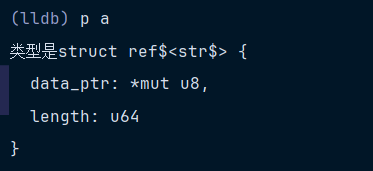
居然直接找到了&str的结构体。
然后计算出大小
python
self.pair_type_size = self.pair_type.GetByteSize()嗯,有点意思
如何获取位置
笔者本来想说索引的,笔者突然感觉不是很好,因为索引一般是从0开始的,因此,笔者决定换一个,叫位置。
继续,如何找到位置的,这就是需要使用update_up_to方法了
这个方法里面,最关键的一步
python
is_present = value & 128 == 0判断最高位------第7位,是否为0。判断是否被占用,使用的位运算。
写自己的代码
现在桶的大小和桶的位置已经知道怎么获取了,该写代码了。
过了几个月后
不是,笔者看了看前面的内容,有点忘了,笔者好像是去年写的吧。
糟了,关于lldb的东西,感觉自己什么都忘记了。
继续操作
不知道过了多久,笔者重新学习了前面的东西,直接给出以前未完成的代码。
rust代码如下
rust
use std::collections::HashSet;

fn main() {
    let mut a=HashSet::new();
    a.insert(9641);
    a.insert(732);
    println!("debugger");
}
简单。
python代码如下
python
from lldb import SBValue, SBType, SBError
from lldb import formatters


def get_template_params(type_name):
    params = []
    level = 0
    start = 0
    for i, c in enumerate(type_name):
        if c == '<':
            level += 1
            if level == 1:
                start = i + 1
        elif c == '>':
            level -= 1
            if level == 0:
                params.append(type_name[start:i].strip())
        elif c == ',' and level == 1:
            params.append(type_name[start:i].strip())
            start = i + 1
    return params
class HashSetSyntheticProvider:
    def __init__(self, objvalue: SBValue, internal_dict):
        self.logger = formatters.Logger.Logger()
        self.objvalue = objvalue
        self.pointer=None
        self.bucket_size=0
        self.generic_type=None
        self.size=0
        self.position_list=[]

    def get_bucket_size(self):
        name=self.objvalue.GetType().GetName()
        generic_name=get_template_params(name)[0]
        bucket_type=self.objvalue.GetTarget().FindFirstType(generic_name)
        self.generic_type=bucket_type
        self.bucket_size= bucket_type.GetByteSize()


    def get_pointer(self):
         table= (
             self.objvalue
            .GetChildMemberWithName('base')
            .GetChildMemberWithName('map')
            .GetChildMemberWithName('table')
            .GetChildMemberWithName('table')
         )
         pointer=(
             table
             .GetChildMemberWithName('ctrl')
             .GetChildMemberWithName('pointer')
         )

         capacity = table.GetChildMemberWithName('bucket_mask').GetValueAsUnsigned() + 1
         self.size=table.GetChildMemberWithName('items').GetValueAsUnsigned()
         self.pointer=pointer
         return capacity


    def get_position(self,capacity):
        process=self.objvalue.GetProcess()
        error=SBError()
        addr = self.pointer.GetValueAsUnsigned()
        data=process.ReadMemory(addr,capacity,error)
        for i, byte in enumerate(data,1):
            if byte < 0x80:
                self.position_list.append(i)
        self.logger>>self.position_list

    def get_data(self,position):
        now_position=self.position_list[position]
        index_address=self.pointer.GetValueAsUnsigned()-self.bucket_size*now_position
        process=self.objvalue.GetProcess()
        error=SBError()
        element = self.pointer.CreateValueFromAddress("[%s]" % position, index_address, self.generic_type)
        self.logger>>element

    def update(self):
        self.position_list = []
        self.get_bucket_size()
        capacity=self.get_pointer()
        self.get_position(capacity)


    def num_children(self):
        return self.size


    def get_child_index(self, name) -> int:
        try:
            index = int(name.lstrip('[').rstrip(']'))
            if 0 <= index < self.size:
                return index
        except ValueError:
            pass
        return -1


    def get_child_at_index(self, index) -> SBValue:
        if index+1 > self.size:
            return None
        return self.get_data(index)
首先,初始化的时候执行update方法。
在update方法中,现在完成了两件事,
第一件事是获取桶的大小,桶的大小就是泛型类型的大小,先获取泛型,然后计算大小即可。
第二件事是获取关键的指针。
第三件事是计算出元素所在的位置,判断小于<0x80,表示桶被占用。
测试一下,现在的情况,
结果如下
rust
(lldb) command source G:\code\Python\play-lldb\.lldbinit
Executing commands in 'G:\code\Python\play-lldb\.lldbinit'.
(lldb) platform settings -w G:/code/Python/play-lldb
(lldb) command source lldb/lldb_commands
Executing commands in 'G:\code\Python\play-lldb\lldb\lldb_commands'.
(lldb) command script import G:\code\Python\play-lldb\lldb\lldb_lookup.py
(lldb) type synthetic add -l lldb_lookup.StringSyntheticProvider  -x "^alloc::string::String$" --category Rust
(lldb) type synthetic add -l lldb_lookup.HashSetSyntheticProvider -x "^std::collections::hash::set::HashSet<.*>$" --category Rust
(lldb) type category enable Rust
(lldb) p a
[1, 4]
(i32) [0] = 732
(i32) [1] = 9641
(std::collections::hash::set::HashSet<i32,std::hash::random::RandomState>) size=2 {}
首先,笔者先通过.lldbinit加载上面的python文件。
笔者的磁盘变了,和前面路径不一样。
然后p a打印看看。
p a,首先进行初始化,执行update,得到位置,
从结果可以看出,元素的位置分别在1和4,
但是为什么会触发get_child_at_index这个方法,然后触发get_data,最后打印其中的值。
难道说p a,这个命令也会触发get_child_at_index这个方法,有可能,
笔者也不知道,忘记了,哈哈哈哈哈哈。
测试一下
那么做出最后的修改,如下。
python
    def get_data(self,position):
        now_position=self.position_list[position]
        index_address=self.pointer.GetValueAsUnsigned()-self.bucket_size*now_position
        process=self.objvalue.GetProcess()
        error=SBError()
        element = self.pointer.CreateValueFromAddress("[%s]" % position, index_address, self.generic_type)
        return element
直接返回element。
再次测试一下。
rust
fn main() {
    let mut a=HashSet::new();
    a.insert(234);
    a.insert(8762);
    println!("debugger");
}
结果如下
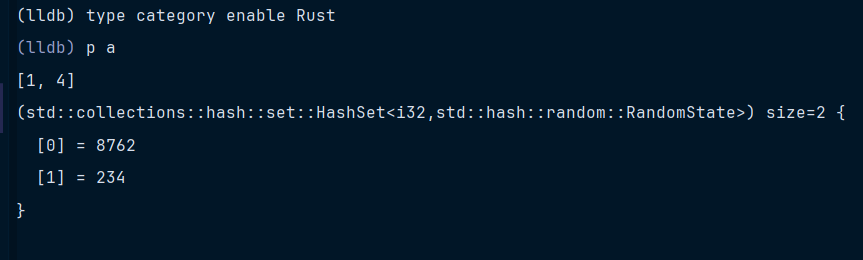
没什么问题。
换成字符串和前面的provider合并使用。
rust
use std::collections::HashSet;

fn main() {
    let mut a=HashSet::new();
    a.insert(String::from("Hello"));
    a.insert(String::from("World"));
    println!("debugger");
}
结果如下
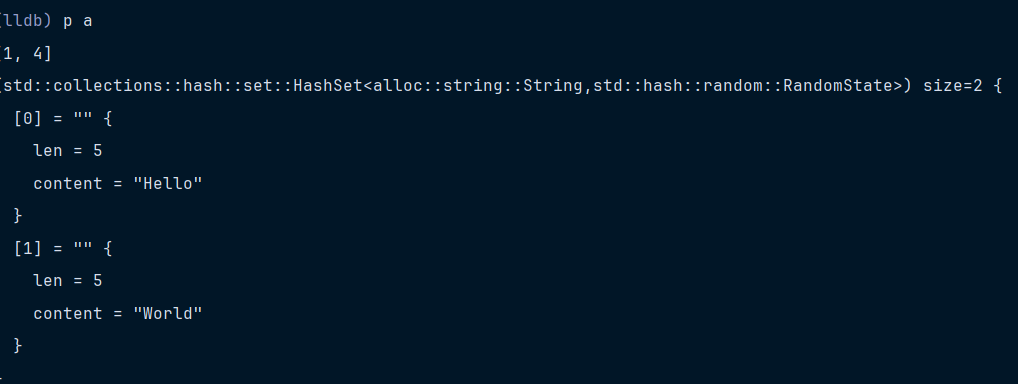
如果不使用笔者自定义的,使用原来的lldb和RustRover定义的provider
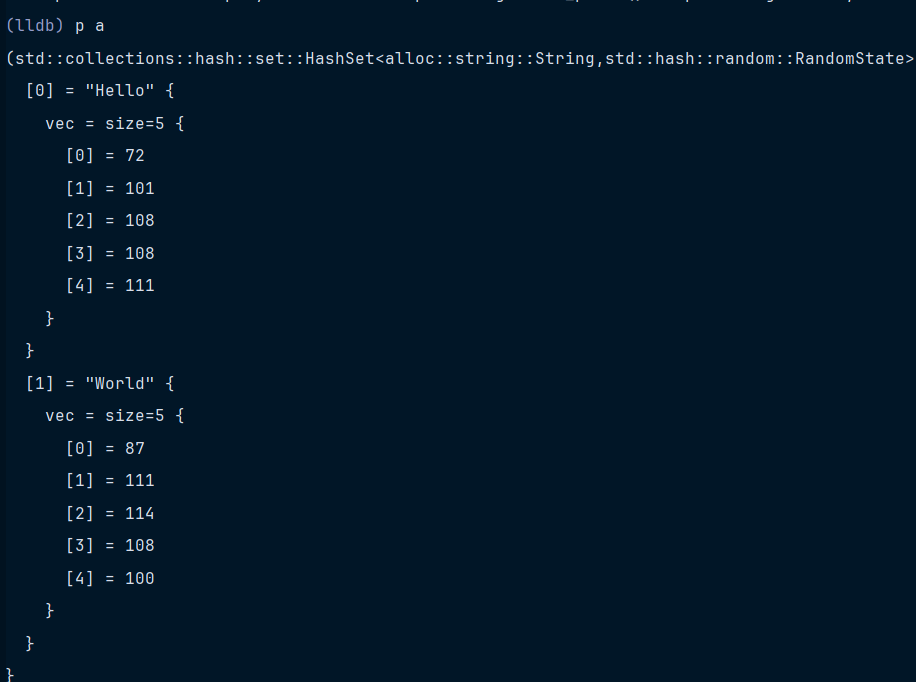
可以。
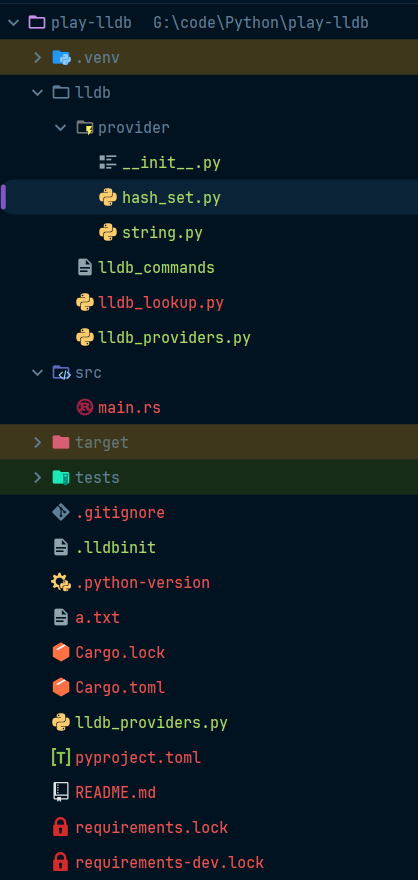
最后目录结构如下
总结
笔者本来还想加点东西的,但感觉没必要了。
后面再说。