文章目录
- [1. 概述](#1. 概述)
-
- [1.1 工作原理总览](#1.1 工作原理总览)
- [2. 工具总览](#2. 工具总览)
- [3. CogFindCircleTool---找圆工具](#3. CogFindCircleTool—找圆工具)
-
- [3.1 引用命名空间与程序集](#3.1 引用命名空间与程序集)
- [3.2 控件类继承关系](#3.2 控件类继承关系)
- [3.3 核心属性与方法](#3.3 核心属性与方法)
-
- [3.3.1 主要属性](#3.3.1 主要属性)
- [3.3.2 主要方法](#3.3.2 主要方法)
- [3.3.3 主要事件](#3.3.3 主要事件)
- [3.4 关键运行参数(CogFindCircleRunParams)](#3.4 关键运行参数(CogFindCircleRunParams))
- [3.5 结果属性(CogFindCircleResults)](#3.5 结果属性(CogFindCircleResults))
- [3.6 使用方法与示例代码](#3.6 使用方法与示例代码)
-
- [3.6.1 基本使用流程](#3.6.1 基本使用流程)
- [3.6.2 示例代码](#3.6.2 示例代码)
- [3.6.3 在ToolGroup 中使用](#3.6.3 在ToolGroup 中使用)
- [3.6.4 从.vpp文件加载工具配置](#3.6.4 从.vpp文件加载工具配置)
- [3.6.5 事件驱动模式](#3.6.5 事件驱动模式)
- [3.6.6 结果可视化叠加到CogDisplay](#3.6.6 结果可视化叠加到CogDisplay)
- [3.6.7 动态调整参数- 适应不同产品](#3.6.7 动态调整参数- 适应不同产品)
- [3.6.8 批量图像检测](#3.6.8 批量图像检测)
- [4. CogFindLineTool---找线工具](#4. CogFindLineTool—找线工具)
-
- [4.1 引用命名空间与程序集](#4.1 引用命名空间与程序集)
- [4.2 控件类继承关系](#4.2 控件类继承关系)
- [4.3 核心属性与方法](#4.3 核心属性与方法)
-
- [4.3.1 主要属性](#4.3.1 主要属性)
- [4.3.2 主要方法](#4.3.2 主要方法)
- [4.4 关键运行参数](#4.4 关键运行参数)
- [4.5 结果属性](#4.5 结果属性)
- [4.6 使用方法与示例代码](#4.6 使用方法与示例代码)
-
- [4.6.1 常见问题:交换搜索方向](#4.6.1 常见问题:交换搜索方向)
- [4.6.2 从.vpp文件加载并运行](#4.6.2 从.vpp文件加载并运行)
- [4.6.3 结果可视化](#4.6.3 结果可视化)
- [4.6.4 双边检测求宽度](#4.6.4 双边检测求宽度)
- [4.6.5 交换搜索方向自适应](#4.6.5 交换搜索方向自适应)
- [5. CogFindCornerTool---找角工具](#5. CogFindCornerTool—找角工具)
-
- [5.1 引用命名空间与程序集](#5.1 引用命名空间与程序集)
- [5.2 概述](#5.2 概述)
- [5.3 核心属性与方法](#5.3 核心属性与方法)
-
- [5.3.1 主要属性](#5.3.1 主要属性)
- [5.3.2 主要方法](#5.3.2 主要方法)
- [5.4 关键运行参数](#5.4 关键运行参数)
- [5.5 结果属性](#5.5 结果属性)
- [5.6 使用方法与示例代码](#5.6 使用方法与示例代码)
-
- [5.6.1 示例:基本使用](#5.6.1 示例:基本使用)
- [5.6.2 示例:结果可视化](#5.6.2 示例:结果可视化)
- [6. CogFindEllipseTool---找椭圆工具](#6. CogFindEllipseTool—找椭圆工具)
-
- [6.1 引用命名空间与程序集](#6.1 引用命名空间与程序集)
- [6.2 概述](#6.2 概述)
- [6.3 核心属性与方法](#6.3 核心属性与方法)
-
- [6.3.1 主要属性](#6.3.1 主要属性)
- [6.3.2 主要方法](#6.3.2 主要方法)
- [6.4 关键运行参数](#6.4 关键运行参数)
- [6.5 结果属性](#6.5 结果属性)
- [6.6 使用方法与示例代码](#6.6 使用方法与示例代码)
-
- [6.6.1 基本使用](#6.6.1 基本使用)
- [6.6.2 从.vpp加载](#6.6.2 从.vpp加载)
- [6.6.3 结果可视化](#6.6.3 结果可视化)
- [7. CogFitCircleTool --- 圆拟合工具](#7. CogFitCircleTool — 圆拟合工具)
-
- [7.1 引用命名空间与程序集](#7.1 引用命名空间与程序集)
- [7.2 核心属性与方法](#7.2 核心属性与方法)
-
- [7.3 关键运行参数](#7.3 关键运行参数)
- [7.4 结果属性](#7.4 结果属性)
- [7.5 使用方法与示例代码](#7.5 使用方法与示例代码)
-
- [7.5.1 典型应用场景](#7.5.1 典型应用场景)
- [7.5.2 从.vpp加载](#7.5.2 从.vpp加载)
- [7.5.3 结合FindCircle和FitCircle进行高精度检测](#7.5.3 结合FindCircle和FitCircle进行高精度检测)
- [7.5.4 结果可视化与残差分析](#7.5.4 结果可视化与残差分析)
- [7.5.5 多次拟合取平均值提高稳定性](#7.5.5 多次拟合取平均值提高稳定性)
- [8. CogFitEllipseTool---椭圆拟合工具](#8. CogFitEllipseTool—椭圆拟合工具)
-
- [8.1 引用命名空间与程序集](#8.1 引用命名空间与程序集)
- [8.2 概述](#8.2 概述)
- [8.3 核心属性与方法](#8.3 核心属性与方法)
-
- [8.4 关键运行参数](#8.4 关键运行参数)
- [8.5 结果属性](#8.5 结果属性)
- [8.6 使用方法与示例代码](#8.6 使用方法与示例代码)
-
- [8.6.1 基本使用](#8.6.1 基本使用)
- [8.6.2 从.vpp加载](#8.6.2 从.vpp加载)
- [8.6.3 结合FindEllipse进行高精度椭圆检测](#8.6.3 结合FindEllipse进行高精度椭圆检测)
- [9. CogFitLineTool---直线拟合工具](#9. CogFitLineTool—直线拟合工具)
-
- [9.1 引用命名空间与程序集](#9.1 引用命名空间与程序集)
- [9.2 核心属性与方法](#9.2 核心属性与方法)
-
- [9.3 关键运行参数](#9.3 关键运行参数)
- [9.4 结果属性](#9.4 结果属性)
- [9.5 使用方法与示例代码](#9.5 使用方法与示例代码)
-
- [9.5.1 典型应用场景](#9.5.1 典型应用场景)
- [9.5.2 从.vpp加载](#9.5.2 从.vpp加载)
- [9.5.3 结果可视化](#9.5.3 结果可视化)
- [9.5.4 多段直线拟合检测边缘平行度](#9.5.4 多段直线拟合检测边缘平行度)
- 10.常见问题与解决方案
-
- [10.1 找圆工具找不到圆](#10.1 找圆工具找不到圆)
- [10.2 找线工具结果不稳定](#10.2 找线工具结果不稳定)
- [10.3 拟合工具残差过大](#10.3 拟合工具残差过大)
- [10.4 卡尺搜索方向错误](#10.4 卡尺搜索方向错误)
1. 概述
VisionPro 的 Geometry -- Finding & Fitting(几何查找与拟合) 工具集是机器视觉中用于几何特征检测与拟合的核心工具组。这些工具基于 卡尺(Caliper) 原理,通过在图像中布置一系列采样线(卡尺),沿采样方向检测边缘点,再将这些边缘点拟合为几何形状(圆、直线、椭圆等)。
1.1 工作原理总览
┌─────────────────────────────────────────────────────┐
│                  输入图像                              │
│                                                      │
│    ┌─── 卡尺1 ───┐                                   │
│    │  搜索方向→   │  边缘点1                           │
│    └─────────────┘                                   │
│    ┌─── 卡尺2 ───┐                                   │
│    │  搜索方向→   │  边缘点2                           │
│    └─────────────┘                                   │
│    ┌─── 卡尺3 ───┐                                   │
│    │  搜索方向→   │  边缘点3                           │
│    └─────────────┘                                   │
│           ...                                        │
│    ┌─── 卡尺N ───┐                                   │
│    │  搜索方向→   │  边缘点N                           │
│    └─────────────┘                                   │
│                                                      │
│    边缘点集合 → 拟合算法 → 输出几何形状                  │
└─────────────────────────────────────────────────────┘
核心概念:
- 卡尺(Caliper):沿指定方向的一维边缘检测器,用于在图像中定位灰度突变点
- 搜索长度(Search Length):卡尺沿搜索方向扫描的长度
- 投影长度(Projection Length):卡尺垂直于搜索方向的投影宽度,用于平均灰度减少噪声
- 搜索方向(Search Direction):卡尺扫描边缘的方向
- 边缘点(Edge Point):卡尺检测到的灰度突变位置
2. 工具总览
| 编号 |
工具名称 |
功能描述 |
命名空间 |
| 1 |
CogFindCircleTool |
在图像中查找圆形边界 |
Cognex.VisionPro.Caliper |
| 2 |
CogFindLineTool |
在图像中查找直线边界 |
Cognex.VisionPro.Caliper |
| 3 |
CogFindCornerTool |
在图像中查找角点 |
Cognex.VisionPro.Caliper |
| 4 |
CogFindEllipseTool |
在图像中查找椭圆边界 |
Cognex.VisionPro.Caliper |
| 5 |
CogFitCircleTool |
将一组点拟合为圆 |
Cognex.VisionPro |
| 6 |
CogFitEllipseTool |
将一组点拟合为椭圆 |
Cognex.VisionPro |
| 7 |
CogFitLineTool |
将一组点拟合为直线 |
Cognex.VisionPro |
| 8 |
CogMultiLineFinderTool |
在图像中查找多条线段 |
Cognex.VisionPro.Caliper |
查找工具 vs 拟合工具:
- 查找工具(Find):内置卡尺,直接从图像中检测边缘点并拟合为几何形状
- 拟合工具(Fit):接收外部输入的点集,通过最小二乘等算法拟合为最佳匹配几何形状
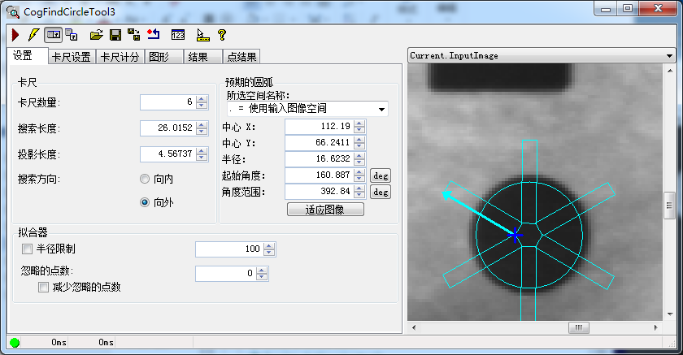
3.1 引用命名空间与程序集
// 必需引用
using Cognex.VisionPro;
using Cognex.VisionPro.Caliper;

// 程序集
// Cognex.VisionPro.dll
// Cognex.VisionPro.Caliper.dll
3.2 控件类继承关系
System.Object
  └── CogToolBase
        └── CogFindCircleTool

编辑控件:
System.Object
  └── System.Windows.Forms.Control
        └── CogFindCircleEditV2
3.3 核心属性与方法
3.3.1 主要属性
| 属性名 |
类型 |
说明 |
InputImage |
ICogImage |
输入图像 |
RunParams |
CogFindCircleRunParams |
运行参数对象 |
Results |
CogFindCircleResults |
运行结果集合 |
CurrentRunRecord |
ICogRecord |
当前运行记录(用于结果可视化) |
LastRunRecord |
ICogRecord |
上次运行记录 |
3.3.2 主要方法
| 方法名 |
说明 |
Run() |
执行找圆操作 |
CreateCurrentRunRecord() |
创建当前运行记录 |
3.3.3 主要事件
| 事件名 |
说明 |
Ran |
工具运行完成后触发 |
Changed |
属性发生变化时触发 |
3.4 关键运行参数(CogFindCircleRunParams)
| 参数名 |
类型 |
默认值 |
说明 |
CaliperRunParams.NumCalipers |
int |
10 |
卡尺数量:沿圆周分布的卡尺个数,越多拟合越精确但速度越慢 |
CaliperRunParams.SearchLength |
double |
100 |
搜索长度:每个卡尺沿搜索方向扫描的像素长度 |
CaliperRunParams.SearchDirection |
CogCaliperSearchDirection |
SearchDirInward |
搜索方向 :Inward(向内)/ Outward(向外)/ Auto(自动) |
CaliperRunParams.ProjectionLength |
double |
10 |
投影长度:卡尺垂直方向的投影宽度,用于灰度平均 |
CaliperRunParams.Edge0Polarity |
CogCaliperPolarity |
DarkToLight |
边缘极性 :DarkToLight(暗→亮)/ LightToDark(亮→暗)/ DontCare(任意) |
CaliperRunParams.ContrastThreshold |
double |
10 |
对比度阈值:低于此值的边缘将被忽略 |
CaliperRunParams.FilterHalfSizeInPixels |
int |
3 |
滤波器半宽:用于平滑噪声,值越大滤波越强 |
ExpectedCircle.Center.X |
double |
0 |
预期圆心X:圆的预期中心X坐标 |
ExpectedCircle.Center.Y |
double |
0 |
预期圆心Y:圆的预期中心Y坐标 |
ExpectedCircle.Radius |
double |
100 |
预期半径:圆的预期半径 |
AngleStart |
double |
0 |
起始角度:卡尺分布的起始角度(度) |
AngleSpan |
double |
360 |
角度范围:卡尺分布的角度范围(度),0-180为半圆,0-360为整圆 |
RadiusLimitEnabled |
bool |
false |
半径限制:是否启用结果半径的范围限制 |
RadiusLimitMin |
double |
0 |
最小半径:结果半径的下限 |
RadiusLimitMax |
double |
1000 |
最大半径:结果半径的上限 |
NumPointsToIgnore |
int |
0 |
忽略点数:拟合时忽略的异常点数量(用于剔除离群点) |
3.5 结果属性(CogFindCircleResults)
| 属性名 |
类型 |
说明 |
GetCircle() |
CogCircle |
获取拟合得到的圆 |
GetCenterX() |
double |
圆心X坐标 |
GetCenterY() |
double |
圆心Y坐标 |
GetRadius() |
double |
圆的半径 |
GetNumPointsFound() |
int |
成功找到的边缘点数量 |
GetEdgePoints() |
CogPointMarker[] |
所有找到的边缘点坐标数组 |
3.6 使用方法与示例代码
3.6.1 基本使用流程
1. 创建工具实例
2. 设置输入图像
3. 配置预期圆(圆心、半径)
4. 设置卡尺参数(数量、搜索长度、投影长度等)
5. 运行工具
6. 读取结果
3.6.2 示例代码
using Cognex.VisionPro;
using Cognex.VisionPro.Caliper;

// 1. 创建工具实例
CogFindCircleTool findCircleTool = new CogFindCircleTool();

// 2. 设置输入图像
findCircleTool.InputImage = cogImage; // ICogImage 类型

// 3. 配置预期圆
findCircleTool.RunParams.ExpectedCircle.Center.X = 320;
findCircleTool.RunParams.ExpectedCircle.Center.Y = 240;
findCircleTool.RunParams.ExpectedCircle.Radius = 100;

// 4. 设置卡尺参数
findCircleTool.RunParams.CaliperRunParams.NumCalipers = 20;      // 20个卡尺
findCircleTool.RunParams.CaliperRunParams.SearchLength = 80;      // 搜索长度80像素
findCircleTool.RunParams.CaliperRunParams.SearchDirection =
    CogCaliperSearchDirection.SearchDirInward;                     // 向内搜索
findCircleTool.RunParams.CaliperRunParams.ProjectionLength = 15;  // 投影长度15像素
findCircleTool.RunParams.CaliperRunParams.Edge0Polarity =
    CogCaliperPolarity.DarkToLight;                               // 暗到亮边缘
findCircleTool.RunParams.CaliperRunParams.ContrastThreshold = 15; // 对比度阈值

// 5. 设置角度范围(半圆)
findCircleTool.RunParams.AngleStart = 0;
findCircleTool.RunParams.AngleSpan = 180;

// 6. 运行工具
findCircleTool.Run();

// 7. 读取结果
if (findCircleTool.Results != null)
{
    CogCircle resultCircle = findCircleTool.Results.GetCircle();
    double centerX = resultCircle.CenterX;
    double centerY = resultCircle.CenterY;
    double radius = resultCircle.Radius;
    int numPoints = findCircleTool.Results.GetNumPointsFound();

    Console.WriteLine($"圆心: ({centerX:F2}, {centerY:F2})");
    Console.WriteLine($"半径: {radius:F2}");
    Console.WriteLine($"找到边缘点: {numPoints}");
}
// 在 ToolGroup 中添加工具
CogToolGroup toolGroup = new CogToolGroup();
CogFindCircleTool findCircle = new CogFindCircleTool();
toolGroup.Tools.Add(findCircle);

// 通过名称访问
CogFindCircleTool tool = toolGroup.Tools["CogFindCircleTool"] as CogFindCircleTool;
3.6.4 从.vpp文件加载工具配置
using Cognex.VisionPro;
using Cognex.VisionPro.Caliper;
using System.IO;

// 从QuickBuild导出的.vpp文件加载工具配置
string vppPath = @"C:\VisionPro\FindCircle.vpp";
CogFindCircleTool findCircle = CogSerializer.LoadObjectFromFile(vppPath) as CogFindCircleTool;

// 设置新图像并运行
findCircle.InputImage = cogImage;
findCircle.Run();

// 获取结果
if (findCircle.Results != null)
{
    CogCircle circle = findCircle.Results.GetCircle();
    Console.WriteLine($"圆心: ({circle.CenterX:F2}, {circle.CenterY:F2})");
    Console.WriteLine($"半径: {circle.Radius:F2}");
}
3.6.5 事件驱动模式
using Cognex.VisionPro;
using Cognex.VisionPro.Caliper;

public class CircleFinder
{
    private CogFindCircleTool _tool;

    public CircleFinder()
    {
        _tool = new CogFindCircleTool();
        _tool.Ran += OnToolRan;  // 注册运行完成事件
    }

    private void OnToolRan(object sender, EventArgs e)
    {
        if (_tool.Results != null)
        {
            CogCircle circle = _tool.Results.GetCircle();
            Console.WriteLine($"[事件回调] 圆心: ({circle.CenterX:F2}, {circle.CenterY:F2})");
            Console.WriteLine($"[事件回调] 半径: {circle.Radius:F2}");
            Console.WriteLine($"[事件回调] 边缘点数: {_tool.Results.GetNumPointsFound()}");
        }
    }

    public void ProcessImage(ICogImage image)
    {
        _tool.InputImage = image;
        _tool.Run();
    }
}
3.6.6 结果可视化叠加到CogDisplay
using Cognex.VisionPro;
using Cognex.VisionPro.Caliper;
using Cognex.VisionPro.Display;

public void ShowCircleResult(CogDisplay display, CogFindCircleTool tool)
{
    // 清除之前的图形
    display.StaticGraphics.Clear();

    if (tool.Results == null) return;

    CogCircle circle = tool.Results.GetCircle();

    // 设置圆的显示样式
    circle.Color = CogColorConstants.Green;
    circle.LineWidthInScreenPixels = 2;
    circle.Interactive = false;

    // 添加到静态图形层
    display.StaticGraphics.Add(circle, "resultCircle");

    // 添加边缘点标记
    CogPointMarker[] edgePoints = tool.Results.GetEdgePoints();
    foreach (var point in edgePoints)
    {
        point.Color = CogColorConstants.Yellow;
        point.SizeInScreenPixels = 5;
        display.StaticGraphics.Add(point, null);
    }

    // 添加圆心标记
    CogPointMarker center = new CogPointMarker();
    center.X = circle.CenterX;
    center.Y = circle.CenterY;
    center.Color = CogColorConstants.Red;
    center.SizeInScreenPixels = 8;
    display.StaticGraphics.Add(center, "center");
}
3.6.7 动态调整参数- 适应不同产品
using Cognex.VisionPro;
using Cognex.VisionPro.Caliper;

public class ProductCircleDetector
{
    private CogFindCircleTool _tool;

    public ProductCircleDetector()
    {
        _tool = new CogFindCircleTool();
    }

    /// <summary>
    /// 根据产品类型配置不同的检测参数
    /// </summary>
    public void ConfigureForProduct(string productType)
    {
        switch (productType)
        {
            case "SmallHole":
                // 小孔检测:更多卡尺,更短搜索长度
                _tool.RunParams.ExpectedCircle.Radius = 20;
                _tool.RunParams.CaliperRunParams.NumCalipers = 30;
                _tool.RunParams.CaliperRunParams.SearchLength = 40;
                _tool.RunParams.CaliperRunParams.ContrastThreshold = 10;
                break;

            case "LargeRing":
                // 大环检测:适中卡尺,较长搜索长度
                _tool.RunParams.ExpectedCircle.Radius = 200;
                _tool.RunParams.CaliperRunParams.NumCalipers = 25;
                _tool.RunParams.CaliperRunParams.SearchLength = 100;
                _tool.RunParams.CaliperRunParams.ContrastThreshold = 20;
                break;

            case "HalfCircle":
                // 半圆检测
                _tool.RunParams.ExpectedCircle.Radius = 80;
                _tool.RunParams.AngleStart = 0;
                _tool.RunParams.AngleSpan = 180;
                _tool.RunParams.CaliperRunParams.NumCalipers = 15;
                break;
        }
    }

    public DetectionResult Detect(ICogImage image)
    {
        _tool.InputImage = image;
        _tool.Run();

        if (_tool.Results == null)
            return new DetectionResult { Success = false };

        CogCircle circle = _tool.Results.GetCircle();
        return new DetectionResult
        {
            Success = true,
            CenterX = circle.CenterX,
            CenterY = circle.CenterY,
            Radius = circle.Radius,
            NumEdgePoints = _tool.Results.GetNumPointsFound()
        };
    }
}

public class DetectionResult
{
    public bool Success { get; set; }
    public double CenterX { get; set; }
    public double CenterY { get; set; }
    public double Radius { get; set; }
    public int NumEdgePoints { get; set; }
}
3.6.8 批量图像检测
using Cognex.VisionPro;
using Cognex.VisionPro.Caliper;
using Cognex.VisionPro.ImageFile;
using System.Collections.Generic;

public List<CircleResult> BatchCircleDetection(string[] imagePaths)
{
    var results = new List<CircleResult>();
    var tool = new CogFindCircleTool();

    // 配置参数
    tool.RunParams.ExpectedCircle.Center.X = 320;
    tool.RunParams.ExpectedCircle.Center.Y = 240;
    tool.RunParams.ExpectedCircle.Radius = 100;
    tool.RunParams.CaliperRunParams.NumCalipers = 20;
    tool.RunParams.CaliperRunParams.SearchLength = 80;

    foreach (string path in imagePaths)
    {
        // 加载图像
        CogImageFileTool imageFile = new CogImageFileTool();
        imageFile.Operator.Open(path, CogImageFileModeConstants.Read);
        imageFile.Run();

        // 执行检测
        tool.InputImage = imageFile.OutputImage;
        tool.Run();

        // 收集结果
        if (tool.Results != null)
        {
            CogCircle circle = tool.Results.GetCircle();
            results.Add(new CircleResult
            {
                ImagePath = path,
                CenterX = circle.CenterX,
                CenterY = circle.CenterY,
                Radius = circle.Radius,
                EdgePoints = tool.Results.GetNumPointsFound(),
                IsValid = tool.Results.GetNumPointsFound() >= 10
            });
        }
    }

    return results;
}

public class CircleResult
{
    public string ImagePath { get; set; }
    public double CenterX { get; set; }
    public double CenterY { get; set; }
    public double Radius { get; set; }
    public int EdgePoints { get; set; }
    public bool IsValid { get; set; }
}
4.1 引用命名空间与程序集
using Cognex.VisionPro;
using Cognex.VisionPro.Caliper;

// 程序集
// Cognex.VisionPro.dll
// Cognex.VisionPro.Caliper.dll
4.2 控件类继承关系
System.Object
  └── CogToolBase
        └── CogFindLineTool

编辑控件:
CogFindLineEditV2
4.3 核心属性与方法
4.3.1 主要属性
| 属性名 |
类型 |
说明 |
InputImage |
ICogImage |
输入图像 |
RunParams |
CogFindLineRunParams |
运行参数 |
Results |
CogFindLineResults |
运行结果 |
4.3.2 主要方法
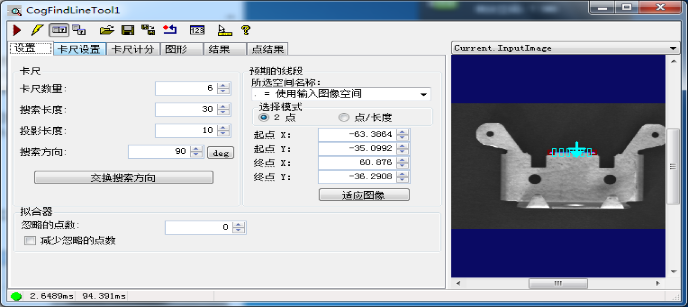
4.4 关键运行参数
| 参数名 |
类型 |
默认值 |
说明 |
CaliperRunParams.NumCalipers |
int |
10 |
卡尺数量:沿线段方向分布的卡尺个数 |
CaliperRunParams.SearchLength |
double |
100 |
搜索长度:每个卡尺的扫描长度 |
CaliperRunParams.SearchDirection |
CogCaliperSearchDirection |
SearchDirInward |
搜索方向 |
CaliperRunParams.ProjectionLength |
double |
10 |
投影长度 |
CaliperRunParams.Edge0Polarity |
CogCaliperPolarity |
DarkToLight |
边缘极性 |
CaliperRunParams.ContrastThreshold |
double |
10 |
对比度阈值 |
CaliperRunParams.FilterHalfSizeInPixels |
int |
3 |
滤波器半宽 |
ExpectedLine.StartX |
double |
0 |
预期线段起点X |
ExpectedLine.StartY |
double |
0 |
预期线段起点Y |
ExpectedLine.EndX |
double |
100 |
预期线段终点X |
ExpectedLine.EndY |
double |
0 |
预期线段终点Y |
NumPointsToIgnore |
int |
0 |
忽略点数:拟合时忽略的离群点数量 |
SwapSearchDirection |
bool |
false |
交换搜索方向:反转所有卡尺的搜索方向 |
4.5 结果属性
| 属性名 |
类型 |
说明 |
GetLine() |
CogLine |
获取拟合得到的直线 |
GetFoundX() |
double[] |
所有边缘点的X坐标数组 |
GetFoundY() |
double[] |
所有边缘点的Y坐标数组 |
GetNumPointsFound() |
int |
成功找到的边缘点数量 |
4.6 使用方法与示例代码
using Cognex.VisionPro;
using Cognex.VisionPro.Caliper;

// 创建工具
CogFindLineTool findLineTool = new CogFindLineTool();
findLineTool.InputImage = cogImage;

// 配置预期线段(起点和终点)
findLineTool.RunParams.ExpectedLine.StartX = 100;
findLineTool.RunParams.ExpectedLine.StartY = 200;
findLineTool.RunParams.ExpectedLine.EndX = 500;
findLineTool.RunParams.ExpectedLine.EndY = 200;

// 设置卡尺参数
findLineTool.RunParams.CaliperRunParams.NumCalipers = 15;
findLineTool.RunParams.CaliperRunParams.SearchLength = 60;
findLineTool.RunParams.CaliperRunParams.SearchDirection =
    CogCaliperSearchDirection.SearchDirInward;
findLineTool.RunParams.CaliperRunParams.Edge0Polarity =
    CogCaliperPolarity.DarkToLight;
findLineTool.RunParams.CaliperRunParams.ContrastThreshold = 10;

// 运行
findLineTool.Run();

// 读取结果
if (findLineTool.Results != null)
{
    CogLine resultLine = findLineTool.Results.GetLine();
    Console.WriteLine($"直线角度: {resultLine.Rotation * 180 / Math.PI:F2}°");
    Console.WriteLine($"起点: ({resultLine.X - Math.Cos(resultLine.Rotation) * 50:F2}, " +
                      $"{resultLine.Y - Math.Sin(resultLine.Rotation) * 50:F2})");
}
4.6.1 常见问题:交换搜索方向
当直线角度变化时,可能出现某些卡尺找不到边缘的情况。此时可以启用 SwapSearchDirection:
findLineTool.RunParams.SwapSearchDirection = true;
4.6.2 从.vpp文件加载并运行
using Cognex.VisionPro;
using Cognex.VisionPro.Caliper;

// 加载配置
CogFindLineTool findLine = CogSerializer.LoadObjectFromFile(@"C:\VisionPro\FindLine.vpp") as CogFindLineTool;

// 运行
findLine.InputImage = cogImage;
findLine.Run();

// 读取结果
if (findLine.Results != null)
{
    CogLine line = findLine.Results.GetLine();
    double angleDeg = line.Rotation * 180.0 / Math.PI;
    Console.WriteLine($"直线角度: {angleDeg:F2}°");
    Console.WriteLine($"边缘点数: {findLine.Results.GetNumPointsFound()}");
}
4.6.3 结果可视化
using Cognex.VisionPro;
using Cognex.VisionPro.Caliper;
using Cognex.VisionPro.Display;

public void ShowLineResult(CogDisplay display, CogFindLineTool tool)
{
    display.StaticGraphics.Clear();

    if (tool.Results == null) return;

    CogLine line = tool.Results.GetLine();
    line.Color = CogColorConstants.Cyan;
    line.LineWidthInScreenPixels = 2;
    display.StaticGraphics.Add(line, "resultLine");

    // 显示边缘点
    double[] xPts = tool.Results.GetFoundX();
    double[] yPts = tool.Results.GetFoundY();
    for (int i = 0; i < xPts.Length; i++)
    {
        CogPointMarker pt = new CogPointMarker();
        pt.X = xPts[i];
        pt.Y = yPts[i];
        pt.Color = CogColorConstants.Yellow;
        pt.SizeInScreenPixels = 4;
        display.StaticGraphics.Add(pt, null);
    }
}
4.6.4 双边检测求宽度
using Cognex.VisionPro;
using Cognex.VisionPro.Caliper;

public double MeasureWidth(ICogImage image, double startX, double startY, double endX, double endY)
{
    // 检测上边缘
    CogFindLineTool topLine = new CogFindLineTool();
    topLine.InputImage = image;
    topLine.RunParams.ExpectedLine.StartX = startX;
    topLine.RunParams.ExpectedLine.StartY = startY - 30;
    topLine.RunParams.ExpectedLine.EndX = endX;
    topLine.RunParams.ExpectedLine.EndY = endY - 30;
    topLine.RunParams.CaliperRunParams.Edge0Polarity = CogCaliperPolarity.DarkToLight;
    topLine.RunParams.CaliperRunParams.NumCalipers = 15;
    topLine.Run();

    // 检测下边缘
    CogFindLineTool bottomLine = new CogFindLineTool();
    bottomLine.InputImage = image;
    bottomLine.RunParams.ExpectedLine.StartX = startX;
    bottomLine.RunParams.ExpectedLine.StartY = startY + 30;
    bottomLine.RunParams.ExpectedLine.EndX = endX;
    bottomLine.RunParams.ExpectedLine.EndY = endY + 30;
    bottomLine.RunParams.CaliperRunParams.Edge0Polarity = CogCaliperPolarity.LightToDark;
    bottomLine.RunParams.CaliperRunParams.NumCalipers = 15;
    bottomLine.Run();

    if (topLine.Results != null && bottomLine.Results != null)
    {
        CogLine top = topLine.Results.GetLine();
        CogLine bottom = bottomLine.Results.GetLine();

        // 计算两线距离(取中点计算)
        double midX = (startX + endX) / 2;
        double topY = top.Y + (midX - top.X) * Math.Tan(top.Rotation);
        double bottomY = bottom.Y + (midX - bottom.X) * Math.Tan(bottom.Rotation);

        return Math.Abs(topY - bottomY);
    }

    return -1; // 检测失败
}
4.6.5 交换搜索方向自适应
using Cognex.VisionPro;
using Cognex.VisionPro.Caliper;

public CogLine AdaptiveLineFind(ICogImage image, double sx, double sy, double ex, double ey)
{
    CogFindLineTool tool = new CogFindLineTool();
    tool.InputImage = image;
    tool.RunParams.ExpectedLine.StartX = sx;
    tool.RunParams.ExpectedLine.StartY = sy;
    tool.RunParams.ExpectedLine.EndX = ex;
    tool.RunParams.ExpectedLine.EndY = ey;
    tool.RunParams.CaliperRunParams.NumCalipers = 20;
    tool.RunParams.CaliperRunParams.SearchLength = 80;

    // 第一次尝试:正常方向
    tool.Run();
    int count1 = tool.Results?.GetNumPointsFound() ?? 0;

    // 如果找到的点太少,交换方向重试
    if (count1 < 10)
    {
        tool.RunParams.SwapSearchDirection = true;
        tool.Run();
        int count2 = tool.Results?.GetNumPointsFound() ?? 0;

        // 选择找到点更多的方向
        if (count2 < count1)
        {
            tool.RunParams.SwapSearchDirection = false;
            // 需要重新运行获取原始结果
        }
    }

    return tool.Results?.GetLine();
}
5.1 引用命名空间与程序集
using Cognex.VisionPro;
using Cognex.VisionPro.Caliper;

// 程序集
// Cognex.VisionPro.dll
// Cognex.VisionPro.Caliper.dll
5.2 概述
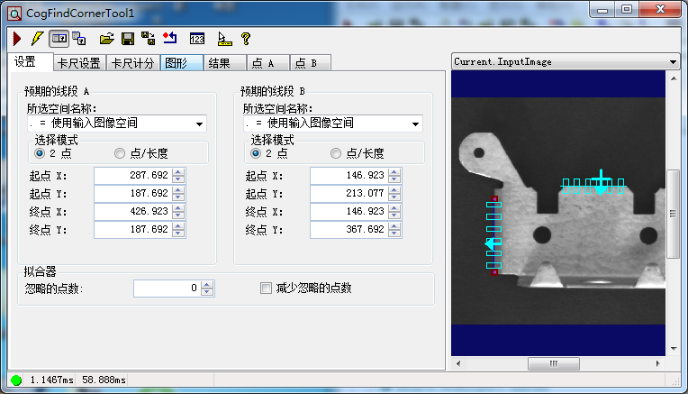
CogFindCornerTool用于在图像中查找两条直线的交点(角点)。该工具内部使用两组卡尺分别检测两条边缘线,然后计算它们的交点。广泛应用于零件角点定位、V形槽检测、L形边缘测量等场景。
5.3 核心属性与方法
5.3.1 主要属性
| 属性名 |
类型 |
说明 |
InputImage |
ICogImage |
输入图像 |
RunParams |
CogFindCornerRunParams |
运行参数对象 |
Results |
CogFindCornerResults |
运行结果集合 |
5.3.2 主要方法
5.4 关键运行参数
| 参数名 |
类型 |
说明 |
ExpectedCornerX |
double |
预期角点X坐标 |
ExpectedCornerY |
double |
预期角点Y坐标 |
Line1CaliperRunParams |
CogCaliperRunParams |
第一条线的卡尺参数 |
Line2CaliperRunParams |
CogCaliperRunParams |
第二条线的卡尺参数 |
Line1CaliperRunParams.NumCalipers |
int |
第一条线的卡尺数量 |
Line1CaliperRunParams.SearchLength |
double |
第一条线的搜索长度 |
Line1CaliperRunParams.Edge0Polarity |
CogCaliperPolarity |
第一条线的边缘极性 |
Line2CaliperRunParams.NumCalipers |
int |
第二条线的卡尺数量 |
Line2CaliperRunParams.SearchLength |
double |
第二条线的搜索长度 |
Line2CaliperRunParams.Edge0Polarity |
CogCaliperPolarity |
第二条线的边缘极性 |
5.5 结果属性
| 属性名 |
类型 |
说明 |
GetCornerX() |
double |
角点X坐标 |
GetCornerY() |
double |
角点Y坐标 |
GetLine1() |
CogLine |
第一条拟合直线 |
GetLine2() |
CogLine |
第二条拟合直线 |
GetAngle() |
double |
两线夹角(弧度) |
5.6 使用方法与示例代码
5.6.1 示例:基本使用
using Cognex.VisionPro;
using Cognex.VisionPro.Caliper;

// 创建工具
CogFindCornerTool findCorner = new CogFindCornerTool();
findCorner.InputImage = cogImage;

// 配置预期角点位置
findCorner.RunParams.ExpectedCornerX = 300;
findCorner.RunParams.ExpectedCornerY = 200;

// 配置两条线的搜索参数
findCorner.RunParams.Line1CaliperRunParams.NumCalipers = 10;
findCorner.RunParams.Line1CaliperRunParams.SearchLength = 60;
findCorner.RunParams.Line1CaliperRunParams.Edge0Polarity = CogCaliperPolarity.DarkToLight;

findCorner.RunParams.Line2CaliperRunParams.NumCalipers = 10;
findCorner.RunParams.Line2CaliperRunParams.SearchLength = 60;
findCorner.RunParams.Line2CaliperRunParams.Edge0Polarity = CogCaliperPolarity.DarkToLight;

// 运行
findCorner.Run();

// 读取结果
if (findCorner.Results != null)
{
    Console.WriteLine($"角点位置: ({findCorner.Results.GetCornerX():F2}, {findCorner.Results.GetCornerY():F2})");
    Console.WriteLine($"夹角: {findCorner.Results.GetAngle() * 180 / Math.PI:F2}°");

    CogLine line1 = findCorner.Results.GetLine1();
    CogLine line2 = findCorner.Results.GetLine2();
    Console.WriteLine($"线1角度: {line1.Rotation * 180 / Math.PI:F2}°");
    Console.WriteLine($"线2角度: {line2.Rotation * 180 / Math.PI:F2}°");
}
5.6.2 示例:结果可视化
using Cognex.VisionPro;
using Cognex.VisionPro.Caliper;
using Cognex.VisionPro.Display;

public void ShowCornerResult(CogDisplay display, CogFindCornerTool tool)
{
    display.StaticGraphics.Clear();

    if (tool.Results == null) return;

    // 显示两条线
    CogLine line1 = tool.Results.GetLine1();
    CogLine line2 = tool.Results.GetLine2();
    line1.Color = CogColorConstants.Green;
    line2.Color = CogColorConstants.Blue;
    line1.LineWidthInScreenPixels = 2;
    line2.LineWidthInScreenPixels = 2;
    display.StaticGraphics.Add(line1, "line1");
    display.StaticGraphics.Add(line2, "line2");

    // 显示角点
    CogPointMarker corner = new CogPointMarker();
    corner.X = tool.Results.GetCornerX();
    corner.Y = tool.Results.GetCornerY();
    corner.Color = CogColorConstants.Red;
    corner.SizeInScreenPixels = 10;
    display.StaticGraphics.Add(corner, "corner");
}
6.1 引用命名空间与程序集
using Cognex.VisionPro;
using Cognex.VisionPro.Caliper;

// 程序集
// Cognex.VisionPro.dll
// Cognex.VisionPro.Caliper.dll
6.2 概述
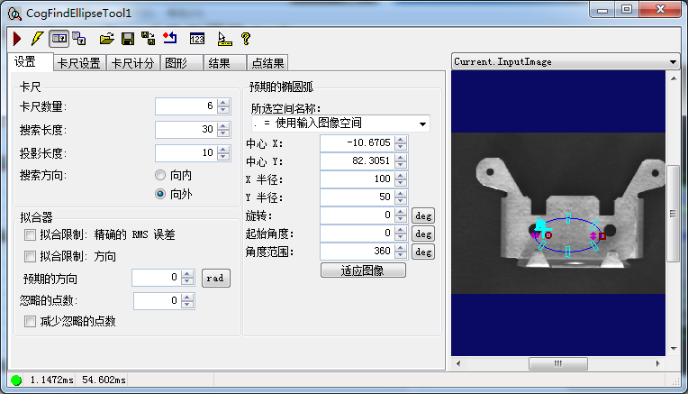
CogFindEllipseTool 用于在图像中查找椭圆边界。其原理与找圆工具类似,但拟合算法使用椭圆方程,支持长短轴和旋转角度的检测。广泛应用于椭圆孔洞检测、倾斜圆检测、椭圆标记识别等场景。
6.3 核心属性与方法
6.3.1 主要属性
| 属性名 |
类型 |
说明 |
InputImage |
ICogImage |
输入图像 |
RunParams |
CogFindEllipseRunParams |
运行参数对象 |
Results |
CogFindEllipseResults |
运行结果集合 |
6.3.2 主要方法
6.4 关键运行参数
| 参数名 |
类型 |
说明 |
ExpectedEllipse.CenterX |
double |
预期椭圆中心X坐标 |
ExpectedEllipse.CenterY |
double |
预期椭圆中心Y坐标 |
ExpectedEllipse.SemiMajorAxis |
double |
预期长半轴长度 |
ExpectedEllipse.SemiMinorAxis |
double |
预期短半轴长度 |
ExpectedEllipse.Rotation |
double |
预期旋转角度(弧度) |
CaliperRunParams.NumCalipers |
int |
卡尺数量 |
CaliperRunParams.SearchLength |
double |
搜索长度 |
CaliperRunParams.Edge0Polarity |
CogCaliperPolarity |
边缘极性 |
CaliperRunParams.ContrastThreshold |
double |
对比度阈值 |
AngleStart |
double |
起始角度(度) |
AngleSpan |
double |
角度范围(度) |
6.5 结果属性
| 属性名 |
类型 |
说明 |
GetEllipse() |
CogEllipse |
拟合得到的椭圆对象 |
GetCenterX() |
double |
中心X坐标 |
GetCenterY() |
double |
中心Y坐标 |
GetSemiMajor() |
double |
长半轴长度 |
GetSemiMinor() |
double |
短半轴长度 |
GetRotation() |
double |
旋转角度(弧度) |
GetNumPointsFound() |
int |
找到的边缘点数量 |
GetEdgePoints() |
CogPointMarker[] |
所有边缘点坐标数组 |
6.6 使用方法与示例代码
6.6.1 基本使用
using Cognex.VisionPro;
using Cognex.VisionPro.Caliper;

// 创建工具
CogFindEllipseTool findEllipse = new CogFindEllipseTool();
findEllipse.InputImage = cogImage;

// 配置预期椭圆
findEllipse.RunParams.ExpectedEllipse.CenterX = 320;
findEllipse.RunParams.ExpectedEllipse.CenterY = 240;
findEllipse.RunParams.ExpectedEllipse.SemiMajorAxis = 120;
findEllipse.RunParams.ExpectedEllipse.SemiMinorAxis = 80;
findEllipse.RunParams.ExpectedEllipse.Rotation = 0;

// 设置卡尺参数
findEllipse.RunParams.CaliperRunParams.NumCalipers = 25;
findEllipse.RunParams.CaliperRunParams.SearchLength = 80;
findEllipse.RunParams.CaliperRunParams.Edge0Polarity = CogCaliperPolarity.DarkToLight;
findEllipse.RunParams.CaliperRunParams.ContrastThreshold = 15;

// 设置角度范围
findEllipse.RunParams.AngleStart = 0;
findEllipse.RunParams.AngleSpan = 360;

// 运行
findEllipse.Run();

// 读取结果
if (findEllipse.Results != null)
{
    CogEllipse ellipse = findEllipse.Results.GetEllipse();
    Console.WriteLine($"中心: ({ellipse.CenterX:F2}, {ellipse.CenterY:F2})");
    Console.WriteLine($"长半轴: {ellipse.SemiMajorAxis:F2}");
    Console.WriteLine($"短半轴: {ellipse.SemiMinorAxis:F2}");
    Console.WriteLine($"旋转角度: {ellipse.Rotation * 180 / Math.PI:F2}°");
    Console.WriteLine($"边缘点数: {findEllipse.Results.GetNumPointsFound()}");
}
6.6.2 从.vpp加载
CogFindEllipseTool findEllipse = CogSerializer.LoadObjectFromFile(@"C:\VisionPro\FindEllipse.vpp") as CogFindEllipseTool;
findEllipse.InputImage = cogImage;
findEllipse.Run();
6.6.3 结果可视化
using Cognex.VisionPro;
using Cognex.VisionPro.Caliper;
using Cognex.VisionPro.Display;

public void ShowEllipseResult(CogDisplay display, CogFindEllipseTool tool)
{
    display.StaticGraphics.Clear();

    if (tool.Results == null) return;

    CogEllipse ellipse = tool.Results.GetEllipse();
    ellipse.Color = CogColorConstants.Green;
    ellipse.LineWidthInScreenPixels = 2;
    display.StaticGraphics.Add(ellipse, "resultEllipse");

    // 显示边缘点
    CogPointMarker[] points = tool.Results.GetEdgePoints();
    foreach (var pt in points)
    {
        pt.Color = CogColorConstants.Yellow;
        pt.SizeInScreenPixels = 4;
        display.StaticGraphics.Add(pt, null);
    }
}
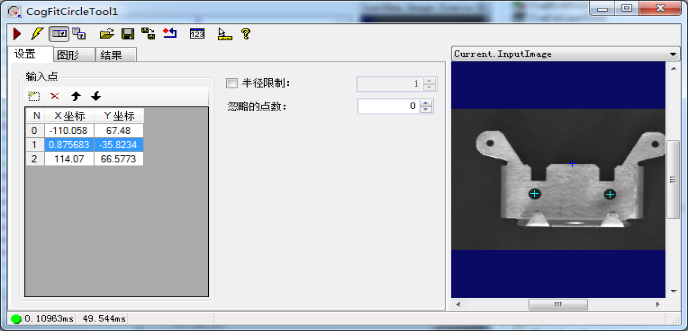
7.1 引用命名空间与程序集
using Cognex.VisionPro;

// 程序集
// Cognex.VisionPro.dll
7.2 核心属性与方法
7.2.1主要属性
| 属性名 |
类型 |
说明 |
InputImage |
ICogImage |
输入图像(可选,用于可视化) |
InputPointX |
double[] |
输入点X坐标数组 |
InputPointY |
double[] |
输入点Y坐标数组 |
RunParams |
CogFitCircleRunParams |
运行参数 |
Results |
CogFitCircleResults |
运行结果 |
7.2.2主要方法
7.3 关键运行参数
| 参数名 |
类型 |
默认值 |
说明 |
Algorithm |
CogFitCircleAlgorithm |
LeastSquares |
拟合算法 :LeastSquares(最小二乘)/ Geometric(几何拟合) |
NumPointsToIgnore |
int |
0 |
忽略点数:迭代剔除的离群点数量 |
MaxIterations |
int |
100 |
最大迭代次数:几何拟合算法的最大迭代次数 |
Tolerance |
double |
0.001 |
收敛容差:迭代算法的收敛阈值 |
7.4 结果属性
| 属性名 |
类型 |
说明 |
GetCircle() |
CogCircle |
拟合得到的圆 |
GetCenterX() |
double |
圆心X坐标 |
GetCenterY() |
double |
圆心Y坐标 |
GetRadius() |
double |
圆的半径 |
GetResidual() |
double |
拟合残差(越小拟合越好) |
7.5 使用方法与示例代码
using Cognex.VisionPro;

// 创建工具
CogFitCircleTool fitCircleTool = new CogFitCircleTool();

// 设置输入点(通常来自 CogFindCircleTool 或 CogCaliperTool 的结果)
double[] pointX = { 100, 150, 200, 250, 300, 250, 200, 150 };
double[] pointY = { 200, 150, 100, 150, 200, 250, 300, 250 };

fitCircleTool.InputPointX = pointX;
fitCircleTool.InputPointY = pointY;

// 设置参数
fitCircleTool.RunParams.Algorithm = CogFitCircleAlgorithm.LeastSquares;
fitCircleTool.RunParams.NumPointsToIgnore = 1; // 忽略1个离群点

// 运行
fitCircleTool.Run();

// 读取结果
if (fitCircleTool.Results != null)
{
    CogCircle circle = fitCircleTool.Results.GetCircle();
    Console.WriteLine($"拟合圆心: ({circle.CenterX:F2}, {circle.CenterY:F2})");
    Console.WriteLine($"拟合半径: {circle.Radius:F2}");
    Console.WriteLine($"拟合残差: {fitCircleTool.Results.GetResidual():F4}");
}
7.5.1 典型应用场景
// 场景:使用多个 CogFindCircleTool 的结果点进行更精确的圆拟合
List<double> allX = new List<double>();
List<double> allY = new List<double>();

// 从多个查找工具收集边缘点
foreach (var tool in findCircleTools)
{
    if (tool.Results != null)
    {
        CogPointMarker[] points = tool.Results.GetEdgePoints();
        foreach (var p in points)
        {
            allX.Add(p.X);
            allY.Add(p.Y);
        }
    }
}

// 使用拟合工具进行最终拟合
CogFitCircleTool fitTool = new CogFitCircleTool();
fitTool.InputPointX = allX.ToArray();
fitTool.InputPointY = allY.ToArray();
fitTool.Run();
7.5.2 从.vpp加载
CogFitCircleTool fitCircle = CogSerializer.LoadObjectFromFile(@"C:\VisionPro\FitCircle.vpp") as CogFitCircleTool;
fitCircle.InputPointX = pointXArray;
fitCircle.InputPointY = pointYArray;
fitCircle.Run();
7.5.3 结合FindCircle和FitCircle进行高精度检测
using Cognex.VisionPro;
using Cognex.VisionPro.Caliper;

public class HighPrecisionCircleDetector
{
    private CogFindCircleTool _finder;
    private CogFitCircleTool _fitter;

    public HighPrecisionCircleDetector()
    {
        _finder = new CogFindCircleTool();
        _fitter = new CogFitCircleTool();
    }

    public CogCircle Detect(ICogImage image, double expectedX, double expectedY, double expectedRadius)
    {
        // 第一步:粗找
        _finder.InputImage = image;
        _finder.RunParams.ExpectedCircle.Center.X = expectedX;
        _finder.RunParams.ExpectedCircle.Center.Y = expectedY;
        _finder.RunParams.ExpectedCircle.Radius = expectedRadius;
        _finder.RunParams.CaliperRunParams.NumCalipers = 15;
        _finder.RunParams.CaliperRunParams.SearchLength = 60;
        _finder.RunParams.NumPointsToIgnore = 1;
        _finder.Run();

        if (_finder.Results == null) return null;

        // 第二步:用找到的边缘点进行精拟合
        CogPointMarker[] edgePoints = _finder.Results.GetEdgePoints();
        double[] xPts = new double[edgePoints.Length];
        double[] yPts = new double[edgePoints.Length];

        for (int i = 0; i < edgePoints.Length; i++)
        {
            xPts[i] = edgePoints[i].X;
            yPts[i] = edgePoints[i].Y;
        }

        _fitter.InputPointX = xPts;
        _fitter.InputPointY = yPts;
        _fitter.RunParams.Algorithm = CogFitCircleAlgorithm.Geometric;
        _fitter.RunParams.NumPointsToIgnore = 2; // 剔除2个离群点
        _fitter.Run();

        return _fitter.Results?.GetCircle();
    }
}
7.5.4 结果可视化与残差分析
using Cognex.VisionPro;
using Cognex.VisionPro.Display;

public void ShowFitCircleResult(CogDisplay display, CogFitCircleTool tool, double[] inputX, double[] inputY)
{
    display.StaticGraphics.Clear();

    if (tool.Results == null) return;

    CogCircle circle = tool.Results.GetCircle();
    circle.Color = CogColorConstants.Green;
    circle.LineWidthInScreenPixels = 2;
    display.StaticGraphics.Add(circle, "fitCircle");

    // 显示输入点
    for (int i = 0; i < inputX.Length; i++)
    {
        CogPointMarker pt = new CogPointMarker();
        pt.X = inputX[i];
        pt.Y = inputY[i];
        pt.Color = CogColorConstants.Yellow;
        pt.SizeInScreenPixels = 4;
        display.StaticGraphics.Add(pt, null);
    }

    // 显示拟合信息
    CogGraphicLabel label = new CogGraphicLabel();
    label.Text = $"圆心: ({circle.CenterX:F2}, {circle.CenterY:F2})\n" +
                 $"半径: {circle.Radius:F2}\n" +
                 $"残差: {tool.Results.GetResidual():F4}";
    label.X = circle.CenterX + circle.Radius + 20;
    label.Y = circle.CenterY;
    label.Color = CogColorConstants.White;
    display.StaticGraphics.Add(label, "info");
}
7.5.5 多次拟合取平均值提高稳定性
using Cognex.VisionPro;
using Cognex.VisionPro.Caliper;
using System.Collections.Generic;

public CogCircle StableCircleDetection(ICogImage[] images, double expectedX, double expectedY, double expectedRadius)
{
    var circles = new List<CogCircle>();
    var finder = new CogFindCircleTool();
    var fitter = new CogFitCircleTool();

    finder.RunParams.ExpectedCircle.Center.X = expectedX;
    finder.RunParams.ExpectedCircle.Center.Y = expectedY;
    finder.RunParams.ExpectedCircle.Radius = expectedRadius;
    finder.RunParams.CaliperRunParams.NumCalipers = 20;

    foreach (var image in images)
    {
        finder.InputImage = image;
        finder.Run();

        if (finder.Results != null && finder.Results.GetNumPointsFound() >= 10)
        {
            CogPointMarker[] pts = finder.Results.GetEdgePoints();
            double[] xArr = new double[pts.Length];
            double[] yArr = new double[pts.Length];
            for (int i = 0; i < pts.Length; i++) { xArr[i] = pts[i].X; yArr[i] = pts[i].Y; }

            fitter.InputPointX = xArr;
            fitter.InputPointY = yArr;
            fitter.Run();

            if (fitter.Results != null) circles.Add(fitter.Results.GetCircle());
        }
    }

    // 取平均值
    double avgX = circles.Average(c => c.CenterX);
    double avgY = circles.Average(c => c.CenterY);
    double avgR = circles.Average(c => c.Radius);

    CogCircle result = new CogCircle();
    result.CenterX = avgX;
    result.CenterY = avgY;
    result.Radius = avgR;
    return result;
}
8.1 引用命名空间与程序集
using Cognex.VisionPro;

// 程序集
// Cognex.VisionPro.dll
8.2 概述
CogFitEllipseTool 将一组输入点拟合为椭圆。适用于需要从离散点集恢复椭圆形状的场景,如孔洞检测、椭圆标记识别等。通常与CogFindEllipseTool 配合使用以提高精度。
8.3 核心属性与方法
8.3.1主要属性
| 属性名 |
类型 |
说明 |
InputPointX |
double[] |
输入点X坐标数组 |
InputPointY |
double[] |
输入点Y坐标数组 |
RunParams |
CogFitEllipseRunParams |
运行参数 |
Results |
CogFitEllipseResults |
运行结果 |
8.3.2主要方法
8.4 关键运行参数
| 参数名 |
类型 |
默认值 |
说明 |
Algorithm |
CogFitEllipseAlgorithm |
LeastSquares |
拟合算法 :LeastSquares(最小二乘)/ Geometric(几何拟合) |
NumPointsToIgnore |
int |
0 |
忽略点数:迭代剔除的离群点数量 |
MaxIterations |
int |
100 |
最大迭代次数 |
Tolerance |
double |
0.001 |
收敛容差 |
8.5 结果属性
| 属性名 |
类型 |
说明 |
GetEllipse() |
CogEllipse |
拟合得到的椭圆对象 |
GetCenterX() |
double |
中心X坐标 |
GetCenterY() |
double |
中心Y坐标 |
GetSemiMajor() |
double |
长半轴 |
GetSemiMinor() |
double |
短半轴 |
GetRotation() |
double |
旋转角度(弧度) |
GetResidual() |
double |
拟合残差 |
8.6 使用方法与示例代码
8.6.1 基本使用
using Cognex.VisionPro;

// 创建工具
CogFitEllipseTool fitEllipse = new CogFitEllipseTool();

// 设置输入点
double[] pointX = { 200, 250, 300, 350, 400, 350, 300, 250, 200, 250, 300, 350 };
double[] pointY = { 200, 170, 160, 170, 200, 230, 240, 230, 200, 170, 160, 170 };

fitEllipse.InputPointX = pointX;
fitEllipse.InputPointY = pointY;

// 运行
fitEllipse.Run();

// 读取结果
if (fitEllipse.Results != null)
{
    CogEllipse ellipse = fitEllipse.Results.GetEllipse();
    Console.WriteLine($"中心: ({ellipse.CenterX:F2}, {ellipse.CenterY:F2})");
    Console.WriteLine($"长半轴: {ellipse.SemiMajorAxis:F2}");
    Console.WriteLine($"短半轴: {ellipse.SemiMinorAxis:F2}");
    Console.WriteLine($"旋转角度: {ellipse.Rotation * 180 / Math.PI:F2}°");
    Console.WriteLine($"拟合残差: {fitEllipse.Results.GetResidual():F4}");
}
8.6.2 从.vpp加载
CogFitEllipseTool fitEllipse = CogSerializer.LoadObjectFromFile(@"C:\VisionPro\FitEllipse.vpp") as CogFitEllipseTool;
fitEllipse.InputPointX = pointXArray;
fitEllipse.InputPointY = pointYArray;
fitEllipse.Run();
8.6.3 结合FindEllipse进行高精度椭圆检测
using Cognex.VisionPro;
using Cognex.VisionPro.Caliper;

public class HighPrecisionEllipseDetector
{
    private CogFindEllipseTool _finder;
    private CogFitEllipseTool _fitter;

    public HighPrecisionEllipseDetector()
    {
        _finder = new CogFindEllipseTool();
        _fitter = new CogFitEllipseTool();
    }

    public CogEllipse Detect(ICogImage image, double cx, double cy, double semiMajor, double semiMinor)
    {
        _finder.InputImage = image;
        _finder.RunParams.ExpectedEllipse.CenterX = cx;
        _finder.RunParams.ExpectedEllipse.CenterY = cy;
        _finder.RunParams.ExpectedEllipse.SemiMajorAxis = semiMajor;
        _finder.RunParams.ExpectedEllipse.SemiMinorAxis = semiMinor;
        _finder.RunParams.CaliperRunParams.NumCalipers = 25;
        _finder.RunParams.CaliperRunParams.SearchLength = 80;
        _finder.Run();

        if (_finder.Results == null) return null;

        CogPointMarker[] pts = _finder.Results.GetEdgePoints();
        double[] xArr = new double[pts.Length];
        double[] yArr = new double[pts.Length];
        for (int i = 0; i < pts.Length; i++) { xArr[i] = pts[i].X; yArr[i] = pts[i].Y; }

        _fitter.InputPointX = xArr;
        _fitter.InputPointY = yArr;
        _fitter.Run();

        return _fitter.Results?.GetEllipse();
    }
}
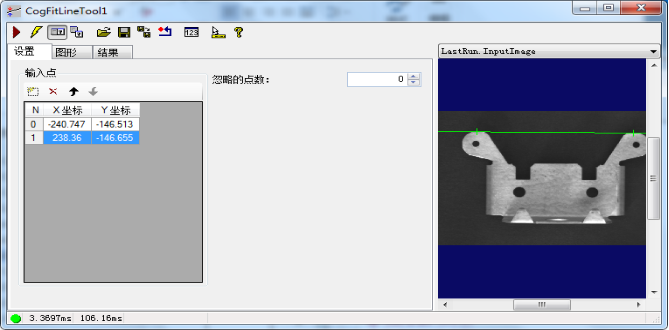
9.1 引用命名空间与程序集
using Cognex.VisionPro;

// 程序集
// Cognex.VisionPro.dll
9.2 核心属性与方法
9.2.1主要属性
| 属性名 |
类型 |
说明 |
InputPointX |
double[] |
输入点X坐标数组 |
InputPointY |
double[] |
输入点Y坐标数组 |
RunParams |
CogFitLineRunParams |
运行参数 |
Results |
CogFitLineResults |
运行结果 |
9.2.2主要方法
9.3 关键运行参数
| 参数名 |
类型 |
默认值 |
说明 |
Algorithm |
CogFitLineAlgorithm |
LeastSquares |
拟合算法 |
NumPointsToIgnore |
int |
0 |
忽略点数 |
MaxIterations |
int |
100 |
最大迭代次数 |
Tolerance |
double |
0.001 |
收敛容差 |
9.4 结果属性
| 属性名 |
类型 |
说明 |
GetLine() |
CogLine |
拟合得到的直线 |
GetX() |
double |
直线上一点X坐标 |
GetY() |
double |
直线上一点Y坐标 |
GetRotation() |
double |
直线角度(弧度) |
GetResidual() |
double |
拟合残差 |
9.5 使用方法与示例代码
using Cognex.VisionPro;

// 创建工具
CogFitLineTool fitLineTool = new CogFitLineTool();

// 设置输入点(通常来自 CogFindLineTool 的边缘点)
double[] pointX = { 100, 200, 300, 400, 500 };
double[] pointY = { 150, 148, 152, 149, 151 };

fitLineTool.InputPointX = pointX;
fitLineTool.InputPointY = pointY;

// 运行
fitLineTool.Run();

// 读取结果
if (fitLineTool.Results != null)
{
    CogLine line = fitLineTool.Results.GetLine();
    Console.WriteLine($"直线角度: {line.Rotation * 180 / Math.PI:F2}°");
    Console.WriteLine($"直线上点: ({line.X:F2}, {line.Y:F2})");
    Console.WriteLine($"拟合残差: {fitLineTool.Results.GetResidual():F4}");
}
9.5.1 典型应用场景
// 场景:使用 CogFindLineTool 的边缘点进行更精确的直线拟合
// 1. 先用 FindLineTool 找到边缘点
findLineTool.Run();

// 2. 提取边缘点
double[] edgeX = findLineTool.Results.GetFoundX();
double[] edgeY = findLineTool.Results.GetFoundY();

// 3. 使用 FitLineTool 进行最终拟合
CogFitLineTool fitTool = new CogFitLineTool();
fitTool.InputPointX = edgeX;
fitTool.InputPointY = edgeY;
fitTool.Run();
9.5.2 从.vpp加载
CogFitLineTool fitLine = CogSerializer.LoadObjectFromFile(@"C:\VisionPro\FitLine.vpp") as CogFitLineTool;
fitLine.InputPointX = pointXArray;
fitLine.InputPointY = pointYArray;
fitLine.Run();
9.5.3 结果可视化
using Cognex.VisionPro;
using Cognex.VisionPro.Display;

public void ShowFitLineResult(CogDisplay display, CogFitLineTool tool, double[] inputX, double[] inputY)
{
    display.StaticGraphics.Clear();

    if (tool.Results == null) return;

    CogLine line = tool.Results.GetLine();
    line.Color = CogColorConstants.Green;
    line.LineWidthInScreenPixels = 2;
    display.StaticGraphics.Add(line, "fitLine");

    // 显示输入点
    for (int i = 0; i < inputX.Length; i++)
    {
        CogPointMarker pt = new CogPointMarker();
        pt.X = inputX[i];
        pt.Y = inputY[i];
        pt.Color = CogColorConstants.Yellow;
        pt.SizeInScreenPixels = 4;
        display.StaticGraphics.Add(pt, null);
    }

    // 显示残差信息
    CogGraphicLabel label = new CogGraphicLabel();
    label.Text = $"角度: {line.Rotation * 180 / Math.PI:F2}°\n残差: {tool.Results.GetResidual():F4}";
    label.X = line.X + 50;
    label.Y = line.Y - 30;
    label.Color = CogColorConstants.White;
    display.StaticGraphics.Add(label, "info");
}
9.5.4 多段直线拟合检测边缘平行度
using Cognex.VisionPro;
using Cognex.VisionPro.Caliper;

public double CheckParallelism(ICogImage image, CogFindLineTool line1Tool, CogFindLineTool line2Tool)
{
    line1Tool.InputImage = image;
    line1Tool.Run();

    line2Tool.InputImage = image;
    line2Tool.Run();

    if (line1Tool.Results == null || line2Tool.Results == null) return -1;

    // 获取边缘点
    double[] x1 = line1Tool.Results.GetFoundX();
    double[] y1 = line1Tool.Results.GetFoundY();
    double[] x2 = line2Tool.Results.GetFoundX();
    double[] y2 = line2Tool.Results.GetFoundY();

    // 分别拟合
    CogFitLineTool fit1 = new CogFitLineTool();
    fit1.InputPointX = x1;
    fit1.InputPointY = y1;
    fit1.Run();

    CogFitLineTool fit2 = new CogFitLineTool();
    fit2.InputPointX = x2;
    fit2.InputPointY = y2;
    fit2.Run();

    if (fit1.Results == null || fit2.Results == null) return -1;

    double angle1 = fit1.Results.GetLine().Rotation;
    double angle2 = fit2.Results.GetLine().Rotation;

    // 返回角度差(弧度转角度)
    return Math.Abs((angle1 - angle2) * 180.0 / Math.PI);
}
10.常见问题与解决方案
10.1 找圆工具找不到圆
可能原因:
- 卡尺数量不足
- 搜索长度太短
- 边缘极性设置错误
- 对比度阈值过高
解决方案:
// 增加卡尺数量
findCircleTool.RunParams.CaliperRunParams.NumCalipers = 30;

// 增加搜索长度
findCircleTool.RunParams.CaliperRunParams.SearchLength = 120;

// 使用 DontCare 极性
findCircleTool.RunParams.CaliperRunParams.Edge0Polarity =
    CogCaliperPolarity.DontCare;

// 降低对比度阈值
findCircleTool.RunParams.CaliperRunParams.ContrastThreshold = 5;
10.2 找线工具结果不稳定
可能原因:
解决方案:
// 增加滤波器半宽
findLineTool.RunParams.CaliperRunParams.FilterHalfSizeInPixels = 5;

// 调整投影长度
findLineTool.RunParams.CaliperRunParams.ProjectionLength = 20;

// 启用忽略离群点
findLineTool.RunParams.NumPointsToIgnore = 2;
10.3 拟合工具残差过大
可能原因:
解决方案:
// 启用离群点剔除
fitCircleTool.RunParams.NumPointsToIgnore = 2;

// 使用几何拟合算法(对噪声更鲁棒)
fitCircleTool.RunParams.Algorithm = CogFitCircleAlgorithm.Geometric;
10.4 卡尺搜索方向错误
现象: 角度变化时部分卡尺找不到边缘
解决方案:
// 交换搜索方向
findLineTool.RunParams.SwapSearchDirection = true;

// 或使用自动搜索方向
findCircleTool.RunParams.CaliperRunParams.SearchDirection =
    CogCaliperSearchDirection.SearchDirAuto;