本文介绍了实时realtime-vla 的加速实现方案,通过Triton后端优化在RTX 4090/5090显卡上达到20-55ms的推理速度。
详细说明了环境搭建、权重转换(支持Pi0/Pi0.5/DM0模型)和推理测试流程,包括:
- 代码获取与依赖安装
- 模型权重下载与格式转换
- 推理引擎初始化与CUDA Graph优化
- 性能测试(端到端延迟34.3Hz,Python开销仅0.004ms)
- 与JAX后端的输出一致性验证(平均误差评估) 测试表明该方案在保持精度的同时显著提升推理速度,适用于实时机器人控制等场景。完整代码已开源。
论文地址 :Running VLAs at Real-time Speed
开源代码 :https://github.com/dexmal/realtime-vla
官方的加速效果:
| Model / Backend | RTX 4090 (1 view) | RTX 4090 (2 views) | RTX 4090 (3 views) | RTX 5090 (1 view) | RTX 5090 (2 views) | RTX 5090 (3 views) |
|---|---|---|---|---|---|---|
| Pi0 Triton | 20.0ms | 27.3ms | 36.8ms | 17.6ms | 24.0ms | 31.9ms |
| Pi05 Triton | 22.1ms | 29.2ms | 38.9ms | 20.1ms | 26.6ms | 34.2ms |
| DM0 Triton | 55.8ms |
1、拉取代码
执行下面代码,拉取 realtime-vla 的代码
bash
git clone https://github.com/dexmal/realtime-vla.git然后进入 realtime-vla 目录中
bash
cd realtime-vla/2、构建开发环境
这里主要对pi0、pi0.5进行加速,使用 openpi 的环境就好啦
开发环境代建参考:《VLA 系列》复现 π0.5、π0-FAST、π0 | 环境搭建 | 模型推理_pi0.5复现-CSDN博客
然后进入 openpi 代码目录中,激活openpi的环境,再来到realtime-vla 目录
3、拉取基础权重
由于pi0、pi0.5使用到 google/paligemma-3b-pt-224 权重,需要先进行下载
推荐使用国内的 modelscope,进行下载,速度比较快
先使用uv进行安装
bash
uv pip install modelscope然后执行下面命令进行下载
bash
python -c "
from modelscope import snapshot_download
snapshot_download(
    'google/paligemma-3b-pt-224',
    cache_dir='./paligemma-3b-pt-224',
    local_files_only=False
)
"
运行效果:
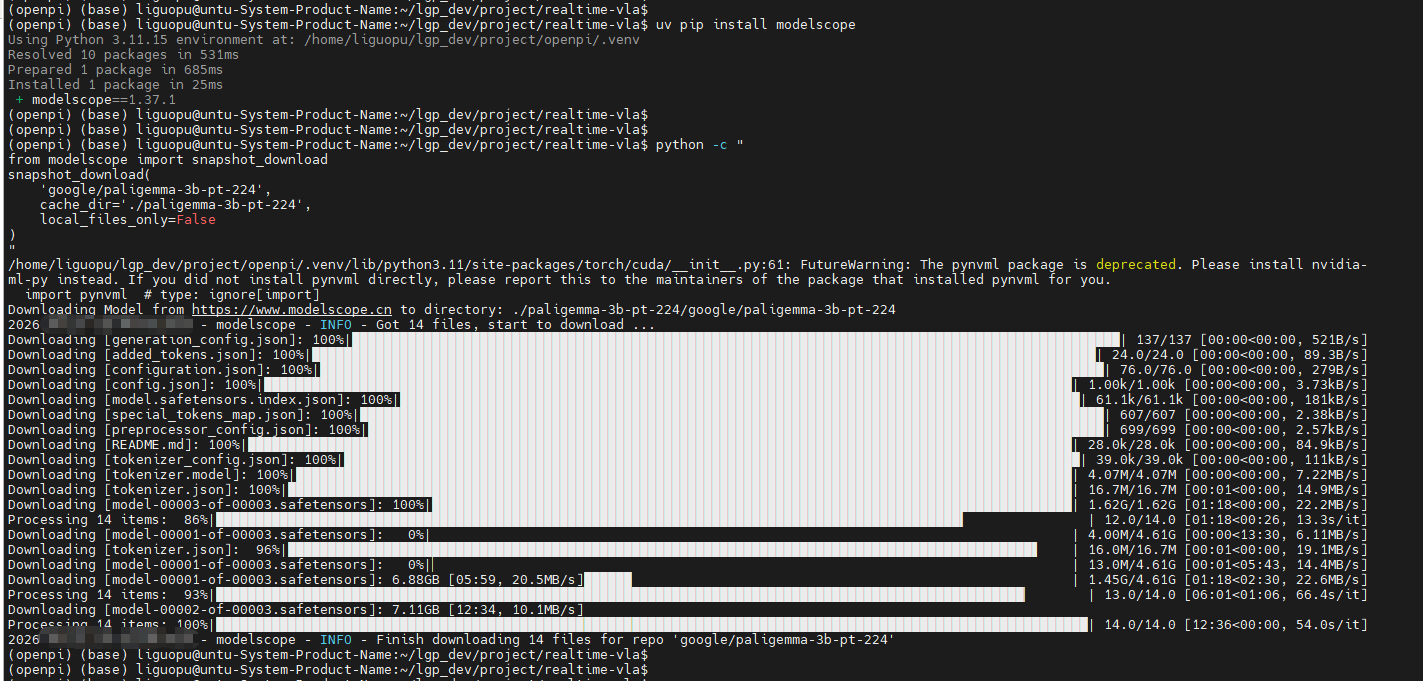
其中,paligemma-3b-pt-224大概11G左右;
由于下载的paligemma-3b-pt-224 嵌套了多层目录,需要改为:
realtime-vla/paligemma-3b-pt-224/google/paligemma-3b-pt-224/ ---> realtime-vla/paligemma-3b-pt-224/
4、模型权重转换
pi0、pi0.5、DM0的转换示例:(因为需要将模型转为"静态图"进行加速推理,所以输入的prompt是固定的)
bash
# pi0的转换示例
pytho3 convert_from_jax.py \
   --jax_path /path/to/checkpoint/folder\
   --output converted_checkpoint.pkl\
   --prompt "your task prompt"\
   --tokenizer_path /path/to/paligemma-3b-pt-224

# pi0.5的转换示例
python3 convert_from_jax_pi05.py \
   --jax_path /path/to/checkpoint/folder\
   --output converted_checkpoint.pkl\
   --prompt "your task prompt"\
   --tokenizer_path /path/to/paligemma-3b-pt-224

# DM0的转换示例
python3 convert_dm0_weight.py \
   --model_path /path/to/checkpoint/folder\
--output converted_checkpoint.pt5、pi05_base 实践示例
1)pi05_base 的模型转换
bash
python3 convert_from_jax_pi05.py \
  --jax_path /home/liguopu/lgp_dev/project/openpi/checkpoints/pi05_base \
  --output pi05_base_converted.pkl \
  --prompt "Pick up the bottle." \
  --tokenizer_path ./paligemma-3b-pt-224
运行信息:
(openpi) (base) liguopu@untu-System-Product-Name:~/lgp_dev/project/realtime-vla $
(openpi) (base) liguopu@untu-System-Product-Name:~/lgp_dev/project/realtime-vla $ python3 convert_from_jax_pi05.py --jax_path /home/liguopu/lgp_dev/project/openpi/check points/pi05_base --output pi05_base_converted.pkl --prompt "Pick up the bottle." --tokenizer_path ./paligemma-3b-pt-224
/home/liguopu/lgp_dev/project/openpi/.venv/lib/python3.11/site-packages/torch/cuda/init.py:61: FutureWarning: The pynvml package is deprecated. Please install nvidia- ml-py instead. If you did not install pynvml directly, please report this to the maintainers of the package that installed pynvml for you.
import pynvml # type: ignoreimport
Loading jax weights from /home/liguopu/lgp_dev/project/openpi/checkpoints/pi05_base/params
WARNING:absl:The transformations API will eventually be replaced by an upgraded design. The current API will not be removed until this point, but it will no longer be act ively worked on.
Loaded JAX params keys: dict_keys('PaliGemma', 'action_in_proj', 'action_out_proj', 'time_mlp_in', 'time_mlp_out')
Truncation was not explicitly activated but `max_length` is provided a specific value, please use `truncation=True` to explicitly truncate examples to max length. Default ing to 'longest_first' truncation strategy. If you encode pairs of sequences (GLUE-style) with the tokenizer you can select this strategy more precisely by providing a sp ecific strategy to `truncation`.
Successfully converted Pi0.5 weights to pi05_base_converted.pkl
(openpi) (base) liguopu@untu-System-Product-Name:~/lgp_dev/project/realtime-vla$
2)编写一个代码,测试是否正常推理
运行指令:
bash
python pi05_base_infer.py代码如下所示:
python
import pickle
import numpy as np
import torch
from pi05_infer import Pi05Inference

# 1. 加载转换后的权重
with open('pi05_base_converted.pkl', 'rb') as f:
    checkpoint = pickle.load(f)

# 2. 初始化推理引擎
infer = Pi05Inference(
    checkpoint=checkpoint,
    num_views=2,
    chunk_size=50,
    tokenizer_path="./paligemma-3b-pt-224",
    discrete_state_input=True,
    max_tokenize_len=200,
)

# 3. 准备输入
images = torch.randn(2, 224, 224, 3, dtype=torch.bfloat16, device="cuda")
noise = torch.randn(50, 32, dtype=torch.bfloat16, device="cuda")
task_prompt = "pick up the red cube"
state_tokens = np.random.randint(0, 256, size=32, dtype=np.int32)

# 4. 执行推理 ------ 参数名必须是 diffusion_noise,不是 diffusion_input_noise
actions = infer.forward(
    observation_images_normalized=images,
    diffusion_noise=noise,           # ← 修正:去掉 input_ 前缀
    task_prompt=task_prompt,
    state_tokens=state_tokens,
)

print("Actions shape:", actions.shape)
print("Actions dtype:", actions.dtype)
print("First action:", actions[0])
运行信息:
max_prompt_len: 200, max_tokenize_len: 200
Actions shape: torch.Size(50, 32)
Actions dtype: torch.bfloat16
First action: tensor([ 0.4258, -0.2637, 0.7461, 0.0029, 0.0054, 0.0515, 0.7695, 0.7812,
-0.0554, 0.4531, -0.0679, -0.8086, 0.3184, 0.4219, 0.1377, 0.8008,
-0.5391, 0.2090, 0.2793, -0.5859, 0.5625, -0.1885, -0.2754, 0.3691,
-0.0035, 0.0022, 0.0033, -0.0265, 0.0038, -0.0195, -0.0192, 0.0381],
device='cuda:0', dtype=torch.bfloat16)
3)编写一个代码,测试推理速度
用于量化 CUDA Graph 优化后的端到端推理延迟,并分析 Python 层开销占比
| 阶段 | 目的 |
|---|---|
| 加载转换权重 | 从 pickle 文件加载已转换的 Pi0.5 权重 |
| 初始化推理引擎 | 创建 Pi05Inference 实例,配置多视角输入、动作块长度等 |
| 构造伪输入 | 生成随机图像/噪声/state tokens,模拟真实推理输入 |
| CUDA 预热 | 执行 3 次前向传播,稳定 GPU 状态 |
| 测试 A:端到端计时 | 1000 次完整 forward()(含 prompt 编码 + CUDA Graph replay) |
| 测试 B:纯 Graph replay | 1000 次仅 infer_graph.replay()(跳过 Python 前置处理) |
| 对比分析 | 计算 Python 开销占比,判断瓶颈在 CPU 还是 GPU 侧 |
运行指令:python pi05_benchmark_1000runs.py
代码如下:
python
import time
import pickle
import numpy as np
import torch
from pi05_infer import Pi05Inference

# ===================== 配置参数 =====================
MODEL_NAME = "Pi05"
NUM_VIEWS = 1
IMAGE_SIZE = 224
CHUNK_SIZE = 50
CHECKPOINT_PATH = "pi05_base_converted.pkl"
TOKENIZER_PATH = "./paligemma-3b-pt-224"

# ===================== 1. 加载转换后的权重 =====================
print("[1/4] 加载转换权重...")
with open(CHECKPOINT_PATH, "rb") as f:
    checkpoint = pickle.load(f)

# ===================== 2. 初始化推理引擎 =====================
print(f"[2/4] 初始化 {MODEL_NAME} Inference(views={NUM_VIEWS}, chunk={CHUNK_SIZE})...")
infer = Pi05Inference(
    checkpoint=checkpoint,
    num_views=NUM_VIEWS,
    chunk_size=CHUNK_SIZE,
    tokenizer_path=TOKENIZER_PATH,
    discrete_state_input=True,
    max_tokenize_len=200,
)

# ===================== 3. 准备输入数据 =====================
print(f"[3/4] 准备测试输入: images=({NUM_VIEWS}, {IMAGE_SIZE}, {IMAGE_SIZE}, 3), noise=({CHUNK_SIZE}, 32)")
images = torch.randn(NUM_VIEWS, IMAGE_SIZE, IMAGE_SIZE, 3, dtype=torch.bfloat16, device="cuda")
noise = torch.randn(CHUNK_SIZE, 32, dtype=torch.bfloat16, device="cuda")
task_prompt = "pick up the red cube"
state_tokens = np.random.randint(0, 256, size=32, dtype=np.int32)

# ===================== 4. 预热 =====================
print("[4/4] 预热 CUDA Graph(3 轮)...")
for i in range(3):
    _ = infer.forward(images, noise, task_prompt, state_tokens)
    torch.cuda.synchronize()
print("预热完成,开始正式测试\n")

# ===================== 5. 测试 A:1000 次端到端推理计时 =====================
print("=" * 60)
print("【测试 A】端到端推理(含 prompt 编码 + CUDA Graph replay)")
print("=" * 60)

end2end_times = []
for i in range(1000):
    torch.cuda.synchronize()
    t0 = time.perf_counter()

    actions = infer.forward(images, noise, task_prompt, state_tokens)

    torch.cuda.synchronize()
    t1 = time.perf_counter()
    elapsed_ms = (t1 - t0) * 1000
    end2end_times.append(elapsed_ms)
    if (i + 1) % 100 == 0:
        print(f"  进度: {i+1}/1000")

# 测试 A 汇总
print()
print("=" * 60)
print("【测试 A 汇总】端到端推理(含 prompt 编码 + CUDA Graph replay)")
print("=" * 60)
print(f"  模型名称:     {MODEL_NAME}")
print(f"  输入视角数:   {NUM_VIEWS}")
print(f"  图像分辨率:   {IMAGE_SIZE} x {IMAGE_SIZE}")
print(f"  动作块长度:   {CHUNK_SIZE}")
print(f"  测试次数:     {len(end2end_times)}")

end2end_sorted = sorted(end2end_times)
n = len(end2end_times)
mean_e2e = sum(end2end_times) / n
median_e2e = end2end_sorted[n // 2]
p99_e2e = end2end_sorted[int(n * 0.99)]
min_e2e = min(end2end_times)
max_e2e = max(end2end_times)

print(f"  平均延迟:     {mean_e2e:7.3f} ms")
print(f"  中位数延迟:   {median_e2e:7.3f} ms")
print(f"  P99 延迟:     {p99_e2e:7.3f} ms")
print(f"  最小延迟:     {min_e2e:7.3f} ms")
print(f"  最大延迟:     {max_e2e:7.3f} ms")
print(f"  理论帧率(avg):{1000/mean_e2e:6.1f} Hz")
print(f"  理论帧率(med):{1000/median_e2e:6.1f} Hz")
print("=" * 60)

# ===================== 6. 测试 B:1000 次纯 CUDA Graph replay 计时 =====================
print()
print("=" * 60)
print("【测试 B】纯 CUDA Graph replay(仅 GPU 内核执行)")
print("=" * 60)

# 先手动执行一次 forward,把 prompt embeds 等准备好
_ = infer.forward(images, noise, task_prompt, state_tokens)
torch.cuda.synchronize()

graph_times = []
for i in range(1000):
    torch.cuda.synchronize()
    t0 = time.perf_counter()

    infer.infer_graph.replay()

    torch.cuda.synchronize()
    t1 = time.perf_counter()
    elapsed_ms = (t1 - t0) * 1000
    graph_times.append(elapsed_ms)
    if (i + 1) % 100 == 0:
        print(f"  进度: {i+1}/1000")

# 测试 B 汇总
print()
print("=" * 60)
print("【测试 B 汇总】纯 CUDA Graph replay(仅 GPU 内核执行)")
print("=" * 60)
print(f"  模型名称:     {MODEL_NAME}")
print(f"  输入视角数:   {NUM_VIEWS}")
print(f"  图像分辨率:   {IMAGE_SIZE} x {IMAGE_SIZE}")
print(f"  动作块长度:   {CHUNK_SIZE}")
print(f"  测试次数:     {len(graph_times)}")

graph_sorted = sorted(graph_times)
n = len(graph_times)
mean_graph = sum(graph_times) / n
median_graph = graph_sorted[n // 2]
p99_graph = graph_sorted[int(n * 0.99)]
min_graph = min(graph_times)
max_graph = max(graph_times)

print(f"  平均延迟:     {mean_graph:7.3f} ms")
print(f"  中位数延迟:   {median_graph:7.3f} ms")
print(f"  P99 延迟:     {p99_graph:7.3f} ms")
print(f"  最小延迟:     {min_graph:7.3f} ms")
print(f"  最大延迟:     {max_graph:7.3f} ms")
print(f"  理论帧率(avg):{1000/mean_graph:6.1f} Hz")
print(f"  理论帧率(med):{1000/median_graph:6.1f} Hz")
print("=" * 60)

# ===================== 7. 对比分析 =====================
print()
print("=" * 60)
print("【A vs B 对比分析】")
print("=" * 60)
overhead_ms = mean_e2e - mean_graph
overhead_pct = (overhead_ms / mean_graph) * 100 if mean_graph > 0 else 0
print(f"  Python 前置开销: {overhead_ms:+.3f} ms ({overhead_pct:+.1f}%)")
print(f"  GPU 计算占比:   {(mean_graph/mean_e2e)*100:.1f}%")
print(f"  结论: ", end="")
if overhead_ms < 1.0:
    print("Python 开销极小,瓶颈在 GPU 计算侧")
elif overhead_ms < 5.0:
    print("Python 开销较小,可进一步优化 prompt 编码")
else:
    print("Python 开销显著,建议预编码 prompt 或优化数据拷贝")
print("=" * 60)
运行效果:(用的是NVIDIA GeForce RTX 4090 的显卡,48GB显存的)
1/4 加载转换权重...
2/4 初始化 Pi05 Inference(views=1, chunk=50)...
max_prompt_len: 200, max_tokenize_len: 200
3/4 准备测试输入: images=(1, 224, 224, 3), noise=(50, 32)
4/4 预热 CUDA Graph(3 轮)...
预热完成,开始正式测试
============================================================
【测试 A 汇总】端到端推理(含 prompt 编码 + CUDA Graph replay)
============================================================
模型名称: Pi05
输入视角数: 1
图像分辨率: 224 x 224
动作块长度: 50
测试次数: 1000
平均延迟: 29.114 ms
中位数延迟: 29.284 ms
P99 延迟: 29.522 ms
最小延迟: 28.526 ms
最大延迟: 30.537 ms
理论帧率(avg): 34.3 Hz
理论帧率(med): 34.1 Hz
============================================================
【测试 B 汇总】纯 CUDA Graph replay(仅 GPU 内核执行)
============================================================
模型名称: Pi05
输入视角数: 1
图像分辨率: 224 x 224
动作块长度: 50
测试次数: 1000
平均延迟: 29.118 ms
中位数延迟: 29.314 ms
P99 延迟: 29.500 ms
最小延迟: 28.610 ms
最大延迟: 30.462 ms
理论帧率(avg): 34.3 Hz
理论帧率(med): 34.1 Hz
============================================================
【A vs B 对比分析】
============================================================
Python 前置开销: -0.004 ms (-0.0%)
GPU 计算占比: 100.0%
结论: Python 开销极小,瓶颈在 GPU 计算侧
============================================================
通过修改代码的NUM_VIEWS = 1,可以测试2、3视角的速度
测试的速度,比官方的慢了一些,可能是魔改的4090的问题,因为测试CUDA利用率已经100%,功率也是430W左右,没有其他程序运行下进行的
4)编写一个代码,测试Pi0.5 基础权重****JAX vs Triton 端到端推理速度对比
加载同一组 Pi05 权重在 JAX 和 Triton 两种后端上,用固定输入跑 N 次端到端推理,统计并对比两者的延迟分布与加速比,判断 Triton 加速是否达到实时部署标准
| 模块 | 功能说明 |
|---|---|
| 输入数据准备 | 使用 DROID 示例数据生成固定随机种子(seed=42)的输入,确保两组后端输入完全一致 |
| 图像预处理 | 解析图像格式 → 保持宽高比缩放 → 零填充到目标尺寸 → 归一化到 [-1, 1] |
| 状态预处理 | 拼接关节位置+夹爪位置 → 填充到 32 维 → 可选归一化 → 离散化为 256-bin token ID |
| JAX 后端计时 | 调用 jax_policy.infer(),记录含 prompt 编码的完整端到端延迟 |
| Triton 后端计时 | 调用 triton_model.forward(),含 torch.cuda.synchronize() 精确 GPU 计时 |
| 统计汇总 | 计算平均/中位数/P99/最小/最大延迟、标准差、理论帧率、加速比 |
代码如下所示:
python
import os
import json
import argparse
import pickle
import time
import numpy as np
import torch
from PIL import Image
from pathlib import Path

from pi05_infer import Pi05Inference
from openpi.policies import droid_policy
from openpi.policies import policy_config as _policy_config
from openpi.training import config as _config


# ===================== 默认参数配置 =====================
DEFAULT_TRITON_PATH = "pi05_base_converted.pkl"
DEFAULT_JAX_PATH = "/home/liguopu/lgp_dev/project/openpi/checkpoints/pi05_base"
DEFAULT_NORM_STATS_DIR = ""  # 速度对比不需要,设为空字符串
DEFAULT_CONFIG_NAME = "pi05_droid"
DEFAULT_PROMPT = "Pick up the bottle."
DEFAULT_TOKENIZER_PATH = "./paligemma-3b-pt-224"
DEFAULT_ACTION_DIM = 8
DEFAULT_CHUNK_SIZE = 15
DEFAULT_NUM_VIEWS = 1
DEFAULT_IMAGE_SIZE = 224
DEFAULT_SPEED_RUNS = 100
DEFAULT_WARMUP = 3


class DroidSpeedComparator:
    """仅对比 JAX 与 Triton 端到端推理速度"""

    def __init__(self, triton_path, jax_path, config_name,
                 tokenizer_path, prompt, discrete_state_input=True,
                 action_dim=8, chunk_size=15, num_views=3, image_size=224,
                 norm_stats_dir=""):
        self.prompt = prompt
        self.discrete_state_input = discrete_state_input
        self.action_dim = action_dim
        self.chunk_size = chunk_size
        self.num_views = num_views
        self.image_size = image_size
        self.model_name = "Pi05_base"

        # 加载归一化统计信息(可选,速度对比不需要)
        self.norm_stats = self._load_norm_stats(norm_stats_dir) if norm_stats_dir else None
        # 离散化用的分箱边界(256个bin)
        self._digitize_bins = np.linspace(-1, 1, 256 + 1)[:-1]

        # 加载 Triton 模型(加速后端)
        print("Loading Triton model...")
        with open(triton_path, "rb") as f:
            weights = pickle.load(f)
        self.triton_model = Pi05Inference(
            checkpoint=weights,
            num_views=num_views,
            chunk_size=chunk_size,
            tokenizer_path=tokenizer_path,
            discrete_state_input=True,
            max_tokenize_len=200,
        )

        # 加载 JAX 模型(官方后端)
        print("Loading JAX model...")
        config = _config.get_config(config_name)
        self.jax_policy = _policy_config.create_trained_policy(config, Path(jax_path))

    def _load_norm_stats(self, norm_stats_dir):
        """从指定目录加载归一化统计信息(可选)"""
        if not norm_stats_dir:
            return None
        norm_stats_path = os.path.join(norm_stats_dir, "norm_stats.json")
        if os.path.exists(norm_stats_path):
            with open(norm_stats_path, "r") as f:
                return json.load(f)["norm_stats"]
        return None

    def _pad_to_dim(self, x, target_dim, axis=-1):
        """将输入数组沿指定轴填充到目标维度"""
        current_dim = x.shape[axis] if len(x.shape) > 0 else len(x)
        if current_dim < target_dim:
            pad_width = [(0, 0)] * len(x.shape)
            pad_width[axis] = (0, target_dim - current_dim)
            return np.pad(x, pad_width)
        return x

    def _resize_with_pad(self, image, height=224, width=224):
        """保持宽高比缩放图像,并用0填充到目标尺寸"""
        pil_image = Image.fromarray(image)
        cur_width, cur_height = pil_image.size
        if cur_width == width and cur_height == height:
            return image
        ratio = max(cur_width / width, cur_height / height)
        resized_height = int(cur_height / ratio)
        resized_width = int(cur_width / ratio)
        resized_image = pil_image.resize((resized_width, resized_height), resample=Image.BILINEAR)
        zero_image = Image.new(resized_image.mode, (width, height), 0)
        pad_height = max(0, int((height - resized_height) / 2))
        pad_width = max(0, int((width - resized_width) / 2))
        zero_image.paste(resized_image, (pad_width, pad_height))
        return np.array(zero_image)

    def _preprocess_image(self, img_np):
        """图像预处理:解析格式 -> 缩放填充 -> 归一化到[-1, 1]"""
        img = np.asarray(img_np)
        if np.issubdtype(img.dtype, np.floating):
            img = (255 * img).astype(np.uint8)
        if img.shape[0] == 3:
            import einops
            img = einops.rearrange(img, "c h w -> h w c")
        img = self._resize_with_pad(img, self.image_size, self.image_size)
        img = img.astype(np.float32) / 255.0 * 2.0 - 1.0
        return img

    def _preprocess_state_discrete(self, joint_pos, gripper_pos):
        """状态预处理(离散模式):拼接 -> 填充 -> 归一化 -> 离散化,返回32个token ID"""
        if np.isscalar(gripper_pos):
            gripper_pos = np.array([gripper_pos], dtype=np.float32)
        state = np.concatenate([joint_pos, gripper_pos]).astype(np.float32)
        state = self._pad_to_dim(state, 32)

        # 速度对比中归一化统计信息可选,无则跳过归一化
        if self.norm_stats and "state" in self.norm_stats:
            q01 = np.array(self.norm_stats["state"]["q01"], dtype=np.float32)
            q99 = np.array(self.norm_stats["state"]["q99"], dtype=np.float32)
            q01 = self._pad_to_dim(q01, 32)
            q99 = self._pad_to_dim(q99, 32)
            state_normed = (state - q01) / (q99 - q01 + 1e-6) * 2.0 - 1.0
        else:
            state_normed = state

        state_normed = np.clip(state_normed, -1.0, 1.0)
        token_ids = np.digitize(state_normed, bins=self._digitize_bins) - 1
        return token_ids.astype(np.int64)

    def _prepare_inputs(self, seed=42):
        """准备一组相同的输入数据,供 JAX 和 Triton 共用"""
        np.random.seed(seed)

        droid_example = droid_policy.make_droid_example()
        noise_np = np.random.randn(self.chunk_size, 32).astype(np.float32)

        exterior = droid_example["observation/exterior_image_1_left"]
        wrist = droid_example["observation/wrist_image_left"]
        joint_pos = np.asarray(droid_example["observation/joint_position"])
        gripper_pos = np.asarray(droid_example["observation/gripper_position"])

        img_base = self._preprocess_image(exterior)
        img_left = self._preprocess_image(wrist)

        # 根据 num_views 严格构建图像列表
        images_list = []
        if self.num_views >= 1:
            images_list.append(img_base)
        if self.num_views >= 2:
            images_list.append(img_left)
        for _ in range(self.num_views - len(images_list)):
            images_list.append(np.zeros_like(img_base))

        state_tokens = self._preprocess_state_discrete(joint_pos, gripper_pos)

        # Triton 输入(Torch Tensor)
        images_torch = torch.from_numpy(
            np.stack(images_list, axis=0)
        ).to(torch.bfloat16).cuda()
        state_torch = torch.from_numpy(state_tokens).to(torch.long).cuda()
        noise_torch = torch.from_numpy(noise_np).to(torch.bfloat16).cuda()

        # JAX 输入(字典)
        jax_input = {
            "observation/exterior_image_1_left": img_base,
            "observation/wrist_image_left": img_left,
            "observation/joint_position": joint_pos,
            "observation/gripper_position": gripper_pos,
            "prompt": self.prompt,
        }

        return {
            "triton": (images_torch, noise_torch, state_torch),
            "jax": (jax_input, noise_np),
        }

    def run(self, num_runs=100, warmup=3):
        """执行速度对比测试"""
        print(f"\n{'='*70}")
        print("【速度对比】JAX 官方后端 vs Triton 加速后端")
        print(f"{'='*70}")
        print(f"  模型名称:     {self.model_name}")
        print(f"  输入视角数:   {self.num_views}")
        print(f"  图像分辨率:   {self.image_size} x {self.image_size}")
        print(f"  动作块长度:   {self.chunk_size}")
        print(f"  测试次数:     {num_runs}")
        print(f"  预热轮数:     {warmup}")
        print(f"  动作维度:     {self.action_dim}")
        print(f"{'='*70}")

        # 准备输入数据
        inputs = self._prepare_inputs(seed=42)
        triton_images, triton_noise, triton_state = inputs["triton"]
        jax_input, jax_noise = inputs["jax"]

        # ===================== JAX 预热 =====================
        print("\n[1/4] JAX 预热...")
        for _ in range(warmup):
            _ = self.jax_policy.infer(jax_input, noise=jax_noise)
        print("JAX 预热完成")

        # ===================== JAX 正式测试 =====================
        print(f"[2/4] JAX 端到端推理计时({num_runs} 次)...")
        jax_times = []
        for i in range(num_runs):
            t0 = time.perf_counter()
            _ = self.jax_policy.infer(jax_input, noise=jax_noise)
            t1 = time.perf_counter()
            jax_times.append((t1 - t0) * 1000)
            if (i + 1) % 20 == 0:
                print(f"  JAX 进度: {i+1}/{num_runs}")

        # ===================== Triton 预热 =====================
        print("\n[3/4] Triton 预热...")
        for _ in range(warmup):
            _ = self.triton_model.forward(
                triton_images, triton_noise, self.prompt, triton_state
            )
        torch.cuda.synchronize()
        print("Triton 预热完成")

        # ===================== Triton 正式测试 =====================
        print(f"[4/4] Triton 端到端推理计时({num_runs} 次)...")
        triton_times = []
        for i in range(num_runs):
            torch.cuda.synchronize()
            t0 = time.perf_counter()
            _ = self.triton_model.forward(
                triton_images, triton_noise, self.prompt, triton_state
            )
            torch.cuda.synchronize()
            t1 = time.perf_counter()
            triton_times.append((t1 - t0) * 1000)
            if (i + 1) % 20 == 0:
                print(f"  Triton 进度: {i+1}/{num_runs}")

        # ===================== 速度汇总 =====================
        print(f"\n{'='*70}")
        print("【速度对比汇总】端到端推理(含 prompt 编码 + 推理)")
        print(f"{'='*70}")
        print(f"  模型名称:     {self.model_name}")
        print(f"  输入视角数:   {self.num_views}")
        print(f"  图像分辨率:   {self.image_size} x {self.image_size}")
        print(f"  动作块长度:   {self.chunk_size}")
        print(f"  测试次数:     {num_runs}")

        def _summary(times, name):
            sorted_t = sorted(times)
            n = len(times)
            mean_t = sum(times) / n
            median_t = sorted_t[n // 2]
            p99_t = sorted_t[int(n * 0.99)]
            min_t = min(times)
            max_t = max(times)
            std_t = np.std(times)
            print(f"\n  [{name}]")
            print(f"    平均延迟:     {mean_t:8.3f} ms")
            print(f"    中位数延迟:   {median_t:8.3f} ms")
            print(f"    P99 延迟:     {p99_t:8.3f} ms")
            print(f"    最小延迟:     {min_t:8.3f} ms")
            print(f"    最大延迟:     {max_t:8.3f} ms")
            print(f"    标准差:       {std_t:8.3f} ms")
            print(f"    理论帧率(avg):{1000/mean_t:7.1f} Hz")
            print(f"    理论帧率(med):{1000/median_t:7.1f} Hz")
            return mean_t, median_t, p99_t

        jax_mean, jax_med, jax_p99 = _summary(jax_times, "JAX 官方后端")
        tri_mean, tri_med, tri_p99 = _summary(triton_times, "Triton 加速后端")

        # 加速比
        print(f"\n{'='*70}")
        print("【加速比分析】")
        print(f"{'='*70}")
        speedup_avg = jax_mean / tri_mean if tri_mean > 0 else float('inf')
        speedup_med = jax_med / tri_med if tri_med > 0 else float('inf')
        speedup_p99 = jax_p99 / tri_p99 if tri_p99 > 0 else float('inf')

        print(f"  平均延迟加速比: {speedup_avg:.2f}x  (JAX {jax_mean:.1f}ms / Triton {tri_mean:.1f}ms)")
        print(f"  中位数加速比:   {speedup_med:.2f}x")
        print(f"  P99 加速比:     {speedup_p99:.2f}x")

        latency_reduction = (jax_mean - tri_mean) / jax_mean * 100
        print(f"\n  延迟降低:       {latency_reduction:.1f}%")
        print(f"  JAX 帧率:       {1000/jax_mean:.1f} Hz")
        print(f"  Triton 帧率:    {1000/tri_mean:.1f} Hz")

        if speedup_avg >= 2.0:
            print(f"  结论: ✅ 显著加速({speedup_avg:.1f}x),适合实时部署")
        elif speedup_avg >= 1.2:
            print(f"  结论: ⚠️ 中等加速({speedup_avg:.1f}x),有优化空间")
        else:
            print(f"  结论: ❌ 加速不明显({speedup_avg:.1f}x),需检查瓶颈")
        print(f"{'='*70}")

        return jax_times, triton_times


def main():
    parser = argparse.ArgumentParser(
        description="对比 JAX 官方后端与 Triton 加速后端的端到端推理速度"
    )
    parser.add_argument("--triton_path", type=str, default=DEFAULT_TRITON_PATH,
                        help=f"Triton 转换后权重路径 (默认: {DEFAULT_TRITON_PATH})")
    parser.add_argument("--jax_path", type=str, default=DEFAULT_JAX_PATH,
                        help=f"JAX 官方 checkpoint 路径 (默认: {DEFAULT_JAX_PATH})")
    parser.add_argument("--norm_stats_dir", type=str, default=DEFAULT_NORM_STATS_DIR,
                        help="归一化统计信息目录 (速度对比可选,默认空)")
    parser.add_argument("--config_name", type=str, default=DEFAULT_CONFIG_NAME,
                        help=f"配置名称 (默认: {DEFAULT_CONFIG_NAME})")
    parser.add_argument("--prompt", type=str, default=DEFAULT_PROMPT,
                        help=f"任务提示词 (默认: '{DEFAULT_PROMPT}')")
    parser.add_argument("--tokenizer_path", type=str, default=DEFAULT_TOKENIZER_PATH,
                        help=f"tokenizer 路径 (默认: {DEFAULT_TOKENIZER_PATH})")
    parser.add_argument("--discrete_state_input", action="store_true", default=True,
                        help="使用离散状态输入 (默认: True)")
    parser.add_argument("--action_dim", type=int, default=DEFAULT_ACTION_DIM,
                        help=f"动作维度 (默认: {DEFAULT_ACTION_DIM})")
    parser.add_argument("--chunk_size", type=int, default=DEFAULT_CHUNK_SIZE,
                        help=f"动作块长度 (默认: {DEFAULT_CHUNK_SIZE})")
    parser.add_argument("--num_views", type=int, default=DEFAULT_NUM_VIEWS,
                        help=f"输入视角数 (默认: {DEFAULT_NUM_VIEWS})")
    parser.add_argument("--image_size", type=int, default=DEFAULT_IMAGE_SIZE,
                        help=f"图像分辨率 (默认: {DEFAULT_IMAGE_SIZE})")
    parser.add_argument("--speed_runs", type=int, default=DEFAULT_SPEED_RUNS,
                        help=f"速度测试轮数 (默认: {DEFAULT_SPEED_RUNS})")
    parser.add_argument("--warmup", type=int, default=DEFAULT_WARMUP,
                        help=f"预热轮数 (默认: {DEFAULT_WARMUP})")
    args = parser.parse_args()

    comp = DroidSpeedComparator(
        triton_path=args.triton_path,
        jax_path=args.jax_path,
        config_name=args.config_name,
        tokenizer_path=args.tokenizer_path,
        prompt=args.prompt,
        discrete_state_input=args.discrete_state_input,
        action_dim=args.action_dim,
        chunk_size=args.chunk_size,
        num_views=args.num_views,
        image_size=args.image_size,
        norm_stats_dir=args.norm_stats_dir if args.norm_stats_dir else "",
    )

    comp.run(num_runs=args.speed_runs, warmup=args.warmup)


if __name__ == "__main__":
    main()
运行信息:
Loading Triton model...
max_prompt_len: 200, max_tokenize_len: 200
Loading JAX model...
======================================================================
【速度对比】JAX 官方后端 vs Triton 加速后端
======================================================================
模型名称: Pi05_base
输入视角数: 1
图像分辨率: 224 x 224
动作块长度: 15
测试次数: 100
预热轮数: 3
动作维度: 8
======================================================================
1/4 JAX 预热...
JAX 预热完成
2/4 JAX 端到端推理计时(100 次)...
JAX 进度: 20/100
JAX 进度: 40/100
JAX 进度: 60/100
JAX 进度: 80/100
JAX 进度: 100/100
3/4 Triton 预热...
Triton 预热完成
4/4 Triton 端到端推理计时(100 次)...
Triton 进度: 20/100
Triton 进度: 40/100
Triton 进度: 60/100
Triton 进度: 80/100
Triton 进度: 100/100
======================================================================
【速度对比汇总】端到端推理(含 prompt 编码 + 推理)
======================================================================
模型名称: Pi05_base
输入视角数: 1
图像分辨率: 224 x 224
动作块长度: 15
测试次数: 100
JAX 官方后端
平均延迟: 93.975 ms
中位数延迟: 98.326 ms
P99 延迟: 103.069 ms
最小延迟: 78.759 ms
最大延迟: 103.069 ms
标准差: 7.822 ms
理论帧率(avg): 10.6 Hz
理论帧率(med): 10.2 Hz
Triton 加速后端
平均延迟: 35.590 ms
中位数延迟: 30.926 ms
P99 延迟: 52.753 ms
最小延迟: 30.463 ms
最大延迟: 52.753 ms
标准差: 6.897 ms
理论帧率(avg): 28.1 Hz
理论帧率(med): 32.3 Hz
======================================================================
【加速比分析】
======================================================================
平均延迟加速比: 2.64x (JAX 94.0ms / Triton 35.6ms)
中位数加速比: 3.18x
P99 加速比: 1.95x
延迟降低: 62.1%
JAX 帧率: 10.6 Hz
Triton 帧率: 28.1 Hz
结论: ✅ 显著加速(2.6x),适合实时部署
======================================================================
5)编写一个代码,测试Pi0.5 基础权重推理验证脚本
用于确认 Triton 加速后的推理引擎在加载基础(非微调)权重后,输出是否稳定、合理且一致。
| 阶段 | 目的 |
|---|---|
| 加载基础权重 | 从 pickle 加载 pi05_base_converted.pkl(原始预训练权重,非 DROID 微调版) |
| 初始化推理引擎 | 创建 Pi05Inference,配置单视角、50 步动作块、离散状态输入 |
| 构造伪输入 | 模拟 DROID 数据格式(单视角 224×224 图像 + 随机噪声 + 文本指令 + 状态 token) |
| 预热 | 3 次前向传播稳定 GPU 状态 |
| 多次推理验证 | 10 次端到端推理,记录延迟与输出动作分布 |
| 一致性校验 | 对比 10 次输出,检查相同输入是否产生相同结果(确定性验证) |
| 合理性检查 | 检测 NaN / Inf,确认输出张量形状与数值范围正常 |
运行指令:python test_verify_triton_droid.py
代码如下所示:
python
import time
import pickle
import numpy as np
import torch
from pi05_infer import Pi05Inference

# 1. 加载转换后的微调权重
print("Loading converted weights...")
with open('pi05_base_converted.pkl', 'rb') as f:
    checkpoint = pickle.load(f)

# 2. 初始化推理引擎
print("Initializing Pi05Inference...")
infer = Pi05Inference(
    checkpoint=checkpoint,
    num_views=1,  # DROID 通常是单视角(外部相机)
    chunk_size=50,
    tokenizer_path="./paligemma-3b-pt-224",
    discrete_state_input=True,
    max_tokenize_len=200,
)

# 3. 准备测试输入(模拟 DROID 格式)
images = torch.randn(1, 224, 224, 3, dtype=torch.bfloat16, device="cuda")
noise = torch.randn(50, 32, dtype=torch.bfloat16, device="cuda")
task_prompt = "Pick up the bottle."
state_tokens = np.random.randint(0, 256, size=32, dtype=np.int32)

# 4. 预热
print("Warming up...")
for _ in range(3):
    _ = infer.forward(images, noise, task_prompt, state_tokens)
    torch.cuda.synchronize()

# 5. 多次推理验证输出稳定性
print("\nRunning 10 inference tests...")
actions_list = []
times = []

for i in range(10):
    torch.cuda.synchronize()
    t0 = time.perf_counter()

    actions = infer.forward(images, noise, task_prompt, state_tokens)

    torch.cuda.synchronize()
    t1 = time.perf_counter()

    elapsed_ms = (t1 - t0) * 1000
    times.append(elapsed_ms)
    actions_list.append(actions.cpu().float().numpy())

    print(f"  Test {i+1}: latency={elapsed_ms:.2f}ms, "
          f"actions_range=[{actions.min():.4f}, {actions.max():.4f}], "
          f"mean={actions.mean():.4f}")

# 6. 验证输出一致性(相同输入应产生相同输出)
print("\nVerifying output consistency...")
for i in range(1, 10):
    diff = np.abs(actions_list[i] - actions_list[0]).max()
    print(f"  Test {i+1} vs Test 1 max diff: {diff:.6f}")

# 7. 统计
print(f"\nLatency stats: mean={np.mean(times):.2f}ms, median={np.median(times):.2f}ms")

# 8. 合理性检查
print(f"\nOutput shape: {actions_list[0].shape}")
print(f"Output dtype: {actions.dtype}")
print(f"Contains NaN: {np.isnan(actions_list[0]).any()}")
print(f"Contains Inf: {np.isinf(actions_list[0]).any()}")

if not np.isnan(actions_list[0]).any() and not np.isinf(actions_list[0]).any():
    print("\n✅ Triton inference output is valid!")
else:
    print("\n❌ Triton inference output contains NaN or Inf!")
运行信息:
Loading converted weights...
Initializing Pi05Inference...
max_prompt_len: 200, max_tokenize_len: 200
Warming up...
Running 10 inference tests...
Test 1: latency=61.08ms, actions_range=-0.8125, 0.8398, mean=0.0354
Test 2: latency=57.96ms, actions_range=-0.8125, 0.8398, mean=0.0354
Test 3: latency=63.85ms, actions_range=-0.8125, 0.8398, mean=0.0354
Test 4: latency=64.14ms, actions_range=-0.8125, 0.8398, mean=0.0354
Test 5: latency=63.84ms, actions_range=-0.8125, 0.8398, mean=0.0354
Test 6: latency=63.70ms, actions_range=-0.8125, 0.8398, mean=0.0354
Test 7: latency=57.46ms, actions_range=-0.8125, 0.8398, mean=0.0354
Test 8: latency=34.04ms, actions_range=-0.8125, 0.8398, mean=0.0354
Test 9: latency=33.08ms, actions_range=-0.8125, 0.8398, mean=0.0354
Test 10: latency=33.89ms, actions_range=-0.8125, 0.8398, mean=0.0354
Verifying output consistency...
Test 2 vs Test 1 max diff: 0.000000
Test 3 vs Test 1 max diff: 0.000000
Test 4 vs Test 1 max diff: 0.000000
Test 5 vs Test 1 max diff: 0.000000
Test 6 vs Test 1 max diff: 0.000000
Test 7 vs Test 1 max diff: 0.000000
Test 8 vs Test 1 max diff: 0.000000
Test 9 vs Test 1 max diff: 0.000000
Test 10 vs Test 1 max diff: 0.000000
Latency stats: mean=53.30ms, median=59.52ms
Output shape: (50, 32)
Output dtype: torch.bfloat16
Contains NaN: False
Contains Inf: False
✅ Triton inference output is valid!
6、pi05 微调权重 实践示例
1)pi05 微调后 的模型转换
python
python3 convert_from_jax_pi05.py \
   --jax_path /home/liguopu/lgp_dev/project/openpi/checkpoints/pi05_droid_finetune_low_mem/my_experiment/1999 \
   --output pi05_droid_finetune_low_mem_discrete_false_converted.pkl \
   --prompt "Pick up the bottle." \
运行信息:
Loading jax weights from /home/liguopu/lgp_dev/project/openpi/checkpoints/pi05_droid_finetune_low_mem/my_experiment/1999/params
WARNING:absl:The transformations API will eventually be replaced by an upgraded design. The current API will not be removed until this point, but it will no longer be actively worked on.
Loaded JAX params keys: dict_keys('PaliGemma', 'action_in_proj', 'action_out_proj', 'time_mlp_in', 'time_mlp_out')
Truncation was not explicitly activated but `max_length` is provided a specific value, please use `truncation=True` to explicitly truncate examples to max length. Defaulting to 'longest_first' truncation strategy. If you encode pairs of sequences (GLUE-style) with the tokenizer you can select this strategy more precisely by providing a specific strategy to `truncation`.
Successfully converted Pi0.5 weights to pi05_droid_finetune_low_mem_discrete_false_converted.pkl
2)编写一个代码,测试****JAX 官方后端 vs Triton 加速后端的推理一致性对比验证
| 阶段 | 目的 |
|---|---|
| 双后端加载 | 同时加载 Triton 转换权重和 JAX 官方策略,建立对照基准 |
| 输入对齐 | 对图像和状态执行完全相同的预处理,消除输入差异 |
| 并行推理 | 同一组输入分别送入 Triton 和 JAX,获取各自输出 |
| 误差量化 | 计算全局 MAE、Max Error、逐维度 MAE |
| 一致性评级 | 按误差阈值自动判定通过/警告/可部署/失败 |
运行命令:
bash
python test_pi05_compare_jax_triton_droid-v1.py \
  --triton_path pi05_droid_finetune_low_mem_converted.pkl \
  --jax_path /home/liguopu/lgp_dev/project/openpi/checkpoints/pi05_droid_finetune_low_mem/my_experiment/1999 \
  --norm_stats_dir /home/liguopu/lgp_dev/project/openpi/checkpoints/pi05_droid_finetune_low_mem/my_experiment/1999/assets/droid \
  --config_name pi05_droid \
  --prompt "Pick up the bottle." \
  --tokenizer_path ./paligemma-3b-pt-224 \
  --action_dim 8 \
  --chunk_size 15
代码如下所示:
python
import os
import json
import argparse
import pickle
import numpy as np
import torch
from PIL import Image
from pathlib import Path

from pi05_infer import Pi05Inference
from openpi.policies import droid_policy
from openpi.policies import policy_config as _policy_config
from openpi.training import config as _config


class DroidComparator:
    def __init__(self, triton_path, jax_path, norm_stats_dir, config_name,
                 tokenizer_path, prompt, discrete_state_input=True,  # 推荐 True
                 action_dim=8, chunk_size=15):
        self.prompt = prompt
        self.discrete_state_input = discrete_state_input
        self.action_dim = action_dim
        self.chunk_size = chunk_size

        # 加载归一化统计信息
        self.norm_stats = self._load_norm_stats(norm_stats_dir)
        # 离散化用的分箱边界(256个bin)
        self._digitize_bins = np.linspace(-1, 1, 256 + 1)[:-1]

        # 加载 Triton 模型(你的优化后端)
        print("Loading Triton model...")
        with open(triton_path, "rb") as f:
            weights = pickle.load(f)
        self.triton_model = Pi05Inference(
            checkpoint=weights,
            num_views=3,
            chunk_size=chunk_size,
            tokenizer_path=tokenizer_path,
            discrete_state_input=True,  # 与测试目标一致
            max_tokenize_len=200,
        )

        # 加载 JAX 模型(官方后端)
        print("Loading JAX model...")
        config = _config.get_config(config_name)
        self.jax_policy = _policy_config.create_trained_policy(config, Path(jax_path))

    def _load_norm_stats(self, norm_stats_dir):
        """从指定目录加载归一化统计信息"""
        norm_stats_path = os.path.join(norm_stats_dir, "norm_stats.json")
        if os.path.exists(norm_stats_path):
            with open(norm_stats_path, "r") as f:
                return json.load(f)["norm_stats"]
        return None

    def _pad_to_dim(self, x, target_dim, axis=-1):
        """将输入数组沿指定轴填充到目标维度"""
        current_dim = x.shape[axis] if len(x.shape) > 0 else len(x)
        if current_dim < target_dim:
            pad_width = [(0, 0)] * len(x.shape)
            pad_width[axis] = (0, target_dim - current_dim)
            return np.pad(x, pad_width)
        return x

    def _resize_with_pad(self, image, height=224, width=224):
        """保持宽高比缩放图像,并用0填充到目标尺寸(完全对齐官方test.py)"""
        pil_image = Image.fromarray(image)
        cur_width, cur_height = pil_image.size
        if cur_width == width and cur_height == height:
            return image
        ratio = max(cur_width / width, cur_height / height)
        resized_height = int(cur_height / ratio)
        resized_width = int(cur_width / ratio)
        resized_image = pil_image.resize((resized_width, resized_height), resample=Image.BILINEAR)
        zero_image = Image.new(resized_image.mode, (width, height), 0)
        pad_height = max(0, int((height - resized_height) / 2))
        pad_width = max(0, int((width - resized_width) / 2))
        zero_image.paste(resized_image, (pad_width, pad_height))
        return np.array(zero_image)

    def _preprocess_image(self, img_np):
        """图像预处理:解析格式 -> 缩放填充 -> 归一化到[-1, 1](完全对齐官方test.py)"""
        img = np.asarray(img_np)
        if np.issubdtype(img.dtype, np.floating):
            img = (255 * img).astype(np.uint8)
        if img.shape[0] == 3:
            import einops
            img = einops.rearrange(img, "c h w -> h w c")
        img = self._resize_with_pad(img, 224, 224)
        img = img.astype(np.float32) / 255.0 * 2.0 - 1.0
        return img

    def _preprocess_state_discrete(self, joint_pos, gripper_pos):
        """
        状态预处理(离散模式):拼接 -> 填充 -> 归一化 -> 离散化
        返回32个token ID(int64),完全对齐官方test.py
        """
        if np.isscalar(gripper_pos):
            gripper_pos = np.array([gripper_pos], dtype=np.float32)
        state = np.concatenate([joint_pos, gripper_pos]).astype(np.float32)
        state = self._pad_to_dim(state, 32)

        # 使用分位数归一化到[-1, 1]
        if self.norm_stats and "state" in self.norm_stats:
            q01 = np.array(self.norm_stats["state"]["q01"], dtype=np.float32)
            q99 = np.array(self.norm_stats["state"]["q99"], dtype=np.float32)
            q01 = self._pad_to_dim(q01, 32)
            q99 = self._pad_to_dim(q99, 32)
            state_normed = (state - q01) / (q99 - q01 + 1e-6) * 2.0 - 1.0
        else:
            state_normed = state

        # 离散化到256个bin
        state_normed = np.clip(state_normed, -1.0, 1.0)
        token_ids = np.digitize(state_normed, bins=self._digitize_bins) - 1
        return token_ids.astype(np.int64)

    def _unnormalize_actions(self, actions_normed):
        """将归一化后的动作反归一化到原始空间"""
        if self.norm_stats and "actions" in self.norm_stats:
            q01 = np.array(self.norm_stats["actions"]["q01"], dtype=np.float32)
            q99 = np.array(self.norm_stats["actions"]["q99"], dtype=np.float32)
            q01 = self._pad_to_dim(q01, 32)
            q99 = self._pad_to_dim(q99, 32)
            actions = (actions_normed + 1.0) / 2.0 * (q99 - q01 + 1e-6) + q01
        else:
            actions = actions_normed
        return actions[:, :self.action_dim]

    def compare(self, num_tests=10):
        print(f"\n{'='*60}")
        print("JAX vs Triton DROID 推理对比 (discrete_state_input=True)")
        print(f"{'='*60}")

        for i in range(num_tests):
            # 1. 生成一组随机输入(状态、噪声)
            droid_example = droid_policy.make_droid_example()
            noise_np = np.random.randn(self.chunk_size, 32).astype(np.float32)

            # 2. 提取原始图像和状态
            exterior = droid_example["observation/exterior_image_1_left"]
            wrist = droid_example["observation/wrist_image_left"]
            joint_pos = np.asarray(droid_example["observation/joint_position"])
            gripper_pos = np.asarray(droid_example["observation/gripper_position"])

            # 3. 【核心修复】对图像执行完全相同的预处理,供 JAX 和 Triton 共用
            img_base = self._preprocess_image(exterior)
            img_left = self._preprocess_image(wrist)
            img_right = np.zeros_like(img_base)  # 第三视角用全0填充

            # 4. 预处理状态(离散token)
            state_tokens = self._preprocess_state_discrete(joint_pos, gripper_pos)

            # 5. 【Triton 推理】将预处理后的数据转为 Torch Tensor 并送入 GPU
            images = torch.from_numpy(
                np.stack([img_base, img_left, img_right], axis=0)
            ).to(torch.bfloat16).cuda()
            state_torch = torch.from_numpy(state_tokens).to(torch.long).cuda()
            noise_torch = torch.from_numpy(noise_np).to(torch.bfloat16).cuda()
            triton_output = self.triton_model.forward(images, noise_torch, self.prompt, state_torch)
            triton_actions = self._unnormalize_actions(triton_output.cpu().float().numpy())

            # 6. 【JAX 推理】构造与 Triton 完全相同的输入字典(图像+状态+提示词)
            #    注意:JAX 的 policy.infer 内部会自行完成归一化和离散化,
            #    因此我们传入原始状态(joint_pos, gripper_pos)即可,但图像必须预处理。
            jax_input = {
                "observation/exterior_image_1_left": img_base,   # 已预处理
                "observation/wrist_image_left": img_left,        # 已预处理
                "observation/joint_position": joint_pos,         # 原始状态
                "observation/gripper_position": gripper_pos,     # 原始状态
                "prompt": self.prompt,
            }
            jax_result = self.jax_policy.infer(jax_input, noise=noise_np)
            jax_actions = jax_result["actions"]

            # 7. 对齐动作长度并计算误差
            min_steps = min(jax_actions.shape[0], triton_actions.shape[0])
            jax_aligned = jax_actions[:min_steps]
            triton_aligned = triton_actions[:min_steps]

            print(f"\n--- Test {i+1}/{num_tests} ---")
            print(f"JAX    actions: shape={jax_actions.shape}, range=[{jax_actions.min():.4f}, {jax_actions.max():.4f}]")
            print(f"Triton actions: shape={triton_actions.shape}, range=[{triton_actions.min():.4f}, {triton_actions.max():.4f}]")

            mae = np.mean(np.abs(triton_aligned - jax_aligned))
            max_err = np.max(np.abs(triton_aligned - jax_aligned))
            print(f"Global MAE: {mae:.6f}, Max Error: {max_err:.6f}")

            print("Per-dimension MAE:")
            for dim in range(self.action_dim):
                dim_mae = np.mean(np.abs(triton_aligned[:, dim] - jax_aligned[:, dim]))
                print(f"  dim {dim}: {dim_mae:.6f}")

            # 根据误差级别给出评估
            if mae < 1e-3:
                print("✅ PASS: MAE < 1e-3")
            elif mae < 1e-2:
                print("⚠️  WARNING: MAE < 1e-2 (acceptable)")
            elif mae < 5e-2:
                print("📊 MAE < 5e-2 (design trade-off, deployable)")
            else:
                print("❌ FAIL: MAE too large")

        print(f"\n{'='*60}")
        print("对比完成")
        print(f"{'='*60}")


def main():
    parser = argparse.ArgumentParser()
    parser.add_argument("--triton_path", type=str, required=True)
    parser.add_argument("--jax_path", type=str, required=True)
    parser.add_argument("--norm_stats_dir", type=str, required=True)
    parser.add_argument("--config_name", type=str, default="pi05_droid")
    parser.add_argument("--prompt", type=str, default="Pick up the bottle.")
    parser.add_argument("--tokenizer_path", type=str, default="./paligemma-3b-pt-224")
    parser.add_argument("--discrete_state_input", action="store_true", default=True)
    parser.add_argument("--action_dim", type=int, default=8)
    parser.add_argument("--chunk_size", type=int, default=15)
    args = parser.parse_args()

    comp = DroidComparator(
        triton_path=args.triton_path,
        jax_path=args.jax_path,
        norm_stats_dir=args.norm_stats_dir,
        config_name=args.config_name,
        tokenizer_path=args.tokenizer_path,
        prompt=args.prompt,
        discrete_state_input=args.discrete_state_input,
        action_dim=args.action_dim,
        chunk_size=args.chunk_size,
    )
    comp.compare(num_tests=10)


if __name__ == "__main__":
    main()
运行信息:
Loading Triton model...
max_prompt_len: 200, max_tokenize_len: 200
Loading JAX model...
============================================================
JAX vs Triton DROID 推理对比 (discrete_state_input=True)
============================================================
--- Test 1/10 ---
JAX actions: shape=(15, 8), range=-0.2873, 0.8841
Triton actions: shape=(15, 8), range=-0.2408, 0.8475
Global MAE: 0.043570, Max Error: 0.184403
Per-dimension MAE:
dim 0: 0.012646
dim 1: 0.026804
dim 2: 0.074144
dim 3: 0.032435
dim 4: 0.028762
dim 5: 0.091247
dim 6: 0.051733
dim 7: 0.030788
📊 MAE < 5e-2 (design trade-off, deployable)
--- Test 2/10 ---
JAX actions: shape=(15, 8), range=-0.6280, 0.6690
Triton actions: shape=(15, 8), range=-0.6153, 0.5471
Global MAE: 0.077840, Max Error: 0.259895
Per-dimension MAE:
dim 0: 0.114950
dim 1: 0.098268
dim 2: 0.019811
dim 3: 0.115439
dim 4: 0.062824
dim 5: 0.081949
dim 6: 0.096452
dim 7: 0.033029
❌ FAIL: MAE too large
--- Test 3/10 ---
JAX actions: shape=(15, 8), range=-0.5544, 0.3675
Triton actions: shape=(15, 8), range=-0.4773, 0.3750
Global MAE: 0.079263, Max Error: 0.319341
Per-dimension MAE:
dim 0: 0.033593
dim 1: 0.097391
dim 2: 0.037398
dim 3: 0.063690
dim 4: 0.070841
dim 5: 0.174956
dim 6: 0.121281
dim 7: 0.034952
❌ FAIL: MAE too large
--- Test 4/10 ---
JAX actions: shape=(15, 8), range=-0.4042, 0.8830
Triton actions: shape=(15, 8), range=-0.2996, 0.9139
Global MAE: 0.064592, Max Error: 0.211363
Per-dimension MAE:
dim 0: 0.019950
dim 1: 0.046448
dim 2: 0.056883
dim 3: 0.068979
dim 4: 0.078694
dim 5: 0.098469
dim 6: 0.128584
dim 7: 0.018731
❌ FAIL: MAE too large
--- Test 5/10 ---
JAX actions: shape=(15, 8), range=-0.6994, 0.6707
Triton actions: shape=(15, 8), range=-0.6767, 0.6503
Global MAE: 0.088871, Max Error: 0.393171
Per-dimension MAE:
dim 0: 0.051963
dim 1: 0.037229
dim 2: 0.039792
dim 3: 0.050262
dim 4: 0.113197
dim 5: 0.065095
dim 6: 0.186282
dim 7: 0.167150
❌ FAIL: MAE too large
--- Test 6/10 ---
JAX actions: shape=(15, 8), range=-0.6909, 0.3633
Triton actions: shape=(15, 8), range=-0.7374, 0.7616
Global MAE: 0.128749, Max Error: 0.597238
Per-dimension MAE:
dim 0: 0.029933
dim 1: 0.050044
dim 2: 0.056748
dim 3: 0.031456
dim 4: 0.169972
dim 5: 0.073704
dim 6: 0.192077
dim 7: 0.426054
❌ FAIL: MAE too large
--- Test 7/10 ---
JAX actions: shape=(15, 8), range=-0.4557, 0.8646
Triton actions: shape=(15, 8), range=-0.4083, 0.8885
Global MAE: 0.062593, Max Error: 0.266613
Per-dimension MAE:
dim 0: 0.011620
dim 1: 0.023778
dim 2: 0.050466
dim 3: 0.014120
dim 4: 0.148288
dim 5: 0.035732
dim 6: 0.133349
dim 7: 0.083391
❌ FAIL: MAE too large
--- Test 8/10 ---
JAX actions: shape=(15, 8), range=-0.6022, 0.6886
Triton actions: shape=(15, 8), range=-0.5626, 0.6398
Global MAE: 0.082532, Max Error: 0.254548
Per-dimension MAE:
dim 0: 0.073425
dim 1: 0.063760
dim 2: 0.050406
dim 3: 0.057179
dim 4: 0.114202
dim 5: 0.028413
dim 6: 0.135704
dim 7: 0.137168
❌ FAIL: MAE too large
--- Test 9/10 ---
JAX actions: shape=(15, 8), range=-0.1179, 0.1835
Triton actions: shape=(15, 8), range=-0.3947, 0.6019
Global MAE: 0.160285, Max Error: 0.418451
Per-dimension MAE:
dim 0: 0.190313
dim 1: 0.068125
dim 2: 0.181805
dim 3: 0.201560
dim 4: 0.087499
dim 5: 0.130815
dim 6: 0.066352
dim 7: 0.355810
❌ FAIL: MAE too large
--- Test 10/10 ---
JAX actions: shape=(15, 8), range=-0.4795, 0.8724
Triton actions: shape=(15, 8), range=-0.5005, 0.8983
Global MAE: 0.034000, Max Error: 0.150526
Per-dimension MAE:
dim 0: 0.018649
dim 1: 0.019654
dim 2: 0.037001
dim 3: 0.043121
dim 4: 0.044089
dim 5: 0.042278
dim 6: 0.038548
dim 7: 0.028658
📊 MAE < 5e-2 (design trade-off, deployable)
============================================================
对比完成
============================================================
3)编写一个代码,测试****JAX 官方后端 vs Triton 加速后端的推理一致性对比验证,添加可视化
计算 MAE/RMSE/Max Error 等多维误差指标,并自动生成 可视化图片
| 功能模块 | 说明 |
|---|---|
| 双后端推理对比 | 同时加载 Triton 优化后端(Pi05Inference)和 JAX 官方后端(openpi policy),对同一组输入进行并行推理 |
| 输入对齐修复 | 核心修复:JAX 和 Triton 使用完全相同的预处理图像 (img_base/img_left/img_right),消除预处理差异导致的误差 |
| 离散状态输入 | 支持 discrete_state_input=True 模式:关节位置+夹爪位置 → 填充到32维 → 分位数归一化 → 256-bin 离散化 → int64 token IDs |
| 动作反归一化 | 基于 norm_stats.json 中的 q01/q99 分位数,将模型输出的归一化动作还原到原始空间 |
| 多维度误差评估 | 计算 Global MAE / Max Error / RMSE,以及每个动作维度(Dim 0~7)的独立 MAE |
| 阈值判定 | 根据 MAE 自动判定:✅ PASS(<1e-3) / ⚠️ WARNING(<1e-2) / 📊 DEPLOYABLE(<5e-2) / ❌ FAIL(≥5e-2) |
运行指令:
 python test_pi05_compare_jax_triton_droid-vis.py \
  --triton_path pi05_droid_finetune_low_mem_converted.pkl \
  --jax_path /home/liguopu/lgp_dev/project/openpi/checkpoints/pi05_droid_finetune_low_mem/my_experiment/1999 \
  --norm_stats_dir /home/liguopu/lgp_dev/project/openpi/checkpoints/pi05_droid_finetune_low_mem/my_experiment/1999/assets/droid \
  --config_name pi05_droid \
  --prompt "Pick up the bottle." \
  --tokenizer_path ./paligemma-3b-pt-224 \
  --action_dim 8 \
  --chunk_size 15 \
  --output_dir ./comparison_results
参数说明:
| 参数 | 说明 |
|---|---|
--triton_path |
Triton 转换后的 .pkl 权重路径 |
--jax_path |
JAX 官方 checkpoint 目录路径 |
--norm_stats_dir |
归一化统计信息目录(含 norm_stats.json) |
--config_name |
模型配置名(默认 pi05_droid) |
--prompt |
文本提示词 |
--tokenizer_path |
PaliGemma tokenizer 路径 |
--action_dim |
动作维度(默认 8) |
--chunk_size |
动作块长度(默认 15) |
--output_dir |
新增 :可视化输出目录(默认 ./comparison_results) |
参考代码:
python
# test_pi05_compare_jax_triton_droid.py ------ 已修复:JAX 和 Triton 使用完全相同的预处理输入
# 增强版:添加多维度可视化对比(区分不同组数据,分别保存+汇总大图)
import os
import json
import argparse
import pickle
import numpy as np
import torch
from PIL import Image
from pathlib import Path
from pi05_infer import Pi05Inference
from openpi.policies import droid_policy
from openpi.policies import policy_config as _policy_config
from openpi.training import config as _config
# ========== 新增:可视化依赖 ==========
import matplotlib
matplotlib.use("Agg") # 无头环境使用Agg后端
import matplotlib.pyplot as plt
from matplotlib.lines import Line2D
class DroidComparator:
def __init__(self, triton_path, jax_path, norm_stats_dir, config_name,
tokenizer_path, prompt, discrete_state_input=True,
action_dim=8, chunk_size=15, output_dir="./comparison_results"):
self.prompt = prompt
self.discrete_state_input = discrete_state_input
self.action_dim = action_dim
self.chunk_size = chunk_size
self.output_dir = output_dir
os.makedirs(self.output_dir, exist_ok=True) # 创建输出目录
# 加载归一化统计信息
self.norm_stats = self._load_norm_stats(norm_stats_dir)
# 离散化用的分箱边界(256个bin)
self._digitize_bins = np.linspace(-1, 1, 256 + 1)[:-1]
# 加载 Triton 模型(你的优化后端)
print("Loading Triton model...")
with open(triton_path, "rb") as f:
weights = pickle.load(f)
self.triton_model = Pi05Inference(
checkpoint=weights,
num_views=3,
chunk_size=chunk_size,
tokenizer_path=tokenizer_path,
discrete_state_input=True,
max_tokenize_len=200,
)
# 加载 JAX 模型(官方后端)
print("Loading JAX model...")
config = _config.get_config(config_name)
self.jax_policy = _policy_config.create_trained_policy(config, Path(jax_path))
# ========== 新增:存储所有测试结果用于汇总可视化 ==========
self.all_results = [] # 存储每组测试的完整数据
def _load_norm_stats(self, norm_stats_dir):
"""从指定目录加载归一化统计信息"""
norm_stats_path = os.path.join(norm_stats_dir, "norm_stats.json")
if os.path.exists(norm_stats_path):
with open(norm_stats_path, "r") as f:
return json.load(f)["norm_stats"]
return None
def _pad_to_dim(self, x, target_dim, axis=-1):
"""将输入数组沿指定轴填充到目标维度"""
current_dim = x.shape[axis] if len(x.shape) > 0 else len(x)
if current_dim < target_dim:
pad_width = [(0, 0)] * len(x.shape)
pad_width[axis] = (0, target_dim - current_dim)
return np.pad(x, pad_width)
return x
def _resize_with_pad(self, image, height=224, width=224):
"""保持宽高比缩放图像,并用0填充到目标尺寸(完全对齐官方test.py)"""
pil_image = Image.fromarray(image)
cur_width, cur_height = pil_image.size
if cur_width == width and cur_height == height:
return image
ratio = max(cur_width / width, cur_height / height)
resized_height = int(cur_height / ratio)
resized_width = int(cur_width / ratio)
resized_image = pil_image.resize((resized_width, resized_height), resample=Image.BILINEAR)
zero_image = Image.new(resized_image.mode, (width, height), 0)
pad_height = max(0, int((height - resized_height) / 2))
pad_width = max(0, int((width - resized_width) / 2))
zero_image.paste(resized_image, (pad_width, pad_height))
return np.array(zero_image)
def _preprocess_image(self, img_np):
"""图像预处理:解析格式 -> 缩放填充 -> 归一化到[-1, 1](完全对齐官方test.py)"""
img = np.asarray(img_np)
if np.issubdtype(img.dtype, np.floating):
img = (255 * img).astype(np.uint8)
if img.shape[0] == 3:
import einops
img = einops.rearrange(img, "c h w -> h w c")
img = self._resize_with_pad(img, 224, 224)
img = img.astype(np.float32) / 255.0 * 2.0 - 1.0
return img
def _preprocess_state_discrete(self, joint_pos, gripper_pos):
"""
状态预处理(离散模式):拼接 -> 填充 -> 归一化 -> 离散化
返回32个token ID(int64),完全对齐官方test.py
"""
if np.isscalar(gripper_pos):
gripper_pos = np.array([gripper_pos], dtype=np.float32)
state = np.concatenate([joint_pos, gripper_pos]).astype(np.float32)
state = self._pad_to_dim(state, 32)
# 使用分位数归一化到[-1, 1]
if self.norm_stats and "state" in self.norm_stats:
q01 = np.array(self.norm_stats["state"]["q01"], dtype=np.float32)
q99 = np.array(self.norm_stats["state"]["q99"], dtype=np.float32)
q01 = self._pad_to_dim(q01, 32)
q99 = self._pad_to_dim(q99, 32)
state_normed = (state - q01) / (q99 - q01 + 1e-6) * 2.0 - 1.0
else:
state_normed = state
# 离散化到256个bin
state_normed = np.clip(state_normed, -1.0, 1.0)
token_ids = np.digitize(state_normed, bins=self._digitize_bins) - 1
return token_ids.astype(np.int64)
def _unnormalize_actions(self, actions_normed):
"""将归一化后的动作反归一化到原始空间"""
if self.norm_stats and "actions" in self.norm_stats:
q01 = np.array(self.norm_stats["actions"]["q01"], dtype=np.float32)
q99 = np.array(self.norm_stats["actions"]["q99"], dtype=np.float32)
q01 = self._pad_to_dim(q01, 32)
q99 = self._pad_to_dim(q99, 32)
actions = (actions_normed + 1.0) / 2.0 * (q99 - q01 + 1e-6) + q01
else:
actions = actions_normed
return actions[:, :self.action_dim]
# ========== 新增:单组测试可视化(保存独立图片) ==========
def _plot_single_test(self, test_idx, jax_actions, triton_actions,
global_mae, global_max_err, global_rmse, per_dim_mae):
"""
为单个测试绘制8维度时序对比图
区分不同维度的数据组,用不同颜色/线型展示
"""
fig, axes = plt.subplots(4, 2, figsize=(14, 16))
axes = axes.flatten()
t = np.arange(self.chunk_size)
for d in range(self.action_dim):
ax = axes[d]
# JAX 动作:蓝色实线+圆点标记
ax.plot(t, jax_actions[:, d], 'b-o', label='JAX',
markersize=5, linewidth=1.8, alpha=0.85, zorder=3)
# Triton 动作:红色虚线+方块标记
ax.plot(t, triton_actions[:, d], 'r-s', label='Triton',
markersize=5, linewidth=1.8, alpha=0.85, zorder=3)
# 误差填充区域:紫色半透明
ax.fill_between(t, jax_actions[:, d], triton_actions[:, d],
alpha=0.25, color='purple', label='Error', zorder=1)
# 标注维度MAE
ax.set_title(f'Dim {d} (MAE={per_dim_mae[d]:.4f})',
fontsize=12, fontweight='bold', color='#2C3E50')
ax.set_xlabel('Time Step', fontsize=10)
ax.set_ylabel('Action Value', fontsize=10)
ax.legend(fontsize=9, loc='best', framealpha=0.9)
ax.grid(alpha=0.3, linestyle='--')
ax.set_xticks(t)
# 全局标题
status = "PASS" if global_mae < 1e-3 else ("WARNING" if global_mae < 1e-2 else
("DEPLOYABLE" if global_mae < 5e-2 else "FAIL"))
status_color = {"PASS": "green", "WARNING": "orange", "DEPLOYABLE": "blue", "FAIL": "red"}[status]
fig.suptitle(
f'Test {test_idx+1}: JAX vs Triton Action Sequence Comparison
'
f'Global MAE={global_mae:.4f} | MaxErr={global_max_err:.4f} | RMSE={global_rmse:.4f} | Status: {status}',
fontsize=14, fontweight='bold', color=status_color, y=1.01
)
plt.tight_layout()
save_path = os.path.join(self.output_dir, f"test_{test_idx+1:02d}_timeseries.png")
plt.savefig(save_path, dpi=150, bbox_inches='tight', facecolor='white')
plt.close(fig)
print(f" 📊 已保存单组可视化: {save_path}")
# ========== 新增:汇总可视化(所有测试整合到一张大图) ==========
def _plot_summary_dashboard(self):
"""
汇总所有测试结果,生成综合对比仪表板大图
区分不同测试组的数据,用子图网格展示
"""
if not self.all_results:
print("⚠️ 无测试结果,跳过汇总可视化")
return
num_tests = len(self.all_results)
# 提取所有测试的指标
global_maes = [r["global_mae"] for r in self.all_results]
global_maxs = [r["global_max_err"] for r in self.all_results]
global_rmses = [r["global_rmse"] for r in self.all_results]
per_dim_maes = np.array([r["per_dim_mae"] for r in self.all_results]) # (num_tests, action_dim)
# 收集所有误差数据
all_errors = []
for r in self.all_results:
all_errors.append(r["triton_actions"] - r["jax_actions"])
all_errors = np.array(all_errors) # (num_tests, chunk_size, action_dim)
fig = plt.figure(figsize=(22, 26))
# ---- 子图A: 全局指标柱状图(区分不同测试组) ----
ax1 = plt.subplot2grid((5, 2), (0, 0), colspan=2)
x = np.arange(num_tests)
width = 0.25
bars1 = ax1.bar(x - width, global_maes, width, label='MAE', color='#E74C3C', alpha=0.85, edgecolor='black', linewidth=0.5)
bars2 = ax1.bar(x, global_rmses, width, label='RMSE', color='#3498DB', alpha=0.85, edgecolor='black', linewidth=0.5)
bars3 = ax1.bar(x + width, global_maxs, width, label='Max Error', color='#F39C12', alpha=0.85, edgecolor='black', linewidth=0.5)
# 阈值参考线
ax1.axhline(y=1e-3, color='green', linestyle='--', linewidth=2, alpha=0.8, label='Pass (<1e-3)')
ax1.axhline(y=1e-2, color='orange', linestyle='--', linewidth=2, alpha=0.8, label='Warning (<1e-2)')
ax1.axhline(y=5e-2, color='red', linestyle='--', linewidth=2, alpha=0.8, label='Deployable (<5e-2)')
ax1.set_title('(A) Global Error Metrics per Test Group', fontsize=14, fontweight='bold', loc='left', color='#2C3E50')
ax1.set_ylabel('Error Value', fontsize=11)
ax1.set_xticks(x)
ax1.set_xticklabels([f'Test {i+1}' for i in range(num_tests)], rotation=30, ha='right')
ax1.legend(loc='upper left', fontsize=9, ncol=2)
ax1.grid(axis='y', alpha=0.3, linestyle='--')
# 柱顶标注数值
for bars in [bars1, bars2, bars3]:
for bar in bars:
height = bar.get_height()
ax1.annotate(f'{height:.3f}',
xy=(bar.get_x() + bar.get_width() / 2, height),
xytext=(0, 3), textcoords="offset points",
ha='center', va='bottom', fontsize=7, rotation=90)
# ---- 子图B: 各维度MAE热力图(区分维度组) ----
ax2 = plt.subplot2grid((5, 2), (1, 0))
im = ax2.imshow(per_dim_maes.T, cmap='YlOrRd', aspect='auto', vmin=0, vmax=0.7)
ax2.set_xticks(np.arange(num_tests))
ax2.set_xticklabels([f'T{i+1}' for i in range(num_tests)], fontsize=9)
ax2.set_yticks(np.arange(self.action_dim))
ax2.set_yticklabels([f'Dim {d}' for d in range(self.action_dim)], fontsize=9)
ax2.set_title('(B) Per-Dimension MAE Heatmap', fontsize=14, fontweight='bold', loc='left', color='#2C3E50')
# 热力图数值标注
for i in range(num_tests):
for d in range(self.action_dim):
val = per_dim_maes[i, d]
text_color = 'white' if val > 0.35 else 'black'
ax2.text(i, d, f'{val:.3f}', ha='center', va='center',
color=text_color, fontsize=7, fontweight='bold')
plt.colorbar(im, ax=ax2, label='MAE', fraction=0.046)
# ---- 子图C: 各维度MAE箱线图(区分维度组) ----
ax3 = plt.subplot2grid((5, 2), (1, 1))
dim_data = [per_dim_maes[:, d] for d in range(self.action_dim)]
bp = ax3.boxplot(dim_data, tick_labels=[f'D{d}' for d in range(self.action_dim)],
patch_artist=True, showmeans=True, meanline=True,
boxprops=dict(linewidth=1.5),
medianprops=dict(color='black', linewidth=2),
meanprops=dict(color='green', linewidth=2, linestyle='--'))
colors = plt.cm.Set3(np.linspace(0, 1, self.action_dim))
for patch, color in zip(bp['boxes'], colors):
patch.set_facecolor(color)
patch.set_alpha(0.7)
patch.set_edgecolor('black')
patch.set_linewidth(1.5)
ax3.axhline(y=5e-2, color='red', linestyle='--', linewidth=2, alpha=0.7, label='Deployable threshold')
ax3.set_title('(C) Per-Dimension MAE Distribution', fontsize=14, fontweight='bold', loc='left', color='#2C3E50')
ax3.set_ylabel('MAE', fontsize=11)
ax3.legend(fontsize=9)
ax3.grid(axis='y', alpha=0.3, linestyle='--')
# ---- 子图D: 最佳测试时序对比(Dim 0-3,偏移展示区分组) ----
ax4 = plt.subplot2grid((5, 2), (2, 0))
best_idx = int(np.argmin(global_maes))
t = np.arange(self.chunk_size)
dim_colors = plt.cm.tab10(np.linspace(0, 1, 4))
for d in range(4):
offset = d * 2.5
ax4.plot(t, self.all_results[best_idx]["jax_actions"][:, d] + offset,
'-', color=dim_colors[d], linewidth=2, alpha=0.9, label=f'JAX Dim{d}')
ax4.plot(t, self.all_results[best_idx]["triton_actions"][:, d] + offset,
'--', color=dim_colors[d], linewidth=2, alpha=0.9, label=f'Triton Dim{d}')
ax4.fill_between(t,
self.all_results[best_idx]["jax_actions"][:, d] + offset,
self.all_results[best_idx]["triton_actions"][:, d] + offset,
alpha=0.15, color=dim_colors[d])
ax4.set_title(f'(D) Best Test (T{best_idx+1}, MAE={global_maes[best_idx]:.3f}): Dims 0-3',
fontsize=14, fontweight='bold', loc='left', color='#2C3E50')
ax4.set_xlabel('Time Step', fontsize=10)
ax4.set_ylabel('Action Value (offset by dim)', fontsize=10)
ax4.grid(alpha=0.3, linestyle='--')
# 简化图例
legend_elements = [
Line2D([0], [0], color='black', lw=2, linestyle='-', label='JAX'),
Line2D([0], [0], color='black', lw=2, linestyle='--', label='Triton')
]
ax4.legend(handles=legend_elements, loc='upper right', fontsize=9)
# ---- 子图E: 最差测试时序对比(Dim 0-3) ----
ax5 = plt.subplot2grid((5, 2), (2, 1))
worst_idx = int(np.argmax(global_maes))
for d in range(4):
offset = d * 2.5
ax5.plot(t, self.all_results[worst_idx]["jax_actions"][:, d] + offset,
'-', color=dim_colors[d], linewidth=2, alpha=0.9)
ax5.plot(t, self.all_results[worst_idx]["triton_actions"][:, d] + offset,
'--', color=dim_colors[d], linewidth=2, alpha=0.9)
ax5.fill_between(t,
self.all_results[worst_idx]["jax_actions"][:, d] + offset,
self.all_results[worst_idx]["triton_actions"][:, d] + offset,
alpha=0.15, color=dim_colors[d])
ax5.set_title(f'(E) Worst Test (T{worst_idx+1}, MAE={global_maes[worst_idx]:.3f}): Dims 0-3',
fontsize=14, fontweight='bold', loc='left', color='#2C3E50')
ax5.set_xlabel('Time Step', fontsize=10)
ax5.set_ylabel('Action Value (offset by dim)', fontsize=10)
ax5.grid(alpha=0.3, linestyle='--')
ax5.legend(handles=legend_elements, loc='upper right', fontsize=9)
# ---- 子图F: 误差分布直方图(所有测试所有维度) ----
ax6 = plt.subplot2grid((5, 2), (3, 0))
all_err_flat = all_errors.flatten()
ax6.hist(all_err_flat, bins=60, color='steelblue', edgecolor='black',
alpha=0.75, linewidth=0.8)
ax6.axvline(x=0, color='red', linestyle='--', linewidth=2.5, label='Zero Error')
ax6.axvline(x=np.mean(all_err_flat), color='green', linestyle='--', linewidth=2.5,
label=f'Mean={np.mean(all_err_flat):.4f}')
ax6.axvline(x=np.median(all_err_flat), color='purple', linestyle='--', linewidth=2.5,
label=f'Median={np.median(all_err_flat):.4f}')
ax6.set_title('(F) Error Distribution (All Tests, All Dims)', fontsize=14, fontweight='bold', loc='left', color='#2C3E50')
ax6.set_xlabel('Error (Triton - JAX)', fontsize=10)
ax6.set_ylabel('Frequency', fontsize=10)
ax6.legend(fontsize=9)
ax6.grid(alpha=0.3, linestyle='--')
# ---- 子图G: MAE/RMSE趋势+阈值区域 ----
ax7 = plt.subplot2grid((5, 2), (3, 1))
test_nums = np.arange(1, num_tests + 1)
ax7.plot(test_nums, global_maes, 'o-', color='#E74C3C', linewidth=2.5,
markersize=9, markerfacecolor='white', markeredgewidth=2, label='MAE')
ax7.plot(test_nums, global_rmses, 's-', color='#3498DB', linewidth=2.5,
markersize=9, markerfacecolor='white', markeredgewidth=2, label='RMSE')
# 阈值区域填充
ax7.axhline(y=1e-3, color='green', linestyle='--', linewidth=1.5, alpha=0.7)
ax7.axhline(y=1e-2, color='orange', linestyle='--', linewidth=1.5, alpha=0.7)
ax7.axhline(y=5e-2, color='red', linestyle='--', linewidth=1.5, alpha=0.7)
ax7.fill_between(test_nums, 0, 1e-3, alpha=0.15, color='green', label='Pass zone')
ax7.fill_between(test_nums, 1e-3, 1e-2, alpha=0.15, color='orange', label='Warning zone')
ax7.fill_between(test_nums, 1e-2, 5e-2, alpha=0.15, color='red', label='Deployable zone')
ax7.set_title('(G) MAE/RMSE Trend with Threshold Zones', fontsize=14, fontweight='bold', loc='left', color='#2C3E50')
ax7.set_xlabel('Test Index', fontsize=10)
ax7.set_ylabel('Error', fontsize=10)
ax7.set_xticks(test_nums)
ax7.legend(loc='upper right', fontsize=9, ncol=2)
ax7.grid(alpha=0.3, linestyle='--')
# ---- 子图H: 全测试误差热力图(时间步×维度,按测试分组) ----
ax8 = plt.subplot2grid((5, 2), (4, 0), colspan=2)
# 将所有测试的误差拼接成一个大矩阵展示
# 每测试之间插入分隔行
separator = np.full((1, self.action_dim), np.nan)
display_matrix = []
for i in range(num_tests):
display_matrix.append(all_errors[i].T) # (action_dim, chunk_size)
if i < num_tests - 1:
display_matrix.append(separator.T)
display_matrix = np.concatenate(display_matrix, axis=1) # (action_dim, total_timesteps)
im2 = ax8.imshow(display_matrix, cmap='RdBu_r', aspect='auto',
vmin=-0.7, vmax=0.7, interpolation='nearest')
ax8.set_title('(H) Error Heatmap: Triton - JAX (All Tests × Time Steps × Dims)',
fontsize=14, fontweight='bold', loc='left', color='#2C3E50')
ax8.set_xlabel('Time Step (grouped by test)', fontsize=10)
ax8.set_ylabel('Action Dimension', fontsize=10)
ax8.set_yticks(np.arange(self.action_dim))
ax8.set_yticklabels([f'Dim {d}' for d in range(self.action_dim)], fontsize=9)
# 标注测试分界线
cumsum = 0
for i in range(num_tests - 1):
cumsum += self.chunk_size
ax8.axvline(x=cumsum + i - 0.5, color='black', linewidth=1.5, linestyle='-')
plt.colorbar(im2, ax=ax8, label='Error', fraction=0.02, pad=0.01)
# 总标题
fig.suptitle(
'JAX vs Triton DROID Inference: Comprehensive Error Analysis Dashboard
'
f'Total Tests: {num_tests} | Action Dim: {self.action_dim} | Chunk Size: {self.chunk_size}',
fontsize=18, fontweight='bold', color='#1A252F', y=0.995
)
plt.tight_layout(rect=[0, 0, 1, 0.98])
save_path = os.path.join(self.output_dir, "summary_dashboard.png")
plt.savefig(save_path, dpi=150, bbox_inches='tight', facecolor='white')
plt.close(fig)
print(f"
📊 汇总仪表板已保存: {save_path}")
# ========== 新增:关键维度专项分析图(Dim 7通常是误差最大的维度) ==========
def _plot_critical_dim_analysis(self):
"""对误差最大的维度(通常是夹爪/末端执行器维度)进行专项分析"""
if not self.all_results:
return
num_tests = len(self.all_results)
# 找出平均MAE最大的维度
per_dim_avg = np.mean([r["per_dim_mae"] for r in self.all_results], axis=0)
critical_dim = int(np.argmax(per_dim_avg))
fig, axes = plt.subplots(2, 2, figsize=(14, 12))
# 1. 关键维度在所有测试中的MAE对比
ax = axes[0, 0]
dim_maes = [r["per_dim_mae"][critical_dim] for r in self.all_results]
colors_bar = ['#27AE60' if v < 1e-3 else '#F39C12' if v < 1e-2 else '#E74C3C' for v in dim_maes]
bars = ax.bar(range(1, num_tests+1), dim_maes, color=colors_bar, edgecolor='black', alpha=0.85)
ax.axhline(y=5e-2, color='red', linestyle='--', linewidth=2, label='Deployable threshold')
ax.set_title(f'Critical Dim {critical_dim}: MAE per Test', fontsize=13, fontweight='bold')
ax.set_xlabel('Test Index')
ax.set_ylabel('MAE')
ax.set_xticks(range(1, num_tests+1))
ax.legend()
ax.grid(axis='y', alpha=0.3)
for bar, val in zip(bars, dim_maes):
ax.text(bar.get_x() + bar.get_width()/2, bar.get_height() + 0.01,
f'{val:.3f}', ha='center', va='bottom', fontsize=8, fontweight='bold')
# 2. 关键维度时序对比(最佳测试)
ax = axes[0, 1]
best_idx = int(np.argmin([r["global_mae"] for r in self.all_results]))
t = np.arange(self.chunk_size)
ax.plot(t, self.all_results[best_idx]["jax_actions"][:, critical_dim],
'b-o', label='JAX', markersize=5, linewidth=2)
ax.plot(t, self.all_results[best_idx]["triton_actions"][:, critical_dim],
'r-s', label='Triton', markersize=5, linewidth=2)
ax.fill_between(t,
self.all_results[best_idx]["jax_actions"][:, critical_dim],
self.all_results[best_idx]["triton_actions"][:, critical_dim],
alpha=0.3, color='purple')
ax.set_title(f'Best Test (T{best_idx+1}): Dim {critical_dim} Sequence', fontsize=13, fontweight='bold')
ax.set_xlabel('Time Step')
ax.set_ylabel('Action Value')
ax.legend()
ax.grid(alpha=0.3)
# 3. 关键维度时序对比(最差测试)
ax = axes[1, 0]
worst_idx = int(np.argmax([r["global_mae"] for r in self.all_results]))
ax.plot(t, self.all_results[worst_idx]["jax_actions"][:, critical_dim],
'b-o', label='JAX', markersize=5, linewidth=2)
ax.plot(t, self.all_results[worst_idx]["triton_actions"][:, critical_dim],
'r-s', label='Triton', markersize=5, linewidth=2)
ax.fill_between(t,
self.all_results[worst_idx]["jax_actions"][:, critical_dim],
self.all_results[worst_idx]["triton_actions"][:, critical_dim],
alpha=0.3, color='purple')
ax.set_title(f'Worst Test (T{worst_idx+1}): Dim {critical_dim} Sequence', fontsize=13, fontweight='bold')
ax.set_xlabel('Time Step')
ax.set_ylabel('Action Value')
ax.legend()
ax.grid(alpha=0.3)
# 4. 关键维度误差分布
ax = axes[1, 1]
critical_errors = np.array([r["triton_actions"][:, critical_dim] - r["jax_actions"][:, critical_dim]
for r in self.all_results]).flatten()
ax.hist(critical_errors, bins=40, color='crimson', edgecolor='black', alpha=0.75)
ax.axvline(x=0, color='black', linestyle='--', linewidth=2.5, label='Zero')
ax.axvline(x=np.mean(critical_errors), color='green', linestyle='--', linewidth=2.5,
label=f'Mean={np.mean(critical_errors):.4f}')
ax.set_title(f'Dim {critical_dim} Error Distribution', fontsize=13, fontweight='bold')
ax.set_xlabel('Error (Triton - JAX)')
ax.set_ylabel('Frequency')
ax.legend()
ax.grid(alpha=0.3)
fig.suptitle(f'Critical Dimension Analysis: Dim {critical_dim} (Avg MAE={per_dim_avg[critical_dim]:.4f})',
fontsize=15, fontweight='bold', y=1.01)
plt.tight_layout()
save_path = os.path.join(self.output_dir, "critical_dim_analysis.png")
plt.savefig(save_path, dpi=150, bbox_inches='tight', facecolor='white')
plt.close(fig)
print(f" 📊 关键维度分析图已保存: {save_path}")
def compare(self, num_tests=10):
print(f"
{'='*60}")
print("JAX vs Triton DROID 推理对比 (discrete_state_input=True)")
print(f"{'='*60}")
print(f"可视化输出目录: {self.output_dir}")
print(f"{'='*60}
")
for i in range(num_tests):
# 1. 生成一组随机输入(状态、噪声)
droid_example = droid_policy.make_droid_example()
noise_np = np.random.randn(self.chunk_size, 32).astype(np.float32)
# 2. 提取原始图像和状态
exterior = droid_example["observation/exterior_image_1_left"]
wrist = droid_example["observation/wrist_image_left"]
joint_pos = np.asarray(droid_example["observation/joint_position"])
gripper_pos = np.asarray(droid_example["observation/gripper_position"])
# 3. 【核心修复】对图像执行完全相同的预处理,供 JAX 和 Triton 共用
img_base = self._preprocess_image(exterior)
img_left = self._preprocess_image(wrist)
img_right = np.zeros_like(img_base) # 第三视角用全0填充
# 4. 预处理状态(离散token)
state_tokens = self._preprocess_state_discrete(joint_pos, gripper_pos)
# 5. 【Triton 推理】将预处理后的数据转为 Torch Tensor 并送入 GPU
images = torch.from_numpy(
np.stack([img_base, img_left, img_right], axis=0)
).to(torch.bfloat16).cuda()
state_torch = torch.from_numpy(state_tokens).to(torch.long).cuda()
noise_torch = torch.from_numpy(noise_np).to(torch.bfloat16).cuda()
triton_output = self.triton_model.forward(images, noise_torch, self.prompt, state_torch)
triton_actions = self._unnormalize_actions(triton_output.cpu().float().numpy())
# 6. 【JAX 推理】构造与 Triton 完全相同的输入字典
jax_input = {
"observation/exterior_image_1_left": img_base,
"observation/wrist_image_left": img_left,
"observation/joint_position": joint_pos,
"observation/gripper_position": gripper_pos,
"prompt": self.prompt,
}
jax_result = self.jax_policy.infer(jax_input, noise=noise_np)
jax_actions = jax_result["actions"]
# 7. 对齐动作长度并计算误差
min_steps = min(jax_actions.shape[0], triton_actions.shape[0])
jax_aligned = jax_actions[:min_steps]
triton_aligned = triton_actions[:min_steps]
# 计算指标
mae = np.mean(np.abs(triton_aligned - jax_aligned))
max_err = np.max(np.abs(triton_aligned - jax_aligned))
rmse = np.sqrt(np.mean((triton_aligned - jax_aligned) ** 2))
per_dim_mae_list = []
for dim in range(self.action_dim):
dim_mae = np.mean(np.abs(triton_aligned[:, dim] - jax_aligned[:, dim]))
per_dim_mae_list.append(dim_mae)
per_dim_mae_arr = np.array(per_dim_mae_list)
# 打印结果(保留原有格式)
print(f"
--- Test {i+1}/{num_tests} ---")
print(f"JAX actions: shape={jax_actions.shape}, range=[{jax_actions.min():.6f}, {jax_actions.max():.6f}]")
print(f"Triton actions: shape={triton_actions.shape}, range=[{triton_actions.min():.6f}, {triton_actions.max():.6f}]")
print(f"Global MAE: {mae:.6f}, Max Error: {max_err:.6f}, RMSE: {rmse:.6f}")
print("Per-dimension MAE:")
for dim in range(self.action_dim):
print(f" dim {dim}: {per_dim_mae_arr[dim]:.6f}")
if mae < 1e-3:
print("✅ PASS: MAE < 1e-3")
elif mae < 1e-2:
print("⚠️ WARNING: MAE < 1e-2 (acceptable)")
elif mae < 5e-2:
print("📊 MAE < 5e-2 (design trade-off, deployable)")
else:
print("❌ FAIL: MAE too large")
# ========== 新增:存储结果并绘制单组可视化 ==========
result = {
"test_idx": i,
"jax_actions": jax_aligned.copy(),
"triton_actions": triton_aligned.copy(),
"global_mae": mae,
"global_max_err": max_err,
"global_rmse": rmse,
"per_dim_mae": per_dim_mae_arr.copy(),
}
self.all_results.append(result)
# 绘制并保存单组测试的时序对比图
self._plot_single_test(i, jax_aligned, triton_aligned, mae, max_err, rmse, per_dim_mae_arr)
# ========== 新增:所有测试完成后,生成汇总可视化 ==========
print(f"
{'='*60}")
print("生成汇总可视化...")
self._plot_summary_dashboard()
self._plot_critical_dim_analysis()
print(f"
{'='*60}")
print("对比完成")
print(f"所有可视化文件保存在: {self.output_dir}")
print(f"{'='*60}")
def main():
parser = argparse.ArgumentParser()
parser.add_argument("--triton_path", type=str, required=True)
parser.add_argument("--jax_path", type=str, required=True)
parser.add_argument("--norm_stats_dir", type=str, required=True)
parser.add_argument("--config_name", type=str, default="pi05_droid")
parser.add_argument("--prompt", type=str, default="Pick up the bottle.")
parser.add_argument("--tokenizer_path", type=str, default="./paligemma-3b-pt-224")
parser.add_argument("--discrete_state_input", action="store_true", default=True)
parser.add_argument("--action_dim", type=int, default=8)
parser.add_argument("--chunk_size", type=int, default=15)
# ========== 新增:输出目录参数 ==========
parser.add_argument("--output_dir", type=str, default="./comparison_results",
help="可视化结果输出目录")
args = parser.parse_args()
comp = DroidComparator(
triton_path=args.triton_path,
jax_path=args.jax_path,
norm_stats_dir=args.norm_stats_dir,
config_name=args.config_name,
tokenizer_path=args.tokenizer_path,
prompt=args.prompt,
discrete_state_input=args.discrete_state_input,
action_dim=args.action_dim,
chunk_size=args.chunk_size,
output_dir=args.output_dir,
)
comp.compare(num_tests=10)
if __name__ == "__main__":
main()运行效果,查看汇总分析:
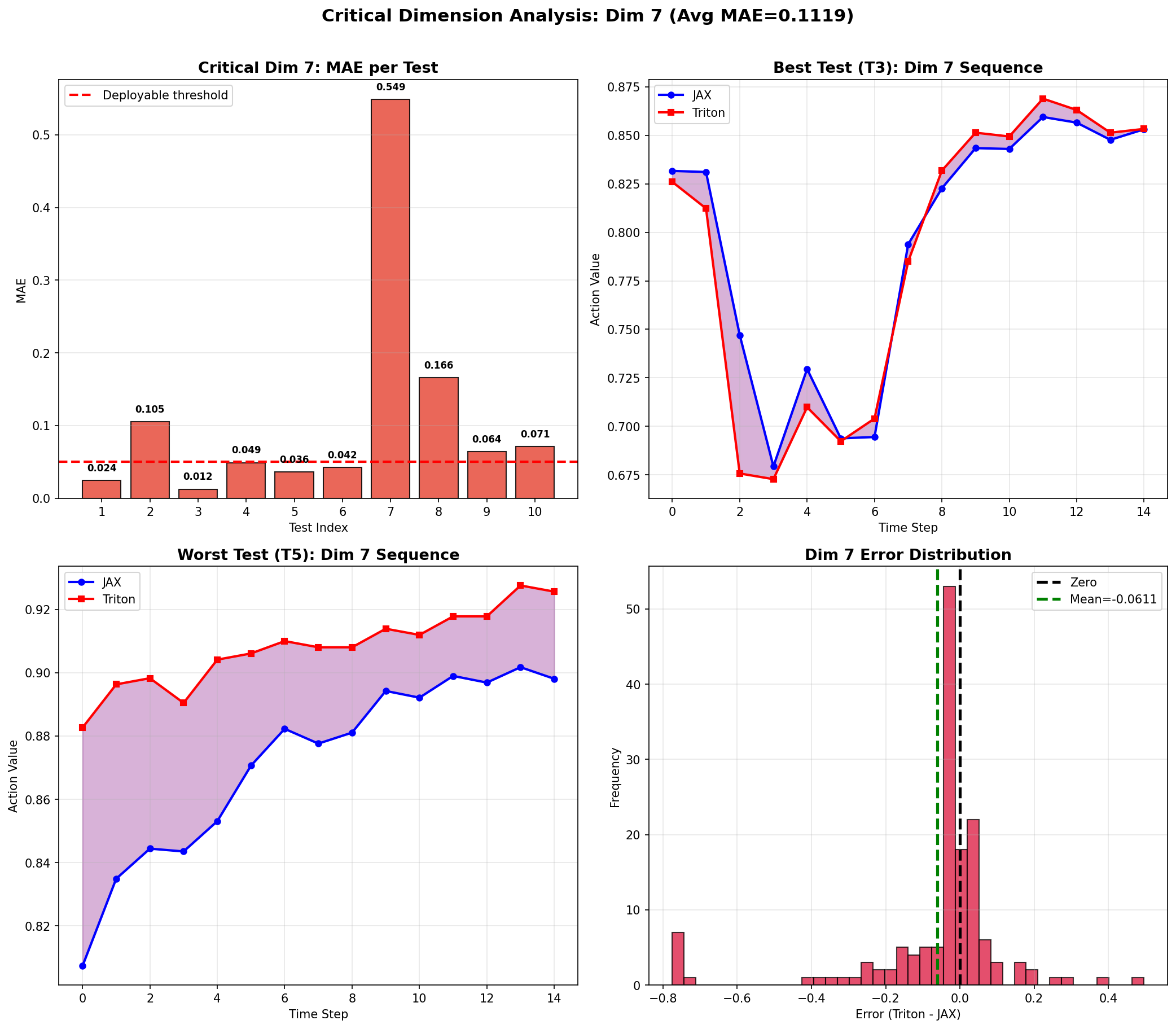
汇总分析2:(整体的偏差比较大)
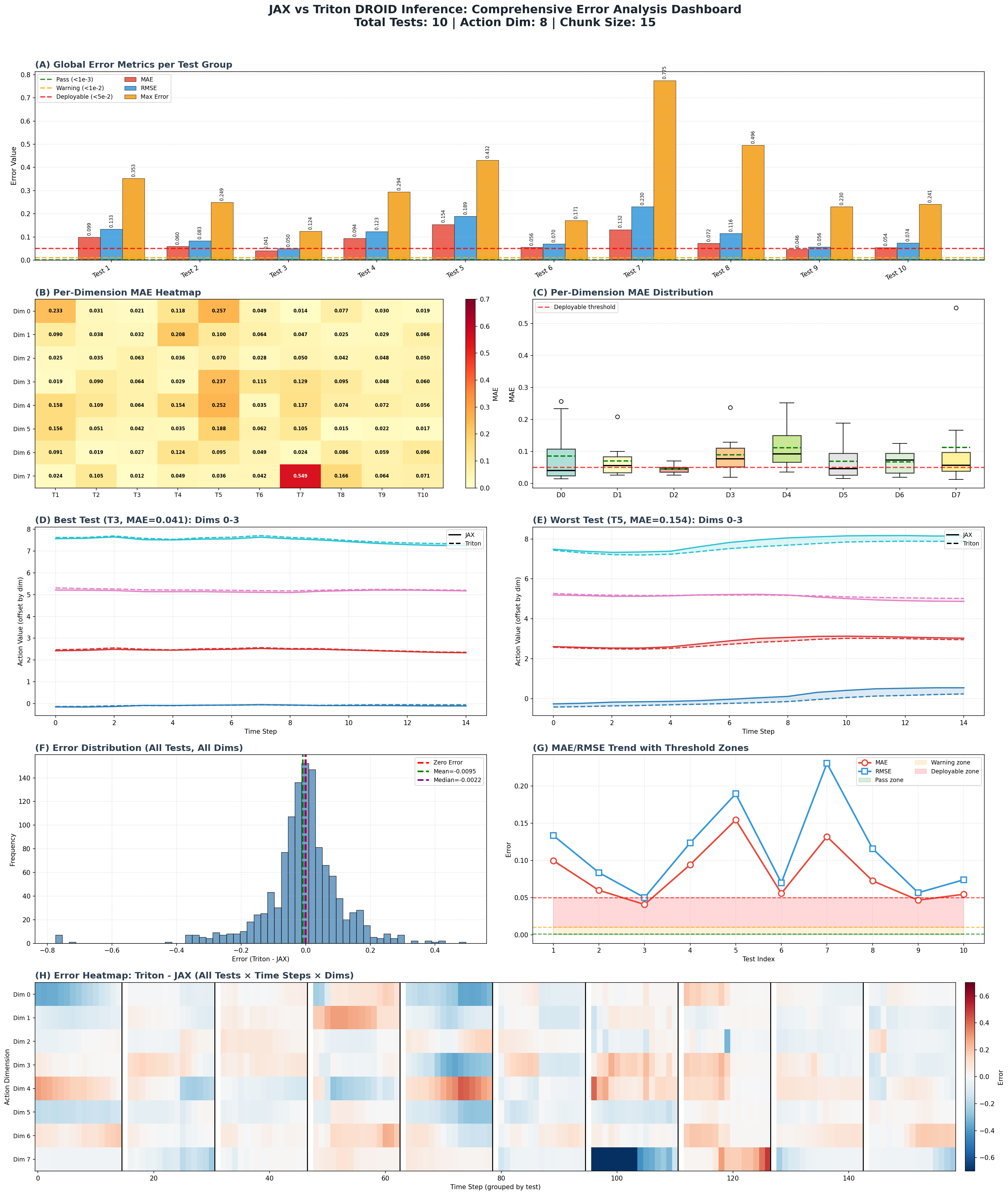
查看某组数据差异对比1:
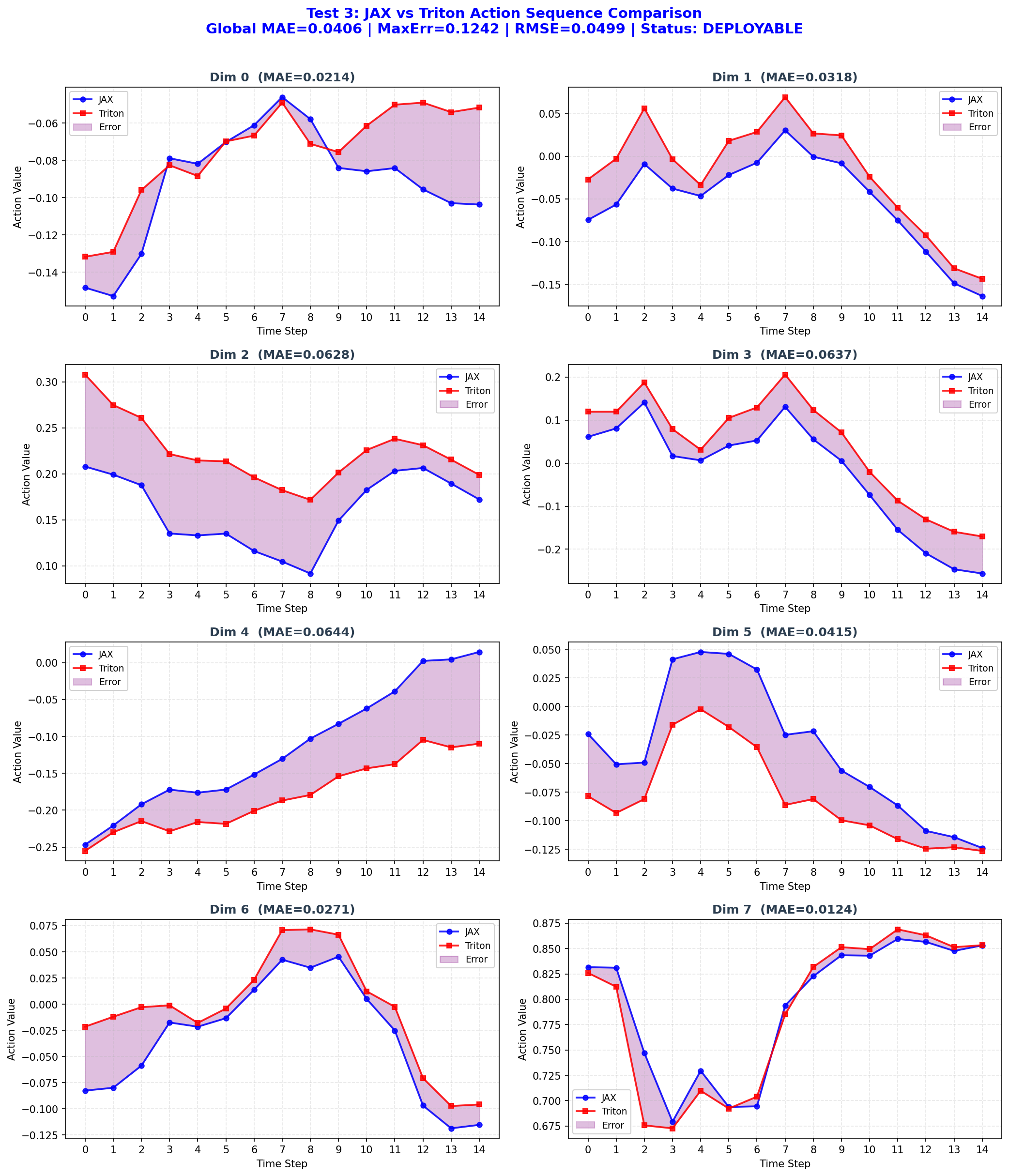
查看某组数据差异对比2:
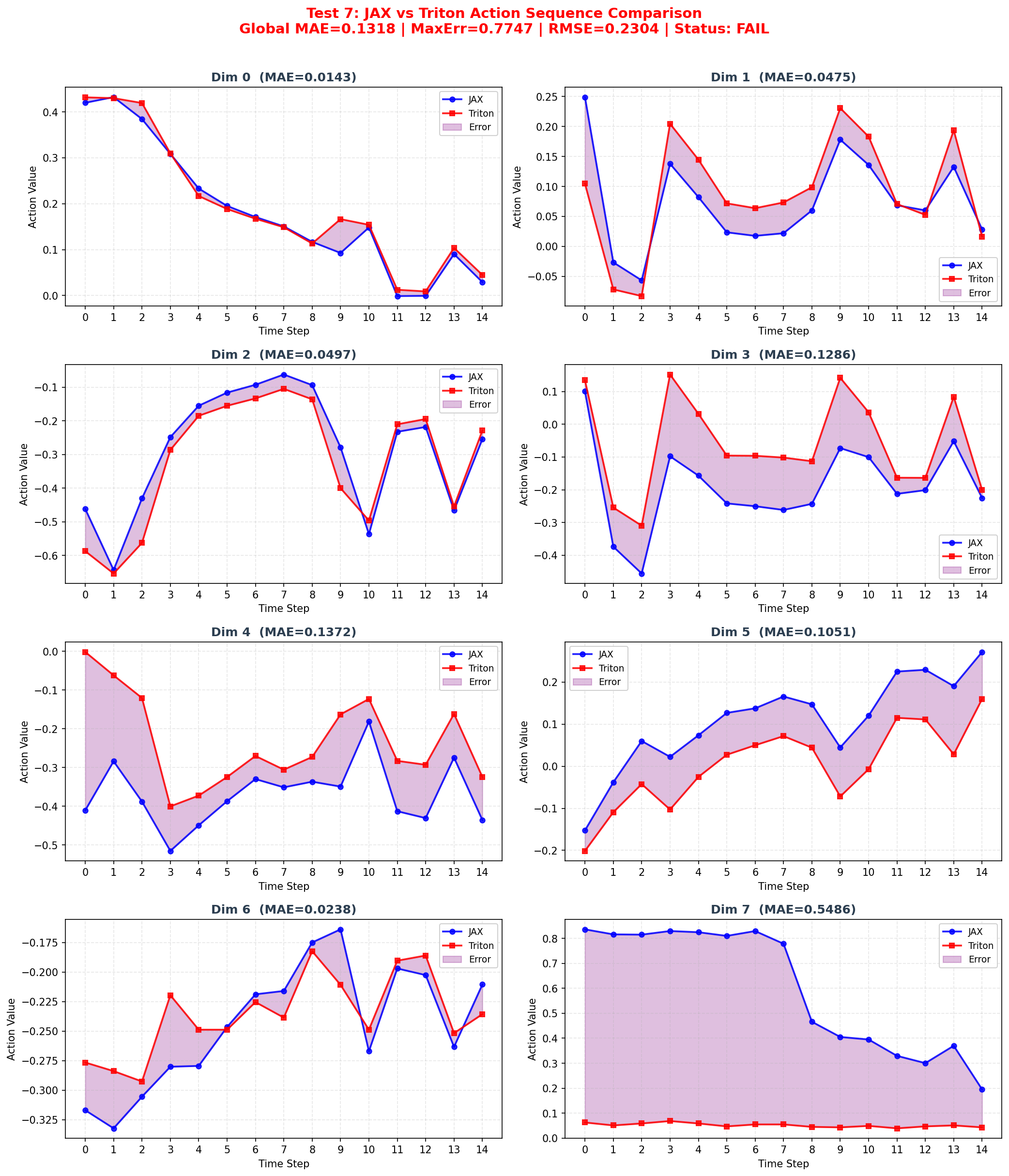
后续的DM0,有待更新中~