01-项目介绍和界面搭建
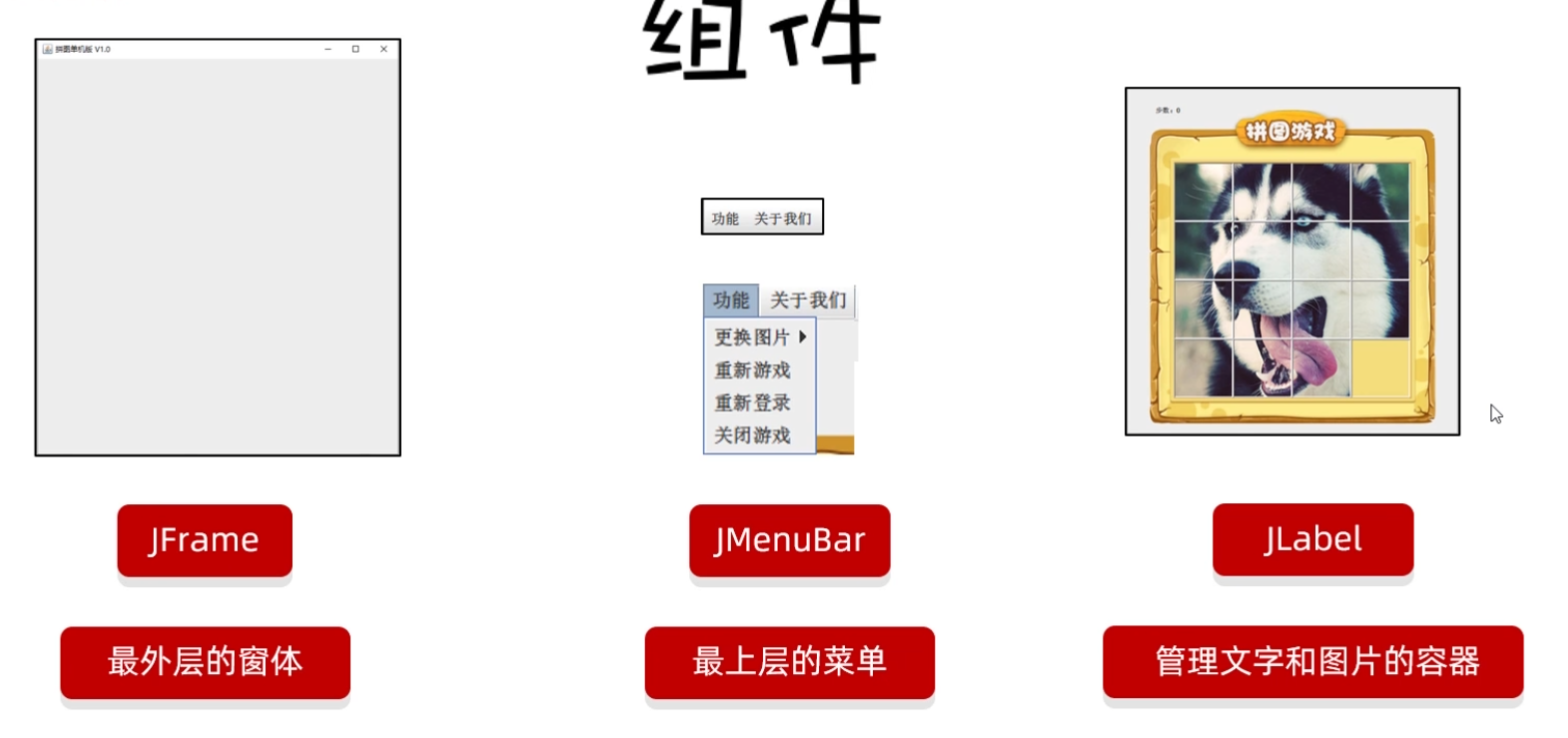
主界面分析
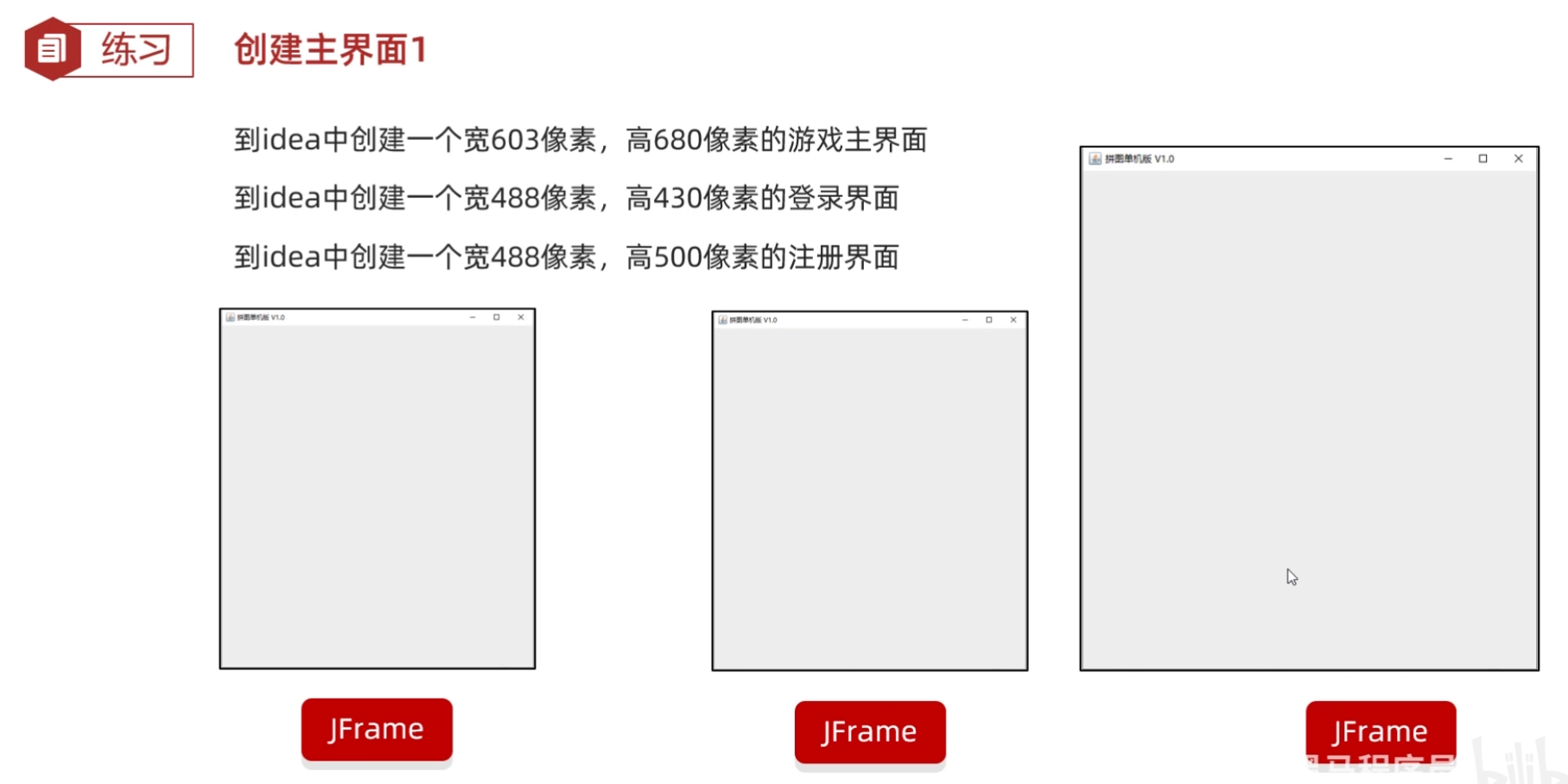
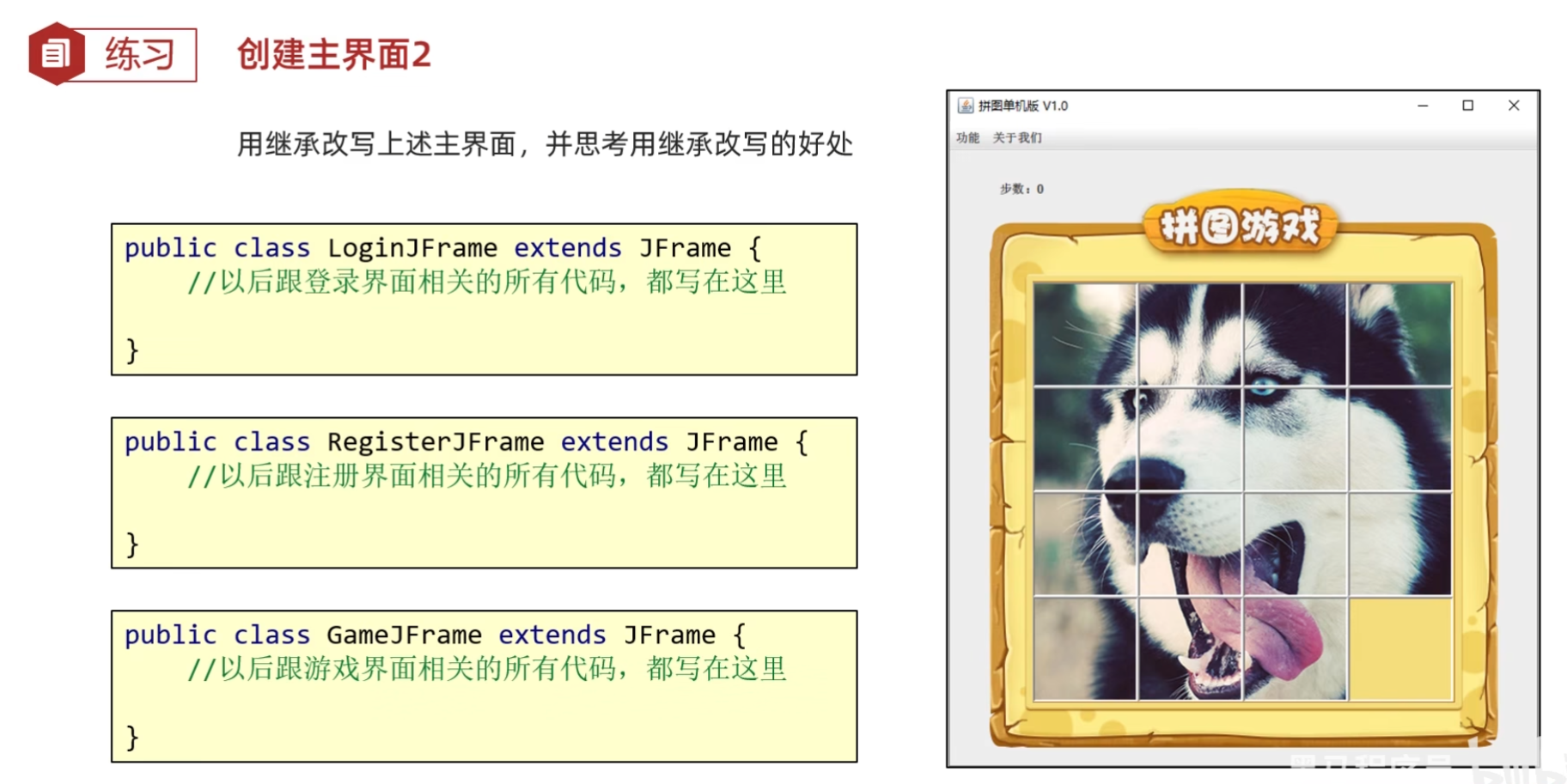
练习:创建主界面
例如:
(源代码)
App
java
package com.itheima.ui;

public class App {
    public static void main(String[] args) {
        //表示程序的启动入口

        //如果我们想要开启一个界面,就创建谁的对象就可以了
        new GameJFrame();

        new LoginJFrame();

        new RegisterJFrame();

    }
}
GameJFrame
java
package com.itheima.ui;

import javax.swing.*;

public class GameJFrame extends JFrame {
    //GameJFrame 表示游戏主界面
    //以后跟游戏有关的代码,都写在这里
    public GameJFrame() {
        this.setSize(603,680);
        this.setVisible(true);
    }
}
LoginJFrame
java
package com.itheima.ui;

import javax.swing.*;

public class LoginJFrame extends JFrame {
    //LoginJFrame 表示登录主界面
    //以后跟登录有关的代码,都写在这里
    public LoginJFrame() {
        this.setSize(488,430);
        this.setVisible(true);
    }
}
RegisterJFrame
java
package com.itheima.ui;

import javax.swing.*;

public class RegisterJFrame extends JFrame {
    //RegisterJFrame 表示注册主界面
    //以后跟注册有关的代码,都写在这里
    public RegisterJFrame(){
        this.setSize(488,500);
        this.setVisible(true);
    }
}
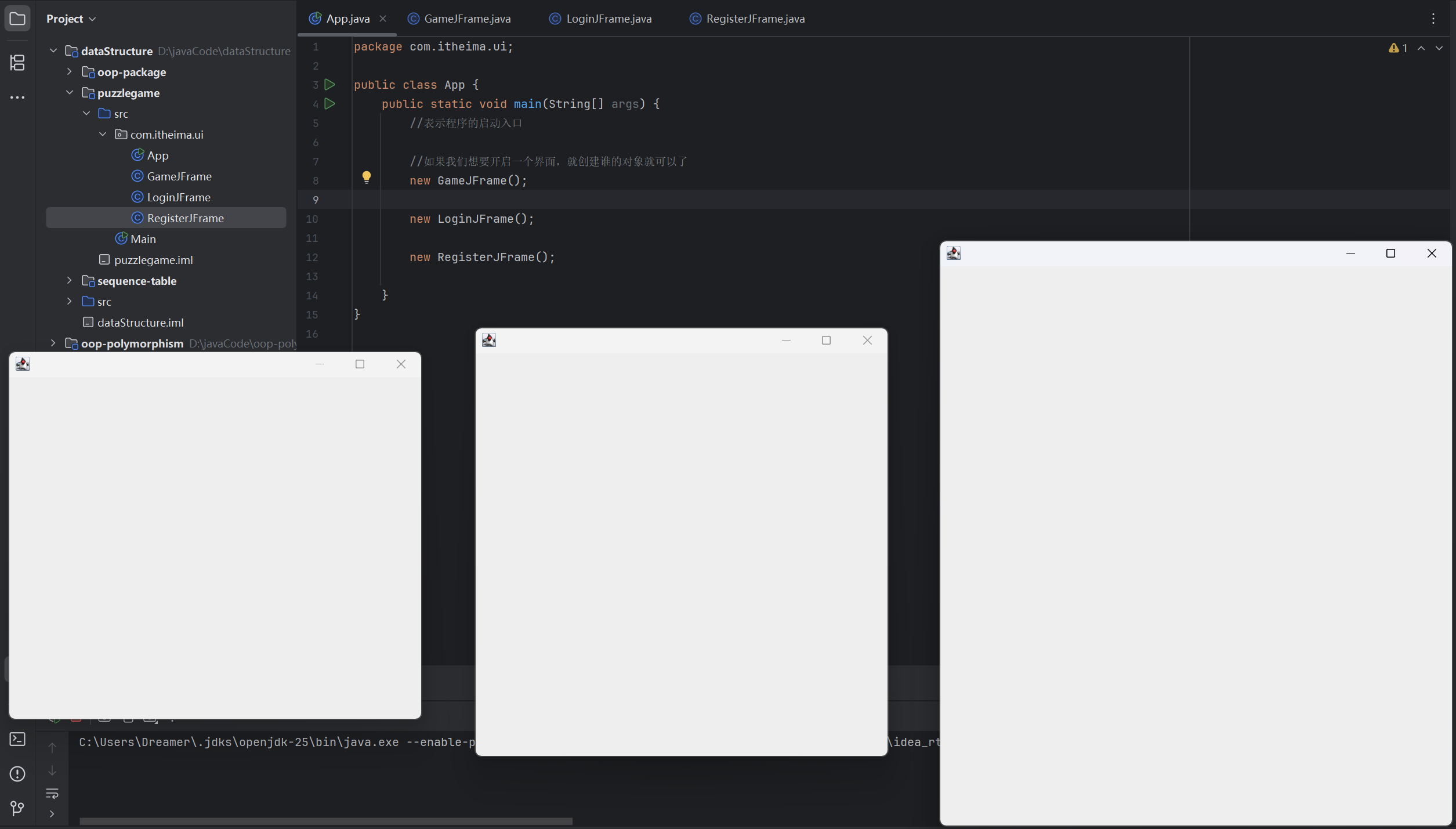
(运行结果截图)
02-界面设置和菜单搭建
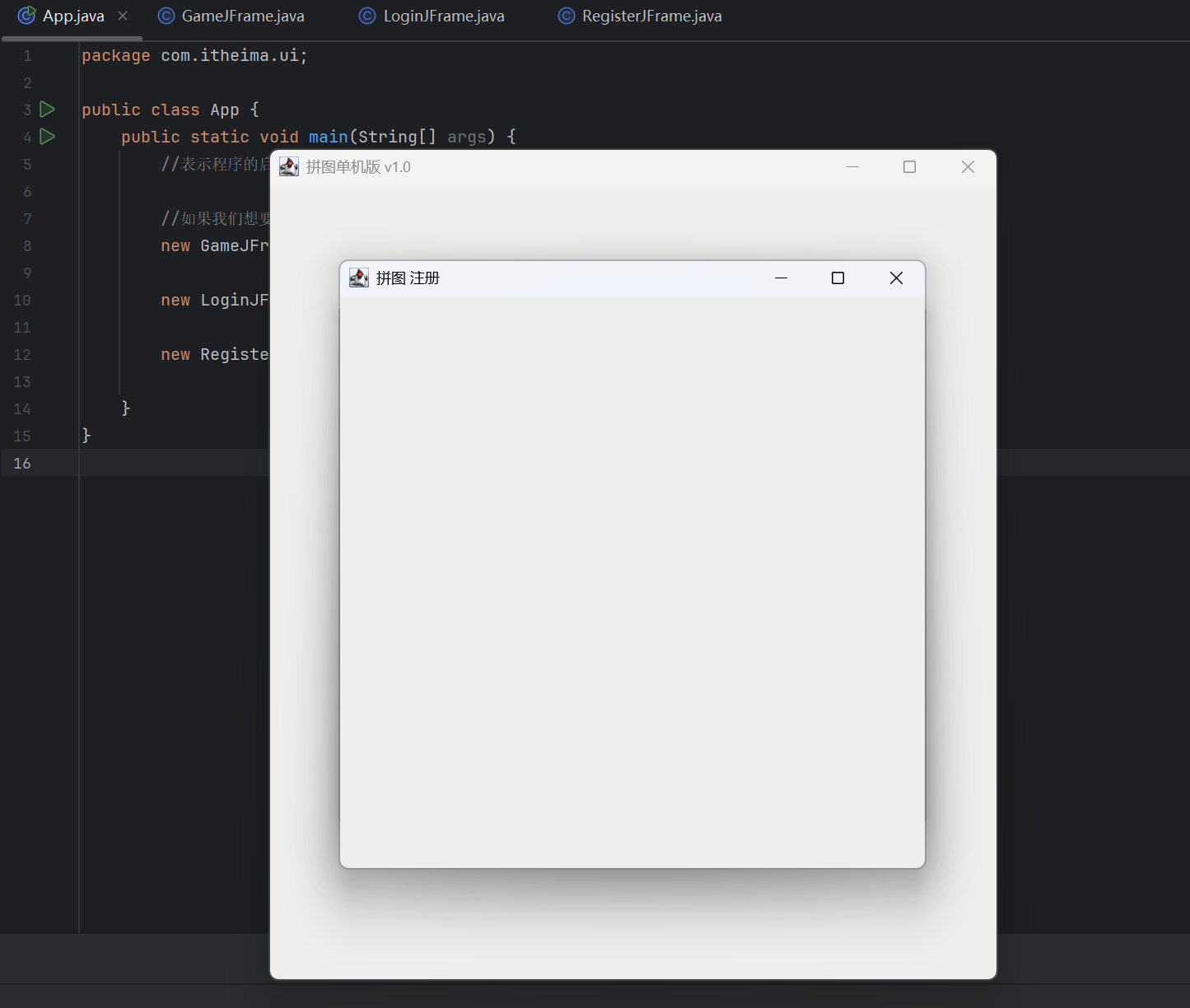
界面设置
例如:
(源代码)
App
java
package com.itheima.ui;

public class App {
    public static void main(String[] args) {
        //表示程序的启动入口

        //如果我们想要开启一个界面,就创建谁的对象就可以了
        new GameJFrame();

        new LoginJFrame();

        new RegisterJFrame();

    }
}
GameJFrame
java
package com.itheima.ui;

import javax.swing.*;

public class GameJFrame extends JFrame {
    //GameJFrame 表示游戏主界面
    //以后跟游戏有关的代码,都写在这里
    public GameJFrame() {
        //设置宽 高
        this.setSize(603,680);
        //设置界面标题
        this.setTitle("拼图单机版 v1.0");
        //设置界面置顶
        this.setAlwaysOnTop(true);
        //设置界面居中
        this.setLocationRelativeTo(null);
        //设置界面关闭
        this.setDefaultCloseOperation(WindowConstants.EXIT_ON_CLOSE);
        //设置显示(建议写在最后)
        this.setVisible(true);
    }
}
LoginJFrame
java
package com.itheima.ui;

import javax.swing.*;

public class LoginJFrame extends JFrame {
    //LoginJFrame 表示登录主界面
    //以后跟登录有关的代码,都写在这里
    public LoginJFrame() {
        //设置宽 高
        this.setSize(488,430);
        //设置界面标题
        this.setTitle("拼图 登录");
        //设置界面置顶
        this.setAlwaysOnTop(true);
        //设置界面居中
        this.setLocationRelativeTo(null);
        //设置界面关闭
        this.setDefaultCloseOperation(WindowConstants.EXIT_ON_CLOSE);
        //设置显示(建议写在最后)
        this.setVisible(true);
    }
}
RegisterJFrame
java
package com.itheima.ui;

import javax.swing.*;

public class RegisterJFrame extends JFrame {
    //RegisterJFrame 表示注册主界面
    //以后跟注册有关的代码,都写在这里
    public RegisterJFrame(){
        //设置宽 高
        this.setSize(488,500);
        //设置界面标题
        this.setTitle("拼图 注册");
        //设置界面置顶
        this.setAlwaysOnTop(true);
        //设置界面居中
        this.setLocationRelativeTo(null);
        //设置界面关闭
        this.setDefaultCloseOperation(WindowConstants.EXIT_ON_CLOSE);
        //设置显示(建议写在最后)
        this.setVisible(true);
    }
}
(运行结果截图)
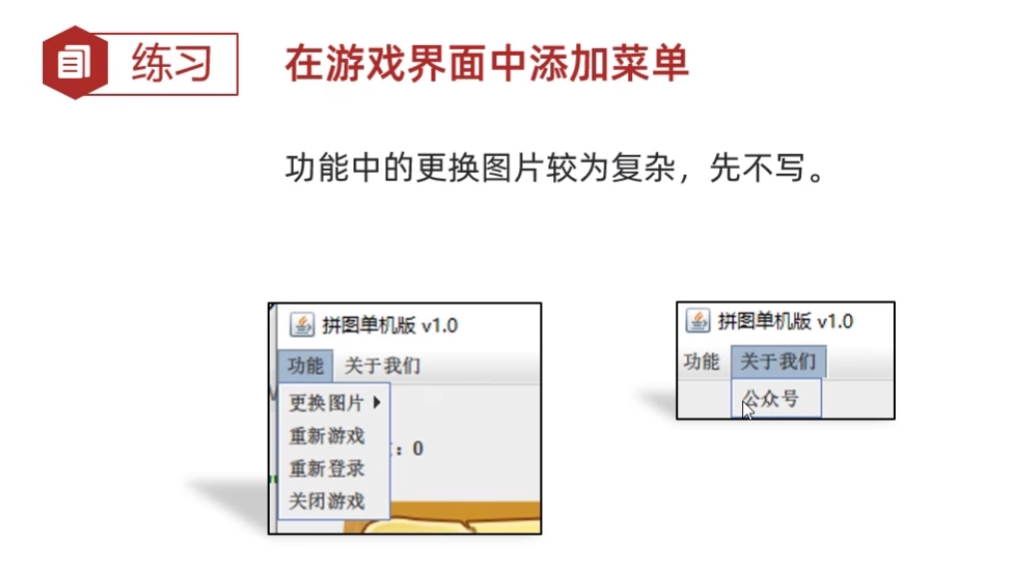
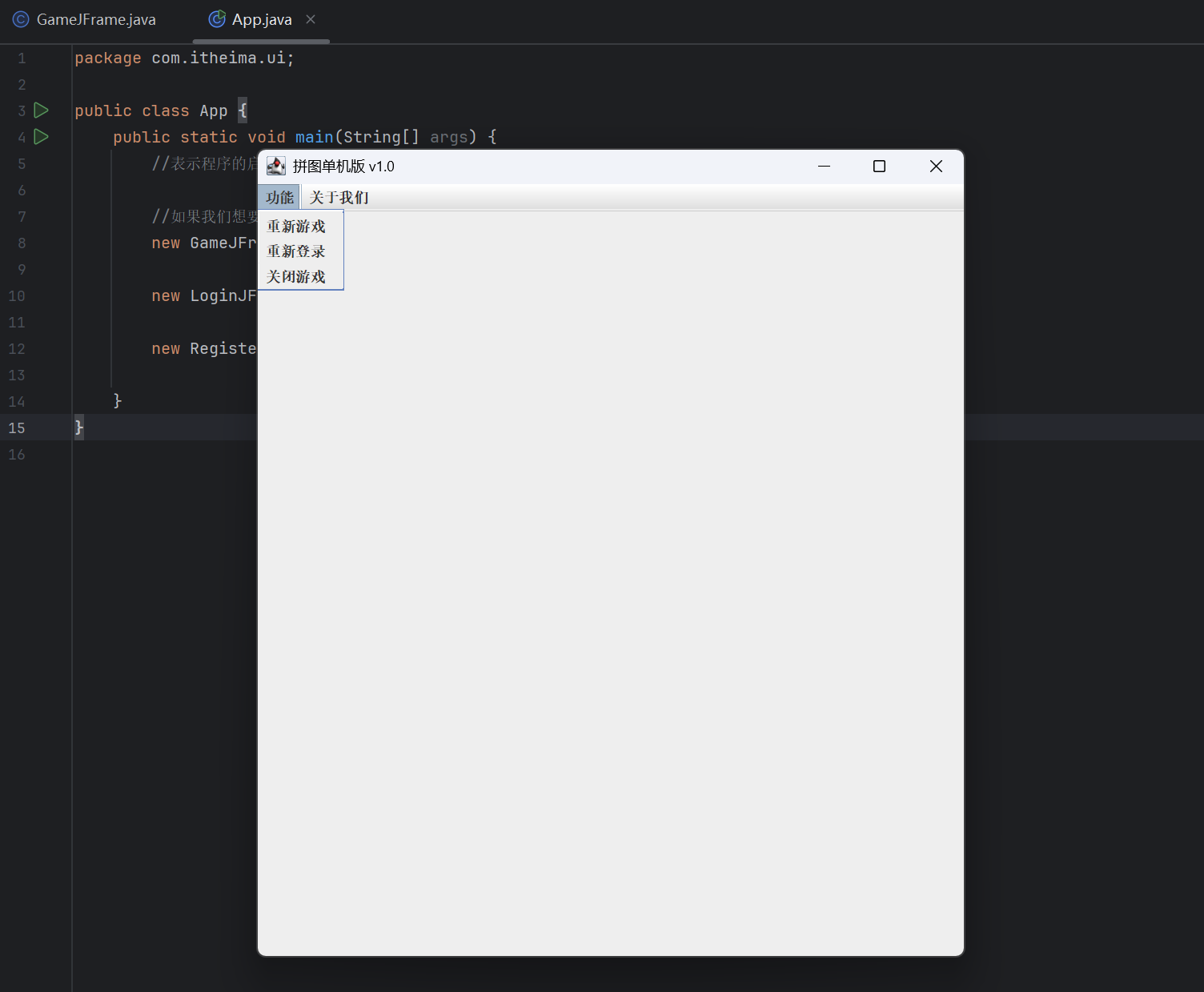
练习:在游戏界面中添加菜单
快捷键:
Ctrl + Alt + M 抽取方法
例如:
(分析)
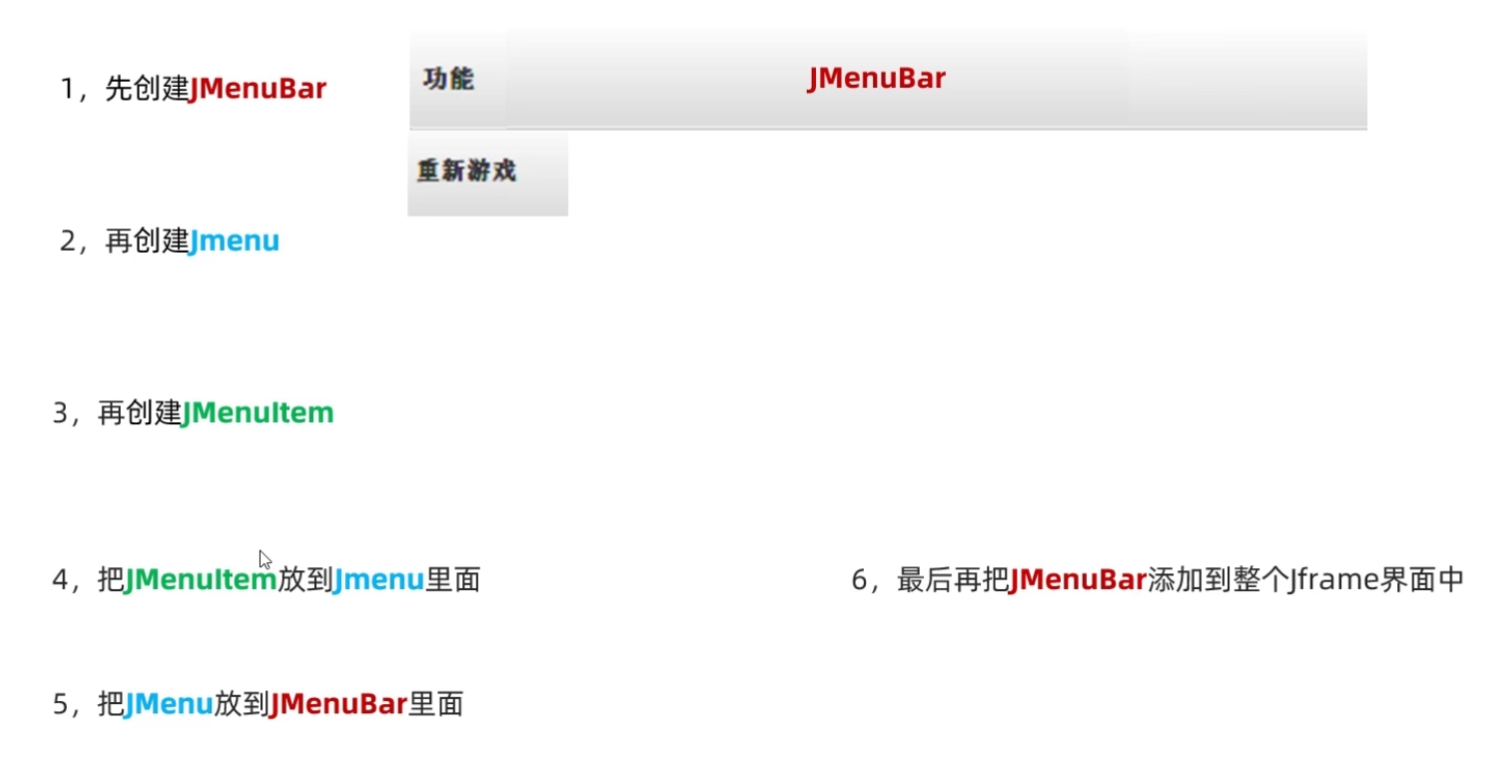
(源代码)
App
java
package com.itheima.ui;

public class App {
    public static void main(String[] args) {
        //表示程序的启动入口

        //如果我们想要开启一个界面,就创建谁的对象就可以了
        new GameJFrame();

        new LoginJFrame();

        new RegisterJFrame();

    }
}
GameJFrame
java
package com.itheima.ui;

import javax.swing.*;

public class GameJFrame extends JFrame {
    //GameJFrame 表示游戏主界面
    //以后跟游戏有关的代码,都写在这里
    public GameJFrame() {
        //初始化界面
        initJFrame();

        //初始化菜单
        initJMenuBar();


        //设置显示(建议写在最后)
        this.setVisible(true);
    }

    private void initJMenuBar() {
        //初始化菜单
        //创建整个的菜单对象
        JMenuBar JMenuBar = new JMenuBar();

        //创建菜单上面的两个选项的对象 (功能 关于我们)
        JMenu functionJMenu = new JMenu("功能");
        JMenu aboutJMenu = new JMenu("关于我们");

        //创建选项下面的条目对象
        JMenuItem replayItem = new JMenuItem("重新游戏");
        JMenuItem reLoginItem = new JMenuItem("重新登录");
        JMenuItem closeItem = new JMenuItem("关闭游戏");

        JMenuItem accountItem = new JMenuItem("公众号");

        //将每一个选项下面的条目添加到选项中
        functionJMenu.add(replayItem);
        functionJMenu.add(reLoginItem);
        functionJMenu.add(closeItem);

        aboutJMenu.add(accountItem);

        //将菜单里面的两个选项添加到菜单中
        JMenuBar.add(functionJMenu);
        JMenuBar.add(aboutJMenu);

        //给整个界面设置菜单
        this.setJMenuBar(JMenuBar);
    }

    private void initJFrame() {
        //设置宽 高
        this.setSize(603,680);
        //设置界面标题
        this.setTitle("拼图单机版 v1.0");
        //设置界面置顶
        this.setAlwaysOnTop(true);
        //设置界面居中
        this.setLocationRelativeTo(null);
        //设置界面关闭
        this.setDefaultCloseOperation(WindowConstants.EXIT_ON_CLOSE);
    }

}
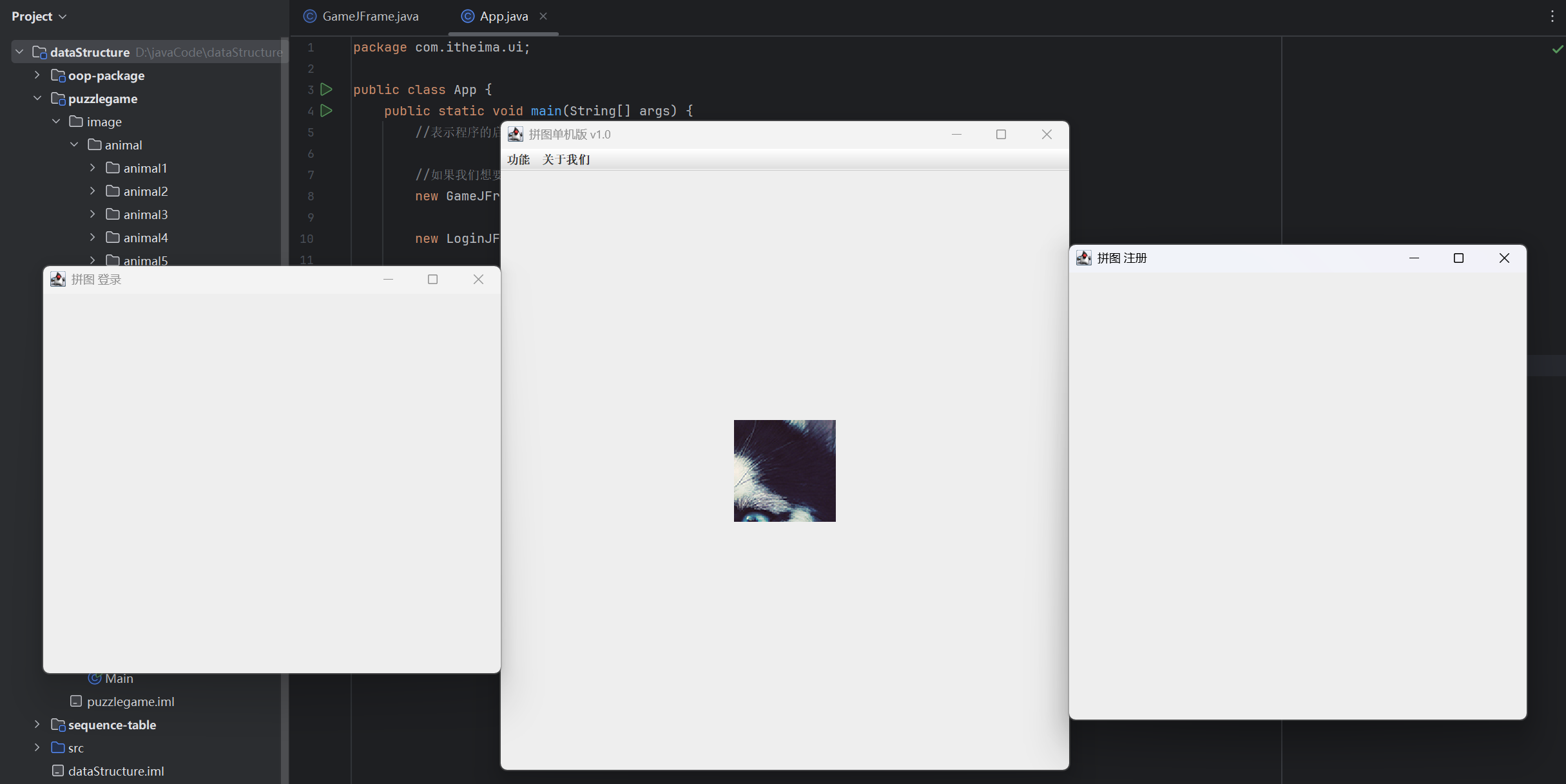
(运行结果截图)
03-添加图片
快捷键:
ctrl + B 跟进
shift + F6 批量选中
在C位添加图片
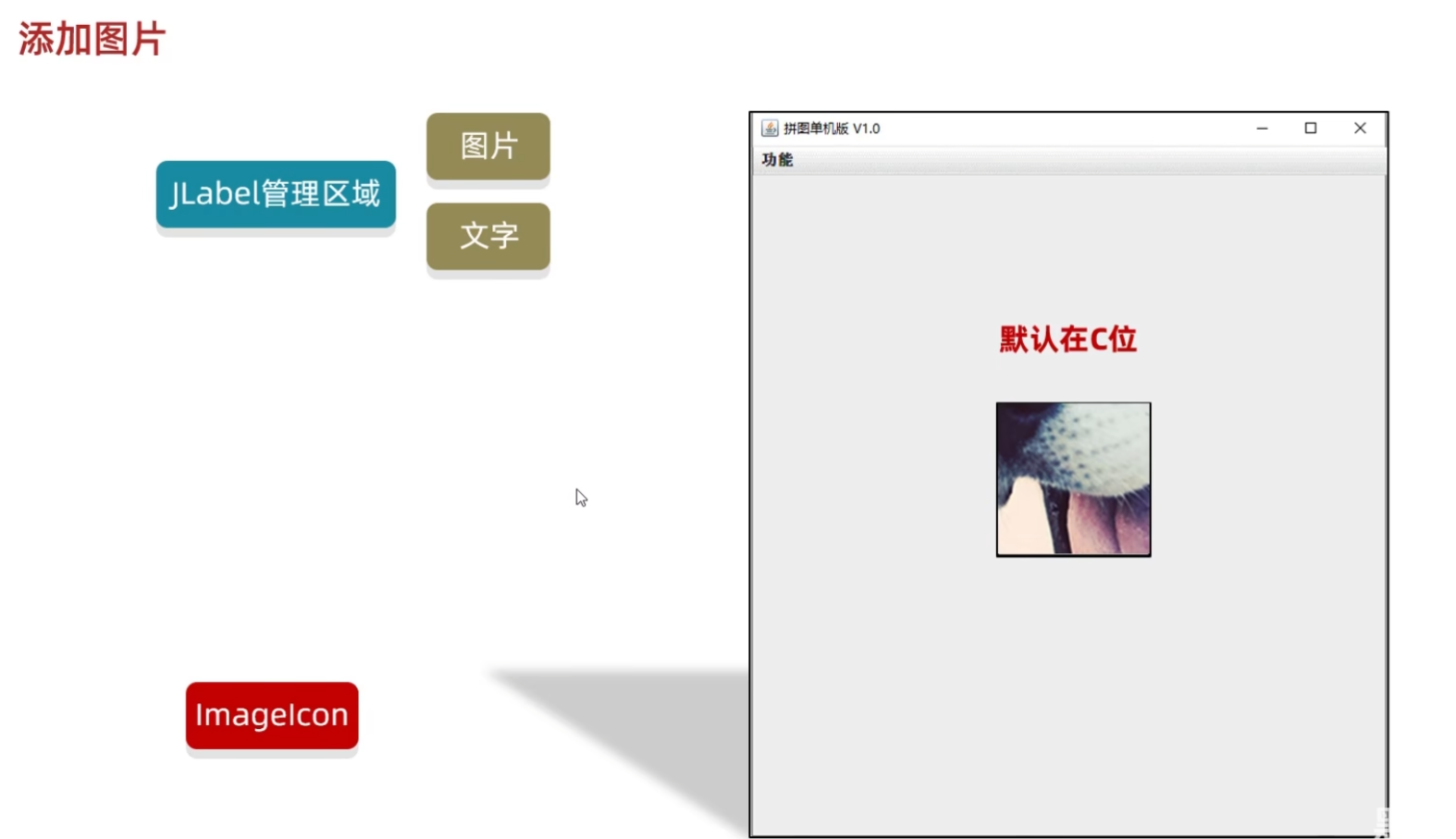
例如:
(源代码)
GameJFrame
java
package com.itheima.ui;

import javax.swing.*;

public class GameJFrame extends JFrame {
    //GameJFrame 表示游戏主界面
    //以后跟游戏有关的代码,都写在这里
    public GameJFrame() {
        //初始化界面
        initJFrame();

        //初始化菜单
        initJMenuBar();

        //初始化图片
        initImage();;


        //设置显示(建议写在最后)
        this.setVisible(true);
    }

    private void initImage() {
        //创建一个图片ImageIcon 的对象
        ImageIcon icon = new ImageIcon("D:\\javaCode\\dataStructure\\puzzlegame\\image\\animal\\animal3\\3.jpg");
        //创建一个JLabel的对象(管理容器)
        JLabel jLabel1 = new JLabel(icon);
        //把管理容器添加到界面中
        this.add(jLabel1);
    }

    private void initJMenuBar() {
        //初始化菜单
        //创建整个的菜单对象
        JMenuBar JMenuBar = new JMenuBar();

        //创建菜单上面的两个选项的对象 (功能 关于我们)
        JMenu functionJMenu = new JMenu("功能");
        JMenu aboutJMenu = new JMenu("关于我们");

        //创建选项下面的条目对象
        JMenuItem replayItem = new JMenuItem("重新游戏");
        JMenuItem reLoginItem = new JMenuItem("重新登录");
        JMenuItem closeItem = new JMenuItem("关闭游戏");

        JMenuItem accountItem = new JMenuItem("公众号");

        //将每一个选项下面的条目添加到选项中
        functionJMenu.add(replayItem);
        functionJMenu.add(reLoginItem);
        functionJMenu.add(closeItem);

        aboutJMenu.add(accountItem);

        //将菜单里面的两个选项添加到菜单中
        JMenuBar.add(functionJMenu);
        JMenuBar.add(aboutJMenu);

        //给整个界面设置菜单
        this.setJMenuBar(JMenuBar);
    }

    private void initJFrame() {
        //设置宽 高
        this.setSize(603,680);
        //设置界面标题
        this.setTitle("拼图单机版 v1.0");
        //设置界面置顶
        this.setAlwaysOnTop(true);
        //设置界面居中
        this.setLocationRelativeTo(null);
        //设置界面关闭
        this.setDefaultCloseOperation(WindowConstants.EXIT_ON_CLOSE);

    }
}
App
java
package com.itheima.ui;

public class App {
    public static void main(String[] args) {
        //表示程序的启动入口

        //如果我们想要开启一个界面,就创建谁的对象就可以了
        new GameJFrame();

        new LoginJFrame();

        new RegisterJFrame();

    }
}
(运行结果截图)
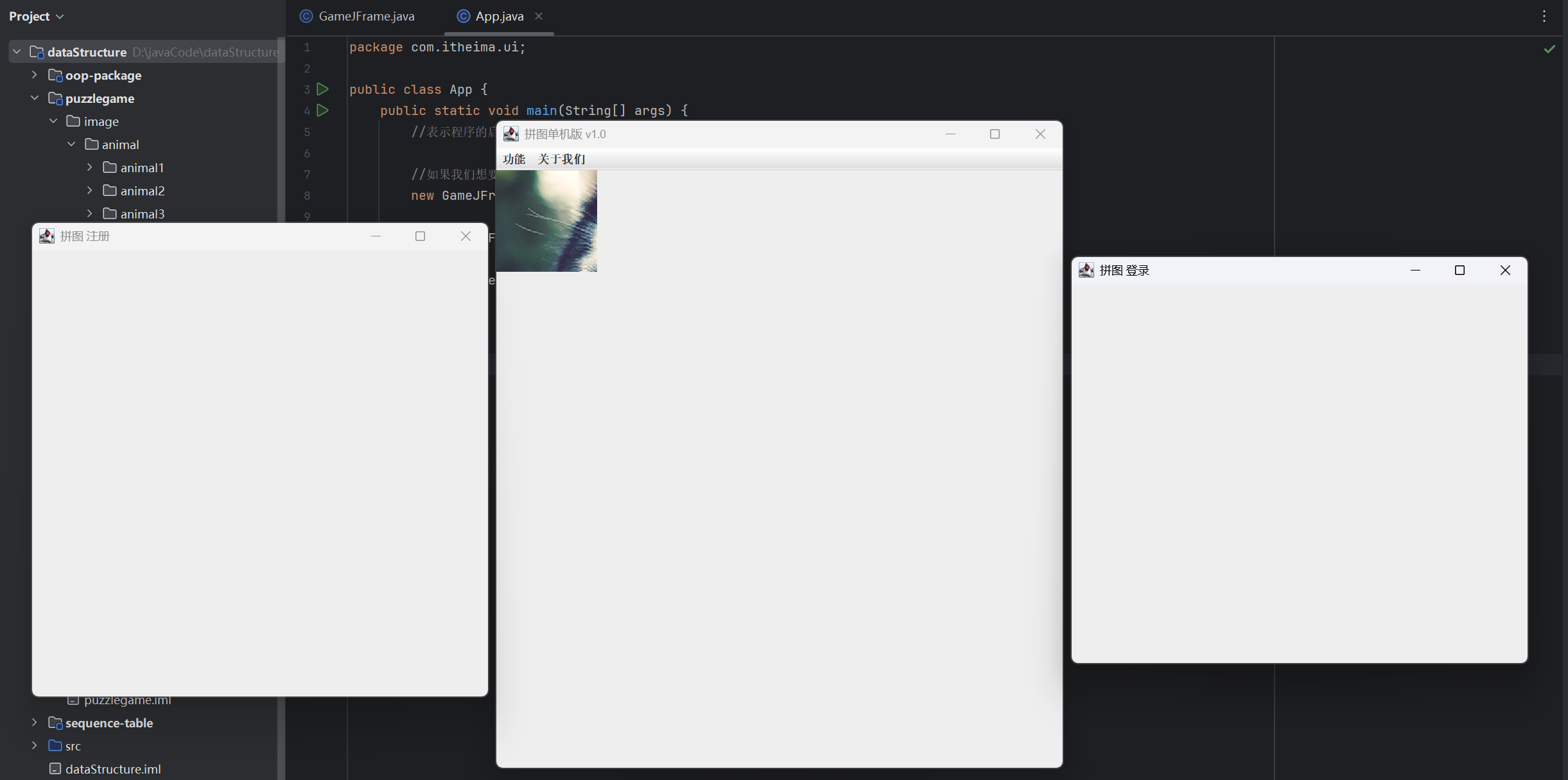
在其他位置添加图片
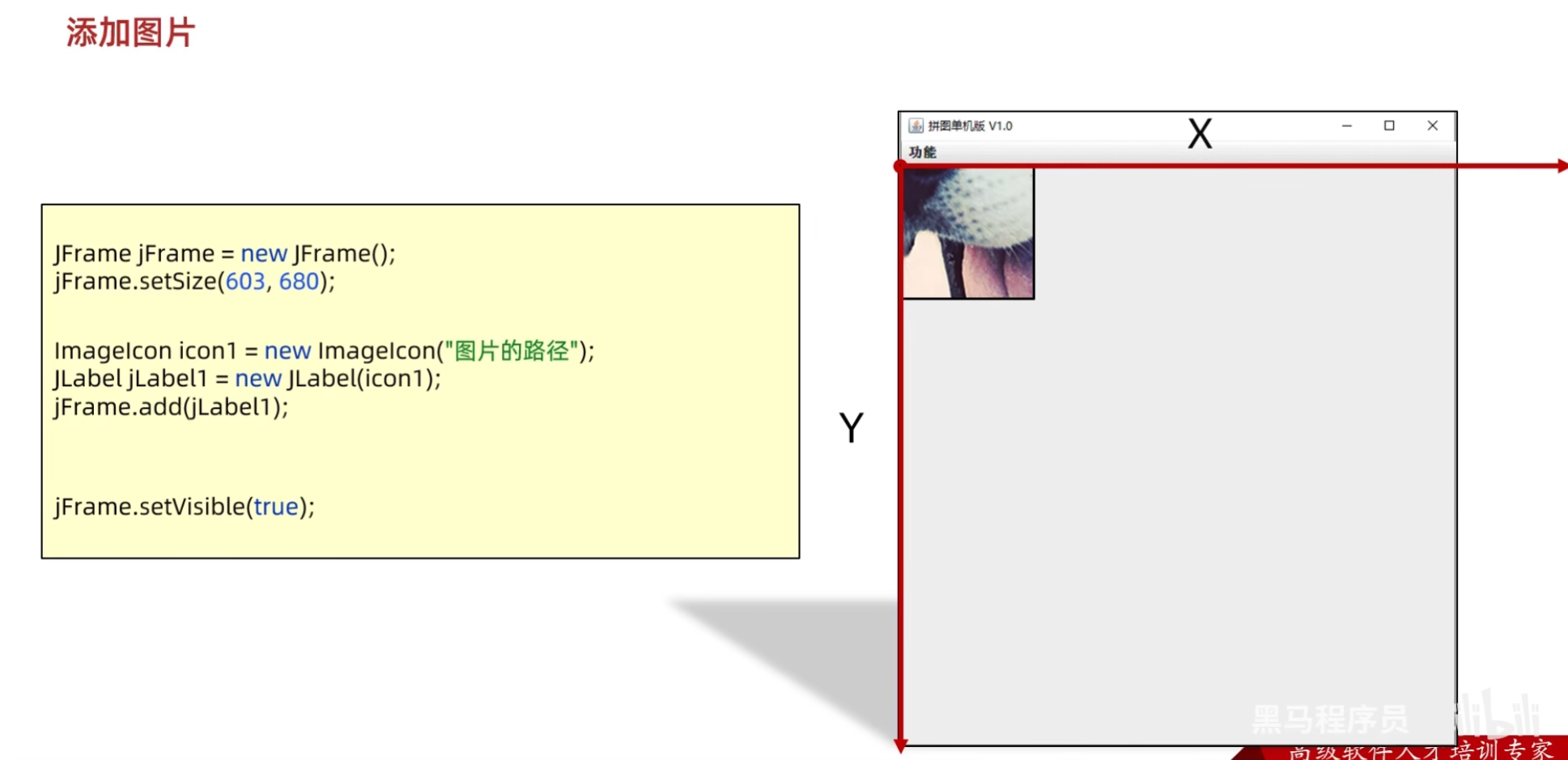
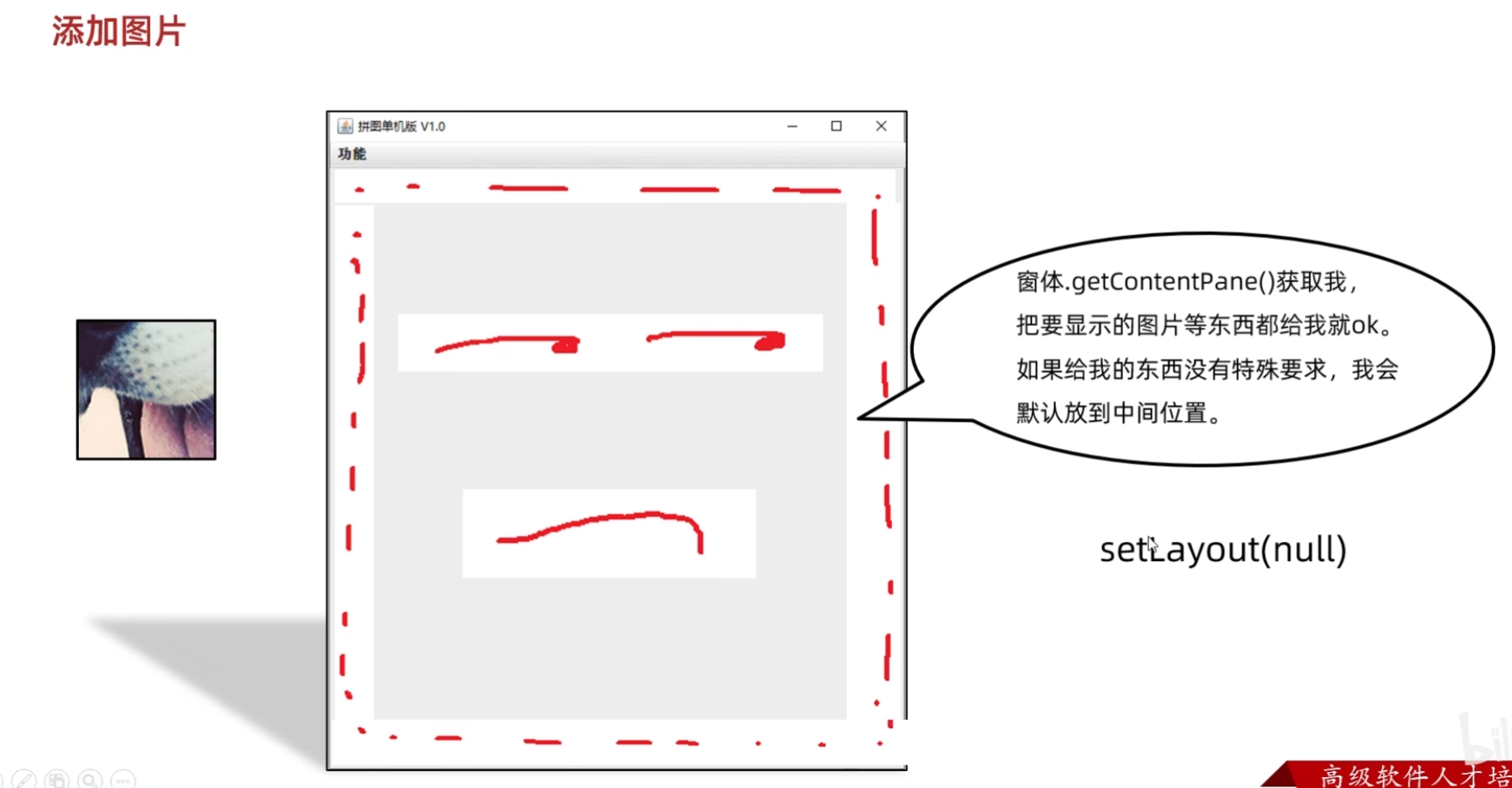
例如:
(源代码)
GameJFrame
java
package com.itheima.ui;

import javax.swing.*;

public class GameJFrame extends JFrame {
    //GameJFrame 表示游戏主界面
    //以后跟游戏有关的代码,都写在这里
    public GameJFrame() {
        //初始化界面
        initJFrame();

        //初始化菜单
        initJMenuBar();

        //初始化图片
        initImage();;


        //设置显示(建议写在最后)
        this.setVisible(true);
    }

    private void initImage() {
        //创建一个图片ImageIcon 的对象
        ImageIcon icon = new ImageIcon("D:\\javaCode\\dataStructure\\puzzlegame\\image\\animal\\animal3\\1.jpg");
        //创建一个JLabel的对象(管理容器)
        JLabel jLabel1 = new JLabel(icon);
        //指定图片位置
        jLabel1.setBounds(0,0,105,105);
        //把管理容器添加到界面中
        //this.add(jLabel1);
        this.getContentPane().add(jLabel1);


    }

    private void initJMenuBar() {
        //初始化菜单
        //创建整个的菜单对象
        JMenuBar JMenuBar = new JMenuBar();

        //创建菜单上面的两个选项的对象 (功能 关于我们)
        JMenu functionJMenu = new JMenu("功能");
        JMenu aboutJMenu = new JMenu("关于我们");

        //创建选项下面的条目对象
        JMenuItem replayItem = new JMenuItem("重新游戏");
        JMenuItem reLoginItem = new JMenuItem("重新登录");
        JMenuItem closeItem = new JMenuItem("关闭游戏");

        JMenuItem accountItem = new JMenuItem("公众号");

        //将每一个选项下面的条目添加到选项中
        functionJMenu.add(replayItem);
        functionJMenu.add(reLoginItem);
        functionJMenu.add(closeItem);

        aboutJMenu.add(accountItem);

        //将菜单里面的两个选项添加到菜单中
        JMenuBar.add(functionJMenu);
        JMenuBar.add(aboutJMenu);

        //给整个界面设置菜单
        this.setJMenuBar(JMenuBar);
    }

    private void initJFrame() {
        //设置宽 高
        this.setSize(603,680);
        //设置界面标题
        this.setTitle("拼图单机版 v1.0");
        //设置界面置顶
        this.setAlwaysOnTop(true);
        //设置界面居中
        this.setLocationRelativeTo(null);
        //设置界面关闭
        this.setDefaultCloseOperation(WindowConstants.EXIT_ON_CLOSE);
        //取消默认的中间位置,只有取消了才会按照XY轴的形式添加组件
        this.setLayout(null);
    }
}
App
java
package com.itheima.ui;

public class App {
    public static void main(String[] args) {
        //表示程序的启动入口

        //如果我们想要开启一个界面,就创建谁的对象就可以了
        new GameJFrame();

        new LoginJFrame();

        new RegisterJFrame();

    }
}
(运行结果截图)
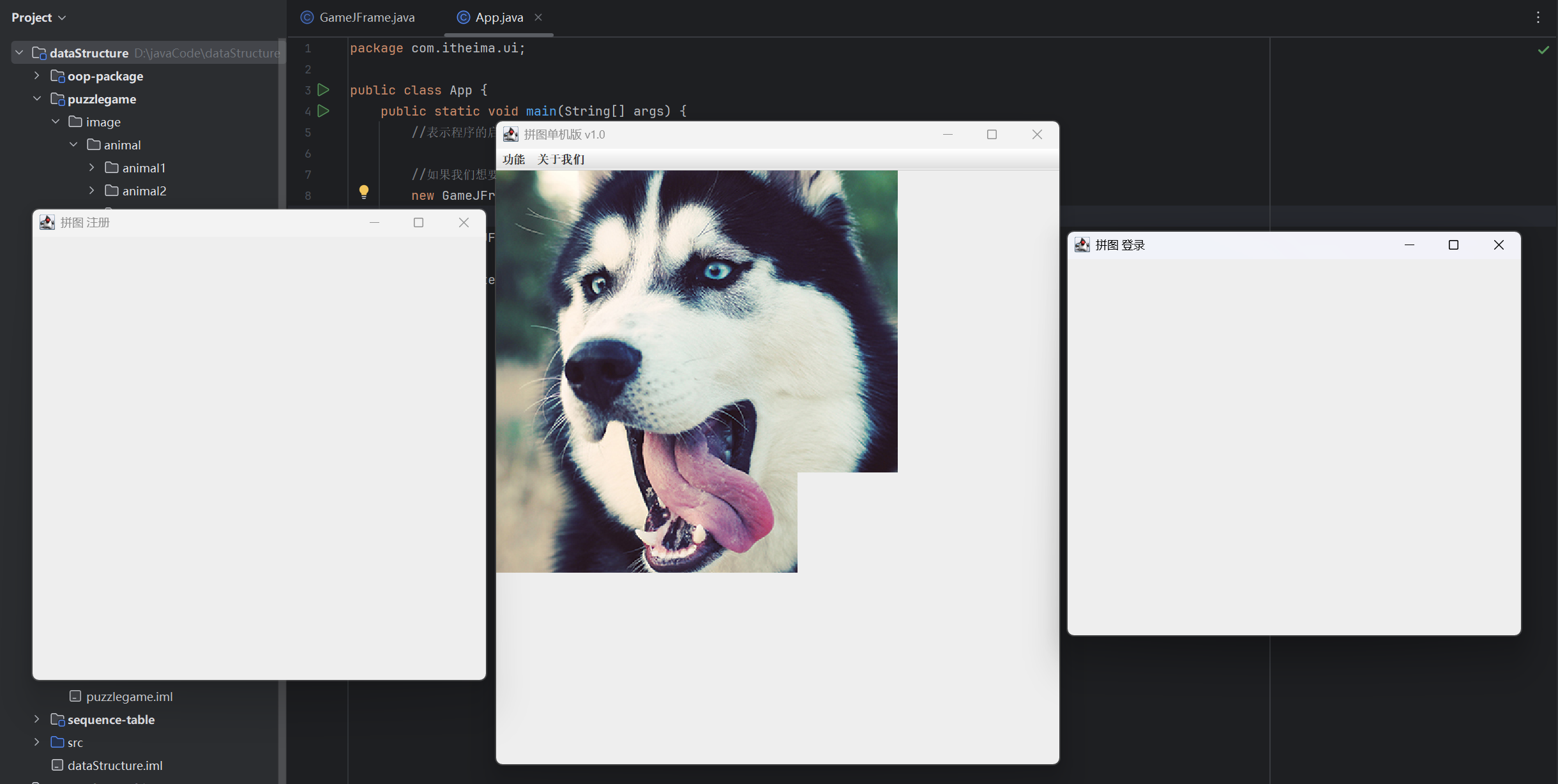
添加全部图片
例如:
(源代码)
GameJFrame
java
package com.itheima.ui;

import javax.swing.*;

public class GameJFrame extends JFrame {
    //GameJFrame 表示游戏主界面
    //以后跟游戏有关的代码,都写在这里
    public GameJFrame() {
        //初始化界面
        initJFrame();

        //初始化菜单
        initJMenuBar();

        //初始化图片
        initImage();;


        //设置显示(建议写在最后)
        this.setVisible(true);
    }

    private void initImage() {
        int number = 1;
        //外循环 --- 把内循环重复执行了4次
        for (int i = 0; i < 4; i++) {
            //内循环 --- 表示在一行添加4张图片
            for (int j = 0; j < 4; j++) {
                //创建一个JLabel的对象(管理容器)
                JLabel jLabel = new JLabel(new ImageIcon("D:\\javaCode\\dataStructure\\puzzlegame\\image\\animal\\animal3\\" + number +".jpg"));
                //指定图片位置
                jLabel.setBounds(105 * j,105 * i,105,105);
                //把管理容器添加到界面中
                this.getContentPane().add(jLabel);
                //添加一次后number需要自增,表示下一次加载后面一张图片
                number++;
            }
        }


    }

    private void initJMenuBar() {
        //初始化菜单
        //创建整个的菜单对象
        JMenuBar JMenuBar = new JMenuBar();

        //创建菜单上面的两个选项的对象 (功能 关于我们)
        JMenu functionJMenu = new JMenu("功能");
        JMenu aboutJMenu = new JMenu("关于我们");

        //创建选项下面的条目对象
        JMenuItem replayItem = new JMenuItem("重新游戏");
        JMenuItem reLoginItem = new JMenuItem("重新登录");
        JMenuItem closeItem = new JMenuItem("关闭游戏");

        JMenuItem accountItem = new JMenuItem("公众号");

        //将每一个选项下面的条目添加到选项中
        functionJMenu.add(replayItem);
        functionJMenu.add(reLoginItem);
        functionJMenu.add(closeItem);

        aboutJMenu.add(accountItem);

        //将菜单里面的两个选项添加到菜单中
        JMenuBar.add(functionJMenu);
        JMenuBar.add(aboutJMenu);

        //给整个界面设置菜单
        this.setJMenuBar(JMenuBar);
    }

    private void initJFrame() {
        //设置宽 高
        this.setSize(603,680);
        //设置界面标题
        this.setTitle("拼图单机版 v1.0");
        //设置界面置顶
        this.setAlwaysOnTop(true);
        //设置界面居中
        this.setLocationRelativeTo(null);
        //设置界面关闭
        this.setDefaultCloseOperation(WindowConstants.EXIT_ON_CLOSE);
        //取消默认的中间位置,只有取消了才会按照XY轴的形式添加组件
        this.setLayout(null);
    }
}
App
java
package com.itheima.ui;

public class App {
    public static void main(String[] args) {
        //表示程序的启动入口

        //如果我们想要开启一个界面,就创建谁的对象就可以了
        new GameJFrame();

        new LoginJFrame();

        new RegisterJFrame();

    }
}
(运行结果截图)
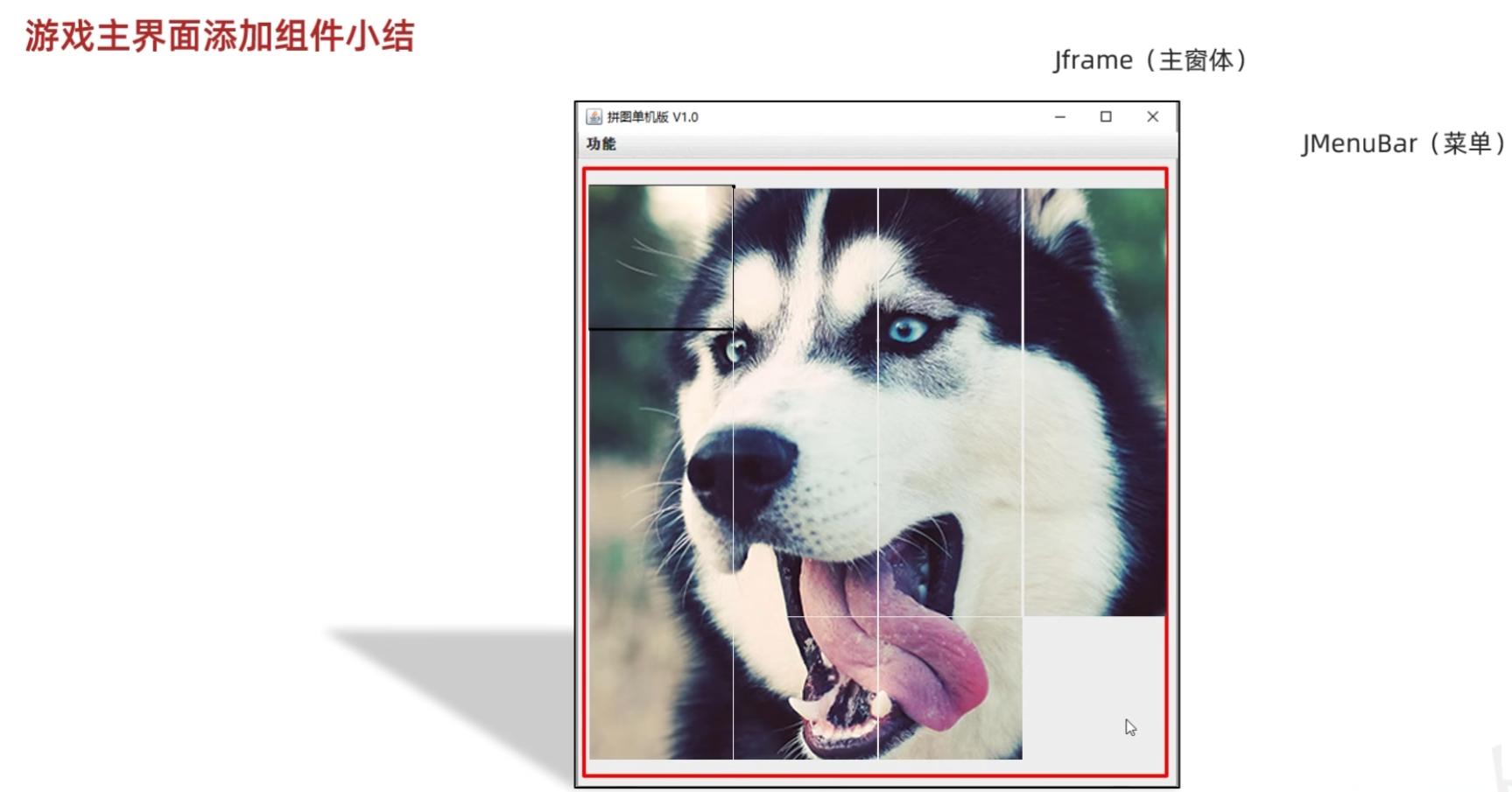
游戏主界面添加组件小结
04-打乱图片顺序
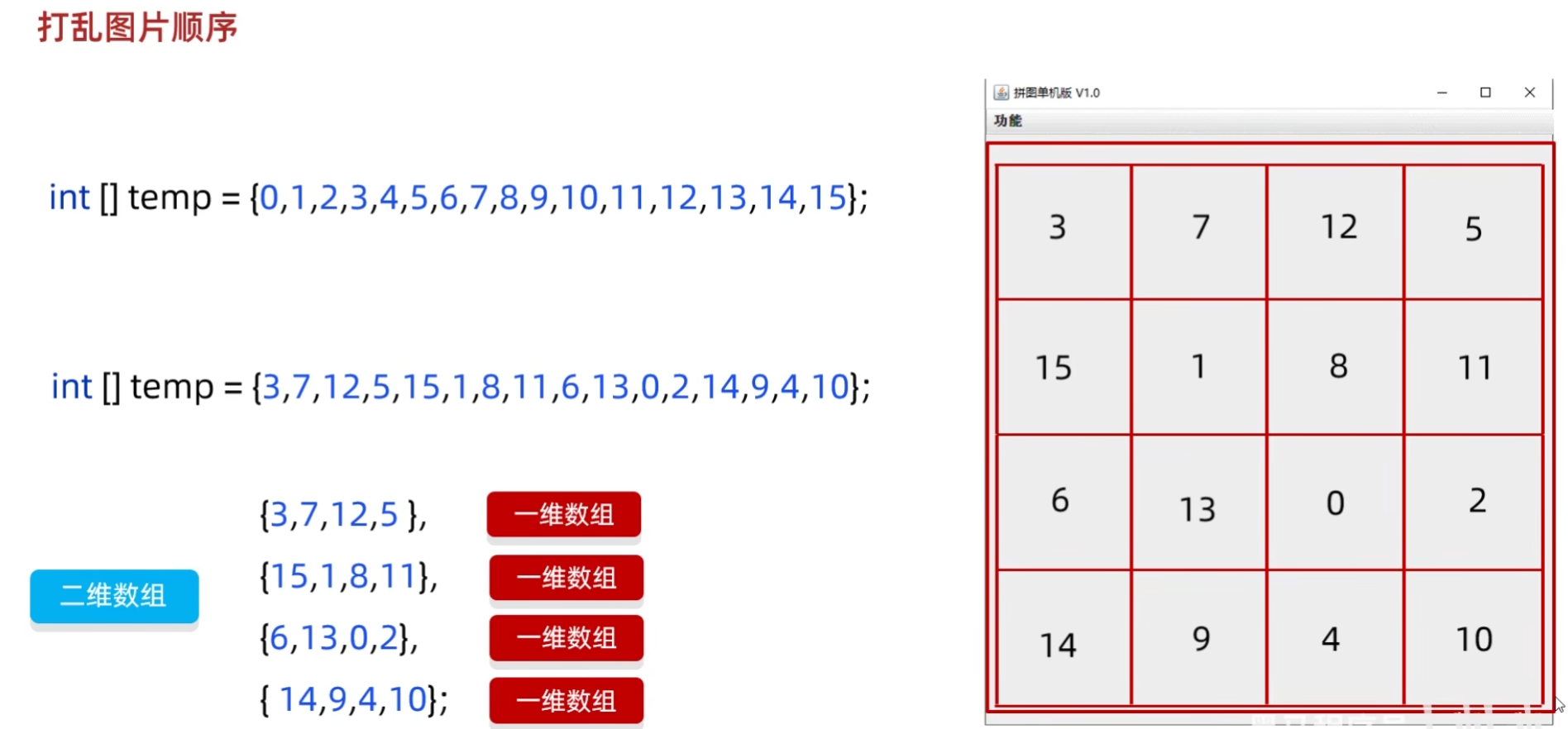
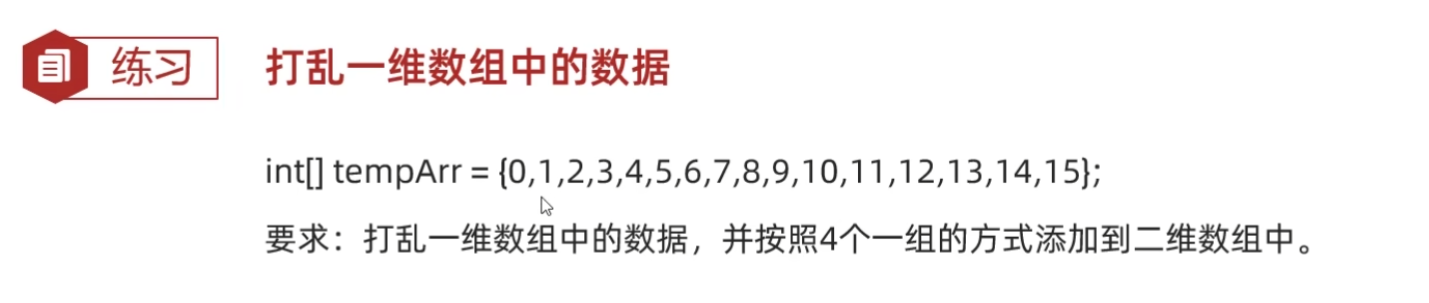
练习:打乱一维数组中的数据
快捷键:
ctrl + alt + L 格式化代码
例如:
(源代码)
Test
java
package com.itheima.test;

import java.util.Random;

public class Test {
    public static void main(String[] args) {
        //1.定义一个一维数组
        int[] tempArr = {0, 1, 2, 3, 4, 5, 6, 7, 8, 9, 10, 11, 12, 13, 14, 15};
        //2.打乱数组中的数据顺序
        //遍历数组,得到每一个元素,拿着每一个元素跟随机索引上的数据进行交换
        Random r = new Random();
        for (int i = 0; i < tempArr.length; i++) {
            int index = r.nextInt(tempArr.length);
            int temp = tempArr[i];
            tempArr[i] =tempArr[index];
            tempArr[index] = temp;
        }

        //3.遍历数组
        for (int i = 0; i < tempArr.length; i++) {
            System.out.print(tempArr[i] + " " );
        }
        System.out.println();

        //4.创建一个二维数组
        int[][] data = new int[4][4];

        //5.给二维数组添加元素
        //解法一:
        for (int i = 0; i < tempArr.length; i++) {
            data[i / 4][i % 4] = tempArr[i];
        }

        //遍历二维数组
        for (int i = 0; i < data.length; i++) {
            for (int j = 0; j < data.length; j++) {
                System.out.print(data[i][j] + " ");
            }
            System.out.println();
        }


    }
}
Test2
java
package com.itheima.test;

import java.util.Random;

public class Test2 {
    public static void main(String[] args) {
        //1.定义一个一维数组
        int[] tempArr = {0, 1, 2, 3, 4, 5, 6, 7, 8, 9, 10, 11, 12, 13, 14, 15};
        //2.打乱数组中的数据顺序
        //遍历数组,得到每一个元素,拿着每一个元素跟随机索引上的数据进行交换
        Random r = new Random();
        for (int i = 0; i < tempArr.length; i++) {
            int index = r.nextInt(tempArr.length);
            int temp = tempArr[i];
            tempArr[i] =tempArr[index];
            tempArr[index] = temp;
        }

        //3.遍历数组
        for (int i = 0; i < tempArr.length; i++) {
            System.out.print(tempArr[i] + " " );
        }
        System.out.println();

        //4.创建一个二维数组
        int[][] data = new int[4][4];

        //5.给二维数组添加元素
        //解法二:遍历一维数组tempArr得到每一个元素,把每一个元素依次添加到二维数组当中
        int index = 0;
        for (int i = 0; i < data.length; i++) {
            for (int j = 0; j < data.length; j++) {
                data[i][j] = tempArr[index];
                index++;
            }
        }

        //遍历二维数组
        for (int i = 0; i < data.length; i++) {
            for (int j = 0; j < data.length; j++) {
                System.out.print(data[i][j] + " ");
            }
            System.out.println();
        }

    }
}
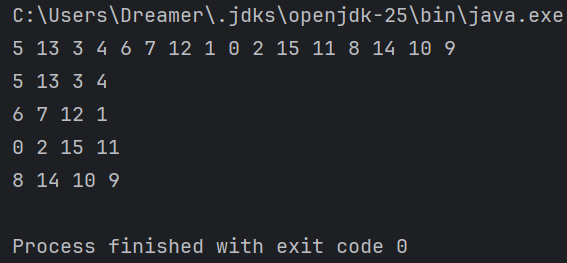
(运行结果截图)
打乱图片
例如:
(源代码)
GameJFrame
java
package com.itheima.ui;

import javax.swing.*;
import java.util.Random;

public class GameJFrame extends JFrame {
    //GameJFrame 表示游戏主界面
    //以后跟游戏有关的代码,都写在这里

    //创建一个二维数组
    //目的:用来管理数据
    //加载图片的时候,会根据二维数组中的数据进行加载
    int[][] data = new int[4][4];

    public GameJFrame() {
        //初始化界面
        initJFrame();

        //初始化菜单
        initJMenuBar();

        //初始化数据(打乱)
        initData();

        //初始化图片(根据打乱后的结果去加载图片)
        initImage();;


        //设置显示(建议写在最后)
        this.setVisible(true);
    }

    private void initData() {
        //1.定义一个一维数组
        int[] tempArr = {0, 1, 2, 3, 4, 5, 6, 7, 8, 9, 10, 11, 12, 13, 14, 15};
        //2.打乱数组中的数据顺序
        //遍历数组,得到每一个元素,拿着每一个元素跟随机索引上的数据进行交换
        Random r = new Random();
        for (int i = 0; i < tempArr.length; i++) {
            int index = r.nextInt(tempArr.length);
            int temp = tempArr[i];
            tempArr[i] =tempArr[index];
            tempArr[index] = temp;
        }

        //5.给二维数组添加元素
        //解法一:
        for (int i = 0; i < tempArr.length; i++) {
            data[i / 4][i % 4] = tempArr[i];
        }


    }

    //初始化图片
    //添加图片的时候,就需要按照二维数组中管理的数据添加图片
    private void initImage() {
        //外循环 --- 把内循环重复执行了4次
        for (int i = 0; i < 4; i++) {
            //内循环 --- 表示在一行添加4张图片
            for (int j = 0; j < 4; j++) {
                //获取当前图片的序号
                int num = data[i][j];
                //创建一个JLabel的对象(管理容器)
                JLabel jLabel = new JLabel(new ImageIcon("D:\\javaCode\\dataStructure\\puzzlegame\\image\\animal\\animal3\\" + num +".jpg"));
                //指定图片位置
                jLabel.setBounds(105 * j,105 * i,105,105);
                //把管理容器添加到界面中
                this.getContentPane().add(jLabel);
                //添加一次后number需要自增,表示下一次加载后面一张图片
            }
        }


    }

    private void initJMenuBar() {
        //初始化菜单
        //创建整个的菜单对象
        JMenuBar JMenuBar = new JMenuBar();

        //创建菜单上面的两个选项的对象 (功能 关于我们)
        JMenu functionJMenu = new JMenu("功能");
        JMenu aboutJMenu = new JMenu("关于我们");

        //创建选项下面的条目对象
        JMenuItem replayItem = new JMenuItem("重新游戏");
        JMenuItem reLoginItem = new JMenuItem("重新登录");
        JMenuItem closeItem = new JMenuItem("关闭游戏");

        JMenuItem accountItem = new JMenuItem("公众号");

        //将每一个选项下面的条目添加到选项中
        functionJMenu.add(replayItem);
        functionJMenu.add(reLoginItem);
        functionJMenu.add(closeItem);

        aboutJMenu.add(accountItem);

        //将菜单里面的两个选项添加到菜单中
        JMenuBar.add(functionJMenu);
        JMenuBar.add(aboutJMenu);

        //给整个界面设置菜单
        this.setJMenuBar(JMenuBar);
    }

    private void initJFrame() {
        //设置宽 高
        this.setSize(603,680);
        //设置界面标题
        this.setTitle("拼图单机版 v1.0");
        //设置界面置顶
        this.setAlwaysOnTop(true);
        //设置界面居中
        this.setLocationRelativeTo(null);
        //设置界面关闭
        this.setDefaultCloseOperation(WindowConstants.EXIT_ON_CLOSE);
        //取消默认的中间位置,只有取消了才会按照XY轴的形式添加组件
        this.setLayout(null);
    }
}
App
java
package com.itheima.ui;

public class App {
    public static void main(String[] args) {
        //表示程序的启动入口

        //如果我们想要开启一个界面,就创建谁的对象就可以了
        new GameJFrame();

        new LoginJFrame();

        new RegisterJFrame();

    }
}
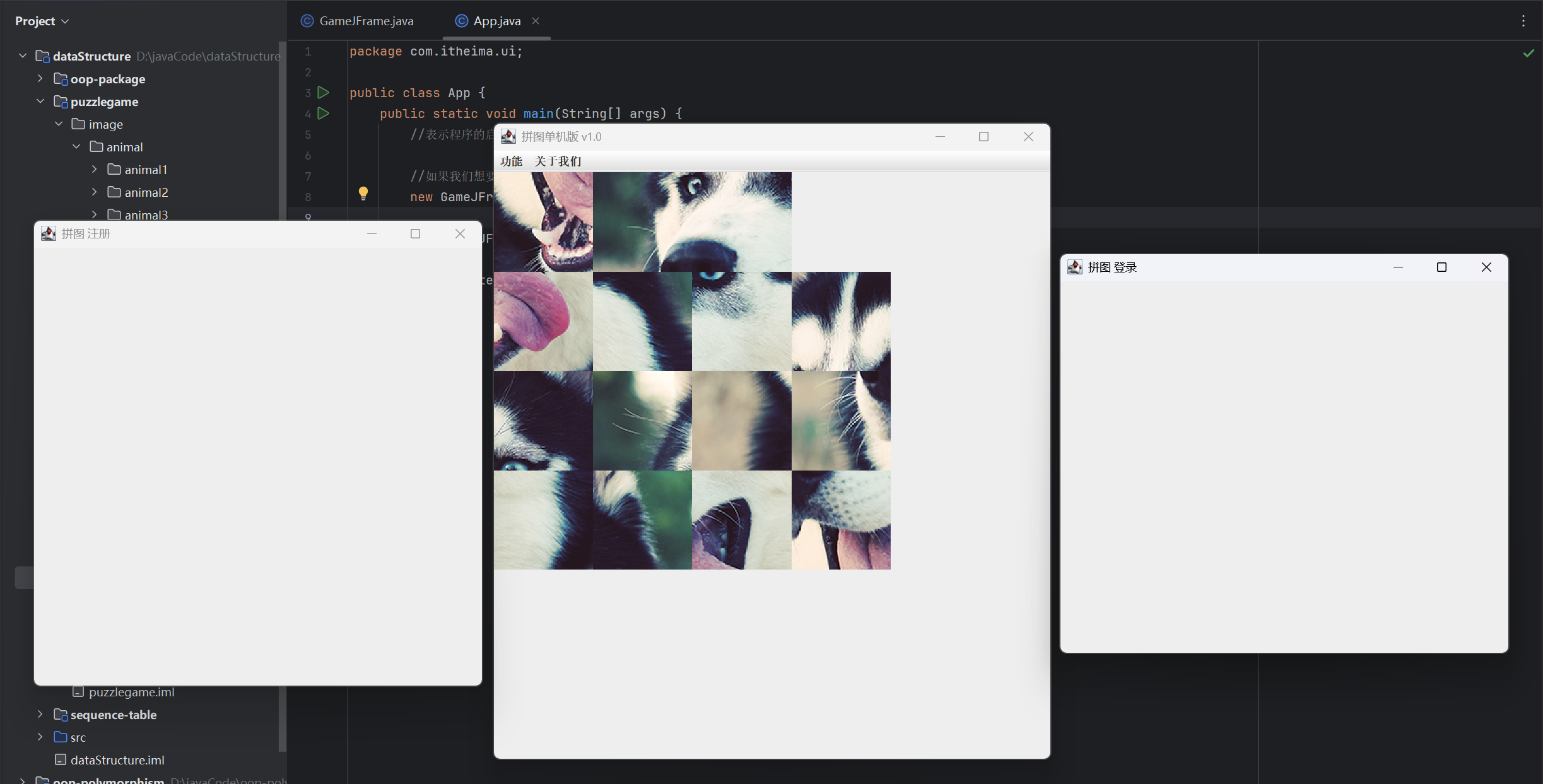
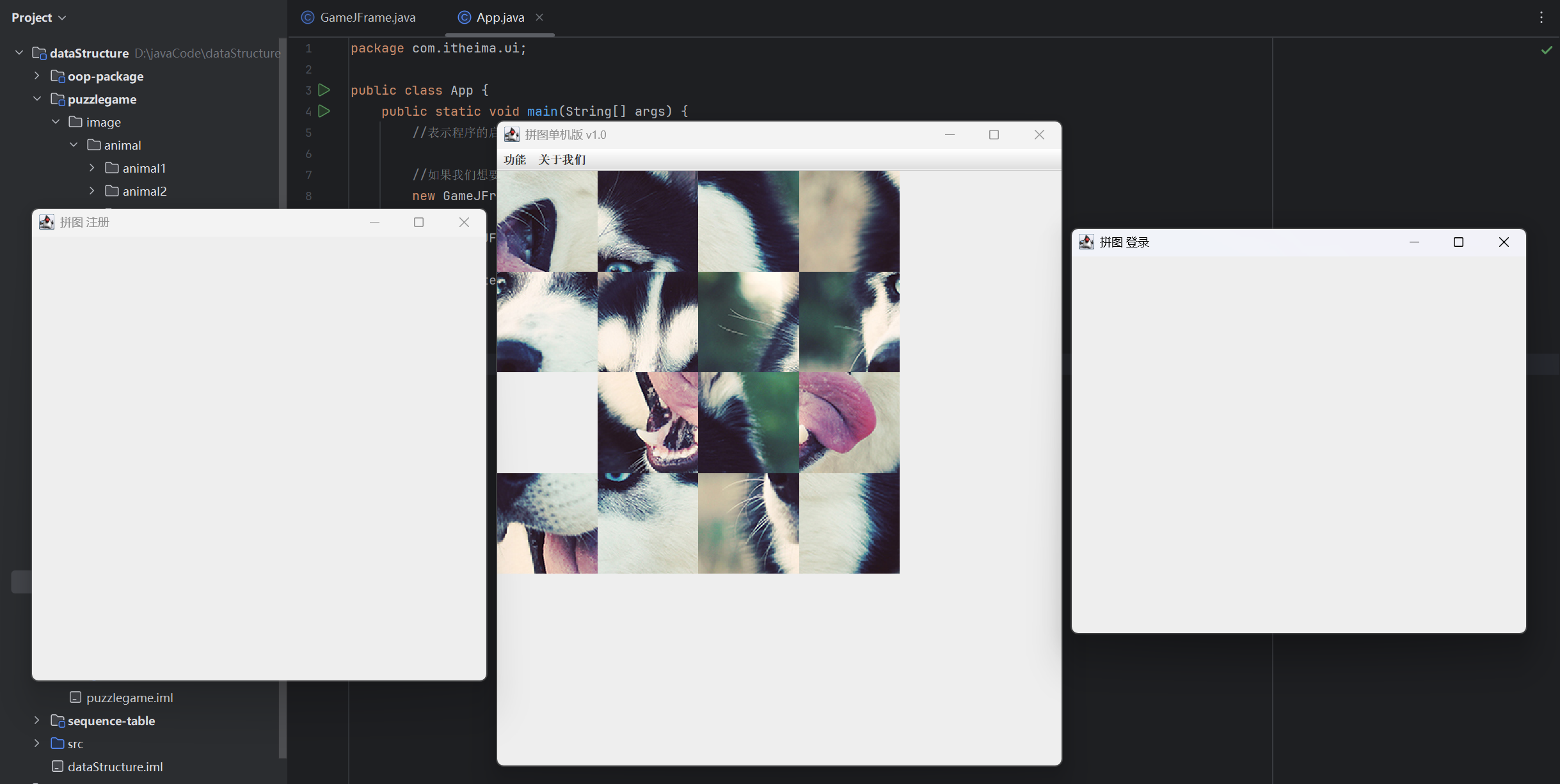
(运行结果截图)
05-事件
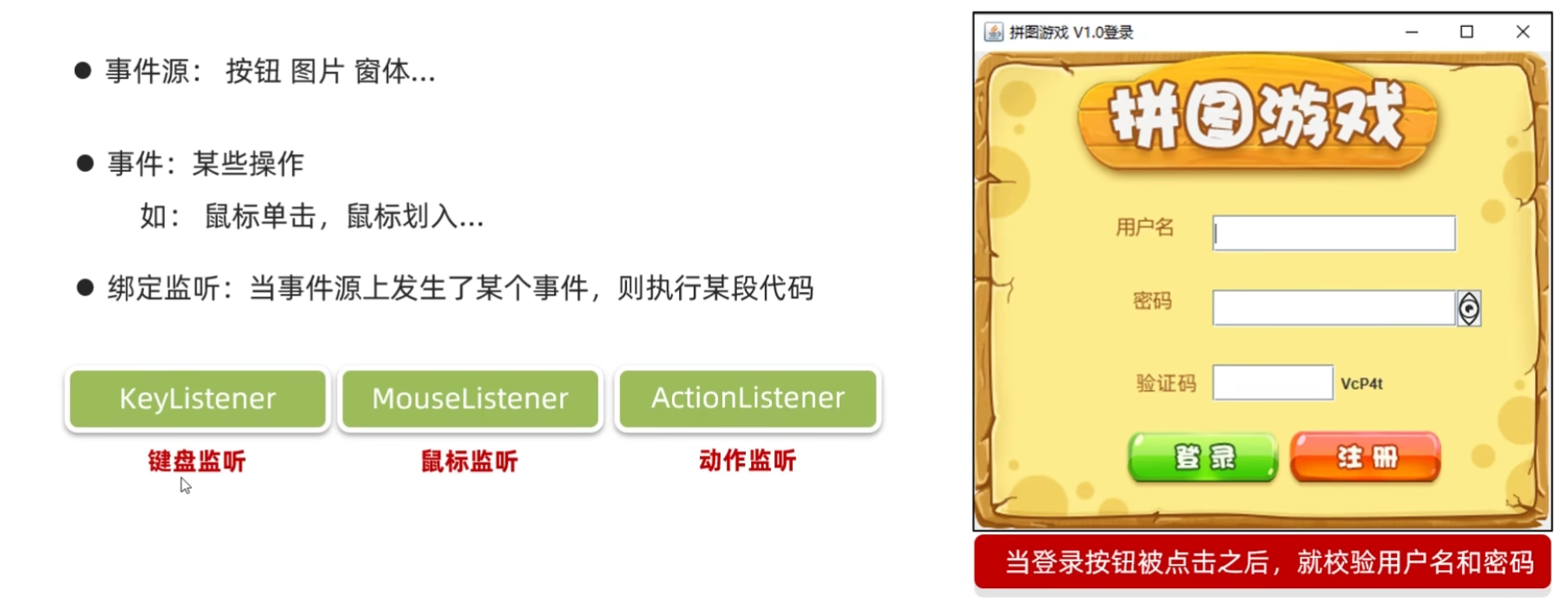
事件
动作监听(ActionListener)
练习1:
(源代码)
MyActionListener
java
package com.itheima.test;

import java.awt.event.ActionEvent;
import java.awt.event.ActionListener;

public class MyActionListener implements ActionListener {
    @Override
    public void actionPerformed(ActionEvent e) {
        System.out.println("按钮被点击了");
    }
}
Test3
java
package com.itheima.test;

import javax.swing.*;

public class Test3 {
    public static void main(String[] args) {
        JFrame jFrame = new JFrame();
        //设置宽 高
        jFrame.setSize(603,680);
        //设置界面标题
        jFrame.setTitle("事件演示");
        //设置界面置顶
        jFrame.setAlwaysOnTop(true);
        //设置界面居中
        jFrame.setLocationRelativeTo(null);
        //设置界面关闭
        jFrame.setDefaultCloseOperation(WindowConstants.EXIT_ON_CLOSE);
        //取消默认的中间位置,只有取消了才会按照XY轴的形式添加组件
        jFrame.setLayout(null);

        //创建一个按钮对象
        JButton jtb = new JButton("点我啊");
        //设置位置和宽高
        jtb.setBounds(0,0,100,50);
        //给按钮添加动作监听
        //jtb:组件对象,表示你要给哪个组件添加事件
        //addActionListener:表示我要给组件添加哪个事件监听(动作监听-鼠标左键,空格)
        //参数:表示事件被触发后要执行的代码
        jtb.addActionListener(new MyActionListener());

        //把按钮添加到界面中
        jFrame.getContentPane().add(jtb);

        jFrame.setVisible(true);
    }
}
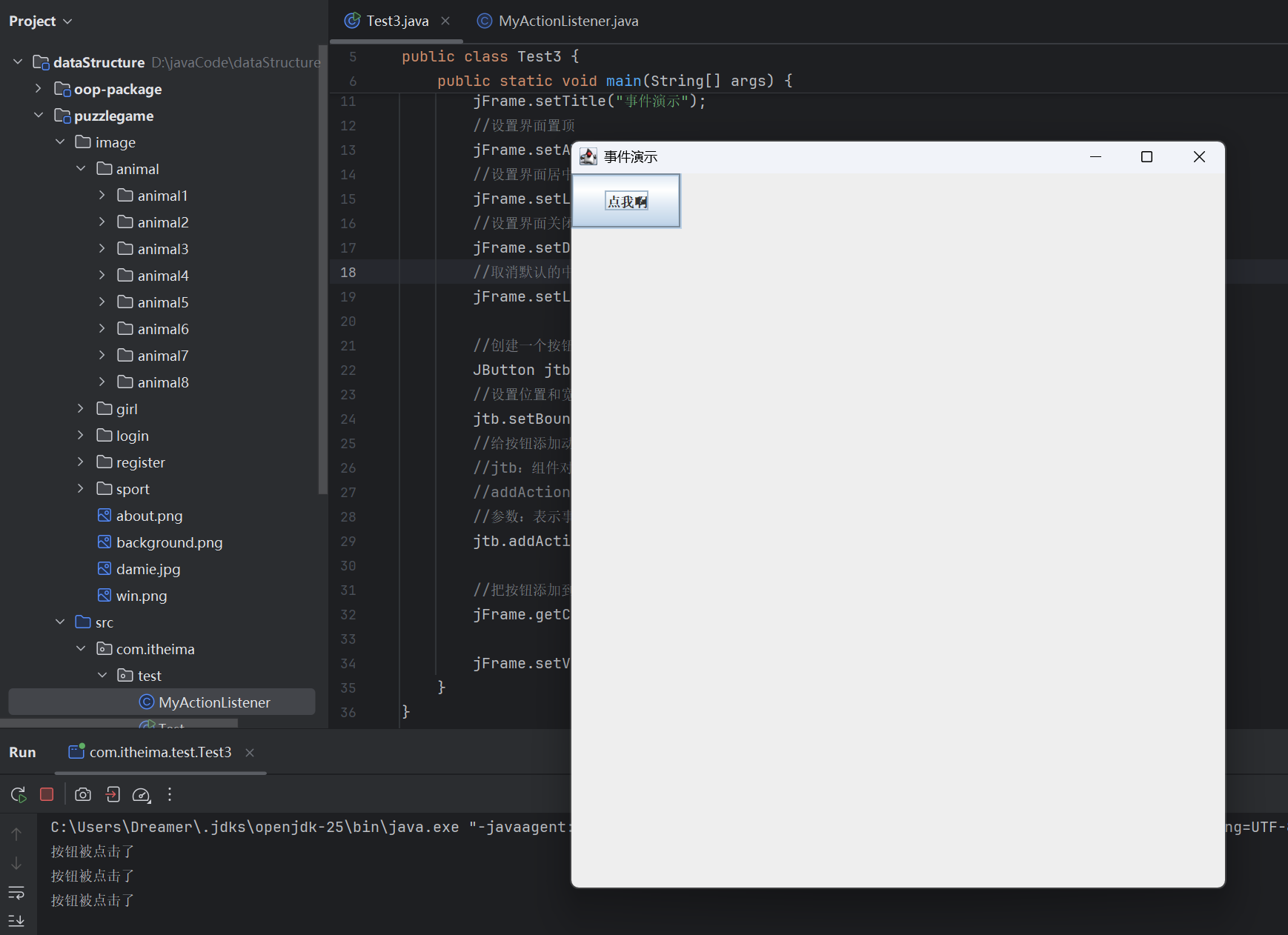
(运行结果截图)
【应用匿名内部类】
(源代码)
Test3
java
package com.itheima.test;

import javax.swing.*;
import java.awt.event.ActionEvent;
import java.awt.event.ActionListener;

public class Test3 {
    public static void main(String[] args) {
        JFrame jFrame = new JFrame();
        //设置宽 高
        jFrame.setSize(603,680);
        //设置界面标题
        jFrame.setTitle("事件演示");
        //设置界面置顶
        jFrame.setAlwaysOnTop(true);
        //设置界面居中
        jFrame.setLocationRelativeTo(null);
        //设置界面关闭
        jFrame.setDefaultCloseOperation(WindowConstants.EXIT_ON_CLOSE);
        //取消默认的中间位置,只有取消了才会按照XY轴的形式添加组件
        jFrame.setLayout(null);

        //创建一个按钮对象
        JButton jtb = new JButton("点我啊");
        //设置位置和宽高
        jtb.setBounds(0,0,100,50);
        //给按钮添加动作监听
        //jtb:组件对象,表示你要给哪个组件添加事件
        //addActionListener:表示我要给组件添加哪个事件监听(动作监听-鼠标左键,空格)
        //参数:表示事件被触发后要执行的代码
        //jtb.addActionListener(new MyActionListener());

        jtb.addActionListener(new ActionListener() {
            @Override
            public void actionPerformed(ActionEvent e) {
                System.out.println("不要点我");
            }
        });

        //把按钮添加到界面中
        jFrame.getContentPane().add(jtb);

        jFrame.setVisible(true);
    }
}
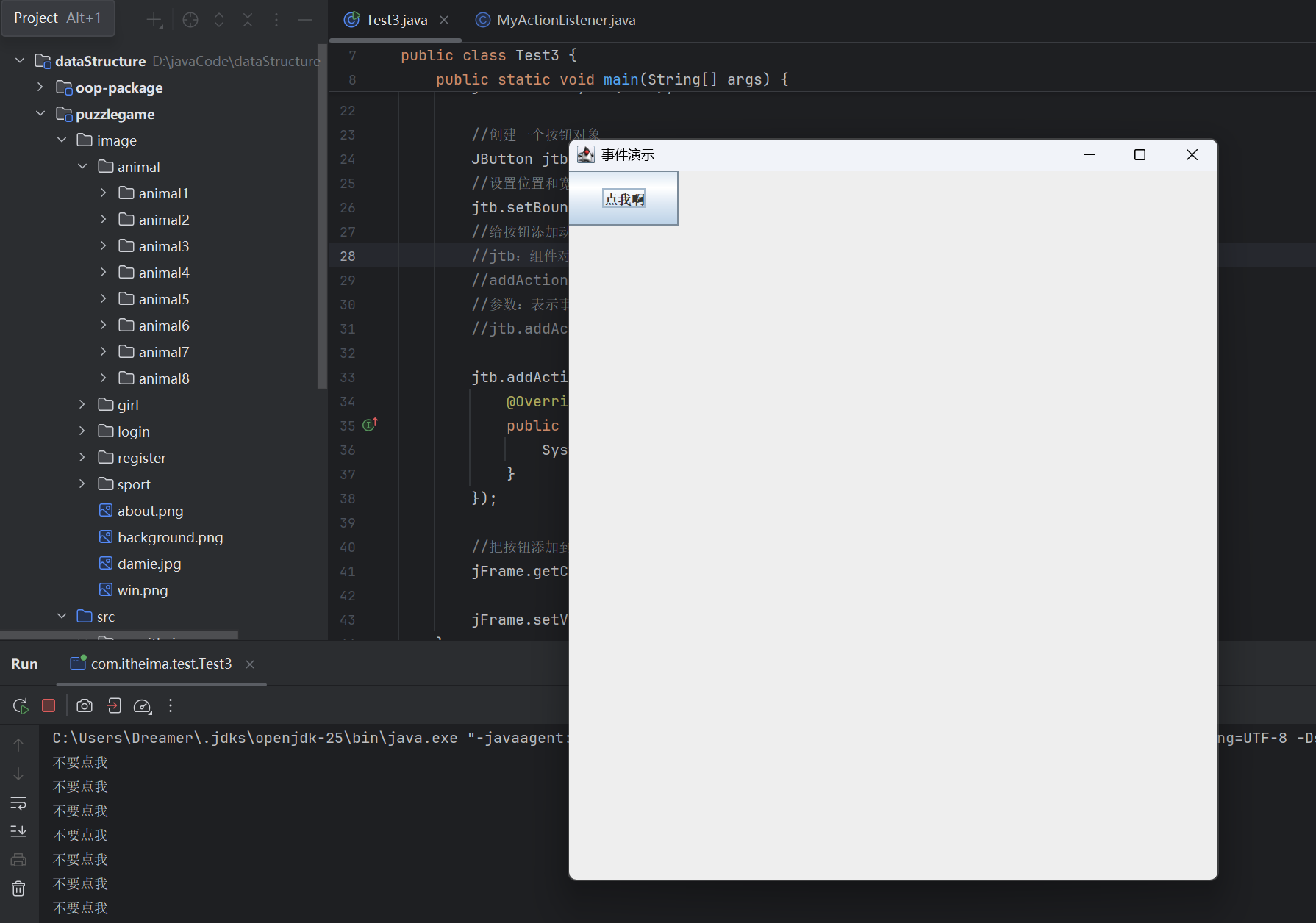
(运行结果截图)
练习2:
(源代码)
MyJFrame
java
package com.itheima.test;

import javax.swing.*;
import java.awt.event.ActionEvent;
import java.awt.event.ActionListener;
import java.util.Random;

public class MyJFrame extends JFrame implements ActionListener{

    //创建一个按钮对象
    JButton jtb1 = new JButton("点我啊");

    //创建一个按钮对象
    JButton jtb2 = new JButton("再点我啊");

    public MyJFrame() {
        JFrame jFrame = new JFrame();
        //设置宽 高
        this.setSize(603,680);
        //设置界面标题
        this.setTitle("拼图单机版 v1.0");
        //设置界面置顶
        this.setAlwaysOnTop(true);
        //设置界面居中
        this.setLocationRelativeTo(null);
        //设置界面关闭
        this.setDefaultCloseOperation(WindowConstants.EXIT_ON_CLOSE);
        //取消默认的中间位置,只有取消了才会按照XY轴的形式添加组件
        this.setLayout(null);


        //设置位置和宽高
        jtb1.setBounds(0,0,100,50);
        //给按钮添加事件
        jtb1.addActionListener(this);


        //设置位置和宽高
        jtb2.setBounds(100,0,100,50);
        jtb2.addActionListener(this);

        //将按钮添加到整个界面中
        this.getContentPane().add(jtb1);
        this.getContentPane().add(jtb2);

        //让整个界面显示出来
        this.setVisible(true);
    }

    @Override
    public void actionPerformed(ActionEvent e) {
        //对当前按钮进行判断

        //获取当前操作的那个按钮对象
        Object source = e.getSource();

        if (source == jtb1) {
            jtb1.setSize(200,200);
        }else if(source == jtb2){
            Random r = new Random();
            jtb2.setLocation(r.nextInt(500),r.nextInt(500));
        }

    }
}
Test4
java
package com.itheima.test;

public class Test4 {
    public static void main(String[] args) {
        new MyJFrame();
    }
}
(运行结果截图)
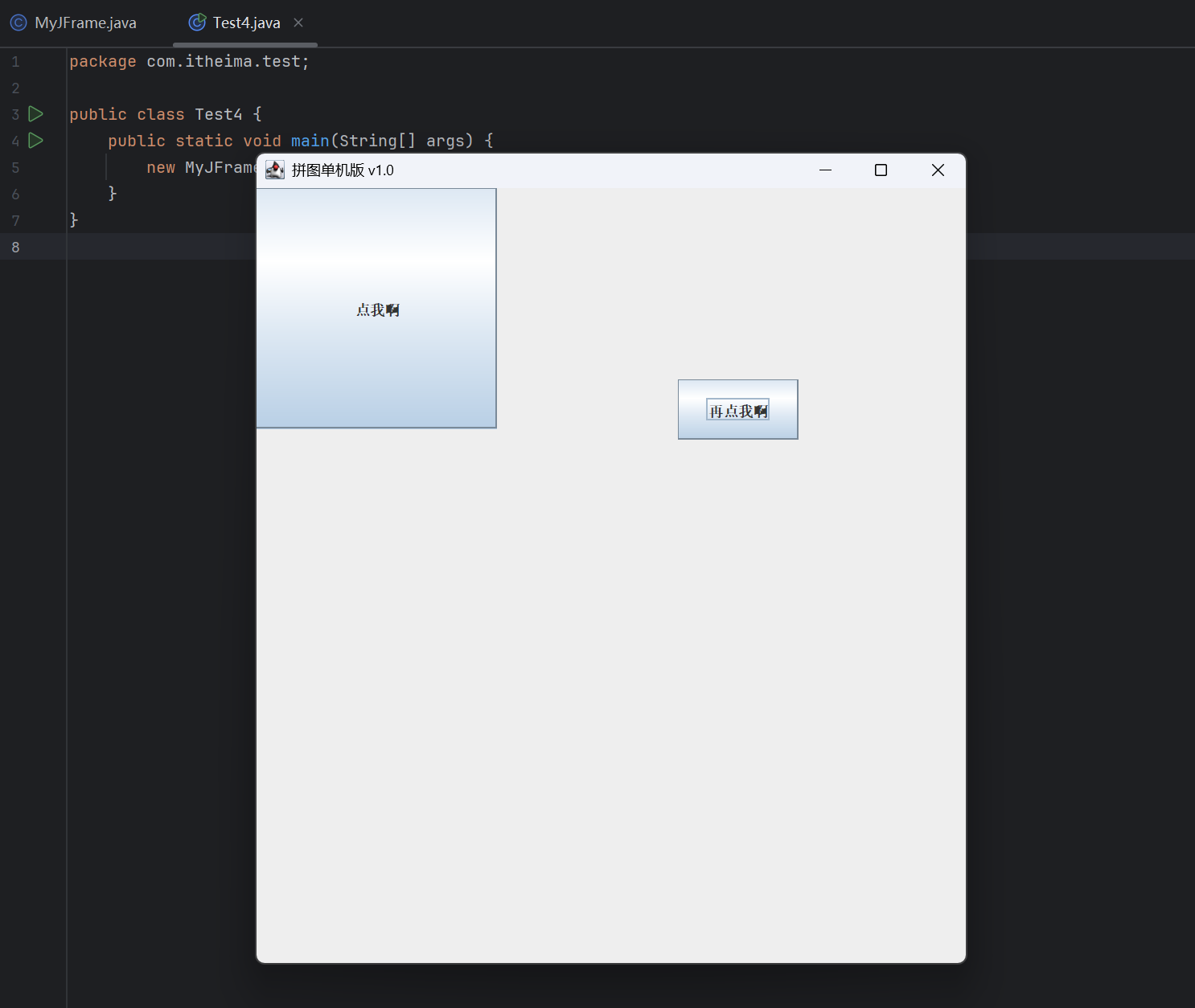
鼠标监听(Mouse Listener**)**
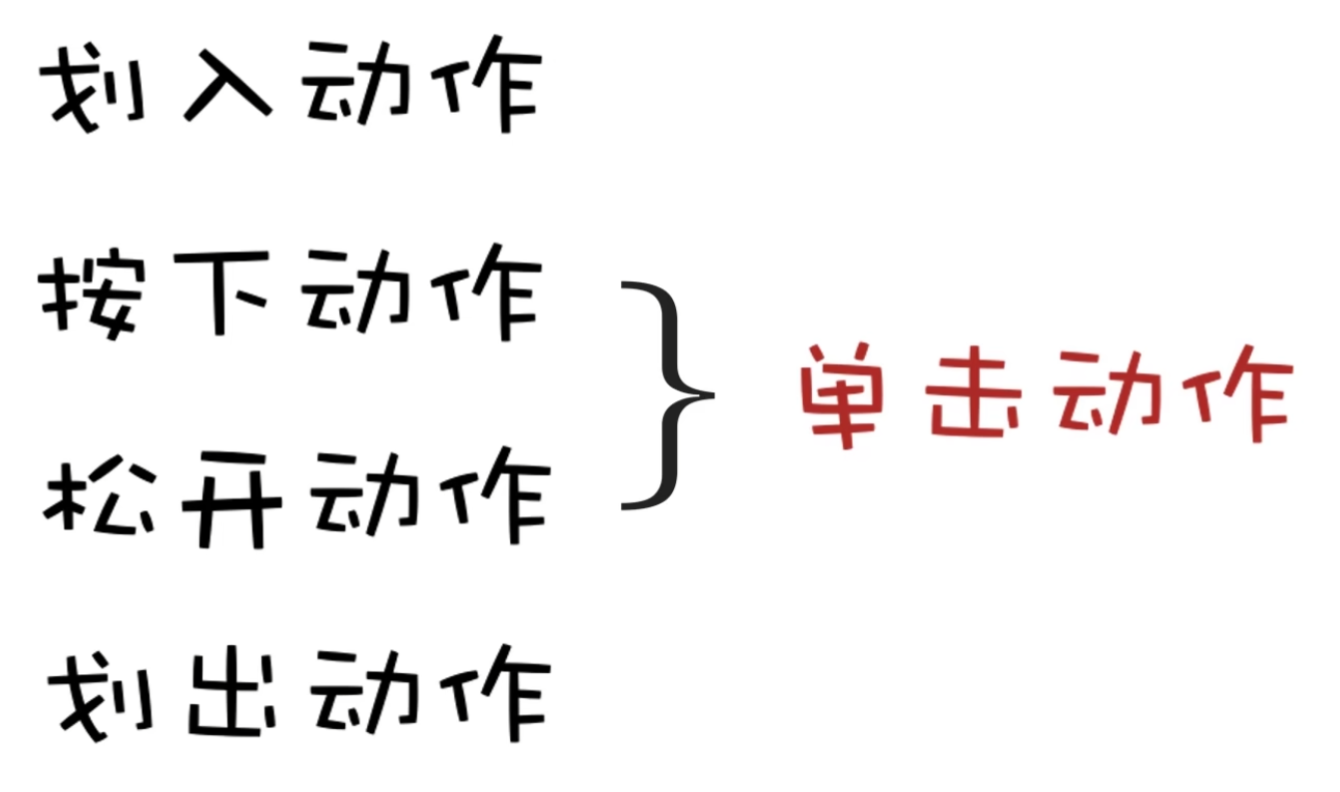
鼠标监听机制
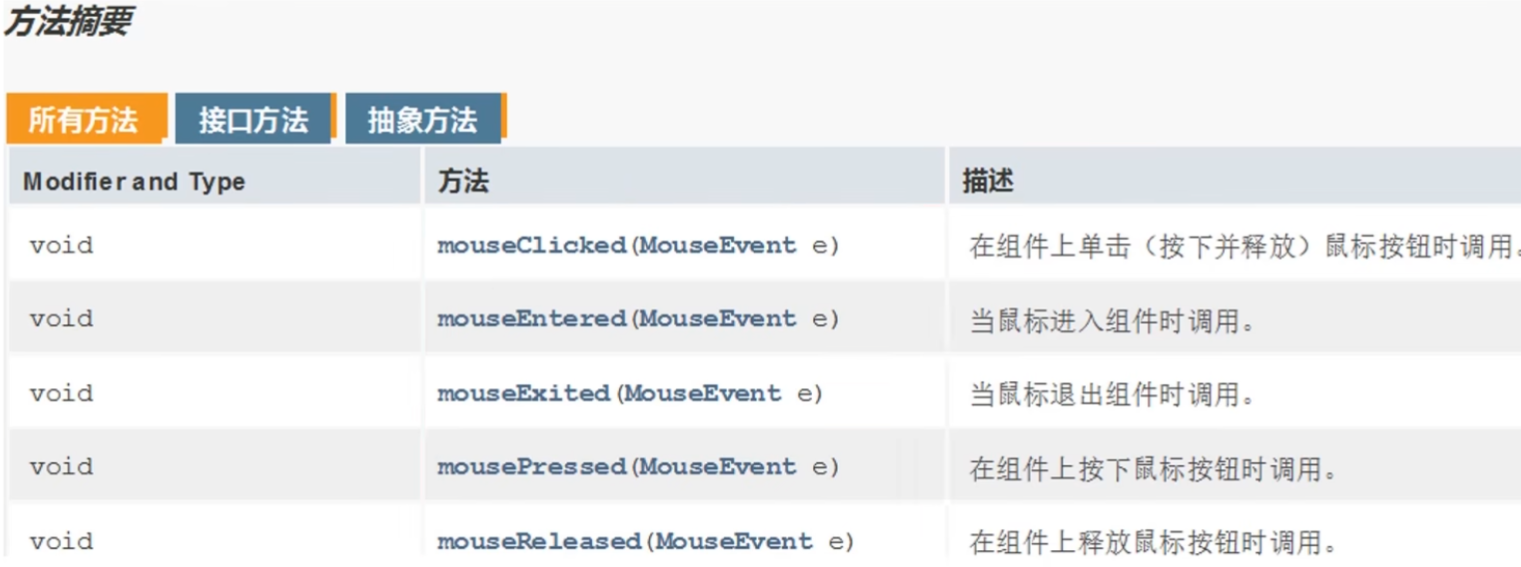
常用方法
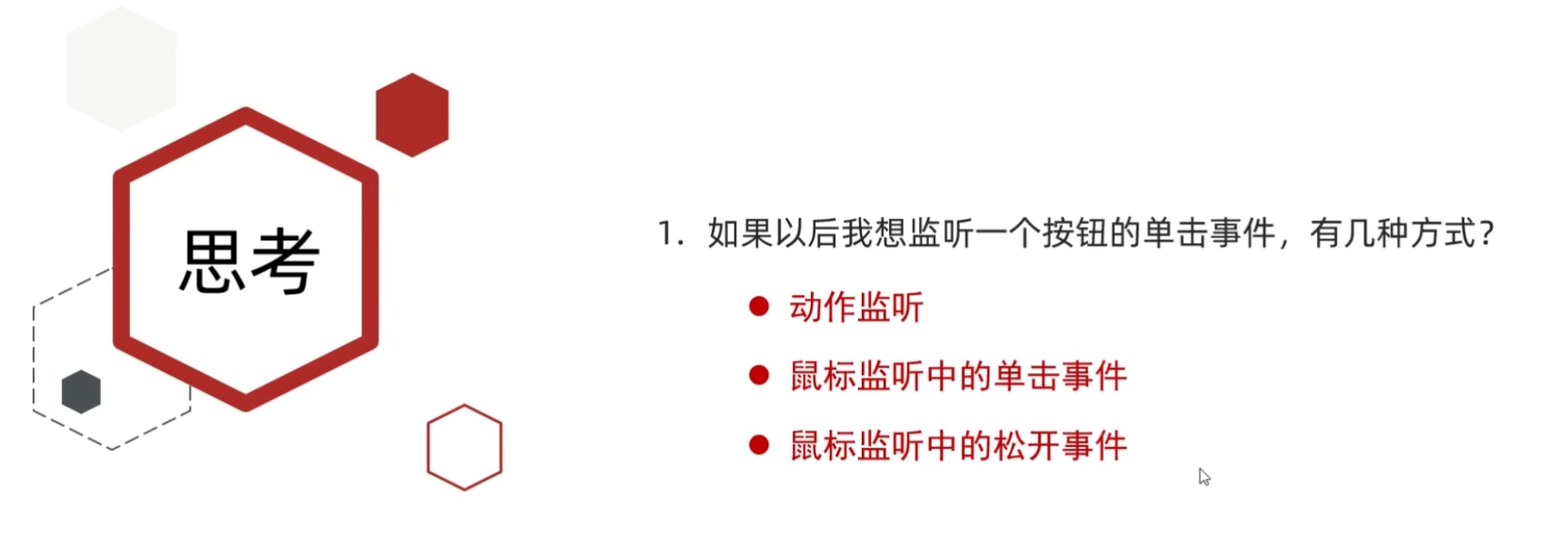
思考
练习
(源代码)
MyJFrame2
java
package com.itheima.test;

import javax.swing.*;
import java.awt.event.ActionListener;
import java.awt.event.MouseEvent;
import java.awt.event.MouseListener;

public class MyJFrame2 extends JFrame implements MouseListener {

    //创建一个按钮对象
    JButton jtb1 = new JButton("点我啊");

    public MyJFrame2() {
        //设置宽 高
        this.setSize(603,680);
        //设置界面标题
        this.setTitle("拼图单机版 v1.0");
        //设置界面置顶
        this.setAlwaysOnTop(true);
        //设置界面居中
        this.setLocationRelativeTo(null);
        //设置界面关闭
        this.setDefaultCloseOperation(WindowConstants.EXIT_ON_CLOSE);
        //取消默认的中间位置,只有取消了才会按照XY轴的形式添加组件
        this.setLayout(null);


        //设置位置和宽高
        jtb1.setBounds(0,0,100,50);
        //给按钮添加事件
        jtb1.addMouseListener(this);


        //将按钮添加到整个界面中
        this.getContentPane().add(jtb1);


        //让整个界面显示出来
        this.setVisible(true);
    }


    @Override
    public void mouseClicked(MouseEvent e) {
        System.out.println("单击");
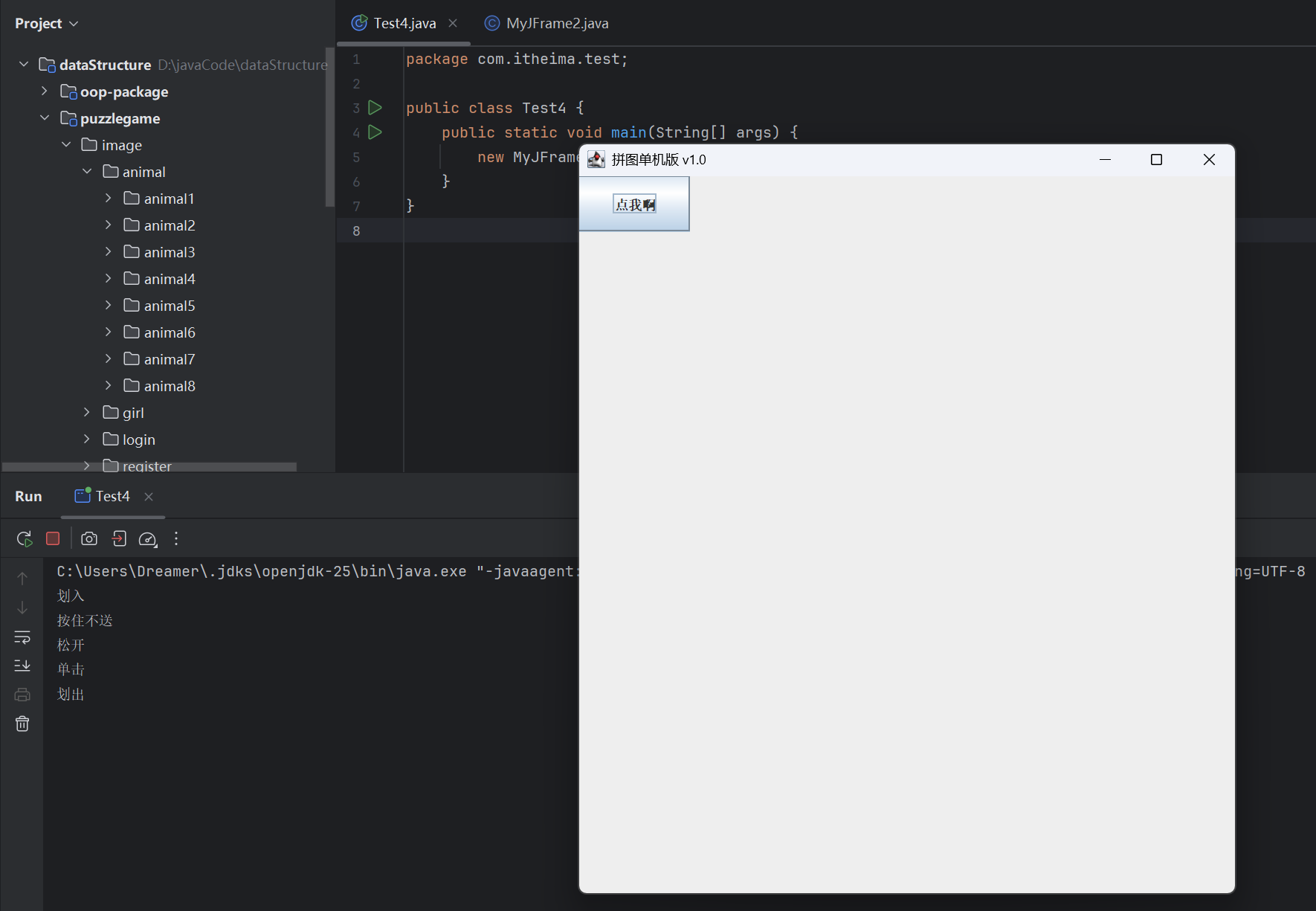
    }

    @Override
    public void mousePressed(MouseEvent e) {
        System.out.println("按住不松");
    }

    @Override
    public void mouseReleased(MouseEvent e) {
        System.out.println("松开");
    }

    @Override
    public void mouseEntered(MouseEvent e) {
        System.out.println("划入");
    }

    @Override
    public void mouseExited(MouseEvent e) {
        System.out.println("划出");
    }
}
Test4
java
package com.itheima.test;

public class Test4 {
    public static void main(String[] args) {
        new MyJFrame2();
    }
}
(运行结果截图)
键盘监听(Key Listener**)**
键盘监听机制
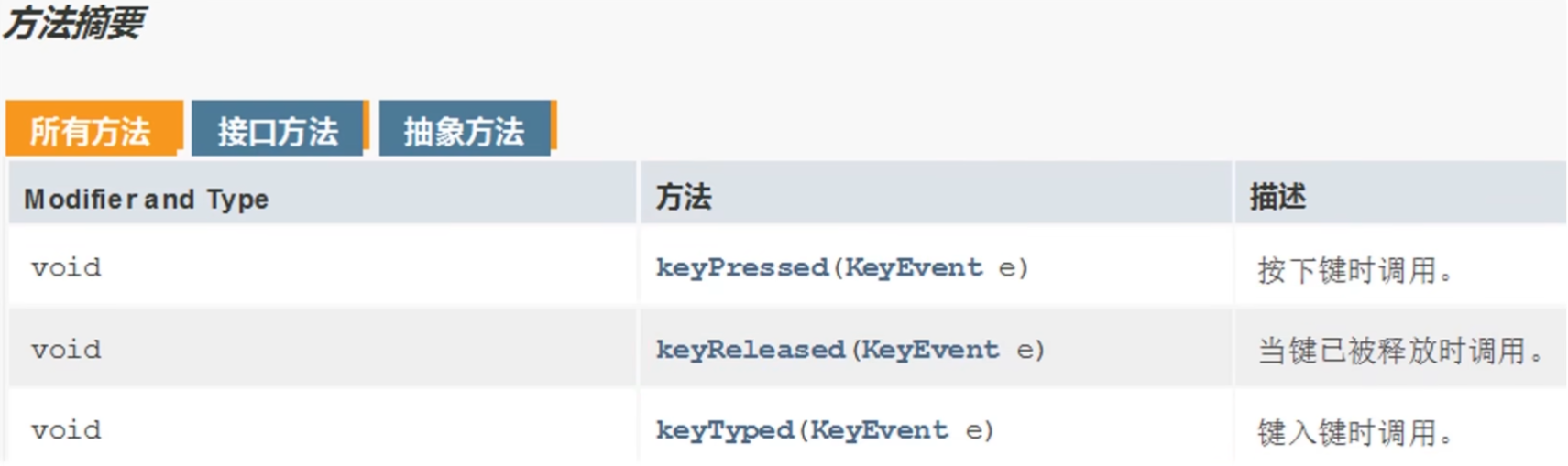
常见方法
练习
(源代码)
MyJFrame3
java
package com.itheima.test;

import javax.swing.*;
import java.awt.event.KeyEvent;
import java.awt.event.KeyListener;

public class MyJFrame3 extends JFrame implements KeyListener {

    JButton jtb1 = new JButton("点我啊");
    public MyJFrame3() {
        //设置宽 高
        this.setSize(603,680);
        //设置界面标题
        this.setTitle("拼图单机版 v1.0");
        //设置界面置顶
        this.setAlwaysOnTop(true);
        //设置界面居中
        this.setLocationRelativeTo(null);
        //设置界面关闭
        this.setDefaultCloseOperation(WindowConstants.EXIT_ON_CLOSE);
        //取消默认的中间位置,只有取消了才会按照XY轴的形式添加组件
        this.setLayout(null);


        //设置位置和宽高
        jtb1.setBounds(0,0,100,50);
        //给按钮添加事件
        jtb1.addKeyListener(this);

        //将按钮添加到整个界面中
        this.getContentPane().add(jtb1);

        //让整个界面显示出来
        this.setVisible(true);

    }

    @Override
    public void keyTyped(KeyEvent e) {

    }

    //细节1:
    //如果我们按下一个按键没有松开,那么会重复的去调用keyPressed方法
    //细节2:
    //键盘里面那么多按键,如何进行区分
    @Override
    public void keyPressed(KeyEvent e) {
        System.out.println("按住不松");
    }

    @Override
    public void keyReleased(KeyEvent e) {
        System.out.println("松开");
        int code = e.getKeyCode();
        if (code == 65) {
            System.out.println("现在按的是A");
        }else if (code == 66) {
            System.out.println("现在按的是B");
        }

    }

}
Test4
java
package com.itheima.test;

public class Test4 {
    public static void main(String[] args) {

        new MyJFrame3();

    }
}
(运行结果截图)
06-美化界面
美化界面
(源代码)
GameJFrame
java
package com.itheima.ui;

import javax.swing.*;
import javax.swing.border.BevelBorder;
import java.util.Random;

public class GameJFrame extends JFrame {
    //GameJFrame 表示游戏主界面
    //以后跟游戏有关的代码,都写在这里

    //创建一个二维数组
    //目的:用来管理数据
    //加载图片的时候,会根据二维数组中的数据进行加载
    int[][] data = new int[4][4];

    public GameJFrame() {
        //初始化界面
        initJFrame();

        //初始化菜单
        initJMenuBar();

        //初始化数据(打乱)
        initData();

        //初始化图片(根据打乱后的结果去加载图片)
        initImage();;


        //设置显示(建议写在最后)
        this.setVisible(true);
    }

    private void initData() {
        //1.定义一个一维数组
        int[] tempArr = {0, 1, 2, 3, 4, 5, 6, 7, 8, 9, 10, 11, 12, 13, 14, 15};
        //2.打乱数组中的数据顺序
        //遍历数组,得到每一个元素,拿着每一个元素跟随机索引上的数据进行交换
        Random r = new Random();
        for (int i = 0; i < tempArr.length; i++) {
            int index = r.nextInt(tempArr.length);
            int temp = tempArr[i];
            tempArr[i] =tempArr[index];
            tempArr[index] = temp;
        }

        //5.给二维数组添加元素
        //解法一:
        for (int i = 0; i < tempArr.length; i++) {
            data[i / 4][i % 4] = tempArr[i];
        }


    }

    //初始化图片
    //添加图片的时候,就需要按照二维数组中管理的数据添加图片
    private void initImage() {
        //细节:
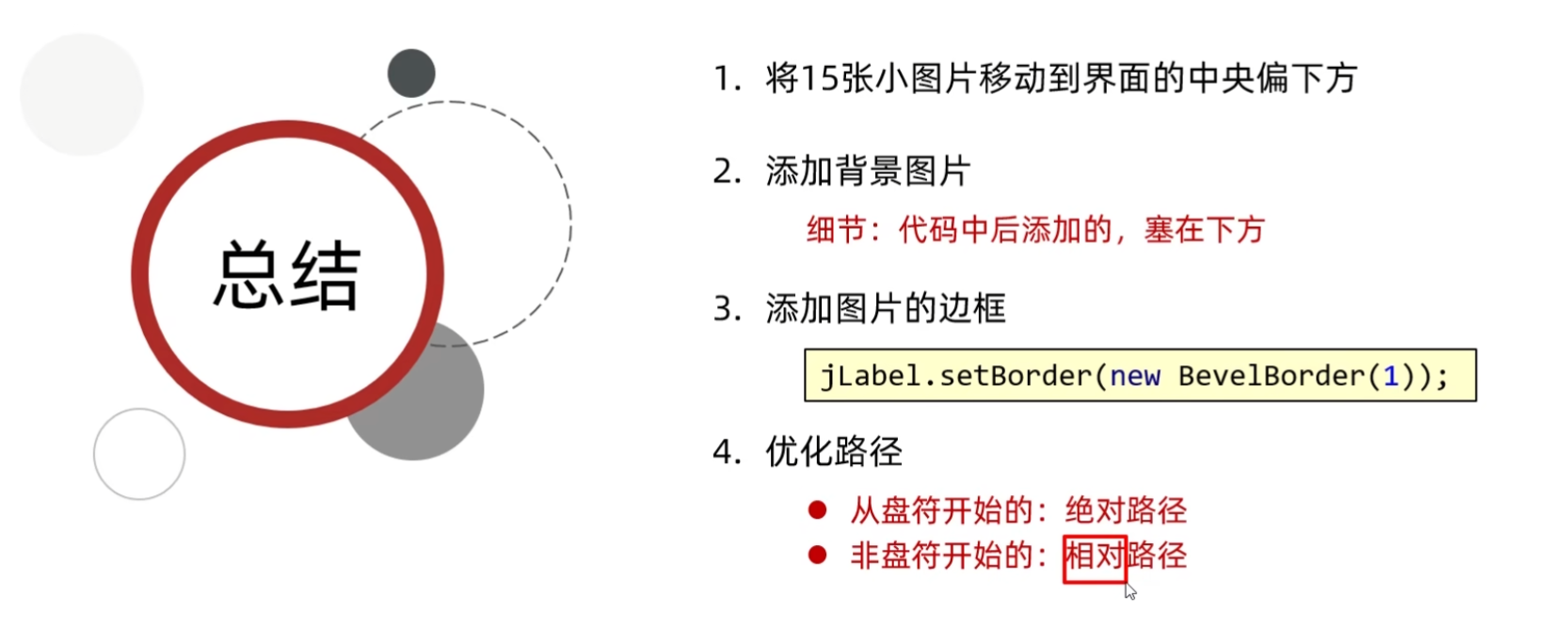
        //先加载的图片在上方,后加载的图片塞在下面

        //外循环 --- 把内循环重复执行了4次
        for (int i = 0; i < 4; i++) {
            //内循环 --- 表示在一行添加4张图片
            for (int j = 0; j < 4; j++) {
                //获取当前图片的序号
                int num = data[i][j];
                //创建一个JLabel的对象(管理容器)
                JLabel jLabel = new JLabel(new ImageIcon("D:\\javaCode\\dataStructure\\puzzlegame\\image\\animal\\animal3\\" + num +".jpg"));
                //指定图片位置
                jLabel.setBounds(105 * j + 83,105 * i + 134,105,105);
                //给图片添加边框
                //0:表示让图片凸起来
                //1:表示让图片凹下去
                jLabel.setBorder(new BevelBorder(BevelBorder.LOWERED));
                //把管理容器添加到界面中
                this.getContentPane().add(jLabel);
                //添加一次后number需要自增,表示下一次加载后面一张图片
            }
        }

        //添加背景图片
        ImageIcon bg = new ImageIcon("D:\\javaCode\\dataStructure\\puzzlegame\\image\\background.png");
        JLabel background = new JLabel(bg);
        background.setBounds(40,40,508,560);
        //把背景图片添加到界面中
        this.getContentPane().add(background);

    }

    private void initJMenuBar() {
        //初始化菜单
        //创建整个的菜单对象
        JMenuBar JMenuBar = new JMenuBar();

        //创建菜单上面的两个选项的对象 (功能 关于我们)
        JMenu functionJMenu = new JMenu("功能");
        JMenu aboutJMenu = new JMenu("关于我们");

        //创建选项下面的条目对象
        JMenuItem replayItem = new JMenuItem("重新游戏");
        JMenuItem reLoginItem = new JMenuItem("重新登录");
        JMenuItem closeItem = new JMenuItem("关闭游戏");

        JMenuItem accountItem = new JMenuItem("公众号");

        //将每一个选项下面的条目添加到选项中
        functionJMenu.add(replayItem);
        functionJMenu.add(reLoginItem);
        functionJMenu.add(closeItem);

        aboutJMenu.add(accountItem);

        //将菜单里面的两个选项添加到菜单中
        JMenuBar.add(functionJMenu);
        JMenuBar.add(aboutJMenu);

        //给整个界面设置菜单
        this.setJMenuBar(JMenuBar);
    }

    private void initJFrame() {
        //设置宽 高
        this.setSize(603,680);
        //设置界面标题
        this.setTitle("拼图单机版 v1.0");
        //设置界面置顶
        this.setAlwaysOnTop(true);
        //设置界面居中
        this.setLocationRelativeTo(null);
        //设置界面关闭
        this.setDefaultCloseOperation(WindowConstants.EXIT_ON_CLOSE);
        //取消默认的中间位置,只有取消了才会按照XY轴的形式添加组件
        this.setLayout(null);
    }
}
App
java
package com.itheima.ui;

public class App {
    public static void main(String[] args) {
        //表示程序的启动入口

        //如果我们想要开启一个界面,就创建谁的对象就可以了
        new GameJFrame();

        new LoginJFrame();

        new RegisterJFrame();

    }
}
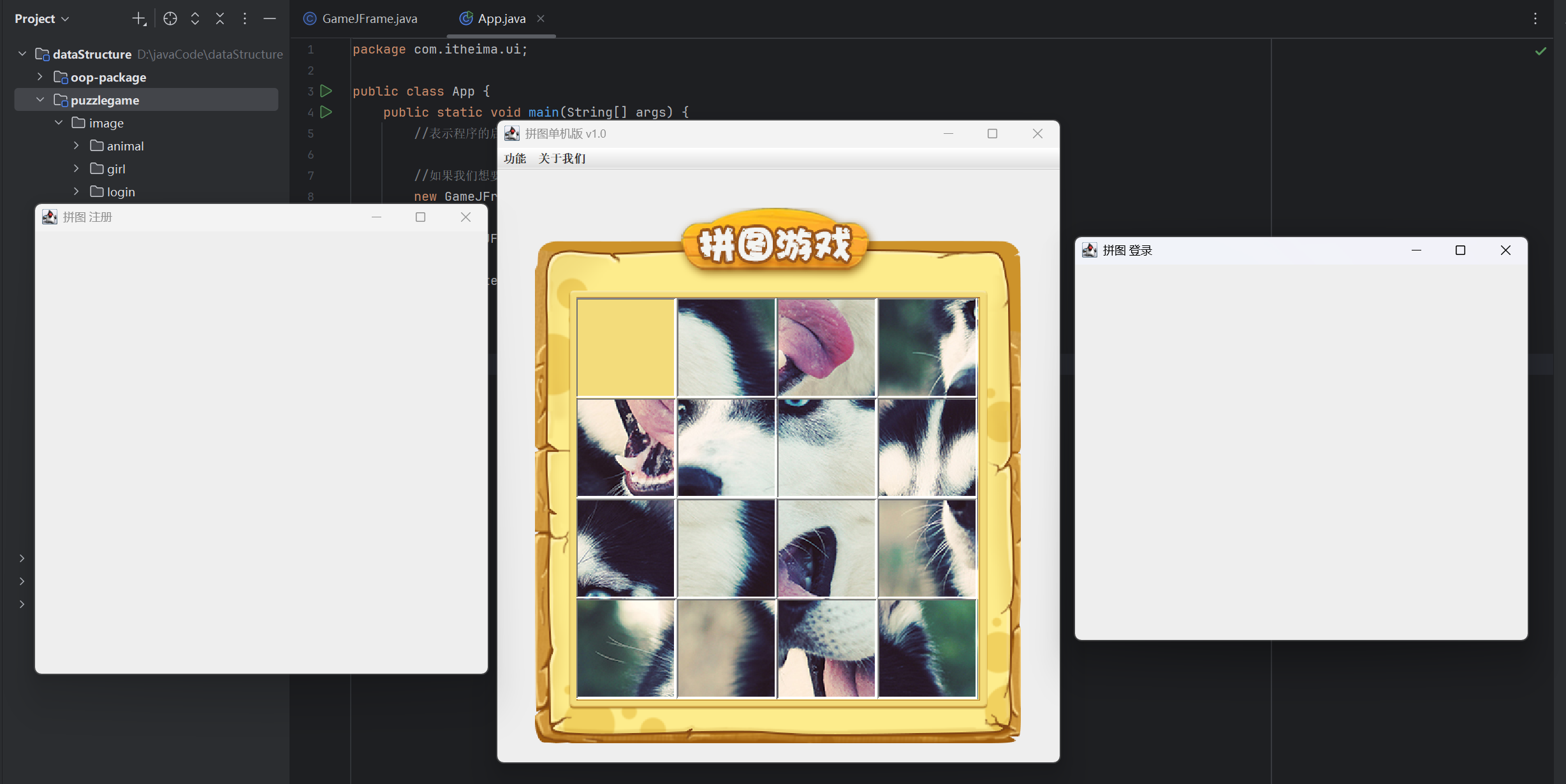
(运行结果截图)
总结
路径分为两种
相对路径:一定是从盘符开始的。C:\ D:\
绝对路径:不是从盘符开始的。
相对路径是相对当前项目而言的。
07-移动图片
上移动
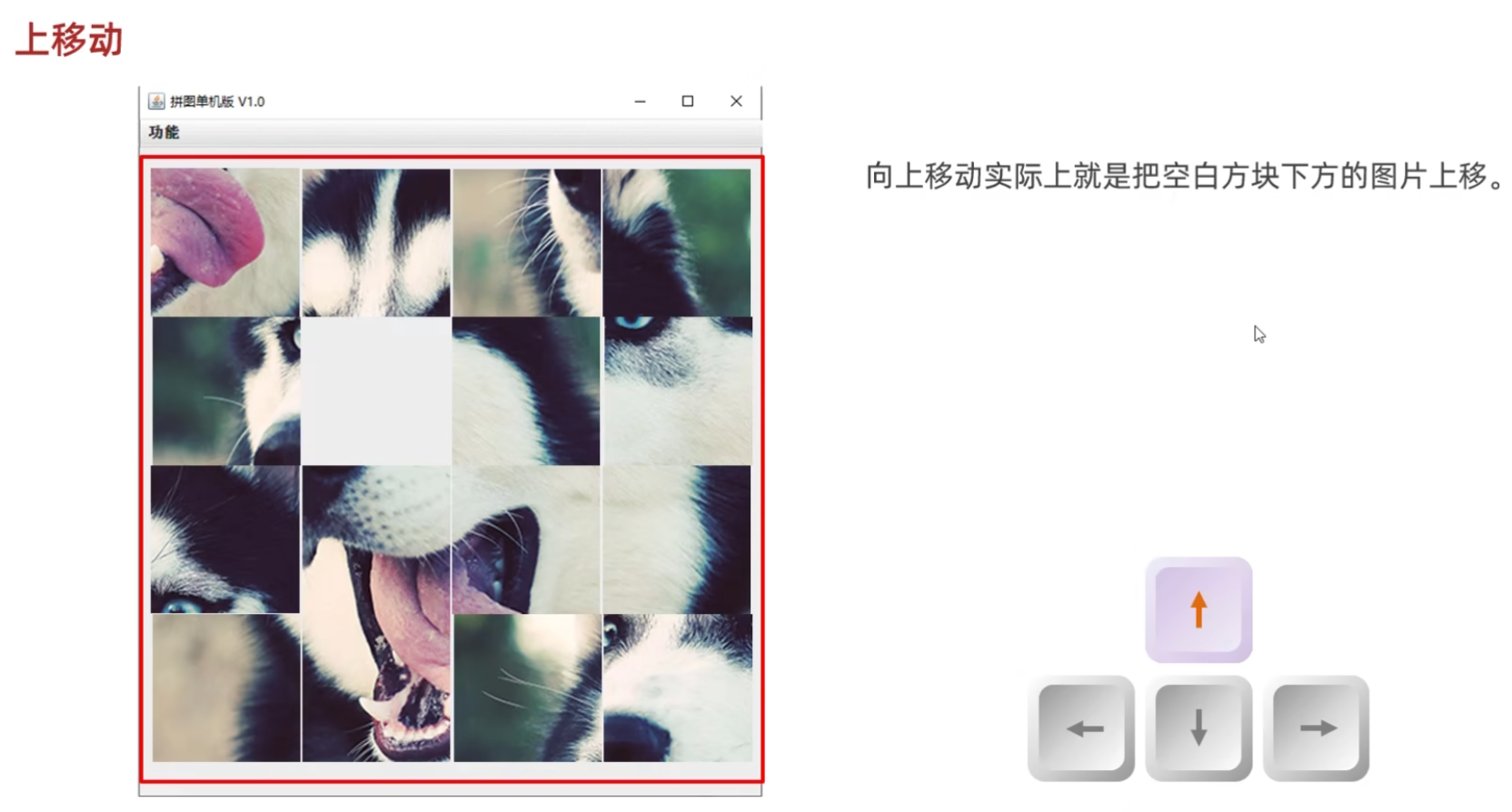
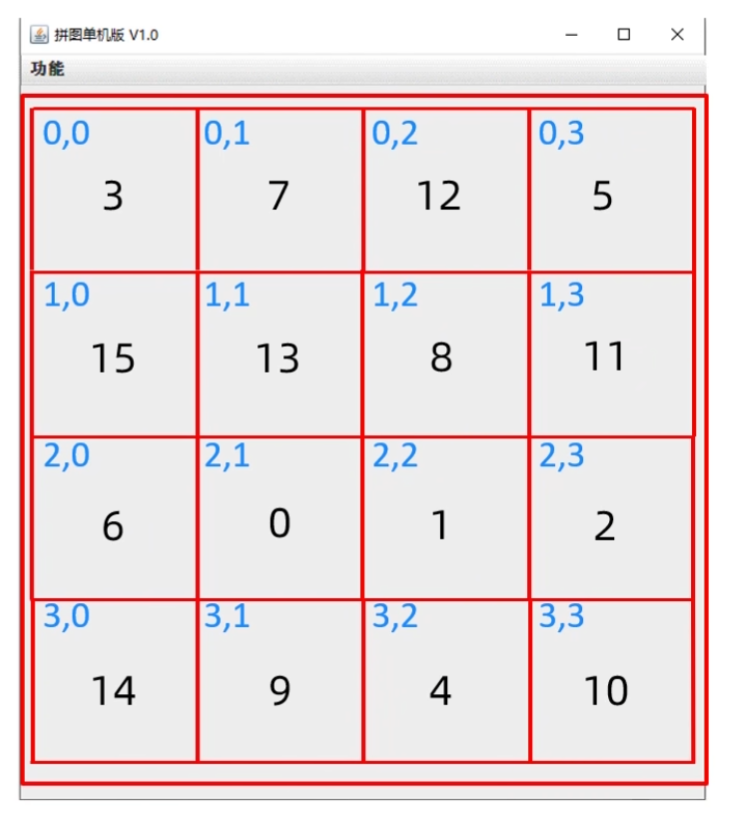
(源代码)
GameJFrame
java
package com.itheima.ui;

import javax.swing.*;
import javax.swing.border.BevelBorder;
import java.awt.event.KeyEvent;
import java.awt.event.KeyListener;
import java.util.Random;

public class GameJFrame extends JFrame implements KeyListener {
    //GameJFrame 表示游戏主界面
    //以后跟游戏有关的代码,都写在这里

    //创建一个二维数组
    //目的:用来管理数据
    //加载图片的时候,会根据二维数组中的数据进行加载
    int[][] data = new int[4][4];

    //记录空白方块在二维数组中的位置
    int x = 0;
    int y = 0;

    public GameJFrame() {
        //初始化界面
        initJFrame();

        //初始化菜单
        initJMenuBar();

        //初始化数据(打乱)
        initData();

        //初始化图片(根据打乱后的结果去加载图片)
        initImage();;


        //设置显示(建议写在最后)
        this.setVisible(true);
    }


    private void initData() {
        //1.定义一个一维数组
        int[] tempArr = {0, 1, 2, 3, 4, 5, 6, 7, 8, 9, 10, 11, 12, 13, 14, 15};
        //2.打乱数组中的数据顺序
        //遍历数组,得到每一个元素,拿着每一个元素跟随机索引上的数据进行交换
        Random r = new Random();
        for (int i = 0; i < tempArr.length; i++) {
            int index = r.nextInt(tempArr.length);
            int temp = tempArr[i];
            tempArr[i] =tempArr[index];
            tempArr[index] = temp;
        }

        //5.给二维数组添加元素
        //解法一:
        for (int i = 0; i < tempArr.length; i++) {
            if(tempArr[i] == 0){
                x = i / 4;
                y = i % 4;
            }else{
                data[i / 4][i % 4] = tempArr[i];
            }

        }
    }


    //初始化图片
    //添加图片的时候,就需要按照二维数组中管理的数据添加图片
    private void initImage() {
        //清空原本已经出现的所有图片
        this.getContentPane().removeAll();

        //细节:
        //先加载的图片在上方,后加载的图片塞在下面

        //外循环 --- 把内循环重复执行了4次
        for (int i = 0; i < 4; i++) {
            //内循环 --- 表示在一行添加4张图片
            for (int j = 0; j < 4; j++) {
                //获取当前图片的序号
                int num = data[i][j];
                //创建一个JLabel的对象(管理容器)
                JLabel jLabel = new JLabel(new ImageIcon("D:\\javaCode\\dataStructure\\puzzlegame\\image\\animal\\animal3\\" + num +".jpg"));
                //指定图片位置
                jLabel.setBounds(105 * j + 83,105 * i + 134,105,105);
                //给图片添加边框
                //0:表示让图片凸起来
                //1:表示让图片凹下去
                jLabel.setBorder(new BevelBorder(BevelBorder.LOWERED));
                //把管理容器添加到界面中
                this.getContentPane().add(jLabel);
                //添加一次后number需要自增,表示下一次加载后面一张图片
            }
        }

        //添加背景图片
        ImageIcon bg = new ImageIcon("D:\\javaCode\\dataStructure\\puzzlegame\\image\\background.png");
        JLabel background = new JLabel(bg);
        background.setBounds(40,40,508,560);
        //把背景图片添加到界面中
        this.getContentPane().add(background);

        //给整个界面添加键盘监听事件
        this.addKeyListener(this);

        //刷新一下界面
        this.getContentPane().repaint();

    }

    private void initJMenuBar() {
        //初始化菜单
        //创建整个的菜单对象
        JMenuBar JMenuBar = new JMenuBar();

        //创建菜单上面的两个选项的对象 (功能 关于我们)
        JMenu functionJMenu = new JMenu("功能");
        JMenu aboutJMenu = new JMenu("关于我们");

        //创建选项下面的条目对象
        JMenuItem replayItem = new JMenuItem("重新游戏");
        JMenuItem reLoginItem = new JMenuItem("重新登录");
        JMenuItem closeItem = new JMenuItem("关闭游戏");

        JMenuItem accountItem = new JMenuItem("公众号");

        //将每一个选项下面的条目添加到选项中
        functionJMenu.add(replayItem);
        functionJMenu.add(reLoginItem);
        functionJMenu.add(closeItem);

        aboutJMenu.add(accountItem);

        //将菜单里面的两个选项添加到菜单中
        JMenuBar.add(functionJMenu);
        JMenuBar.add(aboutJMenu);

        //给整个界面设置菜单
        this.setJMenuBar(JMenuBar);
    }

    private void initJFrame() {
        //设置宽 高
        this.setSize(603,680);
        //设置界面标题
        this.setTitle("拼图单机版 v1.0");
        //设置界面置顶
        this.setAlwaysOnTop(true);
        //设置界面居中
        this.setLocationRelativeTo(null);
        //设置界面关闭
        this.setDefaultCloseOperation(WindowConstants.EXIT_ON_CLOSE);
        //取消默认的中间位置,只有取消了才会按照XY轴的形式添加组件
        this.setLayout(null);
    }

    @Override
    public void keyTyped(KeyEvent e) {

    }

    @Override
    public void keyPressed(KeyEvent e) {

    }

    @Override
    public void keyReleased(KeyEvent e) {
        //对上,下,左,右进行判断
        //左:37 上:38 右:39 下:40
        int code = e.getKeyCode();
        if(code == 37){
            System.out.println("向左移动");
        }else if(code == 38){
            System.out.println("向上移动");
            //逻辑:
            //把空白方块下方的数字往上移动
            //x,y 表示空白方块
            //x + 1,y 表示空白方块下方的数字

            //把空白方块下方的数字赋值给空白方块
            data[x][y] = data[x + 1][y];
            data[x + 1][y] = 0;
            x++;
            //调用方法按照最新的数字加载图片
            initImage();

        }else if(code == 39){
            System.out.println("向右移动");
        }else if(code == 40){
            System.out.println("向下移动");
        }


    }
}
App
java
package com.itheima.ui;

public class App {
    public static void main(String[] args) {
        //表示程序的启动入口

        //如果我们想要开启一个界面,就创建谁的对象就可以了
        new GameJFrame();

        new LoginJFrame();

        new RegisterJFrame();

    }
}
(运行结果截图)
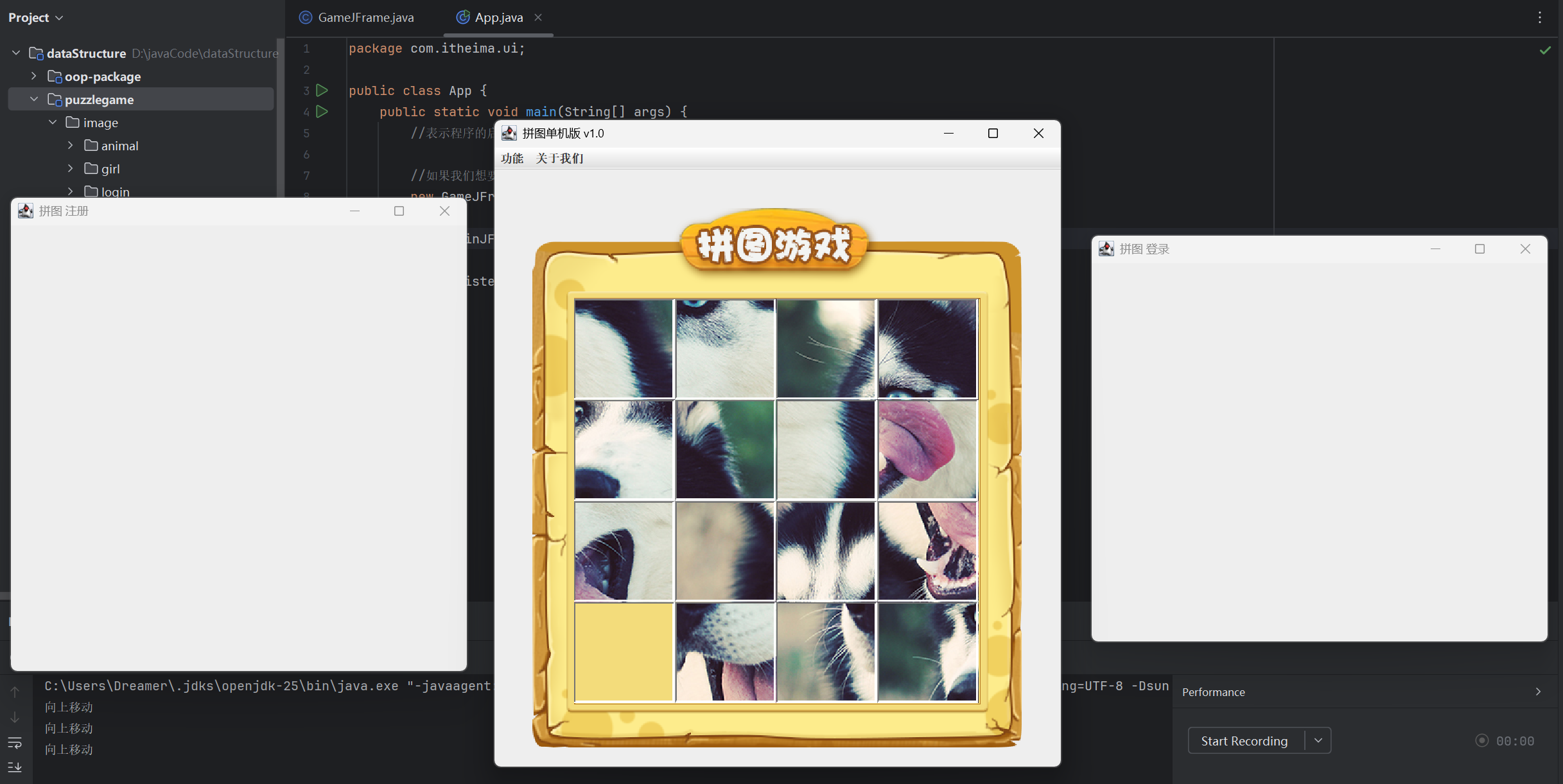
移动图片
(源代码)
GameJFrame
java
package com.itheima.ui;

import javax.swing.*;
import javax.swing.border.BevelBorder;
import java.awt.event.KeyEvent;
import java.awt.event.KeyListener;
import java.util.Random;

public class GameJFrame extends JFrame implements KeyListener {
    //GameJFrame 表示游戏主界面
    //以后跟游戏有关的代码,都写在这里

    //创建一个二维数组
    //目的:用来管理数据
    //加载图片的时候,会根据二维数组中的数据进行加载
    int[][] data = new int[4][4];

    //记录空白方块在二维数组中的位置
    int x = 0;
    int y = 0;

    public GameJFrame() {
        //初始化界面
        initJFrame();

        //初始化菜单
        initJMenuBar();

        //初始化数据(打乱)
        initData();

        //初始化图片(根据打乱后的结果去加载图片)
        initImage();;


        //设置显示(建议写在最后)
        this.setVisible(true);
    }


    private void initData() {
        //1.定义一个一维数组
        int[] tempArr = {0, 1, 2, 3, 4, 5, 6, 7, 8, 9, 10, 11, 12, 13, 14, 15};
        //2.打乱数组中的数据顺序
        //遍历数组,得到每一个元素,拿着每一个元素跟随机索引上的数据进行交换
        Random r = new Random();
        for (int i = 0; i < tempArr.length; i++) {
            int index = r.nextInt(tempArr.length);
            int temp = tempArr[i];
            tempArr[i] =tempArr[index];
            tempArr[index] = temp;
        }

        //5.给二维数组添加元素
        //解法一:
        for (int i = 0; i < tempArr.length; i++) {
            if(tempArr[i] == 0){
                x = i / 4;
                y = i % 4;
            }else{
                data[i / 4][i % 4] = tempArr[i];
            }

        }
    }


    //初始化图片
    //添加图片的时候,就需要按照二维数组中管理的数据添加图片
    private void initImage() {
        //清空原本已经出现的所有图片
        this.getContentPane().removeAll();

        //细节:
        //先加载的图片在上方,后加载的图片塞在下面

        //外循环 --- 把内循环重复执行了4次
        for (int i = 0; i < 4; i++) {
            //内循环 --- 表示在一行添加4张图片
            for (int j = 0; j < 4; j++) {
                //获取当前图片的序号
                int num = data[i][j];
                //创建一个JLabel的对象(管理容器)
                JLabel jLabel = new JLabel(new ImageIcon("D:\\javaCode\\dataStructure\\puzzlegame\\image\\animal\\animal3\\" + num +".jpg"));
                //指定图片位置
                jLabel.setBounds(105 * j + 83,105 * i + 134,105,105);
                //给图片添加边框
                //0:表示让图片凸起来
                //1:表示让图片凹下去
                jLabel.setBorder(new BevelBorder(BevelBorder.LOWERED));
                //把管理容器添加到界面中
                this.getContentPane().add(jLabel);
                //添加一次后number需要自增,表示下一次加载后面一张图片
            }
        }

        //添加背景图片
        ImageIcon bg = new ImageIcon("D:\\javaCode\\dataStructure\\puzzlegame\\image\\background.png");
        JLabel background = new JLabel(bg);
        background.setBounds(40,40,508,560);
        //把背景图片添加到界面中
        this.getContentPane().add(background);

        //给整个界面添加键盘监听事件
        this.addKeyListener(this);

        //刷新一下界面
        this.getContentPane().repaint();

    }

    private void initJMenuBar() {
        //初始化菜单
        //创建整个的菜单对象
        JMenuBar JMenuBar = new JMenuBar();

        //创建菜单上面的两个选项的对象 (功能 关于我们)
        JMenu functionJMenu = new JMenu("功能");
        JMenu aboutJMenu = new JMenu("关于我们");

        //创建选项下面的条目对象
        JMenuItem replayItem = new JMenuItem("重新游戏");
        JMenuItem reLoginItem = new JMenuItem("重新登录");
        JMenuItem closeItem = new JMenuItem("关闭游戏");

        JMenuItem accountItem = new JMenuItem("公众号");

        //将每一个选项下面的条目添加到选项中
        functionJMenu.add(replayItem);
        functionJMenu.add(reLoginItem);
        functionJMenu.add(closeItem);

        aboutJMenu.add(accountItem);

        //将菜单里面的两个选项添加到菜单中
        JMenuBar.add(functionJMenu);
        JMenuBar.add(aboutJMenu);

        //给整个界面设置菜单
        this.setJMenuBar(JMenuBar);
    }

    private void initJFrame() {
        //设置宽 高
        this.setSize(603,680);
        //设置界面标题
        this.setTitle("拼图单机版 v1.0");
        //设置界面置顶
        this.setAlwaysOnTop(true);
        //设置界面居中
        this.setLocationRelativeTo(null);
        //设置界面关闭
        this.setDefaultCloseOperation(WindowConstants.EXIT_ON_CLOSE);
        //取消默认的中间位置,只有取消了才会按照XY轴的形式添加组件
        this.setLayout(null);
    }

    @Override
    public void keyTyped(KeyEvent e) {

    }

    @Override
    public void keyPressed(KeyEvent e) {

    }

    @Override
    public void keyReleased(KeyEvent e) {
        //对上,下,左,右进行判断
        //左:37 上:38 右:39 下:40
        int code = e.getKeyCode();
        if(code == 37){
            System.out.println("向左移动");
            if(y == 3){
                return;
            }

            //把空白方块右方的数字往左移动
            data[x][y] = data[x][y + 1];
            data[x][y + 1] = 0;
            y++;
            //调用方法按照最新的数字加载图片
            initImage();

        }else if(code == 38){
            System.out.println("向上移动");
            if(x == 3){
                //表示空白方块已经在最下方了,他的下面没有图片再能移动了
                return;
            }
            //逻辑:
            //把空白方块下方的数字往上移动
            //x,y 表示空白方块
            //x + 1,y 表示空白方块下方的数字

            //把空白方块下方的数字赋值给空白方块
            data[x][y] = data[x + 1][y];
            data[x + 1][y] = 0;
            x++;
            //调用方法按照最新的数字加载图片
            initImage();

        }else if(code == 39){
            System.out.println("向右移动");
            if(y == 0){
                return;
            }

            //把空白方块左方的数字往右移动
            data[x][y] = data[x][y - 1];
            data[x][y - 1] = 0;
            y--;
            //调用方法按照最新的数字加载图片
            initImage();

        }else if(code == 40){
            System.out.println("向下移动");
            if(x == 0){
                return;
            }

            //把空白方块上方的数字往下移动
            data[x][y] = data[x - 1][y];
            data[x - 1][y] = 0;
            x--;
            //调用方法按照最新的数字加载图片
            initImage();

        }


    }
}
App
java
package com.itheima.ui;

public class App {
    public static void main(String[] args) {
        //表示程序的启动入口

        //如果我们想要开启一个界面,就创建谁的对象就可以了
        new GameJFrame();

        new LoginJFrame();

        new RegisterJFrame();

    }
}
(运行结果截图)
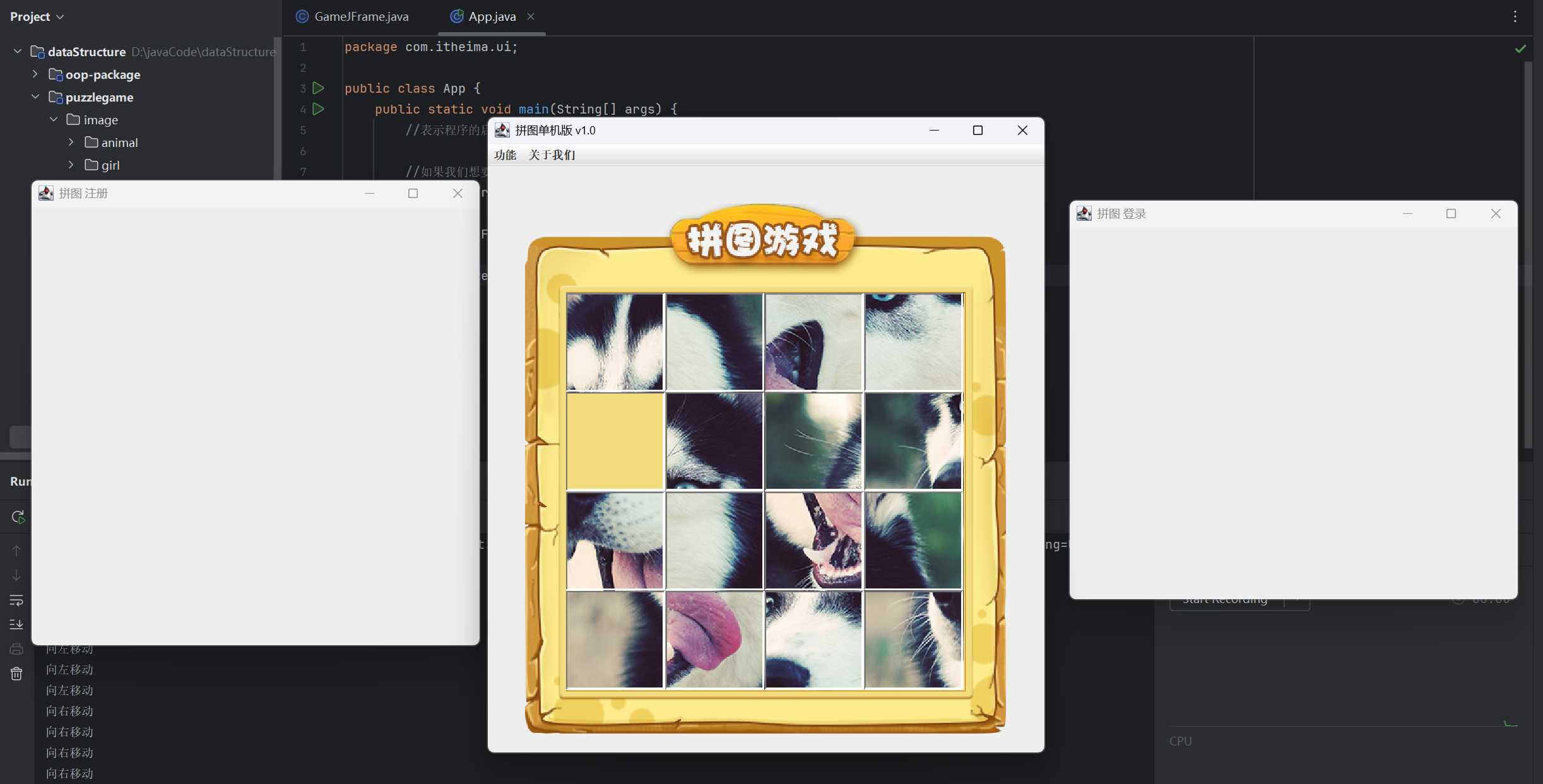
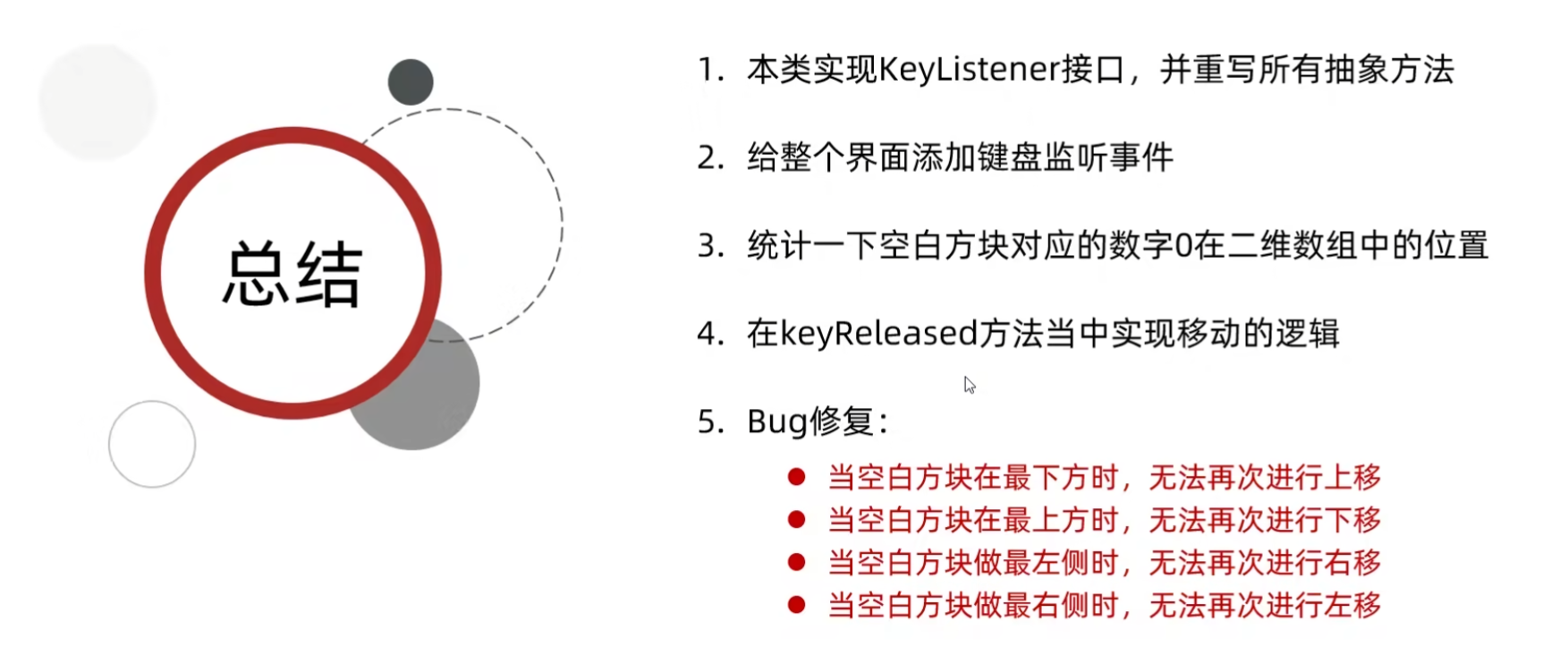
总结
08-查看完整图片、作弊码和判断胜利
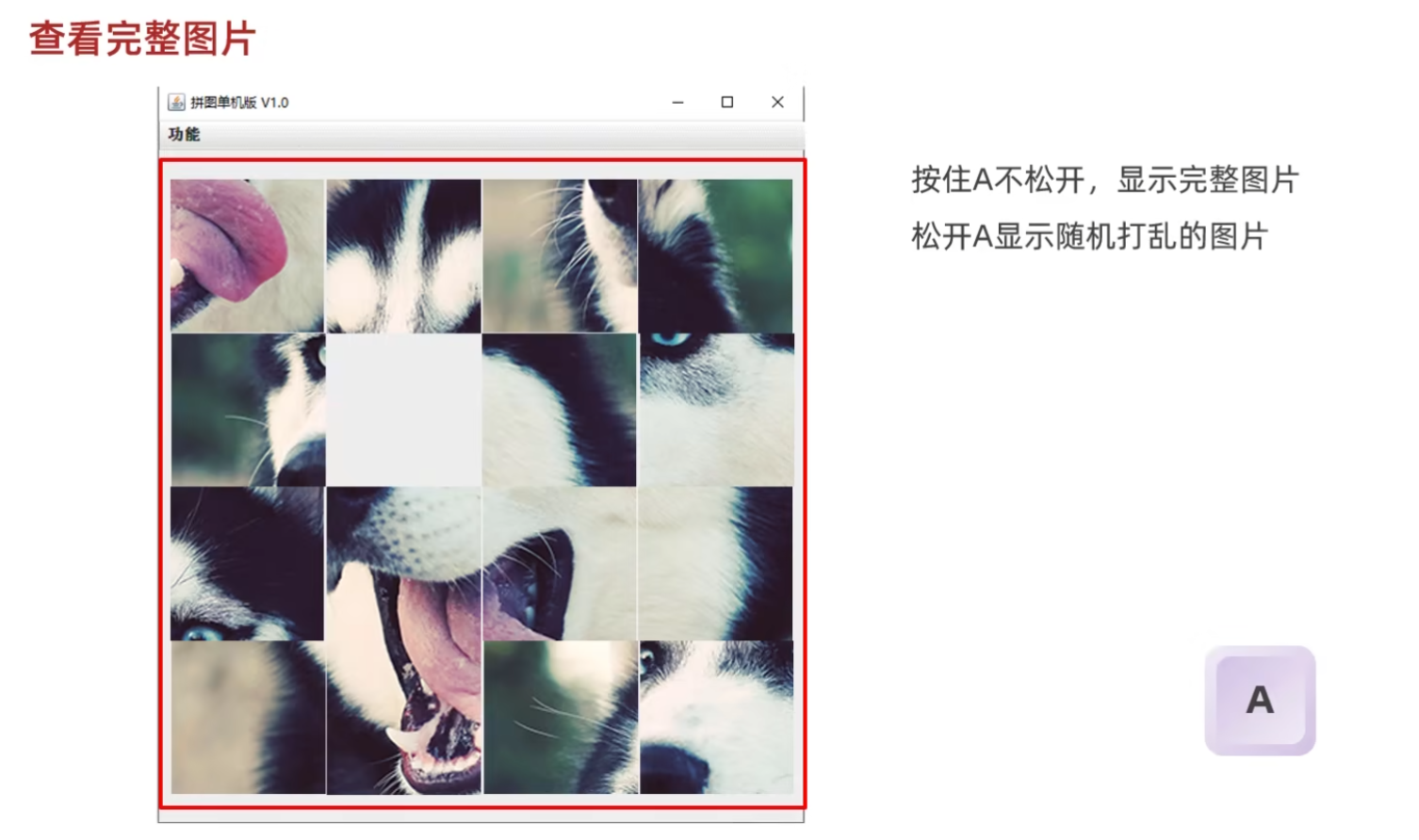
查看完整图片-A
(源代码)
GameJFrame
java
package com.itheima.ui;

import javax.swing.*;
import javax.swing.border.BevelBorder;
import java.awt.event.KeyEvent;
import java.awt.event.KeyListener;
import java.util.Random;

public class GameJFrame extends JFrame implements KeyListener {
    //GameJFrame 表示游戏主界面
    //以后跟游戏有关的代码,都写在这里

    //创建一个二维数组
    //目的:用来管理数据
    //加载图片的时候,会根据二维数组中的数据进行加载
    int[][] data = new int[4][4];

    //记录空白方块在二维数组中的位置
    int x = 0;
    int y = 0;

    String path = "D:\\javaCode\\dataStructure\\puzzlegame\\image\\animal\\animal3\\";

    public GameJFrame() {
        //初始化界面
        initJFrame();

        //初始化菜单
        initJMenuBar();

        //初始化数据(打乱)
        initData();

        //初始化图片(根据打乱后的结果去加载图片)
        initImage();;


        //设置显示(建议写在最后)
        this.setVisible(true);
    }


    private void initData() {
        //1.定义一个一维数组
        int[] tempArr = {0, 1, 2, 3, 4, 5, 6, 7, 8, 9, 10, 11, 12, 13, 14, 15};
        //2.打乱数组中的数据顺序
        //遍历数组,得到每一个元素,拿着每一个元素跟随机索引上的数据进行交换
        Random r = new Random();
        for (int i = 0; i < tempArr.length; i++) {
            int index = r.nextInt(tempArr.length);
            int temp = tempArr[i];
            tempArr[i] =tempArr[index];
            tempArr[index] = temp;
        }

        //5.给二维数组添加元素
        //解法一:
        for (int i = 0; i < tempArr.length; i++) {
            if(tempArr[i] == 0){
                x = i / 4;
                y = i % 4;
            }else{
                data[i / 4][i % 4] = tempArr[i];
            }

        }
    }


    //初始化图片
    //添加图片的时候,就需要按照二维数组中管理的数据添加图片
    private void initImage() {
        //清空原本已经出现的所有图片
        this.getContentPane().removeAll();

        //细节:
        //先加载的图片在上方,后加载的图片塞在下面

        //外循环 --- 把内循环重复执行了4次
        for (int i = 0; i < 4; i++) {
            //内循环 --- 表示在一行添加4张图片
            for (int j = 0; j < 4; j++) {
                //获取当前图片的序号
                int num = data[i][j];
                //创建一个JLabel的对象(管理容器)
                JLabel jLabel = new JLabel(new ImageIcon(path + num +".jpg"));
                //指定图片位置
                jLabel.setBounds(105 * j + 83,105 * i + 134,105,105);
                //给图片添加边框
                //0:表示让图片凸起来
                //1:表示让图片凹下去
                jLabel.setBorder(new BevelBorder(BevelBorder.LOWERED));
                //把管理容器添加到界面中
                this.getContentPane().add(jLabel);
                //添加一次后number需要自增,表示下一次加载后面一张图片
            }
        }

        //添加背景图片
        ImageIcon bg = new ImageIcon("D:\\javaCode\\dataStructure\\puzzlegame\\image\\background.png");
        JLabel background = new JLabel(bg);
        background.setBounds(40,40,508,560);
        //把背景图片添加到界面中
        this.getContentPane().add(background);

        //给整个界面添加键盘监听事件
        this.addKeyListener(this);

        //刷新一下界面
        this.getContentPane().repaint();

    }

    private void initJMenuBar() {
        //初始化菜单
        //创建整个的菜单对象
        JMenuBar JMenuBar = new JMenuBar();

        //创建菜单上面的两个选项的对象 (功能 关于我们)
        JMenu functionJMenu = new JMenu("功能");
        JMenu aboutJMenu = new JMenu("关于我们");

        //创建选项下面的条目对象
        JMenuItem replayItem = new JMenuItem("重新游戏");
        JMenuItem reLoginItem = new JMenuItem("重新登录");
        JMenuItem closeItem = new JMenuItem("关闭游戏");

        JMenuItem accountItem = new JMenuItem("公众号");

        //将每一个选项下面的条目添加到选项中
        functionJMenu.add(replayItem);
        functionJMenu.add(reLoginItem);
        functionJMenu.add(closeItem);

        aboutJMenu.add(accountItem);

        //将菜单里面的两个选项添加到菜单中
        JMenuBar.add(functionJMenu);
        JMenuBar.add(aboutJMenu);

        //给整个界面设置菜单
        this.setJMenuBar(JMenuBar);
    }

    private void initJFrame() {
        //设置宽 高
        this.setSize(603,680);
        //设置界面标题
        this.setTitle("拼图单机版 v1.0");
        //设置界面置顶
        this.setAlwaysOnTop(true);
        //设置界面居中
        this.setLocationRelativeTo(null);
        //设置界面关闭
        this.setDefaultCloseOperation(WindowConstants.EXIT_ON_CLOSE);
        //取消默认的中间位置,只有取消了才会按照XY轴的形式添加组件
        this.setLayout(null);
    }

    @Override
    public void keyTyped(KeyEvent e) {

    }

    @Override
    public void keyPressed(KeyEvent e) {
        int code = e.getKeyCode();
        if(code == 65){
            //把界面中所有图片全部删除
            this.getContentPane().removeAll();
            //加载第一张完整图片
            JLabel all = new JLabel(new ImageIcon(path + "all.jpg"));
            all.setBounds(83,134,420,420);
            this.getContentPane().add(all);

            //添加背景图片
            ImageIcon bg = new ImageIcon("D:\\javaCode\\dataStructure\\puzzlegame\\image\\background.png");
            JLabel background = new JLabel(bg);
            background.setBounds(40,40,508,560);
            //把背景图片添加到界面中
            this.getContentPane().add(background);

            //刷新一下界面
            this.getContentPane().repaint();
        }

    }

    @Override
    public void keyReleased(KeyEvent e) {
        //对上,下,左,右进行判断
        //左:37 上:38 右:39 下:40
        int code = e.getKeyCode();
        if(code == 37){
            System.out.println("向左移动");
            if(y == 3){
                return;
            }

            //把空白方块右方的数字往左移动
            data[x][y] = data[x][y + 1];
            data[x][y + 1] = 0;
            y++;
            //调用方法按照最新的数字加载图片
            initImage();

        }else if(code == 38){
            System.out.println("向上移动");
            if(x == 3){
                //表示空白方块已经在最下方了,他的下面没有图片再能移动了
                return;
            }
            //逻辑:
            //把空白方块下方的数字往上移动
            //x,y 表示空白方块
            //x + 1,y 表示空白方块下方的数字

            //把空白方块下方的数字赋值给空白方块
            data[x][y] = data[x + 1][y];
            data[x + 1][y] = 0;
            x++;
            //调用方法按照最新的数字加载图片
            initImage();

        }else if(code == 39){
            System.out.println("向右移动");
            if(y == 0){
                return;
            }

            //把空白方块左方的数字往右移动
            data[x][y] = data[x][y - 1];
            data[x][y - 1] = 0;
            y--;
            //调用方法按照最新的数字加载图片
            initImage();

        }else if(code == 40){
            System.out.println("向下移动");
            if(x == 0){
                return;
            }

            //把空白方块上方的数字往下移动
            data[x][y] = data[x - 1][y];
            data[x - 1][y] = 0;
            x--;
            //调用方法按照最新的数字加载图片
            initImage();

        }else if(code == 65){
            initImage();
        }


    }
}
App
java
package com.itheima.ui;

public class App {
    public static void main(String[] args) {
        //表示程序的启动入口

        //如果我们想要开启一个界面,就创建谁的对象就可以了
        new GameJFrame();

        new LoginJFrame();

        new RegisterJFrame();

    }
}
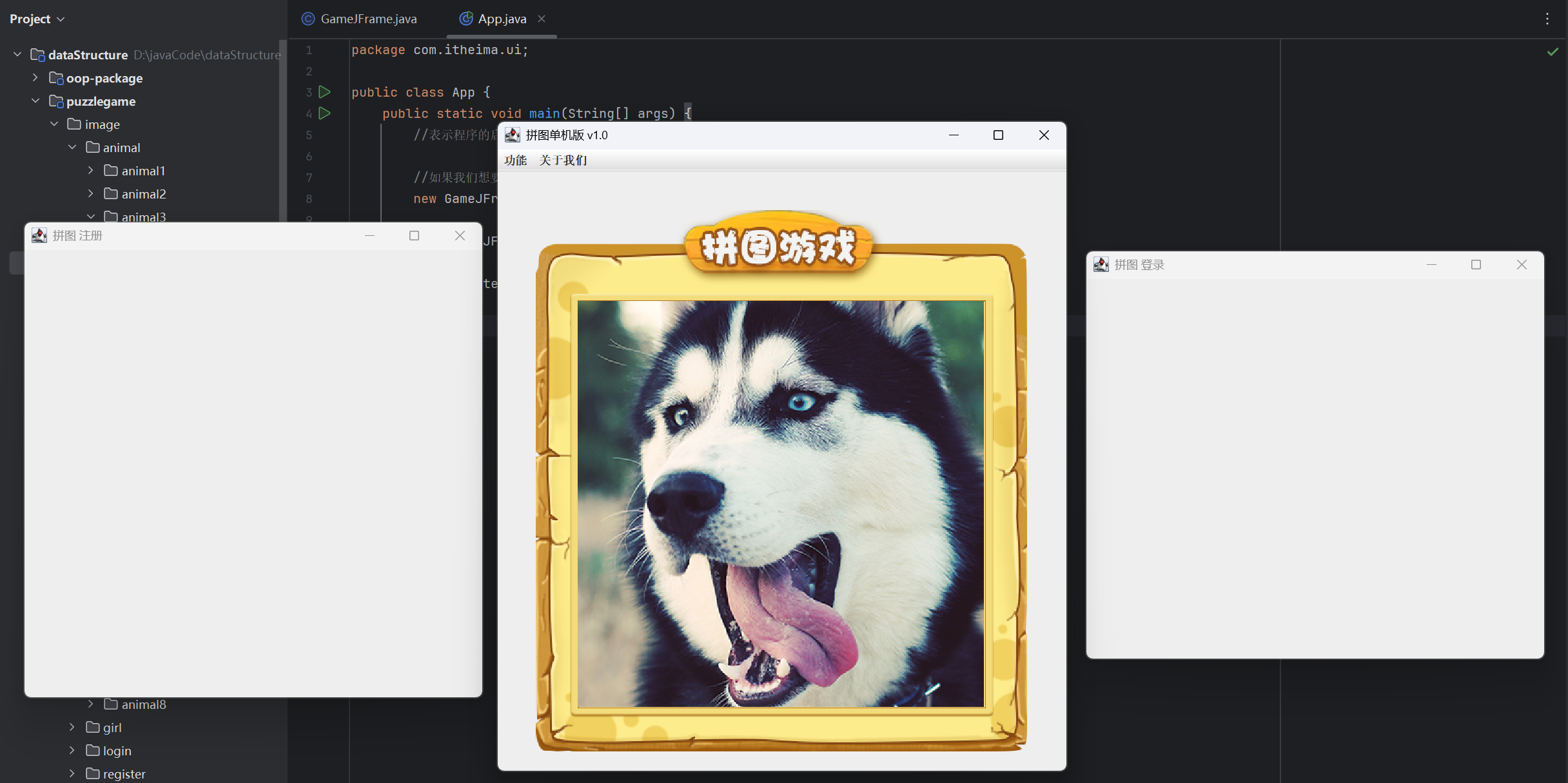
(运行结果截图)
作弊码-W
(源代码)
GameJFrame
java
package com.itheima.ui;

import javax.swing.*;
import javax.swing.border.BevelBorder;
import java.awt.event.KeyEvent;
import java.awt.event.KeyListener;
import java.util.Random;

public class GameJFrame extends JFrame implements KeyListener {
    //GameJFrame 表示游戏主界面
    //以后跟游戏有关的代码,都写在这里

    //创建一个二维数组
    //目的:用来管理数据
    //加载图片的时候,会根据二维数组中的数据进行加载
    int[][] data = new int[4][4];

    //记录空白方块在二维数组中的位置
    int x = 0;
    int y = 0;

    //定义一个变量,记录当前图片的路径
    String path = "D:\\javaCode\\dataStructure\\puzzlegame\\image\\animal\\animal3\\";

    public GameJFrame() {
        //初始化界面
        initJFrame();

        //初始化菜单
        initJMenuBar();

        //初始化数据(打乱)
        initData();

        //初始化图片(根据打乱后的结果去加载图片)
        initImage();;


        //设置显示(建议写在最后)
        this.setVisible(true);
    }


    private void initData() {
        //1.定义一个一维数组
        int[] tempArr = {0, 1, 2, 3, 4, 5, 6, 7, 8, 9, 10, 11, 12, 13, 14, 15};
        //2.打乱数组中的数据顺序
        //遍历数组,得到每一个元素,拿着每一个元素跟随机索引上的数据进行交换
        Random r = new Random();
        for (int i = 0; i < tempArr.length; i++) {
            int index = r.nextInt(tempArr.length);
            int temp = tempArr[i];
            tempArr[i] =tempArr[index];
            tempArr[index] = temp;
        }

        //5.给二维数组添加元素
        //解法一:
        for (int i = 0; i < tempArr.length; i++) {
            if(tempArr[i] == 0){
                x = i / 4;
                y = i % 4;
            }else{
                data[i / 4][i % 4] = tempArr[i];
            }

        }
    }


    //初始化图片
    //添加图片的时候,就需要按照二维数组中管理的数据添加图片
    private void initImage() {
        //清空原本已经出现的所有图片
        this.getContentPane().removeAll();

        //细节:
        //先加载的图片在上方,后加载的图片塞在下面

        //外循环 --- 把内循环重复执行了4次
        for (int i = 0; i < 4; i++) {
            //内循环 --- 表示在一行添加4张图片
            for (int j = 0; j < 4; j++) {
                //获取当前图片的序号
                int num = data[i][j];
                //创建一个JLabel的对象(管理容器)
                JLabel jLabel = new JLabel(new ImageIcon(path + num +".jpg"));
                //指定图片位置
                jLabel.setBounds(105 * j + 83,105 * i + 134,105,105);
                //给图片添加边框
                //0:表示让图片凸起来
                //1:表示让图片凹下去
                jLabel.setBorder(new BevelBorder(BevelBorder.LOWERED));
                //把管理容器添加到界面中
                this.getContentPane().add(jLabel);
                //添加一次后number需要自增,表示下一次加载后面一张图片
            }
        }

        //添加背景图片
        ImageIcon bg = new ImageIcon("D:\\javaCode\\dataStructure\\puzzlegame\\image\\background.png");
        JLabel background = new JLabel(bg);
        background.setBounds(40,40,508,560);
        //把背景图片添加到界面中
        this.getContentPane().add(background);

        //给整个界面添加键盘监听事件
        this.addKeyListener(this);

        //刷新一下界面
        this.getContentPane().repaint();

    }

    private void initJMenuBar() {
        //初始化菜单
        //创建整个的菜单对象
        JMenuBar JMenuBar = new JMenuBar();

        //创建菜单上面的两个选项的对象 (功能 关于我们)
        JMenu functionJMenu = new JMenu("功能");
        JMenu aboutJMenu = new JMenu("关于我们");

        //创建选项下面的条目对象
        JMenuItem replayItem = new JMenuItem("重新游戏");
        JMenuItem reLoginItem = new JMenuItem("重新登录");
        JMenuItem closeItem = new JMenuItem("关闭游戏");

        JMenuItem accountItem = new JMenuItem("公众号");

        //将每一个选项下面的条目添加到选项中
        functionJMenu.add(replayItem);
        functionJMenu.add(reLoginItem);
        functionJMenu.add(closeItem);

        aboutJMenu.add(accountItem);

        //将菜单里面的两个选项添加到菜单中
        JMenuBar.add(functionJMenu);
        JMenuBar.add(aboutJMenu);

        //给整个界面设置菜单
        this.setJMenuBar(JMenuBar);
    }

    private void initJFrame() {
        //设置宽 高
        this.setSize(603,680);
        //设置界面标题
        this.setTitle("拼图单机版 v1.0");
        //设置界面置顶
        this.setAlwaysOnTop(true);
        //设置界面居中
        this.setLocationRelativeTo(null);
        //设置界面关闭
        this.setDefaultCloseOperation(WindowConstants.EXIT_ON_CLOSE);
        //取消默认的中间位置,只有取消了才会按照XY轴的形式添加组件
        this.setLayout(null);
    }

    @Override
    public void keyTyped(KeyEvent e) {

    }

    @Override
    public void keyPressed(KeyEvent e) {
        int code = e.getKeyCode();
        if(code == 65){
            //把界面中所有图片全部删除
            this.getContentPane().removeAll();
            //加载第一张完整图片
            JLabel all = new JLabel(new ImageIcon(path + "all.jpg"));
            all.setBounds(83,134,420,420);
            this.getContentPane().add(all);

            //添加背景图片
            ImageIcon bg = new ImageIcon("D:\\javaCode\\dataStructure\\puzzlegame\\image\\background.png");
            JLabel background = new JLabel(bg);
            background.setBounds(40,40,508,560);
            //把背景图片添加到界面中
            this.getContentPane().add(background);

            //刷新一下界面
            this.getContentPane().repaint();
        }

    }

    @Override
    public void keyReleased(KeyEvent e) {
        //对上,下,左,右进行判断
        //左:37 上:38 右:39 下:40
        int code = e.getKeyCode();
        if(code == 37){
            System.out.println("向左移动");
            if(y == 3){
                return;
            }

            //把空白方块右方的数字往左移动
            data[x][y] = data[x][y + 1];
            data[x][y + 1] = 0;
            y++;
            //调用方法按照最新的数字加载图片
            initImage();

        }else if(code == 38){
            System.out.println("向上移动");
            if(x == 3){
                //表示空白方块已经在最下方了,他的下面没有图片再能移动了
                return;
            }
            //逻辑:
            //把空白方块下方的数字往上移动
            //x,y 表示空白方块
            //x + 1,y 表示空白方块下方的数字

            //把空白方块下方的数字赋值给空白方块
            data[x][y] = data[x + 1][y];
            data[x + 1][y] = 0;
            x++;
            //调用方法按照最新的数字加载图片
            initImage();

        }else if(code == 39){
            System.out.println("向右移动");
            if(y == 0){
                return;
            }

            //把空白方块左方的数字往右移动
            data[x][y] = data[x][y - 1];
            data[x][y - 1] = 0;
            y--;
            //调用方法按照最新的数字加载图片
            initImage();

        }else if(code == 40){
            System.out.println("向下移动");
            if(x == 0){
                return;
            }

            //把空白方块上方的数字往下移动
            data[x][y] = data[x - 1][y];
            data[x - 1][y] = 0;
            x--;
            //调用方法按照最新的数字加载图片
            initImage();

        }else if(code == 65){
            initImage();
        }else if(code == 87){
            data = new int[][]{
                    {1, 2, 3, 4},
                    {5, 6, 7, 8},
                    {9, 10, 11, 12},
                    {13, 14, 15, 0},
            };
            initImage();
        }


    }
}
App
java
package com.itheima.ui;

public class App {
    public static void main(String[] args) {
        //表示程序的启动入口

        //如果我们想要开启一个界面,就创建谁的对象就可以了
        new GameJFrame();

        new LoginJFrame();

        new RegisterJFrame();

    }
}
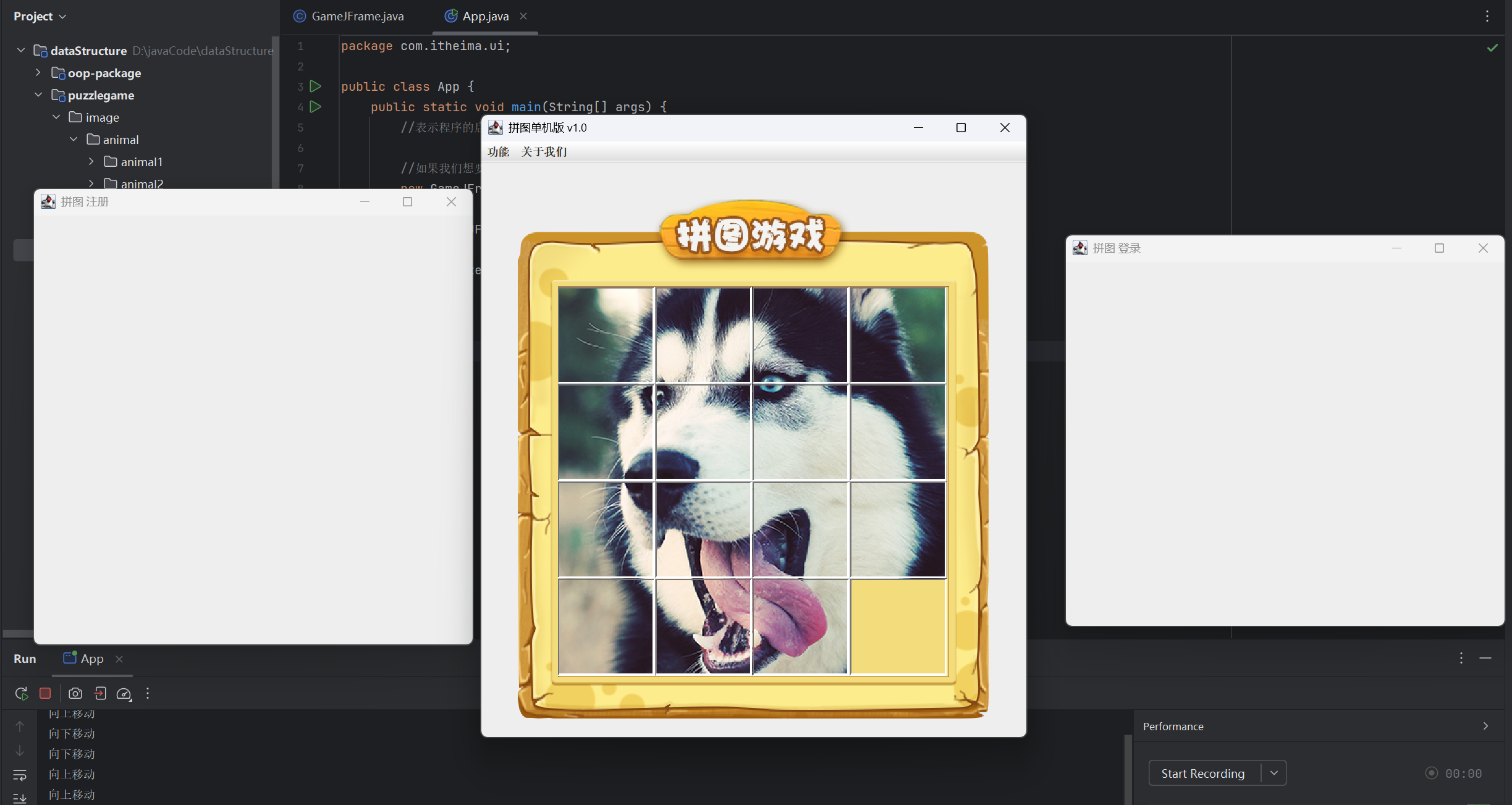
(运行结果截图)
判断胜利
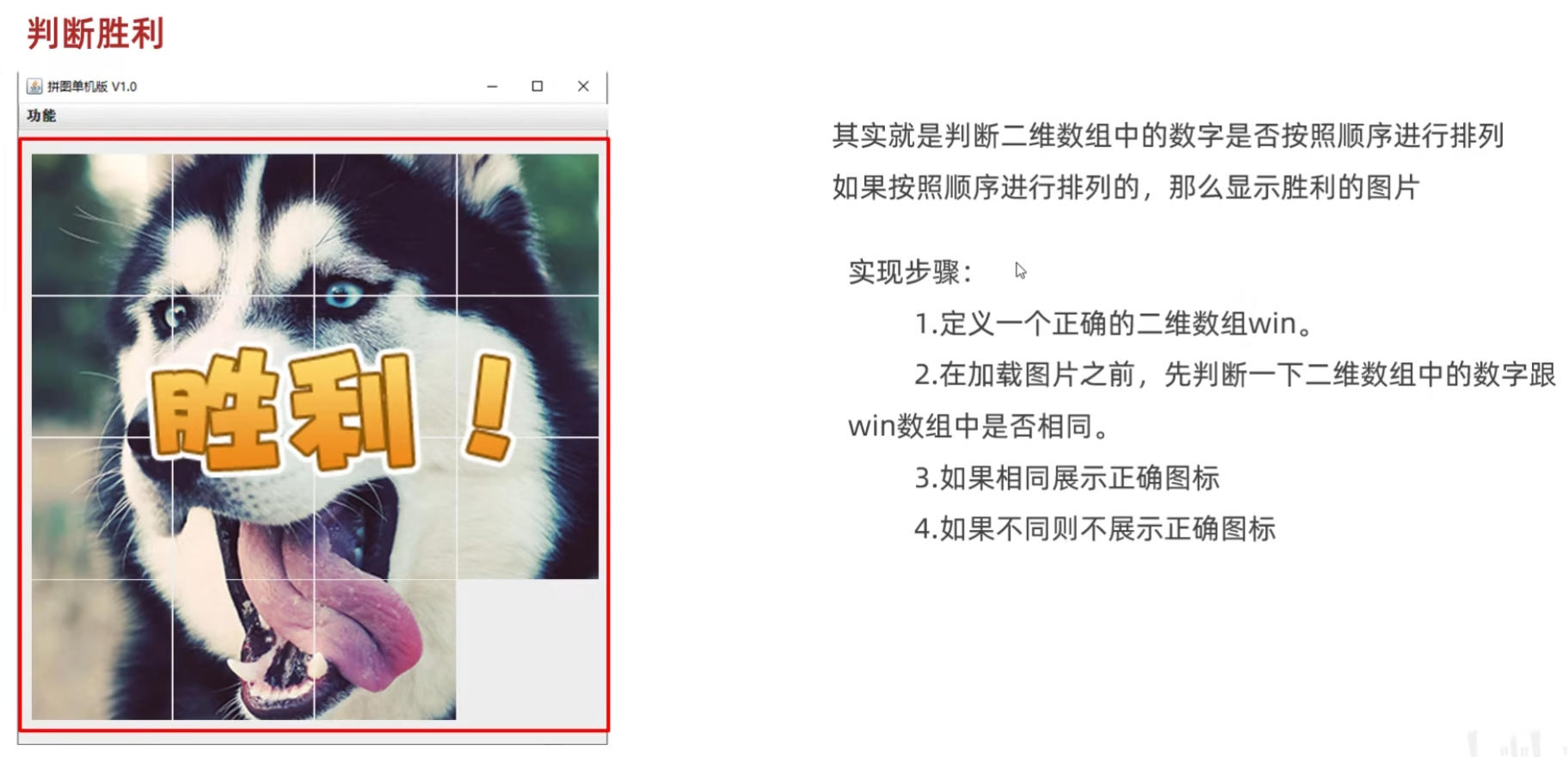
(源代码)
GameJFrame
java
package com.itheima.ui;

import javax.swing.*;
import javax.swing.border.BevelBorder;
import java.awt.event.KeyEvent;
import java.awt.event.KeyListener;
import java.util.Random;

public class GameJFrame extends JFrame implements KeyListener {
    //GameJFrame 表示游戏主界面
    //以后跟游戏有关的代码,都写在这里

    //创建一个二维数组
    //目的:用来管理数据
    //加载图片的时候,会根据二维数组中的数据进行加载
    int[][] data = new int[4][4];

    //记录空白方块在二维数组中的位置
    int x = 0;
    int y = 0;

    //定义一个变量,记录当前图片的路径
    String path = "D:\\javaCode\\dataStructure\\puzzlegame\\image\\animal\\animal3\\";

    //定义一个二维数组,存储正确的数据
    int[][] win = new int[][]{
            {1,2,3,4},
            {5,6,7,8},
            {9,10,11,12},
            {13,14,15,0}
    };

    public GameJFrame() {
        //初始化界面
        initJFrame();

        //初始化菜单
        initJMenuBar();

        //初始化数据(打乱)
        initData();

        //初始化图片(根据打乱后的结果去加载图片)
        initImage();;


        //设置显示(建议写在最后)
        this.setVisible(true);
    }


    private void initData() {
        //1.定义一个一维数组
        int[] tempArr = {0, 1, 2, 3, 4, 5, 6, 7, 8, 9, 10, 11, 12, 13, 14, 15};
        //2.打乱数组中的数据顺序
        //遍历数组,得到每一个元素,拿着每一个元素跟随机索引上的数据进行交换
        Random r = new Random();
        for (int i = 0; i < tempArr.length; i++) {
            int index = r.nextInt(tempArr.length);
            int temp = tempArr[i];
            tempArr[i] =tempArr[index];
            tempArr[index] = temp;
        }

        //5.给二维数组添加元素
        //解法一:
        for (int i = 0; i < tempArr.length; i++) {
            if(tempArr[i] == 0){
                x = i / 4;
                y = i % 4;
            }else{
                data[i / 4][i % 4] = tempArr[i];
            }

        }
    }


    //初始化图片
    //添加图片的时候,就需要按照二维数组中管理的数据添加图片
    private void initImage() {
        //清空原本已经出现的所有图片
        this.getContentPane().removeAll();

        if(victory()){
            //显示胜利的图标
            JLabel winJLabel = new JLabel(new ImageIcon("D:\\javaCode\\dataStructure\\puzzlegame\\image\\win.png"));
            winJLabel.setBounds(203,283,197,73);
            this.getContentPane().add(winJLabel);
        }

        //细节:
        //先加载的图片在上方,后加载的图片塞在下面

        //外循环 --- 把内循环重复执行了4次
        for (int i = 0; i < 4; i++) {
            //内循环 --- 表示在一行添加4张图片
            for (int j = 0; j < 4; j++) {
                //获取当前图片的序号
                int num = data[i][j];
                //创建一个JLabel的对象(管理容器)
                JLabel jLabel = new JLabel(new ImageIcon(path + num +".jpg"));
                //指定图片位置
                jLabel.setBounds(105 * j + 83,105 * i + 134,105,105);
                //给图片添加边框
                //0:表示让图片凸起来
                //1:表示让图片凹下去
                jLabel.setBorder(new BevelBorder(BevelBorder.LOWERED));
                //把管理容器添加到界面中
                this.getContentPane().add(jLabel);
                //添加一次后number需要自增,表示下一次加载后面一张图片
            }
        }

        //添加背景图片
        ImageIcon bg = new ImageIcon("D:\\javaCode\\dataStructure\\puzzlegame\\image\\background.png");
        JLabel background = new JLabel(bg);
        background.setBounds(40,40,508,560);
        //把背景图片添加到界面中
        this.getContentPane().add(background);

        //给整个界面添加键盘监听事件
        this.addKeyListener(this);

        //刷新一下界面
        this.getContentPane().repaint();

    }

    private void initJMenuBar() {
        //初始化菜单
        //创建整个的菜单对象
        JMenuBar JMenuBar = new JMenuBar();

        //创建菜单上面的两个选项的对象 (功能 关于我们)
        JMenu functionJMenu = new JMenu("功能");
        JMenu aboutJMenu = new JMenu("关于我们");

        //创建选项下面的条目对象
        JMenuItem replayItem = new JMenuItem("重新游戏");
        JMenuItem reLoginItem = new JMenuItem("重新登录");
        JMenuItem closeItem = new JMenuItem("关闭游戏");

        JMenuItem accountItem = new JMenuItem("公众号");

        //将每一个选项下面的条目添加到选项中
        functionJMenu.add(replayItem);
        functionJMenu.add(reLoginItem);
        functionJMenu.add(closeItem);

        aboutJMenu.add(accountItem);

        //将菜单里面的两个选项添加到菜单中
        JMenuBar.add(functionJMenu);
        JMenuBar.add(aboutJMenu);

        //给整个界面设置菜单
        this.setJMenuBar(JMenuBar);
    }

    private void initJFrame() {
        //设置宽 高
        this.setSize(603,680);
        //设置界面标题
        this.setTitle("拼图单机版 v1.0");
        //设置界面置顶
        this.setAlwaysOnTop(true);
        //设置界面居中
        this.setLocationRelativeTo(null);
        //设置界面关闭
        this.setDefaultCloseOperation(WindowConstants.EXIT_ON_CLOSE);
        //取消默认的中间位置,只有取消了才会按照XY轴的形式添加组件
        this.setLayout(null);
    }

    @Override
    public void keyTyped(KeyEvent e) {

    }

    @Override
    public void keyPressed(KeyEvent e) {
        int code = e.getKeyCode();
        if(code == 65){
            //把界面中所有图片全部删除
            this.getContentPane().removeAll();
            //加载第一张完整图片
            JLabel all = new JLabel(new ImageIcon(path + "all.jpg"));
            all.setBounds(83,134,420,420);
            this.getContentPane().add(all);

            //添加背景图片
            ImageIcon bg = new ImageIcon("D:\\javaCode\\dataStructure\\puzzlegame\\image\\background.png");
            JLabel background = new JLabel(bg);
            background.setBounds(40,40,508,560);
            //把背景图片添加到界面中
            this.getContentPane().add(background);

            //刷新一下界面
            this.getContentPane().repaint();
        }

    }

    @Override
    public void keyReleased(KeyEvent e) {
        //判断游戏是否胜利,如果胜利,此方法直接结束,不能再执行下面的移动代码了
        if(victory()){
            //结束方法
            return;
        }

        //对上,下,左,右进行判断
        //左:37 上:38 右:39 下:40
        int code = e.getKeyCode();
        if(code == 37){
            System.out.println("向左移动");
            if(y == 3){
                return;
            }

            //把空白方块右方的数字往左移动
            data[x][y] = data[x][y + 1];
            data[x][y + 1] = 0;
            y++;
            //调用方法按照最新的数字加载图片
            initImage();

        }else if(code == 38){
            System.out.println("向上移动");
            if(x == 3){
                //表示空白方块已经在最下方了,他的下面没有图片再能移动了
                return;
            }
            //逻辑:
            //把空白方块下方的数字往上移动
            //x,y 表示空白方块
            //x + 1,y 表示空白方块下方的数字

            //把空白方块下方的数字赋值给空白方块
            data[x][y] = data[x + 1][y];
            data[x + 1][y] = 0;
            x++;
            //调用方法按照最新的数字加载图片
            initImage();

        }else if(code == 39){
            System.out.println("向右移动");
            if(y == 0){
                return;
            }

            //把空白方块左方的数字往右移动
            data[x][y] = data[x][y - 1];
            data[x][y - 1] = 0;
            y--;
            //调用方法按照最新的数字加载图片
            initImage();

        }else if(code == 40){
            System.out.println("向下移动");
            if(x == 0){
                return;
            }

            //把空白方块上方的数字往下移动
            data[x][y] = data[x - 1][y];
            data[x - 1][y] = 0;
            x--;
            //调用方法按照最新的数字加载图片
            initImage();

        }else if(code == 65){
            initImage();
        }else if(code == 87){
            data = new int[][]{
                    {1, 2, 3, 4},
                    {5, 6, 7, 8},
                    {9, 10, 11, 12},
                    {13, 14, 15, 0},
            };
            initImage();
        }

    }

    //判断data数组中的数据是否跟win数组中相同
    //如果全部相同,返回true;否则返回false
    public boolean victory(){
        for (int i = 0; i < data.length; i++) {
            //i : 依次表示二维数组 data 里面的索引
            //data[i] : 表示每一个一维数组
            for (int j = 0; j < data[i].length; j++) {
                if(data[i][j] != win[i][j]){
                    //只要有一个数据不一样,则返回false
                    return false;

                }

            }

        }
        return true;
    }


}
App
java
package com.itheima.ui;

public class App {
    public static void main(String[] args) {
        //表示程序的启动入口

        //如果我们想要开启一个界面,就创建谁的对象就可以了
        new GameJFrame();

        new LoginJFrame();

        new RegisterJFrame();

    }
}
(运行结果截图)
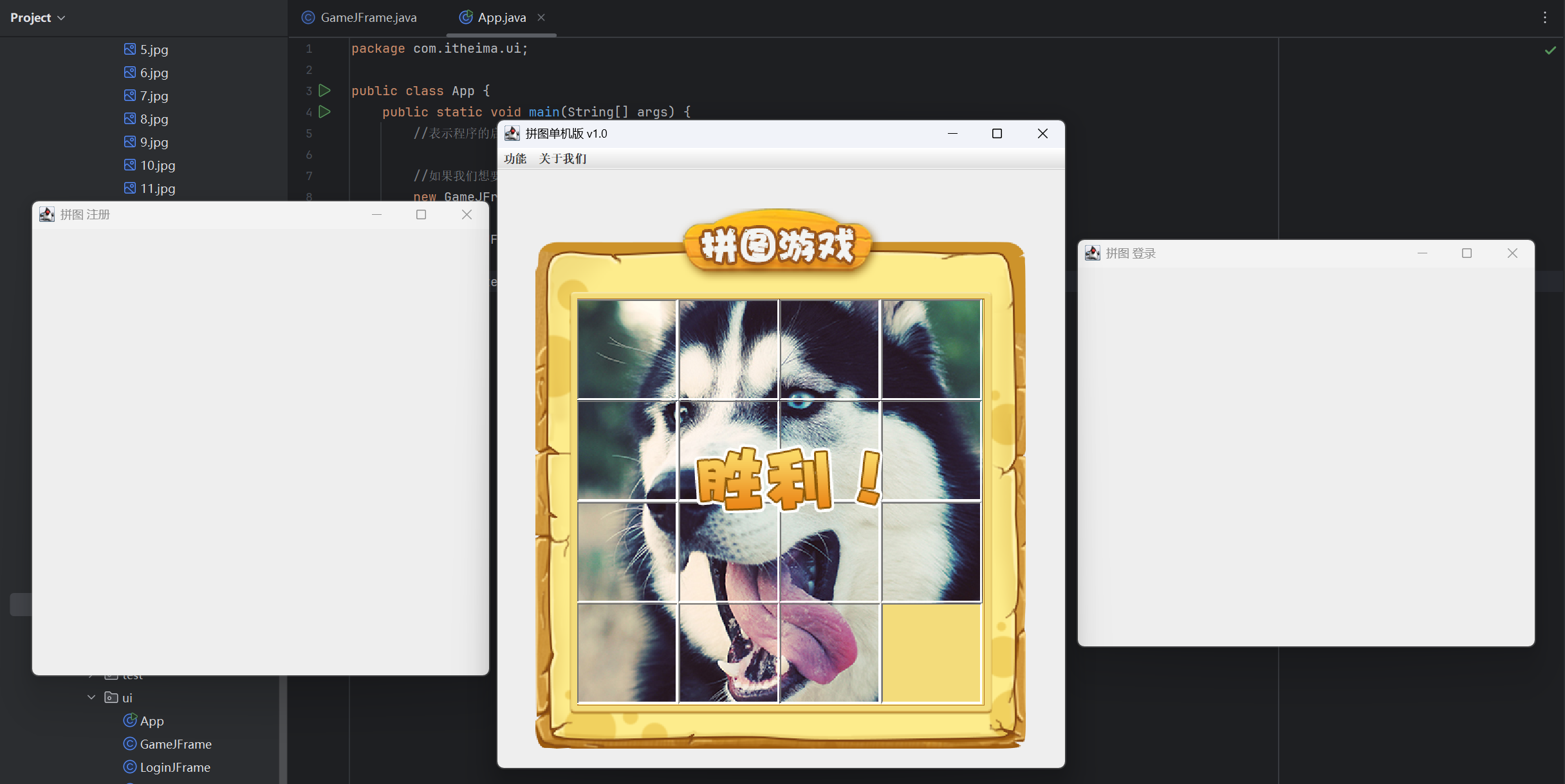
09-计步和菜单业务实现
计步功能
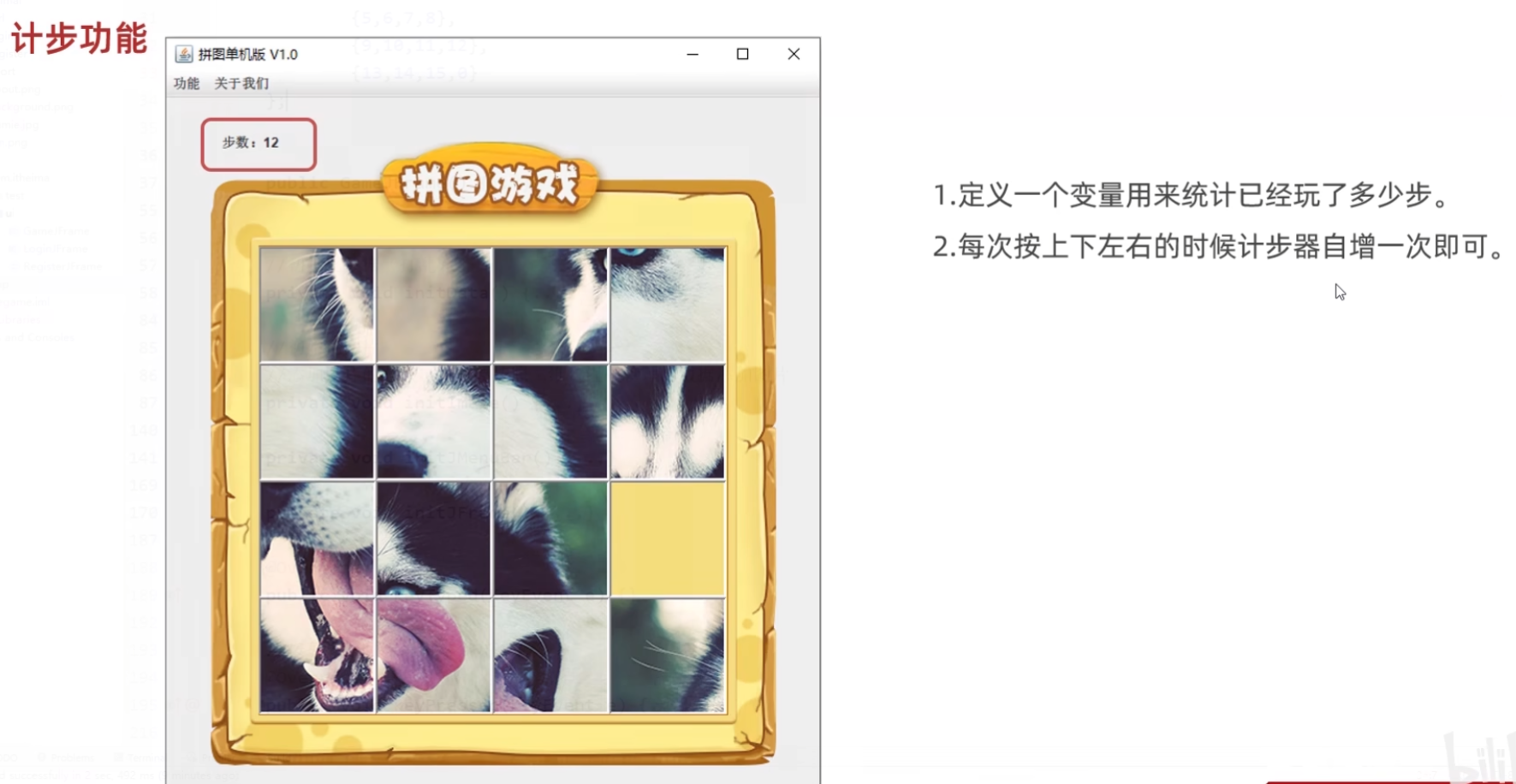
(源代码)
GameJFrame
java
package com.itheima.ui;

import javax.swing.*;
import javax.swing.border.BevelBorder;
import java.awt.event.KeyEvent;
import java.awt.event.KeyListener;
import java.util.Random;

public class GameJFrame extends JFrame implements KeyListener {
    //GameJFrame 表示游戏主界面
    //以后跟游戏有关的代码,都写在这里

    //创建一个二维数组
    //目的:用来管理数据
    //加载图片的时候,会根据二维数组中的数据进行加载
    int[][] data = new int[4][4];

    //记录空白方块在二维数组中的位置
    int x = 0;
    int y = 0;

    //定义一个变量,记录当前图片的路径
    String path = "D:\\javaCode\\dataStructure\\puzzlegame\\image\\animal\\animal3\\";

    //定义一个二维数组,存储正确的数据
    int[][] win = new int[][]{
            {1,2,3,4},
            {5,6,7,8},
            {9,10,11,12},
            {13,14,15,0}
    };

    //定义变量用来统计步数
    int step = 0;

    public GameJFrame() {
        //初始化界面
        initJFrame();

        //初始化菜单
        initJMenuBar();

        //初始化数据(打乱)
        initData();

        //初始化图片(根据打乱后的结果去加载图片)
        initImage();;


        //设置显示(建议写在最后)
        this.setVisible(true);
    }


    private void initData() {
        //1.定义一个一维数组
        int[] tempArr = {0, 1, 2, 3, 4, 5, 6, 7, 8, 9, 10, 11, 12, 13, 14, 15};
        //2.打乱数组中的数据顺序
        //遍历数组,得到每一个元素,拿着每一个元素跟随机索引上的数据进行交换
        Random r = new Random();
        for (int i = 0; i < tempArr.length; i++) {
            int index = r.nextInt(tempArr.length);
            int temp = tempArr[i];
            tempArr[i] =tempArr[index];
            tempArr[index] = temp;
        }

        //5.给二维数组添加元素
        //解法一:
        for (int i = 0; i < tempArr.length; i++) {
            if(tempArr[i] == 0){
                x = i / 4;
                y = i % 4;
            }else{
                data[i / 4][i % 4] = tempArr[i];
            }

        }
    }


    //初始化图片
    //添加图片的时候,就需要按照二维数组中管理的数据添加图片
    private void initImage() {
        //清空原本已经出现的所有图片
        this.getContentPane().removeAll();

        if(victory()){
            //显示胜利的图标
            JLabel winJLabel = new JLabel(new ImageIcon("D:\\javaCode\\dataStructure\\puzzlegame\\image\\win.png"));
            winJLabel.setBounds(203,283,197,73);
            this.getContentPane().add(winJLabel);
        }

        JLabel stepCount = new JLabel("步数:" + step);
        stepCount.setBounds(50,30,100,50);
        this.getContentPane().add(stepCount);

        //细节:
        //先加载的图片在上方,后加载的图片塞在下面

        //外循环 --- 把内循环重复执行了4次
        for (int i = 0; i < 4; i++) {
            //内循环 --- 表示在一行添加4张图片
            for (int j = 0; j < 4; j++) {
                //获取当前图片的序号
                int num = data[i][j];
                //创建一个JLabel的对象(管理容器)
                JLabel jLabel = new JLabel(new ImageIcon(path + num +".jpg"));
                //指定图片位置
                jLabel.setBounds(105 * j + 83,105 * i + 134,105,105);
                //给图片添加边框
                //0:表示让图片凸起来
                //1:表示让图片凹下去
                jLabel.setBorder(new BevelBorder(BevelBorder.LOWERED));
                //把管理容器添加到界面中
                this.getContentPane().add(jLabel);
                //添加一次后number需要自增,表示下一次加载后面一张图片
            }
        }

        //添加背景图片
        ImageIcon bg = new ImageIcon("D:\\javaCode\\dataStructure\\puzzlegame\\image\\background.png");
        JLabel background = new JLabel(bg);
        background.setBounds(40,40,508,560);
        //把背景图片添加到界面中
        this.getContentPane().add(background);

        //给整个界面添加键盘监听事件
        this.addKeyListener(this);

        //刷新一下界面
        this.getContentPane().repaint();

    }

    private void initJMenuBar() {
        //初始化菜单
        //创建整个的菜单对象
        JMenuBar JMenuBar = new JMenuBar();

        //创建菜单上面的两个选项的对象 (功能 关于我们)
        JMenu functionJMenu = new JMenu("功能");
        JMenu aboutJMenu = new JMenu("关于我们");

        //创建选项下面的条目对象
        JMenuItem replayItem = new JMenuItem("重新游戏");
        JMenuItem reLoginItem = new JMenuItem("重新登录");
        JMenuItem closeItem = new JMenuItem("关闭游戏");

        JMenuItem accountItem = new JMenuItem("公众号");

        //将每一个选项下面的条目添加到选项中
        functionJMenu.add(replayItem);
        functionJMenu.add(reLoginItem);
        functionJMenu.add(closeItem);

        aboutJMenu.add(accountItem);

        //将菜单里面的两个选项添加到菜单中
        JMenuBar.add(functionJMenu);
        JMenuBar.add(aboutJMenu);

        //给整个界面设置菜单
        this.setJMenuBar(JMenuBar);
    }

    private void initJFrame() {
        //设置宽 高
        this.setSize(603,680);
        //设置界面标题
        this.setTitle("拼图单机版 v1.0");
        //设置界面置顶
        this.setAlwaysOnTop(true);
        //设置界面居中
        this.setLocationRelativeTo(null);
        //设置界面关闭
        this.setDefaultCloseOperation(WindowConstants.EXIT_ON_CLOSE);
        //取消默认的中间位置,只有取消了才会按照XY轴的形式添加组件
        this.setLayout(null);
    }

    @Override
    public void keyTyped(KeyEvent e) {

    }

    @Override
    public void keyPressed(KeyEvent e) {
        int code = e.getKeyCode();
        if(code == 65){
            //把界面中所有图片全部删除
            this.getContentPane().removeAll();
            //加载第一张完整图片
            JLabel all = new JLabel(new ImageIcon(path + "all.jpg"));
            all.setBounds(83,134,420,420);
            this.getContentPane().add(all);

            //添加背景图片
            ImageIcon bg = new ImageIcon("D:\\javaCode\\dataStructure\\puzzlegame\\image\\background.png");
            JLabel background = new JLabel(bg);
            background.setBounds(40,40,508,560);
            //把背景图片添加到界面中
            this.getContentPane().add(background);

            //刷新一下界面
            this.getContentPane().repaint();
        }

    }

    @Override
    public void keyReleased(KeyEvent e) {
        //判断游戏是否胜利,如果胜利,此方法直接结束,不能再执行下面的移动代码了
        if(victory()){
            //结束方法
            return;
        }

        //对上,下,左,右进行判断
        //左:37 上:38 右:39 下:40
        int code = e.getKeyCode();
        if(code == 37){
            System.out.println("向左移动");
            if(y == 3){
                return;
            }

            //把空白方块右方的数字往左移动
            data[x][y] = data[x][y + 1];
            data[x][y + 1] = 0;
            y++;

            //每移动一次,计数器就自增一次
            step++;
            //调用方法按照最新的数字加载图片
            initImage();

        }else if(code == 38){
            System.out.println("向上移动");
            if(x == 3){
                //表示空白方块已经在最下方了,他的下面没有图片再能移动了
                return;
            }
            //逻辑:
            //把空白方块下方的数字往上移动
            //x,y 表示空白方块
            //x + 1,y 表示空白方块下方的数字

            //把空白方块下方的数字赋值给空白方块
            data[x][y] = data[x + 1][y];
            data[x + 1][y] = 0;
            x++;
            //每移动一次,计数器就自增一次
            step++;
            //调用方法按照最新的数字加载图片
            initImage();

        }else if(code == 39){
            System.out.println("向右移动");
            if(y == 0){
                return;
            }

            //把空白方块左方的数字往右移动
            data[x][y] = data[x][y - 1];
            data[x][y - 1] = 0;
            y--;
            //每移动一次,计数器就自增一次
            step++;
            //调用方法按照最新的数字加载图片
            initImage();

        }else if(code == 40){
            System.out.println("向下移动");
            if(x == 0){
                return;
            }

            //把空白方块上方的数字往下移动
            data[x][y] = data[x - 1][y];
            data[x - 1][y] = 0;
            x--;
            //每移动一次,计数器就自增一次
            step++;
            //调用方法按照最新的数字加载图片
            initImage();

        }else if(code == 65){
            initImage();
        }else if(code == 87){
            data = new int[][]{
                    {1, 2, 3, 4},
                    {5, 6, 7, 8},
                    {9, 10, 11, 12},
                    {13, 14, 15, 0},
            };
            initImage();
        }

    }

    //判断data数组中的数据是否跟win数组中相同
    //如果全部相同,返回true;否则返回false
    public boolean victory(){
        for (int i = 0; i < data.length; i++) {
            //i : 依次表示二维数组 data 里面的索引
            //data[i] : 表示每一个一维数组
            for (int j = 0; j < data[i].length; j++) {
                if(data[i][j] != win[i][j]){
                    //只要有一个数据不一样,则返回false
                    return false;

                }

            }

        }
        return true;
    }


}
App
java
package com.itheima.ui;

public class App {
    public static void main(String[] args) {
        //表示程序的启动入口

        //如果我们想要开启一个界面,就创建谁的对象就可以了
        new GameJFrame();

        new LoginJFrame();

        new RegisterJFrame();

    }
}
(运行结果截图)
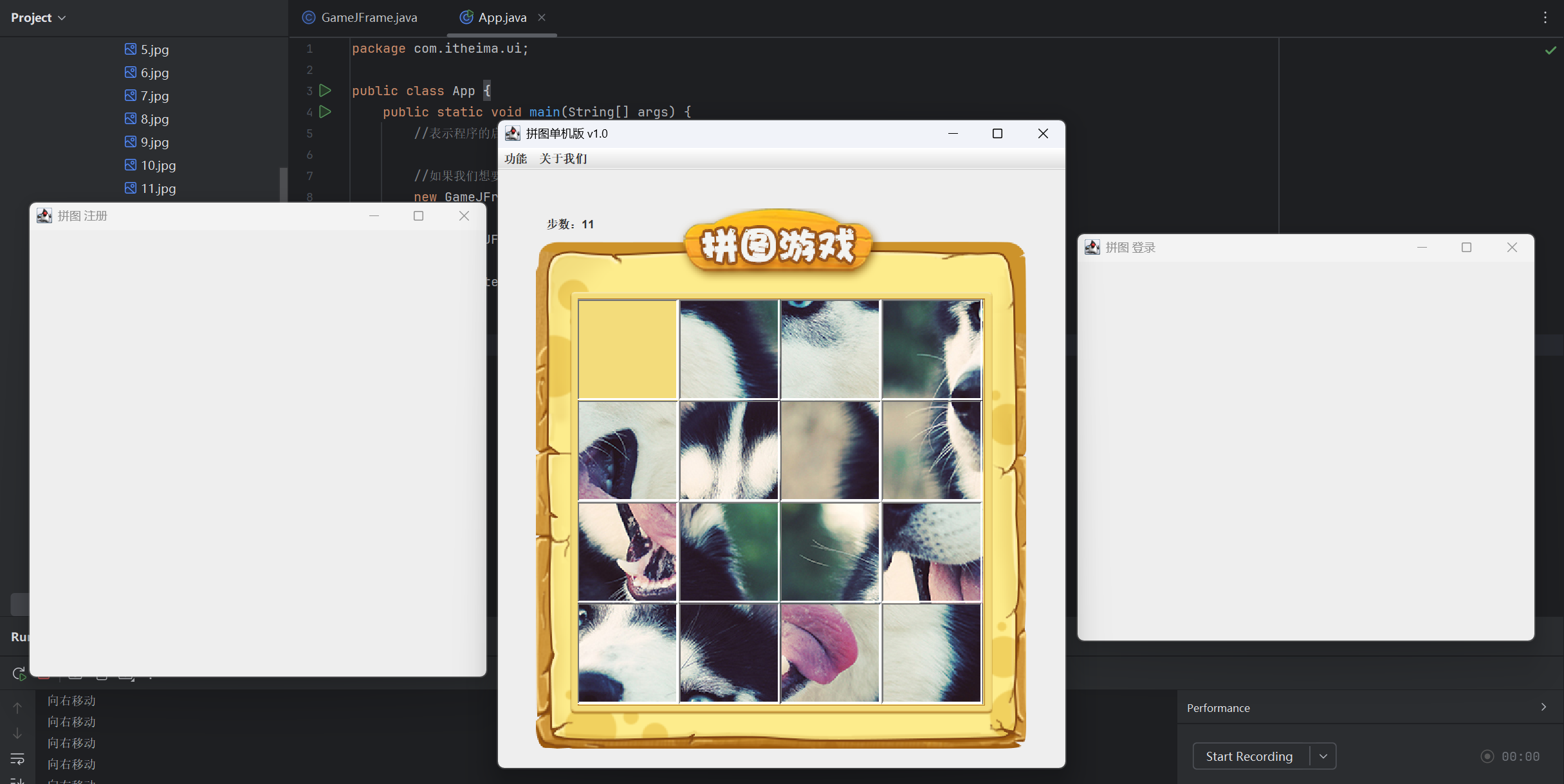
菜单业务实现
重新开始
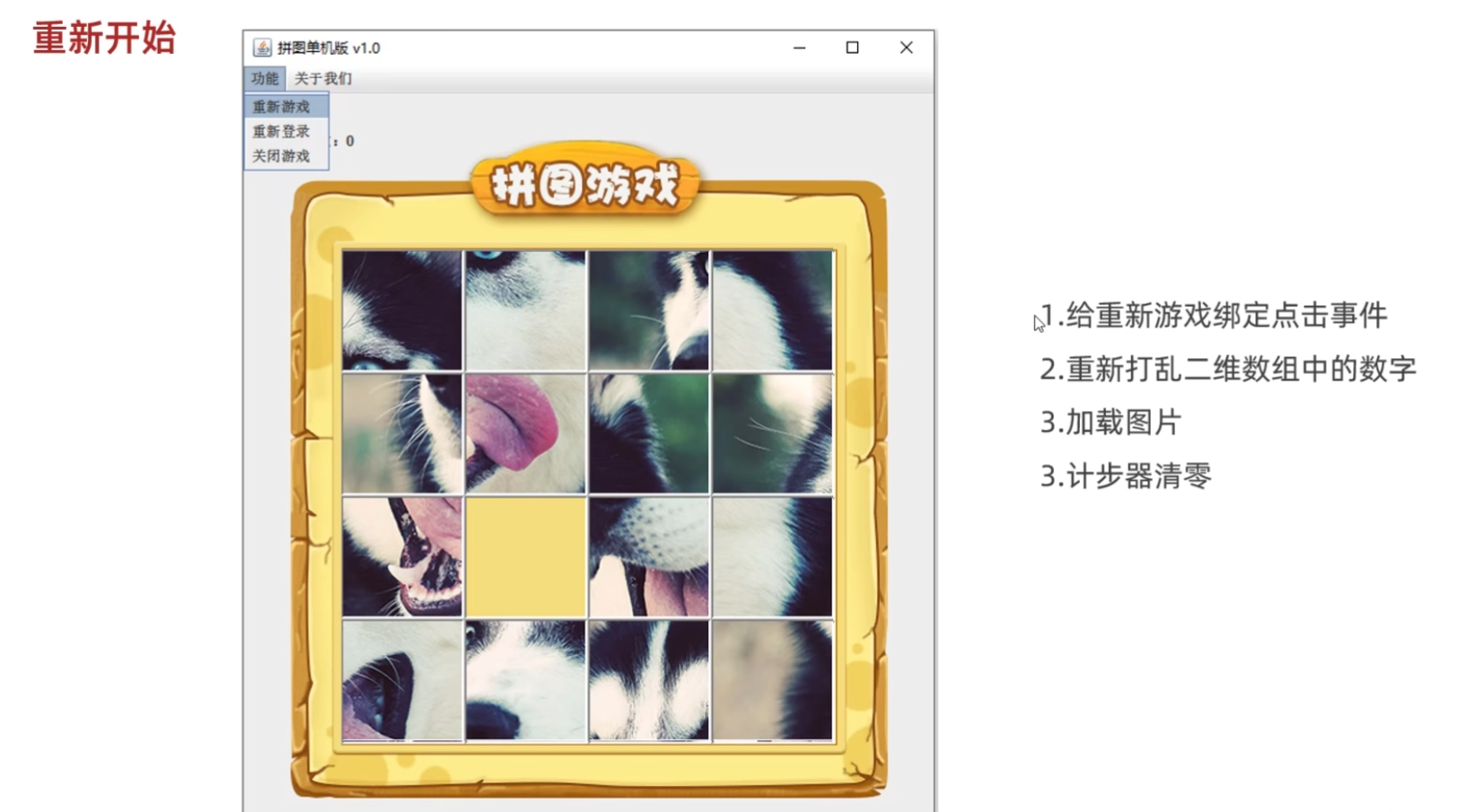
(源代码)
GameJFrame
java
package com.itheima.ui;

import javax.swing.*;
import javax.swing.border.BevelBorder;
import java.awt.event.ActionEvent;
import java.awt.event.ActionListener;
import java.awt.event.KeyEvent;
import java.awt.event.KeyListener;
import java.util.Random;

public class GameJFrame extends JFrame implements KeyListener, ActionListener {
    //GameJFrame 表示游戏主界面
    //以后跟游戏有关的代码,都写在这里

    //创建一个二维数组
    //目的:用来管理数据
    //加载图片的时候,会根据二维数组中的数据进行加载
    int[][] data = new int[4][4];

    //记录空白方块在二维数组中的位置
    int x = 0;
    int y = 0;

    //定义一个变量,记录当前图片的路径
    String path = "D:\\javaCode\\dataStructure\\puzzlegame\\image\\animal\\animal3\\";

    //定义一个二维数组,存储正确的数据
    int[][] win = new int[][]{
            {1,2,3,4},
            {5,6,7,8},
            {9,10,11,12},
            {13,14,15,0}
    };

    //定义变量用来统计步数
    int step = 0;

    //创建选项下面的条目对象
    JMenuItem replayItem = new JMenuItem("重新游戏");
    JMenuItem reLoginItem = new JMenuItem("重新登录");
    JMenuItem closeItem = new JMenuItem("关闭游戏");

    JMenuItem accountItem = new JMenuItem("公众号");

    public GameJFrame() {
        //初始化界面
        initJFrame();

        //初始化菜单
        initJMenuBar();

        //初始化数据(打乱)
        initData();

        //初始化图片(根据打乱后的结果去加载图片)
        initImage();;


        //设置显示(建议写在最后)
        this.setVisible(true);
    }


    private void initData() {
        //1.定义一个一维数组
        int[] tempArr = {0, 1, 2, 3, 4, 5, 6, 7, 8, 9, 10, 11, 12, 13, 14, 15};
        //2.打乱数组中的数据顺序
        //遍历数组,得到每一个元素,拿着每一个元素跟随机索引上的数据进行交换
        Random r = new Random();
        for (int i = 0; i < tempArr.length; i++) {
            int index = r.nextInt(tempArr.length);
            int temp = tempArr[i];
            tempArr[i] =tempArr[index];
            tempArr[index] = temp;
        }

        //5.给二维数组添加元素
        //解法一:
        for (int i = 0; i < tempArr.length; i++) {
            if(tempArr[i] == 0){
                x = i / 4;
                y = i % 4;
            }

            data[i / 4][i % 4] = tempArr[i];

        }
    }


    //初始化图片
    //添加图片的时候,就需要按照二维数组中管理的数据添加图片
    private void initImage() {
        //清空原本已经出现的所有图片
        this.getContentPane().removeAll();

        if(victory()){
            //显示胜利的图标
            JLabel winJLabel = new JLabel(new ImageIcon("D:\\javaCode\\dataStructure\\puzzlegame\\image\\win.png"));
            winJLabel.setBounds(203,283,197,73);
            this.getContentPane().add(winJLabel);
        }

        JLabel stepCount = new JLabel("步数:" + step);
        stepCount.setBounds(50,30,100,50);
        this.getContentPane().add(stepCount);

        //细节:
        //先加载的图片在上方,后加载的图片塞在下面

        //外循环 --- 把内循环重复执行了4次
        for (int i = 0; i < 4; i++) {
            //内循环 --- 表示在一行添加4张图片
            for (int j = 0; j < 4; j++) {
                //获取当前图片的序号
                int num = data[i][j];
                //创建一个JLabel的对象(管理容器)
                JLabel jLabel = new JLabel(new ImageIcon(path + num +".jpg"));
                //指定图片位置
                jLabel.setBounds(105 * j + 83,105 * i + 134,105,105);
                //给图片添加边框
                //0:表示让图片凸起来
                //1:表示让图片凹下去
                jLabel.setBorder(new BevelBorder(BevelBorder.LOWERED));
                //把管理容器添加到界面中
                this.getContentPane().add(jLabel);
                //添加一次后number需要自增,表示下一次加载后面一张图片
            }
        }

        //添加背景图片
        ImageIcon bg = new ImageIcon("D:\\javaCode\\dataStructure\\puzzlegame\\image\\background.png");
        JLabel background = new JLabel(bg);
        background.setBounds(40,40,508,560);
        //把背景图片添加到界面中
        this.getContentPane().add(background);

        //给整个界面添加键盘监听事件
        this.addKeyListener(this);

        //刷新一下界面
        this.getContentPane().repaint();

    }

    private void initJMenuBar() {
        //初始化菜单
        //创建整个的菜单对象
        JMenuBar JMenuBar = new JMenuBar();

        //创建菜单上面的两个选项的对象 (功能 关于我们)
        JMenu functionJMenu = new JMenu("功能");
        JMenu aboutJMenu = new JMenu("关于我们");

        //将每一个选项下面的条目添加到选项中
        functionJMenu.add(replayItem);
        functionJMenu.add(reLoginItem);
        functionJMenu.add(closeItem);

        aboutJMenu.add(accountItem);

        //给条目绑定事件
        replayItem.addActionListener(this);
        reLoginItem.addActionListener(this);
        closeItem.addActionListener(this);
        accountItem.addActionListener(this);

        //将菜单里面的两个选项添加到菜单中
        JMenuBar.add(functionJMenu);
        JMenuBar.add(aboutJMenu);

        //给整个界面设置菜单
        this.setJMenuBar(JMenuBar);
    }

    private void initJFrame() {
        //设置宽 高
        this.setSize(603,680);
        //设置界面标题
        this.setTitle("拼图单机版 v1.0");
        //设置界面置顶
        this.setAlwaysOnTop(true);
        //设置界面居中
        this.setLocationRelativeTo(null);
        //设置界面关闭
        this.setDefaultCloseOperation(WindowConstants.EXIT_ON_CLOSE);
        //取消默认的中间位置,只有取消了才会按照XY轴的形式添加组件
        this.setLayout(null);
    }

    @Override
    public void keyTyped(KeyEvent e) {

    }

    @Override
    public void keyPressed(KeyEvent e) {
        int code = e.getKeyCode();
        if(code == 65){
            //把界面中所有图片全部删除
            this.getContentPane().removeAll();
            //加载第一张完整图片
            JLabel all = new JLabel(new ImageIcon(path + "all.jpg"));
            all.setBounds(83,134,420,420);
            this.getContentPane().add(all);

            //添加背景图片
            ImageIcon bg = new ImageIcon("D:\\javaCode\\dataStructure\\puzzlegame\\image\\background.png");
            JLabel background = new JLabel(bg);
            background.setBounds(40,40,508,560);
            //把背景图片添加到界面中
            this.getContentPane().add(background);

            //刷新一下界面
            this.getContentPane().repaint();
        }

    }

    @Override
    public void keyReleased(KeyEvent e) {
        //判断游戏是否胜利,如果胜利,此方法直接结束,不能再执行下面的移动代码了
        if(victory()){
            //结束方法
            return;
        }

        //对上,下,左,右进行判断
        //左:37 上:38 右:39 下:40
        int code = e.getKeyCode();
        if(code == 37){
            System.out.println("向左移动");
            if(y == 3){
                return;
            }

            //把空白方块右方的数字往左移动
            data[x][y] = data[x][y + 1];
            data[x][y + 1] = 0;
            y++;

            //每移动一次,计数器就自增一次
            step++;
            //调用方法按照最新的数字加载图片
            initImage();

        }else if(code == 38){
            System.out.println("向上移动");
            if(x == 3){
                //表示空白方块已经在最下方了,他的下面没有图片再能移动了
                return;
            }
            //逻辑:
            //把空白方块下方的数字往上移动
            //x,y 表示空白方块
            //x + 1,y 表示空白方块下方的数字

            //把空白方块下方的数字赋值给空白方块
            data[x][y] = data[x + 1][y];
            data[x + 1][y] = 0;
            x++;
            //每移动一次,计数器就自增一次
            step++;
            //调用方法按照最新的数字加载图片
            initImage();

        }else if(code == 39){
            System.out.println("向右移动");
            if(y == 0){
                return;
            }

            //把空白方块左方的数字往右移动
            data[x][y] = data[x][y - 1];
            data[x][y - 1] = 0;
            y--;
            //每移动一次,计数器就自增一次
            step++;
            //调用方法按照最新的数字加载图片
            initImage();

        }else if(code == 40){
            System.out.println("向下移动");
            if(x == 0){
                return;
            }

            //把空白方块上方的数字往下移动
            data[x][y] = data[x - 1][y];
            data[x - 1][y] = 0;
            x--;
            //每移动一次,计数器就自增一次
            step++;
            //调用方法按照最新的数字加载图片
            initImage();

        }else if(code == 65){
            initImage();
        }else if(code == 87){
            data = new int[][]{
                    {1, 2, 3, 4},
                    {5, 6, 7, 8},
                    {9, 10, 11, 12},
                    {13, 14, 15, 0},
            };
            initImage();
        }

    }

    //判断data数组中的数据是否跟win数组中相同
    //如果全部相同,返回true;否则返回false
    public boolean victory(){
        for (int i = 0; i < data.length; i++) {
            //i : 依次表示二维数组 data 里面的索引
            //data[i] : 表示每一个一维数组
            for (int j = 0; j < data[i].length; j++) {
                if(data[i][j] != win[i][j]){
                    //只要有一个数据不一样,则返回false
                    return false;

                }

            }

        }
        return true;
    }


    @Override
    public void actionPerformed(ActionEvent e) {
        //获取当前被点击的条目对象
        Object obj = e.getSource();
        //判断
        if(obj == replayItem){
            System.out.println("重新游戏");

            step = 0;

            initData();

            initImage();

        }else if(obj == reLoginItem){
            System.out.println("重新登录");
        }else if(obj == closeItem){
            System.out.println("关闭游戏");
        }else if(obj == accountItem){
            System.out.println("公众号");
        }
    }
}
App
java
package com.itheima.ui;

public class App {
    public static void main(String[] args) {
        //表示程序的启动入口

        //如果我们想要开启一个界面,就创建谁的对象就可以了
        new GameJFrame();

        new LoginJFrame();

        new RegisterJFrame();

    }
}
(运行结果截图)
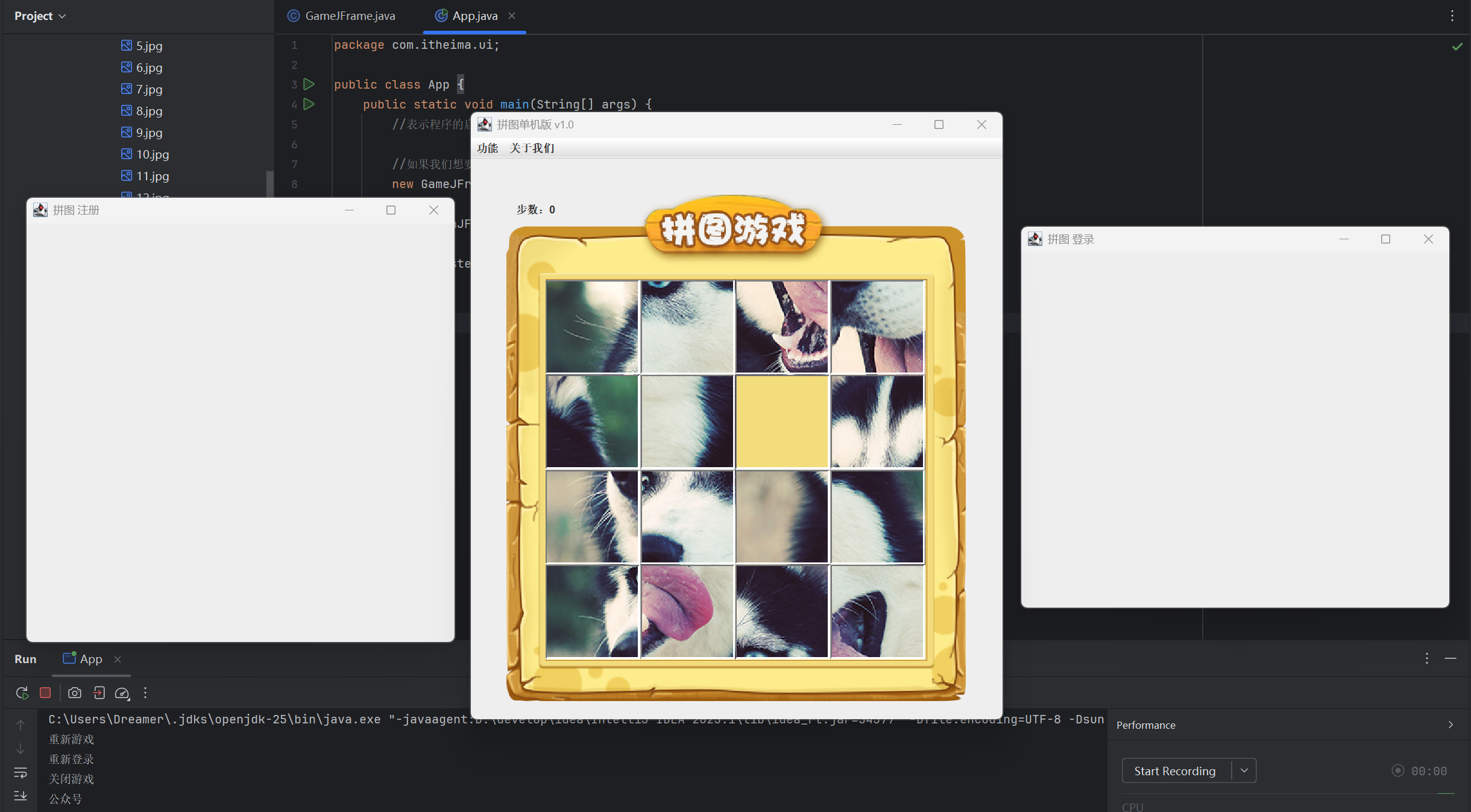
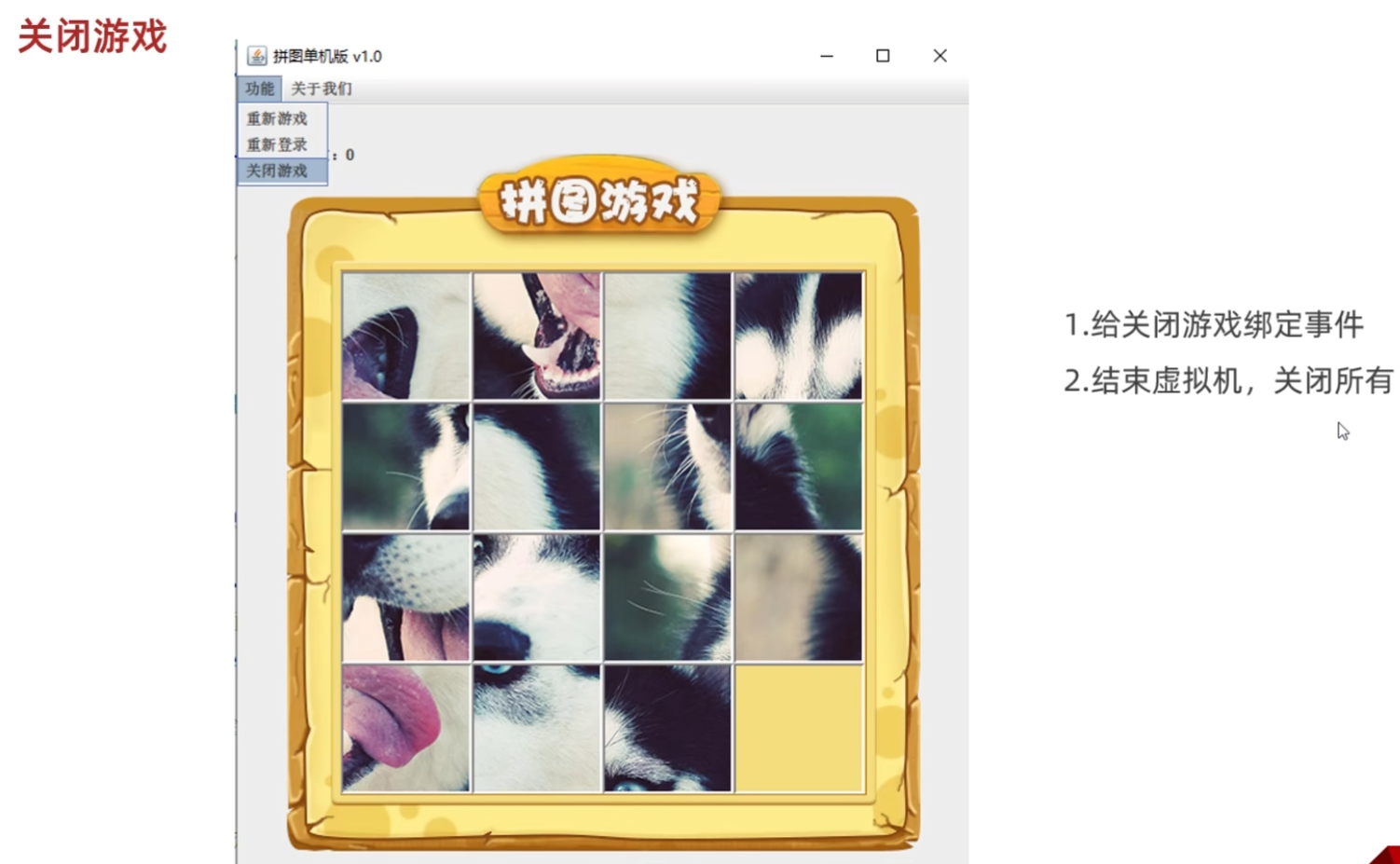
关闭游戏
关于我们

(源代码)
GameJFrame
java
package com.itheima.ui;

import javax.swing.*;
import javax.swing.border.BevelBorder;
import java.awt.event.ActionEvent;
import java.awt.event.ActionListener;
import java.awt.event.KeyEvent;
import java.awt.event.KeyListener;
import java.util.Random;

public class GameJFrame extends JFrame implements KeyListener, ActionListener {
    //GameJFrame 表示游戏主界面
    //以后跟游戏有关的代码,都写在这里

    //创建一个二维数组
    //目的:用来管理数据
    //加载图片的时候,会根据二维数组中的数据进行加载
    int[][] data = new int[4][4];

    //记录空白方块在二维数组中的位置
    int x = 0;
    int y = 0;

    //定义一个变量,记录当前图片的路径
    String path = "D:\\javaCode\\dataStructure\\puzzlegame\\image\\animal\\animal3\\";

    //定义一个二维数组,存储正确的数据
    int[][] win = new int[][]{
            {1,2,3,4},
            {5,6,7,8},
            {9,10,11,12},
            {13,14,15,0}
    };

    //定义变量用来统计步数
    int step = 0;

    //创建选项下面的条目对象
    JMenuItem replayItem = new JMenuItem("重新游戏");
    JMenuItem reLoginItem = new JMenuItem("重新登录");
    JMenuItem closeItem = new JMenuItem("关闭游戏");

    JMenuItem accountItem = new JMenuItem("公众号");

    public GameJFrame() {
        //初始化界面
        initJFrame();

        //初始化菜单
        initJMenuBar();

        //初始化数据(打乱)
        initData();

        //初始化图片(根据打乱后的结果去加载图片)
        initImage();;


        //设置显示(建议写在最后)
        this.setVisible(true);
    }


    private void initData() {
        //1.定义一个一维数组
        int[] tempArr = {0, 1, 2, 3, 4, 5, 6, 7, 8, 9, 10, 11, 12, 13, 14, 15};
        //2.打乱数组中的数据顺序
        //遍历数组,得到每一个元素,拿着每一个元素跟随机索引上的数据进行交换
        Random r = new Random();
        for (int i = 0; i < tempArr.length; i++) {
            int index = r.nextInt(tempArr.length);
            int temp = tempArr[i];
            tempArr[i] =tempArr[index];
            tempArr[index] = temp;
        }

        //5.给二维数组添加元素
        //解法一:
        for (int i = 0; i < tempArr.length; i++) {
            if(tempArr[i] == 0){
                x = i / 4;
                y = i % 4;
            }

            data[i / 4][i % 4] = tempArr[i];

        }
    }


    //初始化图片
    //添加图片的时候,就需要按照二维数组中管理的数据添加图片
    private void initImage() {
        //清空原本已经出现的所有图片
        this.getContentPane().removeAll();

        if(victory()){
            //显示胜利的图标
            JLabel winJLabel = new JLabel(new ImageIcon("D:\\javaCode\\dataStructure\\puzzlegame\\image\\win.png"));
            winJLabel.setBounds(203,283,197,73);
            this.getContentPane().add(winJLabel);
        }

        JLabel stepCount = new JLabel("步数:" + step);
        stepCount.setBounds(50,30,100,50);
        this.getContentPane().add(stepCount);

        //细节:
        //先加载的图片在上方,后加载的图片塞在下面

        //外循环 --- 把内循环重复执行了4次
        for (int i = 0; i < 4; i++) {
            //内循环 --- 表示在一行添加4张图片
            for (int j = 0; j < 4; j++) {
                //获取当前图片的序号
                int num = data[i][j];
                //创建一个JLabel的对象(管理容器)
                JLabel jLabel = new JLabel(new ImageIcon(path + num +".jpg"));
                //指定图片位置
                jLabel.setBounds(105 * j + 83,105 * i + 134,105,105);
                //给图片添加边框
                //0:表示让图片凸起来
                //1:表示让图片凹下去
                jLabel.setBorder(new BevelBorder(BevelBorder.LOWERED));
                //把管理容器添加到界面中
                this.getContentPane().add(jLabel);
                //添加一次后number需要自增,表示下一次加载后面一张图片
            }
        }

        //添加背景图片
        ImageIcon bg = new ImageIcon("D:\\javaCode\\dataStructure\\puzzlegame\\image\\background.png");
        JLabel background = new JLabel(bg);
        background.setBounds(40,40,508,560);
        //把背景图片添加到界面中
        this.getContentPane().add(background);

        //给整个界面添加键盘监听事件
        this.addKeyListener(this);

        //刷新一下界面
        this.getContentPane().repaint();

    }

    private void initJMenuBar() {
        //初始化菜单
        //创建整个的菜单对象
        JMenuBar JMenuBar = new JMenuBar();

        //创建菜单上面的两个选项的对象 (功能 关于我们)
        JMenu functionJMenu = new JMenu("功能");
        JMenu aboutJMenu = new JMenu("关于我们");

        //将每一个选项下面的条目添加到选项中
        functionJMenu.add(replayItem);
        functionJMenu.add(reLoginItem);
        functionJMenu.add(closeItem);

        aboutJMenu.add(accountItem);

        //给条目绑定事件
        replayItem.addActionListener(this);
        reLoginItem.addActionListener(this);
        closeItem.addActionListener(this);
        accountItem.addActionListener(this);

        //将菜单里面的两个选项添加到菜单中
        JMenuBar.add(functionJMenu);
        JMenuBar.add(aboutJMenu);

        //给整个界面设置菜单
        this.setJMenuBar(JMenuBar);
    }

    private void initJFrame() {
        //设置宽 高
        this.setSize(603,680);
        //设置界面标题
        this.setTitle("拼图单机版 v1.0");
        //设置界面置顶
        this.setAlwaysOnTop(true);
        //设置界面居中
        this.setLocationRelativeTo(null);
        //设置界面关闭
        this.setDefaultCloseOperation(WindowConstants.EXIT_ON_CLOSE);
        //取消默认的中间位置,只有取消了才会按照XY轴的形式添加组件
        this.setLayout(null);
    }

    @Override
    public void keyTyped(KeyEvent e) {

    }

    @Override
    public void keyPressed(KeyEvent e) {
        int code = e.getKeyCode();
        if(code == 65){
            //把界面中所有图片全部删除
            this.getContentPane().removeAll();
            //加载第一张完整图片
            JLabel all = new JLabel(new ImageIcon(path + "all.jpg"));
            all.setBounds(83,134,420,420);
            this.getContentPane().add(all);

            //添加背景图片
            ImageIcon bg = new ImageIcon("D:\\javaCode\\dataStructure\\puzzlegame\\image\\background.png");
            JLabel background = new JLabel(bg);
            background.setBounds(40,40,508,560);
            //把背景图片添加到界面中
            this.getContentPane().add(background);

            //刷新一下界面
            this.getContentPane().repaint();
        }

    }

    @Override
    public void keyReleased(KeyEvent e) {
        //判断游戏是否胜利,如果胜利,此方法直接结束,不能再执行下面的移动代码了
        if(victory()){
            //结束方法
            return;
        }

        //对上,下,左,右进行判断
        //左:37 上:38 右:39 下:40
        int code = e.getKeyCode();
        if(code == 37){
            System.out.println("向左移动");
            if(y == 3){
                return;
            }

            //把空白方块右方的数字往左移动
            data[x][y] = data[x][y + 1];
            data[x][y + 1] = 0;
            y++;

            //每移动一次,计数器就自增一次
            step++;
            //调用方法按照最新的数字加载图片
            initImage();

        }else if(code == 38){
            System.out.println("向上移动");
            if(x == 3){
                //表示空白方块已经在最下方了,他的下面没有图片再能移动了
                return;
            }
            //逻辑:
            //把空白方块下方的数字往上移动
            //x,y 表示空白方块
            //x + 1,y 表示空白方块下方的数字

            //把空白方块下方的数字赋值给空白方块
            data[x][y] = data[x + 1][y];
            data[x + 1][y] = 0;
            x++;
            //每移动一次,计数器就自增一次
            step++;
            //调用方法按照最新的数字加载图片
            initImage();

        }else if(code == 39){
            System.out.println("向右移动");
            if(y == 0){
                return;
            }

            //把空白方块左方的数字往右移动
            data[x][y] = data[x][y - 1];
            data[x][y - 1] = 0;
            y--;
            //每移动一次,计数器就自增一次
            step++;
            //调用方法按照最新的数字加载图片
            initImage();

        }else if(code == 40){
            System.out.println("向下移动");
            if(x == 0){
                return;
            }

            //把空白方块上方的数字往下移动
            data[x][y] = data[x - 1][y];
            data[x - 1][y] = 0;
            x--;
            //每移动一次,计数器就自增一次
            step++;
            //调用方法按照最新的数字加载图片
            initImage();

        }else if(code == 65){
            initImage();
        }else if(code == 87){
            data = new int[][]{
                    {1, 2, 3, 4},
                    {5, 6, 7, 8},
                    {9, 10, 11, 12},
                    {13, 14, 15, 0},
            };
            initImage();
        }

    }

    //判断data数组中的数据是否跟win数组中相同
    //如果全部相同,返回true;否则返回false
    public boolean victory(){
        for (int i = 0; i < data.length; i++) {
            //i : 依次表示二维数组 data 里面的索引
            //data[i] : 表示每一个一维数组
            for (int j = 0; j < data[i].length; j++) {
                if(data[i][j] != win[i][j]){
                    //只要有一个数据不一样,则返回false
                    return false;

                }

            }

        }
        return true;
    }


    @Override
    public void actionPerformed(ActionEvent e) {
        //获取当前被点击的条目对象
        Object obj = e.getSource();
        //判断
        if(obj == replayItem){
            System.out.println("重新游戏");

            //计步器清零
            step = 0;
            //再次打乱二维数组中的数据
            initData();
            //重新加载图片
            initImage();

        }else if(obj == reLoginItem){
            System.out.println("重新登录");

            this.setVisible(false);

            new LoginJFrame();

        }else if(obj == closeItem){
            System.out.println("关闭游戏");

            System.exit(0);
        }else if(obj == accountItem){
            System.out.println("公众号");

            //创建一个弹窗对象
            JDialog jDialog = new JDialog();
            //创建一个管理图片的容器JLabel
            JLabel jLabel = new JLabel(new ImageIcon("D:\\javaCode\\dataStructure\\puzzlegame\\image\\about.png"));
            //设置位置和宽,高
            jLabel.setBounds(0,0,258,258);
            //把图片添加到弹窗中
            jDialog.getContentPane().add(jLabel);
            //给弹框设置大小
            jDialog.setSize(344,344);
            //让弹框置顶
            jDialog.setAlwaysOnTop(true);
            //让弹框居中
            jDialog.setLocationRelativeTo(null);
            //弹框不关闭则无法操作下面的界面
            jDialog.setModal(true);
            //让弹框显示出来
            jDialog.setVisible(true);
        }
    }
}
App
java
package com.itheima.ui;

public class App {
    public static void main(String[] args) {
        //表示程序的启动入口

        //如果我们想要开启一个界面,就创建谁的对象就可以了
        new GameJFrame();

        new LoginJFrame();

        new RegisterJFrame();

    }
}
(运行结果截图)

10-阶段项目课后练习
练习一:
自行完成切换美女图片的功能。
需求详解:
1,在功能选项中添加更换图片,在更换图片里面再添加美女,动物,运动。
代码中功能是JMenu,更换图片也是JMenu,美女,动物,运动是三个JMenuItem
代码如下:
java
private void initJMenuBar() {
        //创建菜单并添加到界面当中
        //1.创建菜单JMenuBar的对象
        JMenuBar jMenuBar = new JMenuBar();
         //2.创建菜单上面的两个选项JMenu
        JMenu functionJMenu = new JMenu("功能");
        JMenu aboutJMenu = new JMenu("关于我们");

        //创建更换图片
        JMenu changeImage = new JMenu("更换图片");

        //3.创建JMenuItem的对象
        JMenuItem girl = new JMenuItem("美女");
        JMenuItem animal = new JMenuItem("动物");
        JMenuItem sport = new JMenuItem("运动");
        JMenuItem repalyItem = new JMenuItem("重新游戏");
        JMenuItem reLoginItem = new JMenuItem("重新登录");
        JMenuItem closeItem = new JMenuItem("关闭游戏");
        JMenuItem accountItem = new JMenuItem("公众号");


        //4.把美女,动物,运动添加到更换图片当中
        changeImage.add(girl);
        changeImage.add(animal);
        changeImage.add(sport);

        //5.把更换图片,重新游戏,重新登录,关闭游戏添加到功能当中
        functionJMenu.add(changeImage);
        functionJMenu.add(repalyItem);
        functionJMenu.add(reLoginItem);
        functionJMenu.add(closeItem);
        //6.把公众号添加到关于我们当中
        aboutJMenu.add(accountItem);

        //5.把功能,关于我们添加到JMenuBar当中
        jMenuBar.add(functionJMenu);
        jMenuBar.add(aboutJMenu);

        //6.把整个菜单JMenuBar添加到整个界面当中
        this.setJMenuBar(jMenuBar);
    }
2,当我们点击了美女之后,就会从13组美女图片中随机选择一组。
3,当我们点击了动物之后,就会从8组动物图片中随机选择一组。
4,当我们点击了运动之后,就会从10组运动图片中随机选择一组。
5,细节1:选择完毕之后,游戏界面中需要加载所有的小图片并且打乱顺序
6,细节2:按A的时候显示的是选择之后的图片
练习二(扩展题):
独立完成登录界面,此题为附加扩展题。
需求详解:
java
public class LoginJFrame extends JFrame {
    //创建一个集合存储正确的用户名和密码
    static ArrayList<User> list = new ArrayList<>();
    static {
        list.add(new User("zhangsan","123"));
        list.add(new User("lisi","1234"));
    }


    public LoginJFrame() {
        //初始化界面
        initJFrame();

        //在这个界面中添加内容
        initView();

        //让当前界面显示出来
        this.setVisible(true);
    }

    public void initView() {
        //1. 添加用户名文字
        JLabel usernameText = new JLabel(new ImageIcon("puzzlegame\\image\\login\\用户名.png"));
        usernameText.setBounds(116, 135, 47, 17);
        this.getContentPane().add(usernameText);

        //2.添加用户名输入框
        JTextField username = new JTextField();
        username.setBounds(195, 134, 200, 30);
        this.getContentPane().add(username);

        //3.添加密码文字
        JLabel passwordText = new JLabel(new ImageIcon("puzzlegame\\image\\login\\密码.png"));
        passwordText.setBounds(130, 195, 32, 16);
        this.getContentPane().add(passwordText);

        //4.密码输入框
        JTextField password = new JTextField();
        password.setBounds(195, 195, 200, 30);
        this.getContentPane().add(password);

        //验证码提示
        JLabel codeText = new JLabel(new ImageIcon("puzzlegame\\image\\login\\验证码.png"));
        codeText.setBounds(133, 256, 50, 30);
        this.getContentPane().add(codeText);

        //验证码的输入框
        JTextField code = new JTextField();
        code.setBounds(195, 256, 100, 30);
        this.getContentPane().add(code);

        String codeStr = CodeUtil.getCode();
        JLabel rightCode = new JLabel();
        //设置内容
        rightCode.setText(codeStr);
        //位置和宽高
        rightCode.setBounds(300, 256, 50, 30);
        //添加到界面
        this.getContentPane().add(rightCode);

        //5.添加登录按钮
        JButton login = new JButton();
        login.setBounds(123, 310, 128, 47);
        login.setIcon(new ImageIcon("puzzlegame\\image\\login\\登录按钮.png"));
        //去除按钮的默认边框
        login.setBorderPainted(false);
        //去除按钮的默认背景
        login.setContentAreaFilled(false);
        this.getContentPane().add(login);

        //6.添加注册按钮
        JButton register = new JButton();
        register.setBounds(256, 310, 128, 47);
        register.setIcon(new ImageIcon("puzzlegame\\image\\login\\注册按钮.png"));
        //去除按钮的默认边框
        register.setBorderPainted(false);
        //去除按钮的默认背景
        register.setContentAreaFilled(false);
        this.getContentPane().add(register);

        //7.添加背景图片
        JLabel background = new JLabel(new ImageIcon("puzzlegame\\image\\login\\background.png"));
        background.setBounds(0, 0, 470, 390);
        this.getContentPane().add(background);
    }


    public void initJFrame() {
        this.setSize(488, 430);//设置宽高
        this.setTitle("拼图游戏 V1.0登录");//设置标题
        this.setDefaultCloseOperation(3);//设置关闭模式
        this.setLocationRelativeTo(null);//居中
        this.setAlwaysOnTop(true);//置顶
        this.setLayout(null);//取消内部默认布局
    }


    //要展示用户名或密码错误
    public void showJDialog(String content) {
        //创建一个弹框对象
        JDialog jDialog = new JDialog();
        //给弹框设置大小
        jDialog.setSize(200, 150);
        //让弹框置顶
        jDialog.setAlwaysOnTop(true);
        //让弹框居中
        jDialog.setLocationRelativeTo(null);
        //弹框不关闭永远无法操作下面的界面
        jDialog.setModal(true);

        //创建Jlabel对象管理文字并添加到弹框当中
        JLabel warning = new JLabel(content);
        warning.setBounds(0, 0, 200, 150);
        jDialog.getContentPane().add(warning);

        //让弹框展示出来
        jDialog.setVisible(true);
    }
}
JTextField用到的方法解释:
//设置位置和宽高
setBounds(x,y,宽,高);
//返回输入框中用户输入的数据
//细节:如果用户没有输入,返回的是一个长度为0的字符串
getText();
//修改数据
setText(要修改的内容);
JButton用到的方法解释:
//给按钮设置背景图片,方法中传递ImageIcon的对象即可
setIcon();
本博客是B站黑马程序员Java零基础视频教程_上部day16、17的课后笔记