我们知道,在Kivy中,一个控件自带一些事件,这些事件会在控件上发生某些操作时被触发。例如,在Kivy教程 Kivy - 事件 - 技术教程 中,Button 控件拥有 on_press 事件,在按钮被按下时会被触发。但这就引出了一个问题:除了控件中自带的一些事件,我们有没有可能自定义一些事件,在我们规定的条件下被触发呢?
答案是肯定的。Kivy里有一个库叫做 kivy.event.EventDispatcher 。自定义事件的方法都在这个库里,通过继承,把它并入已有的控件即可。
一、EventDispatcher使用说明
首先,把EventDispatcher这个库引入程序。
python
from kivy.event import EventDispatcher然后,把定义事件的代码分为两部分。一部分在控件的类里,另一部分在程序的类里。
(一)控件类
我想给BoxLayout这类控件添加一些事件。这样的话,我需要创建一个新的类,基于BoxLayout但功能比标准的BoxLayout多一些自定义事件。所以,这个新的类要有两个"父类",一个是BoxLayout本身,给予它作为一个BoxLayout的基本性质;另一个是EventDispatcher,给予它定义事件的方法,如 register_event_type 。
python
class specialBox(BoxLayout, EventDispatcher):
    def __init__(self, *args, **kwargs):
        self.register_event_type('on_moving') # Event type must be registered at __init__
        self.register_event_type('on_down')
        self.register_event_type('on_up')
        return super().__init__(*args, **kwargs) # Remember, super() function must be written
这个 specialBox 是一个特殊的类。它继承了BoxLayout,所以BoxLayout的所有功能(无论是内部还是外部的属性与方法,包括对外接口),specialBox对象都能正常用。但与此同时,在 init 函数中,这个类在原有的基础上,由于继承了EventDispatcher,所以要通过EventDispatcher给予的 register_event_type 方法,定义三个新事件:on_moving, on_down, on_up。
注意:子类在重载函数,包括 init函数,也包括其它函数时,在加入了额外的程序段的同时,务必不要遗漏原有的功能哦!否则会本末倒置,新的类该有的基本功能会失去,程序会异常。所以,最后一句 return super().init(*args, **kwargs)不要忘记!
那么,事件在什么情况下触发,这个怎么定义呢?一般,事件在运行某个函数时触发。在这个例子中,我希望 on_down 事件在 specialBox 的 on_touch_down 函数中触发。你知道吗?对于一个BoxLayout控件,它自带一个功能,就是当被点击时,on_touch_down 就会自动运行,而 touch 参数值就是点击的位置。请参见 Kivy - 输入 - 技术教程 (注意这个教程里的例子有一个致命的问题:遗漏了 super().on_touch_down(touch) 。再次提醒:重载函数后原功能不要弄丢!)或者如果想看详细的说明,可以看这里:kivy 的on_touch_move和on_touch_down_触控手势是触摸屏输入的一种较常见的方式,kivy库提供了触控手势的识别,有了它,就-CSDN博客
python
    def on_touch_down(self, touch):
        print("Down:",touch)
        self.dispatch('on_down') # So this event "on_down" will be triggered when on_touch_down is run
        return super().on_touch_down(touch)
言归正传,重载的函数 on_touch_down 里,有一句 self.dispatch('on_down') 。这句话,就是产生 on_down 事件的语句。
另外,对于定义的事件,必须在该类以内,定义一个对应的函数。这个函数可以是空的,但必须要有,否则报错。
python
    def on_moving(self, *args): # Must define here first, otherwise error will happen
        pass
    def on_down(self, *args):
        pass
    def on_up(self,*args):
        pass
至此,事件的定义已经完成。刚才的代码都是在定义这个新的衍生类 specialBox 。
(二)程序类
接下来的程序就是在App里了。要在程序里,把事件和函数绑定。
记得一个控件的自带事件是如何绑定函数的吗?比如按钮绑定自带的 on_press 事件的方法是
python
self.b1.bind(on_press=self.onstart)那么绑定自定义事件的方法也一样。
python
class MotionApp(App):
    def build(self):
        self.box = specialBox(orientation='vertical')
        self.box.bind(on_down = self.ondown) # event on_down is binded to function self.ondown
        self.box.bind(on_moving = self.onmove)
        self.box.bind(on_up = self.onup)
事件名 = 函数。一样的配方。
二、示例
这个例子中,当界面被点击时,移动鼠标时,鼠标放开时,一些事件,包括自定义的事件,会被触发。触发的结果,可以在控制台里看见。
(一)代码
python
# -*- coding: utf-8 -*-
"""
Created on Thu May 21 17:06:15 2026

@author: iven.dong
"""

from kivy.app import App
from kivy.uix.boxlayout import BoxLayout
from kivy.event import EventDispatcher
from kivy.uix.label import Label

class specialBox(BoxLayout, EventDispatcher):
    def __init__(self, *args, **kwargs):
        self.register_event_type('on_moving') # Event type must be registered at __init__
        self.register_event_type('on_down')
        self.register_event_type('on_up')
        return super().__init__(*args, **kwargs) # Remember, super() function must be written
    def on_touch_down(self, touch):
        print("Down:",touch)
        self.dispatch('on_down') # So this event "on_down" will be triggered when on_touch_down is run
        return super().on_touch_down(touch)
    def on_touch_move(self, touch):
        print("Move:","pos:",touch.pos, "spos", touch.spos)
        self.dispatch('on_moving')
        return super().on_touch_move(touch)
    def on_touch_up(self, touch):
        print("UP!",touch)
        self.dispatch('on_up')
        return super().on_touch_up(touch)
    def on_moving(self, *args): # Must define here first, otherwise error will happen
        pass
    def on_down(self, *args):
        pass
    def on_up(self,*args):
        pass

class MotionApp(App):
    def build(self):
        self.box = specialBox(orientation='vertical')
        self.label = Label(text="Hello")
        self.box.add_widget(self.label)
        self.box.bind(on_down = self.ondown) # event on_down is binded to function self.ondown
        self.box.bind(on_moving = self.onmove)
        self.box.bind(on_up = self.onup)
        return self.box
    def ondown(self, event):
        print("on_down event is triggered in MotionApp")
    def onup(self, event):
        print("on_up event is triggered in MotionApp")
    def onmove(self, event):
        print("on_move event is triggered in MotionApp")


if __name__ == '__main__':
    MotionApp().run()
在类 specialBox 中,事件 on_down,on_up,on_move 都是在初始化时定义的(请看 self.register_event_type 方法)。在点下鼠标,松开鼠标,移动鼠标时,事件会被触发(请看 on_touch_down 等函数里的 self.dispatch 方法)。在类 MotionApp 中,build 里的 self.box.bind 就对这三个事件和函数做了绑定。控制台上的 "on_down event is triggered in MotionApp" 等语句,就是事件触发时运行的绑定函数的结果。
(二)运行效果
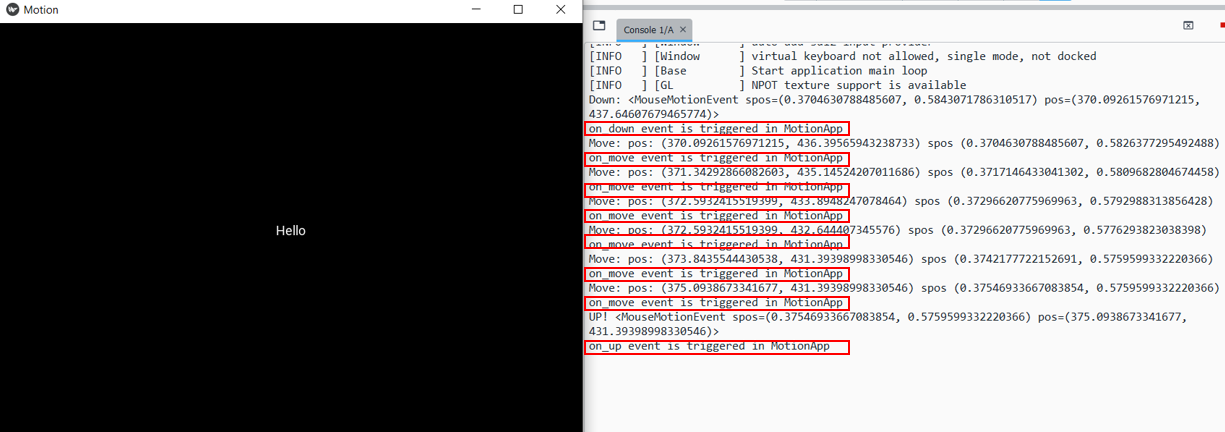
框出来的输出,就是自定义事件绑定的函数的运行结果。
三、总结
Kivy控件可以自定义事件,且将自定义的事件和外部函数绑定。自定义函数的方法由包EventDispatcher 提供。