springboot +vue 前后端分离实现五级行政区划树形菜单及设备管理
一、项目概述
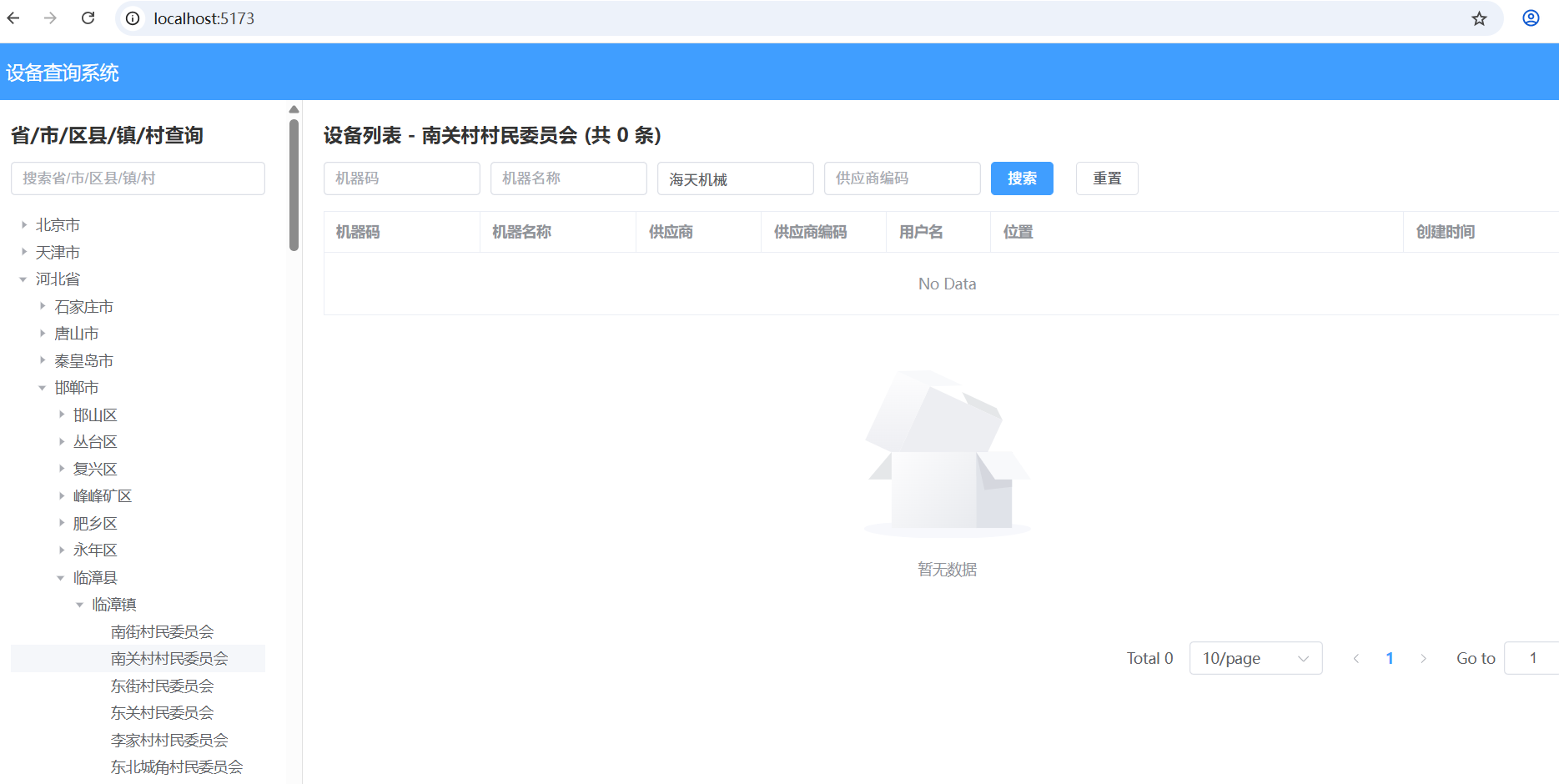
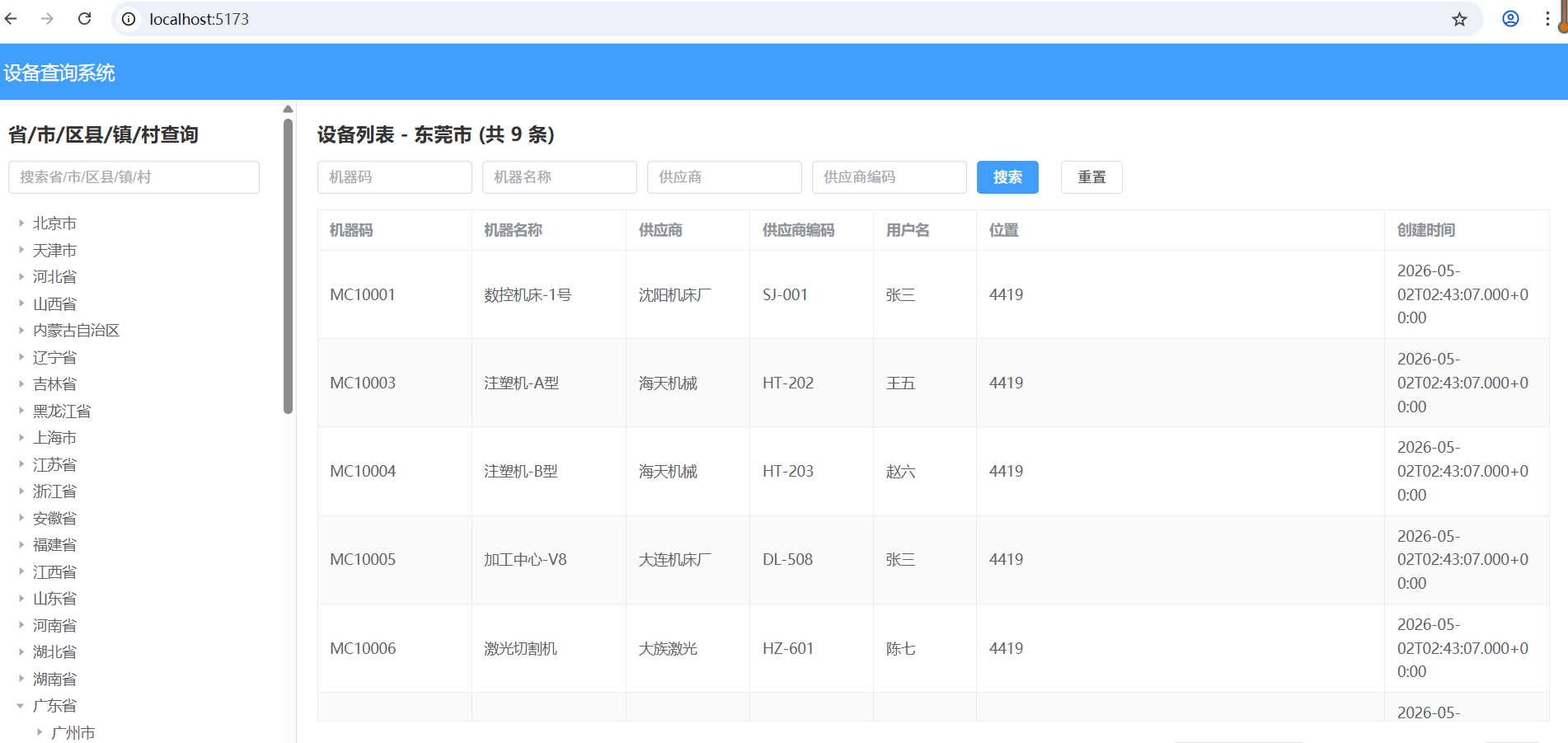
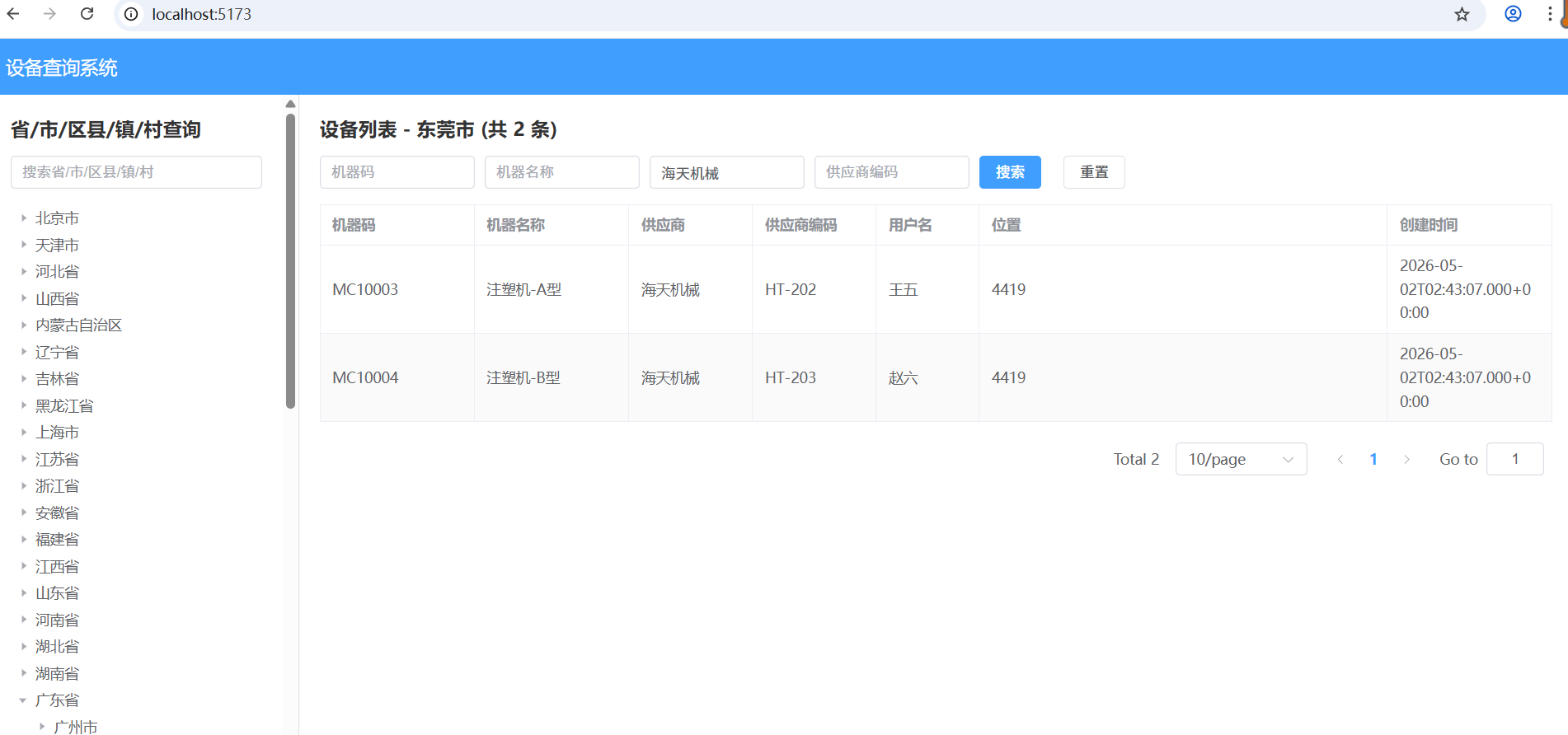
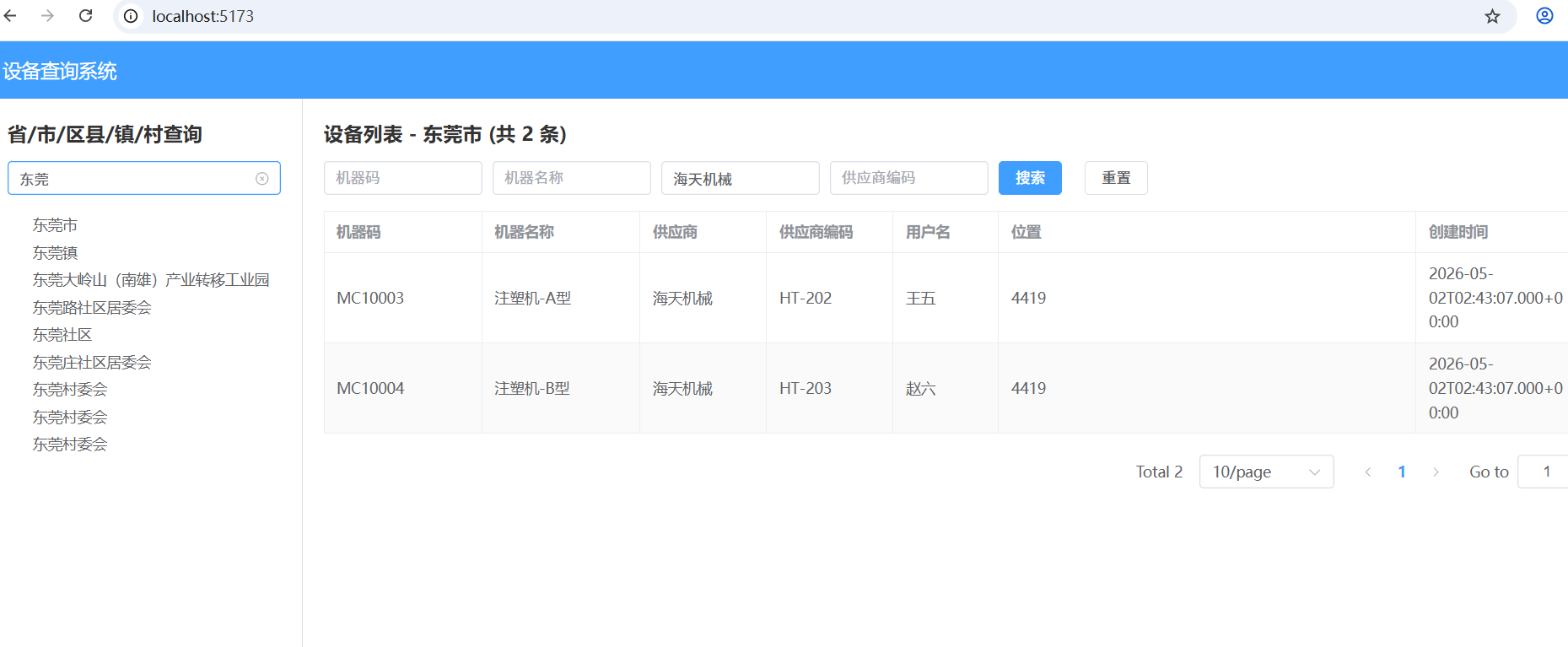
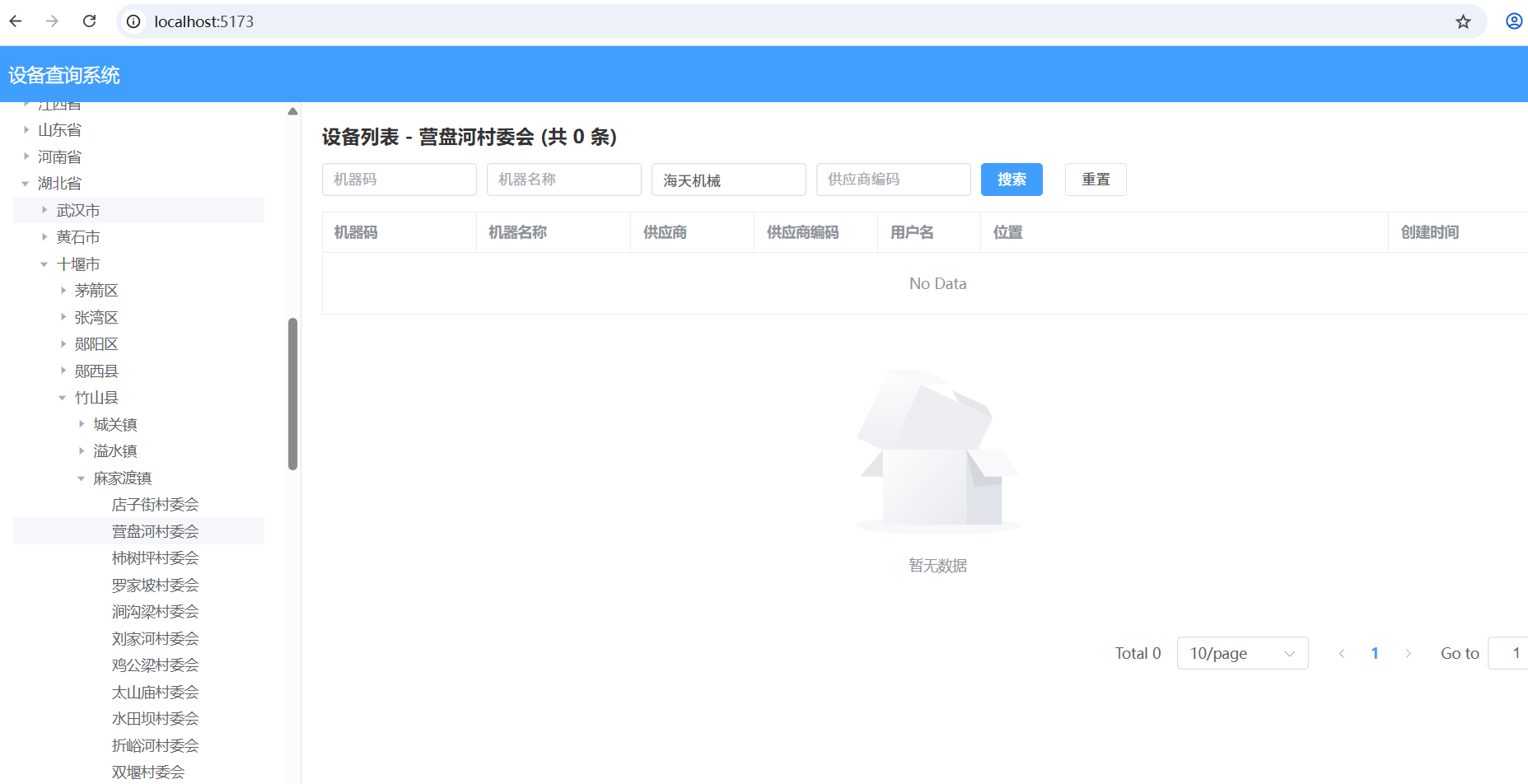
本文基于下图中的"设备查询系统"功能,实现一个完整的五级行政区划(省/市/区县/镇/村)树形菜单 ,点击树节点右侧展示该区域下的设备列表。项目采用Spring Boot + JPA 作为后端,Vue + Element UI作为前端,提供完整的API接口和前端交互。如果我要查询某个地区的设备情况,如下图:
1.1 功能需求
-
左侧树形菜单:展示省→市→区县→镇→村五级行政区划,支持懒加载或一次性加载(本文采用懒加载,性能更优)。
-
右侧设备列表:点击树节点,表格展示该区域下的设备信息(机器码、机器名称、供应商、位置、创建时间等)。
-
分页功能:设备列表支持分页查询。
-
搜索功能:支持按设备名称、机器码等条件筛选(可扩展)。
1.2 技术栈
| 层次 | 技术选型 |
|---|---|
| 后端框架 | Spring Boot 2.x |
| ORM | Spring Data JPA + Hibernate |
| 数据库 | MySQL 8.0/sqlite |
| 前端框架 | Vue 2.x / 3.x + Element UI |
| HTTP客户端 | Axios |
| 构建工具 | Maven / npm |
二、数据库设计
2.1 行政区划表(region)
设计一张自关联的行政区划表,支持无限层级(五级),也可按前文五张表设计。为简化,这里采用单表递归结构。
行政区的数据固定我们可以存在sqlite里面,这样获取数据非常快,当然也可以放在缓存中
CREATE TABLE `area` (`code` VARCHAR(255) PRIMARY KEY, `name` VARCHAR(255), `cityCode` VARCHAR(255) REFERENCES `city` (`code`) ON DELETE SET NULL ON UPDATE CASCADE, `provinceCode` VARCHAR(255) REFERENCES `province` (`code`) ON DELETE SET NULL ON UPDATE CASCADE);CREATE TABLE `city` (`code` VARCHAR(255) PRIMARY KEY, `name` VARCHAR(255), `provinceCode` VARCHAR(255) REFERENCES `province` (`code`) ON DELETE SET NULL ON UPDATE CASCADE);
CREATE TABLE `province` (`code` VARCHAR(255) PRIMARY KEY, `name` VARCHAR(255));
CREATE TABLE `street` (`code` VARCHAR(255) PRIMARY KEY, `name` VARCHAR(255), `areaCode` VARCHAR(255) REFERENCES `area` (`code`) ON DELETE SET NULL ON UPDATE CASCADE, `provinceCode` VARCHAR(255) REFERENCES `province` (`code`) ON DELETE SET NULL ON UPDATE CASCADE, `cityCode` VARCHAR(255) REFERENCES `city` (`code`) ON DELETE SET NULL ON UPDATE CASCADE);
CREATE TABLE `village` (`code` VARCHAR(255) PRIMARY KEY, `name` VARCHAR(255), `streetCode` VARCHAR(255) REFERENCES `street` (`code`) ON DELETE SET NULL ON UPDATE CASCADE, `provinceCode` VARCHAR(255) REFERENCES `province` (`code`) ON DELETE SET NULL ON UPDATE CASCADE, `cityCode` VARCHAR(255) REFERENCES `city` (`code`) ON DELETE SET NULL ON UPDATE CASCADE, `areaCode` VARCHAR(255) REFERENCES `area` (`code`) ON DELETE SET NULL ON UPDATE CASCADE);
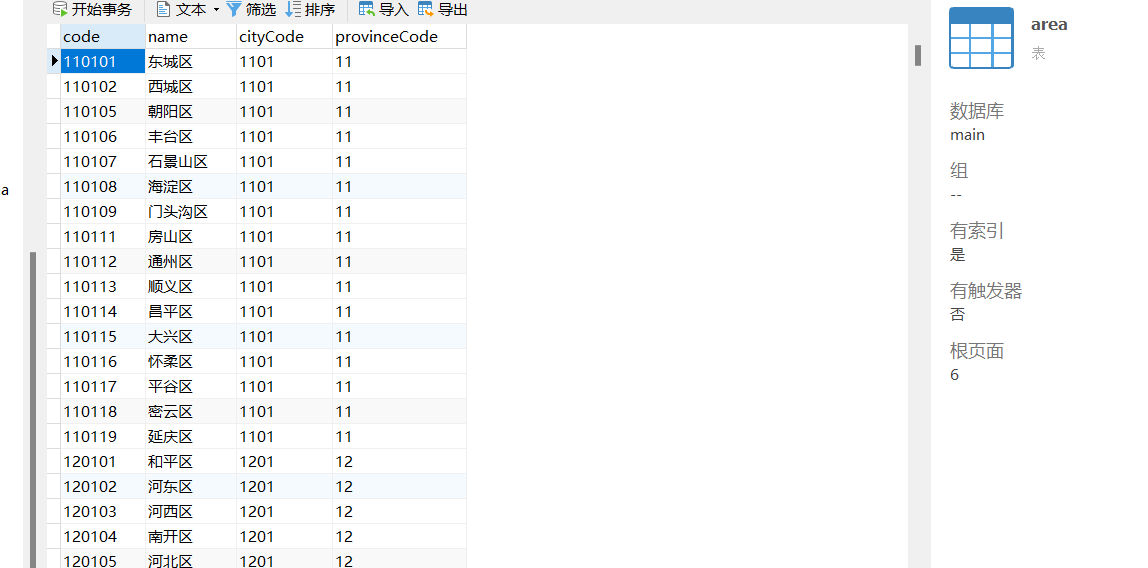
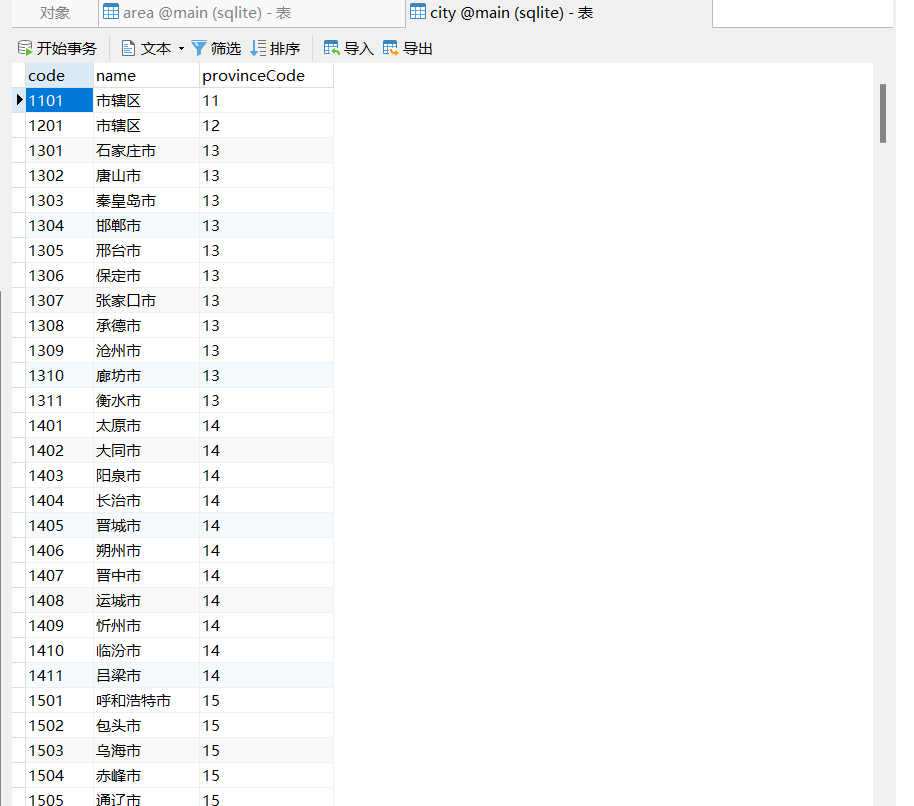
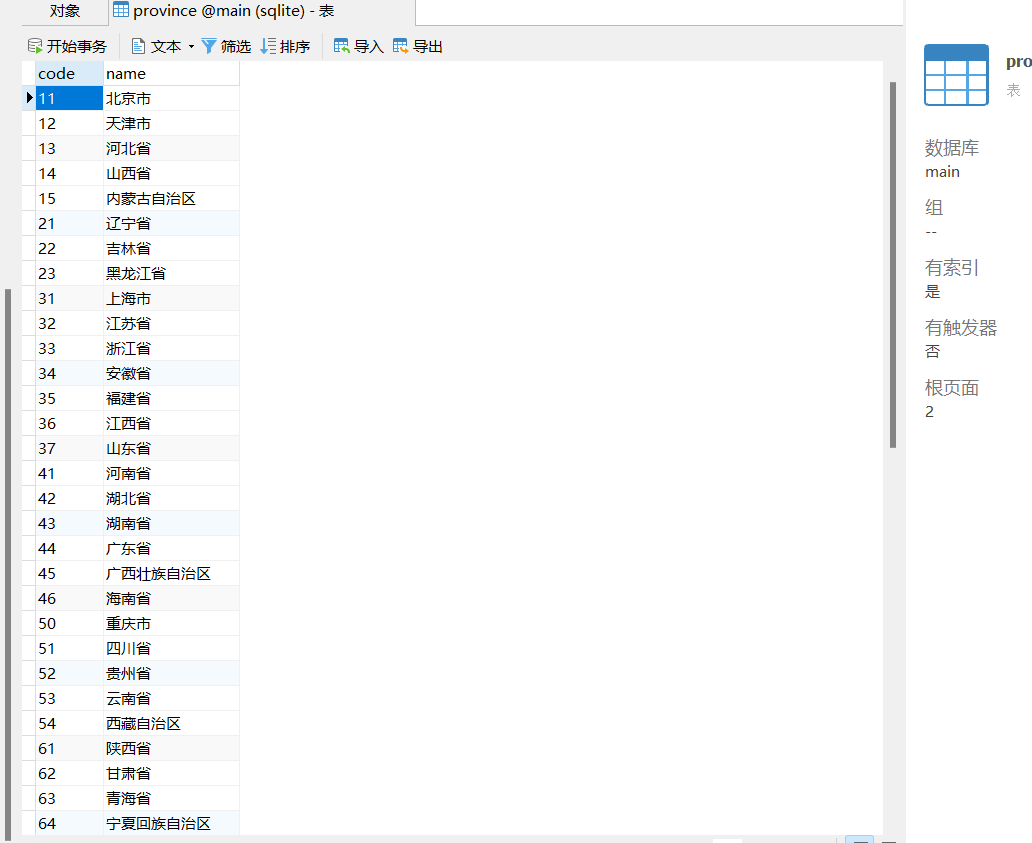
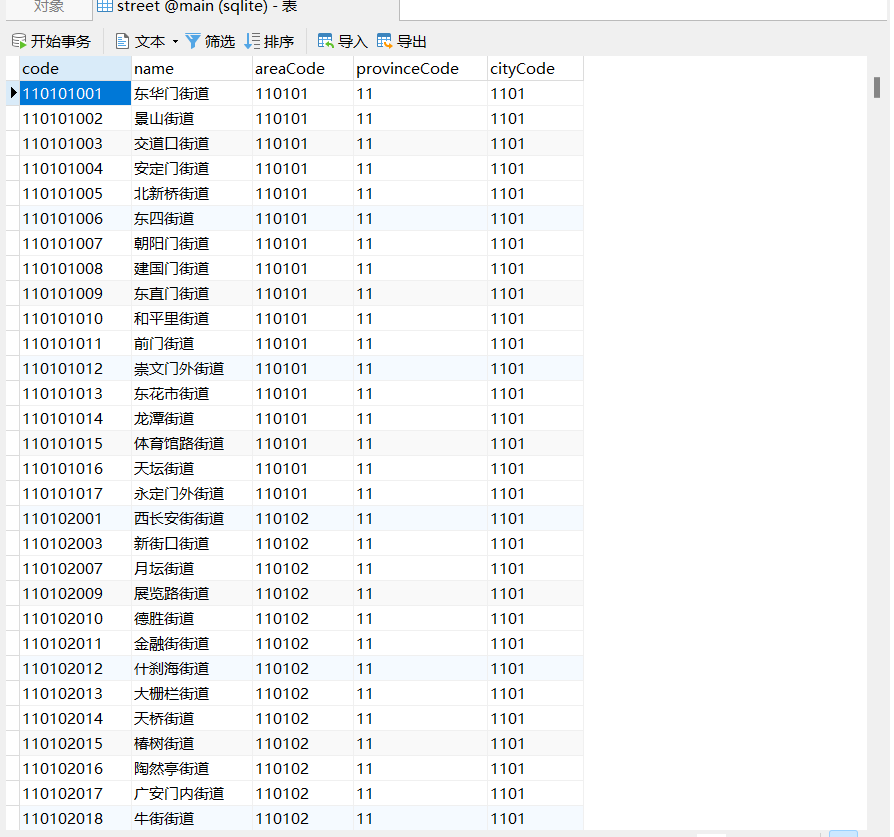
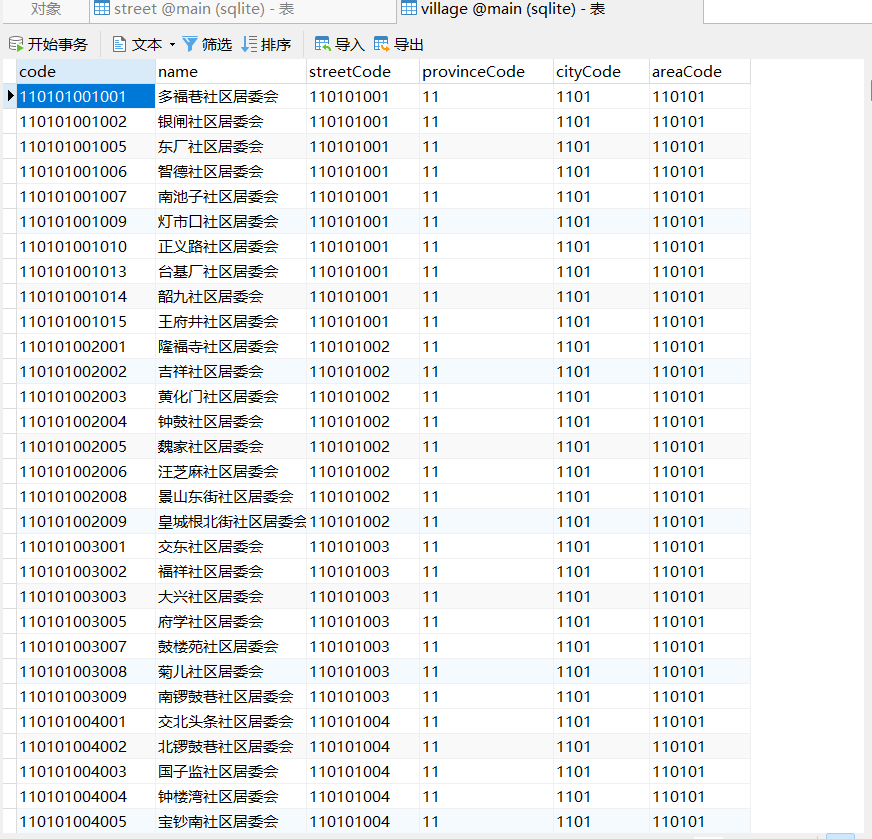
实际项目中也可按省、市、区、镇、村分五张表,但单表更易维护,且JPA通过自关联查询方便。
2.2 设备表(device)
sql
CREATE TABLE `equipment` (
  `id` int(11) NOT NULL AUTO_INCREMENT COMMENT '主键ID',
  `machine_code` varchar(64) COLLATE utf8mb4_unicode_ci NOT NULL COMMENT '机器码',
  `machine_name` varchar(128) COLLATE utf8mb4_unicode_ci NOT NULL COMMENT '机器名称',
  `supplier` varchar(128) COLLATE utf8mb4_unicode_ci DEFAULT NULL COMMENT '供应商',
  `supplier_code` varchar(64) COLLATE utf8mb4_unicode_ci DEFAULT NULL COMMENT '供应商编码',
  `user_name` varchar(64) COLLATE utf8mb4_unicode_ci DEFAULT NULL COMMENT '用户名',
  `location` varchar(255) COLLATE utf8mb4_unicode_ci DEFAULT NULL COMMENT '省/市/区/县/镇',
  `created_at` timestamp NULL DEFAULT CURRENT_TIMESTAMP COMMENT '创建时间',
  `updated_at` timestamp NULL DEFAULT CURRENT_TIMESTAMP ON UPDATE CURRENT_TIMESTAMP COMMENT '更新时间',
  PRIMARY KEY (`id`) USING BTREE,
  UNIQUE KEY `machine_code` (`machine_code`) USING BTREE
) ENGINE=InnoDB AUTO_INCREMENT=11 DEFAULT CHARSET=utf8mb4 COLLATE=utf8mb4_unicode_ci ROW_FORMAT=DYNAMIC COMMENT='设备表';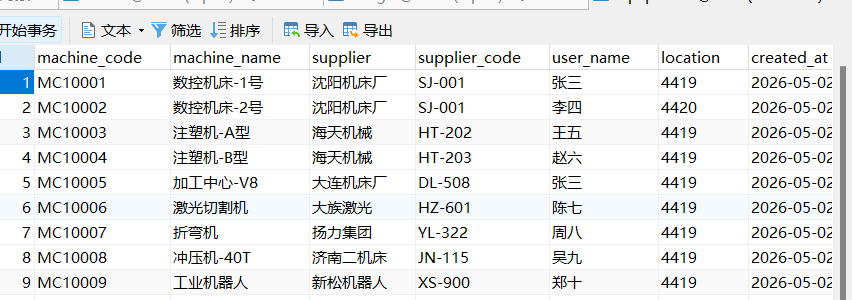
三、后端 Spring Boot + JPA 实现
3.1 项目依赖(pom.xml 核心片段)
xml
<dependency>
    <groupId>org.xerial</groupId>
    <artifactId>sqlite-jdbc</artifactId>
    <version>3.45.1.0</version>
</dependency>

<dependency>
    <groupId>org.springframework.boot</groupId>
    <artifactId>spring-boot-starter-data-jpa</artifactId>
</dependency>

<dependency>
    <groupId>com.mysql</groupId>
    <artifactId>mysql-connector-j</artifactId>
    <version>8.0.33</version>
</dependency>

<dependency>
    <groupId>com.github.gwenn</groupId>
    <artifactId>sqlite-dialect</artifactId>
    <version>0.1.2</version>
</dependency>
yaml
spring:
  datasource:
    url: jdbc:mysql://localhost:3306/device_db?useSSL=false&serverTimezone=Asia/Shanghai
    username: root
    password: 123456
  jpa:
    hibernate:
      ddl-auto: update
    show-sql: true
    properties:
      hibernate:
        dialect: org.hibernate.dialect.MySQL8Dialect
3.3 实体类
Area.java
java
@Entity
@Table(name = "area")
public class Area {
    @Id
    @Column(name = "code")
    private String code;

    private String name;

    @Column(name = "cityCode")
    private String cityCode;

    public Area() {}

    public Area(String code, String name, String cityCode) {
        this.code = code;
        this.name = name;
        this.cityCode = cityCode;
    }

    public String getCode() { return code; }
    public void setCode(String code) { this.code = code; }
    public String getName() { return name; }
    public void setName(String name) { this.name = name; }
    public String getCityCode() { return cityCode; }
    public void setCityCode(String cityCode) { this.cityCode = cityCode; }
}@Entity
@Table(name = "city")
public class City {
@Id
@Column(name = "code")
private String code;
private String name;
@Column(name = "provinceCode")
private String provinceCode;
public City() {}
public City(String code, String name, String provinceCode) {
this.code = code;
this.name = name;
this.provinceCode = provinceCode;
}
public String getCode() { return code; }
public void setCode(String code) { this.code = code; }
public String getName() { return name; }
public void setName(String name) { this.name = name; }
public String getProvinceCode() { return provinceCode; }
public void setProvinceCode(String provinceCode) { this.provinceCode = provinceCode; }
}@Entity
@Table(name = "province")
public class Province {
@Id
@Column(name = "code")
private String code;
private String name;
public Province() {}
public Province(String code, String name) {
this.code = code;
this.name = name;
}
public String getCode() { return code; }
public void setCode(String code) { this.code = code; }
public String getName() { return name; }
public void setName(String name) { this.name = name; }
}@Entity
@Table(name = "street")
public class Street {
@Id
@Column(name = "code")
private String code;
private String name;
@Column(name = "areaCode")
private String areaCode;
public Street() {}
public Street(String code, String name, String areaCode) {
this.code = code;
this.name = name;
this.areaCode = areaCode;
}
public String getCode() { return code; }
public void setCode(String code) { this.code = code; }
public String getName() { return name; }
public void setName(String name) { this.name = name; }
public String getAreaCode() { return areaCode; }
public void setAreaCode(String areaCode) { this.areaCode = areaCode; }
}@Entity
@Table(name = "village")
public class Village {
@Id
@Column(name = "code")
private String code;
private String name;
@Column(name = "streetCode")
private String streetCode;
public Village() {}
public Village(String code, String name, String streetCode) {
this.code = code;
this.name = name;
this.streetCode = streetCode;
}
public String getCode() { return code; }
public void setCode(String code) { this.code = code; }
public String getName() { return name; }
public void setName(String name) { this.name = name; }
public String getStreetCode() { return streetCode; }
public void setStreetCode(String streetCode) { this.streetCode = streetCode; }
}Machine.java
java
@Entity
@Table(name = "equipment")
public class Machine {
    @Id
    @GeneratedValue(strategy = GenerationType.IDENTITY)
    private Integer id;

    @Column(name = "machine_code")
    private String machineCode;

    @Column(name = "machine_name")
    private String machineName;

    private String supplier;

    @Column(name = "supplier_code")
    private String supplierCode;

    @Column(name = "user_name")
    private String userName;

    private String location;

    @Column(name = "created_at")
    private Timestamp createdAt;

    @Column(name = "updated_at")
    private Timestamp updatedAt;

    public Machine() {}

    public Integer getId() { return id; }
    public void setId(Integer id) { this.id = id; }
    public String getMachineCode() { return machineCode; }
    public void setMachineCode(String machineCode) { this.machineCode = machineCode; }
    public String getMachineName() { return machineName; }
    public void setMachineName(String machineName) { this.machineName = machineName; }
    public String getSupplier() { return supplier; }
    public void setSupplier(String supplier) { this.supplier = supplier; }
    public String getSupplierCode() { return supplierCode; }
    public void setSupplierCode(String supplierCode) { this.supplierCode = supplierCode; }
    public String getUserName() { return userName; }
    public void setUserName(String userName) { this.userName = userName; }
    public String getLocation() { return location; }
    public void setLocation(String location) { this.location = location; }
    public Timestamp getCreatedAt() { return createdAt; }
    public void setCreatedAt(Timestamp createdAt) { this.createdAt = createdAt; }
    public Timestamp getUpdatedAt() { return updatedAt; }
    public void setUpdatedAt(Timestamp updatedAt) { this.updatedAt = updatedAt; }
}
3.4 Repository 层
AreaRepository .java
java
@Repository
public interface AreaRepository extends JpaRepository<Area, String> {

    List<Area> findByCityCode(String cityCode);
}
其他类似这个,就不写了。
MachineRepository.java
java
@Repository
public interface MachineRepository extends JpaRepository<Machine, Integer>, JpaSpecificationExecutor<Machine> {

    @Query("SELECT m FROM Machine m WHERE " +
           "(:locationPrefix IS NULL OR m.location LIKE :locationPrefix) AND " +
           "(:machineCode IS NULL OR m.machineCode LIKE :machineCode) AND " +
           "(:machineName IS NULL OR m.machineName LIKE :machineName) AND " +
           "(:supplier IS NULL OR m.supplier LIKE :supplier) AND " +
           "(:supplierCode IS NULL OR m.supplierCode LIKE :supplierCode)")
    List<Machine> findByConditions(
            @Param("locationPrefix") String locationPrefix,
            @Param("machineCode") String machineCode,
            @Param("machineName") String machineName,
            @Param("supplier") String supplier,
            @Param("supplierCode") String supplierCode,
            Pageable pageable);

    @Query("SELECT COUNT(m) FROM Machine m WHERE " +
           "(:locationPrefix IS NULL OR m.location LIKE :locationPrefix) AND " +
           "(:machineCode IS NULL OR m.machineCode LIKE :machineCode) AND " +
           "(:machineName IS NULL OR m.machineName LIKE :machineName) AND " +
           "(:supplier IS NULL OR m.supplier LIKE :supplier) AND " +
           "(:supplierCode IS NULL OR m.supplierCode LIKE :supplierCode)")
    long countByConditions(
            @Param("locationPrefix") String locationPrefix,
            @Param("machineCode") String machineCode,
            @Param("machineName") String machineName,
            @Param("supplier") String supplier,
            @Param("supplierCode") String supplierCode);
}
3.5 Service 层
RegionService.java
@Service
public class RegionService {

    @Autowired
    private ProvinceRepository provinceRepository;

    @Autowired
    private CityRepository cityRepository;

    @Autowired
    private AreaRepository areaRepository;

    @Autowired
    private StreetRepository streetRepository;

    @Autowired
    private VillageRepository villageRepository;

    @Autowired
    private MachineRepository machineRepository;

    @Transactional("sqliteTransactionManager")
    public List<Province> getAllProvinces() {
        return provinceRepository.findAll();
    }

    @Transactional("sqliteTransactionManager")
    public Province getProvinceByCode(String code) {
        return provinceRepository.findByCode(code).orElse(null);
    }

    @Transactional("sqliteTransactionManager")
    public List<City> getCitiesByProvince(String provinceCode) {
        return cityRepository.findByProvinceCode(provinceCode);
    }

    @Transactional("sqliteTransactionManager")
    public List<Area> getAreasByCity(String cityCode) {
        return areaRepository.findByCityCode(cityCode);
    }

    @Transactional("sqliteTransactionManager")
    public List<Street> getStreetsByArea(String areaCode) {
        return streetRepository.findByAreaCode(areaCode);
    }

    @Transactional("sqliteTransactionManager")
    public List<Village> getVillagesByStreet(String streetCode) {
        return villageRepository.findByStreetCode(streetCode);
    }

    @Transactional("mysqlTransactionManager")
    public PageResult<Machine> getMachinesPaged(int page, int size, String locationPrefix,
                                               String machineCode, String machineName,
                                               String supplier, String supplierCode) {
        Pageable pageable = PageRequest.of(page - 1, size);
        List<Machine> data = machineRepository.findByConditions(
                locationPrefix, machineCode, machineName, supplier, supplierCode, pageable);
        long total = machineRepository.countByConditions(
                locationPrefix, machineCode, machineName, supplier, supplierCode);
        return new PageResult<>(data, total, page, size);
    }
}
DeviceService.java
java
package com.example.demo.service;

import com.example.demo.entity.Device;
import com.example.demo.repository.DeviceRepository;
import org.springframework.beans.factory.annotation.Autowired;
import org.springframework.data.domain.Page;
import org.springframework.data.domain.PageRequest;
import org.springframework.data.domain.Pageable;
import org.springframework.stereotype.Service;

@Service
public class DeviceService {

    @Autowired
    private DeviceRepository deviceRepository;

    public Page<Device> getDevicesByLocation(String locationCode, int page, int size) {
        Pageable pageable = PageRequest.of(page - 1, size);
        return deviceRepository.findByLocationCode(locationCode, pageable);
    }
}
3.6 Controller 层
RegionController.java
java
package com.example.demo.controller;

import com.example.demo.entity.Region;
import com.example.demo.service.RegionService;
import org.springframework.beans.factory.annotation.Autowired;
import org.springframework.web.bind.annotation.*;

import java.util.List;

@RestController
@RequestMapping("/api/region")
public class RegionController {

    @Autowired
    private RegionService regionService;

    @GetMapping("/provinces")
    public List<Region> getProvinces() {
        return regionService.getProvinces();
    }

    @GetMapping("/children")
    public List<Region> getChildren(@RequestParam String parentCode) {
        return regionService.getChildren(parentCode);
    }

    // 懒加载专用(树节点点击时调用)
    @GetMapping("/lazy")
    public List<Region> getLazyChildren(@RequestParam String parentCode) {
        return regionService.getLazyChildren(parentCode);
    }

    // 获取完整树(可选)
    @GetMapping("/tree")
    public List<Region> getFullTree() {
        return regionService.getFullTree();
    }
}RegionControllerjava
@RestController
@RequestMapping("/api")
public class RegionController {

    @Autowired
    private RegionService regionService;

    @GetMapping("/provinces")
    public List<Province> getAllProvinces() {
        return regionService.getAllProvinces();
    }

    @GetMapping("/provinces/{code}")
    public Province getProvinceByCode(@PathVariable String code) {
        return regionService.getProvinceByCode(code);
    }

    @GetMapping("/provinces/{provinceCode}/cities")
    public List<City> getCitiesByProvince(@PathVariable String provinceCode) {
        return regionService.getCitiesByProvince(provinceCode);
    }

    @GetMapping("/cities/{cityCode}/areas")
    public List<Area> getAreasByCity(@PathVariable String cityCode) {
        return regionService.getAreasByCity(cityCode);
    }

    @GetMapping("/areas/{areaCode}/streets")
    public List<Street> getStreetsByArea(@PathVariable String areaCode) {
        return regionService.getStreetsByArea(areaCode);
    }

    @GetMapping("/streets/{streetCode}/villages")
    public List<Village> getVillagesByStreet(@PathVariable String streetCode) {
        return regionService.getVillagesByStreet(streetCode);
    }

    @GetMapping("/machines")
    public PageResult<Machine> getMachines(
            @RequestParam(defaultValue = "1") int page,
            @RequestParam(defaultValue = "10") int size,
            @RequestParam(required = false) String locationPrefix,
            @RequestParam(required = false) String machineCode,
            @RequestParam(required = false) String machineName,
            @RequestParam(required = false) String supplier,
            @RequestParam(required = false) String supplierCode) {
        return regionService.getMachinesPaged(page, size, locationPrefix, machineCode, machineName, supplier, supplierCode);
    }
}
3.7 跨域配置(解决前后端分离跨域问题)
java
@Bean
public CorsFilter corsFilter() {
    CorsConfiguration config = new CorsConfiguration();
    config.setAllowCredentials(true);
    config.addAllowedOriginPattern("*");
    config.addAllowedHeader("*");
    config.addAllowedMethod("*");

    UrlBasedCorsConfigurationSource source = new UrlBasedCorsConfigurationSource();
    source.registerCorsConfiguration("/**", config);
    return new CorsFilter(source);
}
四、前端 Vue + Element UI 实现
4.1 初始化 Vue 项目
bash
vue create device-manager
cd device-manager
npm install element-ui axios
4.2 封装 API 请求(src/api/index.js)
javascript
export default defineConfig({
  plugins: [vue()],
  server: {
    port: 5173,
    proxy: {
      '/api': {
        target: 'http://localhost:9988',
        changeOrigin: true
      }
    }
  }
})
4.3 主页面组件(src/views/DeviceQuery.vue)
vue
<template>
  <div class="app">
    <div class="header">设备查询系统</div>
    <div class="container">
      <div class="tree-panel">
        <h3>省/市/区县/镇/村查询</h3>
        <el-input v-model="treeSearch" placeholder="搜索省/市/区县/镇/村" clearable @input="filterTree" />
        <el-tree
          v-loading="treeLoading"
          :data="filteredTreeData"
          :props="treeProps"
          :load="loadNode"
          :default-expanded-keys="expandedKeys"
          :expand-on-click-node="false"
          lazy
          node-key="code"
          @node-click="handleNodeClick"
        />
      </div>
      <div class="table-panel">
        <h3>设备列表 - {{ currentLocationName }} (共 {{ total }} 条)</h3>

        <!-- 搜索条件 -->
        <div class="search-form">
          <el-input v-model="searchForm.machineCode" placeholder="机器码" clearable @keyup.enter="search" />
          <el-input v-model="searchForm.machineName" placeholder="机器名称" clearable @keyup.enter="search" />
          <el-input v-model="searchForm.supplier" placeholder="供应商" clearable @keyup.enter="search" />
          <el-input v-model="searchForm.supplierCode" placeholder="供应商编码" clearable @keyup.enter="search" />
          <el-button type="primary" @click="search">搜索</el-button>
          <el-button @click="reset">重置</el-button>
        </div>

        <el-table :data="equipmentList" border stripe style="width: 100%">
          <el-table-column prop="machineCode" label="机器码" width="150" />
          <el-table-column prop="machineName" label="机器名称" width="150" />
          <el-table-column prop="supplier" label="供应商" width="120" />
          <el-table-column prop="supplierCode" label="供应商编码" width="120" />
          <el-table-column prop="userName" label="用户名" width="100" />
          <el-table-column prop="location" label="位置" />
          <el-table-column prop="createdAt" label="创建时间" width="160" />
        </el-table>
        <el-empty v-if="equipmentList.length === 0 && hasSearched" description="暂无数据" />
        <div class="pagination">
          <el-pagination
            v-model:current-page="currentPage"
            v-model:page-size="pageSize"
            :page-sizes="[10, 20, 50, 100]"
            :total="total"
            layout="total, sizes, prev, pager, next, jumper"
            @size-change="handleSizeChange"
            @current-change="handleCurrentChange"
          />
        </div>
      </div>
    </div>
  </div>
</template>

<script setup>
import { ref, reactive } from 'vue'
import axios from 'axios'
import { ElMessage } from 'element-plus'

const API_BASE = 'http://localhost:9988/api'

const treeData = ref([])
const treeProps = {
  label: 'name',
  children: 'children',
  isLeaf: (data, node) => data.isLeaf === true
}

const currentLocationName = ref('请选择区域')
const currentLocationCode = ref('')
const equipmentList = ref([])
const hasSearched = ref(false)

// 树形搜索
const treeSearch = ref('')
const filteredTreeData = ref([])
const expandedKeys = ref([])
const treeLoading = ref(false)

// 分页参数
const currentPage = ref(1)
const pageSize = ref(10)
const total = ref(0)

// 搜索表单
const searchForm = reactive({
  machineCode: '',
  machineName: '',
  supplier: '',
  supplierCode: ''
})

// 加载省份
const loadProvinces = async () => {
  try {
    const res = await axios.get(`${API_BASE}/provinces`)
    const provinces = res.data.map(p => ({
      code: p.code,
      name: p.name,
      level: 1
    }))
    treeData.value = provinces
    filteredTreeData.value = provinces
  } catch (err) {
    ElMessage.error('加载省份失败')
  }
}

loadProvinces()

// 搜索树节点
const filterTree = async () => {
  const keyword = treeSearch.value.trim()
  if (!keyword) {
    filteredTreeData.value = treeData.value
    expandedKeys.value = []
    return
  }

  treeLoading.value = true

  try {
    const res = await axios.get(`${API_BASE}/dictRegion/search`, {
      params: { keyword }
    })
    filteredTreeData.value = res.data

    const keys = new Set()
    const collectKeys = (nodes) => {
      nodes.forEach(node => {
        keys.add(node.code)
        if (node.children && node.children.length > 0) {
          collectKeys(node.children)
        }
      })
    }
    collectKeys(res.data)
    expandedKeys.value = Array.from(keys)
  } catch (err) {
    console.error('搜索失败:', err)
  } finally {
    treeLoading.value = false
  }
}

// 懒加载子节点
const loadNode = async (node, resolve) => {
  if (node.level === 0) return

  const parentCode = node.data.code
  const level = node.level + 1
  let url = ''

  if (level === 2) {
    url = `${API_BASE}/provinces/${parentCode}/cities`
  } else if (level === 3) {
    url = `${API_BASE}/cities/${parentCode}/areas`
  } else if (level === 4) {
    url = `${API_BASE}/areas/${parentCode}/streets`
  } else if (level === 5) {
    url = `${API_BASE}/streets/${parentCode}/villages`
  } else if (level === 6) {
    url = `${API_BASE}/villages/${parentCode}/children`
  }

  try {
    const res = await axios.get(url)
    const data = res.data.map(item => ({
      code: item.code,
      name: item.name,
      level,
      isLeaf: level >= 5
    }))
    resolve(data)
  } catch (err) {
    resolve([])
  }
}

// 加载设备数据(带分页和搜索)
const loadMachines = async () => {
  try {
    const params = {
      page: currentPage.value,
      size: pageSize.value
    }
    if (currentLocationCode.value) {
      params.locationPrefix = currentLocationCode.value
    }
    if (searchForm.machineCode) {
      params.machineCode = searchForm.machineCode
    }
    if (searchForm.machineName) {
      params.machineName = searchForm.machineName
    }
    if (searchForm.supplier) {
      params.supplier = searchForm.supplier
    }
    if (searchForm.supplierCode) {
      params.supplierCode = searchForm.supplierCode
    }
    const res = await axios.get(`${API_BASE}/machines`, { params })
    equipmentList.value = res.data.data
    total.value = res.data.total
    hasSearched.value = true
  } catch (err) {
    console.error('查询设备失败:', err)
    ElMessage.error('查询设备失败')
    equipmentList.value = []
  }
}

// 点击节点查询设备
const handleNodeClick = async (data) => {
  currentLocationName.value = data.name
  currentLocationCode.value = data.code
  currentPage.value = 1
  await loadMachines()
}

// 搜索
const search = () => {
  currentPage.value = 1
  loadMachines()
}

// 重置
const reset = () => {
  searchForm.machineCode = ''
  searchForm.machineName = ''
  searchForm.supplier = ''
  searchForm.supplierCode = ''
  currentPage.value = 1
  loadMachines()
}

// 页码改变
const handleCurrentChange = async (page) => {
  currentPage.value = page
  await loadMachines()
}

// 每页条数改变
const handleSizeChange = async (size) => {
  pageSize.value = size
  currentPage.value = 1
  await loadMachines()
}
</script>

<style scoped>
.app { height: 100vh; display: flex; flex-direction: column; }
.header { padding: 15px; background: #409EFF; color: white; font-size: 18px; }
.container { flex: 1; display: flex; overflow: hidden; }
.tree-panel { width: 300px; border-right: 1px solid #e0e0e0; padding: 20px; overflow-y: auto; }
.tree-panel .el-input { margin-bottom: 15px; }
.table-panel { flex: 1; padding: 20px; overflow-y: auto; display: flex; flex-direction: column; }
h3 { margin-bottom: 15px; color: #333; }
.search-form { display: flex; gap: 10px; margin-bottom: 15px; flex-wrap: wrap; }
.search-form .el-input { width: 150px; }
.pagination { margin-top: 20px; display: flex; justify-content: flex-end; }
</style>
五、运行与测试
-
启动后端 Spring Boot 应用(默认端口 9988)。
-
启动前端 Vue 项目:
npm run serve(默认端口 8080可能冲突,可修改前端端口为5173,并在跨域配置中允许)。 -
访问
http://localhost:5173,左侧展示省级树,点击展开子级,右侧展示该区域设备列表。
六、扩展建议
-
搜索功能:可在后端增加接口,根据关键字匹配设备名称或机器码,并支持分页。
-
权限控制:可根据用户角色限制可见区域。
通过以上步骤,即可完整实现图中的"设备查询系统"功能。