从iterm2切换到ghostty, 希望配色能保持原有习惯,
仅做了ghostty配置, 没有安装starship(有点花哨)
效果如下:
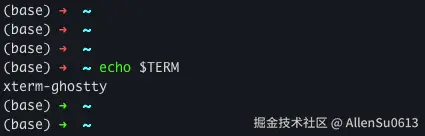
配置路径 ~/.config/ghostty/config 配置如下:
shell
# ============================================
# 在 https://github.com/BruceLanLan/bruceblue-ghostty-config/blob/main/config 的基础上进行二次配置
# 尽量还原 iTerm2 + zsh + oh-my-zsh(robbyrussell主题) 的配色, 减少切换后的不适.
# PS: 颜色还是稍有偏色, 可能跟前景色有关, 改了几次还是不对, 懒得继续改了.
# ============================================

# --- Typography ---
font-family = "Monaco"
font-size = 13
adjust-cell-height = 2

# --- Theme and Colors ---
theme = iTerm2 Default

# --- Window and Appearance ---
background = "#15191e"
background-opacity = 1
background-blur-radius = 30
macos-titlebar-style = transparent
window-padding-x = 10
window-padding-y = 8
window-save-state = always
window-theme = auto

# --- Cursor ---
# PS: 光标样式没有找太喜欢的, 可选项: block / bar / underline / block_hollow
cursor-style = bar
cursor-style-blink = true
cursor-opacity = 1

# --- Mouse ---
mouse-hide-while-typing = true
copy-on-select = clipboard

# --- Quick Terminal ---
quick-terminal-position = top
quick-terminal-screen = mouse
quick-terminal-autohide = true
quick-terminal-animation-duration = 0.15

# --- Security ---
clipboard-paste-protection = true
clipboard-paste-bracketed-safe = true

# --- Shell Integration ---
shell-integration = zsh

# --- Claude 专属优化 ---
# PS: 这里会自动打开claude, 个人比较习惯手动开启, 此处保持注释状态
# initial-command = /opt/homebrew/bin/claude   # 装好claude-code后再取消注释
initial-window = true
quit-after-last-window-closed = true
notify-on-command-finish = always

# --- Performance ---
scrollback-limit = 25000000

# --- 基础分屏(左右添加屏幕)---
keybind = cmd+d=new_split:right
keybind = cmd+shift+enter=toggle_split_zoom
keybind = cmd+shift+f=toggle_split_zoom

# 基础前景背景(iTerm2 默认)
foreground = "#dcdcdc"

# robbyrussell主题配色
palette = 0=#2E2E2E
palette = 1=#FF5555
palette = 2=#00FF00
palette = 3=#FFFF00
palette = 4=#00BFFF
palette = 5=#FF00FF
palette = 6=#00FFFF
palette = 7=#E0E0E0
palette = 8=#666666
palette = 9=#FF4040
palette = 10=#00FF00
palette = 11=#FFFF00
palette = 12=#00BFFF
palette = 13=#FF00FF
palette = 14=#00FFFF
palette = 15=#FFFFFF

# 分屏后 不活跃部分的透明度
unfocused-split-opacity = 0.95