DataStore
Jetpack DataStore 是一种数据存储解决方案,让您可以使用 协议缓冲区存储键值对或类型化对象
Preferences DataStore 可用于替代 SharedPreferences,其是线程安全的
需要注意:
- 请勿在同一进程中为给定文件创建多个 DataStore 实例
- DataStore 的通用类型必须不可变
- 请勿对同一文件混用 SingleProcessDataStore 和 MultiProcessDataStore
依赖
dependencies {
	// Preferences DataStore (SharedPreferences like APIs)
    implementation "androidx.datastore:datastore-preferences:1.2.1"

    // Alternatively - without an Android dependency.
    implementation "androidx.datastore:datastore-preferences-core:1.2.1"

    // optional - RxJava3 support
    implementation "androidx.datastore:datastore-preferences-rxjava3:1.2.1"

    // Typed DataStore for custom data objects (for example, using Proto or JSON).
    implementation "androidx.datastore:datastore:1.2.1"

    // Alternatively - without an Android dependency.
    implementation "androidx.datastore:datastore-core:1.2.1"

    // optional - RxJava3 support
    implementation "androidx.datastore:datastore-rxjava3:1.2.1"

    // RxAndroid: 提供 AndroidSchedulers.mainThread()
    implementation "io.reactivex.rxjava3:rxandroid:3.0.2"
    implementation "io.reactivex.rxjava3:rxjava:3.1.8"

    // Gson:用于 JSON DataStore 的序列化/反序列化
    implementation "com.google.code.gson:gson:2.10.1"

    // 协程 RxJava3 桥接:让 suspend 函数和 Flow 能转成 Single/Flowable
    implementation "org.jetbrains.kotlinx:kotlinx-coroutines-rx3:1.7.3"

	// Lifecycle: ViewModel + LiveData + 把 RxJava Publisher 适配成 LiveData
    def lifecycle_version = "2.7.0"
    implementation "androidx.lifecycle:lifecycle-viewmodel:$lifecycle_version"
    implementation "androidx.lifecycle:lifecycle-livedata:$lifecycle_version"
    implementation "androidx.lifecycle:lifecycle-reactivestreams:$lifecycle_version"
}
Preferences DataStore
MyApplication
java
public class MyApplication extends Application {
    private static MyApplication instance;

    /**
     * 进程内单例的 DataStore.放在 Application 中持有,整个 App 生命周期复用,不要 dispose。
     * /data/data/com.example.demo1/files/datastore/settings.preferences_pb
     */
    private static RxDataStore<Preferences> settingsDataStore;

    @Override
    public void onCreate() {
        super.onCreate();
        instance = this;

        settingsDataStore = new RxPreferenceDataStoreBuilder(this, "settings").build();
    }

    public static Context getContext() {
        return instance;
    }

    public static RxDataStore<Preferences> getSettingsDataStore() {
        return settingsDataStore;
    }
}
SettingsRepository
public class SettingsRepository {

    private static volatile SettingsRepository INSTANCE;

    public static SettingsRepository getInstance() {
        if (INSTANCE == null) {
            synchronized (SettingsRepository.class) {
                if (INSTANCE == null) {
                    INSTANCE = new SettingsRepository(MyApplication.getSettingsDataStore());
                }
            }
        }
        return INSTANCE;
    }

    // key 集中维护,public 让 ViewModel 引用;新增字段只在这加一行
    public static final Preferences.Key<Integer> KEY_COUNTER_A = PreferencesKeys.intKey("counter_a");
    public static final Preferences.Key<Integer> KEY_COUNTER_B = PreferencesKeys.intKey("counter_b");
    private final RxDataStore<Preferences> dataStore;

    private SettingsRepository(RxDataStore<Preferences> dataStore) {
        this.dataStore = dataStore;
    }

    /**
     * 通用读:调用方用 mapper 把整份 Preferences 映射成自己关心的 T。
     * 内部已包成去重(distinctUntilChanged),避免 UI 层收到重复数据。
     */
    public <T> Flowable<T> observeChanged(Function<Preferences, T> mapper) {
        return dataStore.data()
                .map(mapper)
                .distinctUntilChanged()
                .subscribeOn(Schedulers.io())
                .observeOn(AndroidSchedulers.mainThread());
    }

    /**
     * 通用读:调用方用 mapper 把整份 Preferences 映射成自己关心的 T。
     */
    public <T> Flowable<T> observe(Function<Preferences, T> mapper) {
        return dataStore.data()
                .map(mapper)
                .subscribeOn(Schedulers.io())
                .observeOn(AndroidSchedulers.mainThread());
    }

    /**
     * 整体快照流,调试日志用。
     */
    public Flowable<Preferences> observeAll() {
        return observeChanged(prefs -> prefs);
    }

    /**
     * 通用写:调用方用 action 对 MutablePreferences 做任意修改。
     * 内部已包成原子事务(DataStore 的 updateDataAsync 语义)。
     */
    public Single<Preferences> update(Consumer<MutablePreferences> action) {
        return dataStore.updateDataAsync(prefsIn -> {
            MutablePreferences m = prefsIn.toMutablePreferences();
            try {
                action.accept(m);
            } catch (Throwable t) {
                return Single.error(t);
            }
            return Single.just(m);
        });
    }
}
SettingsViewModel
java
public class SettingsViewModel extends ViewModel {

    private static final String TAG = "DataStoreDemo";

    private final SettingsRepository repo = SettingsRepository.getInstance();
    private final CompositeDisposable disposables = new CompositeDisposable();

    // 读:用 mapper 选取自己关心的字段
    private final LiveData<Integer> counterA = LiveDataReactiveStreams.fromPublisher(
            repo.observeChanged(prefs -> getOrZero(prefs, SettingsRepository.KEY_COUNTER_A)));
    private final LiveData<Integer> counterB = LiveDataReactiveStreams.fromPublisher(
            repo.observeChanged(prefs -> getOrZero(prefs, SettingsRepository.KEY_COUNTER_B)));
    private final LiveData<Preferences> allEntries =
            LiveDataReactiveStreams.fromPublisher(repo.observeAll());

    public LiveData<Integer> getCounterA() {
        return counterA;
    }

    public LiveData<Integer> getCounterB() {
        return counterB;
    }

    public LiveData<Preferences> getAllEntries() {
        return allEntries;
    }

    // 写:用 Consumer 描述要做的修改
    public void incA() {
        disposables.add(
                repo.update(m -> {
                    Integer cur = m.get(SettingsRepository.KEY_COUNTER_A);
                    m.set(SettingsRepository.KEY_COUNTER_A, (cur == null ? 0 : cur) + 1);
                }).subscribe(
                        p -> Log.d(TAG, "inc A ok"),
                        e -> Log.e(TAG, "inc A err", e)
                ));
    }

    public void incB() {
        disposables.add(
                repo.update(m -> {
                    Integer cur = m.get(SettingsRepository.KEY_COUNTER_B);
                    m.set(SettingsRepository.KEY_COUNTER_B, (cur == null ? 0 : cur) + 1);
                }).subscribe(
                        p -> Log.d(TAG, "inc B ok"),
                        e -> Log.e(TAG, "inc B err", e)
                ));
    }

    public void reset() {
        disposables.add(
                repo.update(m -> {
                    m.set(SettingsRepository.KEY_COUNTER_A, 0);
                    m.set(SettingsRepository.KEY_COUNTER_B, 0);
                }).subscribe(
                        p -> Log.d(TAG, "reset ok"),
                        e -> Log.e(TAG, "reset err", e)
                ));
    }

    private static int getOrZero(Preferences prefs, Preferences.Key<Integer> key) {
        Integer v = prefs.get(key);
        return v == null ? 0 : v;
    }

    @Override
    protected void onCleared() {
        super.onCleared();
        disposables.clear();
    }
}
MainActivity
java
public class MainActivity extends AppCompatActivity {

    private static final String TAG = "DataStoreDemo";

    private TextView tvCounterA;
    private TextView tvCounterB;
    private Button mBtnInc;
    private Button mBtnIncB;
    private Button mBtnReset;

    private SettingsViewModel viewModel;

    @Override
    protected void onCreate(Bundle savedInstanceState) {
        super.onCreate(savedInstanceState);
        setContentView(R.layout.activity_main);
        initView();
        initViewModel();
        initListener();
    }

    private void initView() {
        tvCounterA = findViewById(R.id.tv_counterA);
        tvCounterB = findViewById(R.id.tv_counter_b);
        mBtnInc = findViewById(R.id.btn_inc);
        mBtnIncB = findViewById(R.id.btn_inc_b);
        mBtnReset = findViewById(R.id.btn_reset);
    }

    private void initViewModel() {
        viewModel = new ViewModelProvider(this).get(SettingsViewModel.class);

        viewModel.getCounterA().observe(this, value ->
                tvCounterA.setText("A=" + value));
        viewModel.getCounterB().observe(this, value ->
                tvCounterB.setText("B=" + value));
        viewModel.getAllEntries().observe(this, this::logAllEntries);
    }

    private void initListener() {
        mBtnInc.setOnClickListener(v -> viewModel.incA());
        mBtnIncB.setOnClickListener(v -> viewModel.incB());
        mBtnReset.setOnClickListener(v -> viewModel.reset());
    }

    private void logAllEntries(Preferences prefs) {
        Log.d(TAG, "all entries = " + prefs.asMap());
    }
}
activity_main.xml
xml
<?xml version="1.0" encoding="utf-8"?>
<androidx.constraintlayout.widget.ConstraintLayout xmlns:android="http://schemas.android.com/apk/res/android"
    xmlns:app="http://schemas.android.com/apk/res-auto"
    android:id="@+id/page_list_container"
    android:layout_width="match_parent"
    android:layout_height="match_parent">

    <TextView
        android:id="@+id/tv_counterA"
        android:layout_width="wrap_content"
        android:layout_height="wrap_content"
        android:text="0"
        android:textSize="24sp"
        app:layout_constraintTop_toTopOf="parent"
        app:layout_constraintBottom_toTopOf="@id/tv_counter_b"
        app:layout_constraintStart_toStartOf="parent"
        app:layout_constraintEnd_toEndOf="parent" />

    <TextView
        android:id="@+id/tv_counter_b"
        android:layout_width="wrap_content"
        android:layout_height="wrap_content"
        android:text="0"
        android:textSize="24sp"
        android:layout_marginTop="16dp"
        app:layout_constraintTop_toBottomOf="@id/tv_counterA"
        app:layout_constraintBottom_toTopOf="@id/btn_inc"
        app:layout_constraintStart_toStartOf="parent"
        app:layout_constraintEnd_toEndOf="parent" />

    <Button
        android:id="@+id/btn_inc"
        android:layout_width="wrap_content"
        android:layout_height="wrap_content"
        android:text="A +1"
        android:layout_marginEnd="8dp"
        app:layout_constraintTop_toBottomOf="@id/tv_counter_b"
        app:layout_constraintBottom_toBottomOf="parent"
        app:layout_constraintStart_toStartOf="parent"
        app:layout_constraintEnd_toStartOf="@id/btn_inc_b" />

    <Button
        android:id="@+id/btn_inc_b"
        android:layout_width="wrap_content"
        android:layout_height="wrap_content"
        android:text="B +1"
        android:layout_marginEnd="8dp"
        app:layout_constraintTop_toTopOf="@id/btn_inc"
        app:layout_constraintBottom_toBottomOf="@id/btn_inc"
        app:layout_constraintStart_toEndOf="@id/btn_inc"
        app:layout_constraintEnd_toStartOf="@id/btn_reset" />

    <Button
        android:id="@+id/btn_reset"
        android:layout_width="wrap_content"
        android:layout_height="wrap_content"
        android:text="重置"
        app:layout_constraintTop_toTopOf="@id/btn_inc"
        app:layout_constraintBottom_toBottomOf="@id/btn_inc"
        app:layout_constraintStart_toEndOf="@id/btn_inc_b"
        app:layout_constraintEnd_toEndOf="parent" />

</androidx.constraintlayout.widget.ConstraintLayout>
查看数据
从以下路径取出文件
/data/data/com.example.demo1/files/datastore/settings.preferences_pb安装protobuf
brew install protobuf进入如下网站搜索datastore-preferences-proto
https://github.com/androidx/androidx/tree/androidx-main找到preferences.proto
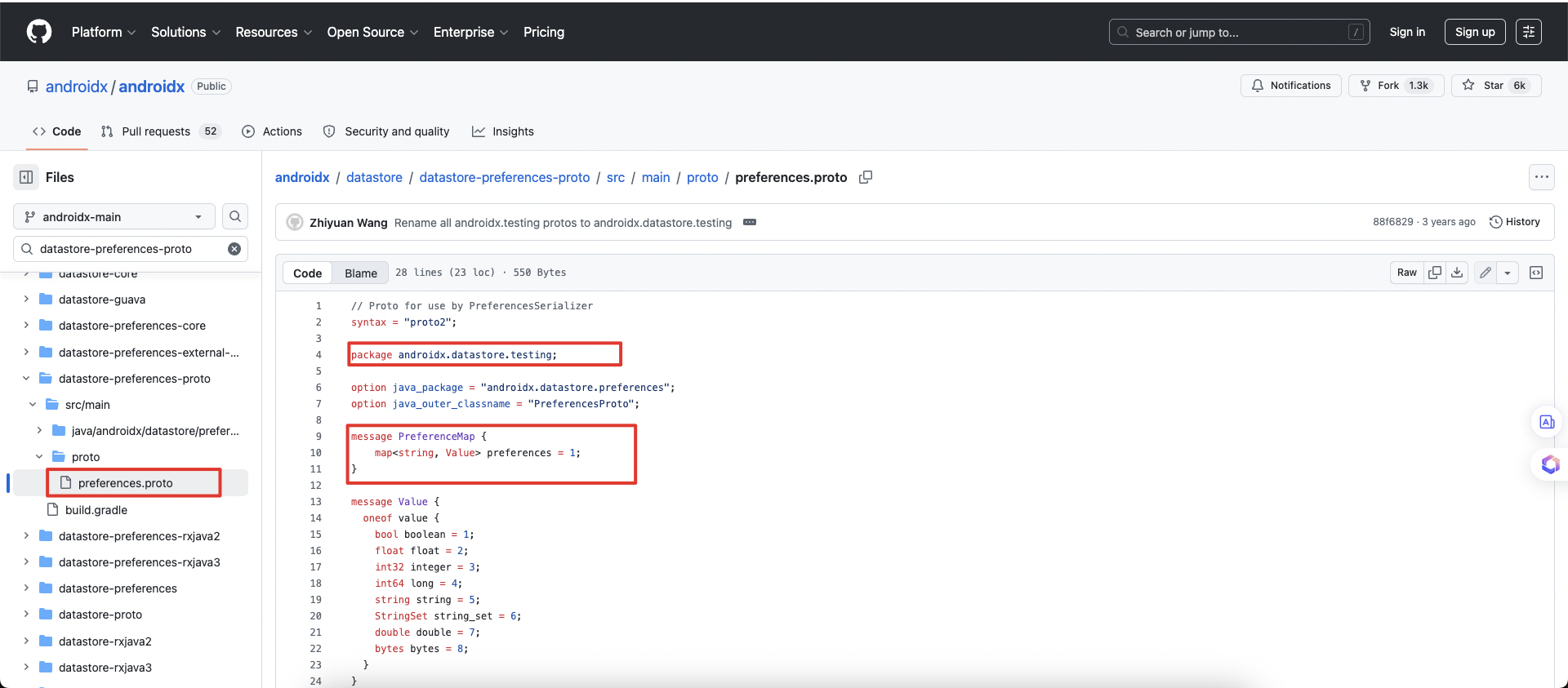
根据package通过如下命令解析
protoc --decode=androidx.datastore.testing.PreferenceMap \
       preferences.proto \
       < settings.preferences_pb
解析结果如下
preferences {
  key: "counter_a"
  value {
    integer: 1
  }
}
preferences {
  key: "counter_b"
  value {
    integer: 1
  }
}
JSON DataStore
Settings
java
public class Settings {

    /**
     * 使用final 字段 + withXxx 方法,保证不可变性。
     */

    public final int counterA;
    public final int counterB;

    /**
     * 无参构造:Gson 反序列化时需要;默认值全为 0。
     */
    public Settings() {
        this(0, 0);
    }

    public Settings(int counterA, int counterB) {
        this.counterA = counterA;
        this.counterB = counterB;
    }

    public Settings withCounterA(int value) {
        return new Settings(value, counterB);
    }

    public Settings withCounterB(int value) {
        return new Settings(counterA, value);
    }

    @NonNull
    @Override
    public String toString() {
        return "Settings{counterA=" + counterA + ", counterB=" + counterB + "}";
    }
}
SettingsSerializer.kt
kotlin
object SettingsSerializer : Serializer<Settings> {

    private val gson = Gson()

    override val defaultValue: Settings = Settings()

    override suspend fun readFrom(input: InputStream): Settings {
        return try {
            InputStreamReader(input, StandardCharsets.UTF_8).use { reader ->
                gson.fromJson(reader, Settings::class.java) ?: defaultValue
            }
        } catch (e: Exception) {
            throw CorruptionException("settings.json corrupted", e)
        }
    }

    override suspend fun writeTo(t: Settings, output: OutputStream) {
        OutputStreamWriter(output, StandardCharsets.UTF_8).use { writer ->
            gson.toJson(t, writer)
        }
    }
}
SettingsRepository
java
public class SettingsRepository {

    private static volatile SettingsRepository INSTANCE;

    public static SettingsRepository getInstance() {
        if (INSTANCE == null) {
            synchronized (SettingsRepository.class) {
                if (INSTANCE == null) {
                    INSTANCE = new SettingsRepository();
                }
            }
        }
        return INSTANCE;
    }

    private final RxDataStore<Settings> dataStore;

    private SettingsRepository() {
        // SettingsSerializer 是 Kotlin object,Java 里通过 .INSTANCE 引用
        dataStore = new RxDataStoreBuilder<>(
                MyApplication.getContext(), "settings.json", SettingsSerializer.INSTANCE
        ).build();
    }

    /**
     * 通用读:调用方用 mapper 从整份 Settings 里提取关心的字段 T。
     * 已包含 distinctUntilChanged 去重。
     */
    public <T> Flowable<T> observeChanged(Function<Settings, T> mapper) {
        return dataStore.data()
                .map(mapper)
                .distinctUntilChanged()
                .subscribeOn(Schedulers.io())
                .observeOn(AndroidSchedulers.mainThread());
    }

    public <T> Flowable<T> observe(Function<Settings, T> mapper) {
        return dataStore.data()
                .map(mapper)
                .subscribeOn(Schedulers.io())
                .observeOn(AndroidSchedulers.mainThread());
    }

    /**
     * 整体快照流,调试日志用。
     */
    public Flowable<Settings> observeAll() {
        return observeChanged(settings -> settings);
    }

    /**
     * 通用写:调用方传入 updater,接收当前 Settings,返回新的 Settings。
     * 注意与 Preferences DataStore 的区别:
     * - Preferences:{@code Consumer<MutablePreferences>}(修改 mutable 对象,无返回值)
     * - JSON DataStore:{@code Function<Settings, Settings>}(不可变,返回新对象)
     */
    public Single<Settings> update(Function<Settings, Settings> updater) {
        return dataStore.updateDataAsync(current -> {
            try {
                return Single.just(updater.apply(current));
            } catch (Throwable t) {
                return Single.error(t);
            }
        });
    }
}
SettingsViewModel
java
public class SettingsViewModel extends ViewModel {

    private static final String TAG = "JsonDataStoreDemo";

    private final SettingsRepository repo = SettingsRepository.getInstance();
    private final CompositeDisposable disposables = new CompositeDisposable();

    private final LiveData<Integer> counterA =
            LiveDataReactiveStreams.fromPublisher(repo.observeChanged(settings -> settings.counterA));
    private final LiveData<Integer> counterB =
            LiveDataReactiveStreams.fromPublisher(repo.observeChanged(settings -> settings.counterB));
    private final LiveData<Settings> allEntries =
            LiveDataReactiveStreams.fromPublisher(repo.observeAll());

    public LiveData<Integer> getCounterA() {
        return counterA;
    }

    public LiveData<Integer> getCounterB() {
        return counterB;
    }

    public LiveData<Settings> getAllEntries() {
        return allEntries;
    }

    // 写:updater 接收当前 Settings,返回新的 Settings(不可变拷贝)
    public void incA() {
        disposables.add(
                repo.update(s -> s.withCounterA(s.counterA + 1))
                        .subscribe(
                                s -> Log.d(TAG, "inc A ok: " + s),
                                e -> Log.e(TAG, "inc A err", e)
                        )
        );
    }

    public void incB() {
        disposables.add(
                repo.update(s -> s.withCounterB(s.counterB + 1))
                        .subscribe(
                                s -> Log.d(TAG, "inc B ok: " + s),
                                e -> Log.e(TAG, "inc B err", e)
                        )
        );
    }

    public void reset() {
        disposables.add(
                repo.update(s -> new Settings())
                        .subscribe(
                                s -> Log.d(TAG, "reset ok: " + s),
                                e -> Log.e(TAG, "reset err", e)
                        )
        );
    }

    @Override
    protected void onCleared() {
        super.onCleared();
        disposables.clear();
    }
}
MainActivity
java
public class MainActivity extends AppCompatActivity {

    private static final String TAG = "DataStoreDemo";

    private TextView tvCounterA;
    private TextView tvCounterB;
    private Button mBtnInc;
    private Button mBtnIncB;
    private Button mBtnReset;

    private SettingsViewModel viewModel;

    @Override
    protected void onCreate(Bundle savedInstanceState) {
        super.onCreate(savedInstanceState);
        setContentView(R.layout.activity_main);
        initView();
        initViewModel();
        initListener();
    }

    private void initView() {
        tvCounterA = findViewById(R.id.tv_counterA);
        tvCounterB = findViewById(R.id.tv_counter_b);
        mBtnInc = findViewById(R.id.btn_inc);
        mBtnIncB = findViewById(R.id.btn_inc_b);
        mBtnReset = findViewById(R.id.btn_reset);
    }

    private void initViewModel() {
        viewModel = new ViewModelProvider(this).get(SettingsViewModel.class);

        viewModel.getCounterA().observe(this, value ->
                tvCounterA.setText("A=" + value));
        viewModel.getCounterB().observe(this, value ->
                tvCounterB.setText("B=" + value));
        viewModel.getAllEntries().observe(this, this::logAllEntries);
    }

    private void initListener() {
        mBtnInc.setOnClickListener(v -> viewModel.incA());
        mBtnIncB.setOnClickListener(v -> viewModel.incB());
        mBtnReset.setOnClickListener(v -> viewModel.reset());
    }

    private void logAllEntries(Settings settings) {
        Log.d(TAG, "all entries = " + settings);
    }
}
activity_main.xml
xml
<?xml version="1.0" encoding="utf-8"?>
<androidx.constraintlayout.widget.ConstraintLayout xmlns:android="http://schemas.android.com/apk/res/android"
    xmlns:app="http://schemas.android.com/apk/res-auto"
    android:id="@+id/page_list_container"
    android:layout_width="match_parent"
    android:layout_height="match_parent">

    <TextView
        android:id="@+id/tv_counterA"
        android:layout_width="wrap_content"
        android:layout_height="wrap_content"
        android:text="0"
        android:textSize="24sp"
        app:layout_constraintTop_toTopOf="parent"
        app:layout_constraintBottom_toTopOf="@id/tv_counter_b"
        app:layout_constraintStart_toStartOf="parent"
        app:layout_constraintEnd_toEndOf="parent" />

    <TextView
        android:id="@+id/tv_counter_b"
        android:layout_width="wrap_content"
        android:layout_height="wrap_content"
        android:text="0"
        android:textSize="24sp"
        android:layout_marginTop="16dp"
        app:layout_constraintTop_toBottomOf="@id/tv_counterA"
        app:layout_constraintBottom_toTopOf="@id/btn_inc"
        app:layout_constraintStart_toStartOf="parent"
        app:layout_constraintEnd_toEndOf="parent" />

    <Button
        android:id="@+id/btn_inc"
        android:layout_width="wrap_content"
        android:layout_height="wrap_content"
        android:text="A +1"
        android:layout_marginEnd="8dp"
        app:layout_constraintTop_toBottomOf="@id/tv_counter_b"
        app:layout_constraintBottom_toBottomOf="parent"
        app:layout_constraintStart_toStartOf="parent"
        app:layout_constraintEnd_toStartOf="@id/btn_inc_b" />

    <Button
        android:id="@+id/btn_inc_b"
        android:layout_width="wrap_content"
        android:layout_height="wrap_content"
        android:text="B +1"
        android:layout_marginEnd="8dp"
        app:layout_constraintTop_toTopOf="@id/btn_inc"
        app:layout_constraintBottom_toBottomOf="@id/btn_inc"
        app:layout_constraintStart_toEndOf="@id/btn_inc"
        app:layout_constraintEnd_toStartOf="@id/btn_reset" />

    <Button
        android:id="@+id/btn_reset"
        android:layout_width="wrap_content"
        android:layout_height="wrap_content"
        android:text="重置"
        app:layout_constraintTop_toTopOf="@id/btn_inc"
        app:layout_constraintBottom_toBottomOf="@id/btn_inc"
        app:layout_constraintStart_toEndOf="@id/btn_inc_b"
        app:layout_constraintEnd_toEndOf="parent" />

</androidx.constraintlayout.widget.ConstraintLayout>
查看数据
从以下路径取出文件
/data/data/com.example.demo1/files/datastore/settings.jsonjson格式可直接打开,结果如下
{"counterA":0,"counterB":0}多进程代码中使用 DataStore
DataStore提供多进程同步
- 读取仅返回已持久存储到磁盘的数据。
- 写后读一致性。
- 写入会序列化。
- 写入绝不会阻塞读取。
MyApplication
java
public class MyApplication extends Application {

    private static MyApplication instance;

    @Override
    public void onCreate() {
        super.onCreate();
        instance = this;

        // JSON DataStore(多进程):每个进程的 Application.onCreate() 各自调一次 init,
        // 两个进程指向同一个 settings.json 文件,由文件锁保证跨进程一致性。
        MultiProcessSettingsDataStore.INSTANCE.init(this);
    }

    public static Context getContext() {
        return instance;
    }

}
Settings
java
public class Settings {

    /**
     * 使用final 字段 + withXxx 方法,保证不可变性。
     */

    public final int counterA;
    public final int counterB;

    /**
     * 无参构造:Gson 反序列化时需要;默认值全为 0。
     */
    public Settings() {
        this(0, 0);
    }

    public Settings(int counterA, int counterB) {
        this.counterA = counterA;
        this.counterB = counterB;
    }

    public Settings withCounterA(int value) {
        return new Settings(value, counterB);
    }

    public Settings withCounterB(int value) {
        return new Settings(counterA, value);
    }

    @NonNull
    @Override
    public String toString() {
        return "Settings{counterA=" + counterA + ", counterB=" + counterB + "}";
    }
}
SettingsSerializer.kt
java
object SettingsSerializer : Serializer<Settings> {

    private val gson = Gson()

    override val defaultValue: Settings = Settings()

    override suspend fun readFrom(input: InputStream): Settings {
        return try {
            InputStreamReader(input, StandardCharsets.UTF_8).use { reader ->
                gson.fromJson(reader, Settings::class.java) ?: defaultValue
            }
        } catch (e: Exception) {
            throw CorruptionException("settings.json corrupted", e)
        }
    }

    override suspend fun writeTo(t: Settings, output: OutputStream) {
        OutputStreamWriter(output, StandardCharsets.UTF_8).use { writer ->
            gson.toJson(t, writer)
        }
    }
}
SettingsRepository
java
public class SettingsRepository {

    private static volatile SettingsRepository INSTANCE;

    public static SettingsRepository getInstance() {
        if (INSTANCE == null) {
            synchronized (SettingsRepository.class) {
                if (INSTANCE == null) {
                    INSTANCE = new SettingsRepository();
                }
            }
        }
        return INSTANCE;
    }

    private SettingsRepository() {
        // MultiProcessSettingsDataStore 已在 MyApplication.onCreate() 中 init,这里直接使用
    }

    // ---------- 读 ----------

    /**
     * 通用读:mapper 从 Settings 里提取关心的字段 T,已包含 distinctUntilChanged。
     * 任意进程写入后,此 Flowable 都会收到通知。
     */
    public <T> Flowable<T> observeChanged(Function<Settings, T> mapper) {
        return MultiProcessSettingsDataStore.INSTANCE.data()
                .map(mapper)
                .distinctUntilChanged()
                .subscribeOn(Schedulers.io())
                .observeOn(AndroidSchedulers.mainThread());
    }

    /** 整体快照流,调试日志用。 */
    public Flowable<Settings> observeAll() {
        return observeChanged(settings -> settings);
    }

    // ---------- 写 ----------

    /**
     * 通用写:updater 接收当前 Settings,返回新 Settings。
     * 底层使用文件锁,跨进程写操作串行,不会丢数据。
     */
    public Single<Settings> update(Function<Settings, Settings> updater) {
        return MultiProcessSettingsDataStore.INSTANCE.update(updater);
    }
}
SettingsViewModel
java
public class SettingsViewModel extends ViewModel {

    private static final String TAG = "JsonDataStoreDemo";

    private final SettingsRepository repo = SettingsRepository.getInstance();
    private final CompositeDisposable disposables = new CompositeDisposable();

    private final LiveData<Integer> counterA =
            LiveDataReactiveStreams.fromPublisher(repo.observeChanged(settings -> settings.counterA));
    private final LiveData<Integer> counterB =
            LiveDataReactiveStreams.fromPublisher(repo.observeChanged(settings -> settings.counterB));
    private final LiveData<Settings> allEntries =
            LiveDataReactiveStreams.fromPublisher(repo.observeAll());

    public LiveData<Integer> getCounterA() {
        return counterA;
    }

    public LiveData<Integer> getCounterB() {
        return counterB;
    }

    public LiveData<Settings> getAllEntries() {
        return allEntries;
    }

    // 写:updater 接收当前 Settings,返回新的 Settings(不可变拷贝)
    public void incA() {
        disposables.add(
                repo.update(s -> s.withCounterA(s.counterA + 1))
                        .subscribe(
                                s -> Log.d(TAG, "inc A ok: " + s),
                                e -> Log.e(TAG, "inc A err", e)
                        )
        );
    }

    public void incB() {
        disposables.add(
                repo.update(s -> s.withCounterB(s.counterB + 1))
                        .subscribe(
                                s -> Log.d(TAG, "inc B ok: " + s),
                                e -> Log.e(TAG, "inc B err", e)
                        )
        );
    }

    public void reset() {
        disposables.add(
                repo.update(s -> new Settings())
                        .subscribe(
                                s -> Log.d(TAG, "reset ok: " + s),
                                e -> Log.e(TAG, "reset err", e)
                        )
        );
    }

    @Override
    protected void onCleared() {
        super.onCleared();
        disposables.clear();
    }
}
MultiProcessSettingsDataStore.kt
kotlin
object MultiProcessSettingsDataStore {

    // "lateinit var" 表示延迟初始化的变量(先声明,后赋值)
    // 相当于 Java 的 private DataStore<Settings> dataStore;
    // "private" 只在本文件内可见
    private lateinit var dataStore: DataStore<Settings>

    /**
     * 初始化,在 MyApplication.onCreate() 中调用。
     * 每个进程各自调一次,但两个进程指向同一个 settings.json 文件。
     */
    // "fun" 是 Kotlin 的方法声明,相当于 Java 的 void/返回值类型 方法名()
    fun init(context: Context) {
        // "::dataStore.isInitialized" 判断 lateinit 变量是否已赋值,避免重复初始化
        // 相当于 Java 的 if (dataStore != null) return;
        if (::dataStore.isInitialized) return

        // MultiProcessDataStoreFactory.create() 创建支持跨进程的 DataStore
        // 相当于 Java 的 new RxDataStoreBuilder<>(...).build(),但支持文件锁
        dataStore = MultiProcessDataStoreFactory.create(
            serializer = SettingsSerializer,   // 序列化器,告诉 DataStore 如何读写 Settings 对象
            produceFile = {
                // 这是一个 lambda(匿名函数),返回文件路径
                // 相当于 Java 的 () -> new File(...)
                // 两个进程必须返回同一个路径,才能共享数据
                File("${context.applicationContext.filesDir}/datastore/settings.json")
                // "${...}" 是 Kotlin 的字符串模板,相当于 Java 的 + 拼接
            },
            corruptionHandler = ReplaceFileCorruptionHandler { Settings(1,1) }
        )
    }

    /**
     * 读:把 Kotlin 的 Flow<Settings> 转成 Java 能用的 Flowable<Settings>。
     * 任意进程写入后,其他进程的订阅者都会收到通知。
     */
    fun data(): Flowable<Settings> =
        // rxFlowable { } 把协程 block 转成 Flowable,来自 kotlinx-coroutines-rx3 库
        rxFlowable(Dispatchers.IO) {
            // dataStore.data 是 Flow<Settings>(Kotlin 的数据流,类似 RxJava 的 Flowable)
            // .collect { } 是订阅操作,相当于 RxJava 的 .subscribe(value -> ...)
            // send(it) 把每次收到的 Settings 发射出去给 Flowable 的订阅者
            // "it" 是 Kotlin lambda 只有一个参数时的默认名字,相当于 Java 的 s -> send(s)
            dataStore.data.collect { send(it) }
        }

    /**
     * 写:接收 Java 的 RxFunction,底层调用 suspend updateData,包装成 Single。
     */
    // "Function<Settings, Settings>" 是 RxJava3 的函数接口
    // 用 RxJava 的 Function 而不是 Kotlin 的 (Settings) -> Settings,
    // 是为了让 Java 调用方可以直接传 lambda,不需要感知 Kotlin 类型
    fun update(transform: Function<Settings, Settings>): Single<Settings> =
        // rxSingle { } 把一个 suspend 操作转成 Single,来自 kotlinx-coroutines-rx3 库
        rxSingle(Dispatchers.IO) {
            // dataStore.updateData 是 suspend 函数(只能在协程里调用)
            // 在文件锁内原子执行:先读 → 执行 transform → 写盘
            // transform.apply(it) 调用 Java 的 Function 接口方法,相当于 Java 的 transform.apply(current)
            dataStore.updateData { transform.apply(it) }
        }
}
AndroidManifest.xml
xml
<?xml version="1.0" encoding="utf-8"?>
<manifest xmlns:android="http://schemas.android.com/apk/res/android"
    xmlns:tools="http://schemas.android.com/tools">

    <application
        android:name=".MyApplication"
        android:allowBackup="true"
        android:dataExtractionRules="@xml/data_extraction_rules"
        android:fullBackupContent="@xml/backup_rules"
        android:icon="@mipmap/ic_launcher"
        android:label="@string/app_name"
        android:roundIcon="@mipmap/ic_launcher_round"
        android:supportsRtl="true"
        android:theme="@style/Theme.Demo1"
        tools:targetApi="31">
        <activity
            android:name=".datastore.MainActivity"
            android:exported="true">
            <intent-filter>
                <action android:name="android.intent.action.MAIN" />

                <category android:name="android.intent.category.LAUNCHER" />
            </intent-filter>
        </activity>
        <!--
            android:process=":b_process" 让 ActivityB 运行在独立进程。
            前缀 ":" 表示这是 App 私有进程,完整名为 com.example.demo1:b_process。
            该进程有自己的 MyApplication.onCreate(),会重新初始化 MultiProcessSettingsDataStore,
            但指向同一个 settings.json 文件,由文件锁保证跨进程数据一致性。
        -->
        <activity
            android:name=".datastore.json.ActivityB"
            android:exported="false"
            android:process=":b_process" />
    </application>

</manifest>
MainActivity
java
public class MainActivity extends AppCompatActivity {

    private static final String TAG = "MainActivity";

    private TextView tvCounterA;
    private TextView tvCounterB;
    private Button mBtnInc;
    private Button mBtnIncB;
    private Button mBtnReset;
    private Button mBtnGoB;
    private Button mBtnCorrupt;

    private SettingsViewModel viewModel;

    @Override
    protected void onCreate(Bundle savedInstanceState) {
        super.onCreate(savedInstanceState);
        setContentView(R.layout.activity_main2);
        initView();
        initViewModel();
        initListener();
    }

    private void initView() {
        tvCounterA = findViewById(R.id.tv_counterA);
        tvCounterB = findViewById(R.id.tv_counter_b);
        mBtnInc = findViewById(R.id.btn_inc);
        mBtnIncB = findViewById(R.id.btn_inc_b);
        mBtnReset = findViewById(R.id.btn_reset);
        mBtnGoB = findViewById(R.id.btn_go_b);
        mBtnCorrupt = findViewById(R.id.btn_corrupt);
    }

    private void initViewModel() {
        viewModel = new ViewModelProvider(this).get(SettingsViewModel.class);

        viewModel.getCounterA().observe(this, value ->
                tvCounterA.setText("A=" + value));
        viewModel.getCounterB().observe(this, value ->
                tvCounterB.setText("B=" + value));
        viewModel.getAllEntries().observe(this, this::logAllEntries);
    }

    private void initListener() {
        mBtnInc.setOnClickListener(v -> viewModel.incA());
        mBtnIncB.setOnClickListener(v -> viewModel.incB());
        mBtnReset.setOnClickListener(v -> viewModel.reset());
        mBtnGoB.setOnClickListener(v ->
                startActivity(new Intent(this, ActivityB.class)));
        mBtnCorrupt.setOnClickListener(v -> corruptAndRestart());
    }

    /**
     * 写入非法 JSON 并杀进程,下次启动会抛异常CorruptionException,然后通过 ReplaceFileCorruptionHandler 修复文件
     */
    private void corruptAndRestart() {
        File f = new File(getFilesDir(), "datastore/settings.json");
        try (FileOutputStream fos = new FileOutputStream(f)) {
            fos.write("not a json".getBytes());
            Log.d(TAG, "corrupted: " + f.getAbsolutePath());
            Toast.makeText(this, "已破坏文件,进程将重启", Toast.LENGTH_SHORT).show();
        } catch (IOException e) {
            Log.e(TAG, "corrupt failed", e);
            return;
        }
        // 延迟一下,让 Toast 有机会显示
        mBtnCorrupt.postDelayed(
                () -> android.os.Process.killProcess(android.os.Process.myPid()),
                500);
    }

    private void logAllEntries(Settings settings) {
        Log.d(TAG, "all entries = " + settings);
    }
}
activity_main.xml
xml
<?xml version="1.0" encoding="utf-8"?>
<androidx.constraintlayout.widget.ConstraintLayout xmlns:android="http://schemas.android.com/apk/res/android"
    xmlns:app="http://schemas.android.com/apk/res-auto"
    android:id="@+id/page_list_container"
    android:layout_width="match_parent"
    android:layout_height="match_parent">

    <TextView
        android:id="@+id/tv_counterA"
        android:layout_width="wrap_content"
        android:layout_height="wrap_content"
        android:text="0"
        android:textSize="24sp"
        app:layout_constraintTop_toTopOf="parent"
        app:layout_constraintBottom_toTopOf="@id/tv_counter_b"
        app:layout_constraintStart_toStartOf="parent"
        app:layout_constraintEnd_toEndOf="parent" />

    <TextView
        android:id="@+id/tv_counter_b"
        android:layout_width="wrap_content"
        android:layout_height="wrap_content"
        android:text="0"
        android:textSize="24sp"
        android:layout_marginTop="16dp"
        app:layout_constraintTop_toBottomOf="@id/tv_counterA"
        app:layout_constraintBottom_toTopOf="@id/btn_inc"
        app:layout_constraintStart_toStartOf="parent"
        app:layout_constraintEnd_toEndOf="parent" />

    <Button
        android:id="@+id/btn_inc"
        android:layout_width="wrap_content"
        android:layout_height="wrap_content"
        android:text="A +1"
        android:layout_marginEnd="8dp"
        app:layout_constraintTop_toBottomOf="@id/tv_counter_b"
        app:layout_constraintStart_toStartOf="parent"
        app:layout_constraintEnd_toStartOf="@id/btn_inc_b" />

    <Button
        android:id="@+id/btn_inc_b"
        android:layout_width="wrap_content"
        android:layout_height="wrap_content"
        android:text="B +1"
        android:layout_marginEnd="8dp"
        app:layout_constraintTop_toTopOf="@id/btn_inc"
        app:layout_constraintBottom_toBottomOf="@id/btn_inc"
        app:layout_constraintStart_toEndOf="@id/btn_inc"
        app:layout_constraintEnd_toStartOf="@id/btn_reset" />

    <Button
        android:id="@+id/btn_reset"
        android:layout_width="wrap_content"
        android:layout_height="wrap_content"
        android:text="重置"
        app:layout_constraintTop_toTopOf="@id/btn_inc"
        app:layout_constraintBottom_toBottomOf="@id/btn_inc"
        app:layout_constraintStart_toEndOf="@id/btn_inc_b"
        app:layout_constraintEnd_toEndOf="parent" />

    <Button
        android:id="@+id/btn_go_b"
        android:layout_width="wrap_content"
        android:layout_height="wrap_content"
        android:text="跳到进程B"
        android:layout_marginTop="16dp"
        app:layout_constraintTop_toBottomOf="@id/btn_inc"
        app:layout_constraintStart_toStartOf="parent"
        app:layout_constraintEnd_toEndOf="parent" />

    <Button
        android:id="@+id/btn_corrupt"
        android:layout_width="wrap_content"
        android:layout_height="wrap_content"
        android:text="破坏文件并重启"
        android:layout_marginTop="16dp"
        app:layout_constraintTop_toBottomOf="@id/btn_go_b"
        app:layout_constraintStart_toStartOf="parent"
        app:layout_constraintEnd_toEndOf="parent" />

</androidx.constraintlayout.widget.ConstraintLayout>
ActivityB
java
public class ActivityB extends AppCompatActivity {

    private static final String TAG = "ActivityB";

    private TextView tvCounterA;
    private TextView tvCounterB;
    private SettingsViewModel viewModel;

    @Override
    protected void onCreate(Bundle savedInstanceState) {
        super.onCreate(savedInstanceState);
        setContentView(R.layout.activity_b);

        tvCounterA = findViewById(R.id.tv_counterA);
        tvCounterB = findViewById(R.id.tv_counter_b);
        Button btnInc = findViewById(R.id.btn_inc);
        Button btnIncB = findViewById(R.id.btn_inc_b);
        Button btnReset = findViewById(R.id.btn_reset);

        // SettingsViewModel 和 SettingsRepository 与主进程用同一套代码,
        // 但这是 :b_process 里全新的实例,通过文件锁与主进程协调
        viewModel = new ViewModelProvider(this).get(SettingsViewModel.class);

        viewModel.getCounterA().observe(this, value -> {
            tvCounterA.setText("A = " + value);
            Log.d(TAG, "counterA updated: " + value);
        });
        viewModel.getCounterB().observe(this, value -> {
            tvCounterB.setText("B = " + value);
            Log.d(TAG, "counterB updated: " + value);
        });

        viewModel.getAllEntries().observe(this, s ->
                Log.d(TAG, "all entries = " + s));

        btnInc.setOnClickListener(v -> viewModel.incA());
        btnIncB.setOnClickListener(v -> viewModel.incB());
        btnReset.setOnClickListener(v -> viewModel.reset());
    }
}
activity_b.xml
xml
<?xml version="1.0" encoding="utf-8"?>
<androidx.constraintlayout.widget.ConstraintLayout xmlns:android="http://schemas.android.com/apk/res/android"
    xmlns:app="http://schemas.android.com/apk/res-auto"
    android:layout_width="match_parent"
    android:layout_height="match_parent">

    <TextView
        android:id="@+id/tv_process_tag"
        android:layout_width="wrap_content"
        android:layout_height="wrap_content"
        android:text="Process B"
        android:textSize="14sp"
        android:textColor="#FF5722"
        android:layout_marginTop="32dp"
        app:layout_constraintTop_toTopOf="parent"
        app:layout_constraintStart_toStartOf="parent"
        app:layout_constraintEnd_toEndOf="parent" />

    <TextView
        android:id="@+id/tv_counterA"
        android:layout_width="wrap_content"
        android:layout_height="wrap_content"
        android:text="0"
        android:textSize="24sp"
        android:layout_marginTop="16dp"
        app:layout_constraintTop_toBottomOf="@id/tv_process_tag"
        app:layout_constraintBottom_toTopOf="@id/tv_counter_b"
        app:layout_constraintStart_toStartOf="parent"
        app:layout_constraintEnd_toEndOf="parent" />

    <TextView
        android:id="@+id/tv_counter_b"
        android:layout_width="wrap_content"
        android:layout_height="wrap_content"
        android:text="0"
        android:textSize="24sp"
        android:layout_marginTop="16dp"
        app:layout_constraintTop_toBottomOf="@id/tv_counterA"
        app:layout_constraintBottom_toTopOf="@id/btn_inc"
        app:layout_constraintStart_toStartOf="parent"
        app:layout_constraintEnd_toEndOf="parent" />

    <Button
        android:id="@+id/btn_inc"
        android:layout_width="wrap_content"
        android:layout_height="wrap_content"
        android:text="A +1"
        android:layout_marginEnd="8dp"
        app:layout_constraintTop_toBottomOf="@id/tv_counter_b"
        app:layout_constraintBottom_toBottomOf="parent"
        app:layout_constraintStart_toStartOf="parent"
        app:layout_constraintEnd_toStartOf="@id/btn_inc_b" />

    <Button
        android:id="@+id/btn_inc_b"
        android:layout_width="wrap_content"
        android:layout_height="wrap_content"
        android:text="B +1"
        android:layout_marginEnd="8dp"
        app:layout_constraintTop_toTopOf="@id/btn_inc"
        app:layout_constraintBottom_toBottomOf="@id/btn_inc"
        app:layout_constraintStart_toEndOf="@id/btn_inc"
        app:layout_constraintEnd_toStartOf="@id/btn_reset" />

    <Button
        android:id="@+id/btn_reset"
        android:layout_width="wrap_content"
        android:layout_height="wrap_content"
        android:text="重置"
        app:layout_constraintTop_toTopOf="@id/btn_inc"
        app:layout_constraintBottom_toBottomOf="@id/btn_inc"
        app:layout_constraintStart_toEndOf="@id/btn_inc_b"
        app:layout_constraintEnd_toEndOf="parent" />

</androidx.constraintlayout.widget.ConstraintLayout>