Git 操作笔记
- [Git 完整操作笔记](#Git 完整操作笔记)
-
- [一、Git Commit(提交)](#一、Git Commit(提交))
- [二、Git Branch(分支)](#二、Git Branch(分支))
- [三、Git Merge(合并)](#三、Git Merge(合并))
- [四、Git Rebase(变基)](#四、Git Rebase(变基))
- [五、HEAD 与分离 HEAD](#五、HEAD 与分离 HEAD)
- 六、相对引用
- 七、撤销变更
-
- [7.1 git reset(本地撤销,改写历史)](#7.1 git reset(本地撤销,改写历史))
- [7.2 git revert(安全撤销,可推送)](#7.2 git revert(安全撤销,可推送))
- 八、Cherry-pick(精确复制提交)
- [九、交互式 Rebase(-i)](#九、交互式 Rebase(-i))
- 十、提交修改技巧
-
- [技巧 #1:用 rebase -i + amend 修改历史提交](#1:用 rebase -i + amend 修改历史提交)
- [技巧 #2:用 cherry-pick + amend(更简洁,避免冲突)](#2:用 cherry-pick + amend(更简洁,避免冲突))
- [十一、Git Tag(标签)](#十一、Git Tag(标签))
- [十二、Git Describe(描述位置)](#十二、Git Describe(描述位置))
- [十三、多分支 Rebase(进阶)](#十三、多分支 Rebase(进阶))
- [十四、选择 parent 提交(^2)](#十四、选择 parent 提交(^2))
- 十五、远程仓库基础
-
- [15.1 git clone](#15.1 git clone)
- [15.2 git fetch(下载,不修改本地)](#15.2 git fetch(下载,不修改本地))
- [15.3 模拟团队协作(fakeTeamwork)](#15.3 模拟团队协作(fakeTeamwork))
- [15.4 git pull(拉取并合并)](#15.4 git pull(拉取并合并))
- [15.5 git push(推送)](#15.5 git push(推送))
- 十六、偏离的工作(推送冲突的处理)
- [十七、远程服务器拒绝(main 被保护)](#十七、远程服务器拒绝(main 被保护))
- 十八、合并多个特性分支后推送
- 十九、远程跟踪分支
- [二十、Push / Fetch 的参数详解](#二十、Push / Fetch 的参数详解)
-
- [20.1 git push 的 `<place>` 参数](#20.1 git push 的
<place>参数) - [20.2 `<source>:<destination>` 格式(来源和目标不同名)](#20.2
<source>:<destination>格式(来源和目标不同名)) - [20.3 git fetch 的参数](#20.3 git fetch 的参数)
- [20.4 空 source 的特殊用法](#20.4 空 source 的特殊用法)
- [20.1 git push 的 `<place>` 参数](#20.1 git push 的
- [二十一、git pull 的参数](#二十一、git pull 的参数)
- 二十二、快速参考速查表
Git 完整操作笔记
📌 本笔记来源于 learngitbranching.js.org 交互式教程内容整理
一、Git Commit(提交)
Git 提交记录保存的是目录下所有已跟踪文件的快照 ,但不会盲目复制整个目录,而是只打包与上次的差异 ,因此非常轻量。每个提交记录都有 parent 节点,维护完整历史。
bash
git commit演示过程 :初始有 C0、C1 两个提交,执行 git commit 后生成 C2,C2 的 parent 是 C1。
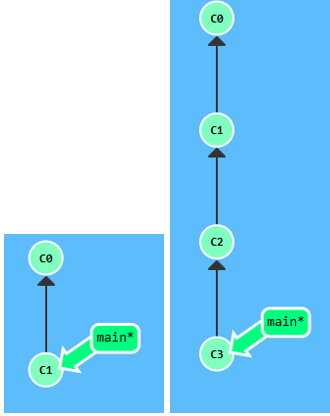
例题:连续提交两次
bashgit commit git commit
二、Git Branch(分支)
分支只是一个指向某个提交记录的轻量指针,创建多少都不会有存储开销。
bash
git branch <name>            # 创建分支
git checkout <name>          # 切换分支(切换后 * 号移动到新分支)
git checkout -b <name>       # 创建并切换(常用简写)
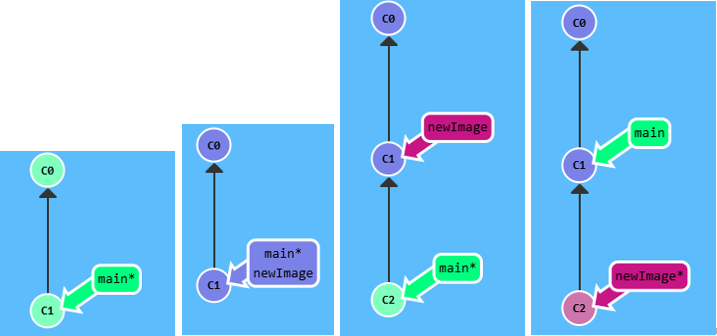
演示过程 :
bash
git branch newImage          # 创建 newImage,指向当前 C1
git commit                   # ⚠️ 此时仍在 main 上,newImage 不动!
git checkout newImage        # 切换到 newImage
git commit                   # 现在提交在 newImage 上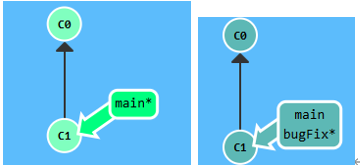
例题:创建名为 bugFix 的分支并切换过去
bashgit branch bugFix git checkout bugFix # 或者一步到位: git checkout -b bugFix
⚠️ Git 2.23 起,
git switch是git checkout的新替代命令,功能更清晰。
三、Git Merge(合并)
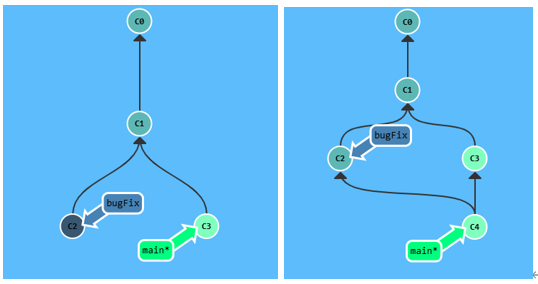
合并两个分支会产生一个特殊的合并提交记录 ,它有两个 parent 节点,包含了两条分支及其所有祖先的内容。
bash
git merge <branch>演示过程 :
bash
# main 和 bugFix 各有一个独有提交
git checkout bugFix
git merge main               # 因为 main 继承自 bugFix,Git 直接 fast-forward(移动指针,无新提交)
四、Git Rebase(变基)
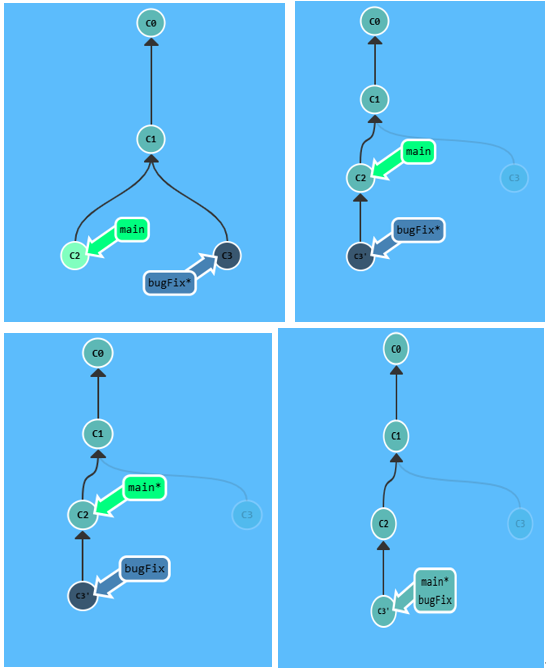
Rebase 将一系列提交记录"复制"后,在另一个地方逐个放下,产生更线性的提交历史。
bash
git rebase <target-branch>演示过程 :
bash
git rebase main              # 将 bugFix 的工作复制并移到 main 顶端(产生 C3' 副本,原 C3 仍存在但半透明)
git checkout main
git rebase bugFix            # 因为 bugFix 继承自 main,只是 fast-forward 移动指针
rebase 与 merge 对比:
| rebase | merge | |
|---|---|---|
| 提交历史 | 线性、整洁 | 保留真实并行历史 |
| 历史是否被修改 | 会改写 | 不会改写 |
| 适用场景 | 追求干净提交树 | 需要保留完整历史 |
五、HEAD 与分离 HEAD
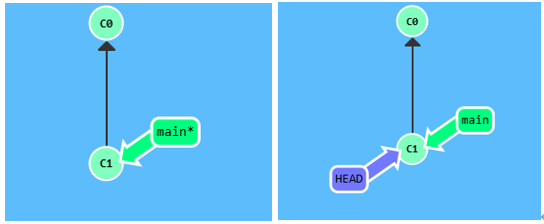
HEAD 是当前所在提交记录的符号名称 ,通常指向分支名(如 main)。
分离 HEAD:让 HEAD 直接指向某个提交哈希,而非分支名。
bash
# 原来:HEAD → main → C1
git checkout C1
# 现在:HEAD → C1(分离状态)
查看 HEAD 指向:
bash
cat .git/HEAD
git symbolic-ref HEAD        # HEAD 指向分支名时使用
六、相对引用
从已知位置出发,通过操作符在提交树中移动:
| 操作符 | 含义 |
|---|---|
^ |
向上移动 1 个提交(parent) |
^^ |
向上移动 2 个提交 |
~<num> |
向上移动多个提交 |
^<num> |
合并提交时选择第几个 parent |
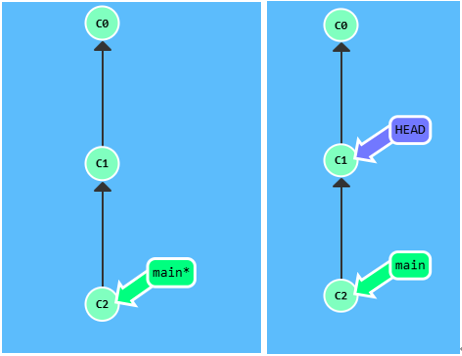
演示 :
bash
git checkout main^           # 切换到 main 的 parent
git checkout HEAD~4          # 从 HEAD 向上移动 4 步
git checkout HEAD~^2~2       # 链式操作:向上1步 → 选第2个parent → 再向上2步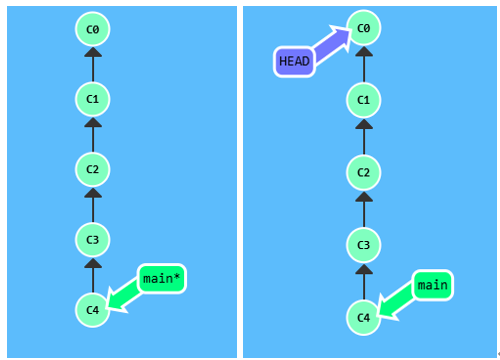
bash
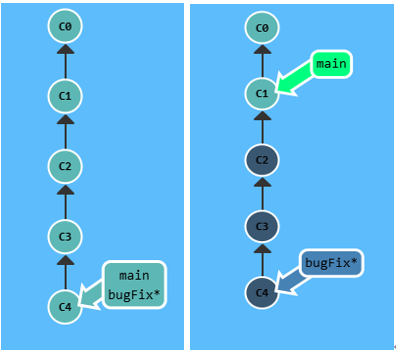
git checkout HEAD~4 # 从 HEAD 向上移动 4 步强制移动分支 :
bash
git branch -f main HEAD~3 # 强制将 main 指向 HEAD 的第 3 级 parent⚠️ 真实 Git 中,不能对当前所在分支执行
git branch -f。
七、撤销变更
7.1 git reset(本地撤销,改写历史)
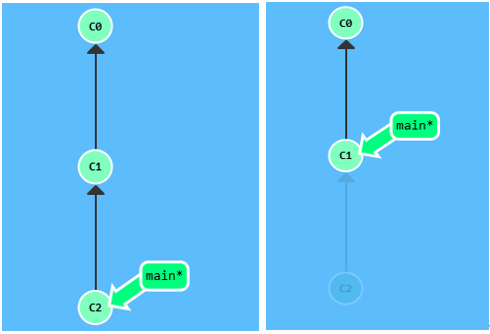
将分支引用向后移动至更早的提交,就好像那个提交从未发生过。
bash
git reset HEAD~1 # main 回退到 C1,C2 的变更回到未暂存状态⚠️
git reset只适合本地分支,不能用于已推送到远程的共享分支。
7.2 git revert(安全撤销,可推送)
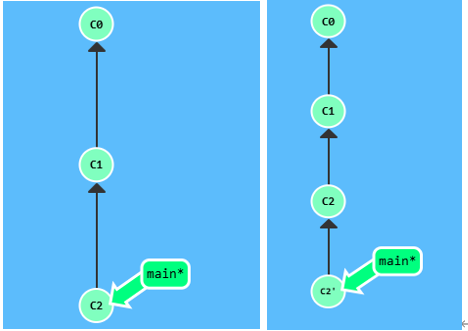
创建一个新的提交记录 来抵消目标提交的变更,不改写历史。
bash
git revert HEAD # 产生新提交 C2',其内容刚好撤销 C2 的变更八、Cherry-pick(精确复制提交)
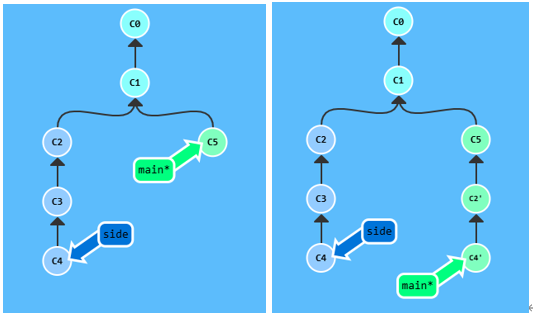
将指定提交记录复制到当前 HEAD 下方,需要知道提交的哈希值(或别名)。
bash
git cherry-pick <C1> <C2> ...演示 :将 side 分支上的 C2、C4 复制到 main 上
bash
# 当前在 main 上
git cherry-pick C2 C4        # C2、C4 被依次复制到 main 顶端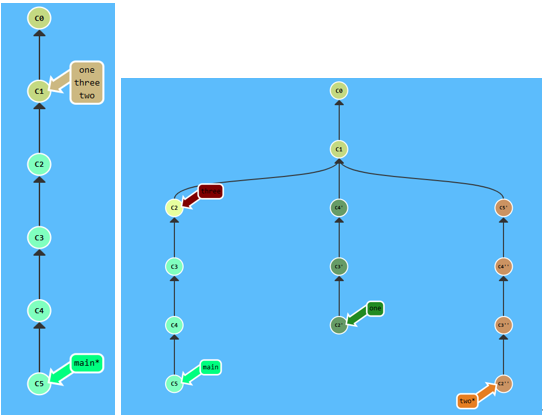
例题:对三个分支分别进行不同的 cherry-pick 操作
- one 需要重新排序并删除 C5
- two 仅需重排顺序
- three 只需要一次提交
bashgit checkout one git cherry-pick C4 C3 C2 git checkout two git cherry-pick C5 C4 C3 C2 git branch -f three C2
九、交互式 Rebase(-i)
当不清楚哪些提交的哈希值时,用交互式变基审查并整理即将变基的提交列表。
bash
git rebase -i HEAD~4交互界面中可以:
- 调整提交顺序(拖动)
- 删除/跳过某个提交(关闭 pick)
- 在真实 Git 中还支持 squash(合并)、edit、reword 等
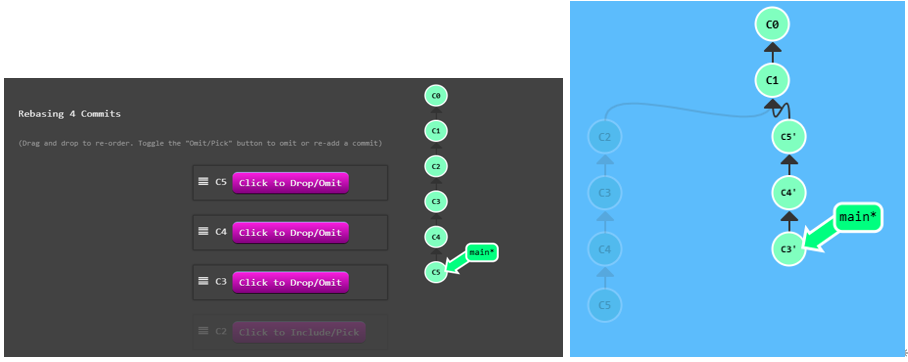
例题:对最近 4 个提交(C2 C3 C4 C5)进行交互式变基,删除 C2,顺序改为 C5 → C4 → C3
bashgit rebase -i HEAD~4 # 在编辑界面:删除 C2,调整顺序为 C5、C4、C3
十、提交修改技巧
技巧 #1:用 rebase -i + amend 修改历史提交
场景 :你在 newImage 分支提交了一次,又基于它创建了 caption 分支再提交一次,现在需要修改 newImage 中的那次提交。
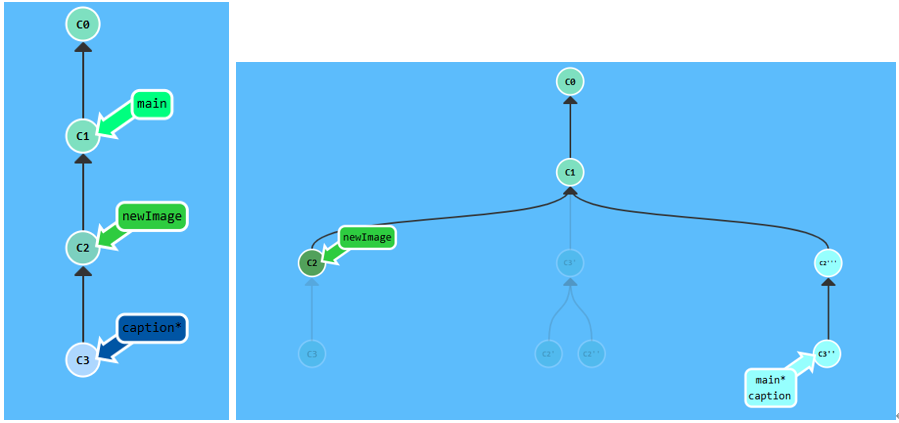
步骤:
bash
git rebase -i HEAD~2         # 将 C2 调到最前(顺序改为:C3, C2 → 变成 C2 在前)
git commit --amend           # 修改现在最新的提交(即原来的 C2)
git rebase -i HEAD~2         # 恢复原来的顺序(C2'', C3')
# 然后更新 main 指向最新
技巧 #2:用 cherry-pick + amend(更简洁,避免冲突)
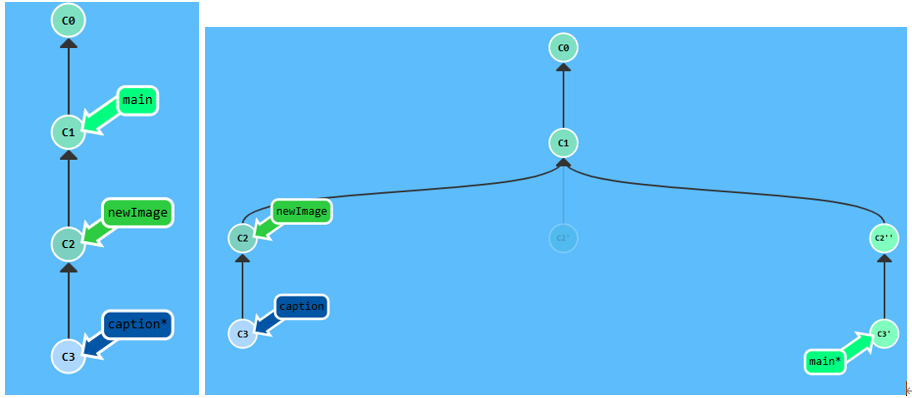
bash
git checkout main
git cherry-pick C2           # 摘取需要修改的提交
git commit --amend           # 修改它
git cherry-pick C3           # 再摘取后续提交
十一、Git Tag(标签)
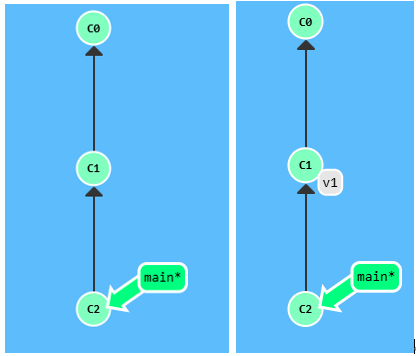
标签是永久指向某个提交的锚点,不会随新提交移动,常用于标记版本发布。
bash
git tag v1 C1                # 在 C1 上创建标签 v1
git tag v1                   # 不指定提交时,默认在 HEAD 处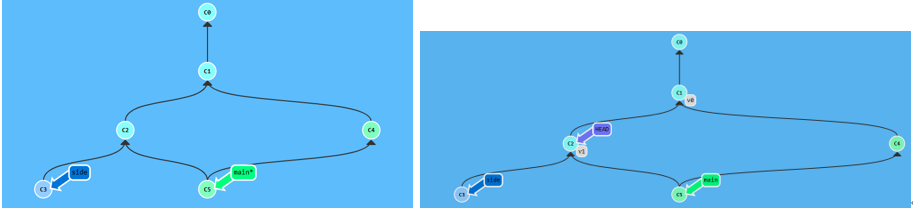
例题:
bashgit tag v0 C1 git tag v1 C2 git checkout C2
十二、Git Describe(描述位置)
帮助找到离某个提交最近的标签,在提交树中定位当前位置。
bash
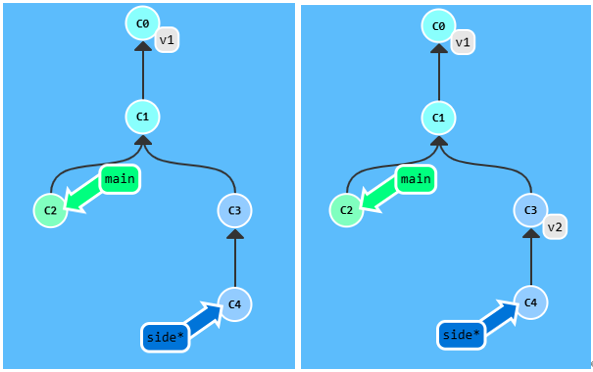
git describe <ref>输出格式 :<tag>-<numCommits>-g<hash>
tag:最近的标签名numCommits:与该标签相差几个提交hash:当前提交哈希的前几位- 若 ref 上就有标签,则只输出标签名
示例 (先执行 git tag v2 C3):
bash
git describe main   # 输出:v1-2-gC2
git describe side   # 输出:v2-1-gC4
十三、多分支 Rebase(进阶)
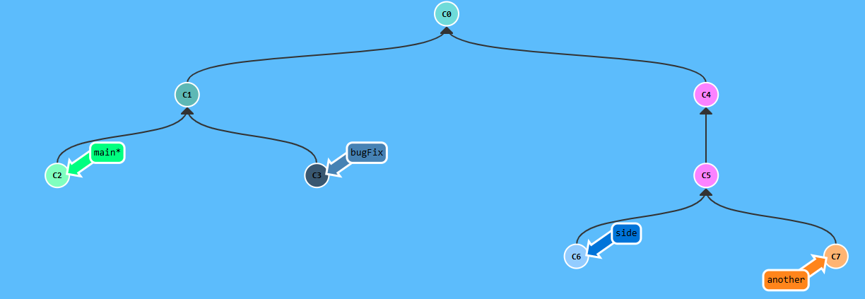
场景 :有 bugfix、side、another 多个分支,需按顺序全部 rebase 到 main 上,使提交历史有序。
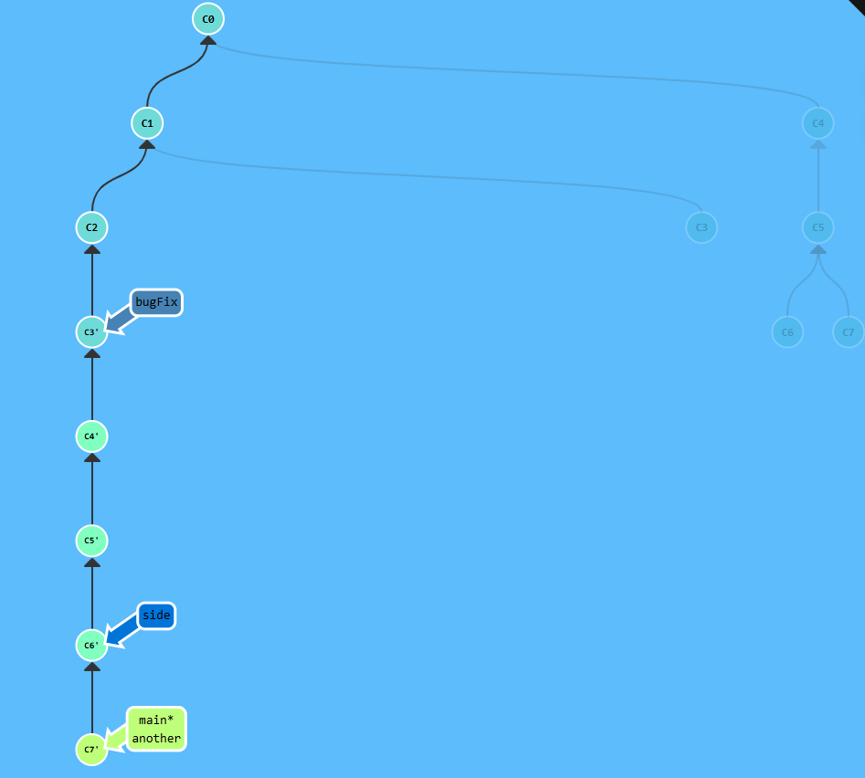
bash
git rebase main bugfix       # 将 bugfix rebase 到 main
git rebase bugfix side       # 将 side rebase 到 bugfix
git rebase side another      # 将 another rebase 到 side
git rebase another main      # 将 main fast-forward 到 another
十四、选择 parent 提交(^2)
合并提交有两个 parent,^ 后加数字可以选择走哪条路径。
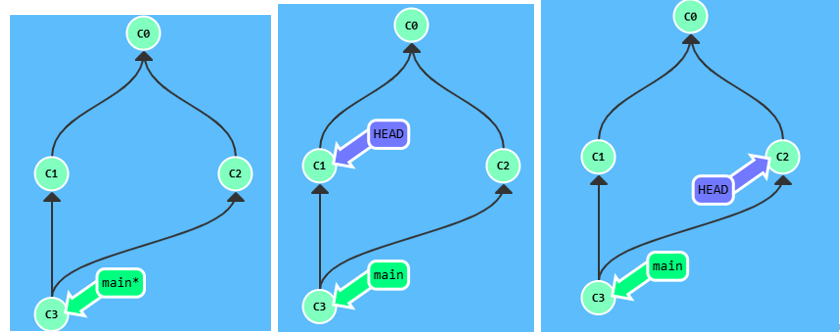
bash
git checkout main^           # 默认选第一个 parent(正上方)
git checkout main^2          # 选第二个 parent(另一条分支)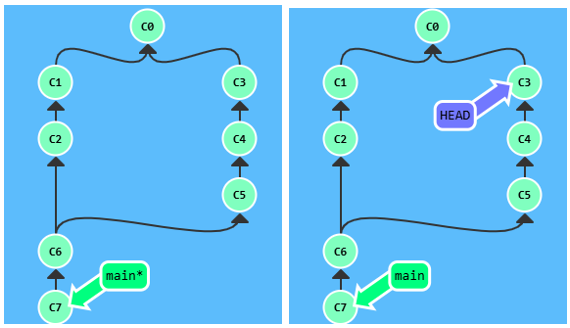
bash
git checkout HEAD~^2~2 # 链式:向上1步 → 选第2个parent → 再向上2步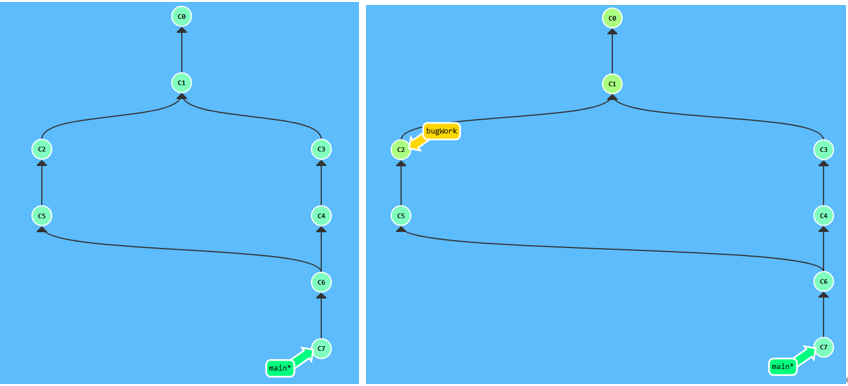
例题:
bashgit branch bugWork main^^2^
十五、远程仓库基础
远程仓库是你仓库在另一台计算机上的拷贝,具备备份和协作两大核心作用。
15.1 git clone
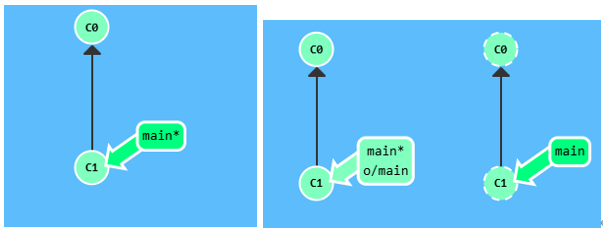
bash
git clone # 在本地创建远程仓库的完整拷贝克隆后,本地会多出一个远程分支 (如 o/main 或 origin/main),命名规范为 <remote>/<branch>。
远程分支的特性:
- 切换到远程分支时自动进入分离 HEAD 状态(不能直接提交)
- 反映远程仓库上次通信时的状态
演示 :切换到远程分支后提交
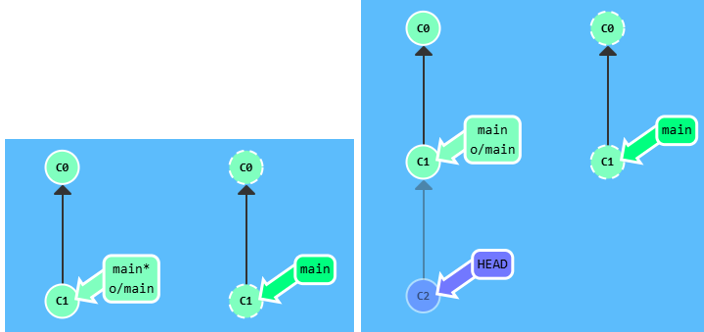
bash
git checkout o/main          # 进入分离 HEAD 状态
git commit                   # o/main 不会更新!因为它只反映远程状态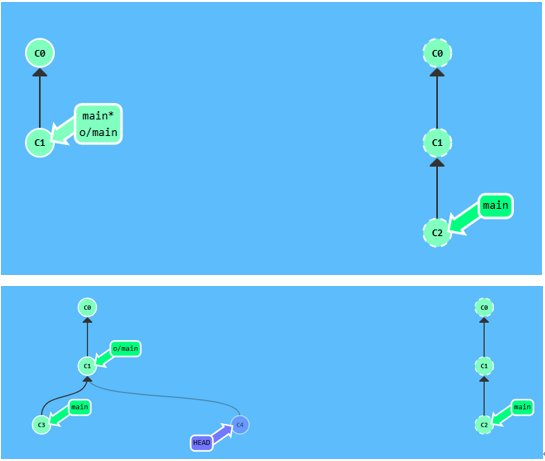
例题:
bashgit commit git checkout o/main git commit
15.2 git fetch(下载,不修改本地)
从远程仓库下载本地缺失的提交记录,并更新远程分支指针(如 o/main),但不修改本地工作分支。
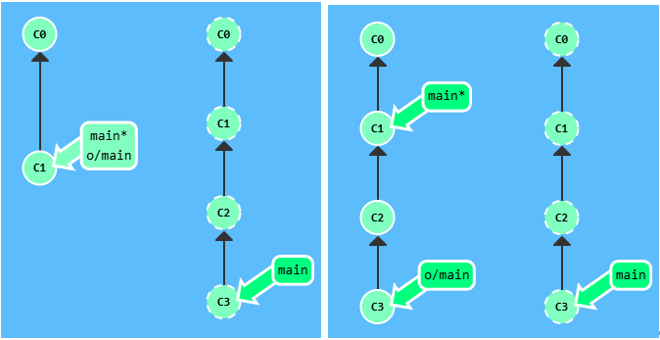
bash
git fetch # 下载所有远程更新⚠️
git fetch只是单纯下载,不会更新你的 main 分支,也不会修改磁盘文件。
15.3 模拟团队协作(fakeTeamwork)
教程内置命令,用于模拟队友向远程仓库推送提交:
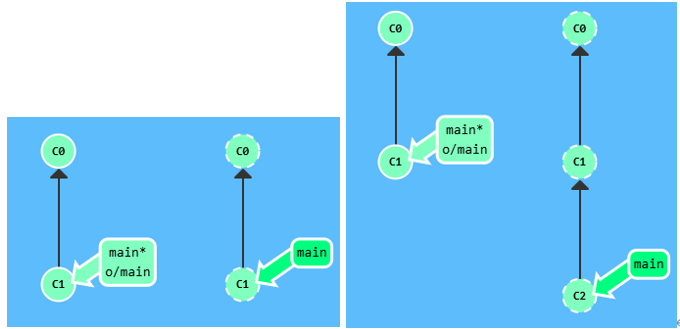
bash
git fakeTeamwork # 在远程 main 上新增一个提交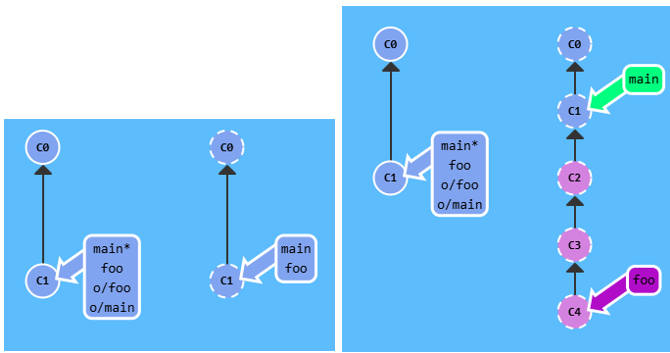
bash
git fakeTeamwork foo 3 # 在远程 foo 分支上新增 3 个提交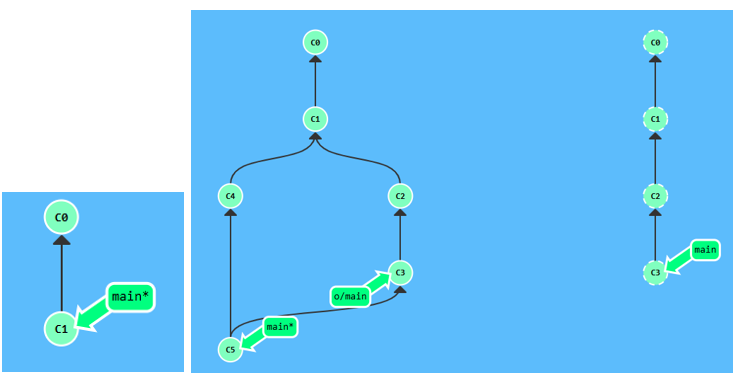
例题:完整的克隆 → 模拟远程变更 → 本地提交 → 拉取流程
bashgit clone git fakeTeamwork 2 git commit git pull
15.4 git pull(拉取并合并)
git pull = git fetch + git merge 的缩写。
bash
# 等价写法:
git fetch
git merge o/main
# ↓ 等同于
git pull

# 等价写法(rebase 版):
git fetch
git rebase o/main
# ↓ 等同于
git pull --rebase
15.5 git push(推送)
将本地提交上传到远程仓库:
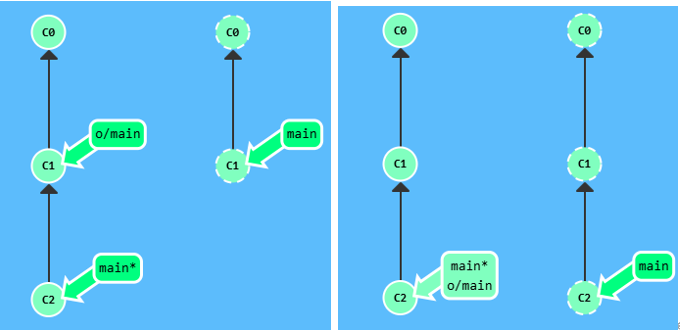
bash
git push # 推送当前分支执行后 :远程仓库接收新提交,远程分支(o/main)也同步更新。
十六、偏离的工作(推送冲突的处理)
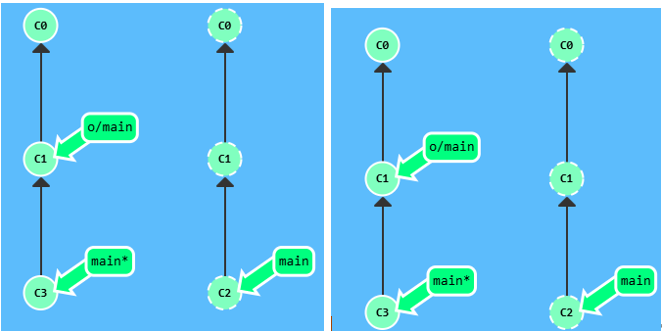
场景 :你在周一克隆了仓库,开发到周五,但同事这期间也推送了新提交。此时你的提交基于旧版本,git push 会被拒绝。
bash
git push # ❌ 在这里执行git push会导致失败!你的 C3 基于旧的 C1,远程已更新到 C2,现象是什么都没有变解决方案一:rebase(保持线性历史)
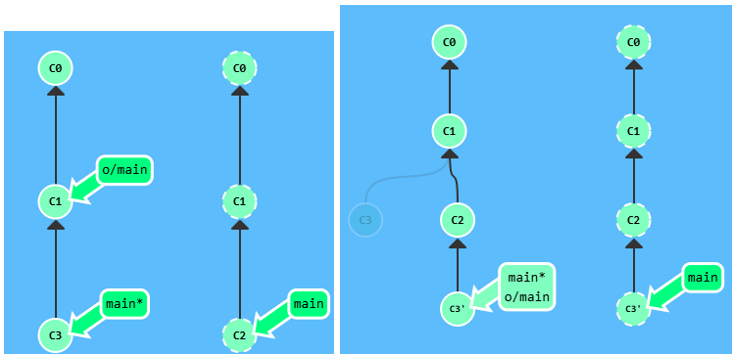
bash
git fetch
git rebase o/main
git push
# 简写:
git pull --rebase
git push
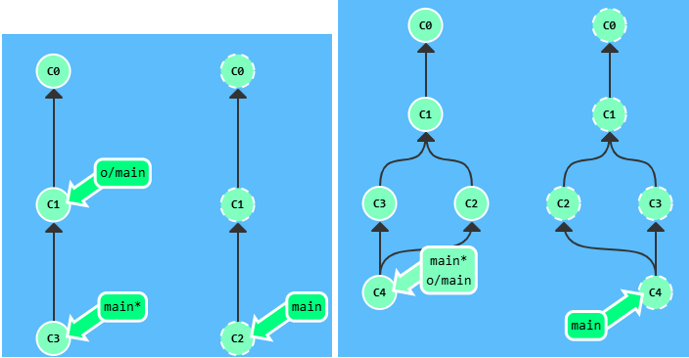
解决方案二:merge
bash
git fetch
git merge o/main
git push
# 简写:
git pull
git push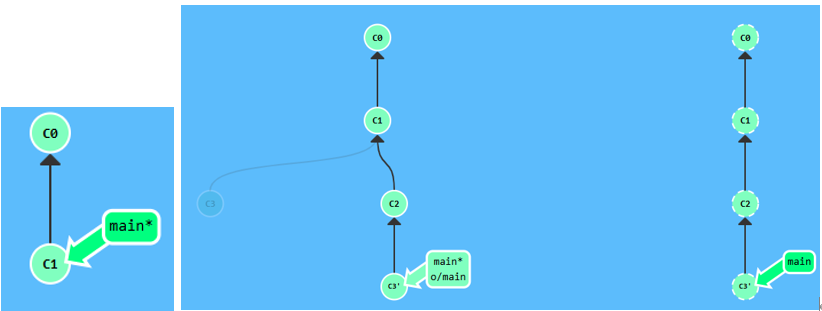
例题:完整的克隆 → 模拟冲突 → 用 rebase 解决后推送
bashgit clone git fakeTeamwork git commit git pull --rebase git push
十七、远程服务器拒绝(main 被保护)
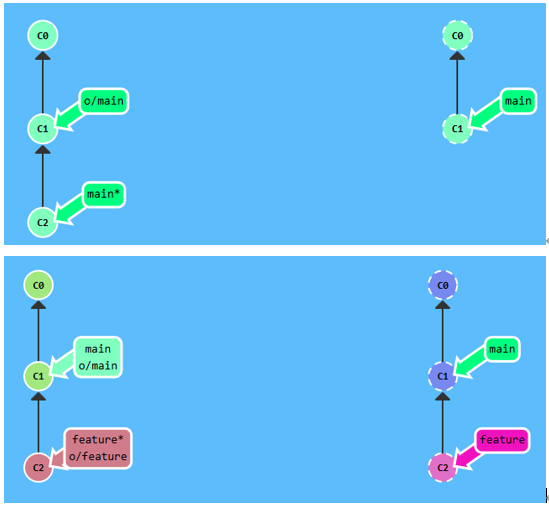
场景:团队项目中 main 分支被锁定,必须通过 Pull Request 合并,不允许直接 push。
错误信息:
! [远程服务器拒绝] main -> main
(TF402455: 不允许推送这个分支;你必须使用 pull request 来更新这个分支。)解决办法:将 main 重置为远程状态,将本地工作移到特性分支后推送:
bash
git branch -f main o/main    # 将本地 main 重置为与远程一致
git checkout -b feature C2   # 从正确的提交创建特性分支
git push origin feature      # 推送特性分支,再去提 PR
十八、合并多个特性分支后推送
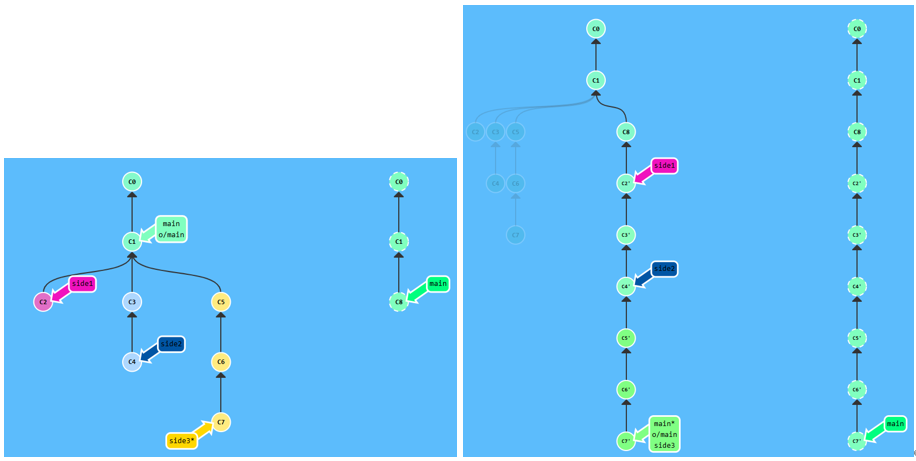
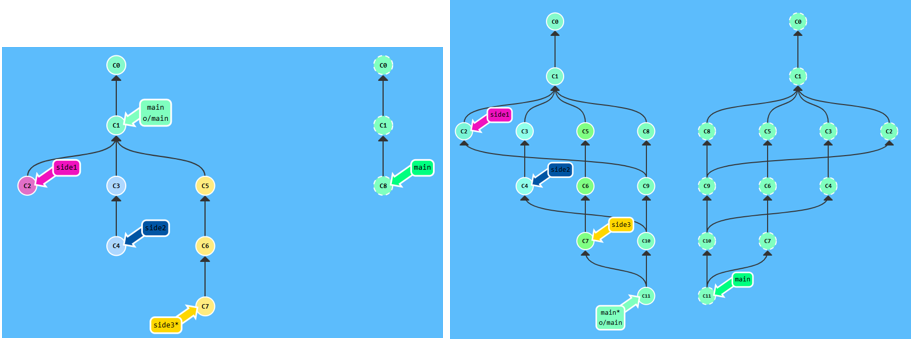
场景:有 side1、side2、side3 三个特性分支,需要按顺序合并到 main 并推送。
方案一:rebase(线性历史)
bash
git fetch
git rebase o/main side1      # 将 side1 rebase 到 o/main 上
git rebase side1 side2       # 将 side2 rebase 到 side1 上
git rebase side2 side3       # 将 side3 rebase 到 side2 上
git rebase side3 main        # 将 main fast-forward 到 side3
git push
方案二:merge(保留历史)
bash
git checkout main
git pull
git merge side1
git merge side2
git merge side3
git push
十九、远程跟踪分支
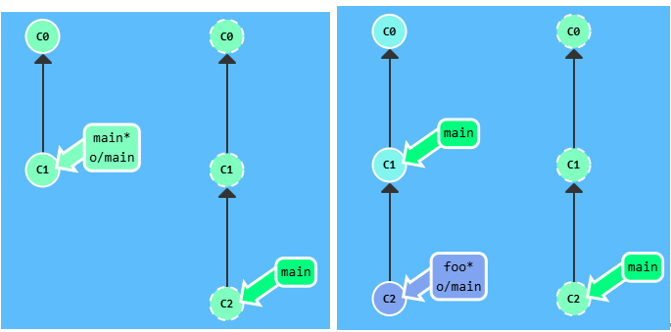
main 和 o/main 的关联关系由分支的 remote tracking 属性决定,克隆时 Git 自动设置:
local branch "main" set to track remote branch "o/main"设置方法一:创建新分支并跟踪远程分支
bash
# 演示:
git checkout -b foo o/main
git pull                         # 更新的是 foo,main 不动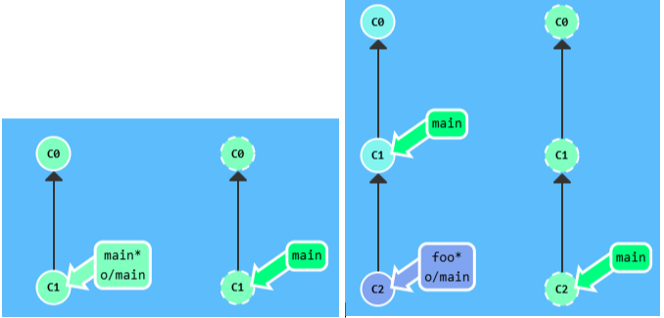
bash
# 演示:
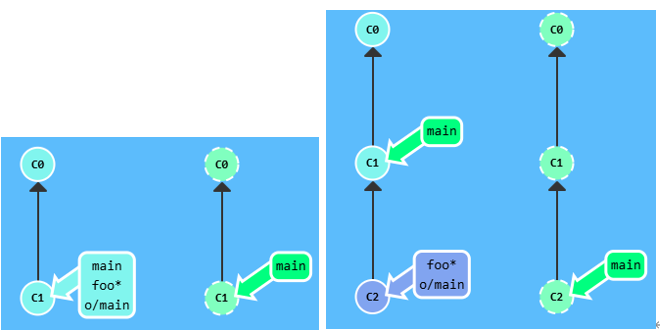
git checkout -b foo o/main
git commit
git push                         # 推送到 origin/main(不是 foo!)
设置方法二 :git branch -u
bash
git branch -u o/main foo        # 让 foo 跟踪 o/main
git branch -u o/main            # 当前在 foo 上时可省略 foo
# 演示:
git branch -u o/main foo
git commit
git push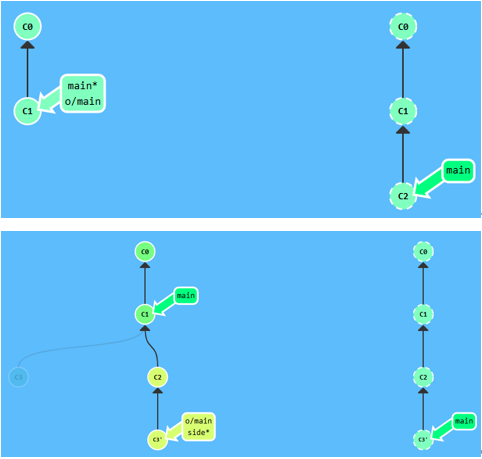
例题:不切换到 main,直接将工作推送到远程 main
bashgit checkout -b side o/main git commit git pull --rebase git push
二十、Push / Fetch 的参数详解
20.1 git push 的 <place> 参数
bash
git push origin main         # 推送本地 main 到远程 main
git push origin foo          # 推送本地 foo 到远程 foo
指定参数后,Git 会忽略当前所在分支,直接操作指定的分支。
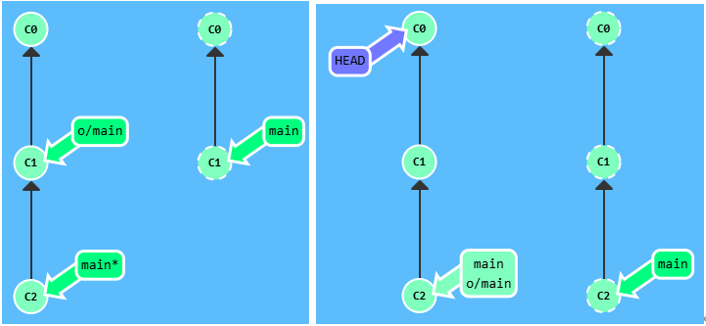
bash
git checkout C0
git push origin main         # 即使 HEAD 在 C0,main 仍会被推送 ✅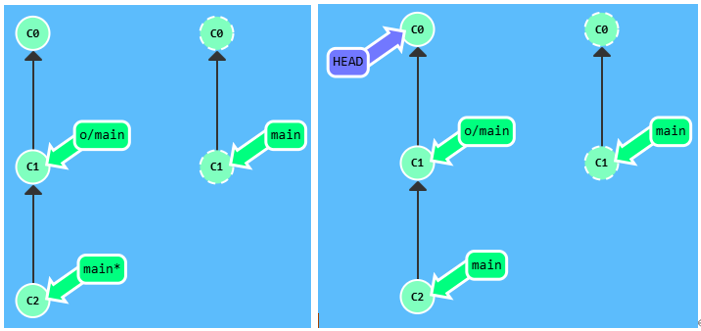
bash
# 如果不指定参数会发生什么呢?
git checkout C0
git push                     # ❌ 失败!HEAD 没有跟踪任何分支
20.2 <source>:<destination> 格式(来源和目标不同名)
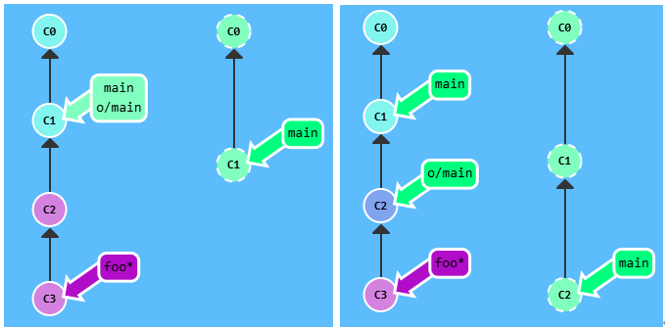
bash
git push origin <source>:<destination>
# 示例:
git push origin foo^:main       # 将 foo^ 位置的提交推送到远程 main
git push origin main:newBranch  # 推送到远程不存在的分支(Git 自动创建)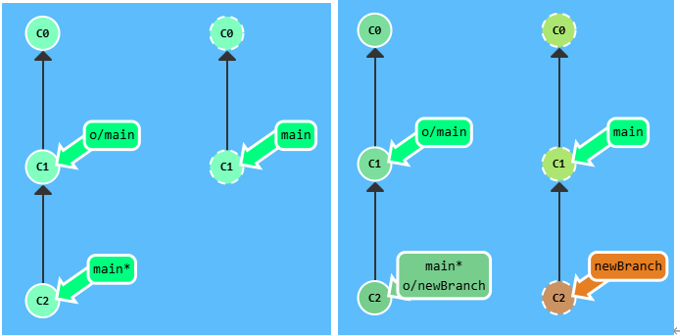
bash
git push origin main:newBranch # 推送到远程不存在的分支(Git 自动创建)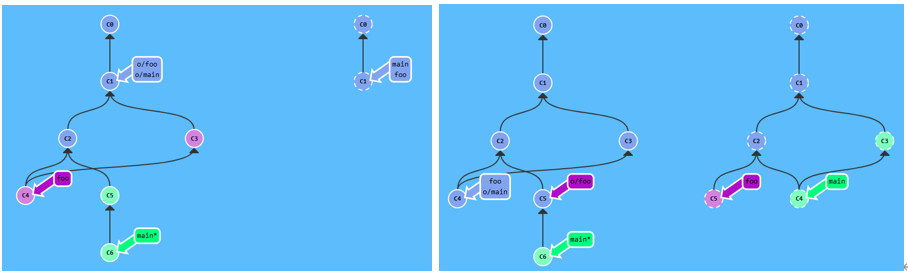
例题:
bashgit push origin main^:foo git push origin foo:main
20.3 git fetch 的参数
git fetch 与 git push 参数概念相同,只是方向相反(下载而非上传):
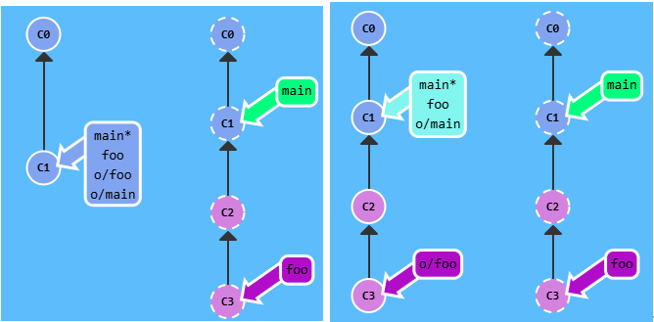
bash
git fetch origin foo # 下载远程 foo,放到本地 o/foo(不影响本地 foo)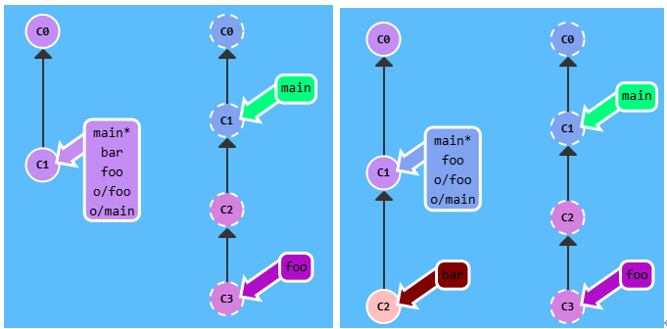
bash
git fetch # 无参数:下载所有远程分支的更新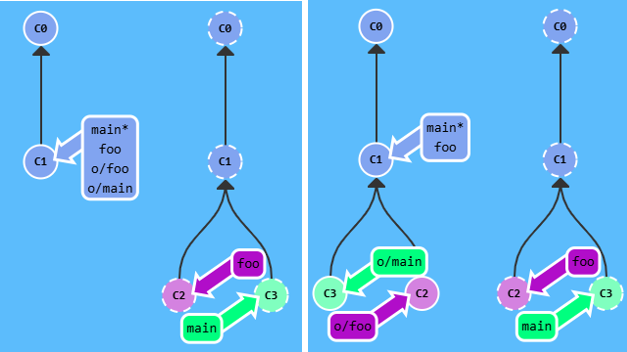
bash
git fetch # 无参数:下载所有远程分支的更新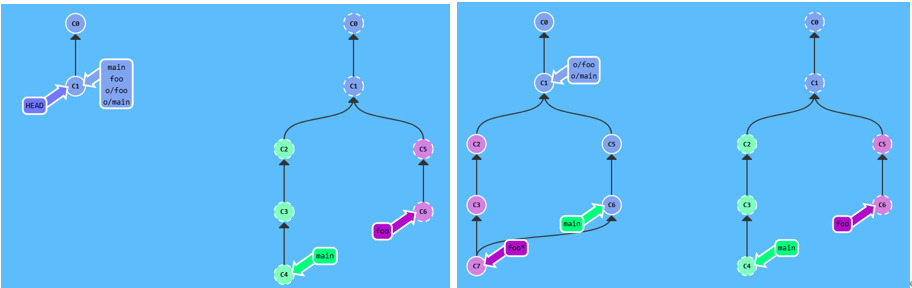
例题:
bashgit fetch origin c3:foo git fetch origin c6:main git checkout foo git merge main
20.4 空 source 的特殊用法
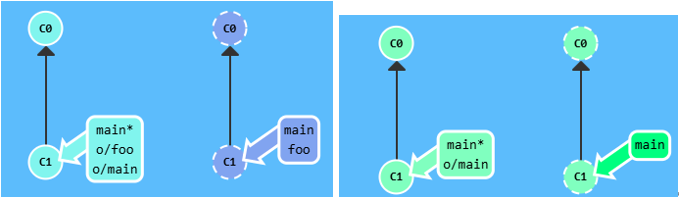
bash
# push 空值到远程 → 删除远程分支
git push origin :foo         # 删除远程 foo 分支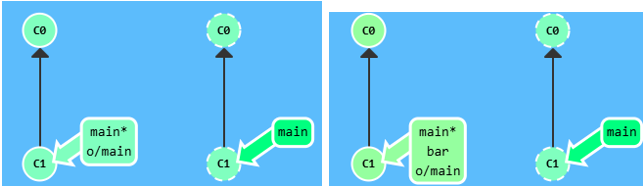
bash
# fetch 空值到本地 → 在本地创建新分支
git fetch origin :bar        # 在本地创建 bar 分支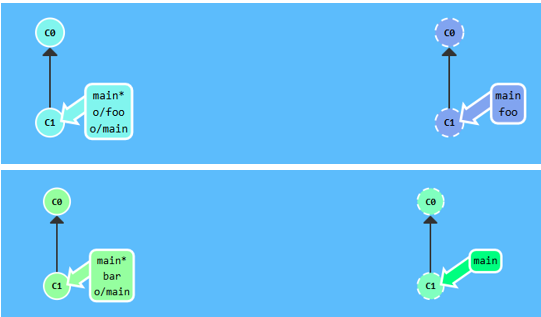
例题:
bashgit push origin :foo git fetch origin :bar
二十一、git pull 的参数
git pull = git fetch + git merge,参数透传给 fetch,fetch 完成后自动 merge:
bash
# 等价命令:
git pull origin foo          # ≡ git fetch origin foo; git merge o/foo
git pull origin bar:bugFix   # ≡ git fetch origin bar:bugFix; git merge bugFix
git pull origin main:foo     # 先在本地创建 foo 并拉取,再 merge 到当前分支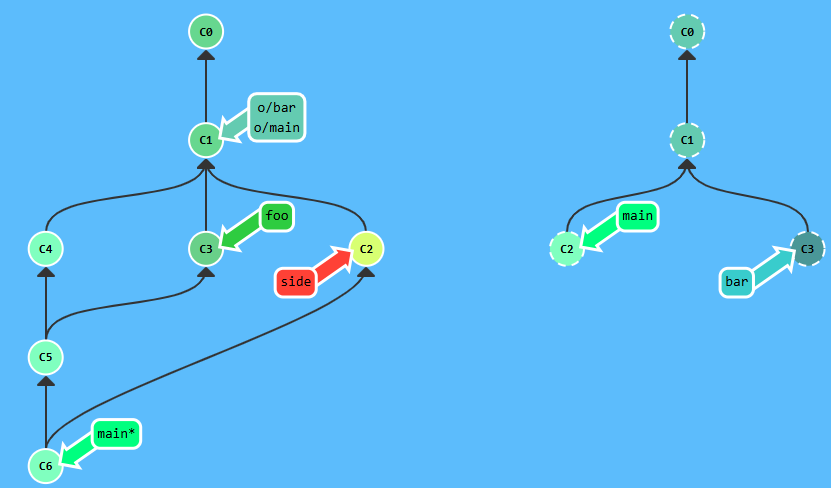
例题:
bashgit pull origin c3:foo git pull origin c2:side
二十二、快速参考速查表
本地操作
| 命令 | 说明 |
|---|---|
git commit |
提交快照 |
git branch <name> |
创建分支 |
git checkout -b <name> |
创建并切换分支 |
git merge <branch> |
合并分支(产生合并提交) |
git rebase <branch> |
变基(产生线性历史) |
git rebase -i HEAD~<n> |
交互式变基(整理提交) |
git cherry-pick <C1> <C2> |
精确摘取指定提交 |
git commit --amend |
修改最近一次提交 |
git reset HEAD~1 |
回退提交(本地) |
git revert HEAD |
撤销提交(安全,可推送) |
git tag <name> <ref> |
创建标签 |
git describe <ref> |
描述当前位置与最近标签的距离 |
git branch -f <name> <ref> |
强制移动分支指针 |
相对引用
| 表达式 | 含义 |
|---|---|
HEAD^ |
上一个提交 |
HEAD~3 |
向上 3 个提交 |
main^2 |
main 合并提交的第二个 parent |
HEAD~^2~2 |
链式相对引用 |
远程操作
| 命令 | 说明 |
|---|---|
git clone |
克隆远程仓库 |
git fetch |
下载远程更新(不修改本地) |
git pull |
fetch + merge |
git pull --rebase |
fetch + rebase |
git push |
推送到远程 |
git push origin <src>:<dst> |
指定来源和目标 |
git push origin :<branch> |
删除远程分支 |
git fetch origin :<branch> |
本地创建新分支 |
git branch -u o/main |
设置当前分支的远程追踪 |
git checkout -b foo o/main |
创建 foo 并跟踪 o/main |