1.创建settle 分支
2.点击结算按钮进行条件判断
javascript
methods: {
			...mapMutations('m_cart',['updateAllGoodsState']),
			changeAllState() {
				this.updateAllGoodsState(!this.isFullCheck)
			},
			settlement() {
				//先判断是否勾选要结算的商品
				if(!this.checkedCount)return uni.$showMsg('请选择要结算的商品')
				//再判断用户是否选择了收货地址
				if(!this.addstr)return uni.$showMsg('请选择收货地址')
				//最后判断用户是否登录
				if(!this.token)return uni.$showMsg('请先登录')
			}
	},
3.完成登录组件的基本布局
javascript
<template>
	<view class="login-container">
		<!--提示登录的图标-->
		<uni-icon type="contact-filled" size="100" color="#AFAFAF"></uni-icon>
		<!--登录按钮-->
		<button type="primary" class="btn-login"></button>
		<!--登录提示-->
		<view class="tips-text">登录后可享受更多权益</view>
	</view>
</template>
4.点击登录按钮获取微信用户的基本信息
javascript
<template>
	<view class="login-container">
		<!--提示登录的图标-->
		<uni-icon type="contact-filled" size="100" color="#AFAFAF"></uni-icon>
		<!--登录按钮-->
		<button type="primary" class="btn-login" open-type="getUserInfo" @getuserinfo="getuserinfo"></button>
		<!--登录提示-->
		<view class="tips-text">登录后可享受更多权益</view>
	</view>
</template>

<script>
	export default {
		data() {
			return{

			};
		},
		methods: {
			//获取用户基本信息
			console.log(e)

			if(e.detail.errMsg==='getUserInfo:fail auth deny')return uni.$showMsg('您取消了登录授权')
		}
	}
</script>
5.将用户的基本信息储存到vuex
javascript
<script>
	export default {
		methods: {
			//获取用户基本信息
			console.log(e)

			if(e.detail.errMsg==='getUserInfo:fail auth deny')return uni.$showMsg('您取消了登录授权')
		},
		getUserInfo(e) {
			console.log(e)

			if(e.detail.errMsg==='getUserInfo:fail auth deny') return uni.$showMsg('您取消了登录授权')

			console.log(e.detail.userInfo)
			this.updateUserInfo(e.detail.userInfo)

			this.getToken(e.detail)
		},
		async getToken(info) {
			//获取code对应的值
			const[err,res] = await uni.login().catch(err=>err)

			if(res.errMsg !== 'login:ok')return uni.$showMsg('登录失败')
			console.log(res.code)
			console.log(info)
		}
	}
</script>
6.用户信息
实现用户头像昵称区域的基本布局
javascript
<template>
	<view class="my-userinfo-container">
		//头像昵称
		<view class="top-box">
			<image src="/static/logo.png" class="avatar"></image>
			<view class="nickname">xxx</view>
		</view>
	</view>
</template>
javascript
<view class="panel-list">
			<!-- 第1个面版-->
			<view class="panel">
				<view class="panel-body">
					<view class="panel-item">
						<text>8</text>
						<text>收藏</text>
					</view>
					<view class="panel-item">
						<text>14</text>
						<text>记录</text>
				</view>
				<view class="panel-item">
					<text>2</text>
					<text>商品</text>
			</view>
		</view>
定义logout 事件处理函数
javascript
async logout() {
		//询问用户是否退出登录
		const[err.succ]=await uni.showModal({
			title:'提示',
			content:'确认退出登录吗'
		}).catch(err=>err)

		if(succ&&succ .confirm) {
			//确认退出登录后需要清空vuex中的 userinfo, token, address
			this.updateUserInfo({})
			this.updateToken('')
			this.updateAddress({})
		}
	}
7.三秒后自动跳转
定义 delayNavigate 方法,初步实现倒计时的提示功能
javascript
//延时导航到 my 页面
		delayNavigate() {
			this.showTips(this.seconds)

			setInterval(()=>{})
		}
		//展示倒计时的提示消息
		showTips(n) {
			uni.showToast({
				icon:'none',
				title:'请登录后再结算,'+n+'秒之后自动跳转到登录页',
				mask:true,
				duration:1500
			})
		}
		data() {
			return {
				//倒计时的秒数
				seconds: 3
			}
		}
改造 delayNavigate 方法如下(使 seconds秒数不会被重置):
javascript
//延时导航到 my 页面
		delayNavigate() {
			this.showTips(this.seconds)

			this.timer=setInterval(()=>{
				this.seconds--

				if (this.seconds<=0) {
					clearInterval(this.timer)

					uni.switchTab({
						url:'/pages/my/my'
					})
					return
				}

				this.showTips(this.seconds)
			},1000)
		}
		//展示倒计时的提示消息
		showTips(n) {
			uni.showToast({
				icon:'none',
				title:'请登录后再结算,'+n+'秒之后自动跳转到登录页',
				mask:true,
				duration:1500
			})
		}
		data() {
			return {
				//倒计时的秒数
				seconds: 3,

				//定时器的Id
				timer:null
			}
		}
	}
登录成功后再返回之前的页面
1.声明一个updateRedirectInfo 的方法:
javascript
mutations: {
			//更新重定向的信息对象
			updateRedirectInfo(state,info) {
				state.rediretInfo=info
				console.log(state.rediretInfo)
			}
		},
2.声明 redirectInfo 的对象
javascript
// state 数据
		state: () => ({
			// 收货地址
			address: JSON.parse(uni.getStorageSync('address')||'{}'),
			token:'',
			//用户信息对象
			userinfo:JSON.parse(uni.getStorageSync('userinfo')||('{}')),
			//重定向的Objeck
			rediretInfo:null
		}),
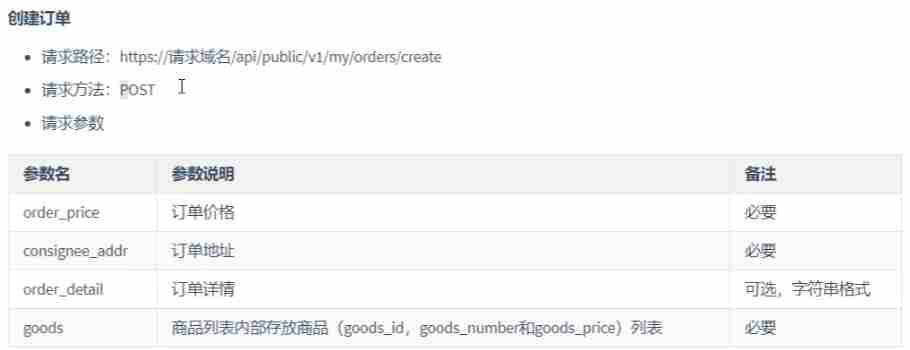
8.创建订单
当前三个判断条件通过之后,调用实现微信支付的方法:
javascript
//请求的根路径
$http.baseUrl ='https://www.uinav.com'

//请求拦截器
$http.beforeRequest=function(options) {
	uni.showLoading({
		uni.uni.showLoading({
			title: '数据加载中...',
			mask: false
		});
	})
	console.log(store)

	//判断当前请求的是否为有权限的接口
	if(options.url.indexOf('/my/')!== -1) {
		options.headers= {
			Authorization:''
		}
	}
javascript
payOrder() {
			//创建订单
			//组织订单的信息对象
			const orderInfo={
				order_price:0.01,
				consignee_addr:this.addstr,
				goods:this.cart.filter(x=> x.goods_state).map(x=> ({
					goods_id:x.goods_id,
					goods_number:x.goods_count,
				}))
			}
			//发起请求
			const {data:res}= await uni.$http.post('/api/public',orderInfo)
			if(res.meta.status!==200)return uni.$showMsg('创建订单失败')

			//得到"订单编号"
			const orderNumber=res.message.order_number

			console.log(orderNumber)
		},