1、导语
本篇博客基于第 3 章博客基础上,引入视觉大模型 Vision-Language Model,支持图片文件上传和识别,第 3 章博客地址:https://blog.csdn.net/BiandanLoveyou/article/details/161004907
2、本篇博客代码地址
本篇博客详细拆解如何引入视觉大模型 VL 来进一步完善 AI 智能客服系统,代码仓库地址:
https://gitee.com/biandanLoveyou/customer-service/tree/05-vision-image/
3、视觉模型的基本理解
3.1 什么是视觉模型?
视觉模型是指能够理解和处理图像、视频等视觉信息的人工智能模型。简单来说,就是让计算机能够"看懂"图片和视频内容。
视觉模型与传统大语言模型的核心能力对比:
| 能力 | 传统大语言模型 | 视觉模型 |
|---|---|---|
| 输入类型 | 仅文本 | 图像、视频、文本 |
| 理解图片 | ❌ 不能 | ✅ 能识别物体、场景、文字 |
| 图文推理 | ❌ 不能 | ✅ 能根据图片回答问题 |
| 典型任务 | 对话、翻译 | 看图说话、图像识别 |
3.2 视觉模型能做什么?
1. 图像识别
输入:一张猫的照片
输出:"这是一只橘猫,正趴在沙发上"
2. 光学字符识别(OCR)
输入:含有"身份证"文字的图片
输出:"图片中的文字是:身份证号XXX"
3. 视觉问答
输入:图片 + 问题"图中有几个人?"
输出:"有3个人"
4. 商品识别
输入:商品照片
输出:"这是华为手机,铂金色"
5. 场景理解
输入:街景照片
输出:"这是一个繁忙的十字路口,有红绿灯和行人"
3.3 视觉模型选型
常见视觉模型对比:
| 模型 | 开发商 | 特点 | 价格 |
|---|---|---|---|
| GPT-4V | OpenAI | 强大的图文推理能力 | 付费 |
| Qwen-VL | 阿里通义 | 开源免费,支持中文好 | 免费 |
| Claude 3.5 | Anthropic | 视觉+长上下文 | 付费 |
| Gemini | 原生多模态 | 部分免费 | |
| LLaVA | 学术界 | 轻量级开源 | 免费 |
本次使用本地部署的视觉模型(请先使用 Ollama 提前下载好):qwen3-vl:4b
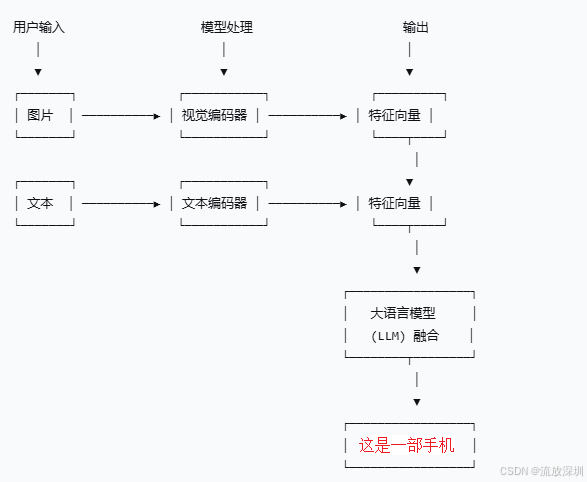
3.4 视觉模型如何与业务系统一起工作解决实际业务问题
视觉模型与业务系统一起工作的核心思路如下:
视觉模型解析结果 → 提取结构化商品信息 → 大语言模型理解意图 → 调用搜索工具 → 返回推荐商品
原理流程图:
用户上传图片 + 问题 "有图片中的商品售卖吗?"
                ↓
        视觉模型解析图片
                ↓
    {
      "商品1": "华为笔记本电脑", "价格": "8000起", "品牌": "华为"
      "商品2": "美的空调", "卖点": "AI制冷,省电40%", "品牌": "美的"
    }
                ↓
        构建增强Prompt
                ↓
        大语言模型分析
                ↓
    识别到用户意图 → 调用 getAllProduct 工具
                ↓
        getAllProduct(productName="华为笔记本电脑")
        getAllProduct(productName="美的空调")
                ↓
        返回搜索结果
    {
      "华为笔记本电脑": [MateBook D 16, MateBook 14],
      "美的空调": [1.5匹新一级空调, 酷省电系列]
    }
                ↓
        LLM 组织回复
    "是的,系统中有您想要的商品!
     1. 华为笔记本电脑 - ¥8000
     2. 美的空调 - ¥5000,AI制冷省电40%
     需要我帮您了解更多详情吗?"
                ↓
        流式返回给前端
4、系统里引入视觉模型
4.1 配置视觉模型客户端 ChatClient
新建配置类 ImageModelConfig:
java
package com.customer.config;

import org.springframework.ai.chat.client.ChatClient;
import org.springframework.ai.ollama.OllamaChatModel;
import org.springframework.ai.ollama.api.OllamaApi;
import org.springframework.ai.ollama.api.OllamaChatOptions;
import org.springframework.beans.factory.annotation.Value;
import org.springframework.context.annotation.Bean;
import org.springframework.context.annotation.Configuration;

/**
 * @author CSDN流放深圳
 * @description 图像模型配置类
 * @create 2026-06-02 15:06
 * @since 1.0.0
 */
@Configuration
public class ImageModelConfig {

    /**
     * 模型名称
     */
    private final String IMAGE_MODEL_NAME = "qwen3-vl:4b";

    @Value("${spring.ai.ollama.base-url}")
    private String BASE_URL;

    /**
     * 初始化图像模型 ChatClient
     *
     * @return
     */
    @Bean(name = "imageChatClient") //调用者需要增加注解 @Qualifier("imageChatClient")
    public ChatClient initImageChatClient() {
        // 构建 Ollama API 客户端
        OllamaApi ollamaApi = OllamaApi.builder()
                .baseUrl(BASE_URL)
                .build();

        // 构建配置选项
        OllamaChatOptions options = OllamaChatOptions.builder()
                .model(IMAGE_MODEL_NAME)//模型名称
                .keepAlive("12h")//模型驻留内存时间12小时
                .truncate(true)//超长文本截断
                .temperature(0.5)
                .build();

        // 创建 OllamaChatModel
        OllamaChatModel ollamaChatModel = OllamaChatModel.builder()
                .ollamaApi(ollamaApi)
                .defaultOptions(options)
                .build();

        return ChatClient.builder(ollamaChatModel).build();
    }
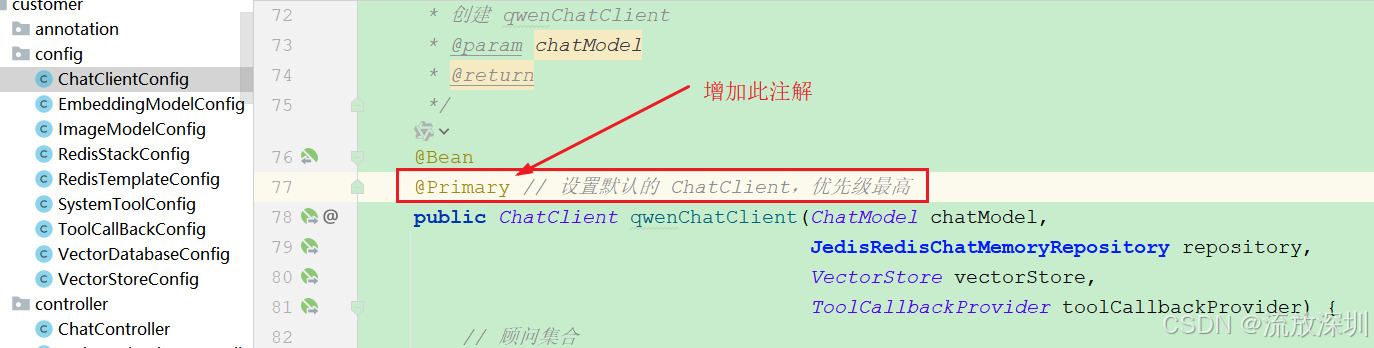
}重要说明:因为系统里配置了两个 ChatClient,需要指定一个默认的 ChatClient 否则启动报错。我们修改:ChatClientConfig 增加默认使用的 Client,增加注解:@Primary
4.2 视觉模型实现类
考虑到用户会上传多张照片进行识别,这里做了一个批量处理:
java
package com.customer.service.impl;

import com.customer.entity.constant.CommonKeys;
import com.customer.holder.UserContextHolder;
import com.customer.service.ImageAnalyzeService;
import com.customer.util.CustomerFileUtil;
import lombok.extern.slf4j.Slf4j;
import org.springframework.ai.chat.client.ChatClient;
import org.springframework.ai.chat.memory.ChatMemory;
import org.springframework.ai.chat.messages.UserMessage;
import org.springframework.ai.content.Media;
import org.springframework.beans.factory.annotation.Autowired;
import org.springframework.beans.factory.annotation.Qualifier;
import org.springframework.core.io.FileSystemResource;
import org.springframework.core.io.Resource;
import org.springframework.stereotype.Service;
import org.springframework.util.MimeType;

import java.io.File;
import java.util.List;
import java.util.Map;

/**
 * @author CSDN流放深圳
 * @description 图片处理服务接口实现类
 * @create 2026-05-16 12:05
 * @since 1.0.0
 */
@Service
@Slf4j
public class ImageServiceImpl implements ImageAnalyzeService {

    @Autowired
    @Qualifier("imageChatClient")//使用视觉模型客户端
    private ChatClient imageChatClient;


    /**
     * 分析图片内容接口
     *
     * @param imageFileList 图片文件集合
     * @return 返回图片解析内容
     */
    @Override
    public String analyzeImage(List<File> imageFileList) {
        // 从上下文获取用户ID
        String userId = UserContextHolder.customerUserInfo().getUserId();

        // 创建用户消息
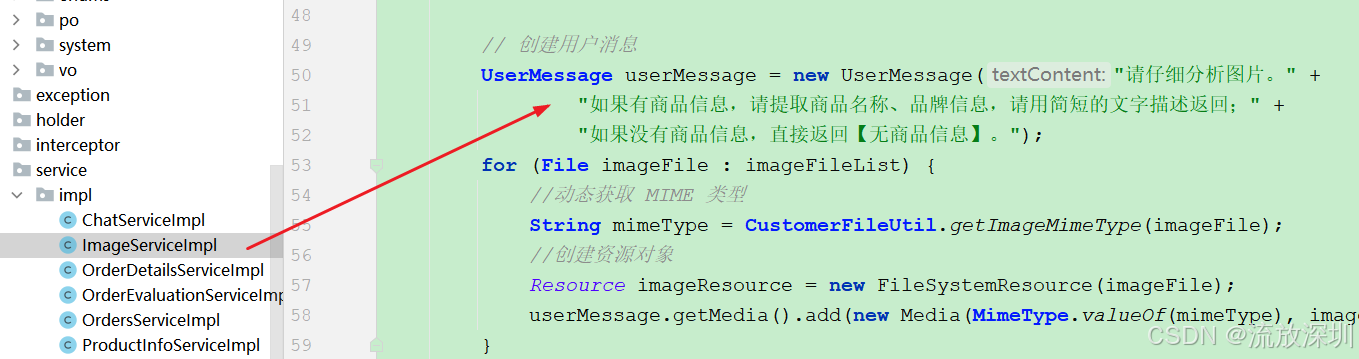
        UserMessage userMessage = new UserMessage("请仔细分析图片。" +
                "如果有商品信息,请提取商品名称、品牌信息,请用简短的文字描述返回;" +
                "如果没有商品信息,直接返回【无商品信息】。");
        for (File imageFile : imageFileList) {
            //动态获取 MIME 类型
            String mimeType = CustomerFileUtil.getImageMimeType(imageFile);
            //创建资源对象
            Resource imageResource = new FileSystemResource(imageFile);
            userMessage.getMedia().add(new Media(MimeType.valueOf(mimeType), imageResource));
        }

        return imageChatClient.prompt()
                .messages(userMessage)
                .toolContext(Map.of(CommonKeys.USER_ID, userId))
                .advisors(a -> a.param(ChatMemory.CONVERSATION_ID, userId))
                .call().content();
    }

}
4.3 业务调用类
当识别用户上传的图片后,直接把识别后的商品信息经过结构化输出,再传递给大语言模型,让大语言模型调用工具帮我们查询系统里的商品信息。修改 ChatServiceImpl 类如下:
java
package com.customer.service.impl;

import cn.hutool.core.collection.CollUtil;
import cn.hutool.core.util.StrUtil;
import com.customer.entity.constant.CommonKeys;
import com.customer.entity.dto.ChatDTO;
import com.customer.holder.UserContextHolder;
import com.customer.service.ChatService;
import com.customer.service.ImageAnalyzeService;
import com.customer.util.CustomerFileUtil;
import lombok.extern.slf4j.Slf4j;
import org.springframework.ai.chat.client.ChatClient;
import org.springframework.ai.chat.memory.ChatMemory;
import org.springframework.beans.factory.annotation.Autowired;
import org.springframework.stereotype.Service;
import org.springframework.web.multipart.MultipartFile;
import reactor.core.publisher.Flux;

import java.io.File;
import java.util.List;
import java.util.Map;
import java.util.concurrent.CompletableFuture;

/**
 * @author CSDN流放深圳
 * @description 聊天服务实现类
 * @create 2026-05-16 12:05
 * @since 1.0.0
 */
@Service
@Slf4j
public class ChatServiceImpl implements ChatService {

    @Autowired
    private ChatClient chatClient;

    @Autowired
    private ImageAnalyzeService imageAnalyzeService;


    /**
     * 与大模型AI聊天
     *
     * @param dto
     * @return 流式输出
     */
    @Override
    public Flux<String> chat(ChatDTO dto) {
        //从上下文获取用户ID
        String userId = UserContextHolder.customerUserInfo().getUserId();
        //判断用户文字输入或者图片是否都为空
        String userMessage = dto.getUserMessage();
        List<MultipartFile> images = dto.getImages();
        if (StrUtil.isEmpty(userMessage) && CollUtil.isEmpty(images)) {
            return Flux.just("请输入文字或者上传图片");
        }
        if(CollUtil.isNotEmpty(images) && images.size() > 3){
            return Flux.just("最多支持上传3张图片");
        }

        //如果有图片,先调用视觉模型处理
        String analyzeResult = null;
        if(CollUtil.isNotEmpty(images)){
            //把图片上传到根目录的临时文件夹
            List<File> fileList = CustomerFileUtil.uploadImages(images);
            //调用视觉模型分析图片
            log.info("--------------  开始调用视觉模型分析图片   --------------");
            analyzeResult = imageAnalyzeService.analyzeImage(fileList);
            //使用视觉模型解析后的图片说明
            log.info("视觉模型解析后的商品信息: {}", analyzeResult);
            //删除临时文件(使用异步非阻塞)
            CompletableFuture.runAsync(() -> CustomerFileUtil.deleteTempFiles(fileList));
        }

        // 构建增强的系统提示词,引导LLM调用商品搜索工具
        String enhancedMessage = buildShoppingPrompt(analyzeResult, userMessage);
        log.info("增强的用户提示词enhancedMessage: {}", enhancedMessage);

        return chatClient.prompt()
                .user(enhancedMessage)
                //设置用户ID到大模型的上下文中,还可以设置其他业务参数,放在 Map 集合中
                .toolContext(Map.of(CommonKeys.USER_ID, userId))
                // 增加"顾问",允许通过注入检索数据(Retrieval Context)和对话历史(Chat Memory)来修改传入的 Prompt
                .advisors(a -> a.param(ChatMemory.CONVERSATION_ID, userId)) //固定值 chat_memory_conversation_id
                .stream().content();
    }

    /**
     * 构建增强的系统提示词,引导LLM调用商品搜索工具
     * @param analyzeResult
     * @param userMessage
     * @return
     */
    private String buildShoppingPrompt(String analyzeResult, String userMessage) {
        String result = "";
        if (StrUtil.isNotBlank(userMessage)) {
            result = "用户提问:" + userMessage;
        }
        if (StrUtil.isNotBlank(analyzeResult)) {
            result += " 查询商品信息:" + analyzeResult;
        }
        return result;
    }


}
4.4 优化商品搜索
之前我们直接通过 like 关键字查询数据库的商品信息,在大型系统显然是不合理的。一般会把商品信息放入 ES(Elasticsearch)等搜索引擎当中。我们这里优化一下,当数据库查询不到商品时,可以使用向量数据库进行查询:
java
package com.customer.service.impl;

import cn.hutool.core.collection.CollUtil;
import cn.hutool.core.util.StrUtil;
import com.alibaba.fastjson2.JSON;
import com.baomidou.mybatisplus.core.toolkit.Wrappers;
import com.baomidou.mybatisplus.extension.service.impl.ServiceImpl;
import com.customer.dao.ProductInfoDao;
import com.customer.entity.po.ProductInfoEntity;
import com.customer.service.ProductInfoService;
import lombok.extern.slf4j.Slf4j;
import org.springframework.ai.document.Document;
import org.springframework.ai.vectorstore.SearchRequest;
import org.springframework.ai.vectorstore.VectorStore;
import org.springframework.beans.factory.annotation.Autowired;
import org.springframework.stereotype.Service;

import java.util.List;

/**
 * @author CSDN流放深圳
 * @description 商品信息服务实现类
 * @create 2026-05-19 14:42
 * @since 1.0.0
 */
@Service
@Slf4j
public class ProductInfoServiceImpl extends ServiceImpl<ProductInfoDao, ProductInfoEntity> implements ProductInfoService {

    @Autowired
    private VectorStore vectorStore;

    /**
     * 根据ID查询商品
     *
     * @param productId
     */
    @Override
    public ProductInfoEntity getProductById(String productId) {
        ProductInfoEntity productInfoEntity = this.baseMapper.selectById(productId);
        return productInfoEntity;
    }

    /**
     * 查询所有商品(可根据商品名称模糊查询匹配)
     *
     * @param productName
     */
    @Override
    public List<ProductInfoEntity> getAllProduct(String productName) {
        log.info("=== getAllProduct 被调用,参数: " + productName + " ===");
        // 查询商品,一般有几种查询策略:1、最常用的 ES(Elasticsearch),2、向量数据库查询(语义搜索),3、缓存查询,4、数据库模糊查询
        List<ProductInfoEntity> list = this.baseMapper.selectList(Wrappers.<ProductInfoEntity>lambdaQuery()
                .like(StrUtil.isNotBlank(productName), ProductInfoEntity::getProductName, productName));
        //2026年6月3日优化:如果数据库中没有数据,则从向量数据库中查询
        if (CollUtil.isEmpty(list)) {
            System.out.println("数据库中没有数据,从向量数据库中查询");
            SearchRequest request = SearchRequest.builder()
                    .query(productName)//查询条件
                    .topK(5)//返回数量
                    .build();
            List<Document> documentList = vectorStore.similaritySearch(request);
            for (Document document : documentList) {
                //获取向量存储中的内容
                String text = document.getText();
                //转为商品信息
                ProductInfoEntity productInfoEntity = JSON.parseObject(text, ProductInfoEntity.class);
                list.add(productInfoEntity);
            }
        }
        log.info("返回商品列表:{}", JSON.toJSONString(list));
        return list;
    }

}
4.5 系统启动时,把商品信息初始化到向量数据库
修改 VectorDatabaseConfig 类,增加系统启动时把商品信息初始化到向量数据库的逻辑:
java
package com.customer.config;

import cn.hutool.crypto.SecureUtil;
import com.alibaba.fastjson.JSON;
import com.customer.entity.constant.CommonRedisKeys;
import com.customer.entity.po.ProductInfoEntity;
import com.customer.service.ProductInfoService;
import jakarta.annotation.PostConstruct;
import lombok.extern.slf4j.Slf4j;
import org.springframework.ai.document.Document;
import org.springframework.ai.reader.TextReader;
import org.springframework.ai.transformer.splitter.TokenTextSplitter;
import org.springframework.ai.vectorstore.VectorStore;
import org.springframework.beans.factory.annotation.Autowired;
import org.springframework.beans.factory.annotation.Value;
import org.springframework.context.annotation.Configuration;
import org.springframework.core.io.Resource;
import org.springframework.data.redis.core.RedisTemplate;

import java.nio.charset.Charset;
import java.util.ArrayList;
import java.util.List;
import java.util.stream.Collectors;

/**
 * @author CSDN流放深圳
 * @description 文件内容存入到向量数据库配置类
 * @create 2026-05-22 10:20
 * @since 1.0.0
 */
@Configuration
@Slf4j
public class VectorDatabaseConfig {

    @Autowired
    private VectorStore vectorStore;

    /**
     * 读取resources目录下的文件【电商系统服务条款】
     */
    @Value("classpath:terms-of-service.txt")
    private Resource resource;

    @Autowired
    private RedisTemplate redisTemplate;

    @Autowired
    private ProductInfoService productInfoService;

    /**
     * 初始化向量数据库。程序启动时就执行
     */
    @PostConstruct
    public void init() {
        //1。读取文件内容
        TextReader textReader = new TextReader(resource);
        //设置编码格式,防止乱码
        textReader.setCharset(Charset.defaultCharset());

        //获取文件路径等元数据
        //拿到文件路径后,常见用途是做去重校验------用文件路径生成哈希值,存入 Redis,避免同一文件被重复加载到向量数据库中。但需要注意,这种方式只能判断"是否同一个文件",无法感知文件内容的变化。如果文件内容更新但路径不变,你可以考虑用文件内容的哈希值来做判断。
        String fileName = (String) textReader.getCustomMetadata().get(TextReader.SOURCE_METADATA);
        //对文件路径进行md5加密
        String securityFileName = SecureUtil.md5(fileName);
        String redisKey = CommonRedisKeys.CUSTOMER_TERMS_OF_SERVICE + securityFileName;
        //如果文档存在,先删掉,再存储
        deleteVectorStoreIfExists(redisKey);
        //写入向量数据库
        List<Document> documentList = new TokenTextSplitter().transform(textReader.read());
        vectorStore.add(documentList);

        //保存文档Id集合
        List<String> documentIds = documentList.stream().map(Document::getId).collect(Collectors.toList());
        //保存到 Redis 中
        redisTemplate.opsForValue().setIfAbsent(redisKey, JSON.toJSONString(documentIds));
        log.info("电商系统服务条款初始化完成,本次共初始化 " + documentIds.size() + " 条数据到向量数据库");
    }

    /**
     * 程序启动,初始化商品信息到向量数据库
     */
    @PostConstruct
    public void initProductInfo() {
        log.info("程序启动,初始化商品信息到向量数据库");
        List<Document> documentList = new ArrayList<>();
        List<ProductInfoEntity> list = productInfoService.getAllProduct(null);
        for (ProductInfoEntity productInfoEntity : list) {
            //转化成文档集合
            documentList.add(new Document(JSON.toJSONString(productInfoEntity)));
        }
        String redisKey = CommonRedisKeys.CUSTOMER_PRODUCT_INFO_KEY;
        //如果文档存在,先删掉,再存储
        deleteVectorStoreIfExists(redisKey);
        //添加到向量存储中
        vectorStore.add(documentList);

        //保存文档Id集合
        List<String> documentIds = documentList.stream().map(Document::getId).collect(Collectors.toList());
        //保存到 Redis 中
        redisTemplate.opsForValue().setIfAbsent(redisKey, JSON.toJSONString(documentIds));
        log.info("商品信息初始化完成,本次共初始化 " + documentIds.size() + " 条数据到向量数据库");
    }

    /**
     * 根据 key 删除Redis 中缓存的向量数据
     * @param redisKey
     */
    private void deleteVectorStoreIfExists(String redisKey){
        //判断文件是否已经存在
        Object obj = redisTemplate.opsForValue().get(redisKey);
        //如果文档存在,先删掉
        if (null != obj) {
            List<String> documentIds = JSON.parseArray((String) redisTemplate.opsForValue().get(redisKey), String.class);
            vectorStore.delete(documentIds);
            redisTemplate.delete(redisKey);
        }
    }
}
4.6 增加文件上传处理工具类
新建工具类:CustomerFileUtil
java
package com.customer.util;

import com.customer.entity.enums.SysExceptionEnum;
import com.customer.exception.CustomerRuntimeException;
import lombok.extern.slf4j.Slf4j;
import org.springframework.util.MimeTypeUtils;
import org.springframework.web.multipart.MultipartFile;

import java.io.File;
import java.io.IOException;
import java.util.ArrayList;
import java.util.List;

/**
 * @author CSDN流放深圳
 * @description 文件处理工具类
 * @create 2026-06-04 15:05
 * @since 1.0.0
 */
@Slf4j
public class CustomerFileUtil {

    /**
     * 上传图片到临时文件夹
     * @param images
     * @return
     */
    public static List<File> uploadImages(List<MultipartFile> images) {
        List<File> tempFileList = new ArrayList<>();
        for (MultipartFile image : images) {
            // 校验文件类型
            String contentType = image.getContentType();
            if (contentType == null || !contentType.startsWith("image/")) {
                throw new CustomerRuntimeException(SysExceptionEnum.IMAGE_FORMAT_ERROR);
            }
            File tempFile = null;
            try {
                // 1. 获取项目根目录
                String projectDir = System.getProperty("user.dir");
                // 2. 创建临时目录
                File tempDir = new File(projectDir, "tempFile");
                if (!tempDir.exists()) {
                    tempDir.mkdirs();
                }
                // 3. 创建临时文件(使用时间戳保证唯一性)
                String extension = getFileExtension(image);
                String fileName = "temp_" + System.currentTimeMillis() + extension;
                tempFile = new File(tempDir, fileName);
                // 4. 保存文件
                image.transferTo(tempFile);
                // 5. 添加到临时文件列表
                tempFileList.add(tempFile);
            } catch (IOException e) {
                log.error("文件IO处理失败: {}", e.getMessage(), e);
                throw new CustomerRuntimeException(SysExceptionEnum.IMAGE_DAMAGED_ERROR);
            } catch (Exception e) {
                log.error("文件处理失败: {}", e.getMessage(), e);
                throw new CustomerRuntimeException(SysExceptionEnum.IMAGE_RECOGNITION_ERROR);
            }
        }
        return tempFileList;
    }

    /**
     * 获取文件扩展名
     * @param file 文件对象
     * @return 文件扩展名
     */
    public static String getFileExtension(MultipartFile file) {
        // 优先从文件名获取
        String originalFilename = file.getOriginalFilename();
        if (originalFilename != null && originalFilename.contains(".")) {
            String ext = originalFilename.substring(originalFilename.lastIndexOf("."));
            // 校验扩展名是否合法
            if (ext.matches("\\.(png|jpg|jpeg|webp|gif|bmp)$")) {
                return ext;
            }
        }

        // 降级:根据 Content-Type 返回默认扩展名
        String contentType = file.getContentType();
        if (contentType != null) {
            if (contentType.contains("png")) return ".png";
            if (contentType.contains("jpeg")) return ".jpg";
            if (contentType.contains("webp")) return ".webp";
            if (contentType.contains("gif")) return ".gif";
            if (contentType.contains("bmp")) return ".bmp";
        }
        // 最终兜底
        return ".png";
    }

    /**
     * 删除临时文件
     * @param fileList
     */
    public static void deleteTempFiles(List<File> fileList) {
        fileList.forEach(file -> {
            if (file.exists()) {
                file.delete();
            }
        });
    }

    /**
     * 获取图片的 MIME 类型
     * @param imageFile 图片文件
     * @return 标准的 MIME 类型
     */
    public static String getImageMimeType(File imageFile) {
        // 根据文件扩展名判断
        String fileName = imageFile.getName().toLowerCase();
        if (fileName.endsWith(".png")) {
            return MimeTypeUtils.IMAGE_PNG_VALUE;  // "image/png"
        } else if (fileName.endsWith(".jpg") || fileName.endsWith(".jpeg")) {
            return MimeTypeUtils.IMAGE_JPEG_VALUE; // "image/jpeg"
        } else if (fileName.endsWith(".gif")) { //"image/gif"
            return MimeTypeUtils.IMAGE_GIF_VALUE;
        } else if (fileName.endsWith(".webp")) {
            return "image/webp";
        } else if (fileName.endsWith(".bmp")) {
            return "image/bmp";
        } else {
            // 默认使用 PNG
            return MimeTypeUtils.IMAGE_PNG_VALUE;
        }
    }
}
4.7 修改聊天入参类
聊天入参增加多文件上传的参数支持,修改 ChatDTO:
java
package com.customer.entity.dto;

import lombok.Data;
import org.springframework.web.multipart.MultipartFile;

import java.util.List;

/**
 * @author CSDN流放深圳
 * @description 聊天参数
 * @create 2026-05-16 11:35
 * @since 1.0.0
 */
@Data
public class ChatDTO {

    /**
     * 聊天内容
     */
    //@NotBlank(message = "【聊天内容】不允许为空[userMessage]", groups = {OtherGroup.class})
    private String userMessage;

    /**
     * 图片文件,MultipartFile 类型
     */
    //@Size(max = 3, message = "【图片文件】最多允许上传3张图片", groups = {OtherGroup.class})
    private List<MultipartFile> images;
}
4.8 修改前端 html
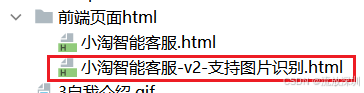
与第 3 章使用不同的前端页面,增加多图片上传功能,完整代码如下(请到代码仓库自行下载):
其它小改动请查看代码仓库,以分支(05-vision-image)最新代码为准。
5、系统演示
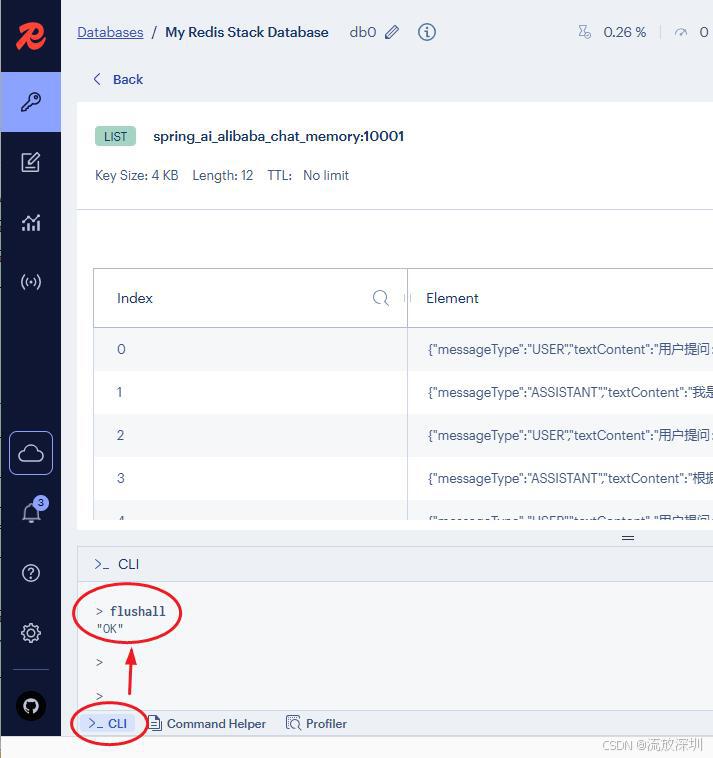
小技巧:可以使用命令 flushall 清空 Redis 的所有 key。注意,这个小技巧仅限于开发的时候使用,生产环境慎用!
5.1 系统启动
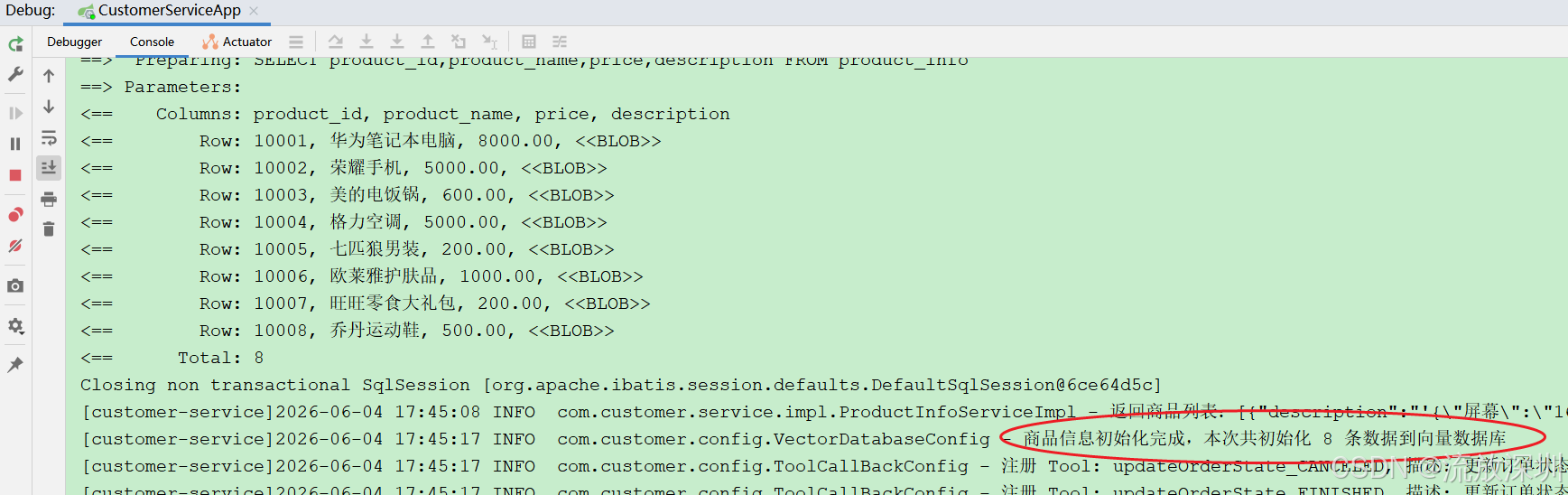
5.2 用户上传商品图片(不加提示词)
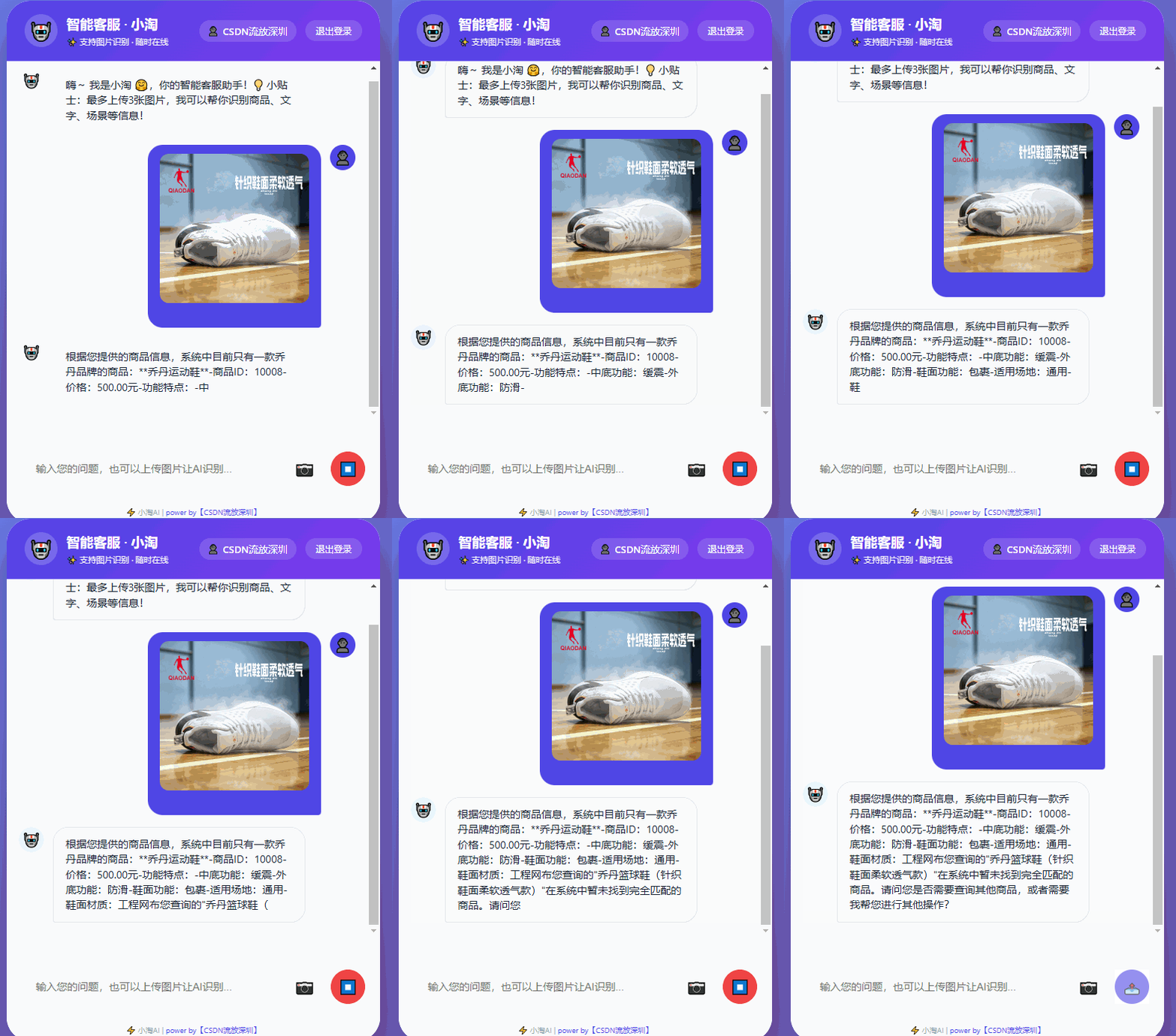
查看后台打印的日志:
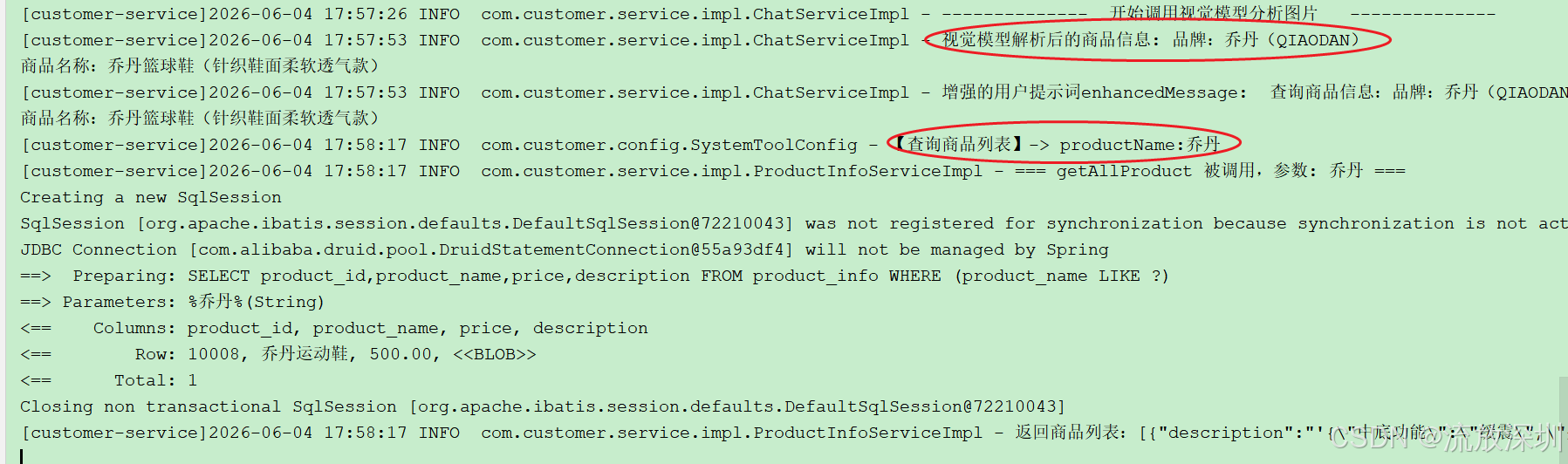
说明:首先调用视觉大模型识别用户上传的图片,通过 UserMessage 限定大模型返回的内容(其实视觉大模型识别一张图片返回的内容会很多,这里我们仅需要商品信息,只对业务有作用的信息即可。)
调用本地大模型比较耗时,需要等待1、2分钟。
5.3 用户上传非商品图片(不加提示词)
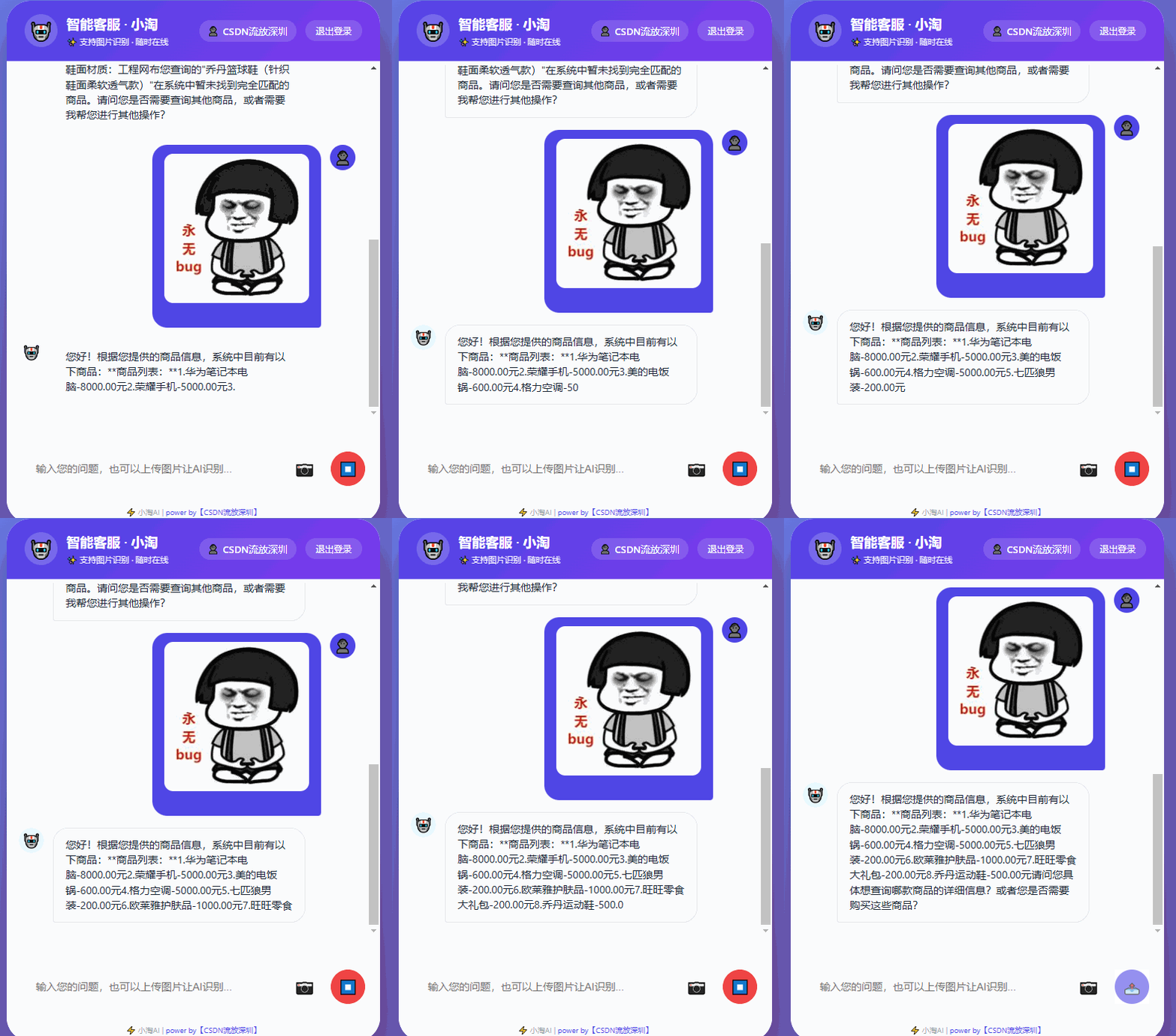
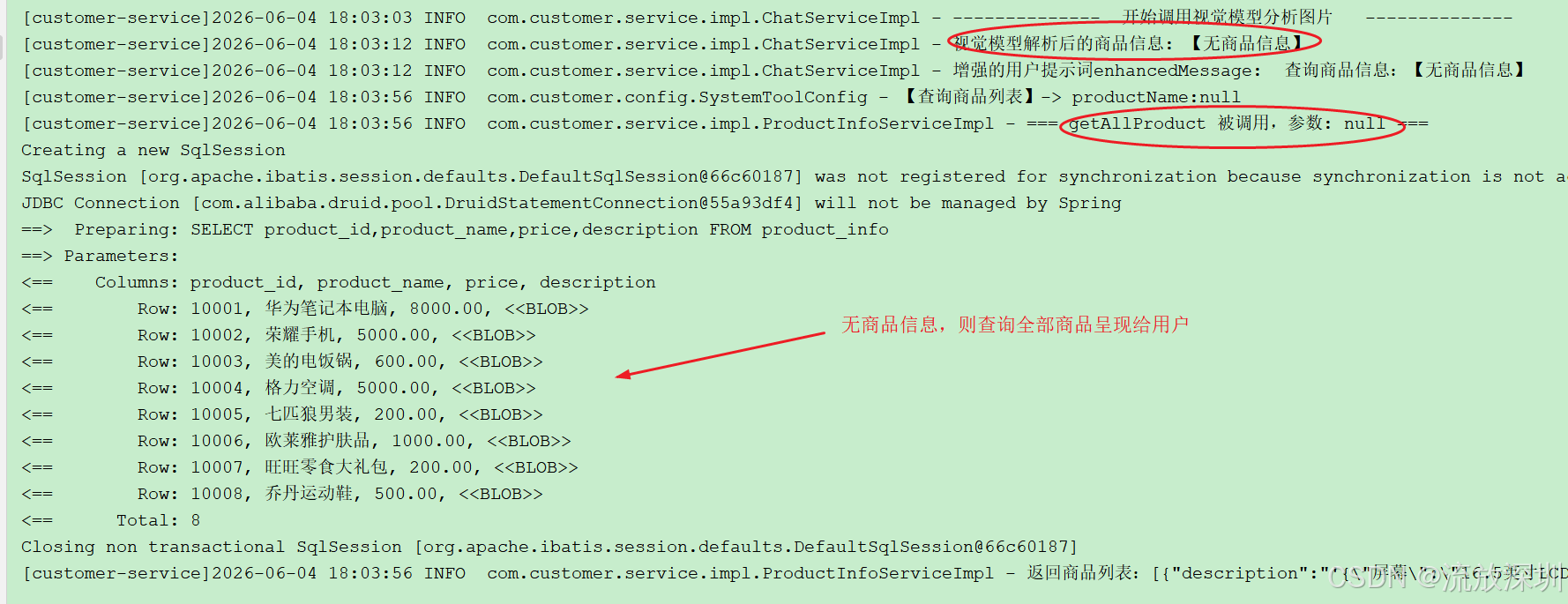
查看后台日志(无商品信息,则查询全部商品呈现给用户):
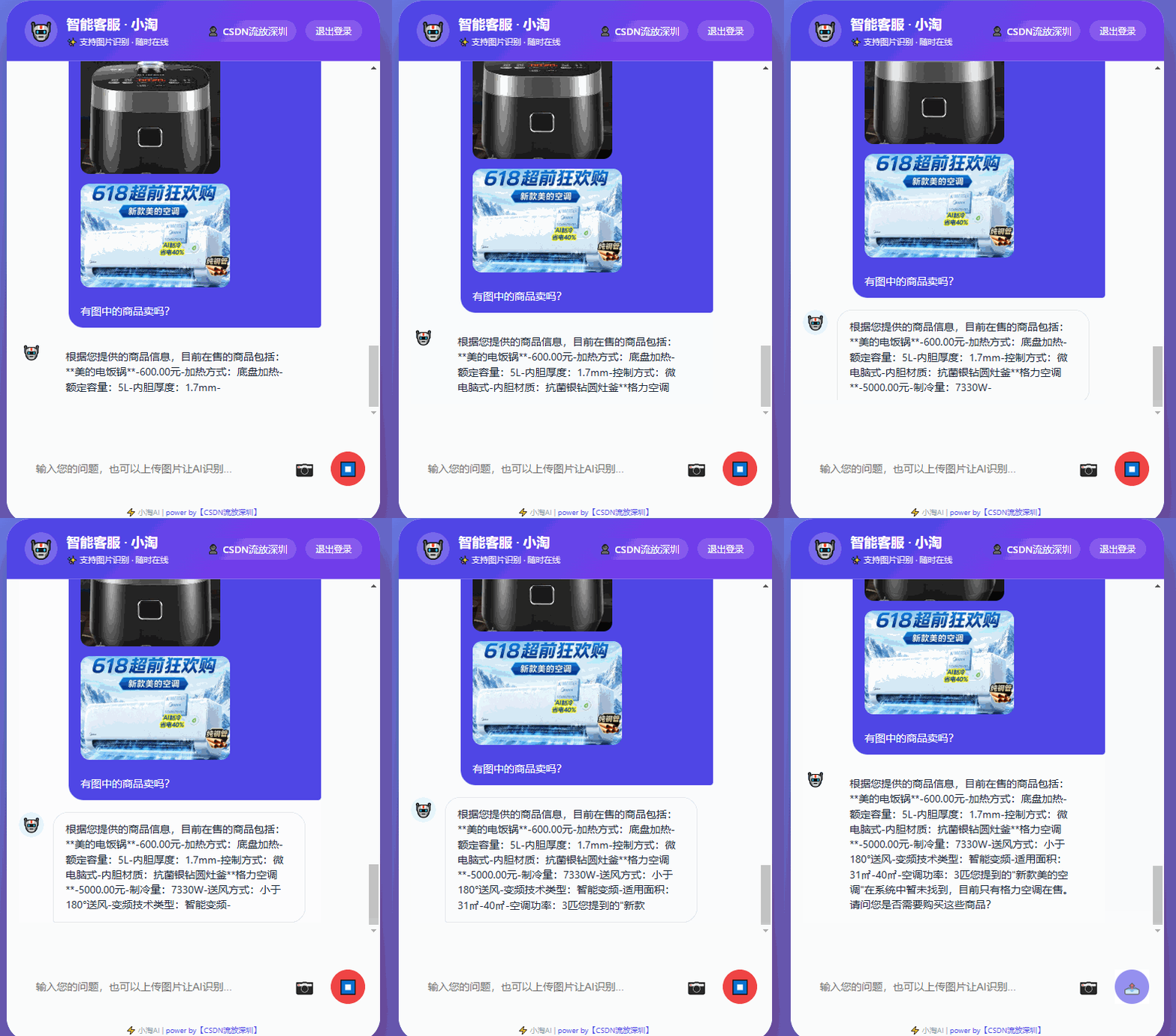
5.4 用户上传图片并询问是否有商品在售
5.5 下单购物
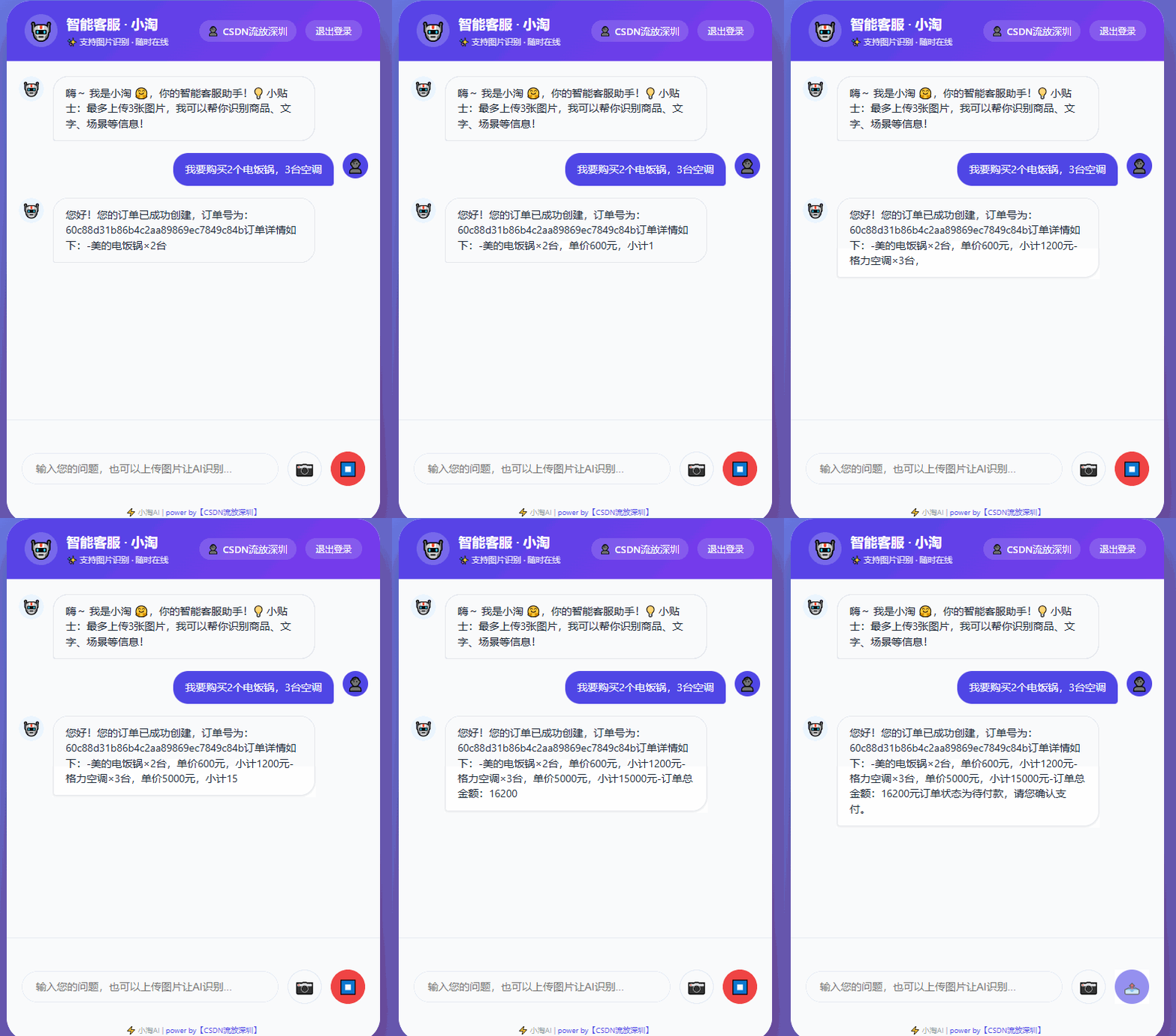
其它订单流程测试可参考第 3 章自行测试。
(end)