一、整体流程图
用户点击登录
    │
    ▼
① LoginWithHuaweiIDRequest(静默登录,获取 authorizationCode)
    │
    ▼
② 将 authorizationCode 发送到自己的后端
    │
    ▼
③ 后端用 authorizationCode 换取 access_token(华为 OAuth Token 端点)
    │
    ▼
④ 后端用 access_token 获取用户信息(可选,实际中 REST API 经常 404)
    │
    ▼
⑤ 后端生成自己的 session token,返回给客户端
    │
    ▼
⑥ 客户端发起 AuthorizationWithHuaweiIDRequest(获取昵称 + 头像)
    │  ← 关键步骤!scopes=['profile'], permissions=['serviceauthcode']
    ▼
⑦ 从响应中取出 nickName、avatarUri,更新 UI
二、前置准备
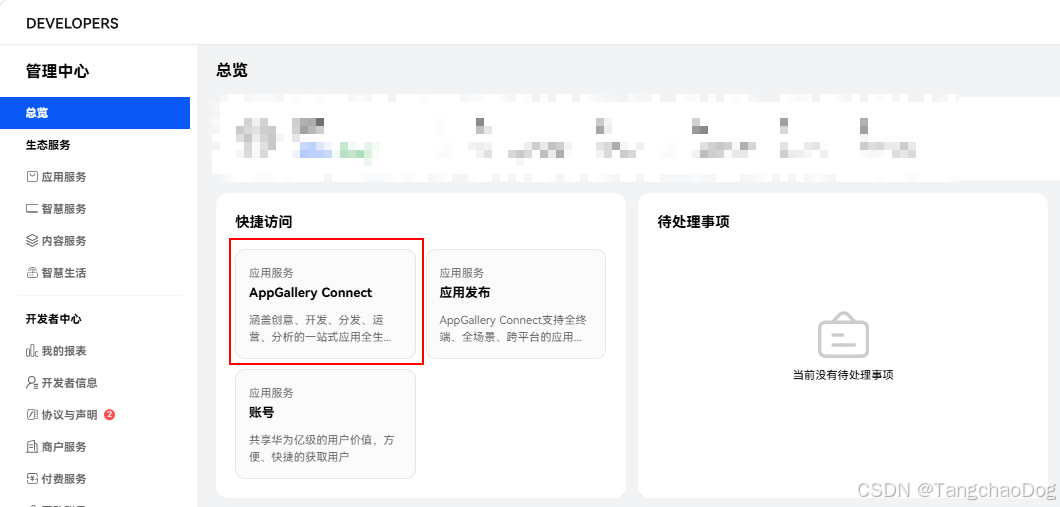
1. 华为开发者联盟配置
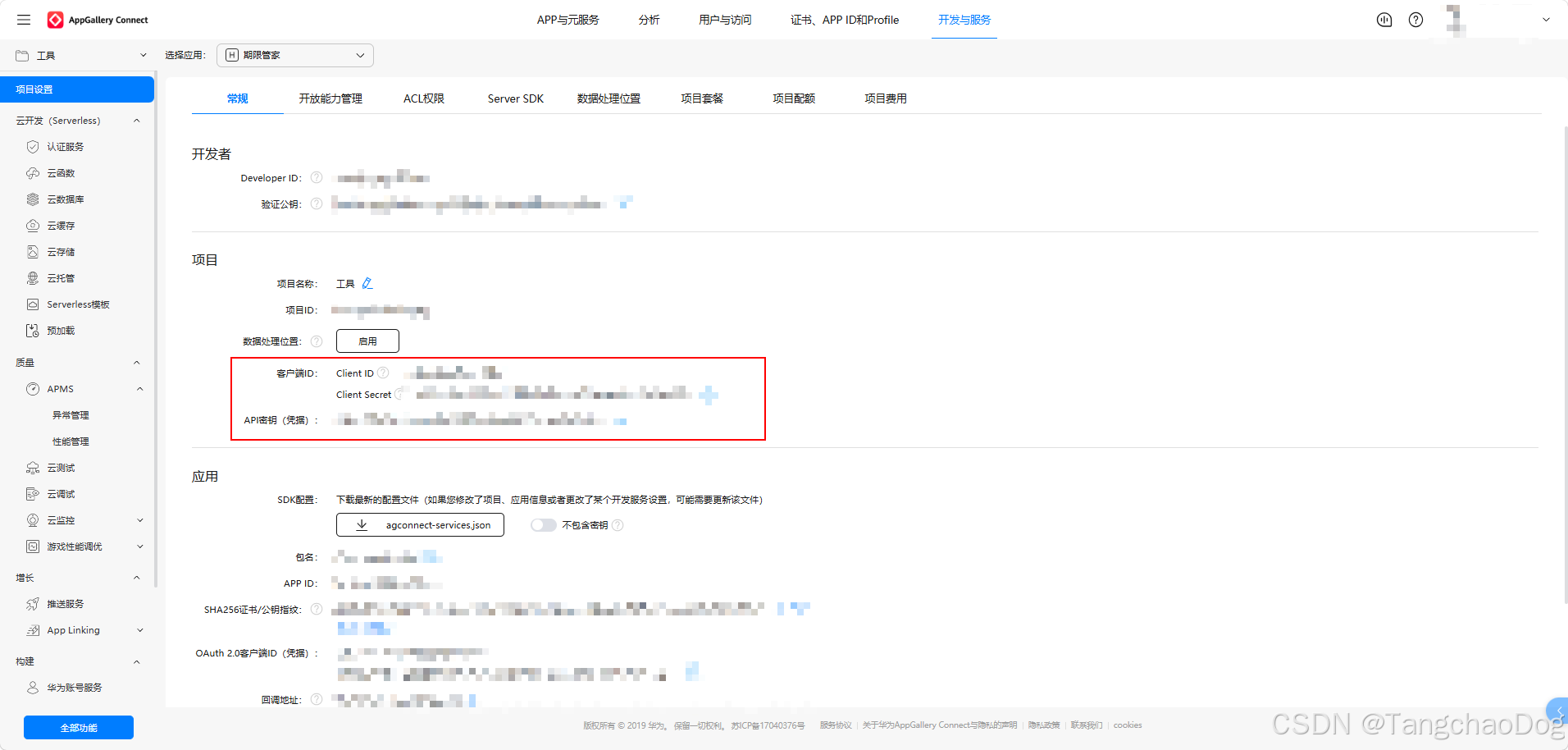
在 华为开发者联盟 创建应用,获取:
- Client ID(客户端ID)
- Client Secret(客户端密钥)
- Redirect URI (回调地址,如
https://your-domain.com/callback)
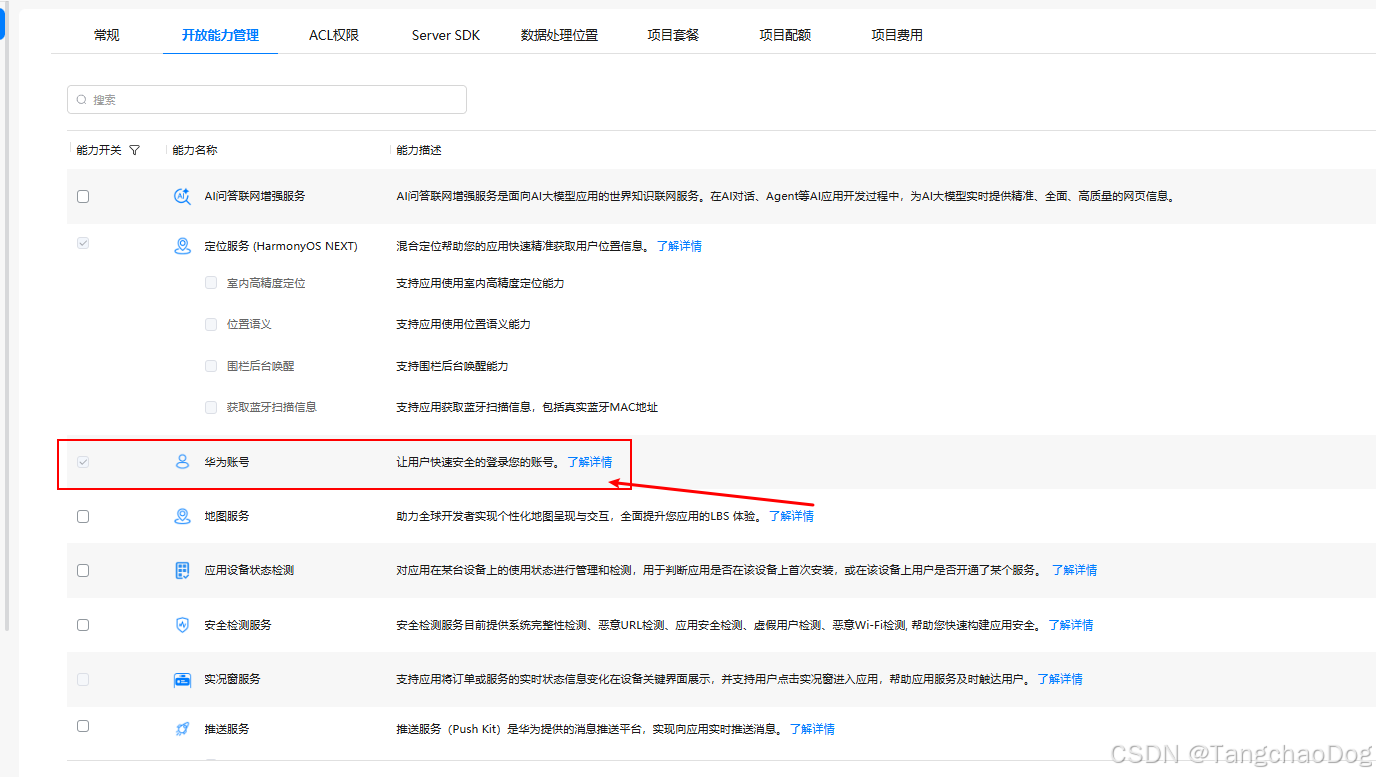
一定要开放华为账号登录能力。不然无权限
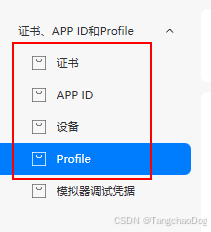
还需要创建好这几个,然后下载.p7b和.cer文件。在DevEco Studio中配置好项目
2. module.json5 配置
在 entry/src/main/module.json5 中添加 client_id metadata 和网络权限:
json5
{
  "module": {
    "requestPermissions": [
      { "name": "ohos.permission.INTERNET" }
    ],
    "metadata": [
      {
        "name": "client_id",
        "value": "你的ClientID"
      }
    ]
  }
}
注意 :
client_idmetadata 是华为账号登录的必要配置,缺少会导致登录失败。
3. 后端环境变量
bash
export HUAWEI_CLIENT_ID="你的ClientID"
export HUAWEI_CLIENT_SECRET="你的ClientSecret"
export HUAWEI_REDIRECT_URI="你的回调地址"
export PORT=7765
三、客户端实现(ArkTS)
导入依赖
typescript
import { authentication } from '@kit.AccountKit';
import { util } from '@kit.ArkTS';
import { common } from '@kit.AbilityKit';
import { http } from '@kit.NetworkKit';
import { BusinessError } from '@kit.BasicServicesKit';
第一步:静默登录获取 authorizationCode
typescript
async huaweiQuickLogin(): Promise<void> {
  let requestState: string = '';
  try {
    // 1. 创建 HuaweiIDProvider
    const provider: authentication.HuaweiIDProvider = new authentication.HuaweiIDProvider();

    // 2. 创建登录请求
    const loginRequest: authentication.LoginWithHuaweiIDRequest =
      provider.createLoginWithHuaweiIDRequest();
    loginRequest.forceLogin = true;
    requestState = util.generateRandomUUID();
    loginRequest.state = requestState;  // 防 CSRF

    // 3. 获取上下文
    const context = this.getUIContext().getHostContext() as common.Context | undefined;
    if (!context) {
      this.toast('获取上下文失败');
      return;
    }

    // 4. 执行登录请求
    const controller: authentication.AuthenticationController =
      new authentication.AuthenticationController(context);
    const response: authentication.LoginWithHuaweiIDResponse =
      await controller.executeRequest(loginRequest) as authentication.LoginWithHuaweiIDResponse;

    // 5. 校验 state(防 CSRF)
    const state: string = response.state ?? '';
    if (state && state !== requestState) {
      this.toast('登录校验失败,请重试');
      return;
    }

    // 6. 提取 authorizationCode 和 idToken
    const credential: authentication.LoginWithHuaweiIDCredential | undefined = response.data;
    const authorizationCode: string = credential?.authorizationCode ?? '';
    const idToken: string = credential?.idToken ?? '';

    if (!authorizationCode) {
      this.toast('未获取到授权码');
      return;
    }

    // 7. 发送到后端验证
    const loginResult = await this.loginToBackend(authorizationCode, idToken, state);
第二步:获取昵称和头像(关键!)
typescript
    // ★★★ 获取昵称 + 头像的关键步骤 ★★★
    let nickname: string = loginResult.nickname;
    let avatarUrl: string = loginResult.avatarUrl;
    try {
      const authRequest: authentication.AuthorizationWithHuaweiIDRequest =
        provider.createAuthorizationWithHuaweiIDRequest();

      // 必须设置 scope 为 profile
      authRequest.scopes = ['profile'];

      // ★ 关键:必须设置 permissions,否则拿不到授权码
      authRequest.permissions = ['serviceauthcode'];

      // 强制拉起授权页面
      authRequest.forceAuthorization = true;

      // 防 CSRF
      authRequest.state = util.generateRandomUUID();

      const authResponse: authentication.AuthorizationWithHuaweiIDResponse =
        await controller.executeRequest(authRequest) as authentication.AuthorizationWithHuaweiIDResponse;

      // 从 data 中提取昵称和头像
      const credential = authResponse.data!;
      const respNickname: string = credential.nickName ?? '';
      const respAvatar: string = credential.avatarUri ?? '';

      if (respNickname) {
        nickname = respNickname;
      }
      if (respAvatar) {
        avatarUrl = respAvatar;
      }
      console.info(`Profile nickname=${nickname}, avatarUrl=${avatarUrl}, openId=${credential.openID}`);
    } catch (err) {
      console.error(`Profile auth request failed: ${JSON.stringify(err)}`);
    }

    // 更新 UI 状态
    this.loggedIn = true;
    this.accountName = nickname || '华为用户';
    this.avatarUrl = avatarUrl;
第三步:发送 authorizationCode 到后端
typescript
async loginToBackend(
  authorizationCode: string,
  idToken: string,
  state: string
): Promise<BackendLoginResponse> {
  const request = http.createHttp();
  const response = await request.request('http://你的后端地址:7765/api/auth/huawei/login', {
    method: http.RequestMethod.POST,
    header: { 'Content-Type': 'application/json' },
    extraData: JSON.stringify({ authorizationCode, idToken, state }),
    expectDataType: http.HttpDataType.STRING
  });
  request.destroy();

  const bodyText: string = typeof response.result === 'string' ? response.result : '';
  const payload = bodyText ? JSON.parse(bodyText) : {};
  if (response.responseCode < 200 || response.responseCode >= 300) {
    throw new Error(payload.error || '后端登录失败');
  }
  return payload;
}
四、后端实现(Go)
1. 用 authorizationCode 换 access_token
go
func exchangeCode(client *http.Client, cfg Config, code string, scopes string) (HuaweiTokenResponse, error) {
    form := url.Values{}
    form.Set("grant_type", "authorization_code")
    form.Set("code", code)
    form.Set("client_id", cfg.HuaweiClientID)
    form.Set("client_secret", cfg.HuaweiSecret)
    form.Set("redirect_uri", cfg.HuaweiRedirect)
    if scopes != "" {
        form.Set("scope", scopes)
    }

    req, _ := http.NewRequest(http.MethodPost, cfg.HuaweiTokenURL, strings.NewReader(form.Encode()))
    req.Header.Set("Content-Type", "application/x-www-form-urlencoded")
    req.Header.Set("Accept", "application/json")

    resp, err := client.Do(req)
    if err != nil {
        return HuaweiTokenResponse{}, fmt.Errorf("request token endpoint failed: %w", err)
    }
    defer resp.Body.Close()

    respBytes, _ := io.ReadAll(io.LimitReader(resp.Body, 1<<20))
    var tok HuaweiTokenResponse
    if err = json.Unmarshal(respBytes, &tok); err != nil {
        return HuaweiTokenResponse{}, fmt.Errorf("invalid token response")
    }
    if tok.AccessToken == "" && tok.IDToken == "" {
        return HuaweiTokenResponse{}, errors.New("empty oauth tokens")
    }
    return tok, nil
}
华为 Token 端点:https://oauth-login.cloud.huawei.com/oauth2/v3/token
2. 用 access_token 获取用户信息(可选)
go
func fetchHuaweiUserInfo(client *http.Client, cfg Config, accessToken string) (HuaweiUserInfoResponse, error) {
    req, _ := http.NewRequest(http.MethodGet, cfg.HuaweiUserInfoURL, nil)
    req.Header.Set("Authorization", "Bearer "+accessToken)
    req.Header.Set("Accept", "application/json")

    resp, err := client.Do(req)
    // ... 解析响应
}
踩坑提醒 :华为 REST API 的 UserInfo 端点(
/rest/v3.1/account/getProfile、/oauth2/v3/userinfo)在实际测试中经常返回 404。这是因为LoginWithHuaweiIDRequest获取的 access_token 只有openidscope,没有profilescope,无法调用需要 profile 权限的 REST API。解决方案 :不要依赖后端 REST API 获取昵称头像,改用客户端的
AuthorizationWithHuaweiIDRequest直接获取。
3. 生成 session token 返回给客户端
go
func makeSessionToken(userID string) string {
    seed := randomToken(24)
    return fmt.Sprintf("hou.%s.%s", userID, seed)
}
五、踩坑总结
| 坑 | 现象 | 解决方案 |
|---|---|---|
client_id metadata 未配置 |
登录无响应或报错 | 在 module.json5 的 metadata 中添加 client_id |
LoginWithHuaweiIDRequest 没有 scopes 属性 |
编译报错 | 该请求类型不支持设置 scopes,去掉即可 |
AuthorizationWithHuaweiIDRequest 未设置 permissions |
拿不到 authorizationCode,昵称头像为空 | 必须设置 authRequest.permissions = ['serviceauthcode'] |
AuthorizationWithHuaweiIDRequest 的 scope 写成 ['openid', 'profile'] |
可能导致授权失败 | 只需写 ['profile'] |
| 后端 UserInfo REST API 返回 404 | access_token scope 不足 | 不依赖后端获取昵称头像,用客户端 AuthorizationWithHuaweiIDRequest |
AuthorizationWithHuaweiIDResponse 没有 nickname 属性 |
编译报错 | 通过 authResponse.data!.nickName 访问(注意大小写:nickName 不是 nickname) |
AuthorizationWithHuaweiIDResponse.data 没有 avatarUrl |
编译报错 | 属性名是 avatarUri 不是 avatarUrl |
permissions 属性不在类型定义中 |
编译报错 | 新版 SDK 已支持直接赋值 authRequest.permissions = ['serviceauthcode'] |
六、核心要点
-
两次请求,各司其职:
LoginWithHuaweiIDRequest:静默登录,获取authorizationCode,发给后端换 tokenAuthorizationWithHuaweiIDRequest:获取用户昵称和头像,必须设置permissions: ['serviceauthcode']和scopes: ['profile']
-
permissions: ['serviceauthcode']是获取昵称头像的关键,没有这个参数,授权请求不会返回 profile 信息。这是华为官方文档明确要求的,但很多教程没有提到。 -
属性名大小写敏感:
- 昵称:
credential.nickName(N 大写) - 头像:
credential.avatarUri(不是 avatarUrl) - OpenID:
credential.openID(ID 大写)
- 昵称:
-
后端 UserInfo REST API 不可靠 :由于 access_token scope 限制,REST API 经常 404。建议在客户端直接用
AuthorizationWithHuaweiIDRequest获取昵称头像,然后通过profileHint传给后端保存。
七、完整代码示例
客户端完整代码(Settings.ets)
typescript
import { promptAction } from '@kit.ArkUI';
import { authentication } from '@kit.AccountKit';
import { BusinessError } from '@kit.BasicServicesKit';
import { util } from '@kit.ArkTS';
import { http } from '@kit.NetworkKit';
import { common } from '@kit.AbilityKit';

const AUTH_BASE_URL: string = 'http://<you_back_url>';

interface BackendLoginResponse {
  token: string;
  userId: string;
  nickname: string;
  avatarUrl: string;
  expiresIn: number;
}

@Entry
@Component
struct Settings {
  @State loggedIn: boolean = false;
  @State accountName: string = '';
  @State avatarUrl: string = '';

  async huaweiQuickLogin(): Promise<void> {
    let requestState: string = '';
    try {
      const provider: authentication.HuaweiIDProvider = new authentication.HuaweiIDProvider();
      const loginRequest: authentication.LoginWithHuaweiIDRequest = provider.createLoginWithHuaweiIDRequest();
      loginRequest.forceLogin = true;
      requestState = util.generateRandomUUID();
      loginRequest.state = requestState;

      const context = this.getUIContext().getHostContext() as common.Context | undefined;
      if (!context) {
        this.toast('获取上下文失败,请重试');
        return;
      }

      const controller: authentication.AuthenticationController = new authentication.AuthenticationController(context);
      const response: authentication.LoginWithHuaweiIDResponse =
        await controller.executeRequest(loginRequest) as authentication.LoginWithHuaweiIDResponse;

      const credential: authentication.LoginWithHuaweiIDCredential | undefined = response.data;
      const state: string = response.state ?? '';
      if (state && state !== requestState) {
        this.toast('登录校验失败,请重试');
        return;
      }

      const authorizationCode: string = credential?.authorizationCode ?? '';
      const idToken: string = credential?.idToken ?? '';

      if (!authorizationCode) {
        this.toast('登录成功,但未获取到授权码');
        return;
      }

      const loginResult: BackendLoginResponse = await this.loginToBackend(authorizationCode, idToken, state);

      // Get profile (nickname + avatar) via AuthorizationWithHuaweiID
      let nickname: string = loginResult.nickname;
      let avatarUrl: string = loginResult.avatarUrl;
      try {
        const authRequest: authentication.AuthorizationWithHuaweiIDRequest = provider.createAuthorizationWithHuaweiIDRequest();
        authRequest.scopes = ['profile'];
        authRequest.permissions = ['serviceauthcode'];
        authRequest.forceAuthorization = true;
        authRequest.state = util.generateRandomUUID();
        const authResponse: authentication.AuthorizationWithHuaweiIDResponse =
          await controller.executeRequest(authRequest) as authentication.AuthorizationWithHuaweiIDResponse;
        const credential = authResponse.data!;
        const respNickname: string = credential.nickName ?? '';
        const respAvatar: string = credential.avatarUri ?? '';
        if (respNickname) {
          nickname = respNickname;
        }
        if (respAvatar) {
          avatarUrl = respAvatar;
        }
        console.info(`Profile nickname=${nickname}, avatarUrl=${avatarUrl}, openId=${credential.openID}`);
      } catch (err) {
        console.error(`Profile auth request failed: ${JSON.stringify(err)}`);
      }

      this.loggedIn = true;
      this.accountName = nickname || '华为用户';
      this.avatarUrl = avatarUrl;
      this.toast('登录成功');
    } catch (error) {
      const err: BusinessError = error as BusinessError;
      if (err && err.message) {
        console.error(`Huawei login failed: ${err.code}, ${err.message}`);
        this.toast(`登录失败:${err.message}`);
      } else {
        console.error(`Huawei login failed: ${JSON.stringify(error)}`);
        this.toast('登录失败,请稍后重试');
      }
    }
  }

  async loginToBackend(
    authorizationCode: string,
    idToken: string,
    state: string
  ): Promise<BackendLoginResponse> {
    const request = http.createHttp();
    const response = await request.request(`${AUTH_BASE_URL}/api/auth/huawei/login`, {
      method: http.RequestMethod.POST,
      header: { 'Content-Type': 'application/json' },
      extraData: JSON.stringify({ authorizationCode, idToken, state }),
      expectDataType: http.HttpDataType.STRING
    });
    request.destroy();

    const bodyText: string = typeof response.result === 'string' ? response.result : '';
    const payload = bodyText ? JSON.parse(bodyText) : {};
    if (response.responseCode < 200 || response.responseCode >= 300) {
      throw new Error(payload.error || '后端登录失败');
    }
    return payload;
  }

  toast(message: string): void {
    promptAction.showToast({ message });
  }

  build() {
    Column() {
      if (this.loggedIn) {
        Text(`欢迎,${this.accountName}`)
        if (this.avatarUrl) {
          Image(this.avatarUrl).width(60).height(60).borderRadius(30)
        }
      } else {
        Button('华为账号登录')
          .onClick(() => this.huaweiQuickLogin())
      }
    }
  }
}
后端完整代码(main.go)
go
package main

import (
	"crypto/rand"
	"encoding/base64"
	"encoding/json"
	"errors"
	"fmt"
	"io"
	"log"
	"net/http"
	"net/url"
	"os"
	"strings"
	"time"
)

type Config struct {
	Port             string
	HuaweiClientID   string
	HuaweiSecret     string
	HuaweiRedirect   string
	HuaweiTokenURL   string
	HuaweiUserInfoURL string
	AllowMockLogin   bool
	FrontendOrigin   string
}

type LoginRequest struct {
	AuthorizationCode string `json:"authorizationCode"`
	IDToken           string `json:"idToken,omitempty"`
	State             string `json:"state,omitempty"`
}

type LoginResponse struct {
	Token     string `json:"token"`
	UserID    string `json:"userId"`
	Nickname  string `json:"nickname"`
	AvatarURL string `json:"avatarUrl,omitempty"`
	ExpiresIn int64  `json:"expiresIn"`
}

type HuaweiTokenResponse struct {
	AccessToken  string `json:"access_token"`
	ExpiresIn    int64  `json:"expires_in"`
	IDToken      string `json:"id_token"`
	TokenType    string `json:"token_type"`
	RefreshToken string `json:"refresh_token"`
	Scope        string `json:"scope"`
	Error        string `json:"error"`
	Description  string `json:"error_description"`
}

func main() {
	cfg := loadConfig()
	log.Printf("Auth mode: allow_mock_login=%v, huawei_oauth_configured=%v", cfg.AllowMockLogin, hasHuaweiOAuthConfig(cfg))
	mux := http.NewServeMux()
	mux.HandleFunc("/healthz", healthHandler)
	mux.HandleFunc("/api/auth/huawei/login", huaweiLoginHandler(cfg))

	handler := withCORS(cfg, withJSON(mux))
	addr := ":" + cfg.Port
	log.Printf("Hou backend listening on %s", addr)
	if err := http.ListenAndServe(addr, handler); err != nil {
		log.Fatal(err)
	}
}

func loadConfig() Config {
	cfg := Config{
		Port:              getEnv("PORT", "7765"),
		HuaweiClientID:    os.Getenv("HUAWEI_CLIENT_ID"),
		HuaweiSecret:      os.Getenv("HUAWEI_CLIENT_SECRET"),
		HuaweiRedirect:    os.Getenv("HUAWEI_REDIRECT_URI"),
		HuaweiTokenURL:    getEnv("HUAWEI_TOKEN_URL", "https://oauth-login.cloud.huawei.com/oauth2/v3/token"),
		HuaweiUserInfoURL: getEnv("HUAWEI_USERINFO_URL", "https://oauth-login.cloud.huawei.com/rest/v3.1/account/getProfile"),
		FrontendOrigin:    getEnv("FRONTEND_ORIGIN", "*"),
	}
	cfg.AllowMockLogin = strings.EqualFold(getEnv("ALLOW_MOCK_LOGIN", "false"), "true")
	return cfg
}

func healthHandler(w http.ResponseWriter, _ *http.Request) {
	writeJSON(w, http.StatusOK, map[string]any{
		"ok":   true,
		"time": time.Now().UTC().Format(time.RFC3339),
	})
}

func huaweiLoginHandler(cfg Config) http.HandlerFunc {
	client := &http.Client{Timeout: 12 * time.Second}
	return func(w http.ResponseWriter, r *http.Request) {
		if r.Method != http.MethodPost {
			writeError(w, http.StatusMethodNotAllowed, "method not allowed")
			return
		}

		var req LoginRequest
		if err := json.NewDecoder(r.Body).Decode(&req); err != nil {
			writeError(w, http.StatusBadRequest, "invalid json body")
			return
		}
		if strings.TrimSpace(req.AuthorizationCode) == "" {
			writeError(w, http.StatusBadRequest, "authorizationCode is required")
			return
		}

		if !hasHuaweiOAuthConfig(cfg) {
			if !cfg.AllowMockLogin {
				writeError(w, http.StatusInternalServerError, "server oauth config missing")
				return
			}
			mock := LoginResponse{
				Token:     "mock-" + randomToken(32),
				UserID:    "mock-user",
				Nickname:  "Mock User",
				ExpiresIn: 3600,
			}
			writeJSON(w, http.StatusOK, mock)
			return
		}

		tok, err := exchangeCode(client, cfg, req.AuthorizationCode, "openid profile")
		if err != nil {
			writeError(w, http.StatusUnauthorized, err.Error())
			return
		}

		claims := decodeJWTClaims(tok.IDToken)
		uid := firstNonEmpty(stringClaim(claims, "sub"), "huawei-user")

		defaultNick := "华为用户"
		if len(uid) > 6 {
			defaultNick = "用户-" + uid[len(uid)-6:]
		}

		resp := LoginResponse{
			Token:     makeSessionToken(uid),
			UserID:    uid,
			Nickname:  defaultNick,
			ExpiresIn: max64(tok.ExpiresIn, 3600),
		}
		log.Printf("huawei login: uid=%s nickname=%s", resp.UserID, resp.Nickname)
		writeJSON(w, http.StatusOK, resp)
	}
}

func hasHuaweiOAuthConfig(cfg Config) bool {
	return strings.TrimSpace(cfg.HuaweiClientID) != "" &&
		strings.TrimSpace(cfg.HuaweiSecret) != "" &&
		strings.TrimSpace(cfg.HuaweiRedirect) != ""
}

func exchangeCode(client *http.Client, cfg Config, code string, scopes string) (HuaweiTokenResponse, error) {
	form := url.Values{}
	form.Set("grant_type", "authorization_code")
	form.Set("code", code)
	form.Set("client_id", cfg.HuaweiClientID)
	form.Set("client_secret", cfg.HuaweiSecret)
	form.Set("redirect_uri", cfg.HuaweiRedirect)
	if scopes != "" {
		form.Set("scope", scopes)
	}

	req, err := http.NewRequest(http.MethodPost, cfg.HuaweiTokenURL, strings.NewReader(form.Encode()))
	if err != nil {
		return HuaweiTokenResponse{}, fmt.Errorf("build token request failed: %w", err)
	}
	req.Header.Set("Content-Type", "application/x-www-form-urlencoded")
	req.Header.Set("Accept", "application/json")

	resp, err := client.Do(req)
	if err != nil {
		return HuaweiTokenResponse{}, fmt.Errorf("request token endpoint failed: %w", err)
	}
	defer resp.Body.Close()

	respBytes, _ := io.ReadAll(io.LimitReader(resp.Body, 1<<20))
	var tok HuaweiTokenResponse
	if err = json.Unmarshal(respBytes, &tok); err != nil {
		return HuaweiTokenResponse{}, fmt.Errorf("invalid token response")
	}
	if tok.AccessToken == "" && tok.IDToken == "" {
		return HuaweiTokenResponse{}, errors.New("empty oauth tokens")
	}
	return tok, nil
}

func withJSON(next http.Handler) http.Handler {
	return http.HandlerFunc(func(w http.ResponseWriter, r *http.Request) {
		w.Header().Set("Content-Type", "application/json; charset=utf-8")
		next.ServeHTTP(w, r)
	})
}

func withCORS(cfg Config, next http.Handler) http.Handler {
	return http.HandlerFunc(func(w http.ResponseWriter, r *http.Request) {
		w.Header().Set("Access-Control-Allow-Origin", cfg.FrontendOrigin)
		w.Header().Set("Access-Control-Allow-Headers", "Content-Type, Authorization")
		w.Header().Set("Access-Control-Allow-Methods", "POST, GET, OPTIONS")
		if r.Method == http.MethodOptions {
			w.WriteHeader(http.StatusNoContent)
			return
		}
		next.ServeHTTP(w, r)
	})
}

func writeError(w http.ResponseWriter, status int, msg string) {
	writeJSON(w, status, map[string]any{"error": msg})
}

func writeJSON(w http.ResponseWriter, status int, data any) {
	w.WriteHeader(status)
	_ = json.NewEncoder(w).Encode(data)
}

func getEnv(key, fallback string) string {
	if v := strings.TrimSpace(os.Getenv(key)); v != "" {
		return v
	}
	return fallback
}

func randomToken(length int) string {
	buf := make([]byte, length)
	_, _ = rand.Read(buf)
	return strings.TrimRight(base64.RawURLEncoding.EncodeToString(buf), "=")
}

func makeSessionToken(userID string) string {
	seed := randomToken(24)
	return fmt.Sprintf("hou.%s.%s", userID, seed)
}

func decodeJWTClaims(jwt string) map[string]any {
	parts := strings.Split(jwt, ".")
	if len(parts) < 2 {
		return map[string]any{}
	}
	payload, err := base64.RawURLEncoding.DecodeString(parts[1])
	if err != nil {
		return map[string]any{}
	}
	var m map[string]any
	if err = json.Unmarshal(payload, &m); err != nil {
		return map[string]any{}
	}
	return m
}

func stringClaim(claims map[string]any, key string) string {
	if claims == nil {
		return ""
	}
	val, _ := claims[key].(string)
	return strings.TrimSpace(val)
}

func firstNonEmpty(values ...string) string {
	for _, v := range values {
		if strings.TrimSpace(v) != "" {
			return v
		}
	}
	return ""
}

func max64(v, fallback int64) int64 {
	if v > 0 {
		return v
	}
	return fallback
}