langchain和langgraph的关系
-
LangChain 是基座 :它定义了最底层的交互协议(如
Runnable协议),提供了与各种大模型(OpenAI, Anthropic)、向量数据库、以及第三方工具交互的具体实现。 -
LangGraph 是扩展:它的代码库高度依赖 LangChain。它利用 LangChain 的组件作为"节点(Nodes)",通过图论的逻辑将这些节点编织在一起。
官网(https://docs.langchain.com 两者都在这个网站上)提到langgraph是 "low-level"(底层) 和我们通常理解的"软件依赖层级"并不是一个维度。这里官网所说的"底层",是指对逻辑控制的"细粒度控制权",而不是指它在软件栈的最下面。它把控制权归还给了开发者。它不预设 Agent 应该怎么工作,而是让你通过代码精确定义每一个状态转换(State Transition)。
langchain的调试工具
欲善其功,必先利其器。Jupyter 是你的"实验台",LangSmith 是你的"监控器",两者都要用,但侧重点不同。请参考我的另一篇博文https://blog.csdn.net/weixin_62437742/article/details/160968161?spm=1001.2014.3001.5502
langchain的用法
构建一个实用的天气预报agent,展示关键的langchain 产品概念:
- system prompts 以优化agent行为
- Create tools 与外部数据集成工具
- Model configuration确保响应一致性
- Structured output 实现可预测结果
- Conversational memory 实现类聊天交互
- Create and run the agent 以测试全功能agent
pythonfrom dataclasses import dataclass from langchain.agents import create_agent from langchain.chat_models import init_chat_model from langchain.tools import tool, ToolRuntime from langgraph.checkpoint.memory import InMemorySaver from langchain.agents.structured_output import ToolStrategy # Define system prompt SYSTEM_PROMPT = """You are an expert weather forecaster, who speaks in puns. You have access to two tools: - get_weather_for_location: use this to get the weather for a specific location - get_user_location: use this to get the user's location If a user asks you for the weather, make sure you know the location. If you can tell from the question that they mean wherever they are, use the get_user_location tool to find their location.""" # Define context schema @dataclass class Context: """Custom runtime context schema.""" user_id: str # Define tools @tool def get_weather_for_location(city: str) -> str: """Get weather for a given city.""" return f"It's always sunny in {city}!" @tool def get_user_location(runtime: ToolRuntime[Context]) -> str: """Retrieve user information based on user ID.""" user_id = runtime.context.user_id return "Florida" if user_id == "1" else "SF" # Configure model model = init_chat_model( "claude-sonnet-4-6", temperature=0 ) # Define response format @dataclass class ResponseFormat: """Response schema for the agent.""" # A punny response (always required) punny_response: str # Any interesting information about the weather if available weather_conditions: str | None = None # Set up memory checkpointer = InMemorySaver() # Create agent agent = create_agent( model=model, system_prompt=SYSTEM_PROMPT, tools=[get_user_location, get_weather_for_location], context_schema=Context, response_format=ToolStrategy(ResponseFormat), checkpointer=checkpointer ) # Run agent # `thread_id` is a unique identifier for a given conversation. config = {"configurable": {"thread_id": "1"}} response = agent.invoke( {"messages": [{"role": "user", "content": "what is the weather outside?"}]}, config=config, context=Context(user_id="1") ) print(response['structured_response']) # ResponseFormat( # punny_response="Florida is still having a 'sun-derful' day! The sunshine is playing 'ray-dio' hits all day long! I'd say it's the perfect weather for some 'solar-bration'! If you were hoping for rain, I'm afraid that idea is all 'washed up' - the forecast remains 'clear-ly' brilliant!", # weather_conditions="It's always sunny in Florida!" # ) # Note that we can continue the conversation using the same `thread_id`. response = agent.invoke( {"messages": [{"role": "user", "content": "thank you!"}]}, config=config, context=Context(user_id="1") ) print(response['structured_response']) # ResponseFormat( # punny_response="You're 'thund-erfully' welcome! It's always a 'breeze' to help you stay 'current' with the weather. I'm just 'cloud'-ing around waiting to 'shower' you with more forecasts whenever you need them. Have a 'sun-sational' day in the Florida sunshine!", # weather_conditions=None # )
langgraph的核心组件
langgraph需要重点理解node,edge以及节点之间是如何利用state保存以及传递数据的。如果说node,edge,conditional_edge是langgraph的骨骼,那么state就是langgraph的血液。
node、edge和conditional_edge
node和edge可以通过看代码理解,还是以langchain-academy课程里面的一个例子来说明https://github.com/langchain-ai/langchain-academy/blob/main/module-1/studio/router.py
具体代码如下所示:
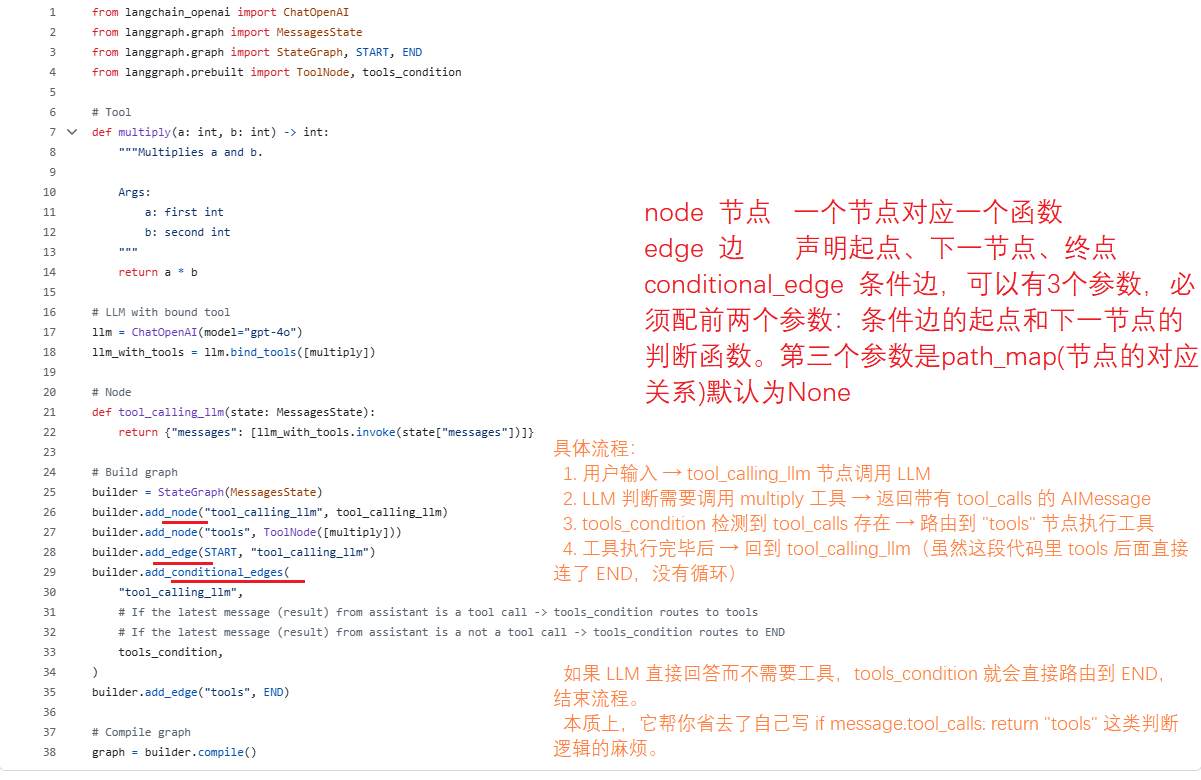
分析完成后,我们运行看看,我使用langgraph dev的形式运行的,在下图左下角 Input处添加HumanMessage. 运行结果如下:
-
第一轮,我输入问题"5加6等于几?" 因为没有加法工具没法回答问题,即没有工具调用,所以直接走END了。
-
第二轮,我输入问题"56乘以12等于多少?"用乘法工具,所以调用了相应的工具函数,然后走了tools节点再结束。
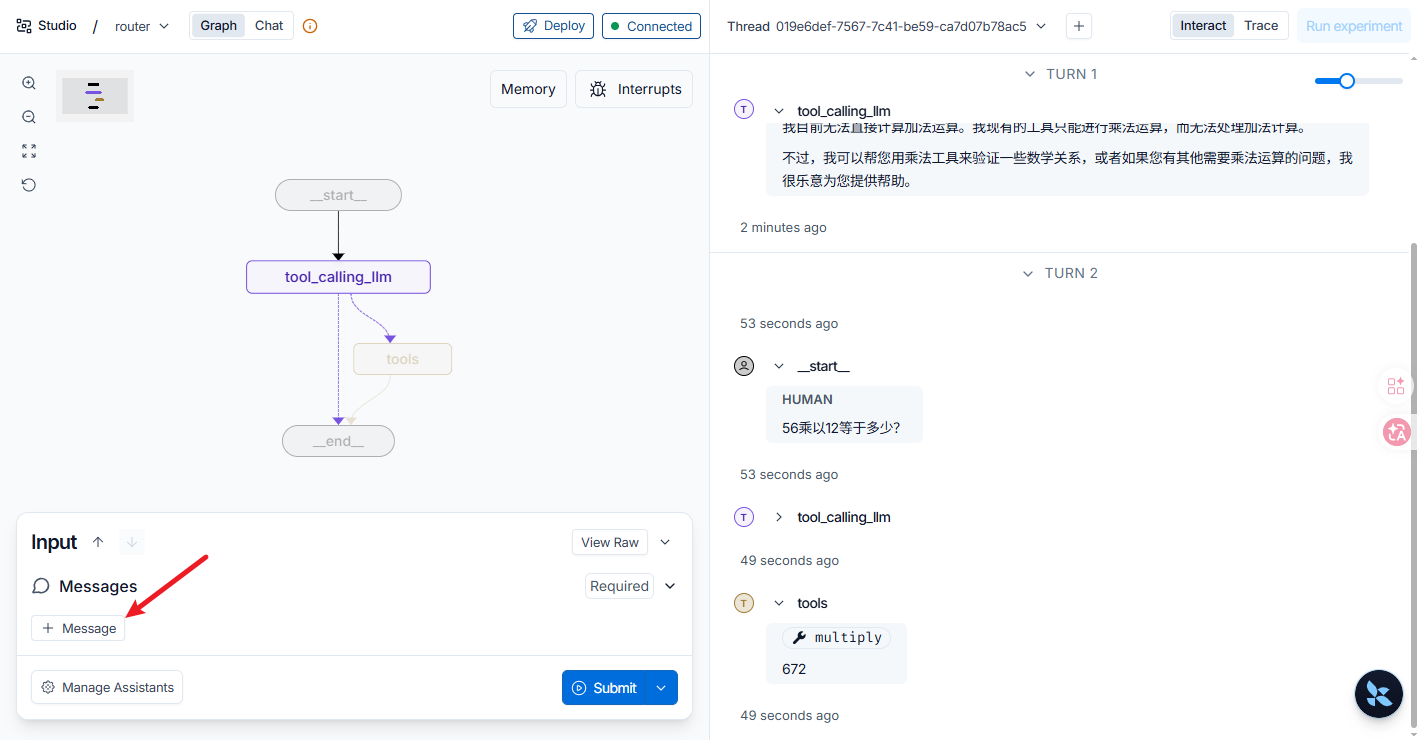
可以看出普通edge是实线,条件边是虚线。tools_condition这个条件判断函数是langgraph的库函数。
其实add_node()第一个参数可以是str,也可以参数列表只有一个func_name,那么函数名就是该节点的字符名称。另外add_node还可以配置的参数有defer操作、retry_policy、cache_policy等。
在这个例子里面图的流程框架用node和edge完整的表达了出来,但是在复杂的业务流程中也有些很多情形在函数中直接用代码跳转到指定node.如下所示,如果条件满足直接调转到终点结束:
python
    # Exit if any termination condition is met
    if exceeded_allowed_iterations or no_tool_calls or research_complete_tool_call:
        logger.info("Research phase terminated, exiting. Ready to write report.")

        return Command(
            goto=END,
            update={
                "notes": get_notes_from_tool_calls(supervisor_messages),
                "research_brief": state.get("research_brief", "")
            }
        )
state状态保存机制
AI 应用需要内存来在多个交互之间共享上下文,有短期记忆和长期记忆。其中state就是用来存储状态(记忆)的常用手段之一 。我们还是以langchain-academy的例子来说明:https://github.com/langchain-ai/langchain-academy/blob/main/module-2/studio/chatbot.py
这是一个简单的机器人聊天agent,用state来存储聊天记录。注意以下部分代码:
python
# State class to store messages and summary
class State(MessagesState):
    summary: str

# Define a new graph
workflow = StateGraph(State)
...
图默认可以使用MessageState,而本例中使用了继承MessagesState的State. 这个State写法其实就等价于:
python
  class State(TypedDict):
      messages: Annotated[list, add_messages]   # ← 继承自 MessagesState
      summary: str                              # ← 这个自己加的
messages字段是追加的,而summary因为没有 Annotated,没有 reducer的字段,默认行为就是后写入覆盖前写入。详细可参考langgraph库里面的add_messages的定义:
python
```python title="Basic usage"
from langchain_core.messages import AIMessage, HumanMessage
msgs1 = [HumanMessage(content="Hello", id="1")]
msgs2 = [AIMessage(content="Hi there!", id="2")]
add_messages(msgs1, msgs2)
# [HumanMessage(content='Hello', id='1'), AIMessage(content='Hi there!', id='2')]
```

```python title="Overwrite existing message"
msgs1 = [HumanMessage(content="Hello", id="1")]
msgs2 = [HumanMessage(content="Hello again", id="1")]
add_messages(msgs1, msgs2)
# [HumanMessage(content='Hello again', id='1')]
```
如果是需要其他类型的reducer操作则需要编写客制化代码定义reducer的具体操作。例如:
python
from typing import Annotated

def overwrite(old, new):
    return new

def merge_dicts(old: dict, new: dict) -> dict:
    return {**old, **new}

class State(TypedDict):
    question: str                          # 默认:覆盖
    answer: Annotated[str, overwrite]      # 显式覆盖
    context: Annotated[list, operator.add] # 追加
    meta: Annotated[dict, merge_dicts]     # 字典合并
那么在节点里不需要手动修改state里面的值, 每个节点只返回一个字典,里面包含它想要修改的字段。LangGraph 的运行时会自动把这个字典合并到全局 state 中。
python
def summarize_conversation(state: State):
    # 完成功能...
    return {"summary": response.content, "messages": delete_messages}
上面的代码看似一样的赋值,但是summary里面的值会被覆盖成最新值而messages里面原来的内容还会被保留只是在后面追加了新值。
中断
中断允许在特定点暂停图执行,并在继续之前等待外部输入。当中断被触发时,LangGraph 会使用其持久化层保存图状态,并无限期等待恢复执行。这个机制常常用来实现人机交互。
中断通过在任何图节点处调用 interrupt() 函数来工作。该函数接受任何 JSON 可序列化的值,并将其暴露给调用者。当你准备继续时,通过重新调用图使用 Command(resume...) 来恢复执行,这成为节点内部 interrupt() 调用的返回值。
使用interrupt中断图
对于interrupt,你可以在认为合适的地方调用,如下所示例:
python
from langgraph.types import interrupt

def approval_node(state: State):
    # Pause and ask for approval
    approved = interrupt("Do you approve this action?")

    # When you resume, Command(resume=...) returns that value here
    return {"approved": approved}
当您调用 interrupt 时,会发生以下情况:
-
图执行在
interrupt被调用的确切位置被挂起 -
状态使用检查点器保存,以便稍后可以继续执行,在生产环境中,这应该是持久的检查点器(例如,由数据库支持)
-
返回值在事件流(
graph.stream_events(..., version="v3"))使用时返回给调用者stream.interrupts,或在默认invoke()API 下__interrupt__;它可以是任何 JSON 序列化值(字符串、对象、数组等) -
图在使用响应恢复执行之前无限期等待
-
当恢复时,响应会传递回节点,成为
interrupt()调用的返回值
使用Command(resume=...) 恢复图
中断执行后,您可以通过调用带有恢复值的 Command(resume=...) 再次启动图来恢复执行。你可以使用FASTAPI调用这些语句完成恢复动作。恢复值会传递回 interrupt 调用,允许节点使用外部输入继续执行。如下例所示(Command是关键字):
python
from langgraph.types import Command

# Initial run - hits the interrupt and pauses
# thread_id is the persistent pointer (stores a stable ID in production)
config = {"configurable": {"thread_id": "thread-1"}}
stream = graph.stream_events({"input": "data"}, config=config, version="v3")

# Drain the stream to drive the run; stream.output awaits the final state.
final = stream.output

# stream.interrupted is True when the run paused for human input, and
# stream.interrupts contains the payloads passed to interrupt().
if stream.interrupted:
    print(stream.interrupts)
    # > (Interrupt(value='Do you approve this action?'),)

# Resume with the human's response
# The resume payload becomes the return value of interrupt() inside the node
resumed = graph.stream_events(Command(resume=True), config=config, version="v3")
final = resumed.output
这里有几点需要注意:
-
你必须使用中断发生时相同的线程 ID (也可以定义sessionid来对应threadid)来恢复
-
传递给
Command(resume=...)的值成为interrupt调用的返回值 -
节点在恢复时从
interrupt被调用的节点的开头重新开始,因此interrupt之前的任何代码都会再次运行 -
您可以将任何 JSON 可序列化值作为恢复值传递
更详细和其他注意事项可参考官网链接 https://docs.langchain.com/oss/python/langgraph/interrupts
这里仅仅介绍中断基础,中断其实到底保持了什么?是我们需要搞明白的问题。其实
LangGraph 的两层保存机制
第一层:常规 Checkpoint(节点级别,自动发生)
图在正常运行时,每执行完一个节点,LangGraph 自动调用 checkpointer.aput():
节点 A 执行完成 → aput(checkpoint) → PostgreSQL
节点 B 执行完成 → aput(checkpoint) → PostgreSQL
节点 C 执行中...调用 interrupt() → 图暂停
此时 PostgreSQL 里最新的 checkpoint 已经包含了节点 B
完成后的完整状态(messages, notes, supervisor_messages 等所有 channel 的值)。
这些业务状态不是 interrupt 保存的,是节点 B 正常结束时就已经存好了。
第二层:Interrupt 写入(执行控制级别)
当 interrupt() 被调用时,LangGraph 额外向 checkpointer 写入:
┌────────────────┬──────────────────────────────────────┐
│ 写入内容 │ 说明 │
├────────────────┼──────────────────────────────────────┤
│ Pending Writes │ 当前节点已经产生但尚未应用到 state 的更新 │
├────────────────┼──────────────────────────────────────┤
│ Interrupt Value │ 你传给 interrupt() 的字典(question, notes_preview等) │
├────────────────┼──────────────────────────────────────┤
│ 任务状态标记 │ 标记当前 task 处于中断状态,需要 resume 值才能继续 │
└────────────────┴──────────────────────────────────────┘
看 PostgresCheckpointSaver.aput_writes()(checkpointer.py:308-349):
async def aput_writes(self, config, writes, task_id, task_path=""):
...
for idx, (c, v) in enumerate(writes):
db.add(
LangGraphWrite(
thread_id=thread_id,
checkpoint_ns=checkpoint_ns,
checkpoint_id=checkpoint_id,
task_id=task_id,
write_idx=inner_idx,
channel=c,
value_type=value_type,
value_data=value_data,
task_path=task_path,
)
)
interrupt() 会触发一次 aput_writes,把中断值作为 pending write 写入。这是执行控制信息,不是业务状态本身。
二、Interrupt 到底保存了什么?
用我的项目的数据结构来说:
PostgreSQL 中一个 Interrupt 时刻的 CheckpointTuple:
├── checkpoint (业务状态快照)
│ ├── channel_values
│ │ ├── messages = Sys, Human1, AI1, Tool1, ... ← 节点B完成时的消息
│ │ ├── (客制变量)supervisor_messages = Sys, AI, Tool, ... ← 节点B完成时的消息
│ │ ├── (客制变量)notes = "发现A", "发现B"
│ │ ├── (客制变量)research_thoughts = "思考1", "思考2"
│ │ └── (客制变量)feedback_round = 1
│ └── channel_versions = {"messages": "abc123", ...} ← 版本向量
│
├── pending_writes (Interrupt 触发写入)
│ └── (task_id, "interrupt", {"question": "...", "notes_preview":
"..."})
│
└── metadata
├── thread_id = "uuid-xxx"
└── 执行元数据
关键区分:
- channel_values 里的 messages/notes
等:是节点正常执行时就已经保存的,interrupt 只是"借用"了这份快照
- pending_writes 里的 interrupt:才是 interrupt
机制真正写入的,用于记录"这里有个中断点,resume 时需要注入值"
三、Resume 时框架怎么恢复?
-
调用 graph.astream(Command(resume="用户反馈"), config)
-
LangGraph 读取 config.configurable.thread_id
-
调用 PostgresCheckpointSaver.aget_tuple(config)
├── 加载 checkpoint → 恢复 channel_values(业务状态)
├── 加载 pending_writes → 发现 (task_id, "interrupt", value)
└── 加载 metadata
-
框架定位到中断的 task
-
用 Command(resume="用户反馈") 替换 pending_writes 中的 interrupt value
-
恢复该 task 的执行,interrupt() 返回 "用户反馈"
-
你的节点代码继续执行:if feedback == "/continue" ...
一句话总结
业务状态(messages, notes 等)是 LangGraph 在节点执行完成后常规 checkpoint 保存的;interrupt() 保存的是"执行控制元数据"(中断点位置 + 中断值),让框架知道 resume 时把值注入到哪里。可以理解为:
-
Checkpoint = 游戏存档:记录了你的血量、装备、位置(业务状态)
-
Interrupt = 暂停菜单:游戏本身已经存档了,暂停只是记住"我从哪里按的暂停键,
恢复时从哪一帧继续"
如果没有 interrupt 这层控制元数据,框架 resume 时虽然能加载存档,但不知道要把
Command(resume=...) 的值喂给哪个节点的哪个 interrupt() 调用。
时间旅行
LangGraph 中,get_state_history() 是实现"时间旅行"功能的核心方法之一。它的主要作用是拉取并浏览指定会话(thread)的全部历史检查点快照。
具体来说,它的用途和功能体现在以下几个方面:
-
像 Git log 一样回溯执行历史
-
为"修改过去"和"分叉执行"提供基础
-
解决真实业务中的复杂需求
在 LangGraph 中,修改过去并改变执行路径的核心机制是结合 get_state_history() 和 update_state()。当你通过历史快照定位到某个特定的检查点(Checkpoint)时,可以使用 update_state() 在该节点注入新的状态。LangGraph 会自动将该检查点作为新的基准,并从该节点的下一个预期步骤开始重新执行图。例如人工审核员发现了这个错误,决定干预。首先,我们需要拉取该会话的历史记录,找到分类出错的那个时间点:
python
# 获取该 thread 的完整历史状态
history = list(graph.get_state_history({"configurable": {"thread_id": "ticket-123"}}))

# 遍历历史,找到 classify_ticket 节点刚执行完时的检查点
target_checkpoint = None
for state_snapshot in history:
    if state_snapshot.next == ("process_refund",):
        # 找到了即将进入 process_refund 的那一刻(即分类刚做完)
        target_checkpoint = state_snapshot
        break