
一、UDP通信概述
UDP是轻量的、不可靠的、面向数据报、无连接的协议,它可以用于对可靠性要求不高的场合,和TCP通信不同,两个程序之间进行UDP通信无需预先建立持久的socket连接,UDP每次发送数据报都需要指定目标地址和端口。
QUdpSocket类用于实现UDP通信。发送数据报使用writeDatagram()函数,数据报的长度一般小于512字节,每个数据报包含发送者和接收者的IP地址和端口等信息;接收数据报要先用bind()函数绑定一个端口,当有数据传入时会触发readyRead信号,使用readDatagram()函数来读取接收到的数据。
二、UDP单播模式
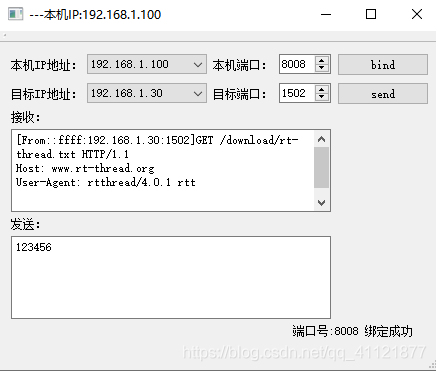
本文实现的是上位机(PC)向下位机(STM32)发送信息,STM32接收到信息之后回立刻返回一帧信息,上位机接收到信息之后,解析命令得到下位机的IP地址和端口号,并同信息内容一同打印。
先在QT的.pro文件中添加QT += network。
1.接收数据
要实现UDP数据的接收,必须先用bind()函数绑定本机的一个端口,用于监听传入的数据报,解除绑定则使用abort()函数。绑定端口之后,当上位机接收到数据就会触发QUdpSocket类中的readyRead()信号,因此将该信号通过槽函数连接到UDPSocketReadyRead()函数处理接收到的数据。
2.发送数据
使用writeDatagram()函数向下位机发送消息时,需要指定目标地址和端口。QUdpSocket发送的数据报是QByteArray类型,长度一般不超过512字节。
/*
*   接收数据
*/
void MainWindow::UDPSocketReadyRead()
{

    while(Myudpsocket->hasPendingDatagrams())
    {
        QByteArray Recivedata;
        Recivedata.resize(Myudpsocket->pendingDatagramSize());
        QHostAddress peerAddr;
        quint16 peerPort;
        Myudpsocket->readDatagram(Recivedata.data(), Recivedata.size(), &peerAddr, &peerPort);
        QString str = Recivedata.data();
        QString peer = "[From" + peerAddr.toString() + ":" + QString::number(peerPort) +"]";
        ui->textEdit_recive->setText(peer+str);
    }
}
总结
以下代码已经经过实际的验证,可正常使用!!!
代码h文件
#ifndef MAINWINDOW_H
#define MAINWINDOW_H

#include <QMainWindow>
#include <QtNetwork/QUdpSocket>
#include <QtNetwork/QHostAddress>
#include <QtNetwork/QNetworkInterface>
#include <QtNetwork/QNetworkAddressEntry>

namespace Ui {
class MainWindow;
}

class MainWindow : public QMainWindow
{
    Q_OBJECT

public:
    explicit MainWindow(QWidget *parent = nullptr);
    ~MainWindow();

private slots:
    void UDPSocketReadyRead();

    void on_pushButton_UDP_send_clicked();

    void on_pushButton_UDP_bind_clicked();

private:
    Ui::MainWindow *ui;

    QString GetlocalIP();

    QUdpSocket *Myudpsocket;

};

#endif // MAINWINDOW_H
代码c文件
#include "mainwindow.h"
#include "ui_mainwindow.h"

MainWindow::MainWindow(QWidget *parent) :
    QMainWindow(parent),
    ui(new Ui::MainWindow)
{
    ui->setupUi(this);

    /********获取本机IP地址**********/
    QString localIP = GetlocalIP();
    this->setWindowTitle("---本机IP:"+localIP);
    ui->comboBox_localIP->addItem(localIP);

    /********本机IP设置**********/
    Myudpsocket = new QUdpSocket(this);
    connect(Myudpsocket, &QUdpSocket::readyRead, this, &MainWindow::UDPSocketReadyRead);

}

MainWindow::~MainWindow()
{
    Myudpsocket->abort();          //解除绑定
    delete ui;
}

/*
*   获取本机IP地址
*/
QString MainWindow::GetlocalIP()
{
    QString strIpAddress;
    QList<QHostAddress> ipAddressesList = QNetworkInterface::allAddresses();
    // 获取第一个本主机的IPv4地址
    int nListSize = ipAddressesList.size();
    for (int i = 0; i < nListSize; ++i)
    {
           if (ipAddressesList.at(i) != QHostAddress::LocalHost &&
               ipAddressesList.at(i).toIPv4Address()) {
               strIpAddress = ipAddressesList.at(i).toString();
               break;
           }
     }
     // 如果没有找到,则以本地IP地址为IP
     if (strIpAddress.isEmpty())
        strIpAddress = QHostAddress(QHostAddress::LocalHost).toString();
     return strIpAddress;
}

/*
*   接收数据
*/
void MainWindow::UDPSocketReadyRead()
{

    while(Myudpsocket->hasPendingDatagrams())
    {
        QByteArray Recivedata;
        Recivedata.resize(Myudpsocket->pendingDatagramSize());
        QHostAddress peerAddr;
        quint16 peerPort;
        Myudpsocket->readDatagram(Recivedata.data(), Recivedata.size(), &peerAddr, &peerPort);
        QString str = Recivedata.data();
        QString peer = "[From" + peerAddr.toString() + ":" + QString::number(peerPort) +"]";
        ui->textEdit_recive->setText(peer+str);
    }
}

/*
*   发送数据
*/
void MainWindow::on_pushButton_UDP_send_clicked()
{
    QHostAddress GoalADDr(QString(ui->comboBox_goalIP->currentText()));
    quint16 GoalPort = ui->spinBox_goalport->value();
    QString sendstr = ui ->textEdit_send->toPlainText();
    QByteArray str = sendstr.toUtf8();
    Myudpsocket->writeDatagram(str, GoalADDr, GoalPort);
//    ui->label_information->setText("send ok!");
}

/*
*   绑定端口
*/
void MainWindow::on_pushButton_UDP_bind_clicked()
{
    quint16 port = ui->spinBox_localport->value();
    if(Myudpsocket->bind(port))
    {
        ui->label_information->setText(QString("端口号:%1 绑定成功").arg(port));
    }else {
        ui->label_information->setText(QString("端口号:%1 绑定失败").arg(port));
    }
}