目录
[HTTP Cookie 定义](#HTTP Cookie 定义)
[认识 cookie](#认识 cookie)
[完整的 Set-Cookie 示例](#完整的 Set-Cookie 示例)
[Cookie 的生命周期](#Cookie 的生命周期)
[实验测试 Cookie](#实验测试 Cookie)
[引入 HTTP Session](#引入 HTTP Session)
[1. Session的本质](#1. Session的本质)
[2. Cookie的作用](#2. Cookie的作用)
[3. 安全性考虑](#3. 安全性考虑)
[4. Session的局限性](#4. Session的局限性)
[5. 实际应用](#5. 实际应用)
关于登录的场景 - B 站登录和未登录
• 问题:B 站是如何认识我这个登录用户的?
• 问题:HTTP 是无状态,无连接的,怎么能够记住我?
HTTP Cookie 定义
HTTP Cookie(也称为 Web Cookie、浏览器 Cookie 或简称 Cookie)是服务器发送到 用户浏览器并保存在浏览器上的一小块数据 ,它会在浏览器之后向同一服务器再次发 起请求时被携带并发送到服务器上。通常,它用于告知服务端两个请求是否来自同一 浏览器,如保持用户的登录状态、记录用户偏好等。
工作原理:
○ 当用户第一次访问网站时,服务器会在响应的 HTTP 头中设置 Set-Cookie 字段,用于发送 Cookie 到用户的浏览器。
○ 浏览器在接收到 Cookie 后,会将其保存在本地(通常是按照域名进行存 储)。
○ 在之后的请求中,浏览器会自动在 HTTP 请求头中携带 Cookie 字段,将之 前保存的 Cookie 信息发送给服务器。
分类
○ 会话 Cookie(Session Cookie):在浏览器关闭时失效。
○ 持久 Cookie(Persistent Cookie):带有明确的过期日期或持续时间, 可以跨多个浏览器会话存在。
○ 如果 cookie 是一个持久性的 cookie,那么它其实就是浏览器相关的,特 定目录下的一个文件。但直接查看这些文件可能会看到乱码或无法读取的内容, 因为 cookie 文件通常以二进制或 sqlite 格式存储。一般我们查看,直接在浏览 器对应的选项中直接查看即可

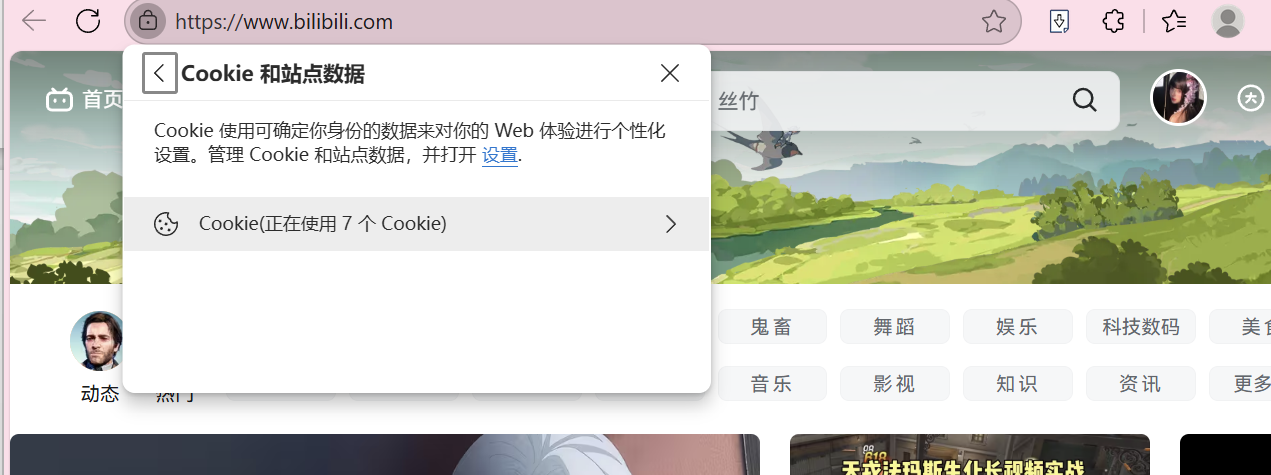
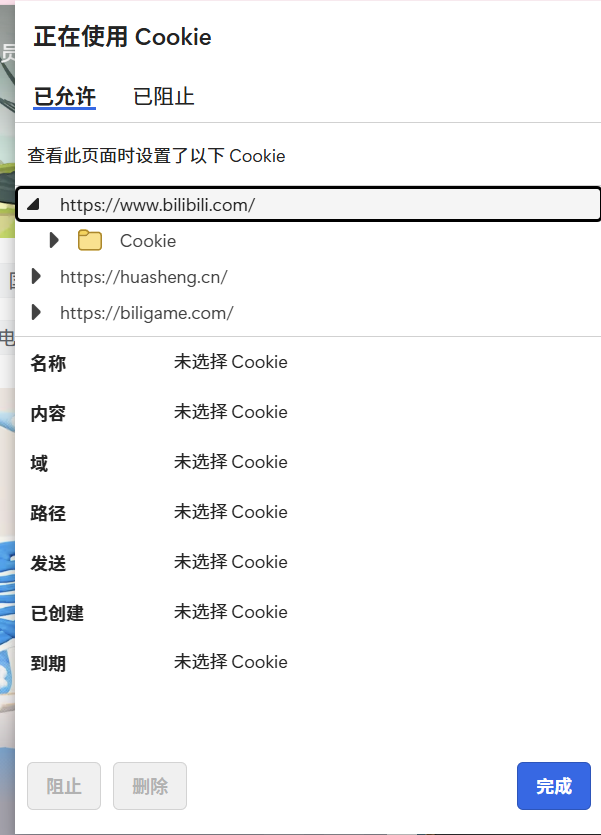
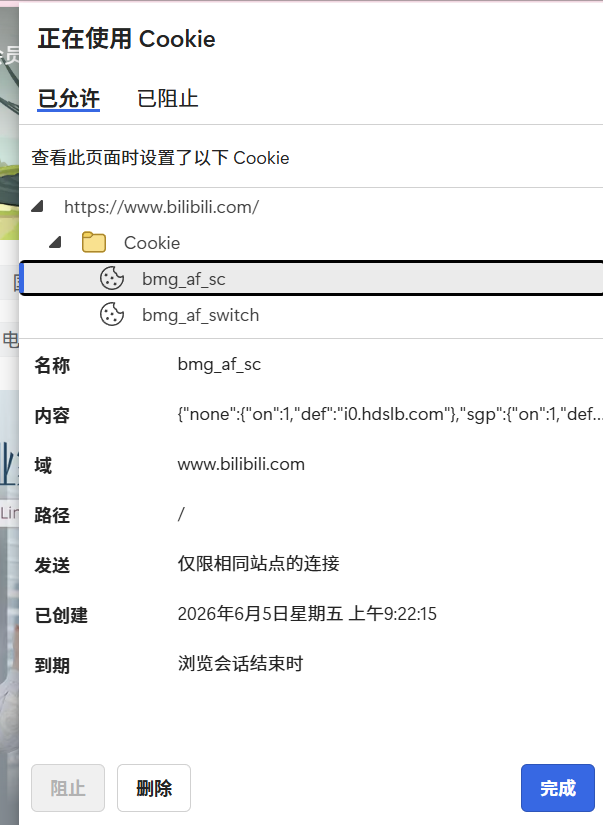
安全性
• 由于 Cookie 是存储在客户端的,因此存在被篡改或窃取的风险。
用途
○ 用户认证和会话管理(最重要)
○ 跟踪用户行为
○ 缓存用户偏好等
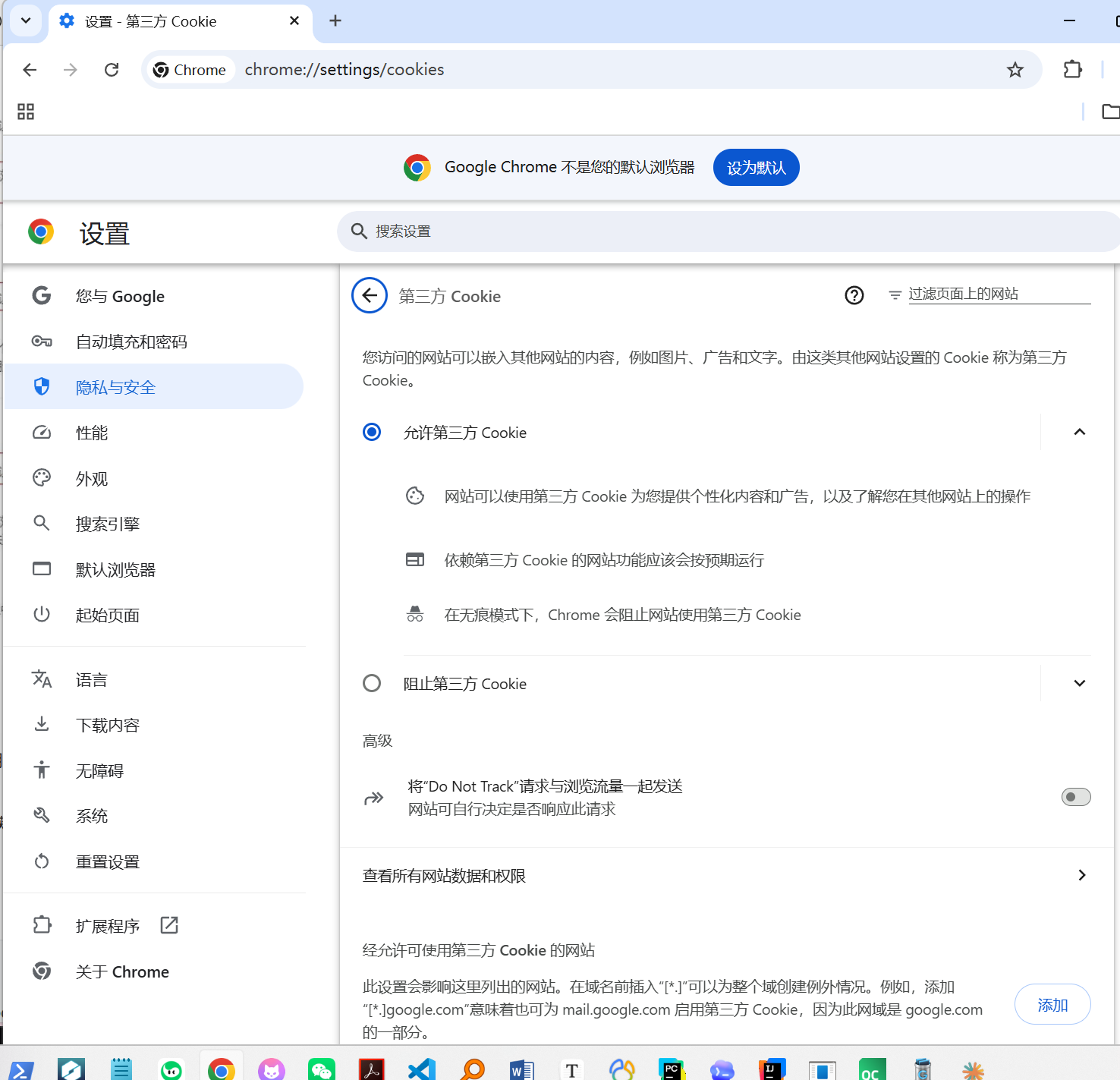
○ 比如在 chrome 浏览器下,可以直接访问:chrome://settings/cookies
认识 cookie
○ HTTP 存在一个报头选项:Set-Cookie, 可以用来进行给浏览器设置 Cookie 值。
○ 在 HTTP 响应头中添加,客户端(如浏览器)获取并自行设置并保存 Cookie。
基本格式
cpp
Set-Cookie: <name>=<value>
其中 <name> 是 Cookie 的名称,<value> 是 Cookie 的值
完整的 Set-Cookie 示例
cpp
Set-Cookie: username=peter; expires=Thu, 18 Dec 2024 12:00:00
UTC; path=/; domain=.example.com; secure; HttpOnly
时间格式必须遵守 RFC 1123 标准,具体格式样例:Tue, 01 Jan 2030 12:34:56 GMT 或者 UTC(推荐)。
关于时间解释
○ Tue: 星期二(星期几的缩写)
○ ,: 逗号分隔符
○ 01: 日期(两位数表示)
○ Jan: 一月(月份的缩写)
○ 2030: 年份(四位数)
○ 12:34:56: 时间(小时、分钟、秒)
○ GMT: 格林威治标准时间(时区缩写)
GMT vs UTC了解即可
GMT(格林威治标准时间)和 UTC(协调世界时)是两个不同的时间标准,但它们 在大多数情况下非常接近,常常被混淆。以下是两者的简单解释和区别:
- GMT(格林威治标准时间):
○ GMT 是格林威治标准时间的缩写,它是以英国伦敦的格林威治区为基准 的世界时间标准。 ○ GMT 不受夏令时或其他因素的影响,通常用于航海、航空、科学、天文 等领域。
○ GMT 的计算方式是基于地球的自转和公转。
- UTC(协调世界时):
○ UTC 全称为"协调世界时",是国际电信联盟(ITU)制定和维护的标准时 间。
○ UTC 的计算方式是基于原子钟,而不是地球的自转,因此它比 GMT 更准 确。据称,世界上最精确的原子钟 50 亿年才会误差 1 秒。
○ UTC 是现在用的时间标准,多数全球性的网络和软件系统将其作为标准 时间。
区别:
• 计算方式:GMT 基于地球的自转和公转,而 UTC 基于原子钟。
• 准确度:由于 UTC 基于原子钟,它比基于地球自转的 GMT 更加精确。 在实际使用中,GMT 和 UTC 之间的差别通常很小,大多数情况下可以互换使用。但 在需要高精度时间计量的场合,如科学研究、网络通信等,UTC 是更为准确的选择。
cpp
Set-Cookie: username=peter; expires=Thu, 18 Dec 2024 12:00:00
UTC; path=/; domain=.example.com; secure; HttpOnly
关于其他可选属性的解释
○ expires= :设置 Cookie 的过期日期/时间。如果未指定此属 性,则 Cookie 默认为会话 Cookie,即当浏览器关闭时过期。
○ path= :限制 Cookie 发送到服务器的哪些路径。默认 为设置它的路径。
○ domain= :指定哪些主机可以接受该 Cookie。默 认为设置它的主机。
○ secure :仅当使用 HTTPS 协议时才发送 Cookie。这有助于防止 Cookie 在不安全的 HTTP 连接中被截获
○ HttpOnly :标记 Cookie 为 HttpOnly,意味着该 Cookie 不能被 客户端脚本(如 JavaScript)访问。这有助于防止跨站脚本攻击(XSS)。
以下是对 Set-Cookie头部字段的简洁描述
| 属性 | 值 | 描述 |
|---|---|---|
| username | peter | 这是 Cookie 的名称和值,标识用户名为 "peter"。 |
| expires | Thu, 18 Dec 2024 12:00:00 UTC | 指定 Cookie 的过期时间。在这个例子中,Cookie 将在 2024 年 12 月 18 日 12:00:00 UTC 后过期。 |
| path | / | 定义 Cookie 的作用范围。这里设置为根路径 /,意味着 Cookie 对 .example.com 域名下的所有路径都可用。 |
| domain | .example.com | 指定哪些域名可以接收这个 Cookie。点前缀 (.) 表示包括所有子域名。 |
| secure | - | 指示 Cookie 只能通过 HTTPS 协议发送,不能通过 HTTP 协议发送,增加安全性。 |
| HttpOnly | - | 阻止客户端脚本(如 JavaScript)访问此 Cookie,有助于防止跨站脚本攻击 (XSS)。 |
注意事项
○ 每个 Cookie 属性都以分号(;)和空格( )分隔。
○ 名称和值之间使用等号(=)分隔。
○ 如果 Cookie 的名称或值包含特殊字符(如空格、分号、逗号等),则需要 进行 URL 编码。
Cookie 的生命周期
○ 如果设置了 expires 属性,则 Cookie 将在指定的日期/时间后过期。
○ 如果没有设置 expires 属性,则 Cookie 默认为会话 Cookie,即当浏览器 关闭时过期。
安全性考虑
○ 使用 secure 标志可以确保 Cookie 仅在 HTTPS 连接上发送,从而提高安 全性。
○ 使用 HttpOnly 标志可以防止客户端脚本(如 JavaScript)访问 Cookie, 从而防止 XSS 攻击。
○ 通过合理设置 Set-Cookie 的格式和属性,可以确保 Cookie 的安全性、有效 性和可访问性,从而满足 Web 应用程序的需求
实验测试 Cookie
通过一个精简的HTTP服务器,演示Cookie的核心功能:
Cookie的设置(Set-Cookie)
Cookie的自动提交
Cookie的过期时间(expires)
Cookie的路径限制(path)
通过这个小实验掌握以下内容:
理解Cookie的工作原理
掌握Set-Cookie响应头的使用
理解expires属性的作用
理解path属性的作用
能够实现简单的Cookie管理
项目结构:
main.cpp # 主程序入口
HttpServer.hpp # HTTP服务器(核心逻辑)
HttpProtocol.hpp # HTTP协议解析(请求/响应)
TcpServer.hpp # TCP服务器(网络通信)
Makefile # 编译脚本
流程
- Cookie写入流程
浏览器请求 /login
    ↓
服务器处理请求
    ↓
构造响应头:Set-Cookie: username=zhangsan
    ↓
发送响应给浏览器
    ↓
浏览器保存Cookie- Cookie自动提交流程
浏览器访问其他页面(如/check)
    ↓
浏览器检查是否有该域名的Cookie
    ↓
如果有,自动添加到请求头:Cookie: username=zhangsan
    ↓
服务器接收请求,从Cookie头中提取信息- Set-Cookie属性
| 属性 | 说明 | 示例 |
|---|---|---|
| name=value | Cookie名称和值 | username=zhangsan |
| expires | 过期时间(RFC1123格式) | expires=Thu, 18 Dec 2024 12:00:00 UTC |
| path | 路径限制 | path=/a/b |
| domain | 域名限制 | domain=.example.com |
| Secure | 仅HTTPS发送 | Secure |
| HttpOnly | 禁止JS访问 | HttpOnly |
单独使用 Cookie,有什么问题?
• 我们写入的是测试数据,如果写入的是用户的私密数据呢?比如,用户名密码, 浏览痕迹等。
• 本质问题在于这些用户私密数据在浏览器(用户端)保存,非常容易被人盗取,更 重要的是,除了被盗取,还有就是用户私密数据也就泄漏了。
测试1:Cookie写入
测试路径 :/login
功能:服务器通过Set-Cookie响应头将Cookie写入浏览器
操作步骤:
-
访问
http://localhost:8080/login -
打开浏览器开发者工具(F12)
-
查看Application → Cookies
-
观察是否出现新的Cookie
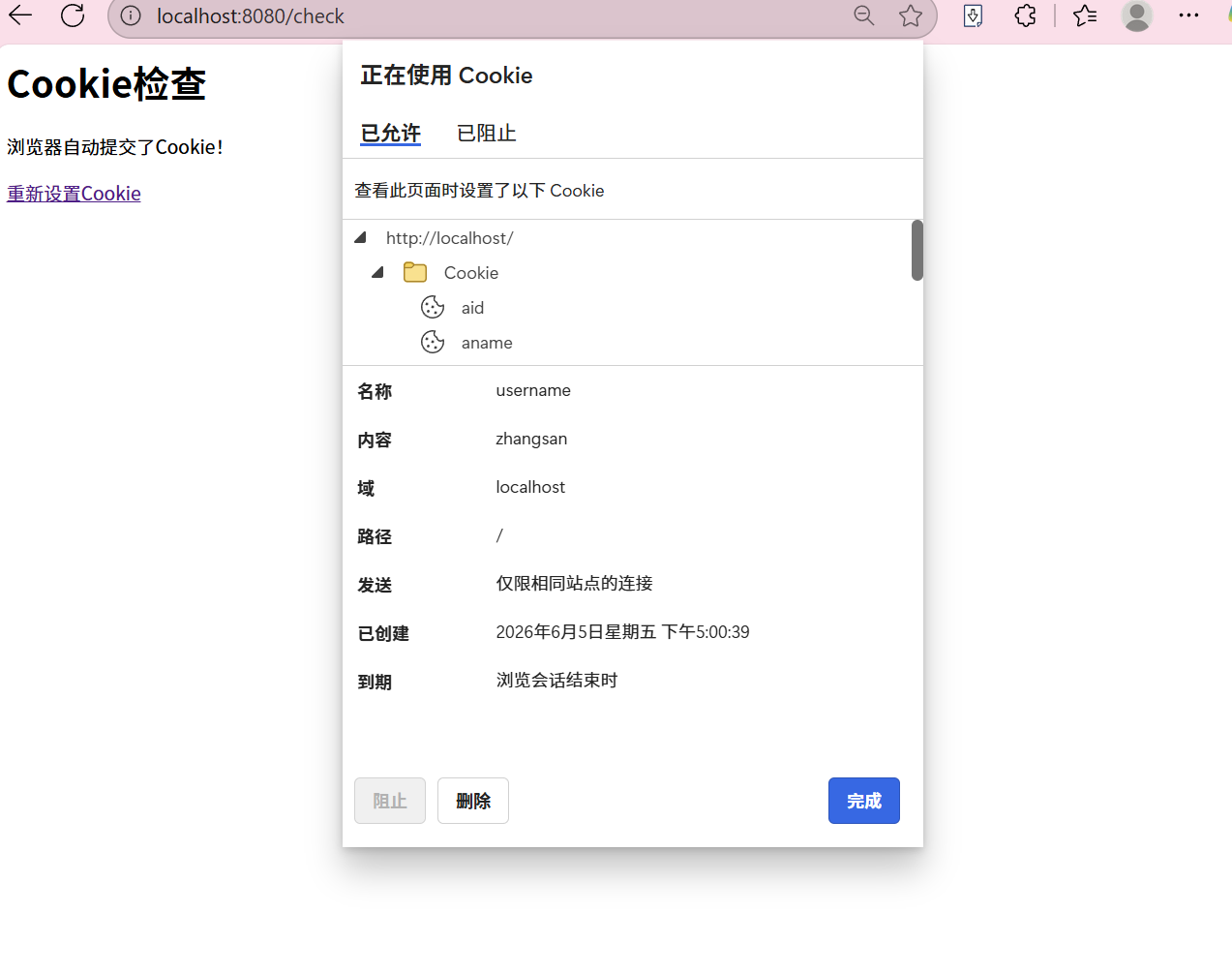
测试2:Cookie自动提交
测试路径 :任意路径(如/check)
功能:浏览器自动携带Cookie发送给服务器
操作步骤:
-
先访问
/login设置Cookie -
然后访问
http://localhost:8080/check -
观察服务器输出的请求头
预期结果: 服务器应该输出:
请求头: Cookie: username=zhangsan这说明浏览器自动携带了Cookie!
测试3:Cookie过期时间(expires)
测试路径 :/login(需修改代码)
功能:设置Cookie的过期时间
操作步骤:
- 修改
HttpServer.hpp中的代码:
cpp
// 取消这行的注释
resp.AddHeader(ProveCookieTimeOut());
// 注释掉这行
// resp.AddHeader(ProveCookieWrite());-
重新编译:
make -
重新运行:
./cookie_server 8080 -
访问
/login -
等待60秒
-
刷新页面,观察Cookie是否消失
预期结果:
-
设置后立即:Cookie存在
-
60秒后:Cookie自动消失
代码解析:
cpp
std::string ProveCookieTimeOut() {
// 60秒后过期
return "Set-Cookie: username=zhangsan; expires=" +
ExpireTimeUseRfc1123(60) + ";";
}
// 时间格式:Thu, 18 Dec 2024 12:00:00 UTC
std::string ExpireTimeUseRfc1123(int t) {
time_t timeout = time(nullptr) + t;
// 必须用gmtime(),不能用localtime()!
struct tm *tm = gmtime(&timeout);
// ... 生成RFC1123格式时间
}注意:
-
必须使用
gmtime()获取UTC时间 -
localtime()返回本地时间,会导致Cookie过期时间错误 -
HTTP协议要求使用UTC时间
测试4:Cookie路径限制(path)
测试路径 :/login(需修改代码)
功能:限制Cookie只在特定路径下提交
操作步骤:
- 修改
HttpServer.hpp中的代码:
cpp
// 取消这行的注释
resp.AddHeader(ProvePath());
// 注释掉其他两行
// resp.AddHeader(ProveCookieWrite());
// resp.AddHeader(ProveCookieTimeOut());-
重新编译:
make -
重新运行:
./cookie_server 8080 -
访问
/login(设置Cookie,路径为/a/b) -
测试不同路径:
| 访问路径 | 是否提交Cookie | 原因 |
|---|---|---|
/a/b/test |
是 | 路径匹配 |
/a/b |
是 | 路径匹配 |
/a/x |
否 | 路径不匹配 |
/ |
否 | 路径不匹配 |
/check |
否 | 路径不匹配 |
预期结果:
-
访问
/a/b/test:服务器输出Cookie: username=zhangsan -
访问
/a/x:服务器输出中没有Cookie
代码解析:
cpp
std::string ProvePath() {
    // 设置路径为/a/b
    return "Set-Cookie: username=zhangsan; path=/a/b;";
}
代码
main.cpp
cpp
/*
 * HTTP Cookie 实验 - 主程序入口
 *
 * 用法: ./cookie_server [端口号]
 * 默认端口8080
 * 浏览器访问 http://localhost:8080/login 开始测试
 */

#include <iostream>
#include <string>
#include "HttpServer.hpp"

int main(int argc, char* argv[]) {
    uint16_t port = 8080;

    if (argc > 1) {
        port = std::stoi(argv[1]);
    }

    HttpServer server(port);
    server.Run();

    return 0;
}
TcpServer.hpp
cpp
#pragma once

#include <iostream>
#include <string>
#include <functional>
#include <sys/socket.h>
#include <netinet/in.h>
#include <arpa/inet.h>
#include <unistd.h>
#include <cstring>

// 回调函数类型,用来处理HTTP请求
using HttpHandler = std::function<std::string(std::string)>;

class TcpServer {
public:
    TcpServer(uint16_t port, HttpHandler handler)
        : _port(port), _listen_fd(-1), _handler(handler) {}

    ~TcpServer() {
        if (_listen_fd >= 0)
            close(_listen_fd);
    }

    bool Init() {
        // 创建tcp socket
        _listen_fd = socket(AF_INET, SOCK_STREAM, 0);
        if (_listen_fd < 0) {
            std::cerr << "创建socket失败" << std::endl;
            return false;
        }

        // 端口复用,不然重启的时候会报 address already in use
        int opt = 1;
        setsockopt(_listen_fd, SOL_SOCKET, SO_REUSEADDR, &opt, sizeof(opt));

        // 绑定ip和端口
        struct sockaddr_in addr;
        memset(&addr, 0, sizeof(addr));
        addr.sin_family = AF_INET;
        addr.sin_port = htons(_port);
        addr.sin_addr.s_addr = INADDR_ANY;

        if (bind(_listen_fd, (struct sockaddr*)&addr, sizeof(addr)) < 0) {
            std::cerr << "绑定地址失败" << std::endl;
            close(_listen_fd);
            return false;
        }

        // 开始监听
        if (listen(_listen_fd, 5) < 0) {
            std::cerr << "监听失败" << std::endl;
            close(_listen_fd);
            return false;
        }

        std::cout << "TCP服务器启动在端口 " << _port << std::endl;
        return true;
    }

    // 主循环,不断accept新连接
    void Start() {
        while (true) {
            struct sockaddr_in client_addr;
            socklen_t client_len = sizeof(client_addr);
            int client_fd = accept(_listen_fd, (struct sockaddr*)&client_addr, &client_len);

            if (client_fd < 0) {
                std::cerr << "接受连接失败" << std::endl;
                continue;
            }

            std::cout << "新连接: " << inet_ntoa(client_addr.sin_addr)
                      << ":" << ntohs(client_addr.sin_port) << std::endl;

            HandleClient(client_fd);
            close(client_fd);
        }
    }

private:
    // 读请求、调回调、发响应
    void HandleClient(int client_fd) {
        char buffer[4096];
        memset(buffer, 0, sizeof(buffer));
        ssize_t bytes_read = recv(client_fd, buffer, sizeof(buffer) - 1, 0);

        if (bytes_read <= 0) {
            return;
        }

        std::string request(buffer, bytes_read);

        // 调用HttpServer里注册的回调来处理请求
        std::string response = _handler(request);

        send(client_fd, response.c_str(), response.length(), 0);
    }

    uint16_t _port;
    int _listen_fd;
    HttpHandler _handler;
};
HttpServer.hpp
cpp
#pragma once

#include <iostream>
#include <string>
#include <memory>
#include <ctime>
#include <vector>
#include <sstream>
#include "TcpServer.hpp"
#include "HttpProtocol.hpp"

class HttpServer {
public:
    HttpServer(uint16_t port) : _port(port) {}
    ~HttpServer() {}

    void Run() {
        TcpServer *tsvr = new TcpServer(_port,
            std::bind(&HttpServer::HandlerHttp, this, std::placeholders::_1));

        if (!tsvr->Init()) {
            delete tsvr;
            return;
        }

        std::cout << "\nHTTP Cookie 实验服务器" << std::endl;
        std::cout << "访问 http://localhost:" << _port << "/login 开始测试\n" << std::endl;

        tsvr->Start();
        delete tsvr;
    }

private:
    // 返回月份英文缩写,给expires用的
    std::string GetMonthName(int month) {
        std::vector<std::string> months = {
            "Jan", "Feb", "Mar", "Apr", "May", "Jun",
            "Jul", "Aug", "Sep", "Oct", "Nov", "Dec"
        };
        return months[month];
    }

    // 返回星期英文缩写
    std::string GetWeekDayName(int day) {
        std::vector<std::string> weekdays = {
            "Sun", "Mon", "Tue", "Wed", "Thu", "Fri", "Sat"
        };
        return weekdays[day];
    }

    // 生成RFC1123格式的UTC过期时间
    // 参数t是秒数,表示多少秒后过期
    // 注意这里必须用gmtime,不能用localtime,因为HTTP要求UTC时间
    std::string ExpireTimeUseRfc1123(int t) {
        time_t timeout = time(nullptr) + t;

        // 用gmtime拿UTC时间,localtime带时区会导致过期时间不对
        struct tm *tm = gmtime(&timeout);

        char timebuffer[1024];
        // 输出格式: "Thu, 18 Dec 2024 12:00:00 UTC"
        snprintf(timebuffer, sizeof(timebuffer),
            "%s, %02d %s %d %02d:%02d:%02d UTC",
            GetWeekDayName(tm->tm_wday).c_str(),
            tm->tm_mday,
            GetMonthName(tm->tm_mon).c_str(),
            tm->tm_year + 1900,
            tm->tm_hour,
            tm->tm_min,
            tm->tm_sec);

        return timebuffer;
    }

    // 测试1: 简单写入cookie,浏览器会保存并在后续请求里自动带上
    std::string ProveCookieWrite() {
        return "Set-Cookie: username=zhangsan;";
    }

    // 测试2: 带过期时间的cookie,60秒后自动失效
    std::string ProveCookieTimeOut() {
        return "Set-Cookie: username=zhangsan; expires=" +
               ExpireTimeUseRfc1123(60) + ";";
    }

    // 测试3: 带路径限制的cookie,只在/a/b路径下才会提交
    std::string ProvePath() {
        return "Set-Cookie: username=zhangsan; path=/a/b;";
    }

    // HTTP请求处理的总入口
    std::string HandlerHttp(std::string request) {
        HttpRequest req;
        HttpResponse resp;

        req.Deserialize(request);
        req.Parse();

        // 如果想看浏览器发了什么,把下面这行取消注释
        // req.DebugHttp();

        std::string url = req.Url();

        // /login - 测试cookie写入
        if (url == "/login") {
            std::cout << "[测试] 访问 /login - 测试Cookie写入" << std::endl;

            resp.SetCode(200);
            resp.SetDesc("OK");
            resp.AddHeader("Content-Type: text/html; charset=utf-8");

            // 通过注释/取消注释来切换测试功能
            resp.AddHeader(ProveCookieWrite());       // 测试cookie写入与自动提交
            // resp.AddHeader(ProveCookieTimeOut());   // 测试过期时间
            // resp.AddHeader(ProvePath());            // 测试路径限制

            resp.AddContent("<html><h1>Cookie已设置!</h1>"
                           "<p>刷新页面查看Cookie自动提交</p>"
                           "<p><a href='/check'>查看Cookie</a></p>"
                           "<p><a href='/a/b/test'>测试路径限制</a></p>"
                           "</html>");
        }
        // /check - 看浏览器有没有自动带上cookie
        else if (url == "/check") {
            std::cout << "[测试] 访问 /check - 查看Cookie自动提交" << std::endl;

            resp.SetCode(200);
            resp.SetDesc("OK");
            resp.AddHeader("Content-Type: text/html; charset=utf-8");

            std::string content = "<html><h1>Cookie检查</h1>";

            // 如果有sessionid就显示出来
            std::string sessionid = req.SessionId();
            if (!sessionid.empty()) {
                content += "<p>sessionid: " + sessionid + "</p>";
            }

            content += "<p>浏览器自动提交了Cookie!</p>";
            content += "<p><a href='/login'>重新设置Cookie</a></p>";
            content += "</html>";

            resp.AddContent(content);
        }
        // /a/b/* 路径 - 测试path属性
        else if (url.find("/a/b") == 0) {
            std::cout << "[测试] 访问 " << url << " - 测试路径限制" << std::endl;

            resp.SetCode(200);
            resp.SetDesc("OK");
            resp.AddHeader("Content-Type: text/html; charset=utf-8");

            std::string content = "<html><h1>路径测试: " + url + "</h1>";
            content += "<p>如果你设置了path=/a/b的Cookie,这里应该能看到</p>";
            content += "<p><a href='/login'>重新设置Cookie</a></p>";
            content += "<p><a href='/a/x/test'>测试其他路径</a></p>";
            content += "</html>";

            resp.AddContent(content);
        }
        // 其他路径,给个导航页
        else {
            std::cout << "[测试] 访问 " << url << std::endl;

            resp.SetCode(200);
            resp.SetDesc("OK");
            resp.AddHeader("Content-Type: text/html; charset=utf-8");

            std::string content = "<html><h1>Cookie实验服务器</h1>";
            content += "<p>可用的测试路径:</p>";
            content += "<ul>";
            content += "<li><a href='/login'>/login</a> - 设置Cookie</li>";
            content += "<li><a href='/check'>/check</a> - 查看Cookie</li>";
            content += "<li><a href='/a/b/test'>/a/b/test</a> - 测试路径限制</li>";
            content += "</ul>";
            content += "</html>";

            resp.AddContent(content);
        }

        return resp.Serialize();
    }

    uint16_t _port;
};
HttpProtocol.hpp
cpp
#pragma once

#include <iostream>
#include <string>
#include <sstream>
#include <vector>
#include <map>

const std::string HttpSep = "\r\n";
const std::string BlankSep = " ";

// HTTP请求类,负责解析浏览器发来的请求
class HttpRequest {
public:
    HttpRequest() {}

    // 反序列化:把原始请求字符串拆成请求行、请求头等
    bool Deserialize(std::string &request) {
        std::string line;

        // 先解析请求行,比如 "GET /login HTTP/1.1"
        if (!GetLine(request, &line))
            return false;
        _req_line = line;

        // 循环解析请求头,遇到空行就结束
        while (true) {
            if (!GetLine(request, &line))
                break;

            // 空行表示头部结束,剩下的就是请求体
            if (line.empty()) {
                _req_content = request;
                break;
            }

            _req_header.push_back(line);
        }

        return true;
    }

    // 解析请求行和Cookie
    void Parse() {
        // 从请求行里拆出 method、url、http版本
        std::istringstream ss(_req_line);
        ss >> _method >> _url >> _http_version;

        // 从请求头里找 Cookie 那一行
        // Cookie格式: "Cookie: name1=value1; name2=value2"
        std::string prefix = "Cookie: ";
        for (auto &line : _req_header) {
            if (strncmp(line.c_str(), prefix.c_str(), prefix.size()) == 0) {
                std::string cookie = line.substr(prefix.size());
                _cookies.push_back(cookie);
                break;
            }
        }

        // 再从cookie里提取sessionid
        prefix = "sessionid=";
        for (const auto &cookie : _cookies) {
            if (strncmp(cookie.c_str(), prefix.c_str(), prefix.size()) == 0) {
                _sessionid = cookie.substr(prefix.size());
                break;
            }
        }
    }

    std::string Url() { return _url; }
    std::string Method() { return _method; }
    std::string SessionId() { return _sessionid; }

    // 调试用,打印请求内容
    void DebugHttp() {
        std::cout << "请求行: " << _req_line << std::endl;
        for (auto &line : _req_header) {
            std::cout << "请求头: " << line << std::endl;
        }
    }

    ~HttpRequest() {}

private:
    // 按 \r\n 拆分,每次取出一行
    bool GetLine(std::string &str, std::string *line) {
        auto pos = str.find(HttpSep);
        if (pos == std::string::npos)
            return false;
        *line = str.substr(0, pos);
        str.erase(0, pos + HttpSep.size());
        return true;
    }

    // 原始数据
    std::string _req_line;
    std::vector<std::string> _req_header;
    std::string _req_content;

    // 解析后的数据
    std::string _method;
    std::string _url;
    std::string _http_version;
    std::vector<std::string> _cookies;
    std::string _sessionid;
};

// HTTP响应类,负责构造返回给浏览器的响应
class HttpResponse {
public:
    HttpResponse() : _resp_blank(HttpSep), _http_version("HTTP/1.1"),
        _status_code(200), _status_code_desc("OK") {}

    void SetCode(int code) { _status_code = code; }
    void SetDesc(const std::string &desc) { _status_code_desc = desc; }

    // 添加响应头,比如 "Content-Type: text/html" 或 "Set-Cookie: xxx"
    void AddHeader(const std::string &header) {
        _resp_header.push_back(header + HttpSep);
    }

    void AddContent(const std::string &content) { _resp_content = content; }

    // 序列化成完整的HTTP响应字符串
    std::string Serialize() {
        MakeStatusLine();
        std::string response_str = _status_line;

        for (auto &header : _resp_header) {
            response_str += header;
        }

        response_str += _resp_blank;  // 空行分隔头部和体部
        response_str += _resp_content;

        return response_str;
    }

    ~HttpResponse() {}

private:
    // 拼状态行: "HTTP/1.1 200 OK\r\n"
    void MakeStatusLine() {
        _status_line = _http_version + BlankSep +
                       std::to_string(_status_code) + BlankSep +
                       _status_code_desc + HttpSep;
    }

    std::string _status_line;
    std::vector<std::string> _resp_header;
    std::string _resp_blank;
    std::string _resp_content;

    std::string _http_version;
    int _status_code;
    std::string _status_code_desc;
};
引入 HTTP Session
定义
HTTP Session 是服务器用来跟踪用户与服务器交互期间用户状态的机制。由于 HTTP 协议是无状态的(每个请求都是独立的),因此服务器需要通过 Session 来记住用户 的信息。
工作原理
当用户首次访问网站时,服务器会为用户创建一个唯一的 Session ID,并通过 Cookie 将其发送到客户端。 客户端在之后的请求中会携带这个 Session ID,服务器通过 Session ID 来识 别用户,从而获取用户的会话信息。
服务器通常会将 Session 信息存储在内存、数据库或缓存中
安全性:
与 Cookie 相似,由于 Session ID 是在客户端和服务器之间传递的,因此也存 在被窃取的风险。
但是一般虽然 Cookie 被盗取了,但是用户只泄漏了一个 Session ID,私密信息 暂时没有被泄露的风险
Session ID 便于服务端进行客户端有效性的管理,比如异地登录。 可以通过 HTTPS 和设置合适的 Cookie 属性(如 HttpOnly 和 Secure)来增强安 全性。
超时和失效:
Session 可以设置超时时间,当超过这个时间后,Session 会自动失效。
服务器也可以主动使 Session 失效,例如当用户登出时。
用途:
用户认证和会话管理
存储用户的临时数据(如购物车内容)
实现分布式系统的会话共享(通过将会话数据存储在共享数据库或缓存中)
实验测试session
Session工作流程
1. 用户访问 /login
   ↓
2. 服务器创建Session对象(存储用户信息)
   ↓
3. 服务器生成唯一的sessionid
   ↓
4. 服务器通过Set-Cookie将sessionid发送给浏览器
   ↓
5. 浏览器保存Cookie
   ↓
6. 用户访问其他页面(如/index)
   ↓
7. 浏览器自动携带sessionid Cookie
   ↓
8. 服务器解析Cookie,获取sessionid
   ↓
9. 服务器通过sessionid查找Session对象
   ↓
10. 服务器识别用户身份
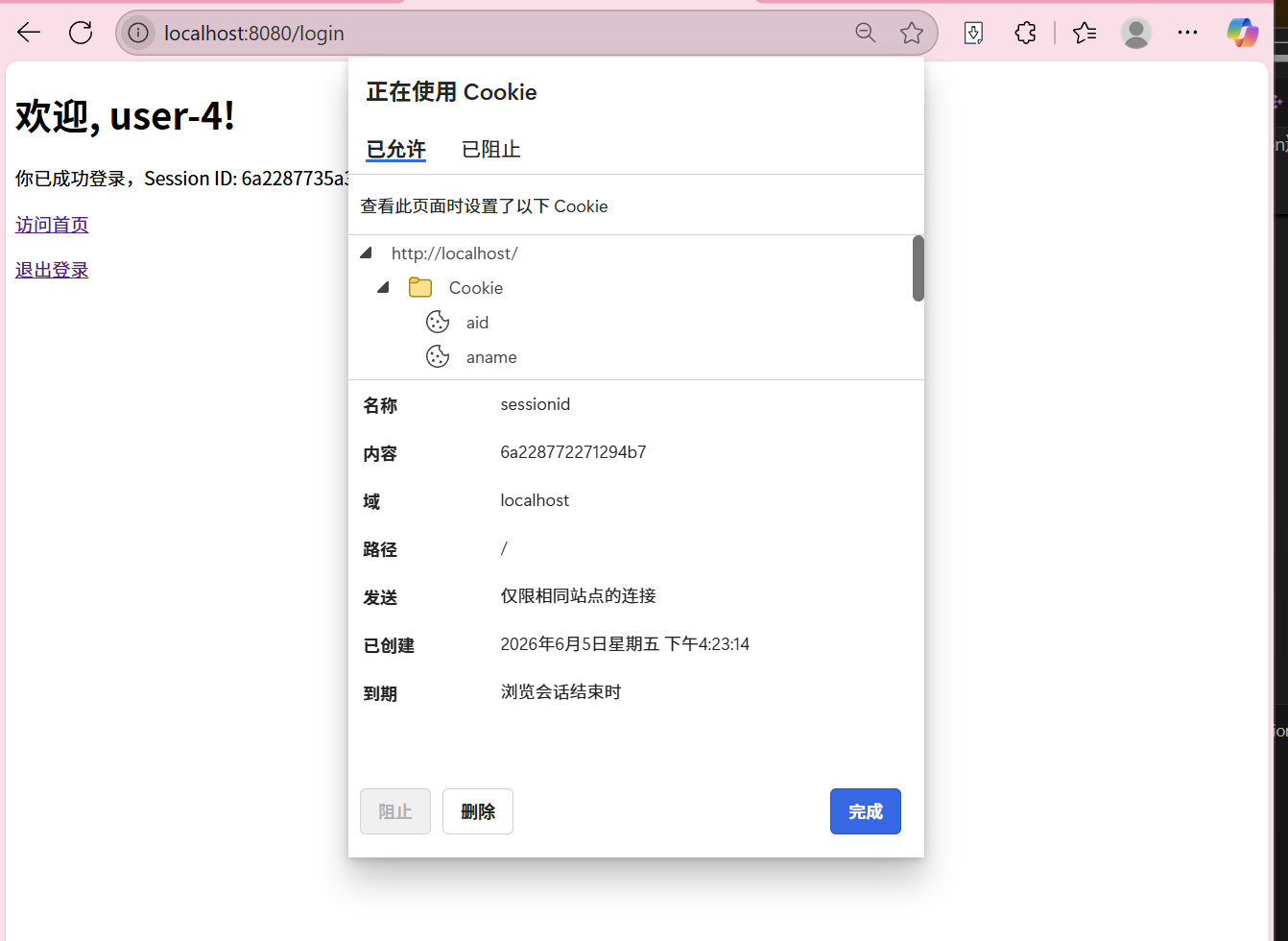
测试1:基本登录流程
-
打开浏览器访问
http://localhost:8080/login -
观察服务器输出:创建了新用户和sessionid
-
浏览器会跳转到首页,显示用户信息
-
查看浏览器Cookie,应该能看到sessionid
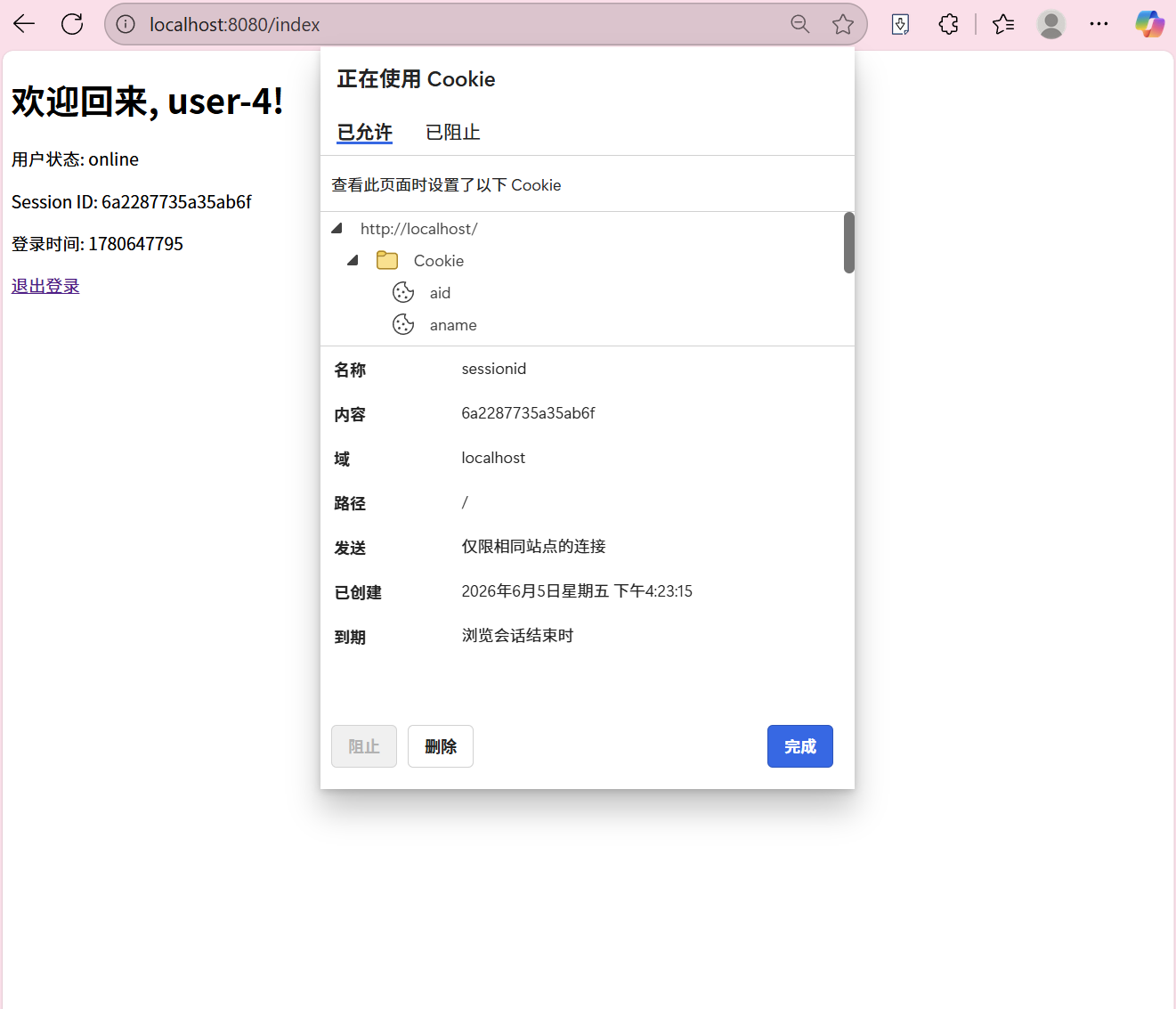
测试2:Session自动携带
-
登录后,直接访问
http://localhost:8080/index -
服务器应该能识别你的身份
-
这是因为浏览器自动携带了sessionid Cookie
测试3:Session隔离
-
用Chrome浏览器登录
-
用Edge浏览器登录
-
观察服务器输出:两个浏览器有不同的用户和sessionid
-
这说明Session是按浏览器隔离的
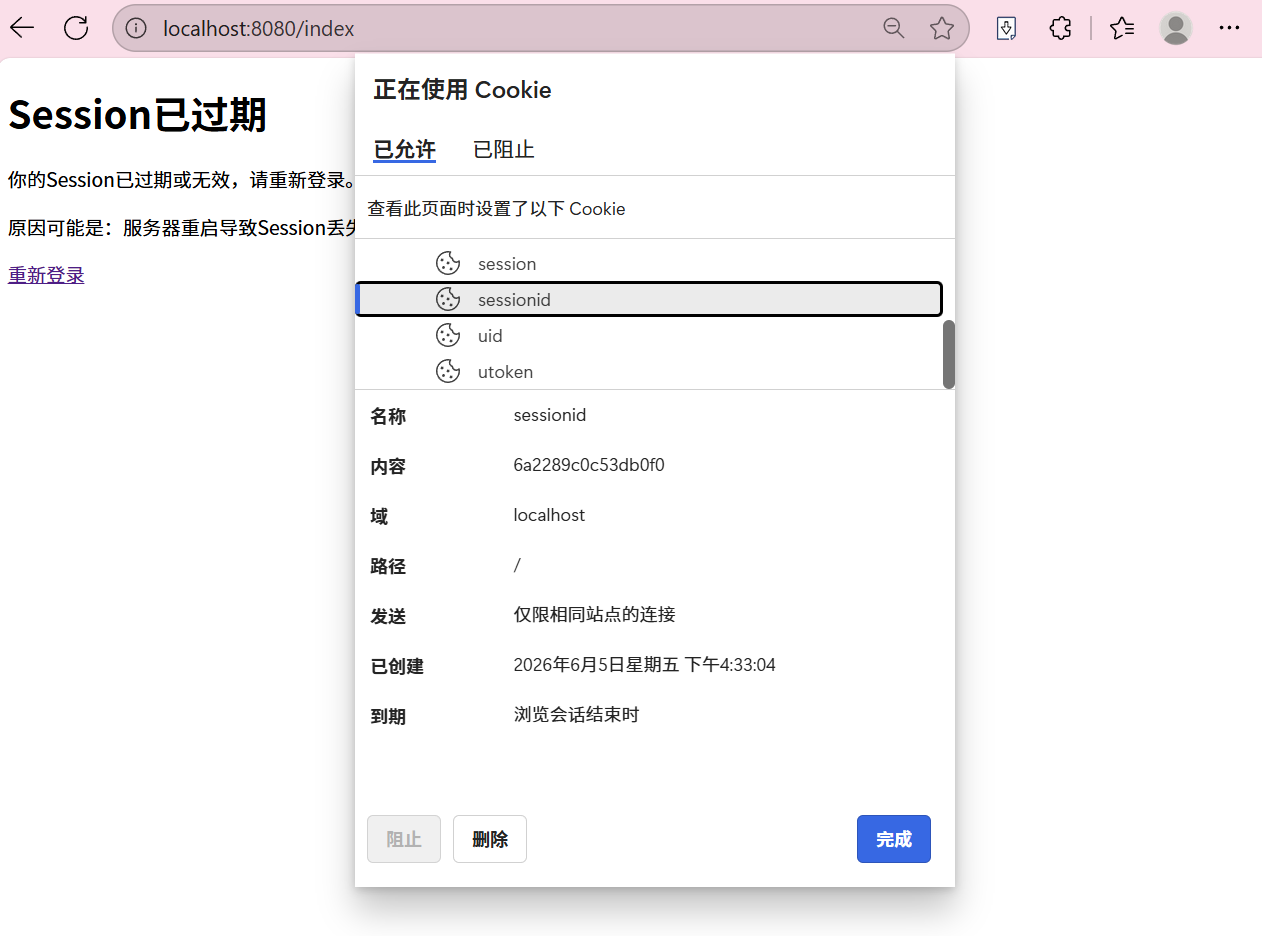
测试4:Session过期(服务器重启)
-
登录后,保持浏览器打开
-
重启服务器(Ctrl+C然后重新运行)
-
刷新浏览器页面
-
观察:服务器提示Session已过期
-
原因:服务器重启后内存中的Session丢失了
总结
1. Session的本质
-
Session是服务器端的会话管理机制
-
客户端只持有Session ID,不存储敏感信息
-
服务器通过Session ID识别用户身份
2. Cookie的作用
-
Cookie是Session的载体
-
服务器通过Set-Cookie设置Cookie
-
浏览器自动携带Cookie发送给服务器
3. 安全性考虑
-
Session ID应该足够随机,难以猜测
-
可以使用HTTPS加密传输
-
设置HttpOnly防止JavaScript访问Cookie
-
设置Secure只在HTTPS下发送Cookie
4. Session的局限性
-
服务器重启会导致Session丢失
-
分布式系统需要共享Session(如使用Redis)
-
Session存储在内存中,有内存限制
5. 实际应用
-
用户登录状态管理
-
购物车功能
-
权限控制
-
用户行为跟踪
代码:
| 文件 | 说明 |
|---|---|
| Session.hpp | Session类和SessionManager类 |
| HttpProtocol.hpp | HTTP请求/响应解析类 |
| HttpServer.hpp | HTTP服务器核心逻辑 |
| main.cpp | 程序入口 |
| Makefile | 编译脚本 |
Session.hpp
cpp
#pragma once

#include <iostream>
#include <string>
#include <memory>
#include <ctime>
#include <unordered_map>
#include <random>
#include <sstream>
#include <iomanip>

// Session类:存储用户会话信息
class Session {
public:
    Session(const std::string& username, const std::string& status)
        : _username(username), _status(status) {
        _create_time = time(nullptr);
    }

    ~Session() {}

    // 获取用户信息
    std::string GetUsername() const { return _username; }
    std::string GetStatus() const { return _status; }
    uint64_t GetCreateTime() const { return _create_time; }

private:
    std::string _username;
    std::string _status;
    uint64_t _create_time;
};

using session_ptr = std::shared_ptr<Session>;

// SessionManager类:管理Session的创建和获取
class SessionManager {
public:
    SessionManager() {
        // 初始化随机数种子
        std::random_device rd;
        _gen.seed(rd());
    }

    // 添加Session,返回sessionid
    std::string AddSession(session_ptr s) {
        // 生成唯一的sessionid:随机数+时间戳
        uint32_t random_id = _dist(_gen);
        std::stringstream ss;
        ss << std::hex << std::time(nullptr) << random_id;
        std::string session_id = ss.str();

        _sessions[session_id] = s;
        return session_id;
    }

    // 获取Session
    session_ptr GetSession(const std::string& session_id) {
        auto it = _sessions.find(session_id);
        if (it == _sessions.end()) {
            return nullptr;  // Session不存在或已过期
        }
        return it->second;
    }

    // 删除Session(用于登出)
    void RemoveSession(const std::string& session_id) {
        _sessions.erase(session_id);
    }

    ~SessionManager() {}

private:
    std::unordered_map<std::string, session_ptr> _sessions;
    std::mt19937 _gen;
    std::uniform_int_distribution<uint32_t> _dist;
};
HttpProtocol.hpp
cpp
#pragma once

#include <iostream>
#include <string>
#include <sstream>
#include <vector>
#include <map>
#include <functional>

const std::string HttpSep = "\r\n";
const std::string BlankSep = " ";

// HTTP请求类
class HttpRequest {
public:
    HttpRequest() {}

    // 解析HTTP请求
    bool Parse(const std::string& request) {
        std::istringstream iss(request);
        std::string line;

        // 解析请求行:GET /path HTTP/1.1
        if (std::getline(iss, line)) {
            // 去除末尾的\r
            if (!line.empty() && line.back() == '\r') {
                line.pop_back();
            }
            std::istringstream line_ss(line);
            line_ss >> _method >> _url >> _http_version;
        }

        // 解析请求头
        while (std::getline(iss, line)) {
            // 去除末尾的\r
            if (!line.empty() && line.back() == '\r') {
                line.pop_back();
            }

            // 空行表示头部结束
            if (line.empty()) {
                break;
            }

            // 解析Cookie头
            if (line.find("Cookie: ") == 0) {
                std::string cookie_str = line.substr(8);  // 跳过"Cookie: "
                ParseCookie(cookie_str);
            }
        }

        return true;
    }

    // 获取请求方法
    std::string GetMethod() const { return _method; }

    // 获取请求URL
    std::string GetUrl() const { return _url; }

    // 获取sessionid
    std::string GetSessionId() const {
        auto it = _cookies.find("sessionid");
        if (it != _cookies.end()) {
            return it->second;
        }
        return "";
    }

    // 获取指定Cookie值
    std::string GetCookie(const std::string& name) const {
        auto it = _cookies.find(name);
        if (it != _cookies.end()) {
            return it->second;
        }
        return "";
    }

private:
    // 解析Cookie字符串
    void ParseCookie(const std::string& cookie_str) {
        std::istringstream iss(cookie_str);
        std::string token;

        while (std::getline(iss, token, ';')) {
            // 去除首尾空格
            size_t start = token.find_first_not_of(" \t");
            size_t end = token.find_last_not_of(" \t");

            if (start != std::string::npos && end != std::string::npos) {
                std::string cookie = token.substr(start, end - start + 1);
                size_t eq_pos = cookie.find('=');
                if (eq_pos != std::string::npos) {
                    std::string name = cookie.substr(0, eq_pos);
                    std::string value = cookie.substr(eq_pos + 1);
                    _cookies[name] = value;
                }
            }
        }
    }

    std::string _method;
    std::string _url;
    std::string _http_version;
    std::map<std::string, std::string> _cookies;
};

// HTTP响应类
class HttpResponse {
public:
    HttpResponse() : _status_code(200), _status_desc("OK") {}

    // 设置状态码
    void SetStatusCode(int code) {
        _status_code = code;
        switch (code) {
            case 200: _status_desc = "OK"; break;
            case 301: _status_desc = "Moved Permanently"; break;
            case 404: _status_desc = "Not Found"; break;
            case 500: _status_desc = "Internal Server Error"; break;
            default: _status_desc = "Unknown"; break;
        }
    }

    // 添加响应头
    void AddHeader(const std::string& key, const std::string& value) {
        _headers[key] = value;
    }

    // 设置响应体
    void SetBody(const std::string& body) {
        _body = body;
    }

    // 序列化为HTTP响应字符串
    std::string Serialize() const {
        std::ostringstream oss;

        // 状态行
        oss << "HTTP/1.1 " << _status_code << " " << _status_desc << "\r\n";

        // 响应头
        for (const auto& header : _headers) {
            oss << header.first << ": " << header.second << "\r\n";
        }

        // 空行分隔头部和体部
        oss << "\r\n";

        // 响应体
        oss << _body;

        return oss.str();
    }

private:
    int _status_code;
    std::string _status_desc;
    std::map<std::string, std::string> _headers;
    std::string _body;
};
HttpServer.hpp
cpp
#pragma once

#include <iostream>
#include <string>
#include <memory>
#include <functional>
#include <sys/socket.h>
#include <netinet/in.h>
#include <arpa/inet.h>
#include <unistd.h>
#include <cstring>
#include "Session.hpp"
#include "HttpProtocol.hpp"

class HttpServer {
public:
    HttpServer(uint16_t port) : _port(port), _listen_fd(-1) {
        _session_manager = std::make_unique<SessionManager>();
    }

    ~HttpServer() {
        if (_listen_fd >= 0) {
            close(_listen_fd);
        }
    }

    // 初始化服务器
    bool Init() {
        // 创建socket
        _listen_fd = socket(AF_INET, SOCK_STREAM, 0);
        if (_listen_fd < 0) {
            std::cerr << "创建socket失败" << std::endl;
            return false;
        }

        // 设置端口复用
        int opt = 1;
        setsockopt(_listen_fd, SOL_SOCKET, SO_REUSEADDR, &opt, sizeof(opt));

        // 绑定地址
        struct sockaddr_in addr;
        memset(&addr, 0, sizeof(addr));
        addr.sin_family = AF_INET;
        addr.sin_port = htons(_port);
        addr.sin_addr.s_addr = INADDR_ANY;

        if (bind(_listen_fd, (struct sockaddr*)&addr, sizeof(addr)) < 0) {
            std::cerr << "绑定地址失败" << std::endl;
            close(_listen_fd);
            return false;
        }

        // 监听
        if (listen(_listen_fd, 5) < 0) {
            std::cerr << "监听失败" << std::endl;
            close(_listen_fd);
            return false;
        }

        std::cout << "HTTP服务器启动在端口 " << _port << std::endl;
        return true;
    }

    // 运行服务器
    void Run() {
        while (true) {
            // 接受连接
            struct sockaddr_in client_addr;
            socklen_t client_len = sizeof(client_addr);
            int client_fd = accept(_listen_fd, (struct sockaddr*)&client_addr, &client_len);

            if (client_fd < 0) {
                std::cerr << "接受连接失败" << std::endl;
                continue;
            }

            std::cout << "新连接: " << inet_ntoa(client_addr.sin_addr) << ":" << ntohs(client_addr.sin_port) << std::endl;

            // 处理请求
            HandleClient(client_fd);
            close(client_fd);
        }
    }

private:
    // 处理客户端请求
    void HandleClient(int client_fd) {
        // 读取请求
        char buffer[4096];
        memset(buffer, 0, sizeof(buffer));
        ssize_t bytes_read = recv(client_fd, buffer, sizeof(buffer) - 1, 0);

        if (bytes_read <= 0) {
            return;
        }

        std::string request(buffer, bytes_read);

        // 解析请求
        HttpRequest req;
        if (!req.Parse(request)) {
            SendResponse(client_fd, 400, "Bad Request", "请求解析失败");
            return;
        }

        std::cout << "请求: " << req.GetMethod() << " " << req.GetUrl() << std::endl;

        // 处理不同路由
        std::string url = req.GetUrl();

        if (url == "/login") {
            HandleLogin(client_fd, req);
        } else if (url == "/index" || url == "/") {
            HandleIndex(client_fd, req);
        } else if (url == "/logout") {
            HandleLogout(client_fd, req);
        } else {
            HandleNotFound(client_fd);
        }
    }

    // 处理登录请求
    void HandleLogin(int client_fd, const HttpRequest& req) {
        std::string session_id = req.GetSessionId();

        // 检查是否已经登录
        if (!session_id.empty()) {
            session_ptr session = _session_manager->GetSession(session_id);
            if (session) {
                // 已经登录,跳转到首页
                SendRedirect(client_fd, "/index");
                return;
            }
        }

        // 新用户登录,创建Session
        static int user_count = 0;
        std::string username = "user-" + std::to_string(user_count++);

        session_ptr new_session = std::make_shared<Session>(username, "online");
        session_id = _session_manager->AddSession(new_session);

        std::cout << "用户 " << username << " 登录,sessionid: " << session_id << std::endl;

        // 构建响应,设置Cookie
        HttpResponse resp;
        resp.SetStatusCode(200);
        resp.AddHeader("Content-Type", "text/html; charset=utf-8");
        resp.AddHeader("Set-Cookie", "sessionid=" + session_id + "; Path=/; HttpOnly");
        resp.AddHeader("Cache-Control", "no-cache, no-store, must-revalidate");

        std::string body = R"(
<!DOCTYPE html>
<html>
<head>
    <title>登录成功</title>
    <meta charset="utf-8">
</head>
<body>
    <h1>欢迎, )" + username + R"(!</h1>
    <p>你已成功登录,Session ID: )" + session_id + R"(</p>
    <p><a href="/index">访问首页</a></p>
    <p><a href="/logout">退出登录</a></p>
</body>
</html>)";

        resp.SetBody(body);
        SendHttpResponse(client_fd, resp);
    }

    // 处理首页请求
    void HandleIndex(int client_fd, const HttpRequest& req) {
        std::string session_id = req.GetSessionId();

        if (session_id.empty()) {
            // 未登录,跳转到登录页
            SendRedirect(client_fd, "/login");
            return;
        }

        // 检查Session是否存在
        session_ptr session = _session_manager->GetSession(session_id);
        if (!session) {
            // Session已过期或不存在
            HttpResponse resp;
            resp.SetStatusCode(200);
            resp.AddHeader("Content-Type", "text/html; charset=utf-8");

            std::string body = R"(
<!DOCTYPE html>
<html>
<head>
    <title>Session已过期</title>
    <meta charset="utf-8">
</head>
<body>
    <h1>Session已过期</h1>
    <p>你的Session已过期或无效,请重新登录。</p>
    <p>原因可能是:服务器重启导致Session丢失,或Cookie中的sessionid已失效。</p>
    <p><a href="/login">重新登录</a></p>
</body>
</html>)";

            resp.SetBody(body);
            SendHttpResponse(client_fd, resp);
            return;
        }

        // 已登录,显示用户信息
        HttpResponse resp;
        resp.SetStatusCode(200);
        resp.AddHeader("Content-Type", "text/html; charset=utf-8");

        std::string body = R"(
<!DOCTYPE html>
<html>
<head>
    <title>首页</title>
    <meta charset="utf-8">
</head>
<body>
    <h1>欢迎回来, )" + session->GetUsername() + R"(!</h1>
    <p>用户状态: )" + session->GetStatus() + R"(</p>
    <p>Session ID: )" + session_id + R"(</p>
    <p>登录时间: )" + std::to_string(session->GetCreateTime()) + R"(</p>
    <p><a href="/logout">退出登录</a></p>
</body>
</html>)";

        resp.SetBody(body);
        SendHttpResponse(client_fd, resp);
    }

    // 处理登出请求
    void HandleLogout(int client_fd, const HttpRequest& req) {
        std::string session_id = req.GetSessionId();

        if (!session_id.empty()) {
            session_ptr session = _session_manager->GetSession(session_id);
            if (session) {
                std::cout << "用户 " << session->GetUsername() << " 登出" << std::endl;
            }
            _session_manager->RemoveSession(session_id);
        }

        // 清除Cookie,跳转到登录页
        // 先删除服务端Session,再通过Set-Cookie清除浏览器Cookie
        HttpResponse resp;
        resp.SetStatusCode(302);
        resp.AddHeader("Location", "/login");
        // 使用Expires比Max-Age更可靠,设置为过去的时间确保浏览器立即删除Cookie
        resp.AddHeader("Set-Cookie", "sessionid=; Path=/; Expires=Thu, 01 Jan 1970 00:00:00 GMT; HttpOnly");
        // 防止缓存,确保Set-Cookie头被浏览器处理
        resp.AddHeader("Cache-Control", "no-cache, no-store, must-revalidate");
        resp.AddHeader("Pragma", "no-cache");

        std::string response_str = resp.Serialize();
        send(client_fd, response_str.c_str(), response_str.length(), 0);
    }

    // 处理404
    void HandleNotFound(int client_fd) {
        SendResponse(client_fd, 404, "Not Found", "页面不存在");
    }

    // 发送HTTP响应
    void SendHttpResponse(int client_fd, const HttpResponse& resp) {
        std::string response_str = resp.Serialize();
        send(client_fd, response_str.c_str(), response_str.length(), 0);
    }

    // 发送简单响应
    void SendResponse(int client_fd, int code, const std::string& desc, const std::string& body) {
        HttpResponse resp;
        resp.SetStatusCode(code);
        resp.AddHeader("Content-Type", "text/html; charset=utf-8");
        resp.SetBody("<h1>" + desc + "</h1><p>" + body + "</p>");
        SendHttpResponse(client_fd, resp);
    }

    // 发送重定向
    void SendRedirect(int client_fd, const std::string& url) {
        HttpResponse resp;
        resp.SetStatusCode(302);
        resp.AddHeader("Location", url);
        std::string response_str = resp.Serialize();
        send(client_fd, response_str.c_str(), response_str.length(), 0);
    }

    uint16_t _port;
    int _listen_fd;
    std::unique_ptr<SessionManager> _session_manager;
};
main.cpp
cpp
#include <iostream>
#include "HttpServer.hpp"

int main(int argc, char* argv[]) {
    uint16_t port = 8080;

    if (argc > 1) {
        port = std::stoi(argv[1]);
    }

    HttpServer server(port);

    if (!server.Init()) {
        std::cerr << "服务器初始化失败" << std::endl;
        return 1;
    }

    std::cout << "=== HTTP Session 演示服务器 ===" << std::endl;
    std::cout << "访问 http://localhost:" << port << "/login 开始测试" << std::endl;
    std::cout << "按 Ctrl+C 停止服务器" << std::endl;

    server.Run();

    return 0;
}
makefile
cpp
CXX = g++
CXXFLAGS = -std=c++14 -Wall -Wextra -g
TARGET = http_server

.PHONY: all clean

all: $(TARGET)

$(TARGET): main.cpp HttpServer.hpp HttpProtocol.hpp Session.hpp
	$(CXX) $(CXXFLAGS) -o $(TARGET) main.cpp -lpthread

clean:
	rm -f $(TARGET)

# 运行服务器
run: $(TARGET)
	./$(TARGET) 8080

# 测试说明
help:
	@echo "使用方法:"
	@echo "  make          # 编译项目"
	@echo "  make run      # 运行服务器"
	@echo "  make clean    # 清理编译文件"
	@echo ""
	@echo "测试步骤:"
	@echo "  1. 运行 make run 启动服务器"
	@echo "  2. 打开浏览器访问 http://localhost:8080/login"
	@echo "  3. 观察Session的创建和使用"
	@echo "  4. 尝试用不同浏览器登录,观察Session隔离"
	@echo "  5. 重启服务器后访问,观察Session丢失现象"
总结:
HTTP Cookie 和 Session 都是用于在 Web 应用中跟踪用户状态的机制。Cookie 是存 储在客户端的,而 Session 是存储在服务器端的。它们各有优缺点,通常在实际应用 中会结合使用,以达到最佳的用户体验和安全性。