在用delphi开发android程序时,自然会涉及到APK的自动升级,目前android已经到了15版本,以前的升级方法已经不能适应,本文介绍适用于android 8-15的统一升级框架。
本文开发环境:Delphi 13.1 android SDK 37
一、准备:file_paths.xml
在项目目录中准备 file_paths.xml 文件,也可以放置在项目目录的 res\xml\ 目录中(本文放在res\xml\目录中)。具体的内容如下:
XML
<?xml version="1.0" encoding="utf-8"?>
<paths xmlns:android="http://schemas.android.com/apk/apk/res/android">
    <cache-path name="internal_cache_files" path="." />

    <external-cache-path name="external_cache_files" path="." />

    <external-path name="external_files" path="." />
    <external-files-path name="external_private_files" path="." />
    <files-path name="internal_files" path="." />
</paths>
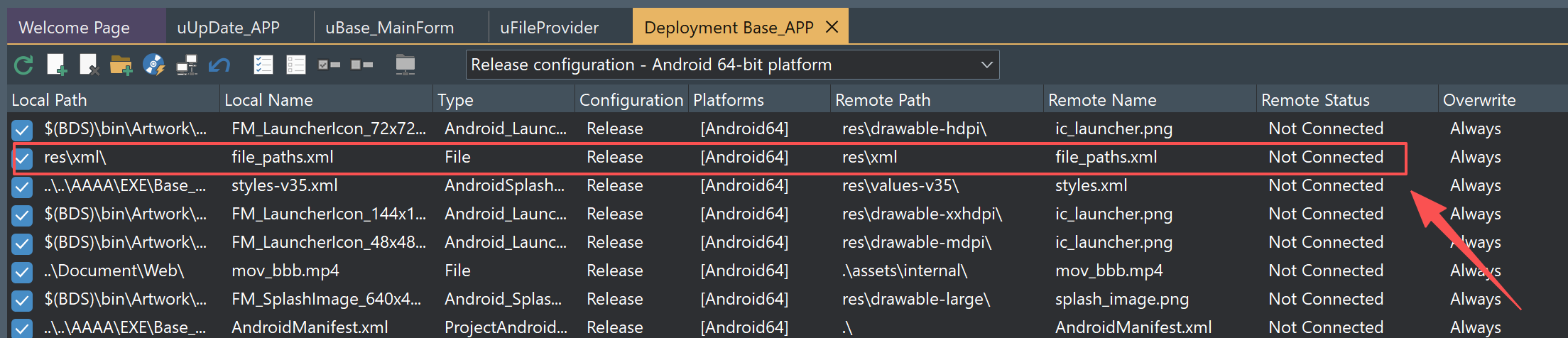
二、将上一步的 file_paths.xml 文件分发(deployment)到系统中
将 file_paths.xml 文件部署到远端的 res\xml 目录中。见下图:
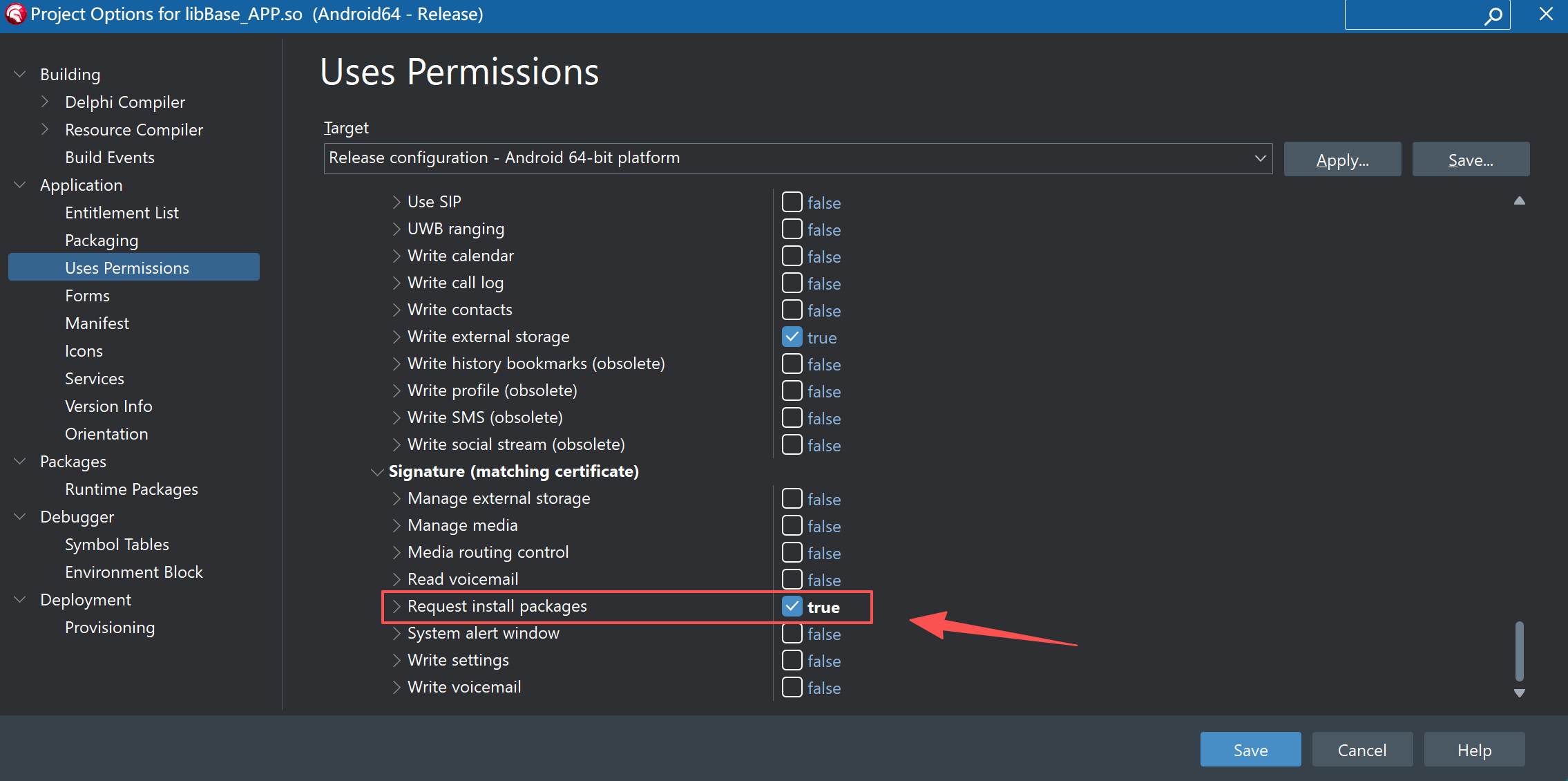
三、勾选 REQUEST_INSTALL_PACKAGES 权限
在项目的权限列表中确认勾选:REQUEST_INSTALL_PACKAGES 选项。
四、修改 AndroidManifest.template.xml
在项目目录中,修改下AndroidManifest.template.xml 文件,在 <%provider%> 和 <%application-meta-data%> 之间增加如下内容:
XML
<provider
    android:name="androidx.core.content.FileProvider"
    android:authorities="%package%.fileprovider"
    android:exported="false"
    android:grantUriPermissions="true">

    <meta-data
        android:name="android.support.FILE_PROVIDER_PATHS"
        android:resource="@xml/file_paths" />

</provider>
增加后类似如下:
XML
....
<%queries-child-elements%>
    </queries>

    <application
	android:usesCleartextTraffic="true"
        android:debuggable="%debuggable%"
        android:hardwareAccelerated="%hardwareAccelerated%"
        android:icon="%icon%"
        android:label="%label%"
        android:largeHeap="%largeHeap%"
        android:persistent="%persistent%"
        android:requestLegacyExternalStorage="true"
        android:resizeableActivity="true"
        android:restoreAnyVersion="%restoreAnyVersion%"
        android:theme="%theme%" >
<%provider%>
<provider
    android:name="androidx.core.content.FileProvider"
    android:authorities="%package%.fileprovider"
    android:exported="false"
    android:grantUriPermissions="true">

    <meta-data
        android:name="android.support.FILE_PROVIDER_PATHS"
        android:resource="@xml/file_paths" />

</provider>

<%application-meta-data%>
<%uses-libraries%>
....-
android:name:必须死死锁死在现代标准的androidx.core.content.FileProvider上。 -
android:authorities:这里使用了 Delphi 动态占位符%package%.fileprovider。在编译的一瞬间,Delphi 会自动把%package%替换为你项目里配置的商业包名(如com.apk.webstudio)。这就与我们 Delphi 代码中通过TAndroidHelper.Context.getPackageName + '.fileprovider'动态拼接出来的验证字符串形成了绝对完美的、严丝合缝的闭环死锁对齐。 -
android:resource:其中的@xml/file_paths正好精准指向了我们在第二步中部署到res\xml\目录下的file_paths.xml资产。
五、引用单元中需要增加如下定义类型
Delphi
{$IFDEF ANDROID}
type
  // 🏆 现场手写极其纯净的现代 AndroidX FileProvider JNI 映射
  JFileProviderClass = interface(JObjectClass)
    ['{E90E9BA1-5D3E-4B07-A57B-A31ED814B258}']
    {class} function getUriForFile(context: JContext; authority: JString; fileObj: JFile): Jnet_Uri; cdecl;
  end;

  [JavaSignature('androidx/core/content/FileProvider')] // 🔥 锁死现代 AndroidX 标准路径
  JFileProvider = interface(JObject)
    ['{84323676-92E6-407B-8BA4-EA752A123FE3}']
  end;
  TJFileProvider = class(TJavaGenericImport<JFileProviderClass, JFileProvider>)end;
{$ENDIF}
经过以上五步,就可以完美实现android的自动升级,具体的升级单元包含的函数定义如下:
Delphi
unit uUpDate_APP;

interface

uses
  System.SysUtils, System.Classes, System.Net.HttpClient, System.JSON,
  System.IOUtils, Androidapi.Helpers, Androidapi.JNI.GraphicsContentViewText,
  Androidapi.JNI.Net, Androidapi.JNI.JavaTypes, Androidapi.JNI.App,


  FMX.Platform,

  {$IFDEF ANDROID}
  Androidapi.JNI.Os,
  Androidapi.JNIBridge,
  Androidapi.JNI.Support,
  {$ENDIF}


  Androidapi.JNI.Provider, FMX.Dialogs, FMX.StdCtrls, FMX.Controls;

type
  TUpdateInfo = record
    VersionCode: Int64;
    VersionName: string;
    ApkUrl: string;
  end;


 {$IFDEF ANDROID}
type
  // 🏆 现场手写极其纯净的现代 AndroidX FileProvider JNI 映射
  JFileProviderClass = interface(JObjectClass)
    ['{E90E9BA1-5D3E-4B07-A57B-A31ED814B258}']
    {class} function getUriForFile(context: JContext; authority: JString; fileObj: JFile): Jnet_Uri; cdecl;
  end;

  [JavaSignature('androidx/core/content/FileProvider')] // 🔥 锁死现代 AndroidX 标准路径
  JFileProvider = interface(JObject)
    ['{84323676-92E6-407B-8BA4-EA752A123FE3}']
  end;
  TJFileProvider = class(TJavaGenericImport<JFileProviderClass, JFileProvider>)end;
{$ENDIF}


  //获取本机程序版本
function GetVersionCode: Int64;

//获取服务器程序版本
function GetUpdateInfo(const AUrl: string;  out AInfo: TUpdateInfo): Boolean;


//获取下载文件路径及名称
function GetApkFileName: string;

//下载SDK
procedure DownloadApk(
  const AUrl,
  AFileName: string);


/// <summary>
///  绝对安全的本地 APK 物理拉起安装函数 (100% 免疫 Android 7.0~14+ 版本权限绞杀)
///  AAPKPath: 本地 APK 的绝对物理路径
/// </summary>
procedure SilentInstallLocalAPK(const AAPKPath: string);


implementation

uses
System.Types, System.Math, System.Net.HttpClientComponent;实际完整单元下载(付费):uUpDate_APP.pas
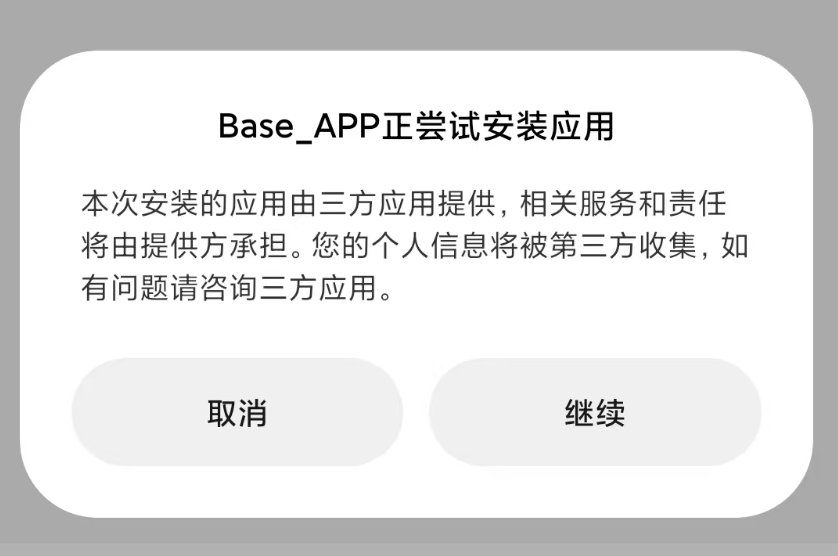
在Android 11上测试截图:
在 android 12 上测试截图(模拟器):