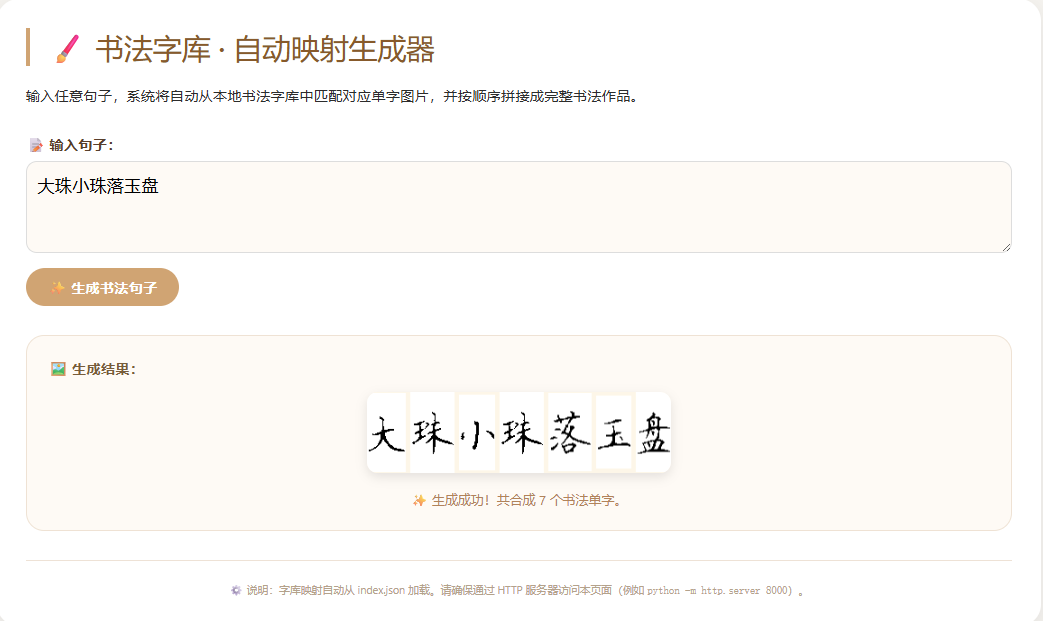
目录
- 一、前言
- 第一步、安装python
- 第二步、导入书法图片库
- [第三步:编写 Python 脚本生成 index.json](#第三步:编写 Python 脚本生成 index.json)
- 第四步:编写前端代码
- 第五步、运行脚本,生成index.json文件
- [第六步:启动 Python 自带的 HTTP 服务器](#第六步:启动 Python 自带的 HTTP 服务器)
- 第六步:访问本地书法字典
一、前言
本文介绍一种自制书法字典的方法,它可以将我们输入的任意内容,转换成我们需要的书法作品。它不依赖网络,完全在本地运行,只要你导入想要的书法图片库,就可以了。如下图中,我们输入了"厚德载物",前台就会转换成相应的书法字体。
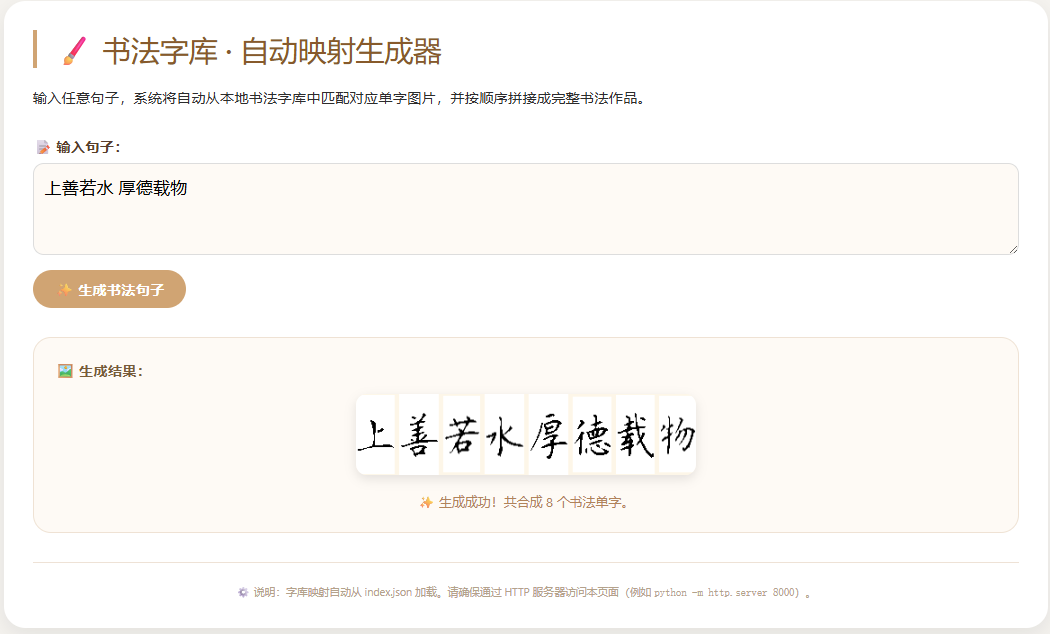
下面我们从头说这个软件工具在windows下的搭建步骤:
第一步、安装python
- 本方法需要先在电脑上安装python环境。具体安装配置方法就不说了。确保你的电脑已安装 Python(版本 3.6 以上)。
第二步、导入书法图片库
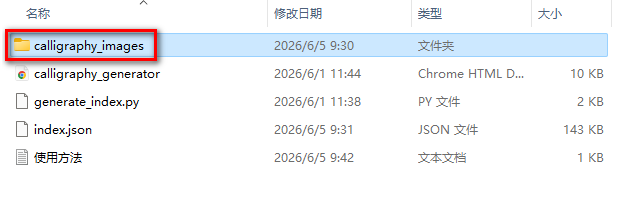
- 先创建一个主目录,然后在主目录下创建一个文件夹,用来存放你的书法图片,图片格式为png。如本文中,书法图片库的文件夹名称为calligraphy_images。
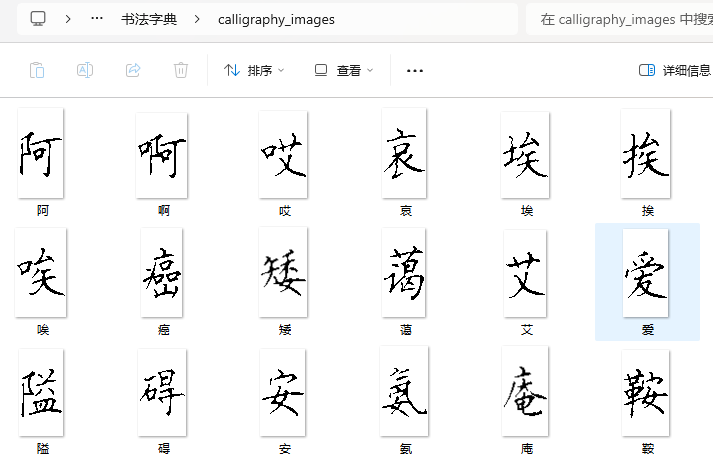
- 然后将你的书法图片存放到calligraphy_images文件夹下,这些图片的制作方法,我在前面的文章中有介绍过,可以参考:
- 注意这些图片的名称要和书法字的实际内容对应。
第三步:编写 Python 脚本生成 index.json
- 创建一个 Python 文件,用来生成字体与实际文件名的映射关系,以便在你导入新的字库时,自动加入到系统。例如本文中的 generate_index.py,脚本与 calligraphy_images文件夹放在同一级目录下。
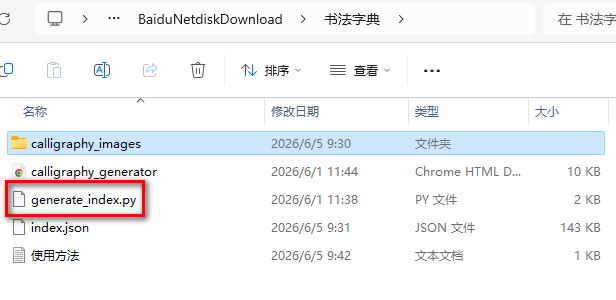
这个脚本内容如下:
c
import os
import json
import glob

def generate_image_index(image_folder, output_json="index.json", base_url="./calligraphy_images/"):
    """
    扫描 image_folder 下的所有图片文件,生成 汉字 -> 图片路径 的映射 JSON。
    :param image_folder: 图片文件夹路径
    :param output_json: 输出的 JSON 文件名
    :param base_url: 前端访问图片的基础 URL(相对路径或绝对路径)
    """
    # 支持的图片扩展名
    extensions = ('*.png', '*.jpg', '*.jpeg', '*.bmp', '*.tiff')
    image_files = []
    for ext in extensions:
        image_files.extend(glob.glob(os.path.join(image_folder, ext)))
        image_files.extend(glob.glob(os.path.join(image_folder, ext.upper())))

    # 去重并排序
    image_files = sorted(set(image_files))

    mapping = {}
    for full_path in image_files:
        # 提取不带扩展名的文件名作为汉字(假设文件名就是汉字字符)
        basename = os.path.basename(full_path)
        # 移除扩展名
        char_name = os.path.splitext(basename)[0]
        # 构建前端可访问的路径(使用正斜杠,兼容 Windows)
        relative_path = os.path.join(base_url, basename).replace('\\', '/')
        mapping[char_name] = relative_path

    # 写入 JSON 文件
    with open(output_json, 'w', encoding='utf-8') as f:
        json.dump(mapping, f, ensure_ascii=False, indent=2)

    print(f"成功生成 {output_json},共包含 {len(mapping)} 个汉字映射。")

if __name__ == "__main__":
    # 假设图片文件夹名为 calligraphy_images,与脚本同级
    generate_image_index("./calligraphy_images", "index.json", "./calligraphy_images/")
第四步:编写前端代码
- 编写前端html页面, 如本文中的calligraphy_generator.html,放在与 calligraphy_images相同的目录下。
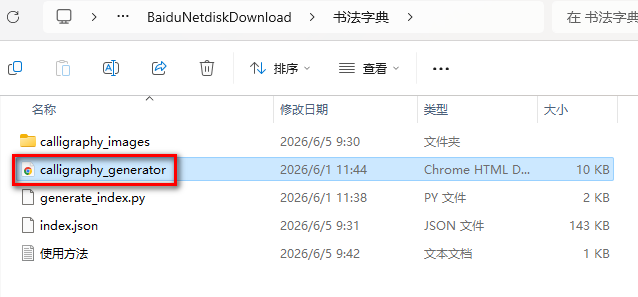
- 前端文件calligraphy_generator.html的内容如下:
c
<!DOCTYPE html>
<html lang="zh-CN">
<head>
    <meta charset="UTF-8">
    <title>书法字库 · 自动映射生成器</title>
    <style>
        * {
            box-sizing: border-box;
        }

        body {
            font-family: 'Segoe UI', system-ui, -apple-system, BlinkMacSystemFont, 'Microsoft YaHei', sans-serif;
            max-width: 1200px;
            margin: 2rem auto;
            padding: 20px;
            background: #f5f3ef;
            color: #2c2c2c;
        }

        .container {
            background: white;
            border-radius: 24px;
            box-shadow: 0 8px 24px rgba(0,0,0,0.08);
            padding: 2rem;
        }

        h1 {
            margin-top: 0;
            color: #8b5a2b;
            border-left: 5px solid #d4a373;
            padding-left: 20px;
            font-weight: 500;
        }

        .input-area {
            margin: 2rem 0;
        }

        label {
            display: block;
            font-weight: 600;
            margin-bottom: 8px;
            color: #5a3e2b;
        }

        textarea {
            width: 100%;
            padding: 12px;
            font-size: 1.1rem;
            border: 1px solid #ddd;
            border-radius: 12px;
            font-family: inherit;
            resize: vertical;
            background: #fefaf5;
        }

        textarea:focus {
            outline: none;
            border-color: #d4a373;
            box-shadow: 0 0 0 3px rgba(212, 163, 115, 0.2);
        }

        button {
            background: #d4a373;
            color: white;
            border: none;
            padding: 10px 24px;
            font-size: 1rem;
            font-weight: 600;
            border-radius: 40px;
            cursor: pointer;
            transition: all 0.2s ease;
            margin-top: 12px;
        }

        button:hover {
            background: #b8865b;
            transform: translateY(-1px);
        }

        button:disabled {
            background: #ccc;
            cursor: not-allowed;
            transform: none;
        }

        .result-area {
            margin: 2rem 0;
            padding: 1.5rem;
            background: #fefaf5;
            border-radius: 20px;
            border: 1px solid #f0e2d4;
            text-align: center;
        }

        .result-header {
            font-weight: 600;
            margin-bottom: 16px;
            color: #7a5c3a;
            text-align: left;
        }

        #outputCanvas {
            max-width: 100%;
            border-radius: 12px;
            box-shadow: 0 4px 12px rgba(0,0,0,0.1);
            background: white;
        }

        .status {
            margin-top: 16px;
            font-size: 0.9rem;
            color: #b5835a;
        }

        .footer {
            font-size: 0.75rem;
            text-align: center;
            margin-top: 2rem;
            color: #b6a28b;
            border-top: 1px solid #efe2d6;
            padding-top: 1.5rem;
        }
    </style>
</head>
<body>
<div class="container">
    <h1>🖌️ 书法字库 · 自动映射生成器</h1>
    <p>输入任意句子,系统将自动从本地书法字库中匹配对应单字图片,并按顺序拼接成完整书法作品。</p>

    <div class="input-area">
        <label>📝 输入句子:</label>
        <textarea id="sentenceInput" rows="3" placeholder="例如:上善若水 厚德载物" style="font-size: 1.2rem;">厚德载物</textarea>
        <button id="generateBtn" disabled>⏳ 字库加载中...</button>
    </div>

    <div class="result-area">
        <div class="result-header">🖼️ 生成结果:</div>
        <canvas id="outputCanvas" width="800" height="200" style="max-width:100%; height:auto; background:#fef6e8;"></canvas>
        <div id="statusMsg" class="status"></div>
    </div>
    <div class="footer">
        ⚙️ 说明:字库映射自动从 index.json 加载。请确保通过 HTTP 服务器访问本页面(例如 <code>python -m http.server 8000</code>)。
    </div>
</div>

<script>
    // 配置参数
    const GAP_BETWEEN_CHARS = 5;   // 字间距(像素)
    const MAPPING_JSON_URL = 'index.json';   // 映射文件路径

    let charImageMap = {};          // 存储 汉字 -> 图片路径
    let mappingLoaded = false;       // 映射是否加载完成
    const generateBtn = document.getElementById('generateBtn');
    const sentenceInput = document.getElementById('sentenceInput');
    const outputCanvas = document.getElementById('outputCanvas');
    const statusMsgDiv = document.getElementById('statusMsg');

    // 加载映射表
    async function loadMapping() {
        statusMsgDiv.innerHTML = '📚 正在加载字库映射表...';
        try {
            const response = await fetch(MAPPING_JSON_URL);
            if (!response.ok) {
                throw new Error(`HTTP ${response.status}: ${response.statusText}`);
            }
            charImageMap = await response.json();
            const count = Object.keys(charImageMap).length;
            statusMsgDiv.innerHTML = `✅ 字库加载成功!共 ${count} 个书法单字。`;
            mappingLoaded = true;
            generateBtn.disabled = false;
            generateBtn.textContent = '✨ 生成书法句子';
        } catch (err) {
            console.error('加载映射失败:', err);
            statusMsgDiv.innerHTML = `❌ 无法加载字库映射文件 (${MAPPING_JSON_URL})。请确保:<br>
                1. 已运行 Python 脚本生成 index.json;<br>
                2. 通过 HTTP 服务器访问本页面(如 python -m http.server 8000)。<br>
                错误详情:${err.message}`;
            generateBtn.disabled = true;
            generateBtn.textContent = '❌ 字库加载失败';
        }
    }

    // 异步加载单张图片
    function loadImage(src) {
        return new Promise((resolve, reject) => {
            const img = new Image();
            img.onload = () => resolve(img);
            img.onerror = () => reject(new Error(`图片加载失败: ${src}`));
            img.src = src;
        });
    }

    // 拼接句子
    async function composeSentence(sentence) {
        if (!mappingLoaded) {
            statusMsgDiv.innerHTML = '⏳ 字库尚未加载完成,请稍后再试。';
            return;
        }

        const chars = sentence.split('');
        const tasks = [];
        const missingChars = [];

        for (let char of chars) {
            if (char.trim() === '') continue;
            const imgPath = charImageMap[char];
            if (!imgPath) {
                missingChars.push(char);
                tasks.push(null);
            } else {
                tasks.push(loadImage(imgPath));
            }
        }

        if (missingChars.length > 0) {
            statusMsgDiv.innerHTML = `⚠️ 警告:以下汉字在字库中不存在:${missingChars.join('、')}<br>将只生成存在的部分。`;
        } else {
            statusMsgDiv.innerHTML = '✅ 所有汉字均在字库中找到,正在拼接...';
        }

        const results = await Promise.allSettled(tasks.map(task => task ? task : Promise.reject('图片路径不存在')));
        const validImages = [];
        let idx = 0;
        for (let char of chars) {
            if (char.trim() === '') continue;
            const result = results[idx];
            if (result.status === 'fulfilled') {
                validImages.push({
                    char: char,
                    img: result.value,
                    width: result.value.width,
                    height: result.value.height
                });
            }
            idx++;
        }

        if (validImages.length === 0) {
            statusMsgDiv.innerHTML = '❌ 没有成功加载任何图片,请检查图片文件是否存在。';
            return;
        }

        // 计算 canvas 尺寸
        let maxHeight = 0;
        let totalWidth = 0;
        for (let item of validImages) {
            maxHeight = Math.max(maxHeight, item.height);
            totalWidth += item.width;
        }
        totalWidth += (validImages.length - 1) * GAP_BETWEEN_CHARS;

        outputCanvas.width = totalWidth;
        outputCanvas.height = maxHeight;

        const ctx = outputCanvas.getContext('2d');
        ctx.fillStyle = '#fef6e8';
        ctx.fillRect(0, 0, totalWidth, maxHeight);

        let currentX = 0;
        for (let item of validImages) {
            const yOffset = (maxHeight - item.height) / 2;
            ctx.drawImage(item.img, currentX, yOffset, item.width, item.height);
            currentX += item.width + GAP_BETWEEN_CHARS;
        }
        statusMsgDiv.innerHTML = `✨ 生成成功!共合成 ${validImages.length} 个书法单字。`;
    }

    // 事件绑定
    generateBtn.addEventListener('click', async () => {
        const sentence = sentenceInput.value.trim();
        if (!sentence) {
            statusMsgDiv.innerHTML = '⚠️ 请输入一句需要生成的文字。';
            return;
        }
        statusMsgDiv.innerHTML = '🖌️ 正在合成,请稍候...';
        await composeSentence(sentence);
    });

    // 启动时加载映射表
    loadMapping();
</script>
</body>
</html>
第五步、运行脚本,生成index.json文件
-
打开终端(CMD / PowerShell / Terminal),进入该目录,执行:
cpython generate_index.py

- 运行成功后,会在同一目录下自动生成 index.json 文件:
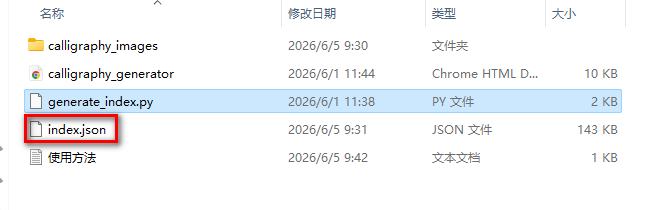
index.json文件的内容类似:
c
{
   "一": "./calligraphy_images/一.png",
  "丁": "./calligraphy_images/丁.png",
  "七": "./calligraphy_images/七.png",
  "万": "./calligraphy_images/万.png",
  "丈": "./calligraphy_images/丈.png",
  "三": "./calligraphy_images/三.png",
  "上": "./calligraphy_images/上.png",
  "下": "./calligraphy_images/下.png",
  "不": "./calligraphy_images/不.png",
  "与": "./calligraphy_images/与.png",
  "丐": "./calligraphy_images/丐.png",
  "丑": "./calligraphy_images/丑.png"
}
第六步:启动 Python 自带的 HTTP 服务器
-
打开终端,进入包含 calligraphy_generator.html、index.json 和 calligraphy_images文件夹的目录。执行以下命令:
cpython -m http.server 8000

第六步:访问本地书法字典
- 在浏览器中输入以下网址,就可以打开字典了。
c
http://localhost:8000/calligraphy_generator.html- 打开页面的时候,下面会显示加载成功的字库数量:
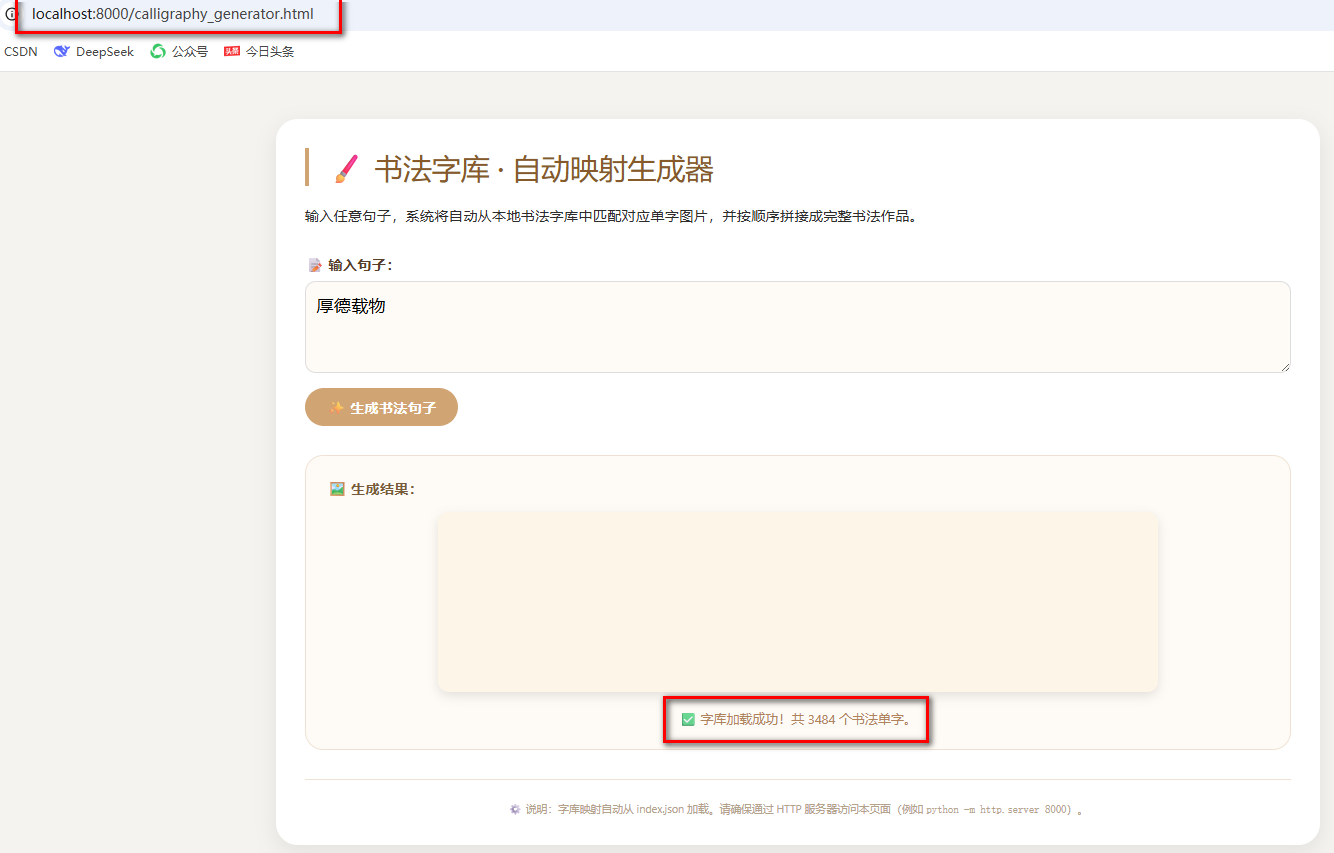
- 现在,你就可以任意使用了,想让它输出什么都行,当然,你的图片库中要有东西