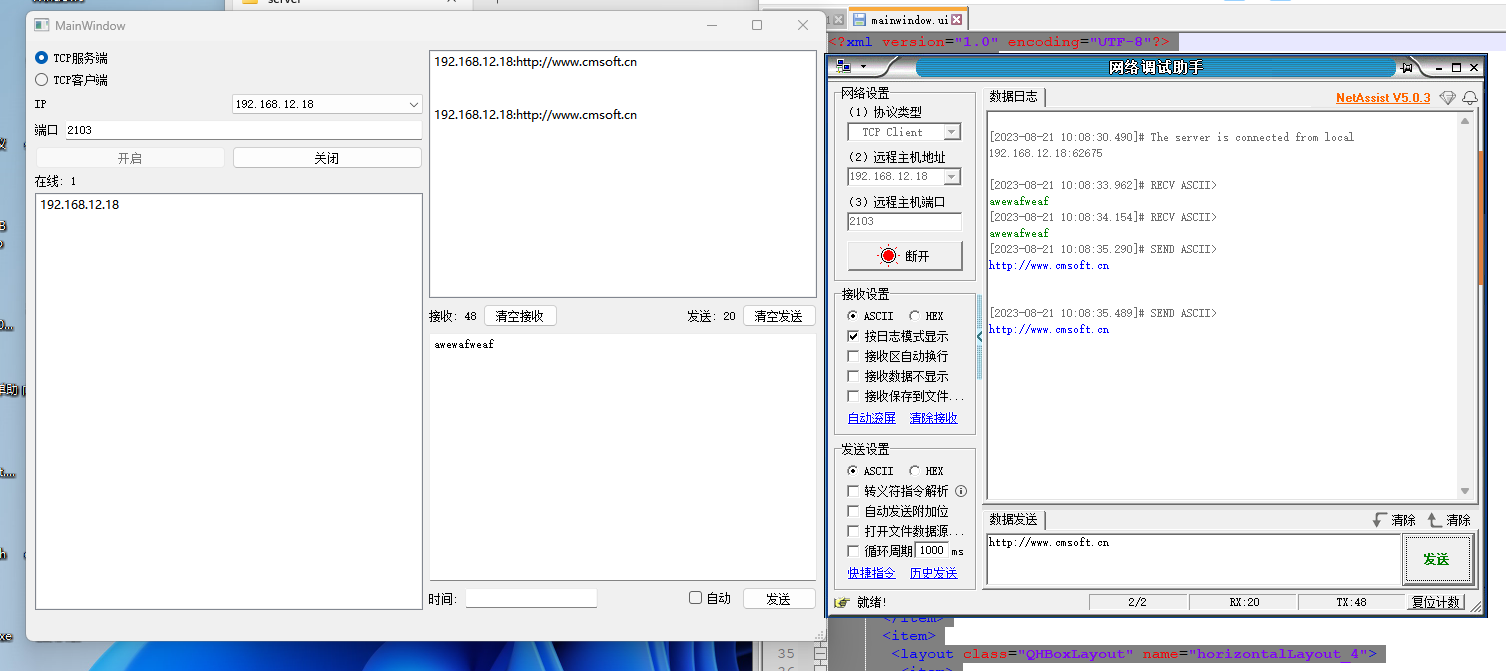
一、源码
头文件
#ifndef MAINWINDOW_H
#define MAINWINDOW_H


#include <QMainWindow>
#include <QTcpServer>
#include <QTcpSocket>
#include <QHostAddress>
#include <QFile>
#include <QTimer>
#include <QMessageBox>
#include <QNetworkInterface>


QT_BEGIN_NAMESPACE
namespace Ui { class MainWindow; }
QT_END_NAMESPACE


class MainWindow : public QMainWindow
{
    Q_OBJECT


public:
    MainWindow(QWidget *parent = nullptr);
    ~MainWindow();


    QStringList GetlocalIP();


private slots:
    void on_severRB_clicked();//选择作为服务器
    void on_clientRB_clicked();//选择作为客户端
    void on_StartBt_clicked();//启动服务器或链接客户端
    void on_closeBt_clicked();//关闭服务器或断开客户端
    void on_onlineUserList_doubleClicked(const QModelIndex &index);//选择给哪个客户端发送数据
    void on_autoCB_clicked(bool checked);//选择自动发送还是手动发送
    void on_sendMsgBt_clicked();//发送信息


    //服务器
    void accept_connect();//与newconnection信号关联
    void recv_data(); //接收数据
    void auto_time_send();//定时器定时发送数据
    void client_disconnect();//关联掉线信号
    void connect_suc();//检测客户端连接成功信号
    void on_clearRcvBt_clicked();
    void displayError(QAbstractSocket::SocketError socketError);


    void on_clearSendBt_clicked();


private:
    Ui::MainWindow *ui;


    QTimer *mTimer;//定时发送数据
    QTcpServer *mServer;
    QTcpSocket *mSocket;
    QVector<QTcpSocket*> clients; //存储所有在线客户端(容器)


    bool isServer;//标志位,true为服务器,false为客户端


    //保存接收和发送数据的字节数
    quint64 recvSize;
    quint64 sendSize;


    qint16 onNum = 0;
    bool isCheckServer;//判断是否选择了服务器
    bool isCheckClient;//判断是否选择了客户端
};
#endif // MAINWINDOW_H
C文件
#include "mainwindow.h"
#include "ui_mainwindow.h"


MainWindow::MainWindow(QWidget *parent)
    : QMainWindow(parent)
    , ui(new Ui::MainWindow)
{
    ui->setupUi(this);


    recvSize = 0;
    sendSize = 0;


    //获取本地ip
    QStringList localIP = GetlocalIP();
    ui->comboBox->addItems(localIP);


    //初始化定时器
    mTimer = new QTimer();
    connect(mTimer,SIGNAL(timeout()),this,SLOT(auto_time_send()));
}


MainWindow::~MainWindow()
{
    delete ui;
}


//与newconnection信号关联
void MainWindow::accept_connect()
{
    mSocket = mServer->nextPendingConnection(); //返回与客户端连接通信的套接字


    //关联接收数据信号
    connect(mSocket,SIGNAL(readyRead()),this,SLOT(recv_data()));
    //关联掉线信号
    connect(mSocket,SIGNAL(disconnected()),this,SLOT(client_disconnect()));


    //上线用户添加到客户列表容器
    clients.append(mSocket);
    //把用户添加到界面列表中
    QString ip = mSocket->peerAddress().toString().remove("::ffff:");//去除客户端中多余的字符
    ui->onlineUserList->addItem(ip);


    //在线数量添加
    onNum++;
    ui->onlineUserCount->setText(QString::number(onNum));//显示在线数
}


//接收数据
void  MainWindow::recv_data()
{
    QTcpSocket *obj = (QTcpSocket*)sender();
    //获取发送数据端的IP
    QString ip = obj->peerAddress().toString();
    ip.remove("::ffff:");
    QString msg = obj->readAll();
    ui->receiveList->addItem(ip+":"+msg);//显示接收到的数据
    recvSize += msg.size();//统计接收到的数据的字节数
    ui->receiveNumLabel->setText(QString::number(recvSize));
}


void MainWindow::client_disconnect()
{
    QTcpSocket *obj = (QTcpSocket*)sender();//获取掉线对象
    if(isServer)
    {
        int row = clients.indexOf(obj);//找到掉线对象的内容所在的行
        QListWidgetItem *item = ui->onlineUserList->takeItem(row);//从界面列表中去除找到的一行内容
        delete item;
        clients.remove(row);//从容器中删除对象


        //掉线时删除在线数量
        onNum--;
        ui->onlineUserCount->setText(QString::number(onNum));
    }
    else
    {
        ui->StartBt->setEnabled(true);//断开连接的时候重新启用开始按钮
    }
}


//客户端连接成功
void MainWindow::connect_suc()
{
    ui->StartBt->setEnabled(false);//连接成功则禁用开始按钮
}


//定时器定时发送数据
void MainWindow::auto_time_send()
{
    quint64 len = mSocket->write(ui->sendMsgEdit->toPlainText().toUtf8());
    if(len > 0)
    {
        sendSize += len;//统计发送的字节数
        ui->sendNumLabel->setText(QString::number(sendSize));//把发送的字节数显示到sendNumLabel上
    }
}


QStringList MainWindow::GetlocalIP()
{
    QStringList strIpAddress;
    QList<QHostAddress> ipAddressesList = QNetworkInterface::allAddresses();
    // 获取第一个本主机的IPv4地址
    int nListSize = ipAddressesList.size();
    for (int i = 0; i < nListSize; ++i)
    {
           if (ipAddressesList.at(i) != QHostAddress::LocalHost &&
               ipAddressesList.at(i).toIPv4Address()) {
               strIpAddress << ipAddressesList.at(i).toString();
               //break;
           }
     }
     // 如果没有找到,则以本地IP地址为IP
     if (strIpAddress.isEmpty())
        strIpAddress << QHostAddress(QHostAddress::LocalHost).toString();
     return strIpAddress;
}


//选择作为服务器
void MainWindow::on_severRB_clicked()
{
    this->isCheckServer = true;
    this->isServer = true;
    this->isCheckClient = false;
}


//选择作为客户端
void MainWindow::on_clientRB_clicked()
{
    this->isCheckClient = true;
    this->isServer = false;
    this->isCheckServer = false;
}


//启动服务器或者链接服务器
void MainWindow::on_StartBt_clicked()
{
    if(isServer) //服务器
    {
        mServer = new QTcpServer();
        //关联新客户端链接信号
        connect(mServer,SIGNAL(newConnection()),this,SLOT(accept_connect()));
        mServer->listen(QHostAddress::Any,ui->PortEdit->text().toInt());//启动服务器监听
        ui->StartBt->setEnabled(false);//开始按钮禁用
    }
    if(isServer == false) //客户端
    {
        mSocket = new QTcpSocket();
        //检测链接成功信号
        connect(mSocket,SIGNAL(connected()),this,SLOT(connect_suc()));
        // 关联连接失败信号
        connect(mSocket, SIGNAL(error(QAbstractSocket::SocketError)), this, SLOT(displayError(QAbstractSocket::SocketError)));
        //设置服务器的 ip和端口号
        mSocket->connectToHost(ui->comboBox->currentText(),ui->PortEdit->text().toInt());


        //关联接收数据信号
        connect(mSocket,SIGNAL(readyRead()),this,SLOT(recv_data()));
        //关联掉线信号
        connect(mSocket,SIGNAL(disconnected()),this,SLOT(client_disconnect()));
    }


    if(isCheckServer == false && isCheckClient == false)//如果两个都没选择
    {
        QMessageBox::warning(this,"提示","请选择服务器或者客户端");
        ui->StartBt->setEnabled(true);
        return;
    }


    if(isCheckServer)//选择了服务器
    {
        if(ui->PortEdit->text().isEmpty() || ui->PortEdit->text() == "请输入端口号")
        {
            QMessageBox::warning(this,"提示","请输入端口号");
            ui->StartBt->setEnabled(true);
            return;
        }
    }


    if(isCheckClient)//选择了客户端
    {
        if(ui->comboBox->currentText().isEmpty())
        {
            QMessageBox::warning(this,"提示","请输入ip和端口号");
            ui->StartBt->setEnabled(true);
            return;
        }
    }
}


void MainWindow::displayError(QAbstractSocket::SocketError socketError)
{
    switch (socketError) {
    case QAbstractSocket::RemoteHostClosedError:
        qDebug() << "The remote host closed the connection";
        break;
    case QAbstractSocket::HostNotFoundError:
        qDebug() << "The host was not found";
        break;
    case QAbstractSocket::ConnectionRefusedError:
        qDebug() << "The connection was refused by the peer";
        break;
    default:
        qDebug() << "The following error occurred: " << mSocket->errorString();
    }
}
 //关闭服务器或者断开
 void MainWindow::on_closeBt_clicked()
 {
    if(isServer)//服务器
    {
        for(int i=0;i<clients.count();i++)
        {
            clients.at(i)->close();//关闭所有客户端
        }


        //关闭所有服务器之后开始按钮才能启用
        mServer->close();
        ui->StartBt->setEnabled(true);
    }
    else //客户端
    {
        mSocket->close();//关闭客户端
        ui->StartBt->setEnabled(true);//启用开始按钮
    }


 }


//双击选择要发送的客户端
void MainWindow::on_onlineUserList_doubleClicked(const QModelIndex &index)
{
    mSocket = clients.at(index.row());


}


//自动发送数据
void MainWindow::on_autoCB_clicked(bool checked)
{
    if(checked)
    {
        if(ui->autoTimeEdit->text().toInt() <= 0)
        {
            QMessageBox::warning(this,"提示","请输入时间值ms");
            ui->autoCB->setChecked(false);//把按钮重新置于没选中的状态
            return;
        }
        mTimer->start(ui->autoTimeEdit->text().toInt());//启动定时器
    }
    else
    {
        mTimer->stop();//停止定时器
    }


}


//手动发送数据
void MainWindow::on_sendMsgBt_clicked()
{
    auto_time_send();


}


//清空接收区
void MainWindow::on_clearRcvBt_clicked()
{
    ui->receiveNumLabel->clear();
    this->recvSize = 0;
    ui->receiveNumLabel->setText(QString::number(recvSize));
}


//清空发送区
void MainWindow::on_clearSendBt_clicked()
{
    ui->sendNumLabel->clear();
    this->sendSize = 0;
    ui->sendNumLabel->setText(QString::number(sendSize));
}
UI文件
<?xml version="1.0" encoding="UTF-8"?>
<ui version="4.0">
 <class>MainWindow</class>
 <widget class="QMainWindow" name="MainWindow">
  <property name="geometry">
   <rect>
    <x>0</x>
    <y>0</y>
    <width>800</width>
    <height>600</height>
   </rect>
  </property>
  <property name="windowTitle">
   <string>MainWindow</string>
  </property>
  <widget class="QWidget" name="centralwidget">
   <layout class="QGridLayout" name="gridLayout">
    <item row="0" column="0">
     <layout class="QVBoxLayout" name="verticalLayout_2">
      <item>
       <widget class="QRadioButton" name="severRB">
        <property name="text">
         <string>TCP服务端</string>
        </property>
       </widget>
      </item>
      <item>
       <widget class="QRadioButton" name="clientRB">
        <property name="text">
         <string>TCP客户端</string>
        </property>
       </widget>
      </item>
      <item>
       <layout class="QHBoxLayout" name="horizontalLayout_4">
        <item>
         <widget class="QLabel" name="label">
          <property name="text">
           <string>IP</string>
          </property>
         </widget>
        </item>
        <item>
         <widget class="QComboBox" name="comboBox"/>
        </item>
       </layout>
      </item>
      <item>
       <layout class="QFormLayout" name="formLayout_3">
        <item row="0" column="0">
         <widget class="QLabel" name="label_2">
          <property name="text">
           <string>端口</string>
          </property>
         </widget>
        </item>
        <item row="0" column="1">
         <widget class="QLineEdit" name="PortEdit">
          <property name="text">
           <string>2103</string>
          </property>
         </widget>
        </item>
       </layout>
      </item>
      <item>
       <layout class="QHBoxLayout" name="horizontalLayout_3">
        <item>
         <widget class="QPushButton" name="StartBt">
          <property name="text">
           <string>开启</string>
          </property>
         </widget>
        </item>
        <item>
         <widget class="QPushButton" name="closeBt">
          <property name="text">
           <string>关闭</string>
          </property>
         </widget>
        </item>
       </layout>
      </item>
      <item>
       <layout class="QFormLayout" name="formLayout">
        <item row="0" column="0">
         <widget class="QLabel" name="label_3">
          <property name="text">
           <string>在线:</string>
          </property>
         </widget>
        </item>
        <item row="0" column="1">
         <widget class="QLabel" name="onlineUserCount">
          <property name="text">
           <string>0</string>
          </property>
         </widget>
        </item>
       </layout>
      </item>
      <item>
       <widget class="QListWidget" name="onlineUserList"/>
      </item>
     </layout>
    </item>
    <item row="0" column="1">
     <layout class="QVBoxLayout" name="verticalLayout">
      <item>
       <widget class="QListWidget" name="receiveList"/>
      </item>
      <item>
       <layout class="QHBoxLayout" name="horizontalLayout">
        <item>
         <widget class="QLabel" name="label_5">
          <property name="text">
           <string>接收:</string>
          </property>
         </widget>
        </item>
        <item>
         <widget class="QLabel" name="receiveNumLabel">
          <property name="text">
           <string>0</string>
          </property>
         </widget>
        </item>
        <item>
         <widget class="QPushButton" name="clearRcvBt">
          <property name="text">
           <string>清空接收</string>
          </property>
         </widget>
        </item>
        <item>
         <spacer name="horizontalSpacer">
          <property name="orientation">
           <enum>Qt::Horizontal</enum>
          </property>
          <property name="sizeHint" stdset="0">
           <size>
            <width>40</width>
            <height>20</height>
           </size>
          </property>
         </spacer>
        </item>
        <item>
         <widget class="QLabel" name="label_8">
          <property name="text">
           <string>发送:</string>
          </property>
         </widget>
        </item>
        <item>
         <widget class="QLabel" name="sendNumLabel">
          <property name="text">
           <string>0</string>
          </property>
         </widget>
        </item>
        <item>
         <widget class="QPushButton" name="clearSendBt">
          <property name="text">
           <string>清空发送</string>
          </property>
         </widget>
        </item>
       </layout>
      </item>
      <item>
       <widget class="QTextEdit" name="sendMsgEdit"/>
      </item>
      <item>
       <layout class="QHBoxLayout" name="horizontalLayout_2">
        <item>
         <widget class="QLabel" name="label_9">
          <property name="text">
           <string>时间:</string>
          </property>
         </widget>
        </item>
        <item>
         <widget class="QLineEdit" name="autoTimeEdit"/>
        </item>
        <item>
         <spacer name="horizontalSpacer_2">
          <property name="orientation">
           <enum>Qt::Horizontal</enum>
          </property>
          <property name="sizeHint" stdset="0">
           <size>
            <width>40</width>
            <height>20</height>
           </size>
          </property>
         </spacer>
        </item>
        <item>
         <widget class="QCheckBox" name="autoCB">
          <property name="text">
           <string>自动</string>
          </property>
         </widget>
        </item>
        <item>
         <widget class="QPushButton" name="sendMsgBt">
          <property name="text">
           <string>发送</string>
          </property>
         </widget>
        </item>
       </layout>
      </item>
     </layout>
    </item>
   </layout>
  </widget>
  <widget class="QMenuBar" name="menubar">
   <property name="geometry">
    <rect>
     <x>0</x>
     <y>0</y>
     <width>800</width>
     <height>22</height>
    </rect>
   </property>
  </widget>
  <widget class="QStatusBar" name="statusbar"/>
 </widget>
 <resources/>
 <connections/>
</ui>
pro文件
QT       += core gui
QT       += network
greaterThan(QT_MAJOR_VERSION, 4): QT += widgets

CONFIG += c++17

# You can make your code fail to compile if it uses deprecated APIs.
# In order to do so, uncomment the following line.
#DEFINES += QT_DISABLE_DEPRECATED_BEFORE=0x060000    # disables all the APIs deprecated before Qt 6.0.0

SOURCES += \
    main.cpp \
    mainwindow.cpp

HEADERS += \
    mainwindow.h

FORMS += \
    mainwindow.ui

# Default rules for deployment.
qnx: target.path = /tmp/$${TARGET}/bin
else: unix:!android: target.path = /opt/$${TARGET}/bin
!isEmpty(target.path): INSTALLS += target
二、测试