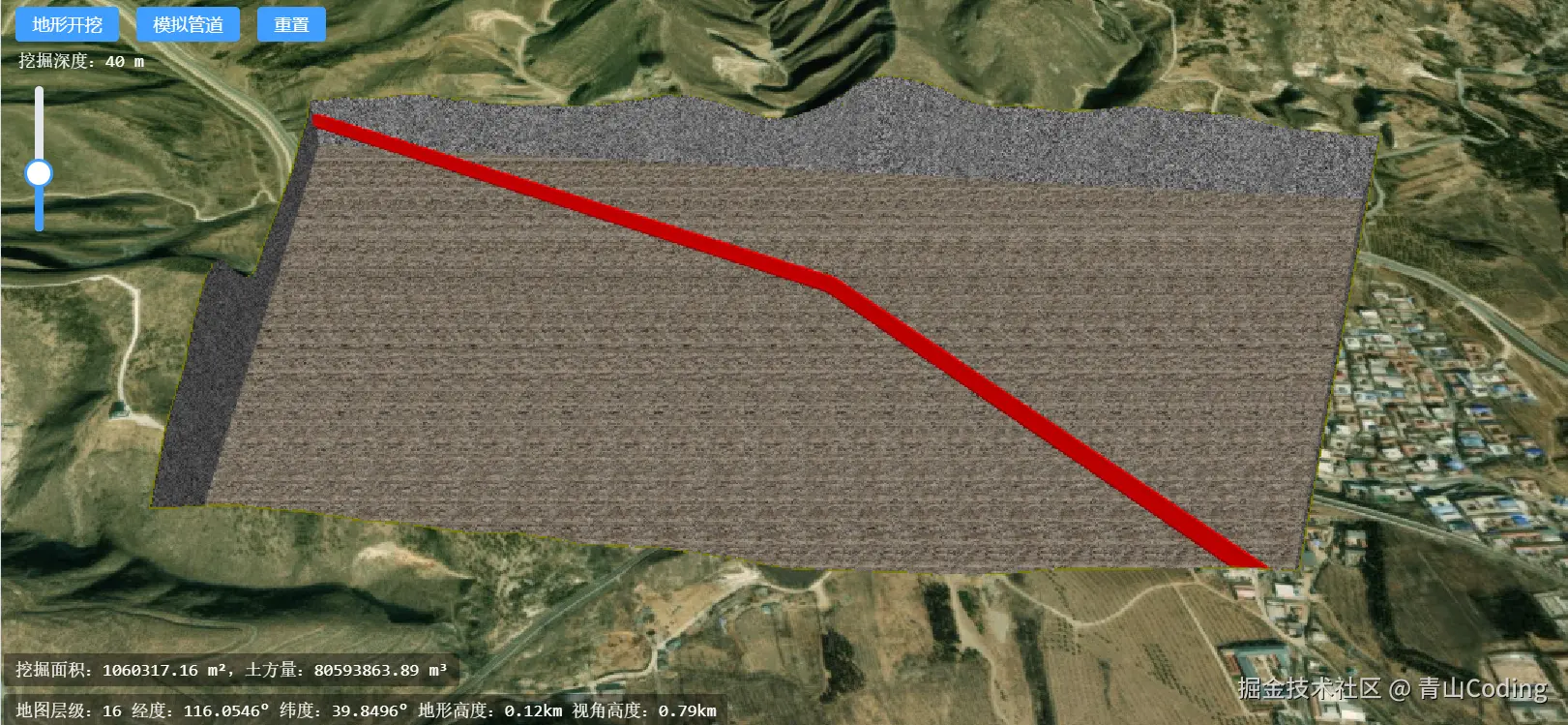
地形挖掘
在 Cesium 三维GIS项目中,地形开挖主要用于:基坑模拟、土方施工、管道布设等场景是工程类系统最常见的核心需求。
核心功能实现
- 地形裁剪:根据实际需要对地形进行裁剪:其核心是依据cesium的
ClippingPlaneCollectionAPI实现 - 数据插值:插值计算基坑四周的墙体的地形高度,绘制四周墙体。
- 方量计算:根据挖掘范围的面积和地形实际高度的平均值,计算出挖掘的土方量。
- 管道模拟:根据实际当前地形的高度与挖掘中心点的高度,模拟埋管的深度。
地形裁剪
地形裁剪的核心是构造裁剪面的法向量。根据右手定则:
- 食指指向椭球法向(地心 → 地表)
- 中指指向多边形前进方向
- 大拇指即为裁剪面法向
在cesium中,大拇指指向的一侧会被裁剪掉。对于顺时针的经纬度顶点数组,通过计算边方向向量与椭球法向的叉乘,可得到指向多边形内部的裁剪面法向,从而实现地形开挖。关键代码如下:
js
const sub = cesium.Cartesian3.subtract(p2, p1, new cesium.Cartesian3())
const normal = cesium.Cartesian3.normalize(p1, new cesium.Cartesian3())
const cross = cesium.Cartesian3.cross(sub, normal, new cesium.Cartesian3())
const direction = cesium.Cartesian3.normalize(cross, new cesium.Cartesian3())
const plane = cesium.Plane.fromPointNormal(p1, direction)
clippingPlanes.push(plane)
数据插值
这部分获取的数据主要是用于四周墙体的绘制以及后续的方量计算,通过对传入的经纬度数据进行分别进行角度和弧度的插值,角度主要用于墙体的绘制,弧度主要是进行地形采样,通过sampleTerrainMostDetailed批量获取实际的地形高度。关键代码如下:
js
const lon = cesium.Math.lerp(p1.longitude, p2.longitude, t);
const lat = cesium.Math.lerp(p1.latitude, p2.latitude, t);
const cartoLon = cesium.Math.lerp(lon1, lon2, t);
const cartoLat = cesium.Math.lerp(lat1, lat2, t);
terrainSamplePositions.push(new cesium.Cartographic(cartoLon, cartoLat));
clippingPositionCloseLerp.push(lon, lat);
方量计算
通过对地形采样获取的实际高度,计算出平均挖掘深度,通过挖掘面积×平均高度,从而计算出挖掘的土方量。代码如下:
js
calculateVolumeAndArea(maxHeights, minHeights) {
        // 1. 计算所有点的平均挖深
        let totalDepth = 0;
        const pointCount = maxHeights.length;

        for (let i = 0; i < pointCount; i++) {
            const depth = maxHeights[i] - minHeights[i];
            totalDepth += depth > 0 ? depth : 0; // 只算挖掉的部分
        }
        const avgDepth = totalDepth / pointCount;

        // 2. 计算多边形水平投影面积(平方米)
        const { clippingPositionClose } = this
        const positions = clippingPositionClose.map(item => [item.longitude, item.latitude])
        const polygon = turf.polygon([positions]);
        const area = turf.area(polygon);
        // 3. 体积 = 面积 × 平均挖深
        const volume = area * avgDepth;
        this.area = parseFloat(area.toFixed(2))
        this.volume = parseFloat(volume.toFixed(2))

    }
管道模拟
这里只是简单的模拟一下中空管道在基坑内部,通过entity中的polylineVolume实现,可根据实际业务场景进行修改。
js
const addPolyVolume = () => {
    if (positions.length < 3) return
    const points = positions.map(item => [item.longitude, item.latitude, item.height - excavationHeight.value])
    var features = turf.points(points);
    const { geometry } = turf.center(features);
    const cartographic = cesium.Cartographic.fromDegrees(...geometry.coordinates)
    const height = viewer.value.scene.globe.getHeight(cartographic)
    const data = [points[0], [...geometry.coordinates, height - excavationHeight.value], points[Math.ceil(points.length / 2)]].flat()
    viewer.value.entities.add({
        name: "中空管道",
        polylineVolume: {
            positions: cesium.Cartesian3.fromDegreesArrayHeights(data),
            shape: computeHollowCircle(10.0, 2), // 外径不变,只改壁厚
            material: cesium.Color.RED.withAlpha(0.8),
            outline: false,
            outlineColor: cesium.Color.BLACK,
        },
    });
}
实现效果