【iOS】源码学习-SDWebImage源码学习
前言
SDWebImage是iOS/macOS开发中最主流、最经典的异步图片加载缓存框架,主要功能有异步加载网络图片、自动缓存图片(支持内存缓存和磁盘缓存)、占位图处理(加载前显示默认图片)、GIF支持、下载进度回调(可以显示下载进度或加载动画)、方便集成UIImageView/UIButton。
核心简介
SDWebImage是基于GCD、ARC实现的异步图片处理框架,核心解决主线程卡顿、重复下载、图片资源冗余三大问题,核心功能如下:
- 异步网络加载:所有耗时下载、解码操作均在子线程执行,不阻塞UI主线程。
- 双层缓存机制:内存缓存和磁盘缓存。极速复用已加载图片,减少网络请求。
- 智能缓存管理:支持自动过期清理、大小阈值限制、手动精准清理。
- 全格式动图适配:5.0+版本支持GIF、APNG、WebP、HEIC等动态图片格式。
- 按需加载优化:结合列表视图复用,实现图片预加载、加载取消、优先级控制。
- 图片实时处理:支持圆角、缩放、裁剪等转换器能力,且处理结果参与缓存。
- 完善状态回调:提供下载进度、加载完成、失败回调,可区分图片来源(内存/磁盘/网络)
核心优势:
- 规避系统缺陷:系统默认图片解码在主线程执行,易造成UI卡顿,SDWebImage后台解码优化体验。
- 任务去重:相同URL图片避免重复下载、解码,节省流量与性能。
- 自动容错:非法URL、失败URL黑名单机制,避免无效重复请求。
- 内存可控:强弱双缓存策略,平衡加载速度与内存占用。
强弱双缓存:强引用缓存保证访问速度,弱引用缓存控制内存峰值。
整体架构
SDWebImage采用分层解耦架构,核心分为五大核心类:
- 核心协调者:
SDWebImageManager负责协调缓存查找、下载和图片处理流程。它使用组合模式将SDWebImageCache和SDWebImageDownloader组合在一起,实现了对图片加载完整生命周期的管理。是UIImageView+WebCache底层实际调用的管理类,支持自定义Manager,替换项目自有缓存或自定义下载器。
- 缓存模块:
SDImageCache负责内存和磁盘缓存的双层存储。内存缓存于NSCache实现,提供快速访问;磁盘缓存将图片持久化存储到文件系统中,支持自定义缓存策略,可配置缓存最大占用空间、缓存过期时间,同时提供手动清空缓存、删除指定图片缓存的 API,日常由SDWebImageManager自动调度存取。
- 下载模块:
SDWebImageDownloader基于NSURLSession构建的异步下载器,内部维护操作队列,支持并发控制、最大并发数限制、请求优先级设置、下载超时、请求头配置和身份验证等高级功能。通过 SDWebImageDownloaderOperation(NSOperation子类)封装单次下载任务,一个图片请求对应一个 Operation实例,自带取消下载、合并相同 URL 重复请求优化,开发者可继承该Operation类自定义HTTP请求头、下载规则。
- 解码与处理模块:
SDWebImageDecoder负责图片解码、缩放、裁剪、压缩等后处理操作,将下载完成的二进制NSData转为UIImage,在后台线程执行这些操作,避免阻塞主线程造成UI卡顿,兼容JPG、PNG、GIF、WebP等多种图片格式,支持同步、异步两种解码方式。
- 视图扩展:
UIImageView+WebCache为UIKit组件提供的便携接口,开发者可以通过一行代码实现图片的异步加载和缓存管理,是业务开发最常用入口,内部全部中转调用SDWebImageManager完成全流程。
核心机制
- 图片解码机制:
iOS系统在渲染图片时需要将其解码为位图格式,这个过程默认在主线程进行,可能会导致界面卡顿。因此SDWebImage做了优化:
- 解码时机与线程策略:当图片从磁盘加载或者网络下载完成之后,就会立即在后台线程进行解码,解码器使用专门的NSOperationQueue,避免解码任务阻塞。
- 空间换时间的缓存策略:解码后的位图数据会被缓存到内存中。当同一图片再次请求时,可以直接使用缓存的解码结果。
- 渐进式解码支持:对于网络下载的大图片,SDWebImage支持渐进式解码。即图片在下载过程中逐步显示,用户可以较快地看到图片内容,提升等待体验。
- 双层缓存机制:
这是SDWebImage的核心保障。主要体现在:
- 内存缓存:基于NSCache实现,具有自动清理机制。App收到低内存警告或切后台时,NSCache自动释放缓存数据。默认不限制缓存条目数量,即countLimit无上限。totalCostLimit默认值为0代表不通过cost管控容量。开发者可以自定义countLimit、totalCostLimit来手动约束缓存容量,超限后自动淘汰旧数据。
- countLimit:最大缓存条数
- totalCostLimit:内存总成本上限
举个自定义配置的例子:
objc
#import <SDWebImage/SDWebImage.h>

- (BOOL)application:(UIApplication *)application
didFinishLaunchingWithOptions:(NSDictionary *)launchOptions {
  // 获取设备整机物理内存大小,动态适配不同机型
	NSUInteger physicalMemory = (NSUInteger)[NSProcessInfo processInfo].physicalMemory;
  // 取整机内存1/8作为图片内存缓存最大占用上限
	NSUInteger memoryCacheLimit = physicalMemory / 8;
  // 获取SDWebImage全局缓存单例的配置对象
	SDImageCacheConfig *config = [SDImageCache sharedImageCache].config;
  // 对应底层totalCostLimit
	config.maxMemoryCost = memoryCacheLimit;
  // 对应底层countLimit
	config.maxMemoryCount = 300;
  return YES;
}- 磁盘缓存:图片以文件形式存储在cache目录中,文件名经过MD5哈希处理确保唯一性和安全性。
当缓存超过限制时,SDWebImage会基于文件的最后访问时间进行清理,优先移除最久未访问的图片。同样也可在SDImageCacheConfig中自定义设置。
MD5:是一种哈希摘要算法。使得任意长度文件、字符串变为固定32位十六进制字符串。MD5的特点在于不能通过MD5反推出原图内容,可以用来做文件唯一标识,可去重、防篡改。
- 强弱双缓存策略:
- 强缓存(memoryCache):NSCache实现,默认持有图片,不会随意释放,保证加载速度。
- 弱缓存(weakMemoryCache):NSMapTable实现,内存紧张时可被系统回收。
强缓存失效后,若图片未被系统回收,可从弱缓存中恢复,减少重复解码开销。
- 灵活的缓存清理机制:
objc+ (nonnull instancetype)sharedImageCache { static dispatch_once_t once; static id instance; dispatch_once(&once, ^{ instance = [self new]; }); return instance; }从源码我们发现,SDImageCache本身就是一个懒加载的单例类。
- 自动清理机制:
- 基于时间的清理:默认情况下会清理超过一周的缓存文件。
- 基于大小的清理:当缓存超过设定的大小时,自动清理最旧的图片文件。
- 手动清理机制:
- 清理所有内存缓存:
[[SDImageCache sharedImageCache] clearMemory]; - 异步清理所有磁盘缓存:
[[SDImageCache sharedImageCache] clearDiskOnCompletion:nil]; - 异步清理过期的磁盘缓存:
[[SDImageCache sharedImageCache] deleteOldFilesWithCompletionBlock:nil];
- 清理所有内存缓存:
- 细粒度控制:基于特定URL或key清理缓存,实现更精准的缓存管理。
- 粗粒度:一键全部清空所有图片缓存。
- 细粒度:根据单个图片URL、缓存key,只删某一张或某几张指定图片缓存,别的缓存保留不动。
具体示例:
根据URL:
objc
#import <SDWebImage/SDWebImage.h>

- (void)removeCacheForURL:(NSURL *)url {
  if (!url) {
    return;
  }
  // SDWebImage内部根据URL自动生成缓存key
  NSString *cacheKey = [[SDWebImageManager sharedManager] cacheKeyForURL:url];
  // SDImageCacheTypeAll表示同时删除内存缓存+磁盘缓存
  [[SDImageCache sharedImageCache] removeImageForKey:cacheKey cacheType:SDImageCacheTypeAll completion:^{
      NSLog(@"已清理指定 URL 的内存和磁盘缓存");
  }];
}
根据key:
objc
// 存图:手动指定唯一key存入双层缓存
NSString *key = @"infrared-visible-fusion-preview-001";
[[SDImageCache sharedImageCache] storeImage:image imageData:nil forKey:key cacheType:SDImageCacheTypeAll completion:nil];

// 删图:只删除这个自定义key对应的缓存
[[SDImageCache sharedImageCache] removeImageForKey:key cacheType:SDImageCacheTypeAll completion:^{
    NSLog(@"已清理指定 key 的缓存");
}];- 动态图片适配机制:
SDWebImage5.0前,SDWebImage将GIF全部分解为帧序列,内存占用过大,仅支持基础GIF。
SDWebImage5.0后,引入SDAnimatedImage协议,提供统一的动画图片接口、支持多格式(如GIF、APNG、WebP、HEIC等)。核心优化了惰性解码策略,仅解码当前显示和预加载的帧,通过maxBufferSize属性来控制缓冲帧数,寻找流畅度和内存消耗的平衡点。
静态图用UIImageView,动态图用SDAnimatedImageView,框架自动识别适配。
- 列表按需求加载优化
针对UITableView、UICollectionView列表复用场景,SDWebImage做了全套优化,解决滚动卡顿、图片错乱、无效加载问题:
- 复用取消机制:cell复用时,自动取消未完成的图片加载任务,避免旧任务覆盖新图片。
- 视图可见性优先级:优先加载屏幕可见cell图片,预加载图片设置低优先级。
- 智能预加载:结合系统预加载代理,提前缓存即将展示的图片,支持预加载任务去重、取消。
具体示例:
objc
// Cell复用取消加载
- (void)prepareForReuse {
    [super prepareForReuse];
    [self.imageView sd_cancelCurrentImageLoad];
}

// 低优先级预加载配置
SDWebImageOptions options = SDWebImageLowPriority | SDWebImageProgressiveLoad;
[cell.imageView sd_setImageWithURL:imageURL placeholderImage:nil options:options];
图片预加载优化的核心是:依托iOS tableView预加载协议提前缓存图片提升滑动流畅度,通过字典记录预加载令牌,避免重复请求。页面快速回滚时借助SDWebImage的token取消无效下载,节约流量与系统性能。
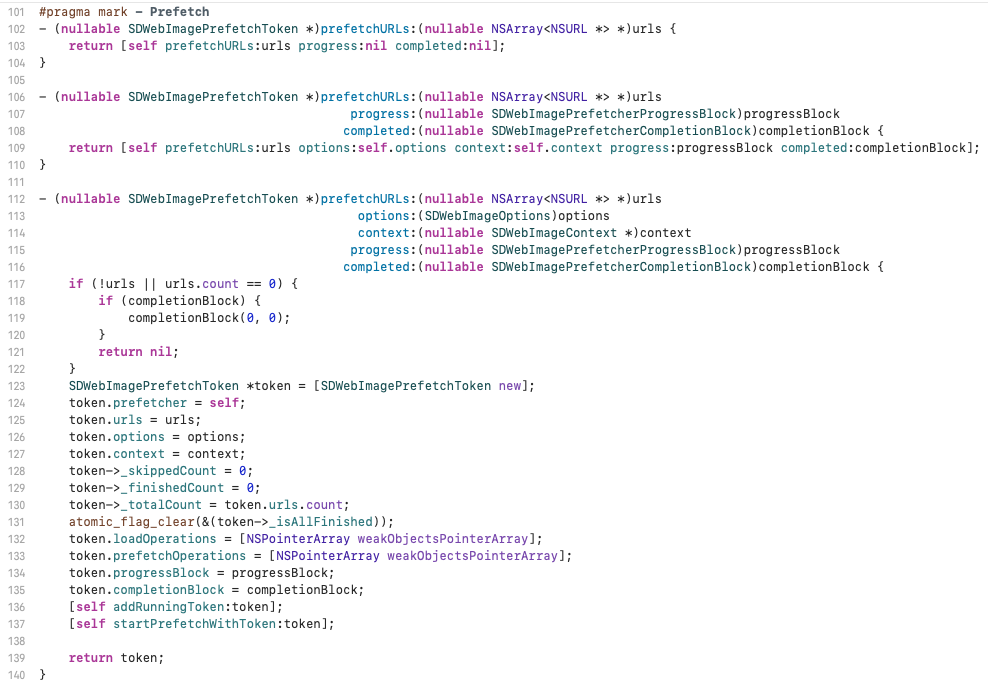
objc
// 将要预加载Cell,发起图片预下载
- (void)tableView:(UITableView *)tableView prefetchRowsAtIndexPaths:(NSArray<NSIndexPath *> *)indexPaths;

// 取消预加载Cell,终止无用预下载
- (void)tableView:(UITableView *)tableView cancelPrefetchingForRowsAtIndexPaths:(NSArray<NSIndexPath *> *)indexPaths;
具体示例调用:
objc
#import <UIKit/UIKit.h>
#import <SDWebImage/SDWebImage.h>

@interface DemoVC : UIViewController <UITableViewDataSource, UITableViewDelegate, UITableViewDataSourcePrefetching>
@property (nonatomic, strong) UITableView *tableView;
@property (nonatomic, strong) NSMutableArray<NSURL *> *dataArr;
// 存储预加载Token,key为indexPath
@property (nonatomic, strong) NSMutableDictionary<NSIndexPath *, SDWebImagePrefetchToken *> *tokenDict;
@end

@implementation DemoVC
- (void)viewDidLoad {
    [super viewDidLoad];
    // ...
    // 开启系统预加载
    self.tableView.prefetchDataSource = self;
    [self.tableView registerClass:[UITableViewCell class] forCellReuseIdentifier:@"cell"];
}

#pragma mark - TableView数据源
- (NSInteger)tableView:(UITableView *)tableView numberOfRowsInSection:(NSInteger)section {
    return self.dataArr.count;
}
- (UITableViewCell *)tableView:(UITableView *)tableView cellForRowAtIndexPath:(NSIndexPath *)indexPath {
    UITableViewCell *cell = [tableView dequeueReusableCellWithIdentifier:@"cell" forIndexPath:indexPath];
    // 页面展示时读取缓存
    [cell.imageView sd_setImageWithURL:self.dataArr[indexPath.row]];
    cell.textLabel.text = @(indexPath.row).stringValue;
    return cell;
}

#pragma mark - 系统预加载代理(UIKit原生)
- (void)tableView:(UITableView *)tableView prefetchRowsAtIndexPaths:(NSArray<NSIndexPath *> *)indexPaths {
    for (NSIndexPath *idx in indexPaths) {
        if (idx.row >= self.dataArr.count) continue;
        NSURL *url = self.dataArr[idx.row];
        // 已存在预加载任务,防止重复请求
        if (self.tokenDict[idx]) {
          continue;
        }

        // SDWebImage核心API调用
        SDWebImagePrefetchToken *token = [[SDWebImagePrefetcher sharedImagePrefetcher] prefetchURLs:@[url] options:SDWebImageLowPriority context:nil progress:nil completed:^(NSUInteger noOfFinishedUrls, NSUInteger noOfSkippedUrls) {
            dispatch_async(dispatch_get_main_queue(), ^{
                [self.tokenDict removeObjectForKey:idx];
            });
        }];
        if (token) self.tokenDict[idx] = token;
    }
}

// 滑动回退取消预加载
- (void)tableView:(UITableView *)tableView cancelPrefetchingForRowsAtIndexPaths:(NSArray<NSIndexPath *> *)indexPaths {
    for (NSIndexPath *idx in indexPaths) {
        SDWebImagePrefetchToken *token = self.tokenDict[idx];
        if (token) {
            [token cancel]; // SDWebImage原生取消API
            [self.tokenDict removeObjectForKey:idx];
        }
    }
}

@end- 图片转换器与性能监控
- 图片转换器:支持缩放、圆角、裁剪等实时图片处理,处理结果参与缓存,避免重复渲染消耗性能。
objc
// 缩放+圆角组合转换器
SDImageResizingTransformer *resizeTransformer = [SDImageResizingTransformer transformerWithSize:CGSizeMake(100, 100) scaleMode:SDImageScaleModeAspectFill];
SDImageRoundCornerTransformer *roundTransformer = [SDImageRoundCornerTransformer transformerWithRadius:10 corners:UIRectCornerAllCorners borderWidth:1 borderColor:[UIColor whiteColor]];
SDImagePipelineTransformer *pipelineTransformer = [SDImagePipelineTransformer transformerWithTransformers:@[resizeTransformer, roundTransformer]];

// 加载并处理图片
[imageView sd_setImageWithURL:url placeholderImage:[UIImage imageNamed:@"placeholder"] options:0 context:@{SDWebImageContextImageTransformer: pipelineTransformer}];- 性能监控:支持实时获取缓存占用、加载耗时、图片来源等数据,便于性能排查。
objc
// 异步获取磁盘缓存信息
- (void)printSDWebImageDiskCacheInfoAsync {
    [[SDImageCache sharedImageCache] calculateSizeWithCompletionBlock:^(NSUInteger fileCount, NSUInteger totalSize) {
        NSLog(@"缓存数量:%lu,缓存大小:%.2f MB", fileCount, totalSize / 1024.0 / 1024.0);
    }];
}

// 监控图片加载耗时与来源
- (void)setImageWithURL:(NSURL *)url imageView:(UIImageView *)imageView {
    if (!url) { imageView.image = nil; return; }
    CFTimeInterval startTime = CACurrentMediaTime();
    [imageView sd_setImageWithURL:url placeholderImage:nil options:0 progress:nil completed:^(UIImage *image, NSError *error, SDImageCacheType cacheType, NSURL *imageURL) {
        CFTimeInterval cost = CACurrentMediaTime() - startTime;
        NSString *source = @[@"网络", @"磁盘缓存", @"内存缓存"][cacheType];
        NSLog(@"加载完成,来源:%@,耗时:%.3fs", source, cost);
    }];
}
具体示例:
使用SDWebImage下载图片,并统计下载耗时、缓存来源以及下载进度。
objc
#import "ImageLoader.h"
#import <SDWebImage/SDWebImage.h>
#import <QuartzCore/QuartzCore.h> // 苹果系统原生框架,用来取高精度时间

// CFTimeInterval startTime = CACurrentMediaTime(); // 开始时间
// CFTimeInterval endTime = CACurrentMediaTime(); // 结束时间
// CFTimeInterval cost = endTime - startTime; // 加载耗时(秒)

@implementation ImageLoader

+ (void)setImageWithURL:(NSURL *)url imageView:(UIImageView *)imageView {
  if (!url) {
      imageView.image = nil;
      NSLog(@"图片URL为空");
      return;
  }

  // 系统开机运行总秒数,高精度毫秒级,比NSDate准,专门用来计算代码执行耗时
  CFTimeInterval startTime = CACurrentMediaTime();

  // absoluteString:NSURL的一个属性,用来把NSURL对象转换成完整的URL字符串
  NSLog(@"开始加载图片: %@", url.absoluteString);

  // options:位掩码
  // SDWebImageRetryFailed:下载失败后允许再次尝试。不用这个,第一次超时后,SDWebImage会记住URL失败过状态,短时间内不会重试
  // SDWebImageHighPriority:高优先级
  // SDWebImageCacheMemoryOnly:不缓存
  // SDWebImageRefreshCached:刷新缓存
  [imageView sd_setImageWithURL:url placeholderImage:nil options:SDWebImageRetryFailed progress:^(NSInteger receivedSize, NSInteger expectedSize, NSURL * _Nullable targetURL) {
    // receivedSize:已经收到多少字节 expectedSize:文件总大小 targetURL:当前正在下载的URL
    // 下载过程反复回调

      if (expectedSize > 0) {
          CGFloat progress = (CGFloat)receivedSize / (CGFloat)expectedSize;
          NSLog(@"下载进度: %.2f%% (%ld/%ld KB)", progress * 100.0, (long)(receivedSize / 1024), (long)(expectedSize / 1024));
      }
  } completed:^(UIImage * _Nullable image, NSError * _Nullable error, SDImageCacheType cacheType, NSURL * _Nullable imageURL) {
    // cacheType:表示图片来源
    // SDImageCacheTypeNone:表示缓存没有命中,从网络下载
    // SDImageCacheTypeDisk:从磁盘缓存读取
    // SDImageCacheTypeMemory:从内存缓存读取
    CFTimeInterval endTime = CACurrentMediaTime();
    CFTimeInterval cost = endTime - startTime;

    NSString *source = @"Unknown";
    switch (cacheType) {
      case SDImageCacheTypeNone:
          source = @"Network";
          break;
      case SDImageCacheTypeDisk:
          source = @"Disk Cache";
          break;
      case SDImageCacheTypeMemory:
          source = @"Memory Cache";
          break;
      default:
          break;
    }

    if (error) {
      NSLog(@"\n 图片加载失败" "\nURL: %@" "\nError: %@" "\n耗时: %.3f 秒", imageURL.absoluteString, error.localizedDescription, cost);
    } else {
      NSLog(@"\n 图片加载成功" "\nURL: %@" "\n来源: %@" "\n尺寸: %.0f x %.0f" "\n耗时: %.3f 秒", imageURL.absoluteString, source, image.size.width, image.size.height, cost);
    }
  }];
}

@end
完整流程
图片加载完整流程如下:
- UIImageView+WebCache层sd_setImageWithURL:
主要执行了:
- 立即显示占位图。
- 取消之前的请求,避免发生图片混乱。
- 先检查内存缓存,再检查磁盘缓存。如果缓存命中,直接返回图片并显示;反之未命中,开始网络下载。
- 下载完成后对图片进行解码和缓存。
- 主线程显示最终图片。
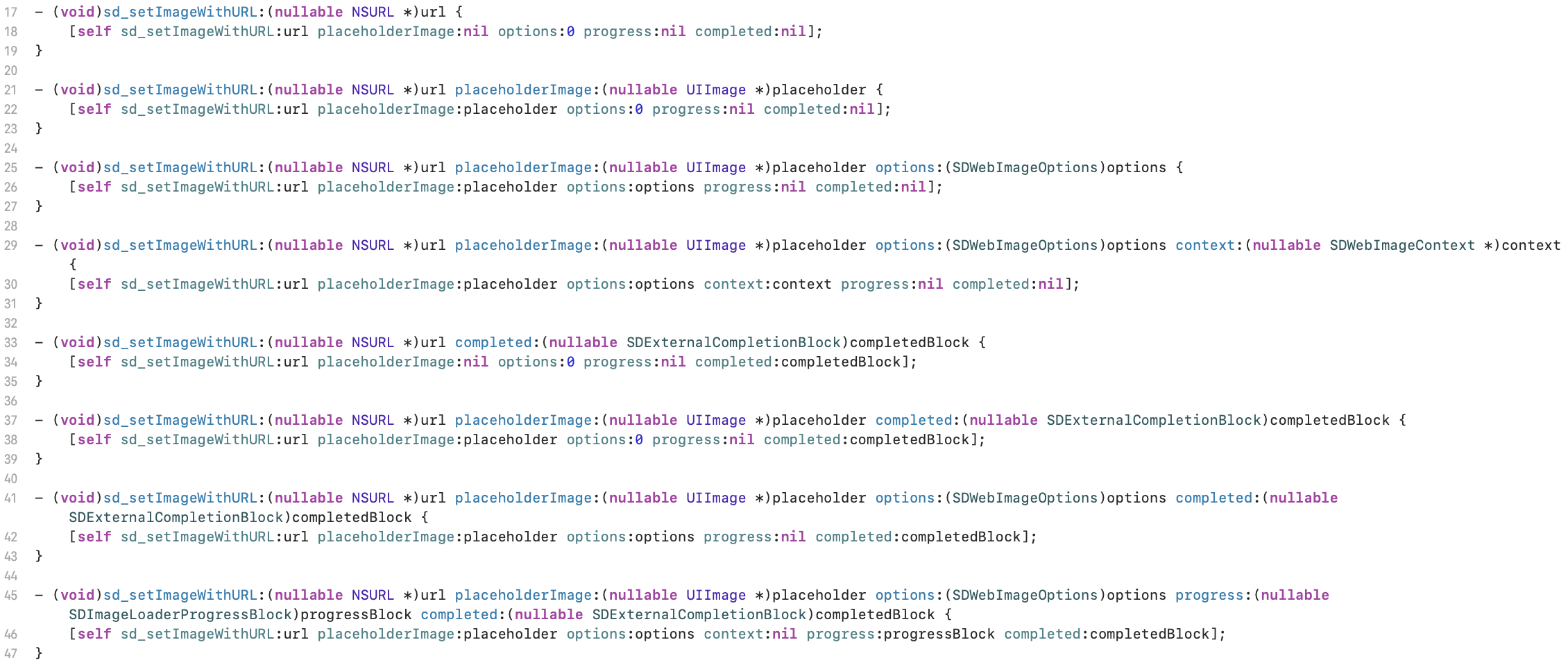
最终其实就是调用了方法:
objc
- (void)sd_setImageWithURL:(nullable NSURL *)url
          placeholderImage:(nullable UIImage *)placeholder
                   options:(SDWebImageOptions)options
                   context:(nullable SDWebImageContext *)context
                  progress:(nullable SDImageLoaderProgressBlock)progressBlock
                 completed:(nullable SDExternalCompletionBlock)completedBlock {
    [self sd_internalSetImageWithURL:url
                    placeholderImage:placeholder
                             options:options
                             context:context
                       setImageBlock:nil
                            progress:progressBlock
                           completed:^(UIImage * _Nullable image, NSData * _Nullable data, NSError * _Nullable error, SDImageCacheType cacheType, BOOL finished, NSURL * _Nullable imageURL) {
                               if (completedBlock) {
                                   completedBlock(image, error, cacheType, imageURL);
                               }
                           }];
}
然后再看一下它调用的这个方法:
objc
- (nullable id<SDWebImageOperation>)sd_internalSetImageWithURL:(nullable NSURL *)url
                                              placeholderImage:(nullable UIImage *)placeholder
                                                       options:(SDWebImageOptions)options
                                                       context:(nullable SDWebImageContext *)context
                                                 setImageBlock:(nullable SDSetImageBlock)setImageBlock
                                                      progress:(nullable SDImageLoaderProgressBlock)progressBlock
                                                     completed:(nullable SDInternalCompletionBlock)completedBlock;
它主要实现了:
- 处理参数使得安全执行:
- 将NSString类型的URL转换为NSURL
- 过滤非法URL,确保后续流程安全
- 生成唯一validOperationKey,用于标识和管理当前图片加载操作
objc
if ([url isKindOfClass:NSString.class]) {
        url = [NSURL URLWithString:(NSString *)url];
    }
    // Prevents app crashing on argument type error like sending NSNull instead of NSURL
    if (![url isKindOfClass:NSURL.class]) {
        url = nil;
    }

    if (context) {
        // copy to avoid mutable object
        // 创建一个副本,避免直接修改原来的值
        context = [context copy];
    } else {
        context = [NSDictionary dictionary];
    }
		// 生成一个唯一的key来管理当前图片加载操作,后续也会将url作为属性绑定到UIView上
NSString *validOperationKey = context[SDWebImageContextSetImageOperationKey];- 取消历史操作,保证一个单线程
即第一次设置图片时生成唯一key,然后开启下载,任务存入operationDictionary。快速滚动时,cell复用,同一个UIImageView再次调用sd_setImage。拿到相同key,在新任务发起前,用sd_cancelImageLoadOperationWithKey取消上一个还在跑的旧下载。旧网络请求中断,不会再回调图片,新下载进入任务字典。
objc
NSString *validOperationKey = context[SDWebImageContextSetImageOperationKey];
// 用户未指定时,生成默认key
if (!validOperationKey) {
    // pass through the operation key to downstream, which can used for tracing operation or image view class
    // 为了不直接修改传入的上下文对象,先进行深拷贝,得到可修改的副本mutableContext,在该副本中设置新的操作值,再把修改后的mutableContext复制为一个不可变字典,替换原来的context对象
    validOperationKey = NSStringFromClass([self class]);
    // 原context不可变,不能直接修改,通过mutableCopy生成可变副本
    SDWebImageMutableContext *mutableContext = [context mutableCopy];
    // 让context携带key
    mutableContext[SDWebImageContextSetImageOperationKey] = validOperationKey;
    // 通过copy变回不可变字典,覆盖原context,后续下载过程全程携带该key
    context = [mutableContext copy];
}
// 用关联对象给当前UIImageView记录唯一标识key
self.sd_latestOperationKey = validOperationKey;
// 用户没有开启SDWebImageAvoidAutoCancelImage(禁止自动取消旧任务)时,就执行取消逻辑
if (!(SD_OPTIONS_CONTAINS(options, SDWebImageAvoidAutoCancelImage))) {
    // cancel previous loading for the same set-image operation key by default
    // 根据当前key查找并取消上一次同一个key的图片下载任务
    [self sd_cancelImageLoadOperationWithKey:validOperationKey];
}
objc
// 在列表或滚动视图中,用户快速滚动,视图复用会导致视图内容频繁更新。如果不取消前面的下载操作,可能会同时进行多个不必要的下载任务、增加内存和网络负担;也可能会使得新的下载任务先于旧的下载任务完成,导致视图显示图片错误
- (void)sd_cancelImageLoadOperationWithKey:(nullable NSString *)key {
    if (!key) {
        key = NSStringFromClass(self.class);
    }
    // Cancel in progress downloader from queue
    // 从当前UIImageView关联对象中取出key全局字典,其中存储了该控件所有正在执行的下载任务
    SDOperationsDictionary *operationDictionary = [self sd_operationDictionary];
    id<SDWebImageOperation> operation;

    @synchronized (self) {
        // 加互斥锁,保证多线程下安全读取字典,防止同时读写导致数组、字典崩溃
        operation = [operationDictionary objectForKey:key];
    }
    if (operation) {
        // 找到对应下载任务,遵守SDWebImageOperation协议就调用cancel终止网络请求
        if ([operation respondsToSelector:@selector(cancel)]) {
            // cancel内部:关闭网络请求、终止数据回调
            [operation cancel];
        }
        // 再次加锁,从任务字典移除已取消的任务,释放资源
        @synchronized (self) {
            [operationDictionary removeObjectForKey:key];
        }
    }
}- 初始化一个SDWebImageManager并判断是否需要弱缓存,根据placeholder显示图片
即调用sd_setImageWithURL开始加载图片,优先从context拿自定义manager。有则切断引用防止内存泄漏,无则用全局单例。然后读取缓存配置,标记是否开启弱内存缓存和延迟占位图。未配置SDWebImageDelayPlaceholder时,开启弱缓存就会空查询一次内存缓存触发弱缓存同步,随后主线程立即设置占位图。
objc
SDWebImageManager *manager = context[SDWebImageContextCustomManager];
if (!manager) {
  manager = [SDWebImageManager sharedManager];
} else {
  // remove this manager to avoid retain cycle (manger -> loader -> operation -> context -> manager)
  // 自定义manager被context持有,任务又持有context,manager又持有下载任务,形成循环引用,内存无法释放、内存泄漏。因此拿到context后,立即删除manager键值。
  // 全局sharedManager时单例全局常驻,不存在内存释放问题,不用删除
  SDWebImageMutableContext *mutableContext = [context mutableCopy];
  mutableContext[SDWebImageContextCustomManager] = nil;
  context = [mutableContext copy];
}
SDCallbackQueue *queue = context[SDWebImageContextCallbackQueue];
BOOL shouldUseWeakCache = NO;
// 当前实例是否开启弱引用内存缓存
// 弱引用缓存:内存缓存用__weak弱引用存储图片
if ([manager.imageCache isKindOfClass:SDImageCache.class]) {
  shouldUseWeakCache = ((SDImageCache *)manager.imageCache).config.shouldUseWeakMemoryCache;
}
if (!(options & SDWebImageDelayPlaceholder)) {
  if (shouldUseWeakCache) {
      // 如果开启弱内存缓存,就根据url和context生成缓存key,并主动查询一次内存缓存,触发弱缓存同步逻辑
      NSString *key = [manager cacheKeyForURL:url context:context];
      // call memory cache to trigger weak cache sync logic, ignore the return value and go on normal query
      // this unfortunately will cause twice memory cache query, but it's fast enough
      // in the future the weak cache feature may be re-design or removed
      [((SDImageCache *)manager.imageCache) imageFromMemoryCacheForKey:key];
  }
  // 主线程刷新UI
  [(queue ?: SDCallbackQueue.mainQueue) async:^{
      [self sd_setImage:placeholder imageData:nil basedOnClassOrViaCustomSetImageBlock:setImageBlock cacheType:SDImageCacheTypeNone imageURL:url];
  }];
}
- 普通内存缓存:strong持有图片,内存紧张不会自动释放,占用内存。
- 弱缓存:缓存只存弱指针,系统内存吃紧时图片对象会被系统自动收回,降低OOM(内存溢出)概率。
弱缓存表数据同步滞后,需要主动调用imageFromMemoryCacheForKey触发一次查询,同步弱缓存数据,即多一次内存查询。
SDWebImageDelayPlaceholder逻辑:开启后,先查内存、磁盘缓存,查到原图直接展示原图、不闪现占位。只有缓存缺失走网络下载后,才会后续展示占位。
- 判断URL是否存在
如果URL存在,就正式进入图片加载流程,即重置进度、启动加载指示器、绑定进度回调、调用manager加载图片、把下载任务绑定到视图,完成后回调图片。
objc
if (url) {
  // reset the progress // 重置进度条
  NSProgress *imageProgress = loadState.progress;
  if (imageProgress) {
      imageProgress.totalUnitCount = 0; // 总大小清零
      imageProgress.completedUnitCount = 0; // 已下载大小清零
  }

#if SD_UIKIT || SD_MAC
  // check and start image indicator // 开始显示加载指示器
  [self sd_startImageIndicatorWithQueue:queue];
  id<SDWebImageIndicator> imageIndicator = self.sd_imageIndicator;
#endif
  // 设置一个回调函数,下载过程中不断触发
  SDImageLoaderProgressBlock combinedProgressBlock = ^(NSInteger receivedSize, NSInteger expectedSize, NSURL * _Nullable targetURL) {
      if (imageProgress) {
          imageProgress.totalUnitCount = expectedSize;
          imageProgress.completedUnitCount = receivedSize;
      }
#if SD_UIKIT || SD_MAC
      if ([imageIndicator respondsToSelector:@selector(updateIndicatorProgress:)]) {
          double progress = 0;
          if (expectedSize != 0) {
              progress = (double)receivedSize / expectedSize;
          }
          progress = MAX(MIN(progress, 1), 0); // 0.0 - 1.0
          // 主线程更新指示器进度
          dispatch_async(dispatch_get_main_queue(), ^{
              [imageIndicator updateIndicatorProgress:progress];
          });
      }
#endif
      // 执行外部传入的block
      if (progressBlock) {
          progressBlock(receivedSize, expectedSize, targetURL);
      }
  };
  // 弱引用避免循环引用
  @weakify(self);
  // 调用manager开始真正加载图片
  operation = [manager loadImageWithURL:url options:options context:context progress:combinedProgressBlock completed:^(UIImage *image, NSData *data, NSError *error, SDImageCacheType cacheType, BOOL finished, NSURL *imageURL) {
    //... 内部做显示图片、隐藏显示器、缓存、动画、回调等
    // 把当前下载任务绑定到视图,下次可根据key取消旧任务
    [self sd_setImageLoadOperation:operation forKey:validOperationKey];
}- SDWebManager层loadImageWithURL:
loadImageWithURL是SDWebImageManager中的方法。SDWebImageManager这个单例在初始化时,同步初始化了SDImageCache和SDWebImageDownloader,其主要作用就在于调度SDImageCache和SDWebImageDownloader进行缓存、下载。
主要执行了:
- 参数校验
objc
if ([url isKindOfClass:NSString.class]) {
  url = [NSURL URLWithString:(NSString *)url];
}

// Prevents app crashing on argument type error like sending NSNull instead of NSURL
if (![url isKindOfClass:NSURL.class]) {
  url = nil;
}- 创建操作对象,用来管理下载和缓存的部分,即关联manager
objc
SDWebImageCombinedOperation *operation = [SDWebImageCombinedOperation new];
operation.manager = self;- 判断是否是失败URL,维护URL黑名单,防止多次失败下载
objc
BOOL isFailedUrl = NO;
// 递归锁保证了对共享资源(self.failedURLs)的安全访问,防止其他线程访问当前集合并对其进行修改
if (url) {
    SD_LOCK(_failedURLsLock);
    isFailedUrl = [self.failedURLs containsObject:url];
    SD_UNLOCK(_failedURLsLock);
}
如果URL无效或是黑名单URL且没开重试标记SDWebImageRetryFailed,立即调用完成回调并返回错误信息。
objc
if (url.absoluteString.length == 0 || (!(result.options & SDWebImageRetryFailed) && isFailedUrl)) {
  NSString *description = isFailedUrl ? @"Image url is blacklisted" : @"Image url is nil";
  NSInteger code = isFailedUrl ? SDWebImageErrorBlackListed : SDWebImageErrorInvalidURL;
  [self callCompletionBlockForOperation:operation completion:completedBlock error:[NSError errorWithDomain:SDWebImageErrorDomain code:code userInfo:@{NSLocalizedDescriptionKey : description}] queue:result.context[SDWebImageContextCallbackQueue] url:url];
  return operation;
}- 上述问题通过后,将当前操作加到操作队列并预处理
objc
SD_LOCK(_runningOperationsLock);
[self.runningOperations addObject:operation];
SD_UNLOCK(_runningOperationsLock);- 最后进入callCacheProcessForOperation函数,其中层层调用queryImageForKey、queryCacheOperationForKey函数
objc
[self callCacheProcessForOperation:operation url:url options:result.options context:result.context progress:progressBlock completed:completedBlock];- SDImageCache层queryCacheOperationForKey:
先看一下SDImageCache类,其在manager初始化时就已完成初始化。
首先了解一下有关缓存配置的类别,用来保存缓存策略信息:
objc
- (instancetype)init {
    if (self = [super init]) {
        _shouldDisableiCloud = YES; // 因为图片缓存通常是可再生数据。
        _shouldCacheImagesInMemory = YES; // 决定是否启用强引用的内存缓存,内存缓存可以显著提高加载速度并且减少解码、磁盘I/O,但占用内存
        _shouldUseWeakMemoryCache = NO; // 决定是否开启弱引用的内存缓存,设置为NO的表示使用默认的强引用缓存,反之YES是在实现上把缓存同时保存在一个弱引用容器中,这样在内存紧张时系统可以释放这些对象
        _shouldRemoveExpiredDataWhenEnterBackground = YES; // 当app进入后台时是否清理过期磁盘缓存
        _shouldRemoveExpiredDataWhenTerminate = YES; // 当app终止时是否清理过期磁盘缓存,与_shouldRemoveExpiredDataWhenEnterBackground共同决定是否在合适的生命周期时间节点清理过期数据,维持磁盘缓存的整洁与节省存储空间
        _diskCacheReadingOptions = 0; // 普通打开读取缓存文件
        _diskCacheWritingOptions = NSDataWritingAtomic; // 原子写入磁盘
        _maxDiskAge = kDefaultCacheMaxDiskAge; // 磁盘文件过期时间,默认30天
        _maxDiskSize = 0; // 磁盘缓存总容量上限,0表示无上限
        _diskCacheExpireType = SDImageCacheConfigExpireTypeAccessDate; // 文件过期时间
        _fileManager = nil; // 用于文件操作的NSFileManager实例,nil会使用库内部默认的NSFileManager,如果想自定义可以在外部传入自定义实例
        if (@available(iOS 10.0, tvOS 10.0, macOS 10.12, watchOS 3.0, *)) {
            // 带自动释放池的串行队列属性,对非ARC或需要在队列任务中自动管理autorelease对象时很有用,可以减少内存的瞬时峰值
            _ioQueueAttributes = DISPATCH_QUEUE_SERIAL_WITH_AUTORELEASE_POOL; // DISPATCH_AUTORELEASE_FREQUENCY_WORK_ITEM
        } else {
            _ioQueueAttributes = DISPATCH_QUEUE_SERIAL; // NULL
        } // 为了在I/O操作的串行队列上保证正确的内存管理和稳定性
        // 指定用来实际实现内存缓存和磁盘缓存的类,默认指向库自带的SDMemoryCache和SDDiskCache
        _memoryCacheClass = [SDMemoryCache class];
        _diskCacheClass = [SDDiskCache class];
    }
    return self;
}
几种内存策略枚举:
objctypedef NS_ENUM(NSInteger, SDImageCacheType) { /** * For query and contains op in response, means the image isn't available in the image cache * For op in request, this type is not available and take no effect. */ SDImageCacheTypeNone, // 图片需要从网络下载 /** * For query and contains op in response, means the image was obtained from the disk cache. * For op in request, means process only disk cache. */ SDImageCacheTypeDisk, // 图片来源于磁盘缓存 /** * For query and contains op in response, means the image was obtained from the memory cache. * For op in request, means process only memory cache. */ SDImageCacheTypeMemory, // 图片来源于内存缓存 /** * For query and contains op in response, this type is not available and take no effect. * For op in request, means process both memory cache and disk cache. */ SDImageCacheTypeAll // 表示请求操作,同时查询内存和磁盘缓存 };
初始化SDImageCache:
objc
// p1:缓存命名空间,用于区分不同缓存目录 p2:磁盘缓存根目录,nil表示使用SDWebImage默认缓存目录 p3:缓存配置对象,nil表示使用默认配置
- (nonnull instancetype)initWithNamespace:(nonnull NSString *)ns
                       diskCacheDirectory:(nullable NSString *)directory
                                   config:(nullable SDImageCacheConfig *)config {
    if ((self = [super init])) {
        // namespace不能为nil,拼接磁盘缓存路径需要namespace
        NSAssert(ns, @"Cache namespace should not be nil");

        if (!config) {
            // 外部未传入配置,使用默认缓存配置
            config = SDImageCacheConfig.defaultCacheConfig;
        }
        // 拷贝配置,防止外部后续修改config影响当前缓存对象
        _config = [config copy];

        // Create IO queue
        // 创建磁盘IO队列,用于决定QoS属性,即约束调度策略,决定任务是并发还是串行
        dispatch_queue_attr_t ioQueueAttributes = _config.ioQueueAttributes;
        // 创建一个专门处理磁盘读写的队列,用于执行磁盘读取、写入、删除、清理等操作
        _ioQueue = dispatch_queue_create("com.hackemist.SDImageCache.ioQueue", ioQueueAttributes);
        NSAssert(_ioQueue, @"The IO queue should not be nil. Your configured `ioQueueAttributes` may be wrong");

        // Init the memory cache
        // 初始化内存缓存,检查自定义内存缓存是否遵守SDMemoryCache协议
        NSAssert([config.memoryCacheClass conformsToProtocol:@protocol(SDMemoryCache)], @"Custom memory cache class must conform to `SDMemoryCache` protocol");
        // 创建内存缓存对象
        _memoryCache = [[config.memoryCacheClass alloc] initWithConfig:_config];

        // Init the disk cache
        // 初始化磁盘缓存路径
        if (!directory) {
            // Use default disk cache directory
            // 外部未传入就使用默认缓存目录
            directory = [self.class defaultDiskCacheDirectory];
        }
        // 拼接最终磁盘缓存目录
        _diskCachePath = [directory stringByAppendingPathComponent:ns];

        NSAssert([config.diskCacheClass conformsToProtocol:@protocol(SDDiskCache)], @"Custom disk cache class must conform to `SDDiskCache` protocol");
        _diskCache = [[config.diskCacheClass alloc] initWithCachePath:_diskCachePath config:_config];

        // Check and migrate disk cache directory if need
        // 检查并迁移旧缓存目录
        [self migrateDiskCacheDirectory];

#if SD_UIKIT
        // Subscribe to app events
        // 监听应用即将终止通知:应用退出前可以清理过期缓存,完成必要磁盘操作
        [[NSNotificationCenter defaultCenter] addObserver:self
                                                 selector:@selector(applicationWillTerminate:)
                                                     name:UIApplicationWillTerminateNotification
                                                   object:nil];

        // 监听应用进入后台通知:进入后台时通常会触发磁盘缓存清理,避免缓存无限增长
        [[NSNotificationCenter defaultCenter] addObserver:self
                                                 selector:@selector(applicationDidEnterBackground:)
                                                     name:UIApplicationDidEnterBackgroundNotification
                                                   object:nil];
#endif
#if SD_MAC
        // macOS应用即将退出时,执行对应的缓存处理逻辑
        [[NSNotificationCenter defaultCenter] addObserver:self
                                                 selector:@selector(applicationWillTerminate:)
                                                     name:NSApplicationWillTerminateNotification
                                                   object:nil];
#endif
    }

    return self;
}
然后看核心查询方法queryCacheOperationForKey。主要是先查内存缓存,必要时查询磁盘缓存,并支持同步、异步查询、取消操作、回调队列切换等操作。
完整步骤:
- 校验key、queryCacheType,非法直接回调返回nil。
- 按需查询内存缓存,命中后按配置处理动图、类型校验。
- 判断是否仅需内存结果,是则直接回调结束。
- 否则进入磁盘查询:创建任务令牌,判定磁盘查询为同步还是异步。
- 封装两个block,内部先校验任务取消状态。
- queryDiskDataBlock:加锁判断任务是否取消,未取消则读取磁盘二进制NSData。
- queryDiskImageBlock:先检验任务状态,再判断内存是否命中。如果命中,直接复用,不重复解码;反之,读取context,磁盘有数据的情况下,解码数据为UIImage,按需同步写入内存缓存。
- 串行 IO 队列中执行磁盘逻辑:
- 同步:阻塞当前线程执行,执行完立即回调。
- 异步:后台执行,完成后切回调队列,多重校验任务状态再回调。
- 返回任务令牌,支持外部取消操作。
objc
- (nullable SDImageCacheToken *)queryCacheOperationForKey:(nullable NSString *)key options:(SDImageCacheOptions)options context:(nullable SDWebImageContext *)context cacheType:(SDImageCacheType)queryCacheType done:(nullable SDImageCacheQueryCompletionBlock)doneBlock {
    // 查询是否有key
    if (!key) {
        if (doneBlock) {
            doneBlock(nil, nil, SDImageCacheTypeNone);
        }
        return nil;
    }
    // Invalid cache type
    // 查询类型是否为None
    if (queryCacheType == SDImageCacheTypeNone) {
        if (doneBlock) {
            doneBlock(nil, nil, SDImageCacheTypeNone);
        }
        return nil;
    }

    // First check the in-memory cache... // 先查内存缓存
    UIImage *image;
    BOOL shouldQueryDiskOnly = (queryCacheType == SDImageCacheTypeDisk);
    if (!shouldQueryDiskOnly) {
        image = [self imageFromMemoryCacheForKey:key];
    }

    if (image) {
        // 处理动画图,只解码第一帧
        if (options & SDImageCacheDecodeFirstFrameOnly) {
            // Ensure static image
            if (image.sd_imageFrameCount > 1) {
#if SD_MAC
                image = [[NSImage alloc] initWithCGImage:image.CGImage scale:image.scale orientation:kCGImagePropertyOrientationUp];
#else
                image = [[UIImage alloc] initWithCGImage:image.CGImage scale:image.scale orientation:image.imageOrientation];
#endif
            }
        } else if (options & SDImageCacheMatchAnimatedImageClass) {
            // Check image class matching // 检查缓存图片类型
            Class animatedImageClass = image.class;
            Class desiredImageClass = context[SDWebImageContextAnimatedImageClass];
            if (desiredImageClass && ![animatedImageClass isSubclassOfClass:desiredImageClass]) {
                // 缓存失败
                image = nil;
            }
        }
    }

    // 判断是否不用查磁盘
    BOOL shouldQueryMemoryOnly = (queryCacheType == SDImageCacheTypeMemory) || (image && !(options & SDImageCacheQueryMemoryData));
    if (shouldQueryMemoryOnly) {
        // 如果只查内存就直接回调
        if (doneBlock) {
            doneBlock(image, nil, SDImageCacheTypeMemory);
        }
        return nil;
    }

    // Second check the disk cache... // 查询磁盘缓存
    SDCallbackQueue *queue = context[SDWebImageContextCallbackQueue];
    // 创建一个查询token
    SDImageCacheToken *operation = [[SDImageCacheToken alloc] initWithDoneBlock:doneBlock];
    operation.key = key;
    operation.callbackQueue = queue;
    // Check whether we need to synchronously query disk
    // 1. in-memory cache hit & memoryDataSync
    // 2. in-memory cache miss & diskDataSync
    // image && options & SDImageCacheQueryMemoryDataSync:内存命中时,同步查询磁盘数据
    // !image && options & SDImageCacheQueryDiskDataSync:内存未命中时,同步查询磁盘数据
    // 查询是异步还是同步
    // 同步:当前线程阻塞等待磁盘结果,执行完再往下走
    // 异步:丢到GCD磁盘队列后台执行,当前线程继续跑
    BOOL shouldQueryDiskSync = ((image && options & SDImageCacheQueryMemoryDataSync) ||
                                (!image && options & SDImageCacheQueryDiskDataSync));
    // 真正执行磁盘查询的逻辑
    NSData* (^queryDiskDataBlock)(void) = ^NSData* {
        @synchronized (operation) {
            // 任务已经取消,直接终止查询磁盘
            if (operation.isCancelled) {
                return nil;
            }
        }
        // 遍历所有缓存路径,读取磁盘图片二进制数据
        return [self diskImageDataBySearchingAllPathsForKey:key];
    };

    // 把NSData传入当前block解码生成UIImage
    UIImage* (^queryDiskImageBlock)(NSData*) = ^UIImage*(NSData* diskData) {
        @synchronized (operation) {
            if (operation.isCancelled) {
                return nil;
            }
        }

        UIImage *diskImage;
        if (image) {
            // 如果内存缓存已经读取到图片就直接使用,此时磁盘数据没有必要进行解码操作
            // the image is from in-memory cache, but need image data
            diskImage = image;
        } else if (diskData) {
            // 如果内存没有但磁盘有就进行解码操作
            // the image memory cache miss, need image data and image
            // 判断是否需要重新写回内存缓存,默认需要
            BOOL shouldCacheToMemory = YES;
            // 读取context判断具体缓存策略
            if (context[SDWebImageContextStoreCacheType]) {
                SDImageCacheType cacheType = [context[SDWebImageContextStoreCacheType] integerValue];
                shouldCacheToMemory = (cacheType == SDImageCacheTypeAll || cacheType == SDImageCacheTypeMemory);
            }
            // Special case: If user query image in list for the same URL, to avoid decode and write **same** image object into disk cache multiple times, we query and check memory cache here again. See: #3523
            // This because disk operation can be async, previous sync check of `memory cache miss`, does not gurantee current check of `memory cache miss`
            // 解码前再次检查内存缓存,避免重复解码
            if (!shouldQueryDiskSync) {
                // First check the in-memory cache...
                if (!shouldQueryDiskOnly) {
                    diskImage = [self imageFromMemoryCacheForKey:key];
                }
            }
            // decode image data only if in-memory cache missed
            if (!diskImage) {
                diskImage = [self diskImageForKey:key data:diskData options:options context:context];
                // check if we need sync logic
                if (shouldCacheToMemory) {
                    // 将解码后的图片同步到内存缓存中
                    [self _syncDiskToMemoryWithImage:diskImage forKey:key];
                }
            }
        }
        return diskImage;
    };

    // Query in ioQueue to keep IO-safe
    // 使用同步串行队列,避免多个线程同时读写磁盘缓存,保证磁盘缓存操作有序,避免文件读写竞争
    if (shouldQueryDiskSync) {
        __block NSData* diskData;
        __block UIImage* diskImage;
        dispatch_sync(self.ioQueue, ^{
            diskData = queryDiskDataBlock();
            diskImage = queryDiskImageBlock(diskData);
        });
        if (doneBlock) {
            doneBlock(diskImage, diskData, SDImageCacheTypeDisk);
        }
    } else {
        // 使用异步查询,不阻塞当前线程
        dispatch_async(self.ioQueue, ^{
            NSData* diskData = queryDiskDataBlock();
            UIImage* diskImage = queryDiskImageBlock(diskData);
            @synchronized (operation) {
                if (operation.isCancelled) {
                    return;
                }
            }
            if (doneBlock) {
                // 如果context中指定了回调队列,就使用指定的,否则默认主队列
                [(queue ?: SDCallbackQueue.mainQueue) async:^{
                    // Dispatch from IO queue to main queue need time, user may call cancel during the dispatch timing
                    // This check is here to avoid double callback (one is from `SDImageCacheToken` in sync)
                    @synchronized (operation) {
                        // 再次判断,IO队列切换到主列队有时间差
                        if (operation.isCancelled) {
                            return;
                        }
                    }
                    doneBlock(diskImage, diskData, SDImageCacheTypeDisk);
                }];
            }
        });
    }

    return operation;
}
最后删除缓存:
删除缓存的操作需要一个fileManager迭代器来获取需要删除的图片文件,默认最大时间限制为1周,计算出需要被清除的时间范围。遍历这个范围内需要删除的图片,从磁盘删除。再根据缓存策略中的最大缓存大小判断是否需要进一步的缓存处理。
- SDWebImageManager层callDownloadProcessForOperation:
缓存查询结束后,决定是否继续走下载流程。它根据接收到的查询结果cachedImage、cachedData、cacheType和options、代理、loader能力等条件决定是以下哪种情况:
- 需要下载,就走imageLoader网络请求
- 不需要下载,但有缓存图,就直接回调缓存图
- 不需要下载,也没有缓存图,就回调nil
objc
- (void)callDownloadProcessForOperation:(nonnull SDWebImageCombinedOperation *)operation
                                    url:(nonnull NSURL *)url
                                options:(SDWebImageOptions)options
                                context:(SDWebImageContext *)context
                            cachedImage:(nullable UIImage *)cachedImage
                             cachedData:(nullable NSData *)cachedData
                              cacheType:(SDImageCacheType)cacheType
                               progress:(nullable SDImageLoaderProgressBlock)progressBlock
                              completed:(nullable SDInternalCompletionBlock)completedBlock {
    // Mark the cache operation end // 方法调用时,缓存查询已经结束
    @synchronized (operation) {
        operation.cacheOperation = nil;
    }

    // Grab the image loader to use
    // 获取图片加载器。优先使用context提供的,否则使用默认的imageLoader
    id<SDImageLoader> imageLoader = context[SDWebImageContextImageLoader];
    if (!imageLoader) {
        imageLoader = self.imageLoader;
    }

    // Check whether we should download image from network // 判断是否需要从网络加载图片
    BOOL shouldDownload = !SD_OPTIONS_CONTAINS(options, SDWebImageFromCacheOnly);
    shouldDownload &= (!cachedImage || options & SDWebImageRefreshCached);
    shouldDownload &= (![self.delegate respondsToSelector:@selector(imageManager:shouldDownloadImageForURL:)] || [self.delegate imageManager:self shouldDownloadImageForURL:url]);
    if ([imageLoader respondsToSelector:@selector(canRequestImageForURL:options:context:)]) {
        shouldDownload &= [imageLoader canRequestImageForURL:url options:options context:context];
    } else {
        shouldDownload &= [imageLoader canRequestImageForURL:url];
    }
    // 确定要下载
    if (shouldDownload) {
        // 有缓存图并且要求刷新。先回调缓存图,然后继续下载新图。可能出现两次回调
        if (cachedImage && options & SDWebImageRefreshCached) {
            // If image was found in the cache but SDWebImageRefreshCached is provided, notify about the cached image
            // AND try to re-download it in order to let a chance to NSURLCache to refresh it from server.
            // 通知找到缓存图片并且尝试重新下载来更新缓存
            [self callCompletionBlockForOperation:operation completion:completedBlock image:cachedImage data:cachedData error:nil cacheType:cacheType finished:YES queue:context[SDWebImageContextCallbackQueue] url:url];
            // Pass the cached image to the image loader. The image loader should check whether the remote image is equal to the cached image.
            // 将缓存图片传递给图片加载器,以便比较远程图片和缓存图片是否一致
            SDWebImageMutableContext *mutableContext;
            if (context) {
                mutableContext = [context mutableCopy];
            } else {
                mutableContext = [NSMutableDictionary dictionary];
            }
            // 往context中塞入缓存图,通知后面的图片加载器。比如使用HTTP缓存机制时,loader可以根据缓存图或者缓存数据判断远端图片是否变化
            mutableContext[SDWebImageContextLoaderCachedImage] = cachedImage;
            context = [mutableContext copy];
        }

        @weakify(operation);
        // 处理循环引用
        id<SDWebImageOperation> loaderOperation = [imageLoader requestImageWithURL:url options:options context:context progress:progressBlock completed:^(UIImage *downloadedImage, NSData *downloadedData, NSError *error, BOOL finished) {
            @strongify(operation);
            // 如果下载任务主动被用户取消,这里就回调一个取消错误
            if (!operation || operation.isCancelled) {
                // Image combined operation cancelled by user
                [self callCompletionBlockForOperation:operation completion:completedBlock error:[NSError errorWithDomain:SDWebImageErrorDomain code:SDWebImageErrorCancelled userInfo:@{NSLocalizedDescriptionKey : @"Operation cancelled by user during sending the request"}] queue:context[SDWebImageContextCallbackQueue] url:url];
            } else if (cachedImage && options & SDWebImageRefreshCached && [error.domain isEqualToString:SDWebImageErrorDomain] && error.code == SDWebImageErrorCacheNotModified) {
                // Image refresh hit the NSURLCache cache, do not call the completion block
            } else if ([error.domain isEqualToString:SDWebImageErrorDomain] && error.code == SDWebImageErrorCancelled) {
                // Download operation cancelled by user before sending the request, don't block failed URL
                [self callCompletionBlockForOperation:operation completion:completedBlock error:error queue:context[SDWebImageContextCallbackQueue] url:url];
            } else if (error) {
                [self callCompletionBlockForOperation:operation completion:completedBlock error:error queue:context[SDWebImageContextCallbackQueue] url:url];
                BOOL shouldBlockFailedURL = [self shouldBlockFailedURLWithURL:url error:error options:options context:context];

                if (shouldBlockFailedURL) {
                    SD_LOCK(self->_failedURLsLock);
                    [self.failedURLs addObject:url];
                    SD_UNLOCK(self->_failedURLsLock);
                }
            } else {
                if ((options & SDWebImageRetryFailed)) {
                    SD_LOCK(self->_failedURLsLock);
                    [self.failedURLs removeObject:url];
                    SD_UNLOCK(self->_failedURLsLock);
                }
                // Continue transform process
                [self callTransformProcessForOperation:operation url:url options:options context:context originalImage:downloadedImage originalData:downloadedData cacheType:SDImageCacheTypeNone finished:finished completed:completedBlock];
            }

            if (finished) {
                [self safelyRemoveOperationFromRunning:operation];
            }
        }];
        @synchronized (operation) {
            operation.loaderOperation = loaderOperation;
        }
        // 不需要下载,但缓存中有图片,直接回调缓存图
    } else if (cachedImage) {
        [self callCompletionBlockForOperation:operation completion:completedBlock image:cachedImage data:cachedData error:nil cacheType:cacheType finished:YES queue:context[SDWebImageContextCallbackQueue] url:url];
        [self safelyRemoveOperationFromRunning:operation];
        // 不需要下载,也没有缓存图,回调nil
    } else {
        // Image not in cache and download disallowed by delegate
        [self callCompletionBlockForOperation:operation completion:completedBlock image:nil data:nil error:nil cacheType:SDImageCacheTypeNone finished:YES queue:context[SDWebImageContextCallbackQueue] url:url];
        [self safelyRemoveOperationFromRunning:operation];
    }
}
其中主要通过requestImageWithURL函数来调用downloadImageWithURL来正式从网络上加载图片。
- SDImageLoadersManager层downloadImageWithURL:
根据URL创建或复用一个图片下载任务,并把当前调用者的progressBlock和completedBlock注册到这个下载任务上,最后返回一个可用于取消下载的token。
这样就可以在取消的回调中及时取消下载操作。
objc
- (nullable SDWebImageDownloadToken *)downloadImageWithURL:(nullable NSURL *)url
                                                   options:(SDWebImageDownloaderOptions)options
                                                   context:(nullable SDWebImageContext *)context
                                                  progress:(nullable SDWebImageDownloaderProgressBlock)progressBlock
                                                 completed:(nullable SDWebImageDownloaderCompletedBlock)completedBlock {
    // The URL will be used as the key to the callbacks dictionary so it cannot be nil. If it is nil immediately call the completed block with no image or data.
    if (url == nil) {
        if (completedBlock) {
            NSError *error = [NSError errorWithDomain:SDWebImageErrorDomain code:SDWebImageErrorInvalidURL userInfo:@{NSLocalizedDescriptionKey : @"Image url is nil"}];
            completedBlock(nil, nil, error, YES);
        }
        return nil;
    }

    id downloadOperationCancelToken; // 在下载操作内部取消操作的标识
    // 一个operation可能被多个地方复用。例如如果有三个视图复用同一张图片,SDWebImage不会创建3个网络请求,而是创建一个下载operation并设置三组回调,每个回调都有一个自己的取消token
    // When different thumbnail size download with same url, we need to make sure each callback called with desired size
    id<SDWebImageCacheKeyFilter> cacheKeyFilter = context[SDWebImageContextCacheKeyFilter];
    NSString *cacheKey;
    if (cacheKeyFilter) {
        cacheKey = [cacheKeyFilter cacheKeyForURL:url];
    } else {
        cacheKey = url.absoluteString;
    }
    // 根据context、下载选项和cacheKey生成图片解码相关的配置
    // cacheKey是为了适应不同图片尺寸处理场景
    SDImageCoderOptions *decodeOptions = SDGetDecodeOptionsFromContext(context, [self.class imageOptionsFromDownloaderOptions:options], cacheKey);
    SD_LOCK(_operationsLock);
    NSOperation<SDWebImageDownloaderOperation> *operation = [self.URLOperations objectForKey:url];
    // There is a case that the operation may be marked as finished or cancelled, but not been removed from `self.URLOperations`.
    // 检查是否可以复用现有的下载操作
    BOOL shouldNotReuseOperation;
    if (operation) {
        @synchronized (operation) {
            shouldNotReuseOperation = operation.isFinished || operation.isCancelled;
        }
    } else {
        shouldNotReuseOperation = YES;
    }
    if (shouldNotReuseOperation) {
        // 创建新的下载操作
        operation = [self createDownloaderOperationWithUrl:url options:options context:context];
        // 创建operation失败就直接回调错误,需要先解锁再return,防止没释放锁卡住后续任务
        if (!operation) {
            SD_UNLOCK(_operationsLock);
            if (completedBlock) {
                NSError *error = [NSError errorWithDomain:SDWebImageErrorDomain code:SDWebImageErrorInvalidDownloadOperation userInfo:@{NSLocalizedDescriptionKey : @"Downloader operation is nil"}];
                completedBlock(nil, nil, error, YES);
            }
            return nil;
        }
        @weakify(self);
        // 结束任务时要移除operation。如果不删除,字典会一直残留旧任务,后续再次请求同URL,会误判还在下载,无法新建请求
        operation.completionBlock = ^{
            @strongify(self);
            if (!self) {
                return;
            }
            SD_LOCK(self->_operationsLock);
            [self.URLOperations removeObjectForKey:url];
            SD_UNLOCK(self->_operationsLock);
        };
        [self.URLOperations setObject:operation forKey:url];
        // Add the handlers before submitting to operation queue, avoid the race condition that operation finished before setting handlers.
        downloadOperationCancelToken = [operation addHandlersForProgress:progressBlock completed:completedBlock decodeOptions:decodeOptions];
        // Add operation to operation queue only after all configuration done according to Apple's doc.
        // `addOperation:` does not synchronously execute the `operation.completionBlock` so this will not cause deadlock.
        // 给operation添加进度回调和完成回调,然后加入到下载队列
        [self.downloadQueue addOperation:operation];
    } else {
        // When we reuse the download operation to attach more callbacks, there may be thread safe issue because the getter of callbacks may in another queue (decoding queue or delegate queue)
        // So we lock the operation here, and in `SDWebImageDownloaderOperation`, we use `@synchonzied (self)`, to ensure the thread safe between these two classes.
        // 下载合并核心机制:如果当前URL已有正在下载的opertaion,就不创建新的网络请求,而是直接添加当前调用者回调到opertaion里
        @synchronized (operation) {
            downloadOperationCancelToken = [operation addHandlersForProgress:progressBlock completed:completedBlock decodeOptions:decodeOptions];
        }
    }
    SD_UNLOCK(_operationsLock);

    // 提供外部取消下载请求的接口
    SDWebImageDownloadToken *token = [[SDWebImageDownloadToken alloc] initWithDownloadOperation:operation];
    token.url = url;
    token.request = operation.request;
    token.downloadOperationCancelToken = downloadOperationCancelToken;

    return token;
}- SDImageCache层storeImage:
下载成功后,在显示前,负责把图片存内存缓存和磁盘缓存双缓存。
- SDWebImageManager层setImage:
下载、缓存结果回调到SDWebImageManger,切回主线程最终显示。
总结
总结一下整个SDWebImage加载图片的完整流程:
调用sd_setImageWithURL发起加载,先经SDWebImageManager查询缓存:优先查内存,再查磁盘。缓存未命中则由下载器发起网络请求,同URL复用下载任务。下载完成后后台解码图片,通过storeImage先后存入内存、磁盘缓存,最终切回主线程将图片赋值到视图完成显示。